
WNP-RT-001 - Router Gembird - Free user manual and instructions
Find the device manual for free WNP-RT-001 Gembird in PDF.


| Product Type | Wireless Broadband Router |
| Model | WNP-RT-001 |
| Brand | Gembird |
| Wireless Standards | IEEE 802.11b/g/n |
| Maximum Data Rate | 300 Mbps (802.11n) |
| Frequency Band | 2.4 - 2.4835 GHz |
| Ports | 4 x LAN 10/100M auto MDI/MDIX, 1 x WAN 10/100M auto MDI/MDIX |
| Security | 64/128-bit WEP, WPA-PSK, WPA2-PSK, WPS (Wi-Fi Protected Setup) |
| Firewall | Built-in with IP, MAC, and URL filtering |
| DHCP Server | Built-in, automatic IP address distribution |
| Advanced Features | SSID broadcast control, MAC access control list, WMM, WMM/APSD, auto-channel selection, UPnP, static routing |
| Transmission Distance | Indoors up to 100 m, outdoors up to 300 m (dependent on environment) |
| Dimensions (W x D x H) | 153 x 100 x 30 mm |
| Net Weight | 163 g |
| Power Supply | 5V DC, up to 1 A |
| Operating Temperature | 0°C to 40°C |
| Storage Temperature | -40°C to 70°C |
| Operating Humidity | 10% to 90% non-condensing |
| Storage Humidity | 5% to 95% non-condensing |
| Warranty | 24 months |
Frequently Asked Questions - WNP-RT-001 Gembird
User questions about WNP-RT-001 Gembird
0 question about this device. Answer the ones you know or ask your own.
Ask a new question about this device
Download the instructions for your Router in PDF format for free! Find your manual WNP-RT-001 - Gembird and take your electronic device back in hand. On this page are published all the documents necessary for the use of your device. WNP-RT-001 by Gembird.
USER MANUAL WNP-RT-001 Gembird
natural_image
Abstract logo design featuring a stylized arrow and 'GE' letters, no readable text or symbols beyond the graphic elements.GEMBIRD®

natural_image
Front view of a wireless router with two black antennas on top (no visible text or symbols on the device body)WIRELESS BROADBAND ROUTER, 300 MBPS
WIRELESS BREITBANDROUTER, 300 MBPS
DRAADLOZE ROUTER, 300 MBPS
ROUTEUR HAUT DÉBIT SANS FIL, 300 MBPS
- Wireless 300 Mbps router with built-in 4-port 10/100Mbps LAN switch
• Supports all IEEE802.11b/g/n WiFi standards - Up to 300 Mbps data transfer rate via the wireless 802.11n protocol
- Built-in DHCP server automatically assigns and manages all IP addresses within your LAN
- Advanced firewall, 64/128-bit WEP encryption and WPA-PSK, WPA2-PSK security
• Supports Wi-Fi Protected Setup (WPS) for easy security setup
• Supports MAC/IP filtering and URL blocking (family filter) - Easy to use Web-interface for all router management options
Specifications
• Supported standards: IEEE 802.11n, IEEE 802.11g, IEEE 802.11b
- Ports: LAN: 4 x 10/100M Auto Negotiation RJ45 ports; WAN: 1 x 10/100M Auto Negotiation RJ45 port
• Frequency Band 2.4 \~ 2.4835 GHz
• Supports UPnP, static routing
• Supports SSID broadcast control and MAC access control list
• Supports 64/128bit WEP, complies with 128 bit WPA (TKIP/AES)
• Built-in firewall supports IP-, MAC- and URL filtering
• Built-in DHCP server with automatic dynamic IP address distribution
• WMM and WMM / APSD supported
• Wireless Auto-channel selection
• TCP/UDP/ICMP/ARP protocol stack
- Transmission Distance: Indoors up to 100 m, outdoors up to 300 m (distance is dependent of environmental conditions, obstructions, walls, ceilings, etc)
• Dimensions: 153 x 100 x 30 mm (W x D x H)
- Net weight: 163 g
• Power consumption: 5V DC, up to 1 A
- Operating Temperature: 0^ C 40^ C
• Storage Temperature: -40°C \~70°C
- Operating Humidity: 10% 90% non-condensing;
• Storage Humidity: 5% \~ 95% non-condensing

①

flowchart
graph TD
    A["INTERNET"] --> B["Modem"]
    B --> C["Router"]
    C --> D["Laptop"]
    C --> E["Desktop Computer"]
    C --> F["Mobile Phone"]
②

WPS

③


natural_image
Front view of a wireless router with two black antennas and a blue control panel (no visible text or symbols)

natural_image
Black laptop with blank screen and keyboard (no visible text or symbols)


a.
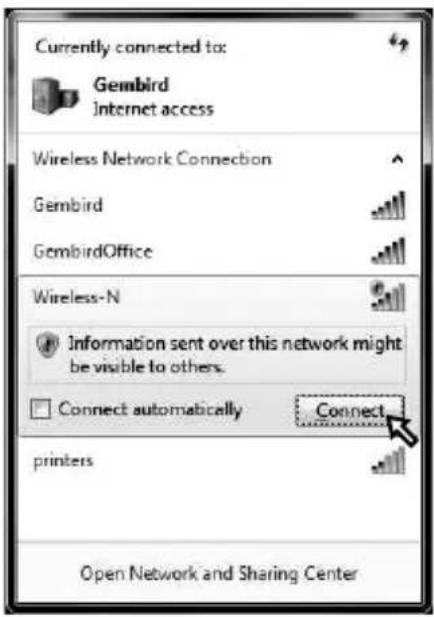
b.

C.


a.
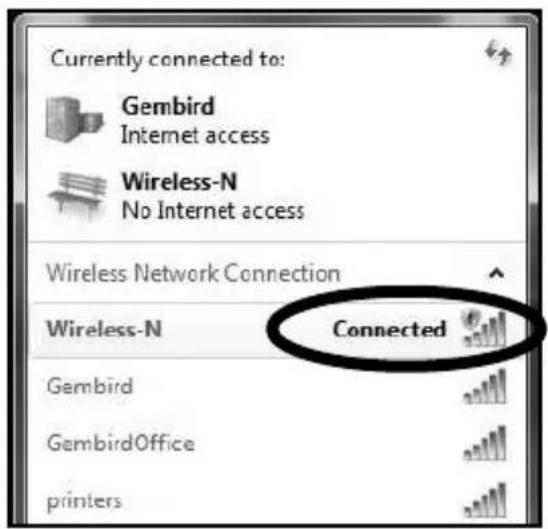
b.

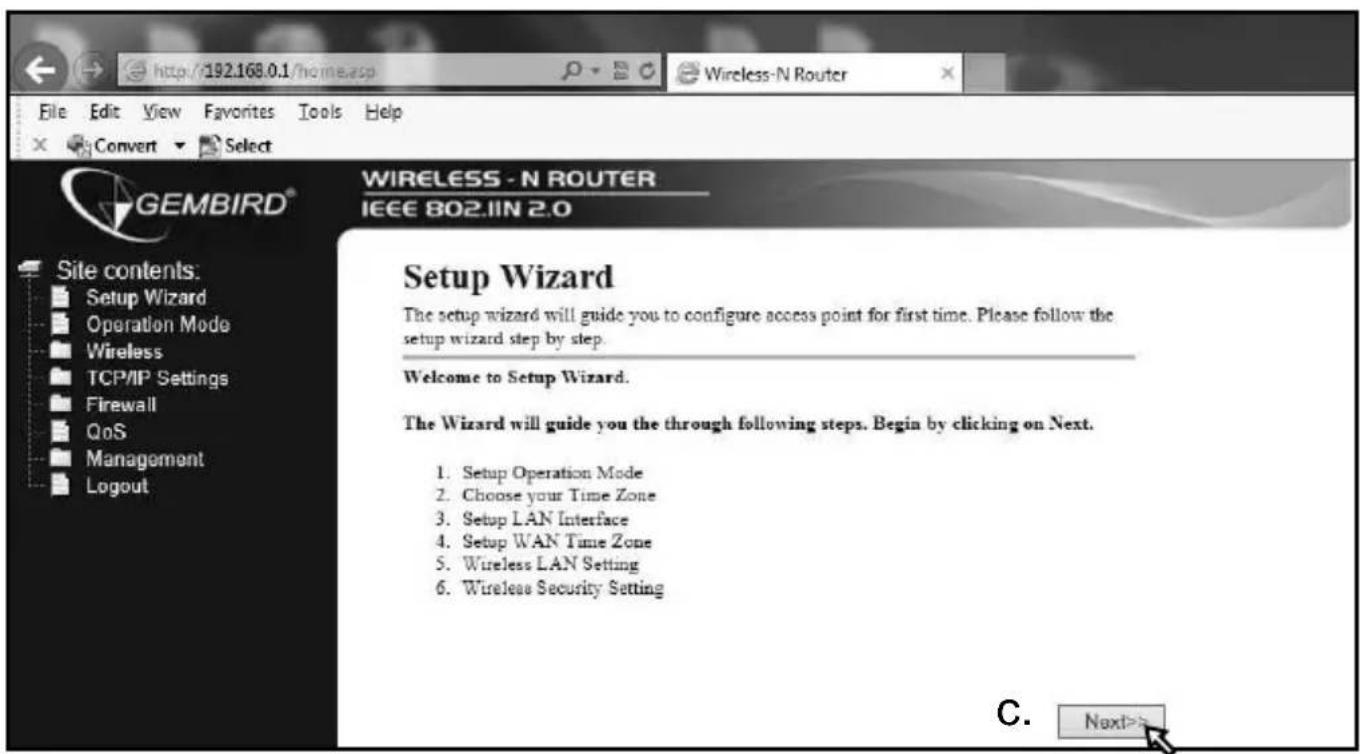


a.

b.


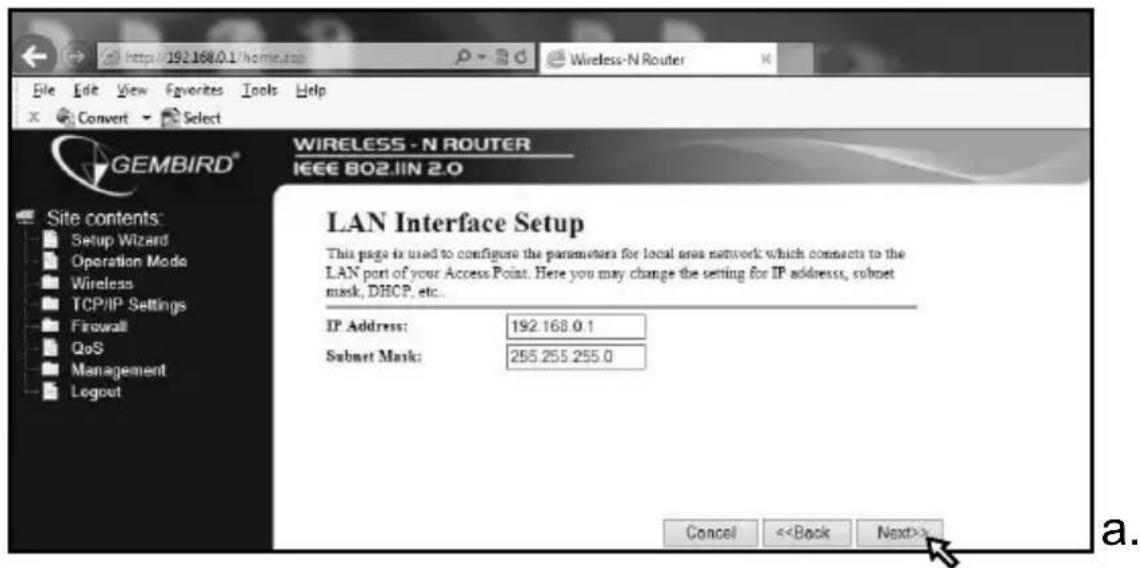


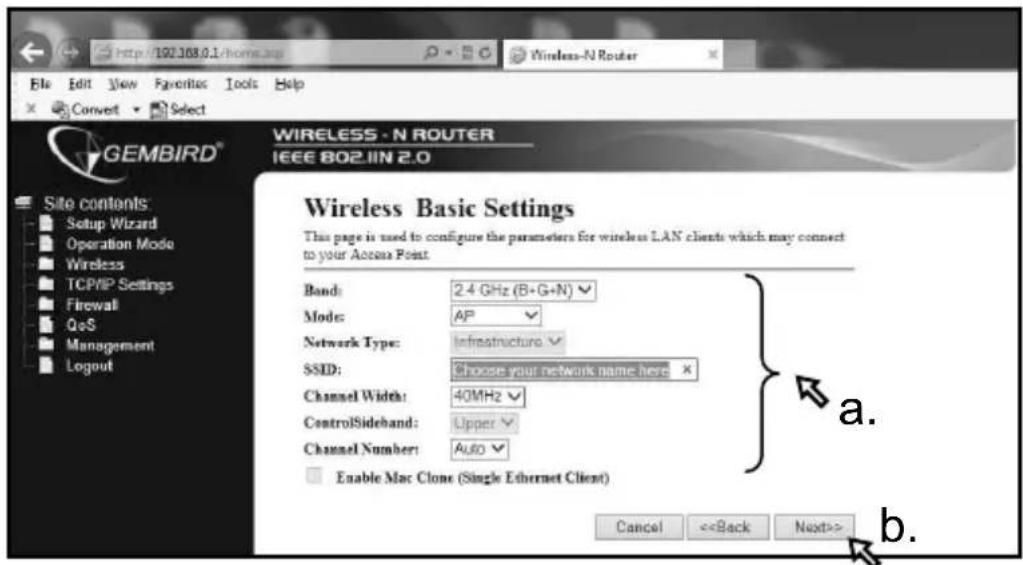
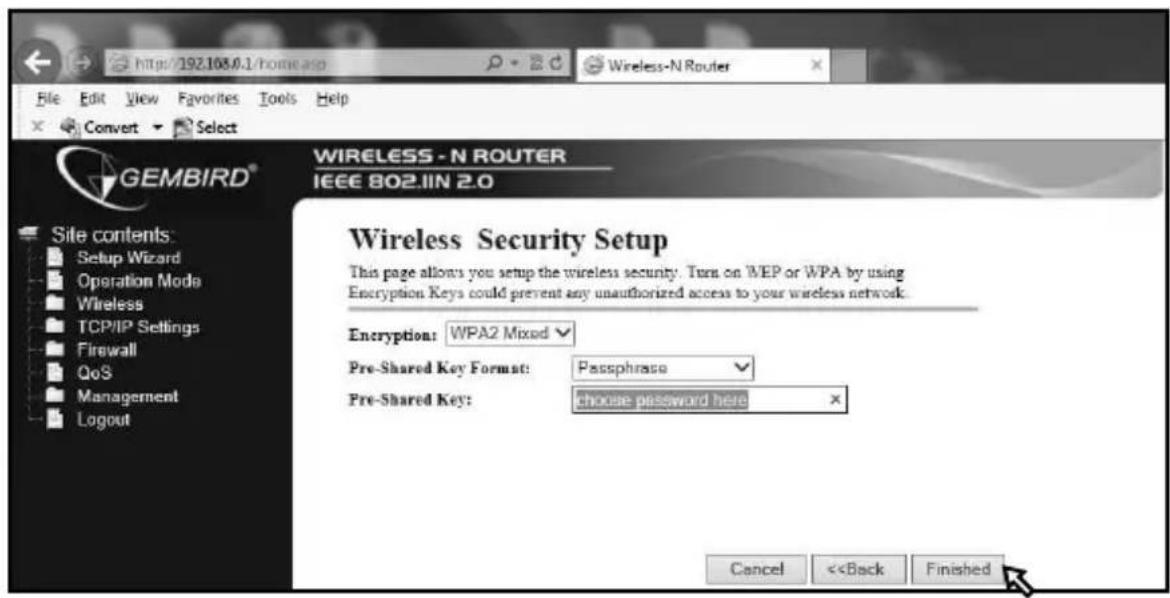
natural_image
Simple line drawing of a hand washing a cup with water droplets falling (no text or symbols)natural_image
Simple line drawing of a hand using a tool to cut a screwdriver into a screw (no text or symbols)natural_image
Simple line drawing of a hand holding a bag with a crossed-out arrow, no text or symbols presentWaste disposal:
 Do not deposit this equipment with the household waste. Improper disposal can harm both the environment and human health. For Information about waste collection facilities for used electrical and electronic devices, please contact your city council or an authorized company for the disposal of electrical and electronic equipment.Entsorgungshinweise:
  Richtlijnen m.b.t. afvalverwerking
   Batterijen en accu's dienen als klein-chemisch afval afgeleverd te worden bij toegewezen afvalverzamelpunten (zie www.afvalgids.nl). U dient ervoor te zorgen dat de batterijen/accu's leeg zijn en dus geen stroom meer kunnen leveren. Let op, de batterijen/accu's dienen onbeschadigd ingeleverd te worden. Gooi dit product niet weg in uw vuilnisbak. Dit kan zowel het milieu als de menselijke gezondheid schade toebrengen. Informatie over het inleveren van dit product kunt u inwinnen bij uw gemeentelijke vuilnisdienst of andere geautoriseerde instelling in uw buurt.Traitement des déchets:
 Ne jetez pas cet appareil dans les déchets domestiques. Un traitement inapproprié peut être dommageable à l'environnement et à la santé humain. Vous trouvez des informations sur les centres de rassemblement des appareils vieux chez l'administration municipale ou chez un centre autorisé pour le traitement des appareils électriques ou électroniques.| WARRANTY CONDITIONS | GARANTIE BEDINGUNGEN |
| The receipt must clearly list the date of purchase and the part number, in addition it should be printed. Keep the receipt for the entire warranty period since it is required for all warranty claims. During the warranty period the defective items will be credited, repaired or replaced at the manufacturer's expense. Work carried out under the warranty neither extends the warranty period nor starts a new warranty period. The manufacturer reserves the right to void any warranty claim for damages or defects due to misuse, abuse or external impact (falling down, impact, ingress of water, dust, contamination or break). Wearing parts (e.g. rechargeable batteries) are excluded from the warranty. Upon receipt of the RMA goods, Gembird Europe B.V. reserves the right to choose between replacement of defective goods or issuing a credit note. The credit note amount will always be calculated on the basis of the current market value of the defective products | Die Garantie beträgt 24 Monate ab Verkaufsdatum an den Endverbraucher. Das Kaufdatum und der Gerätetyp sind durch eine maschinell erstellte Kaufquittung zu belegen. Bitte bewahren Sie Ihren Kaufbeleg daher für die Dauer der Garantie auf, da er Voraussetzung für eine eventuelle Reklamation ist. Innerhalb der Garantiezeit werden alle Mängel, wahlweise durch den Hersteller entweder durch Instandsetzung, Austausch mangelhafter Teile oder im Austausch, behoben. Die Ausführung der Garantieleistung bewirkt weder eine Verlängerung noch einen Neubeginn der Garantiezeit.Eine Garantieleistung entfällt für Schäden oder Mängel die durch unsachgemäße Handhabung oder durch äußere Einwirkung (Sturz, Schlag, Wasser, Staub, Verschmutzung oder Bruch) herbeigeführt wurden. Verschleißteile (z.B. Akkus) sind von der Garantie ausgenommen. |
| Gembird Europe B.V.Wittevrouwen 56, 1358CD AlmereThe Netherlandswww.gembird.nl/supportsupport@gmb.nlTel. +31-36-5211588 | GEMBIRD Deutschland GmbHCoesterweg 45, 59494 SoestDeutschlandwww.gembird.de/supportsupport@gembird.deTel. +49-180 5-4362470,14 € pro Minute aus dem deutschen Festnetz.Mobilfunkpreise können abweichen |
| GARANTIE VOORWAARDEN | CONDITIONS DE GARANTIE |
| Op de aankoopbon moeten de aankoopdatum en productomschrijving duidelijk vermeld staan. Gelieve de aankoopbon de gehele garantieperiode te bewaren, deze is ten alle tijden benodigd voor alle garantie aanspraken. Tijdens de garantieperiode zullen alle gebreken verholpen of vervangen worden door de fabrikant d.m.v. reparatie, omruiling van het defecte onderdeel of het gehele apparaat. Aanspraken tijdens de garantieperiode leiden niet tot verlenging hiervan. Garantieaanspraak vervalt bij schade of gebreken die ontstaan zijn door oneigenlijk gebruik, misbruik of invloeden van buitenaf (vallen, stoten, water, stof, vuil of breken). Slijtagegevoelige onderdelen (b.v. batterijen) zijn uitgesloten van garantie. Bij ontvangst van de RMA goederen behoudt Gembird zich het recht om te kiezen tussen vervanging van de defecte waren of het uitgeven van een kreditnota. Het bedrag van de kreditnota zal altijd gecalculeerd zijn op basis van de huidige marktprijs voor het defecte produkt. | Le talon de garantie doit énumérer clairement la date d'achat et le type d'appareil.Conservez le reçu d'achat pendant toute la durée de la garantie car elle est nécessaire pour toute réclamation. Au cours de la période de garantie tous les défauts doivent être remplacé aux frais du fabricant, soit par la réparation ou la remplacement de la pièce défectueuse ou l'ensemble du produit. Les travaux effectués sous garantie ne prolongent pas la période de garantie ni ne commencent pas une nouvelle période de garantie.Le fabricant se réserve le droit d'annuler toute demande de garantie pour les dommages ou défauts dus à une mauvaise utilisation, abus ou les effets externes (chute, choc, pénétration de l'eau, la poussière, etc..).Les pièces d'usure (par exemple les piles rechargeables) sont exclus de la garantie.Dès réception de la marchandise sous garantie, le SAV de Gembird Europe BV se réserve le droit de choisir entre le remplacement des produits défectueux ou de délivrer un avoir.Le montant d'avoir sera toujours calculée sur la base de la valeur actuelle du marché des produits défectueux. |
| Gembird Europe B.V.Wittevrouwen 56, 1358CD AlmereThe Netherlandswww.gembird.nl/supportsupport@gmb.nlTel. +31-36-5211588€ 0,15 p/m binnen NederlandExclusief mobiele telefoonkosten | Gembird Europe B.V.Wittevrouwen 561358CD Almere, The Netherlandswww.gembird.nl/supportgembird@letmerepair.fr+33(0) 251 404849Prix d'appel depuis telephone fixe Pays-Bas : 0.15 euro / minPrix d'appel depuis telephone mobile / autre pays - selon operateur |
ГАРАНТИЙНЫЙ ТАЛОН
 1. Гарантийное обслуживание предоставляется в течение срока гарантии, при наличии правильно и четко заполненного гарантийного талона, и изделия в полной комплектации. Серийный номер и модель изделия должны соответствовать указанным в гарантийном талоне. 2. Гарантийное обслуживание представляет собой бесплатное устранение всех неполадок (ремонт), или замену изделия на новое (аналогичное). 3. Гарантия не распространяется на неисправности, вызванные следующими причинами: \- использование изделия не по назначению. \- нарушение условий эксплуатации, хранения или перевозки изделия, которые указаны в настоящей инструкции. \- подключение нестандартных или неисправных периферийных устройств, аксессуаров. \- механические повреждения, попадание внутрь изделия посторонних предметов, веществ, жидкостей, насекомых. • ремонт изделия не уполномоченными на то лицами. 4. Комплектность и внешний вид изделия проверяются Покупателем при получении товара в присутствии персонала фирмы. Послепродажные претензии по укомплектованности и внешнему виду не принимаются. Наименование изделия: Модель Серийный номер Срок гарантии Дата продажи «\_\_\_\_» \_\_\_\_ 20\_\_\_\_ года Фирма-продавец: Адрес и телефон фирмы-продавца: М.П. С условиями гарантии ознакомлен и согласен: Продавец: \_\_\_\_ Покупатель: \_\_\_\_УМОВИ ГАРАНТИЙНОГО ОБСЛУГОВУВАННЯ
 1. Гарантійне обслуговування надається протягом терміну гарантії, при наявності Гарантійного талону, заповненого належним чином, та виробу в повній комплектації. 2. Гарантійне обслуговування не підтримується в разі порушення правил експлуатації, зберігання або перевезення виробу, що зазначені в інструкції по експлуатації виробу. 3. Гарантійне обслуговування скасовується у випадках: - наявності механічних пошкоджень або слідів стороннього втручання; - пошкодження викликані стихійним лихом або нещасним випадком, включаючи й блискавку, потраплянням у виріб сторонніх предметів, рідин, комах, тощо; - пошкодження викликані застосуванням або підключенням нестандартних або несправних периферійних пристроїв, аксесуарів; 4. Гарантія не поширюється на витратні матеріали та додаткові аксесуари; 3 гарантійними умовами згоден. Підпис покупця: \_\_\_\_ ГАРАНТИЙНИЙ ТАЛОН № \_\_\_\_ Товар/модель \_\_\_\_ Серійний номер \_\_\_\_ Термін гаранії \_\_\_\_ Дата продажу \_\_\_\_ Продавець (назва, телефон) Печатка та підпис продавця 3 гарантійних питань звертайтесь до сервісних центрів Gembird. Про адреси та контакти Ви можете дізнатись на сайті www.gembird.ua або по телефону 044-4510213.
Brand : Gembird
Model : WNP-RT-001
Category : Router