Miwell SL - Microwave Oven V-ZUG - Free user manual and instructions
Find the device manual for free Miwell SL V-ZUG in PDF.


User questions about Miwell SL V-ZUG
0 question about this device. Answer the ones you know or ask your own.
Ask a new question about this device
Download the instructions for your Microwave Oven in PDF format for free! Find your manual Miwell SL - V-ZUG and take your electronic device back in hand. On this page are published all the documents necessary for the use of your device. Miwell SL by V-ZUG.
USER MANUAL Miwell SL V-ZUG
natural_image
Illustration of a kitchen oven with a blank front panel and control buttons (no text or symbols)Operating instructions
Thank you for choosing to buy one of our products. Your appliance is made to high standards and is easy to use. Nevertheless, please take the time to read these operating instructions in order to familiarize yourself with the appliance and get the best use out of it.
Please follow the safety precautions.
Modifications
Text, diagrams and data correspond to the technical standard of the appliance at the time these operating instructions went to press. The right to make technical modifications for the purpose of the further development of the appliance is reserved.
Validity
The model number corresponds to the first three digits on the identification plate. These operating instructions apply to the models:
Type Model no. Size system
| MW-SL 944 SMS 55 | |
| MW-SL/60 945 EURO 60 |
Variations depending on the model are noted in the text.
Contents
1 Safety precautions 5
1.1 Symbols used .... 5
1.2 General safety precautions 6
1.3 Appliance-specific safety precautions 7
1.4 Disclaimer 11
1.5 Instructions for use 12
1.6 Microwave 14
1.7 Note on accessories 17
1.8 Disposal 19
2 Appliance description 20
2.1 Construction 20
2.2 Operating and display elements 21
2.3 Accessories 22
2.4 Ventilation fan 24
2.5 Installation 24
3 Operating the appliance 25
3.1 Using for the first time 25
3.2 Example 26
4 User settings 28
4.1 Start protection 29
4.2 Time display 29
4.3 Illumination 29
5 Time functions 30
5.1 Setting and changing the time 30
5.2 Timer 31
5.3 Operating time 33
5.4 Delayed start 35
6 Operating modes 38
6.1 Power&Favorit 40
6.2 PerfectDefrost 41
6.3 CombiCrunch 42
6.4 Combi mode 43
7 Tips on settings 44
7.1 Optimal use 44
7.2 Heating up 45
7.3 Defrosting 46
7.4 Simultaneous defrosting and cooking 47
7.5 Cooking 48
8 Care and maintenance 52
8.1 Cleaning the exterior 52
8.2 Cleaning the appliance door 52
8.3 Cleaning the cooking space 53
8.4 Cleaning the accessories 54
8.5 Replacing a defective light bulb 54
9 Trouble-shooting 55
9.1 What to do if .... 55
9.2 After a power failure 57
10 Accessories and spare parts 58
11 Technical data 59
12 Disposal 60
13 Index 61
14 Repair service 63
15 Quick instructions 64
1 Safety precautions
1.1 Symbols used

Denotes important safety precautions. Failure to observe said precautions can result in injury or in damage to the appliance or fittings!

Information and precautions that should be observed.

Information on disposal.

Information about the operating instructions.
▶Indicates step-by-step instructions.
- Describes how the appliance reacts to the steps taken.
- Indicates a list.
1.2 General safety precautions

- Read the operating instructions before using the appliance for the first time!

- This appliance is not intended for use by persons (including children) with reduced physical, sensory or mental capabilities, or lack of experience and/or knowledge, unless they are supervised or have been given instruction concerning use of the appliance by a person responsible for their safety.
- Children should be supervised to ensure that they do not play with the appliance.
- If the mains cable of this appliance is damaged, it must be replaced by the manufacturer or its Customer Services or a similarly qualified person in order to avoid hazard.
1.3 Appliance-specific safety precautions

- READ THE IMPORTANT SAFETY INSTRUCTIONS CAREFULLY AND RETAIN FOR FUTURE USE.
- WARNING: Children should only use the appliance in the combined operating mode under adult supervision due to the temperatures generated.
- WARNING: In the event that the appliance door or door seal is damaged, the appliance must not be used until it has been repaired by a qualified competent person.
-
WARNING: It is hazardous for anyone other than a qualified competent person to carry out any service or repair operation which involves the removal of a cover which gives protection against exposure to microwave energy.
-
WARNING: Liquids and other foods must not be heated in sealed containers, as they are liable to explode.
- The appliance is intended to be used in household.
- Only use containers that are suitable for use in microwave appliances.
- The appliance must be carefully monitored when cooking foodstuffs in containers made from plastic or paper, as they could ignite.
- The appliance is intended for heating food and beverages.
Drying of food or clothing and heating of warming pads, slippers, sponges, damp cloth and similar may lead to risk of injury, ignition or fire. -
If smoke is detected, switch off the appliance or pull out the mains plug, and keep the appliance door closed to stifle any flames.
-
Microwave heating of beverages can result in delayed eruptive boiling, therefore care must be taken when handling the vessel.
- The contents of feeding bottles and baby food jars must be stirred or shaken and the temperature must to be checked before consumption, in order to avoid burns and scalds.
- Eggs in their shell or whole hard-boiled eggs should not be heated in microwave appliances since they may explode, even after microwave heating has ended.
- The appliance should be cleaned regularly and any food residue should be removed.
-
Failure to maintain the appliance in a clean condition could lead to deterioration of the surface that could adversely affect the life of the appliance and possibly result in a hazardous situation.
-
Do not use abrasive cleaning agents or sharp metal scrapers for cleaning the glass of the appliance door, as they can scratch the surfaces. This can destroy the glass.
- Under no circumstances use a steam cleaner.
1.4 Disclaimer
- Any repairs, modifications or manipulations to the appliance, especially any live parts, may only be carried out by the manufacturer, its Customer Services or similarly qualified persons. Repairs if carried out incorrectly may cause serious injury, damage to the appliance and fittings, as well as affect the functioning of the appliance. If the appliance is not working properly or in case of a repair order, follow the instructions given in the REPAIR SERVICE section. If necessary, please contact Customer Services.
- Make sure no water gets inside the appliance: Do not spray the appliance with water. If water gets inside it can damage the appliance.
- Retain these operating instructions for future reference. If you sell or pass the appliance on to a third party, please ensure these operating instructions accompany the appliance, together with the instructions on installation.
- The appliance is designed for use in the home for preparing food. No liability is assumed for any damage caused by improper or incorrect use.
1.5 Instructions for use
- The appliance corresponds to recognised technology standards and the relevant safety regulations. Proper use of the appliance is essential to avoid damage and accidents. Please observe the precautions given in these operating instructions.
- The appliance must be installed and connected up to the electricity supply in accordance with the separate installation instructions. Have the necessary work carried out by a qualified fitter/electrician.
- Before using the newly installed appliance for the first time, please observe the precautions in USING FOR THE FIRST TIME.
- If the appliance malfunctions, you must disconnect it from the power supply immediately.
- You should not in any circumstances flambé or cook with a lot of fat in the cooking space.
- You should not use the appliance as a room heater.
- You should never use the appliance to dry animals, fabrics or paper!
- You should ensure that the mains cables of other electrical appliances do not get caught in the door of the appliance, the electrical cable insulation could become damaged.
- You should ensure there are no foreign bodies or pets in the cooking space before closing the appliance door.
- You should not store objects in the cooking space that could pose a danger if the appliance were accidentally switched on. You should not store food or any temperature-sensitive or inflammable materials, e.g. cleaning agents, oven sprays, etc., in the cooking space.
- You should use original spare parts only.
Caution: Danger of injury!
- Be careful that fingers do not get caught in the door hinges. Otherwise, if the appliance door is moved, there is a risk of injury. Particular care should be taken when children are around.
- An open appliance door poses danger of tripping or injury! Do not sit or rest on the appliance door or use it as a storage surface.
Caution: Burns hazard!
- Accessible parts of the appliance can get hot when in use. Keep children away!
- The appliance, the appliance door and especially the glass get very hot when in use.
- Steam may escape from the cooking space when the appliance door is opened. Do not put your hands into the cooking space if there is steam in it!
- Overheated fat and oil can easily catch fire. Heating oil in the cooking space to sear meat is dangerous and should not be done. Never try to extinguish burning oil or fat with water (danger of explosion)! Extinguish the flames using a fire blanket and keep all doors and windows closed.
- Do not pour spirits (e.g. brandy, whisky, schnapps, etc.) over hot food – danger of explosion!
- Accessories get hot in the cooking space. Always wear protective gloves or use oven cloths.
- If you notice smoke possibly coming from a fire in the appliance or inside the cooking space, keep the appliance door closed and disconnect the appliance from the mains supply.
- The appliance will remain hot for some time after it is switched off and cool down only slowly to room temperature. Allow sufficient time for the appliance to cool down before, for instance, cleaning it.
- Do not leave the appliance unsupervised when drying herbs, bread, mushrooms, etc. If the foodstuff dries out too much, this can pose a fire hazard.
How to avoid damaging the appliance
- The construction of the appliance may not be changed in any way. Do not apply force to or interfere with the appliance door or the control and safety devices. The illumination may only be replaced by our Customer Services.
- Always keep the appliance clean. Clean the appliance door with mild detergent.
- Take care not to damage the appliance door, the door frame and the door hinges.
- Do not use abrasive cleaning agents or cleaning aids such as steel wool, knives, glass scrapers, razor blades, etc. to clean the door glass. Scratches on the door glass could cause a breakage.
- Close the appliance door carefully.
- When cleaning the appliance make sure no water can get into the inside of the appliance. Use only a moderately damp cloth. Do not spray the inside or outside of the appliance with water. Do not use a steam cleaner. If water gets inside the appliance, it can cause damage.
1.6 Microwave
- Microwave energy is safe when used properly. When the appliance door is opened, microwave operation is automatically interrupted. In the event of a malfunction or damage to the appliance, especially to the appliance door, do not use microwave operation. The appliance must be repaired by qualified personnel.
- Ensure that nothing is trapped between the appliance door and the frame.
- Do not switch the microwave on until you have put the food in the cooking space.
Heating foods and liquids
- Do not leave your appliance unattended when heating or cooking food in containers that are made of plastic, paper or other flammable materials. The containers can melt or ignite.
- Do not heat beverages or food that contain alcohol. Ignition hazard and danger of explosion!
- When heating liquids, place a teaspoon in the vessel to prevent delayed boiling (or superboiling). With delayed boiling, boiling point is reached without the typical steam bubbles forming. Disturbing an open vessel, even slightly, can cause the liquid to shoot out – risk of scalding!
- Do not use vessels with a narrow spout.
- Stir liquids halfway through heating and when the time is up allow the vessel to stand in the cooking space for a short time. Stir the contents once more and then take the vessel out of the cooking space.
- Infant food in jars or bottles must be heated without the lid, top or teat. Infant food must be stirred or shaken well after being heated. It is imperative to check the temperature of the food before giving it to the infant – risk of scalding!
- Do not heat food in tightly sealed containers (tins, bottles, sealed foil, paper or metal disposable packaging). Remove plastic packaging before cooking or defrosting foods. Sealed containers can explode. Always open the containers.
- The cooking time depends on the quantity, nature and initial temperature of the food, as well the dishes being used. Always start with the shorter cooking time given to avoid overcooking the food. Otherwise, smaller quantities or food with a low moisture content can dry out and possibly ignite. If the food has not reached the right stage of cooking when the time is up, then extend the cooking time.
- Prick food with a skin or peel such as potatoes, tomatoes, sausages, shell food, etc. with a fork. Otherwise, the steam that is produced will be unable to escape and may cause the food to explode.
- Do not cook eggs in the shell. Do not heat up boiled eggs. Eggs can explode in the microwave. Crack the eggs open and then whisk them. Pierce the yolks of fried eggs.
1.7 Note on accessories

The accessories get very hot during use – burns hazard! Always wear protective gloves or use oven cloths.
Turntable roller and glass turntable
- You should use the appliance at all times and exclusively with the turntable roller and the glass turntable supplied.
- You should never place a vessel or container other than the glass turntable directly on the turntable roller.
- You should allow the glass turntable to cool down first before cleaning it or rinsing it with water.
- You should not cook food directly on the glass turntable.
- You should not place hot food or containers on the glass turntable when it is cold.
- You should not place frozen food or containers on the glass turntable when it is hot.
CombiCrunch plate
- You should use the CombiCrunch plate in the CombiCrunch mode only.
- You should never use the CombiCrunch plate together with the wire rack in the CombiCrunch mode.
- You should never use the CombiCrunch plate as a stand for other cookware or containers.
Wire rack
- You should always place the wire rack in the centre of the glass turntable.
- When using the combi mode, do not put metal cookware on the wire rack. Otherwise, arcing can occur which will damage your appliance.
- You should never use the wire rack with the Power&Favorit, microwave and CombiCrunch operating modes. Otherwise, arcing can occur which will damage your appliance.
Food cover
- Use the food cover with the Power&Favorit and microwave modes only. The food cover could otherwise melt.
Cookware
- You should ensure that the cookware does not touch the sides of the cooking space as it rotates.
Note also when using the microwave and combi modes:
- You should use only heat-resistant, microwave-proof dishes, such as glass, ceramic, porcelain or temperature-resistant plastics. Microwaves can penetrate these materials. Microwaves cannot or can only partially penetrate metal cookware; food in this instance will remain cold. If you use metal cookware, arcing could occur which will damage the appliance.
- You should only use cookware with a metal decor, e.g. a gold rim, or food in aluminium containers if the manufacturer guarantees their microwave compatibility. This also applies to products made from recycled paper.
- Do not use a meat thermometer. The features of meat thermometers can cause arcing in the microwave mode, which will damage your appliance.
- Porcelain, ceramic and earthenware dishes with cavities – which can fill with water – can crack. Follow the manufacturers' instructions.
1.8 Disposal
Packaging

Danger of suffocation! Packaging materials (e.g. plastic, polystyrene) can be dangerous for children. Keep packaging materials away from children.

All packaging material is marked and should be collected for recycling and disposed of in an environmentally friendly way.
Disconnection
▶Pull the plug out of the mains socket or have the appliance disconnected from the mains supply by an electrician. Then cut off the mains cable.
▶Disable the appliance after disconnecting it.
Appliance disposal
- The symbol on the identification plate warns that the appliance may not be disposed of in normal household waste.
- The appliance must be disposed of in accordance with local regulations on waste disposal. For more information on the handling, disposal and recycling of the product, please contact the local authorities, the local recycling facilities for household waste or the retailer from whom you purchased the appliance.
2 Appliance description
2.1 Construction
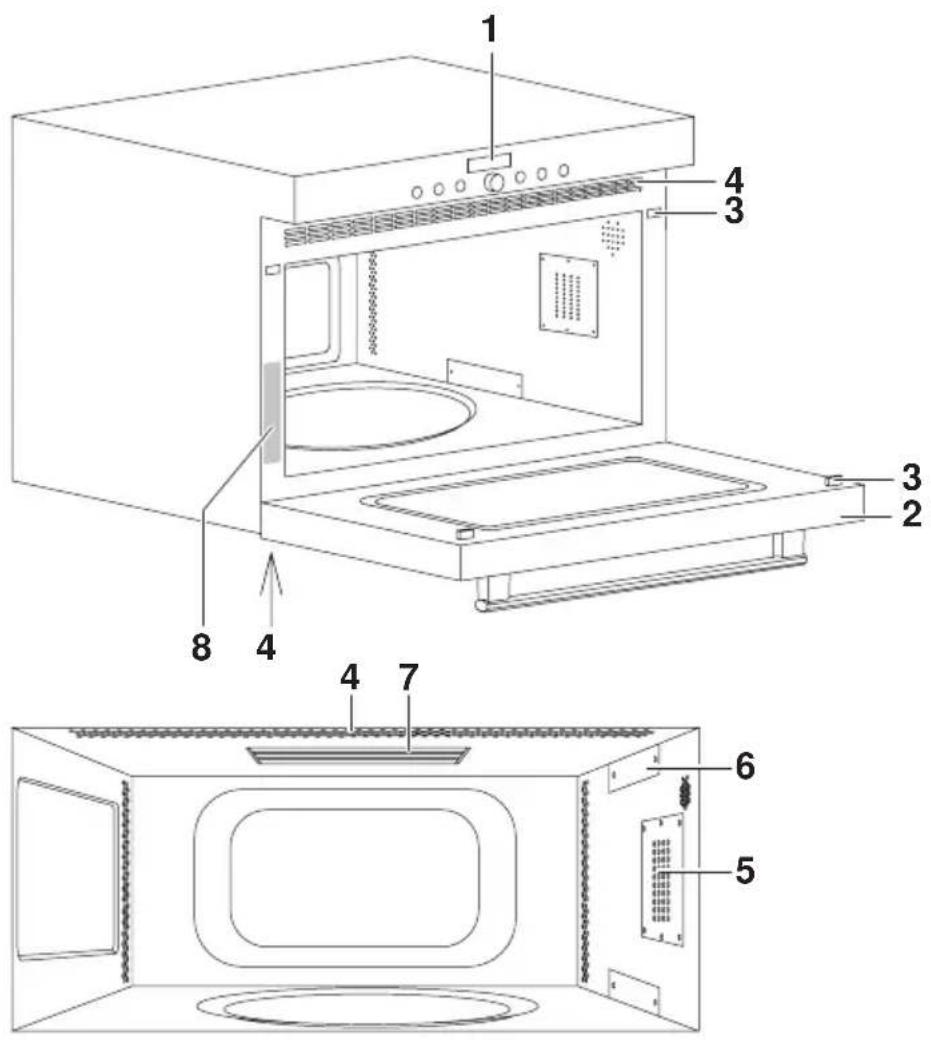
text_image
Technical diagram of a microwave oven with numbered components for identification and assembly reference.1 Operating and display elements
2 Appliance door
3 Safety lock
4 Ventilation slots
5 Illumination
6 Microwave inlet
7 Grill
8 Identification plate
2.2 Operating and display elements

text_image
500 14:25 OKButtons

Illumination Timer


Operating mode Time, operating time,
switch-off time

Microwave operating modes Off

Adjusting knob
Displays
500
Microwave power level
14:25
Time, operating time, switch-off time, timer, etc.
Operating mode

Grill
Microwave operating modes

Power&Favorit PerfectDefrost


Microwave CombiCrunch

Symbols

Timer Switch-off time


Operating time Time

2.3 Accessories

natural_image
Line drawing of a circular mechanical component mounted on a stand (no text or symbols)Turntable roller and glass turntable

You should always use the turntable roller and the glass turntable in combination with the other accessories.
- Place the turntable roller in the fitting in the floor of the cooking space.
- Position the glass turntable on the turntable roller so that the pegs on the base of the glass turntable engage in the corresponding recesses of the turntable drive in the floor of the cooking space. The glass turntable can turn clockwise or anti-clockwise.
The glass turntable must be used with all operating modes. It collects meat juices and food particles, preventing soiling of the cooking space floor.
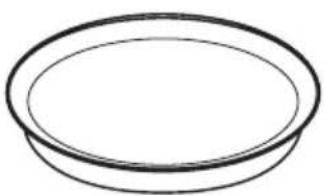
CombiCrunch plate

You should use the CombiCrunch plate in the CombiCrunch mode only.
You should not use knives or cutting wheels to cut on the CombiCrunch plate. This will cause visible damage.
- Use CombiCrunch plate to make the food brown and crispy.
▶Place the food directly on the CombiCrunch plate.
natural_image
Simple line drawing of a circular bowl or plate (no text or symbols)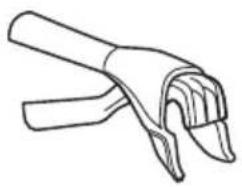
natural_image
Line drawing of a hand gripping a piece of wood or metal (no text or symbols)CombiCrunch grip
▶Use the CombiCrunch grip for taking the Combi-Crunch plate out of the cooking space.
Wire rack

When using the combi mode, you should never place metal dishware on the wire rack. Otherwise, arcing can occur which will damage the appliance.

natural_image
Line drawing of a simple oval-shaped table with slatted edges and a small rectangular object on top (no text or symbols)▶When using the grill mode, place the food directly on the wire shelf and do not cover.

natural_image
Technical line drawing of a mechanical component with concentric rings and mounting holes (no text or symbols)Food cover

Use the food cover with the Power&Favorit and microwave modes only. The food cover could otherwise melt.
- Use the food cover to prevent the food from drying out.
- It prevents the cooking space from becoming soiled.
• Using it shortens the cooking time. - For heating food on more than one level:
▶Place a plate on the glass turntable and cover with the food cover.
▶Place a second plate on the food cover and cover it with a second food cover.
2.4 Ventilation fan
The fan switches on automatically during operation. The fan can continue to run at the end of operation to cool the electronic components. During this time, the appliance door can be opened and the food removed. The fan switches off automatically.
2.5 Installation

Do not obstruct the ventilation openings at any time.
The appliance may only be operated with the appropriate approved installation kit. Alternative ways of setting up or installing the appliance are not permitted.
A special installation kit is provided for installing the appliance.
The appliance can be operated at an ambient temperature of +5 °C to +35 °C.
Adequate air circulation is essential for the trouble-free operation of the appliance. Observe, therefore, the installation instructions and follow the detailed installation specifications.
3 Operating the appliance
The operating modes, the operating time, the switch-off time and various other functions can be selected by pressing the appropriate button once or more.
- The symbol for the function selected illuminates or flashes.
- A recommendation flashes in the corresponding digital display.
- Turn the adjusting knob to change the setting.
- Press the adjusting knob to confirm the setting or it will be automatically accepted after 10 seconds.
- Other settings or changes can be made at any time.
- Press the button to switch off the appliance.
3.1 Using for the first time
Before using the newly installed appliance for the first time the following measures should be taken:
▶Remove all packaging and transport materials from the cooking space.
When 12:00 flashes in the right digital display, turn the OK adjusting knob to set the time.

- Press the adjusting knob to switch between hours and minutes.
- Turn it to set the hours and the minutes.
- Press the adjusting knob to confirm the setting or it will be automatically accepted after 10 seconds.
▶Clean the cooking space and the accessories.
3.2 Example

Liquids such as milk microwaved without a teaspoon become superheated. Disturbing the vessel even slightly can cause the liquid to erupt. Burns hazard!
Burns hazard from heat produced during cooking! Use protective gloves or oven cloths. Keep children away.
Stir liquids before consuming them.
The symbols are explained in 'Tips on settings'. The tables in 'Tips on settings' give:
| Heating up Quantity W G mins. | ||||||||
| Plated meal 300 g - 800 - 2-3 - |
- The turntable roller and the glass turntable must be used with all operating modes.
▶Next steps are described on the following sides.
Selecting the operating mode
▶Select the operating mode.
- flashes in the left digital display.
- The symbol flashes.
- The symbol illuminates.
- Illuminates in the right digital display.
▶Turn the adjusting knob to change the microwave power level to 800.
▶Use the button to select the operating time.
- ① dominates in the left digital display.
- The symbol illuminates.
- The symbol flashes.
- flashes in the right digital display.
▶Turn the adjusting knob to change the operating time to and 2'00 press to confirm.
- The plate meal is heated up.
Switching off
▶Press the button.
- The ≈ symbols and the digital displays go out.

When the symbols are no longer illuminated the appliance is off. The fan can continue to run.
Removing the cooked food from the cooking space

Burns hazard! Hot air may escape from the cooking space when the appliance door is opened.
The accessories will be hot. Use either protective gloves or the CombiCrunch grip.
▶To prevent corrosion, leave the appliance door open until the cooking space has cooled down.
4 User settings
You can adjust the settings.
▶With the appliance switched off, hold the adjusting knob depressed for 5 seconds.
- appears in the digital display.
▶Press the adjusting knob to confirm.
- Appears in the digital display for «Start protection on».
▶Turn the adjusting knob to select setting.
▶Press the adjusting knob to confirm.
- E.g. Eflashes in the digital display for «Time display visible».
▶Turn the adjusting knob to change the digital display to for Eh: 0 «Time display invisible».
▶Press the adjusting knob to confirm the setting.
▶The microwave power level can be changed by turning the adjusting knob ○.

After a power failure, the respective factory settings are restored.
Possible settingschildproof lockchildproof lock
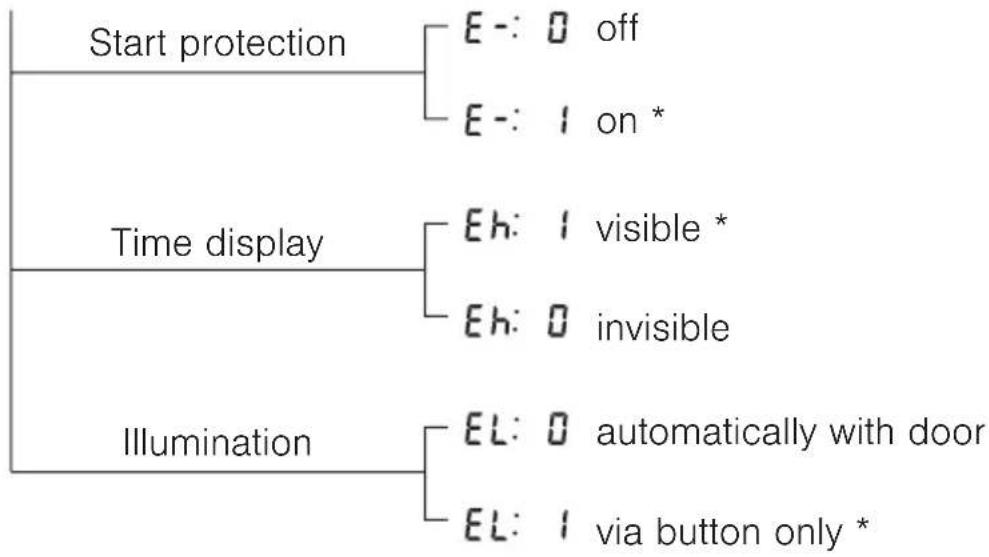
flowchart
graph TD
    A["Start protection"] --> B["E-: 0 off"]
    A --> C["E-: 1 on *"]
    D["Time display"] --> E["Eh: 1 visible *"]
    D --> F["Eh: 0 invisible"]
    G["Illumination"] --> H["EL: 0 automatically with door"]
    G --> I["EL: 1 via button only *"]
* Factory setting
4.1 Start protection
Start protection prevents an operating mode being started accidentally. If the length of time between closing the appliance door and starting the appliance is longer than 1 minute, start protection is automatically activated.
- If any attempt is made to start any operating mode, appears in the digital displays.
- Opening the appliance door deactivates start protection.
- Press the adjusting knob to start the operating mode.

The -and buttons can be used irrespective of whether start protection is activated or not.
4.2 Time display
If the «invisible» setting is selected, the displays are not illuminated when the appliance is off, minimizing power consumption. The time is displayed when the appliance is on.

To reduce power consumption to an absolute minimum, select Eh: 0 «Time display invisible». Despite automatic energy-saving stand-by, all safety functions are active. All displays go out when the cooking process has been completed.
4.3 Illumination
With the «automatically with door» setting, when an operating mode is running the illumination comes on when the appliance door is opened and goes off again when it is closed.

Press the -button to switch the illumination on or off at any time. If the illumination is not switched off by pressing the -button, it will go off automatically 30 minutes after use.
5 Time functions
The following time functions are available:
- Time
- Timer – can be used at any time and independently of all other functions
- Operating time – time-controlled switch-off of the appliance
- Delayed start – time-controlled switch-on and switch-off of the appliance

When the appliance is switched off, the time display is dimmed between 24:00 and 6:00.
5.1 Setting and changing the time

The time cannot be changed if the appliance is in operation or if a delayed start has been set.
▶Press the button.
- The hour flashes in the right digital display.
- The symbol flashes.
▶Turn the adjusting knob to set the hour.
▶Press the button or the adjusting knob.
- The minutes flash in the right digital display.
- The symbol flashes.
▶Turn the adjusting knob to set the minutes.
Press the adjusting knob to confirm the setting.
5.2 Timer
The timer functions like an egg timer. It can be used at any time and independently of all other functions.
Setting
▶Press the button.
- flashes in the right digital display.
- The symbol flashes.
▶Turn the adjusting knob to set the timer duration.
The timer can be set for:
- up to 10 minutes in 10-second intervals, e.g. = 9 minutes and 50 seconds.
• over 10 minutes in 1-minute intervals, e.g. = 1 hour and 12 minutes.
The maximum timer duration that can be set is 9 hours and 59 minutes.

Press the 🔊 button 1× to reset the timer duration to .
▶Press the adjusting knob to start the timer.
- The countdown to the time remaining is visible in the right digital display.
- The symbol illuminates.
When the set duration is up:
- A sequence of 5 short acoustic signals is repeated for 1 minute.
- The symbol flashes.
Press the 🔒 button to switch off the acoustic signal.
Checking and changing
▶Press the button.
- The countdown to the time remaining flashes in the right digital display.
- The symbol flashes.
Turn the adjusting knob to change the timer duration.
Switching off before time
▶Press the button 2×.
- flashes in the right digital display.
- The symbol flashes.
▶Press the adjusting knob to confirm.
5.3 Operating time
The operating mode selected switches off automatically when the operating time is up.
Setting
▶Select the desired operating mode.
▶ If the right digital display does not flash, press the ⏻ button.
- A corresponding recommended value appears in the right digital display.
- The symbol flashes.
▶Turn the adjusting knob to set the duration.
▶Press the adjusting knob to confirm.
Checking and changing
▶Press the button.
- The time remaining flashes in the right digital display.
- The symbol flashes.
Turn the adjusting knob to change the duration.
Switching off before time
▶Press the button.
End of the operating time
When the set duration is up:
- The appliance switches off automatically.
- A long, intermittent acoustic signal is emitted for 1 minute.
- flashes in the right digital display.
- The symbol flashes.
- The settings remain for 3 minutes.
Extending the operating time
▶ Turn the OK adjusting knob within 3 minutes to select a new duration.
Switching off
▶Press the button to switch off.
- The settings are cleared.
5.4 Delayed start
The delayed start is activated when for the operating mode selected both an operating time and a switch-off time are set. The appliance switches automatically on and off again at the desired times.

Delayed start can only be selected if the operating time is shorter than 20 minutes.
Perishables should not be kept unrefrigerated.
No start delay is possible for operating mode «PerfectDefrost».
▶Select the desired operating mode
Setting the operating time
▶ If the right digital display does not flash, press the ⏻ button.
- The corresponding recommended value flashes in the right digital display.
- The symbol flashes.
▶Turn the adjusting knob to set the duration.
Setting the switch-off time
▶Press the button again.
- The switch-off time - without a delayed start - e.g. 8 flashes in the right digital display.
- The symbol flashes.
▶Turn the adjusting knob to set the switch-off time.

The switch-off time can be delayed by a maximum of 23 hours and 59 minutes.
▶Press the adjusting knob to confirm.
- The time appears in the right digital display.
- The symbol illuminates.
- The operating mode selected remains switched off until the automatic start.
Example: ▶Select the operating mode and 150 W.
▶At 8:00, set an operating time of 15 minutes.
▶Set the switch-off time to 11:30.
- The appliance will automatically switch on at 11:15 and off again at 11:30.
Checking and changing
▶Press the button 1×.
- The operating time is visible for 2 seconds.
▶Press the button 2×.
- The switch-off time flashes. It can be changed.

The operating time, the operating mode and the microwave power level cannot be changed.
Switching off before time
▶Press the button.
End of the operating time
When the set duration is up:
- The appliance switches off automatically.
- A long, intermittent acoustic signal is emitted for 1 minute.
- flashes in the right digital display.
- The symbol flashes.
- The settings remain for 3 minutes.
Extending the operating time
▶ Turn the OK adjusting knob within 3 minutes to select a new duration.
Switching off
▶Press the button to switch off.
- The settings are cleared.
6 Operating modes
All the operating modes are described below.
▶ See also the notes in TIPS ON SETTINGS.
| Operating mode Symbol | Range Recommendation | ||
| Grill - 15 mins. |  | ||
| Power&Favorit |  | 1000 W0-2 mins. 30 secs. | 1000 W50 secs. |
| Microwave |  | 0-850 W0-1hr. 30 mins. | 650 W5 mins. |
| PerfectDefrost 50-2500 g 400 g |  | ||
| CombiCrunch 0-1 hr. 30 mins. 2 mins. |  | ||
| Combi mode + |  | 0-650 W0-1hr. 30 mins. | 650 W / 5 mins.or350 W / 15 mins. |
▶Always use the turntable roller and the glass turntable in combination with the other accessories.

natural_image
Simple line drawing of a circular disc mounted on a tripod stand (no text or symbols)Use Accessories
| For browning and crisping food, as well as gratinating and toasting. Preheat the cooking space for 5 minutes. Place the food to be grilled directly on the wire rack. |  |
| For everyday use for heating liquids such as water for tea, milk, etc. | - |
| For preparing and heating vegetables, potatoes, meat, fish, etc. Most foods need to be turned or stirred halfway through the cooking time. |  |
| For defrosting meat, fish, poultry, etc. - | |
| For pizzas, flans, quiches, eggs and bacon, hamburgers, small sausages, etc. | 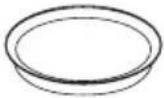 |
| For gratins, lasagne, poultry, jacket potatoes, etc. | 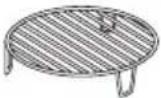 |
6.1 Power&Favorit
The heating of liquids, e.g. 2 dl coffee, can be saved with this operating mode.
▶Select the operating mode.
- illuminates in the left digital display.
- The symbol flashes.
- flashes in the right digital display.
▶Turn the adjusting knob to set the operating time.
▶Press the adjusting knob for at least 2 seconds to save the duration.
The next time the operating mode is selected, the operating time saved flashes in the right digital display.
6.2 PerfectDefrost
This operating mode is for perfectly defrosting food that has a net weight of 50–2500 g. An automatic programme is defined for the following 5 food groups:
| Left digital display Food group Max. weight | ||
| 1 | Meat 2000 g | |
| 2 | Chicken 2500 g | |
| 3 | Fish 1500 g | |
| 4 | Vegetables 1500 g | |
| 5 | Bread 1000 g | |
Attach the sticker (supplied) with the 5 food groups as shown:
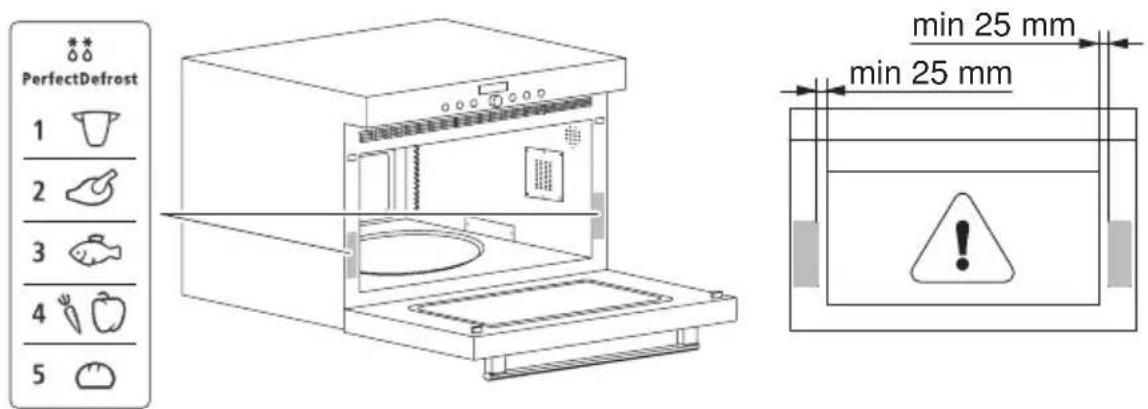
text_image
PerfectDefrost 1 2 3 4 5 min 25 mm min 25 mm min 25 mm▶Select the operating mode.
- flashes in the left digital display.
- illuminates in the right digital display.
▶Turn the adjusting knob to select the food group and press to confirm.
- The food group illuminates in the left digital display.
- flashes in the right digital display.
▶ Turn the OK adjusting knob to select the weight of the food and press to confirm.
- The programme starts.
- The countdown to the time remaining appears in the right digital display.
The appliance stops roughly halfway through the defrosting duration.
- A triple acoustic signal is emitted.
- appears in the left digital display.
- Appears in the right digital display.
▶Open the appliance door.
▶Stir or turn the food.
- Close the appliance door and press the adjusting knob to confirm.
- The defrosting is continued.

If the food is not turned or stirred, defrosting continues automatically after 2 minutes.
6.3 CombiCrunch
This mode combines microwave and grill. The CombiCrunch plate must be used to obtain an optimal result.
▶Select the operating mode.
- flashes in the right digital display.
▶ Turn the OK adjusting knob to set the operating time and press to confirm.
6.4 Combi mode
The combi mode is only possible with the microwave and grill.
▶Select the operating mode.
- flashes in the right digital display.
- The I and symbols flash.
▶Turn the adjusting knob to set the duration (maximum of ). 1h30

The cooking time refers to both the grill and microwave modes.
▶Select the operating mode.
- The operating time selected illuminates in the right digital display.
- The symbol illuminates.
- The symbol flashes.
- flashes in the left digital display.
▶ Turn the adjusting knob to set the microwave power level.
▶Set a delayed start, if required.
▶Press the adjusting knob to confirm.
Checking and changing
▶Use the button to add or switch off the grill.
▶Use the button to select the microwave.
- The symbol flashes.
- The microwave power level flashes in the left digital display.
▶Reduce the microwave power level to 0 by turning the adjusting knob.
- The microwave mode is switched off.
Switching off
▶Press the button.
7 Tips on settings
Symbols used
| Grill | |
| Microwave operating modes | |
| W Watts | |
| G Weight | |
| mins. Duration in minutes | |
| Accessories | |
7.1 Optimal use
The recommended settings given in recipe books are likely to be too high and the accessories not optimal for this appliance. In the following tables, you will find information to help you get the best use out of the appliance.
▶Always place the food in the centre of the glass turntable.
▶ Cover liquid and steaming food, unless it should remain crispy.
- Food containing less liquid must be covered over when being heated up to prevent it drying out.
▶Stir or turn the food halfway through time.
▶At the end of cooking, allow the food to stand in the cooking space for more even heating (standing time).
▶Avoid opening the appliance door frequently.

Several small portions heat faster and more evenly than a single large portion.
7.2 Heating up
| Quantity W G min | 12 | |||||
| Plated meal 300 g - 800 - 2-3 - | ||||||
| Goulash 300 g - 800 - 3 - | ||||||
| Soup 3 dl - 800 - 1.5-2 | - | |||||
| Sauce | 3 dl - 800 - 2-3 | |||||
| Hamburgers | 2 - 800 - 6-8 | |||||
| Small sausages | 2 - 500 - 6-8 | |||||
| Lasagne | 450 g - 500 - 5-6 | |||||
| Pasta | 200 g - 800 - 2 | |||||
| Rice | 150 g - 800 - 1.5 | |||||
| Rice | 300 g - 800 - 2-3 | |||||
| Chicken 300 g - 500 - 3-4 | ||||||
| Vegetables | 250 g - 800 - 1.5 | |||||
| Milk | 2 dl | - | - | 1 | - | |
| Coffee | 2 dl | - | - | 1 | - | |
▶When heating liquids, place a teaspoon in the vessel to prevent delayed boiling (or superboiling).
▶Stir or, turn the food halfway through time.
▶After heating food up, allow to stand for about 2 minutes.
▶Always add a little liquid to rice and pasta.
7.3 Defrosting
| Food Quantity W G mins. | ||||||
| Small sausages 500 g -- 500 g -- | ||||||
| Shrimps | 200 g | - | - | 200 g | - | |
| Spinach | 300 g | - | 350 | - | - | |
| Mixed vegetables | 250 g | - | 350 | - | - | |
| Fruit | 250 g | - | - | 250 g | - | |
| Bread loaf | 500 g -- | 500 g | -- | |||
| Baguette rolls | 2 | - | - | 200 g | - | |
| Sponge cake | 1 | - | - | 600 g | - | |
| Brioche rolls | 5 | - | - | 600 g | - |
▶Stir or turn the food halfway through the defrosting time.
The defrosting time depends on the shape and quantity of the food.
▶When freezing food, try to make as flat and small a shape as possible.
- For perfect defrosting, allow the food to stand about 4 minutes after defrosting.
7.4 Simultaneous defrosting and cooking
| Frozen food Quantity W G mins. | [IMAGE] |  | |||||
| Pizza | 200 g300 g400 g | - | - | - | 679 |  | |
| Hamburgers | 24 | - | - | - | 5-67-8 | ||
| Fish fingers | 200 g300 g | - | - | - | 57 | ||
| Chips | 200 g300 g400 g | - | - | - | 81012 | ||
| Mixed vegetables | 200 g300 g400 g | - | - | - | 567 | ||
| Fruit compote | 200 g300 g400 g | - 650 | 456 | - | |||
| Lasagne | 400 g to450 g | - 650 | |||||
| Soup 3 dl - 800 - 5 - | |||||||
| Ready meal 400 g - 800 - | 6-8 | ||||||
▶Follow the manufacturers' recommendations.
▶Stir or turn the food halfway through the cooking time.
7.5 Cooking
| Meat Quantity W G mins. | → | ||||||
| Joint of pork 1 kg - - - 20 |  | ||||||
| Joint of veal 1 kg - - - 15-18 | |||||||
| Pork chop | 1 kg thick1 kg thin | - | - | - | 22-2418-20 | ||
| Haunch of lamb 1 kg - - - 20-25 | |||||||
| Roast beef | 1 kg rare1 kg medium1 kg well done | - | - | - | 10-1212-1414-16 | ||
| Sausages | 200 g400 g | - | - | - | 4-57-8 | ||
| Brochette (kebab) 600 g | - - - 12-15 | ||||||
| Chicken | 1.2 kg whole600 g portions | - | - | - | 20-2516-18 | ||
▶ Depending on the piece of meat, turn halfway through the cooking time.
▶ Allow the food to stand for about 10–15 minutes after cooking.
| Fish Quantity W G mins. | → |  | |||||
| Fish, whole | 500 g800 g | 650 | 10-1212-15 |  | |||
| Fillet of fish | 400 g500 g | - | - | - | 3-55-6 |  | |
| Salmon | 2 slicesà 200 g | - | - | - | |||
| Fillet of dover sole 400 g - 650 - 4-5 |  | ||||||
| Trout | 2 slicesà 200 g2 slicesà 400 g | -650 | 5-78-11 | ||||
| Squid | 650 g | 650 | - | 7-9 |  | ||
| Crab | 500 g - 500 - |  | |||||
▶Liquid, e.g. stock or wine, may be added.
▶Allow to stand for about 3 minutes after cooking.
| Fresh vegetables Quantity W G mins. | → | [IMAGE] | |||||
| Broccoli | 300 g500 g | -800 | 3-46-8 |  | |||
| Artichoke | 12 | -800 | 4-56-8 | ||||
| Carrots | 300 g400 g | -800 | 3-46-8 | ||||
| Cauliflower | 300 g500 g | -800 | 3-46-8 | ||||
| Brussels sprouts 500 g - 800 - 6-9 | |||||||
| Fennel 300 g - 800 - 3-4 | |||||||
| Mushrooms 500 g - 800 - 3-5 | |||||||
| Corn on the cob | 500 g(2 ears of corn) | -800 | 10-12 | ||||
| Aubergine 400 g - - - 6-8 |  | ||||||
| Potatoes, chopped | 250 g400 g500 g | - | - | - | 8-1012-1415-18 | ||
| Potatoes, whole | 1 (à 250 g)2 (à 250 g)4 (à 250 g) | -800 | 4-68-1012-15 |  | |||
| Fresh vegetables Quantity W G mins. |  | ||||||
| Sweet pepper | 24 | - | - | - | 7-810-12 |  | |
| Peas * 250 g - 800 - 4-5 |  | ||||||
| Tomatoes * 400 g - 800 - 2-3 | |||||||
| Spinach * 250 g - 800 - 3-4 | |||||||
| Zucchetti 250 g --- 1-2 |  | ||||||
* Always add a little liquid.
▶ Stir or turn the food halfway through the cooking time.
8 Care and maintenance

Allow the appliance and accessories to cool down before cleaning. The appliance may not be used if the appliance safety door catch is damaged. Inspect these parts regularly.
Do not use abrasive cleaning agents or cleaning aids such as steel wool, knives, glass scrapers, razor blades, etc. to clean the door glass. Scratches on the door glass could cause breakage.
Do not use abrasive or caustic cleaning agents or stainless steel cleaner. Do not use scouring pads, wire wool, etc. as such products will damage the surfaces.
8.1 Cleaning the exterior
▶Remove any soiling or traces of cleaning agent immediately.
- Clean the surfaces with a soft cloth dampened with water and a little washing-up liquid – for metallic surfaces rub in the direction of the original polish lines. Wipe dry with a soft cloth.
8.2 Cleaning the appliance door

Under no circumstances may the appliance door be removed! Do not use abrasive cleaning agents or cleaning aids such as steel wool, knives, glass scrapers, razor blades, etc. to clean the door glass. Scratches on the door glass could cause breakage.
▶Clean the appliance door with a soft cloth dampened with water and a litte washing-up liquid. Wipe dry with a soft cloth.
8.3 Cleaning the cooking space

Always replace the turntable roller and glass turntable immediately after cleaning.
Do not use abrasive cleaning agents. Do not use scouring pads, wire wool, etc. as such products will damage the surface.
▶Clean the cooking space regularly, especially when food has been spilt. Take care that no grease splashes or food residues harden. Take all accessories out of the cooking space before cleaning.
▶Ideally remove any soiling with a soft cloth dampened with water and a little washing-up liquid while the cooking space is still warm to the touch. Wipe dry with a soft cloth.
▶For stubborn dirt deposits heat up a glass of water at maximum microwave power level for 2–3 minutes. The steam that is produced will soften the soiling.
▶To eliminate unpleasant odours, heat up a glass of water with lemon juice for 2–3 minutes at maximum microwave power level.
8.4 Cleaning the accessories

Allow the glass turntable to cool down before cleaning. Allow the CombiCrunch plate to cool down well before cleaning. Do not immerse the CombiCrunch plate in water whilst still hot or cool it under running water. Rapid cooling will damage the ComiCrunch plate. Scouring pads, steel wool, etc. will cause visible damage.
The following accessories can be cleaned in the dishwasher:
- turntable roller
- glass turntable
- food cover
- CombiCrunch grip
- wire rack.

Do not clean the CombiCrunch plate in the dishwasher as this could damage the surface coating!
▶Clean using a mild detergent, water and a sponge.
8.5 Replacing a defective light bulb
For safety reasons, in case of a defective light bulb please contact our Customer Services.
9 Trouble-shooting
This section lists faults that can be solved simply by following the instructions given. If another fault is displayed or the fault cannot be remedied, please call Customer Services.

Please note down the FN number and the error message in full, e.g.
F xx, before calling Customer Services.
9.1 What to do if ...
... the appliance was switched on without any food in it
| Possible cause Solution | |
| The appliance will be undamaged if only switched on for a short time. Do not switch the appliance on without any food in it. |
... the appliance is not working
| Possible cause Solution | |
| • Appliance is no connected to the power supply. | ▶Check the power supply. |
| • Fuse or automatic circuit breaker for electrical installations in the home is defective. | ▶Change the fuse.▶Reset the automatic circuit breaker. |
| • Interruption in the power supply. | ▶Check the power supply. |
| • The appliance is faulty. | ▶Contact our Customer Services. |
... a scratching noise can be heard when the appliance is switched on
Possible cause Solution
• Cooking space floor and turntable roller are soiled.
▶Clean the floor of the cooking space and the turntable roller regularly.
... the appliance affects your television reception
Possible cause Solution
Your appliance is not faulty in this case. When in use, it can cause interference to television or radio reception. This is a similar kind of interference to that caused by small electrical appliances (such as mixers, vacuum cleaners, etc.).
... hot air flows out of the appliance
Possible cause Solution
This is a normal functional state. The heat emitted by the food warms the air in the cooking space. This is then discharged to the outside. The heated air contains no microwaves. The ventilation openings are on no account to be obstructed.
... the appliance switches off prematurely
| Possible cause Solution | |
| • Appliance is overheated. | ▸ Check the ventilation slots. These must be freely accessible. |
| • Ventilation slots are obstructed. | ▸Remove any objects obstructing the ventilation slots. |
| ▸Wait for the appliance to cool down.▸Restart the appliance. |
9.2 After a power failure
After a power failure, flashes in the right digital display and the symbol flashes.
▶Turn the adjusting knob to set the hour.
▶Press the adjusting knob to confirm.
▶Turn the adjusting knob to set the minutes.
▶Press the adjusting knob again to confirm the time.

All the user settings are reset to the factory settings.
10 Accessories and spare parts
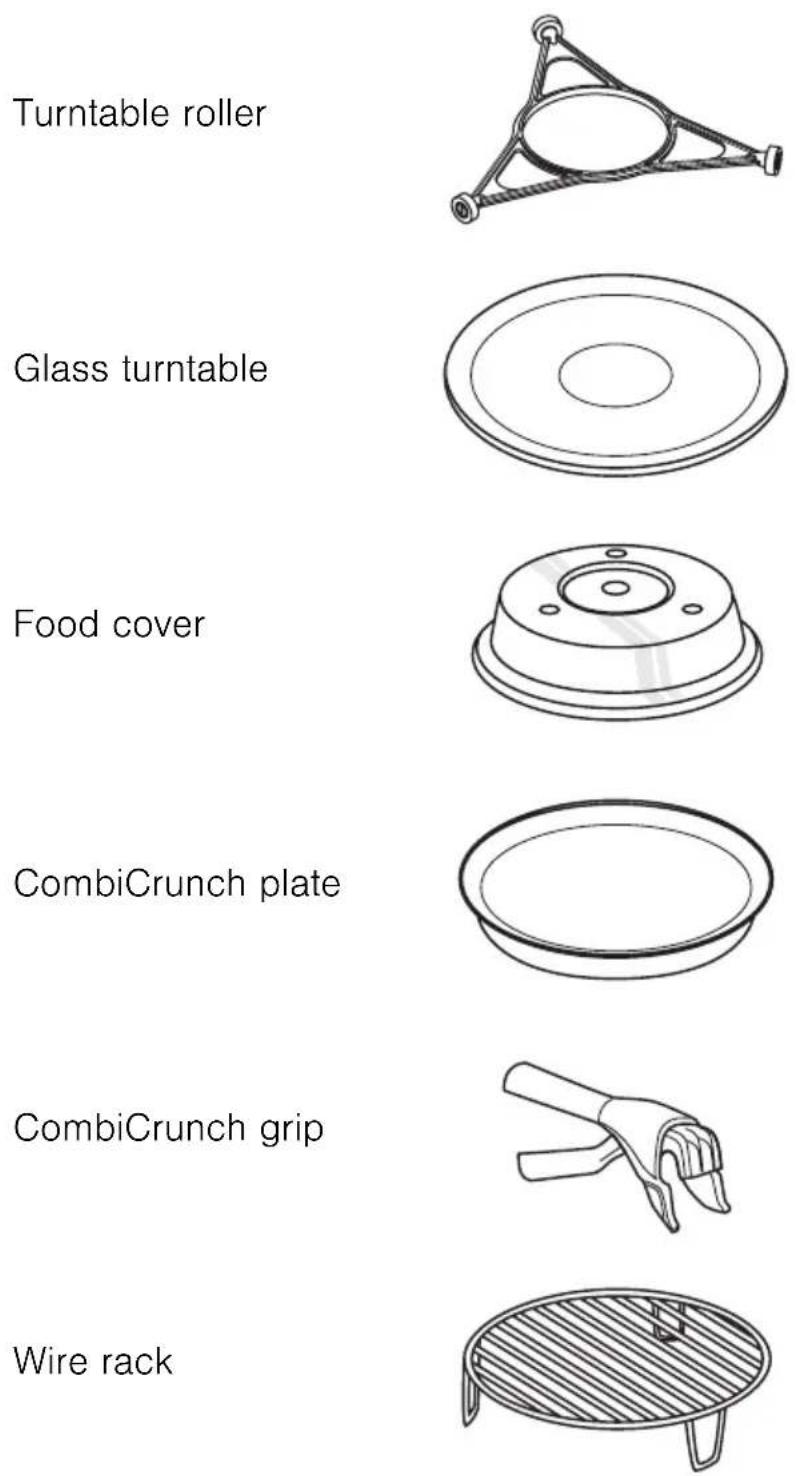
Please give model number of the appliance and exact description of the accessory or spare part when ordering parts.
11 Technical data
External dimensions
▶See installation instructions
Electrical connection
▶See identification plate 1

natural_image
Simple line drawing of a bathroom sink with a curved sink and a horizontal plate (no text or symbols)Automatic energy-saving stand-by
To avoid consuming power unnecessarily, the appliance is equipped with automatic energy-saving stand-by.

To reduce power consumption to a minimum, select «Time display invisible», in the user settings. Despite automatic energy-saving stand-by, all safety functions are active.
12 Disposal
Packaging
- All packaging materials (cardboard, plastic film (PE) and polystyrene (EPS)) are marked and should, if possible, be collected for recycling and disposed of in an environmentally friendly way.
Disconnection
- Disconnect the appliance from the mains. With a fixed appliance, this is to be carried out by a qualified electrician!
Safety
- Disable the appliance to prevent accidents caused by improper use, especially through children playing.
- Pull the plug out of the mains socket or have the appliance disconnected from the mains by a qualified electrician. Then cut off the mains cable.
- Remove or disable the lock on the appliance door.
Disposal
- The old appliance should not be discarded as worthless rubbish. If disposed of correctly, the raw materials can be recovered for recycling.
- The symbol on the identification plate warns that the appliance may not be disposed of in normal household waste.
- The appliance must be disposed of in accordance with local regulations on waste disposal. For more information on the handling, disposal and recycling of the product, please contact the local authorities, the local recycling facilities for household waste or the retailer from whom you purchased the appliance.
13 Index
A
Accessories ..... 17, 22, 58
Cleaning 54
Ordering 63
Acoustic signal 28
Ambient temperature ..... 24
Appliance description ..... 20
Appliance door 20
Cleaning 52
Avoiding damaging appliance .... 14
B
Buttons 21
C
Care. 52
Childproof lock 28
Cleaning 52
Combi mode 38,43
CombiCrunch 38,42
Grip 23
Plate 17,22
Construction 20
Cooking 48
Cooking space
Cleaning 53
Cookware 18
D
Defrosting 46
Delayed start 35
Disclaimer 11
Disconnection 60
Display elements 21
Displays 21
Disposal.... 60
Appliance disposal ..... 19
Disconnection 19
Packaging 19
E
Electrical connection ..... 59
Exterior
Cleaning 52
External dimensions.... 59
F
Food cover 18,23
Foods
Heating 15
G
Glass turntable 17,22
Grill 20,38
H
Heating up. 45
|
Identification plate ..... 20, 59
Illumination 20, 28, 29
Installation 24
Instructions for use 12
L
Light bulb, replacing 54
Liquids
Heating 15
M
Maintenance 52
Malfunction 63
Microwave 38
Safety precautions. 14
Microwave operating modes ..... 21
Model
Number 2
Type 2
0
Operating elements ..... 21
Operating mode 21
CombiCrunch 42
PerfectDefrost 41
Power&Favorit 40
Operating modes.... 38
Operating the appliance
Example 26
Operating time. 33
Operation 25
Optimal use 44
Orders 63
P
Packaging 60
PerfectDefrost 38,41
Power failure 57
Power&Favorit 38,40
Q
Queries 63
Quick instructions 64
R
Radio interference. 56
Removing cooked food. . . . . . . . 27
Repair service 63
S
Safety 60
Safety lock 20
Safety precautions. 5
Appliance-specific. 7
General 6
Scratching noise 56
Service agreement 63
Service Centre. 63
Spare parts 58
Ordering 63
Stand-by 59
Start protection 29
Switch-off time. 35
Symbols 2, 5, 21
Symbols used 44
T
Technical data 59
Television interference ..... 56
Temperature unit. 28
Time Setting 30
Time display 28, 29
Flashing 57
Time format. 28
Time functions. 30
Timer....31
Tips on settings. 44
Cooking 48
Defrosting 46
Heating up 45
Trouble-shooting 55
Turntable roller 17,22
U
Use, optimal ..... 44
User settings.....28
Using for the first time. 25
V
Validity 2
Ventilation fan 24
Ventilation slots....57
W
Wire rack 17,23
14 Repair service

The TROUBLE-SHOOTING section will help you to correct minor malfunctions yourself, saving you the time and trouble of calling out a service technician and the cost that goes along with it.
Whether you contact us about a malfunction or an order, please always state the serial number (FN) and the model type of your appliance. Enter these details below and also on the service sticker which comes with the appliance. Stick it in a conspicuous place or in your telephone or address book.
FN
Appliance
You will also find the same details on the certificate of guarantee, the original sales invoice and the identification plate of the appliance.
▶Open the appliance door.
- The identification plate is on the left-hand side of the cooking space.
If the appliance is not working properly, contact your nearest V-ZUG Ltd Service Centre using freephone 0800 850 850 and stand in close proximity to the appliance.
Queries, orders, service agreement
For administrative and technical queries or problems, as well as for ordering spare parts and accessories, please contact our head office in Zug on telephone number +41 (0)41 767 67 67.
As regards the maintenance of all our products, when the warranty expires you have the option of taking out a service agreement. We will be happy to send you the necessary forms.
15 Quick instructions
Please first read the safety precautions in the operating instructions!
To set the time
▶Press the button.
▶Turn the adjusting knob to set the hour.
▶Press the button again.
▶Turn the adjusting knob to set the minutes.
To switch off the appliance
▶Press the button.
To set the timer
▶Press the button.
▶Turn the adjusting knob to set the timer duration.
Switching Power&Favorit on
▶Press the button.
▶Press the adjusting knob to confirm.