
TL-ANT5823B - WiFi antenna TP-LINK - Free user manual and instructions
Find the device manual for free TL-ANT5823B TP-LINK in PDF.


| Product Type | Outdoor Panel Antenna |
| Brand | TP-Link |
| Model | TL-ANT5823B |
| Frequency Range | 5150-5850 MHz (5 GHz) |
| Gain | 23 dBi |
| VSWR | ≤ 1.5 |
| Horizontal Beamwidth | 12° |
| Vertical Beamwidth | 12° |
| Polarization | Vertical or Horizontal |
| Front-to-Back Ratio | > 28 dB |
| Impedance | 50 Ω |
| Maximum Input Power | 100 W |
| Connector Type | N Female |
| Dimensions (L × W × D) | 320 × 320 × 20 mm |
| Weight | 1.8 kg |
| Mounting Mast Diameter | 30-50 mm |
| Radome Material | ABS |
| Rated Wind Velocity | 241 km/h |
| Operating Frequency Compatibility | 5 GHz Access Points only (not 2.4 GHz) |
| Installation Type | Outdoor mast or tower mounting |
| Weatherproofing | UV-resistant ABS radome, rated for outdoor use |
| Maintenance | Inspect and tighten mounting hardware periodically; clean with soft dry cloth |
| Safety Warnings | Mount away from power lines; avoid installation in rain or thunderstorms; do not install alone |
| Spare Parts | Contact TP-Link support for replacement parts; no user-serviceable parts inside |
Frequently Asked Questions - TL-ANT5823B TP-LINK
User questions about TL-ANT5823B TP-LINK
0 question about this device. Answer the ones you know or ask your own.
Ask a new question about this device
Download the instructions for your WiFi antenna in PDF format for free! Find your manual TL-ANT5823B - TP-LINK and take your electronic device back in hand. On this page are published all the documents necessary for the use of your device. TL-ANT5823B by TP-LINK.
USER MANUAL TL-ANT5823B TP-LINK
Quick Installation Guide
5GHz 23dBi Outdoor Panel Antenna
TL-ANT5823B
7106503928
Rev. 1.0.0
I. Introduction

natural_image
Exterior view of a metallic rectangular device mounted on a vertical pole, labeled 'TL-ANT5823B' (no other text or symbols visible)TL-ANT5823B, the TP-Link 5GHz 23dBi Outdoor Panel Antenna, is applicable for outdoor point-to-point or point-to-multi-point directional signal transmission.
It is usually mounted on such high-level outdoor locations as towers, roofs, etc.
The easy way to mount TL-ANT5823B is to bind it to a mast, as illustrated above.
* TL-ANT5823B is only compatible with 5GHz Access Points. Please do not connect it with 2.4GHz AP.
II. Specifications
| Electrical Specifications | |
| Model TL-ANT5823B | |
| Frequency Rang-MHz 5150-5850 | |
| Gain-dBi 23 | |
| VSWR ≤1.5 | |
| Horizontal Beamwidth-° 12 | |
| Vertical Beamwidth-° 12 | |
| Polarization Vertical or Horizontal | |
| F/B Ratio-dB >28 | |
| Impedance-Ω 50 | |
| Maximum Input Power-W 100 | |
| Connector N Female | |
| Mechanical Specifications | |
| Antenna Dimension-mm 320×320×20 | |
| Weight-Kg 1,8 | |
| Mounting Mast Diameter-mm | ∅30~∅50 |
| Radome Material ABS | |
| Rated Wind Velocity-Km/h | 241 |
III. Radiation Patterns
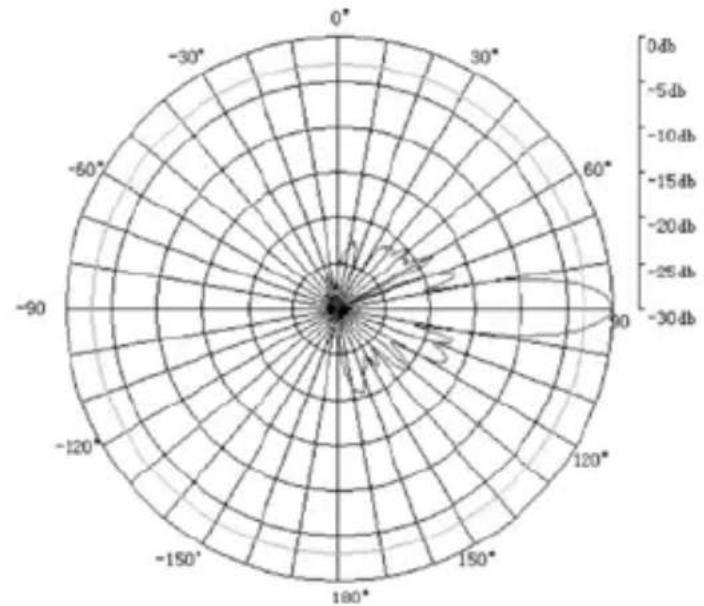
radar
| Angle | Value (dB) | |-------|------------| | 0° | -30 | | 30° | -25 | | 60° | -20 | | 90° | -15 | | 120° | -10 | | 150° | -5 | | 180° | 0 | | 210° | 5 | | 240° | 10 | | 270° | 15 | | 300° | 20 | | 330° | 25 | | 360° | 30 |Vertical Pattern
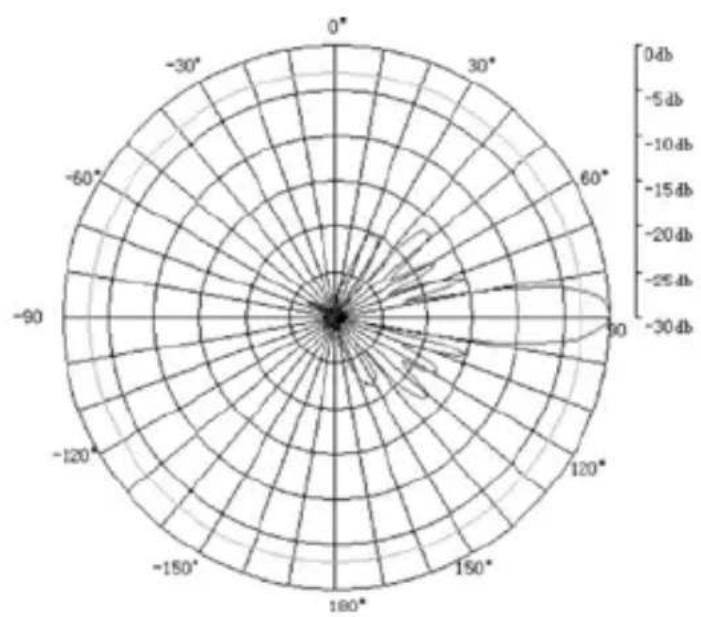
radar
| Angle | Value (dB) | |-------|------------| | 0° | 0.4 | | 30° | 0.2 | | 60° | 0.1 | | 90° | 0.05 | | 120° | 0.03 | | 150° | 0.02 | | 180° | 0.01 | | 210° | 0.005 | | 240° | 0.003 | | 270° | 0.002 | | 300° | 0.001 | | 330° | 0.0005 | | 360° | 0.0001 |Horizontal Pattern
IV. Installation
Please find the necessary accessories in the attachment, and take the following steps to install your antenna TL-ANT5823B.

- Mount the antenna on the “L” type brackets according to the mounting diagram.
Make sure the antenna polarization is parallel to the direction you need. When the antenna polarization is vertical to the ground, the antenna is vertically polarized. When the antenna polarization is horizontal to the ground, the antenna is horizontally polarized.
-
Mount the antenna on the pipe mast according to the mounting diagram.
-
Test the antenna with equipment to make sure the antenna receive the best signal by turning the azimuth and pitching angle, then lock all the screws and seal the connector between antenna and cable.

- Connect TL-ANT5823B to 5GHz AP (Access Point) interface with cables. It's recommended to use radio frequency cables with high quality and low loss. Besides, the shorter the cable is, the better it will be to avoid unnecessary loss.
Warning:
- Mount the antenna at a safe location, far away from power lines, lamps, and other cables.
- Do not mount the antenna in the rain or thunder storm.
- Do not mount the antenna alone.
Technical Support
■ For more troubleshooting help, go to: http://www.tp-link.com/en/support/faq
■ To download the latest Firmware, Driver, Utility and User Guide, go to: http://www.tp-link.com/en/support/download
■ For all other technical support, please contact us by using the following details:
Global
Tel: +86 755 26504400
E-mail: support@tp-link.com
Service time: 24hrs, 7 days a week
Singapore
Tel: +65 62840493
E-mail: support.sg@tp-link.com
Service time: 24hrs, 7 days a week
UK
Tel: +44 (0) 845 147 0017
E-mail: support.uk@tp-link.com
Service time: 24hrs, 7 days a week
USA/Canada
Toll Free: +1 866 225 8139
E-mail: support.usa@tp-link.com
Service time: 24hrs, 7 days a week
Malaysia
Tel: 1300 88 875465 (1300 88TPLINK)
Email: support.my@tp-link.com
Service time: 24hrs, 7 days a week
Turkey
Tel: 444 19 25 (Turkish Service)
E-mail: support.tr@tp-link.com
Service time: 9:00 AM to 6:00 PM
7 days a week
Poland
Tel: +48 (0) 801 080 618 / +48 22 7217563 (if calls from mobile phone)
E-mail: support.pl@tp-link.com
Service time: Monday to Friday 9:00 AM to 5:00
PM. GMT+1 or GMT+2
(Daylight Saving Time)
Germany / Austria
Tel: +49 1805 875465 (German Service) +49 1805 TPLINK
E-mail: support.de@tp-link.com
Fee: 0.14 EUR/min from the German fixed phone network and up to 0.42 EUR/min from mobile phone
Service time: Monday to Friday 9:00 AM to 6:00
PM. GMT+ 1 or GMT+ 2 (Daylight Saving Time in Germany)
*Except bank holidays in Hesse
Australia & New Zealand
Tel: AU 1300 87 5465
NZ 0800 87 5465
E-mail: support@tp-link.com.au
Service time: 24hrs, 7 days a week
Italy
Tel: +39 02 66987799
E-mail: support.it@tp-link.com
Service time: Monday to Friday
9:00 AM to 6:00 PM
Ukraine
Tel:0-800-505-508
E-mail: support.ua@tp-link.com
Service time: Monday to Friday
14:00 PM to 22:00 PM
Brazil
Toll Free: 0800-770-4337 (Portuguese Service)
E-mail: suporte.br@tp-link.com
Service time: Monday to Saturday
08:00 AM to 08:00 PM
Indonesia
Tel: (+62) 021 6259 135
E-mail : support.id@tp-link.com
Service time : Monday to Friday
9:00 -12:00; 13:00 -18:00
*Except public holidays
Switzerland
Tel: +41 (0) 848 800998 (German Service)
E-mail: support.ch@tp-link.com
Fee: 4-8 Rp/min, depending on rate of different time
Service time: Monday to Friday 9:00 AM to 6:00
PM. GMT+ 1 or GMT+ 2
(Daylight Saving Time)
Russian Federation
Tel: 8 (499) 754-55-60
8 (800) 250-55-60
(toll-free call from any RF region)
E-mail: support.ru@tp-link.com
Service time: From 10:00 to 18:00
(Moscow time)
*Except weekends and holidays in Russian Federation


Brand : TP-LINK
Model : TL-ANT5823B
Category : WiFi antenna