BF306 - Scale OMRON - Free user manual and instructions
Find the device manual for free BF306 OMRON in PDF.


User questions about BF306 OMRON
0 question about this device. Answer the ones you know or ask your own.
Ask a new question about this device
Download the instructions for your Scale in PDF format for free! Find your manual BF306 - OMRON and take your electronic device back in hand. On this page are published all the documents necessary for the use of your device. BF306 by OMRON.
USER MANUAL BF306 OMRON
natural_image
Simple curved line drawing without any text, numbers, or symbols
text_image
HEIGHT WEIGHT AGE MALE FEMALE MEM NO. 22.5% OMRON BODY FAT MONITOR BF306 FAT NORMAL Cut StartBody Fat Monitor
Model BF306
• Instruction Manual page 2
- Gebrauchsanweisung Seite 9
- Gebruiksaanwijzing pagina 16
- Mode d'emploi page 23
• Manuale de instruzione pagina 30
- Manual de instrucciones pagina 37
Thank you for purchasing this OMRON BF306 Body Fat Monitor. To ensure proper and safe use of this unit, please take a few minutes to carefully read this instruction manual.
Please keep this instruction manual on hand and in a safe place for future reference.
TABLE OF CONTENTS
1 Safety precautions and storage 2
1.1 Important safety instructions ..... 2
1.2 Care and storage 2
1.3 Features of this product 2
2 How to obtain a correct measurement? 3
2.1 Recommended times for measurement ..... 3
2.2 The conditions or circumstances that are not suitable for a correct measurement ....3
2.3 Exceptions 3
2.4 Recommendations for taking a measurement ..... 3
3 Operation and usage of the Omron BF 306 body fat monitor .... 4
3.1 Description of the unit 4
3.2 Battery insertion and replacement ..... 4
3.3 Setting personal data before taking a measurement 5
3.4 To take a measurement....5
3.5 Setting and using personal memory number ..... 6
3.6 To change any values 6
4 How to interpret measured results 6
4.1 BMI (Body Mass Index) value 6
4.2 Body fat percentage 6
5 Troubleshooting 7
5.1 Possible causes of inaccurate measurements .....7
5.2 Explanation of error codes .....7
5.3 Troubleshooting 7
5.4 Important information for users ....8
6 Specifications 8
1. SAFETY PRECAUTIONS AND STORAGE
1.1 Important safety instructions
Please read the following instructions carefully, as they contain important information concerning the setting up, use and care of your new Body Fat Monitor.
Keep this manual for future reference.
Do not disassemble the body fat monitor. Apart from the batteries, it contains no user serviceable parts.
Do not subject the device to strong shocks.
Although there are no known side effects, the body fat monitor must NOT be used under the following conditions:
- During an acute contagious disease;
- By persons with medical implants (e.g. pacemakers);
- By persons with any heart disease. Use the monitor after consultation with your doctor;
- Never use it in combination with artificial heart-lung and other electronic life support systems;
- Never use it in combination with an electrocardiograph and other (portable) electronic medical devices.
Do not use the body fat monitor in a highly humid environment such as sauna or while you are in a bath or in a shower. Never submerse in water.
Do not let unattended children or infirm persons have access to the unit.
If you discover that the body fat monitor is damaged or does not operate properly, switch it off immediately and stop using it. An authorized dealer using only original OMRON spare parts must carry out any repairs. Any part of the unit may only be repaired or replaced by the Omron Service representative.
Please note that this device is only intended to measure the body composition
1.2 Care and Storage
Clean the main unit with a soft dry cloth. If the main unit is heavily stained, wipe it with a cloth lightly dampened with water or detergent, then wipe it dry with a dry cloth.
Avoid an excessive amount of water, this can cause internal damage. Do not wipe the unit with benzene, paint thinner, alcohol, or other volatile detergents.

natural_image
Illustration showing a hand holding a small container and a crossed-out bottle with a 'X' symbol (no text or labels present)1.3 Features of the product
Accurate measurement
The body fat percentage is measured based on the electric resistance and the personal data such as height, weight, age and gender. The measured results are closely correlated with the "underwater weighing method" and the DEXA (Dual Energy X-ray Absorbtometry) method, which are said to be the standard measurements methods for measuring the body fat percentage.
Measurement is fast and simple
After setting the data, body fat mass can be measured by simply holding the grip electrodes and pushing the Start button. The measured results are displayed approximately 7 seconds after the Start screen is displayed.
Large and clear displays
The easy to read large digital and graphic displays can be understood at a glance. The measured results based on body fat percentage and on BMI calculations are displayed alternately, as well as their interpretations.
Memory
The memory can store the personal data (height, weight, age and gender) of up to 9 people simultaneously.
Small, lightweight and portable
2. HOW TO OBTAIN A CORRECT MEASUREMENT
The body fat monitor is a monitoring device. It should be used at a fixed point in time and with a fixed period between two measurements. For instance: once a week on a Sunday morning. With this in mind, please find in paragraph 2.1 a table with recommended times for measurement. There are conditions that are not suitable for taking a body fat measurement. There are also some exceptions that are excluded for taking a body fat measurement. This is explained in paragraph 2.2 and 2.3. This chapter will end with some recommendation (paragraph 2.4) before taking a measurement.
2.1 Recommended times for measurement
Understanding the normal changes in your body fat percentage can help you in preventing or reducing obesity. Being aware of the times when the body fat percentages shift within your own daily schedule will assist you in obtaining an accurate trend of your body fat. It is recommended to use this unit in the same environment and same daily circumstances. (See chart)
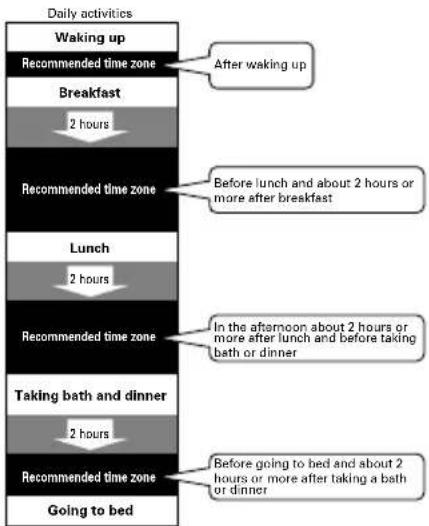
flowchart
graph TD
    A["Waking up"] --> B["Recommended time zone"]
    B --> C["Breakfast"]
    C --> D["2 hours"]
    D --> E["Recommended time zone"]
    E --> F["Lunch"]
    F --> G["2 hours"]
    G --> H["Recommended time zone"]
    H --> I["Taking bath and dinner"]
    I --> J["2 hours"]
    J --> K["Recommended time zone"]
    K --> L["Going to bed"]

    style A fill:#f9f,stroke:#333
    style B fill:#ccf,stroke:#333
    style C fill:#cfc,stroke:#333
    style D fill:#fcc,stroke:#333
    style E fill:#cff,stroke:#333
    style F fill:#ffc,stroke:#333
    style G fill:#cfc,stroke:#333
    style H fill:#cfc,stroke:#333
    style I fill:#cfc,stroke:#333
    style J fill:#cfc,stroke:#333
    style K fill:#cfc,stroke:#333
    style L fill:#cfc,stroke:#333

    note1["After waking up"]
    note2["Before lunch and about 2 hours or more after breakfast"]
    note3["In the afternoon about 2 hours or more after lunch and before taking bath or dinner"]
    note4["Before going to bed and about 2 hours or more after taking a bath or dinner"]
2.2 The conditions or circumstances NOT suitable for a correct measurement
If a measurement is made under the following physical conditions, the measured body fat percentage may differ significantly from the actual one because the water content in the body changes.

Immediately after vigorous exercise
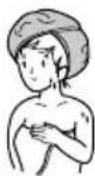
Immediately after
taking bath or sauna

After drinking much alcohol

After taking a large amount of water or after a meal
2.3 Exceptions
In some cases, the measured body fat percentage may differ too much from the actual body fat percentage. These exceptions are the people for who measurements may vary due to consistently changing amounts of water and tissue density within their bodies.
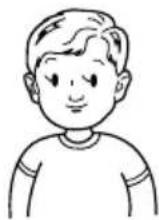
Children of growing stage

natural_image
Simple line drawing of an elderly person's face (no text or symbols)Elderly people and women after menopause
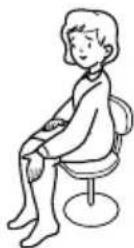
Those having
swelling

Patients of osteoporosis having very low bone density

People with a fever
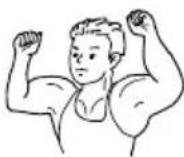
Bodybuilders or professional athletes

Patients under -

going dialysis Pregnant women
2.4 Recommendations for taking a measurement
If the palms of your hands are dry or the temperature of your palms or the grip of the electrodes are extremely cool, stable measurement is impossible, which may lead to display error indication or inaccurate results.
Please pay special attention in winter because the air is dry and/or the temperature is low.
Conditions Actions
| Hands are dry. Slightly moisten hands witha wet towel, then measure. |
| When you hold the grip Warm the grip electrodes byelectrodes, they feel cold. leaving the unit in a warmroom for approximately tenminutes. |
| Your body and hands are cold. Warm your hands by due to the blood not circulating immersing in warm water well. or staying in a warm room. |
Start the measurement again.
3. OPERATION AND USAGE OF THE OMRON BF306 BODY FAT MONITOR
In this chapter a thorough description will be given about the usage of the OMRON BF 306 Body Fat Monitor. First a description of the main unit will be given followed by an instruction to insert the batteries. Please note that paragraph 3.3, 3.4 and 3.5 are about the setting and taking the measurement.
This chapter will be closed with a paragraph about changing the values.
3.1. Description of the unit
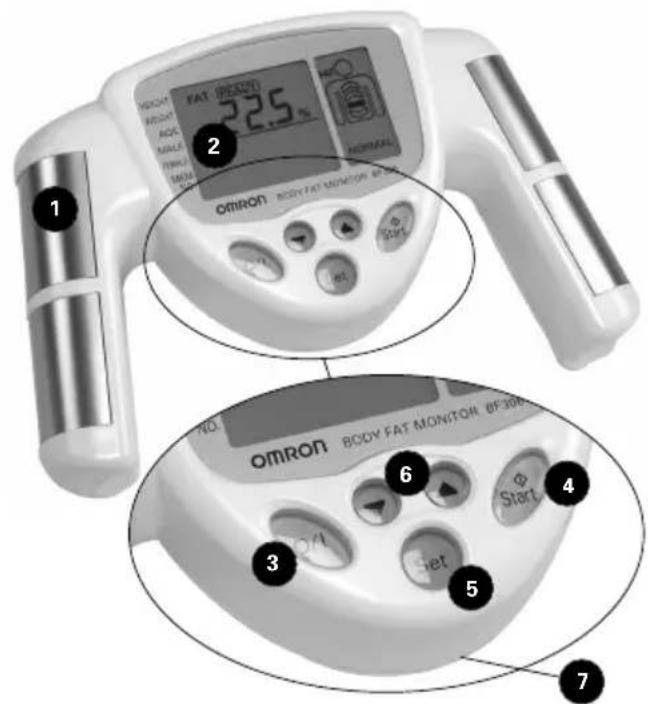
text_image
1 2 3 4 5 6 7 OMRON BODY FAT MONITOR 8F30B 22.5 % HOMMINT No. Omron BODY FAT MONITOR 8F30B1 Grip electrodes
Extremely weak electric current is applied from here during the measurement
2 Display
Displays the set value and the measurement results
3 O/I button
Turns the power on and off
4 Start button
Push the button and take the measurement posture, then the measurement starts
5 Set button
Stores the memory number (1-9) and personal data
6 Up/Down ( ▲ / ▼ ) button
Increases/decreases the values of personal data including height, weight, age and gender, as well as the personal memory number.
7 Battery cover (rear)
text_image
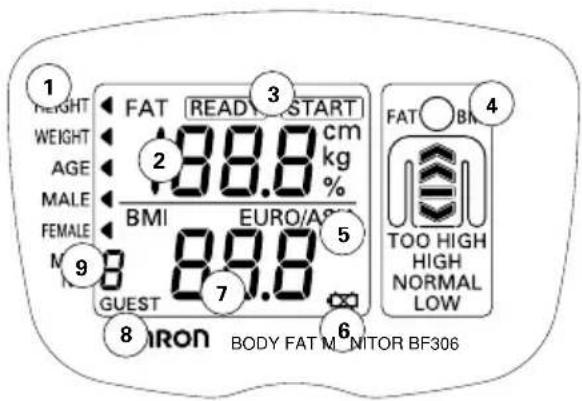
1 HEIGHT WEIGHT AGE MALE FEMALE M GUEST 2 88.8 cm kg % BME EURO/A 5 7 8 IRON BODY FAT MONITOR BF306 3 4 FAT BM TOO HIGH HIGH NORMAL LOW① Display of height / weight / age mode
② Display of the values of body fat percentage / height / weight / age
③ Display of ready before and after a measurement
④ Graphical interpretation of fat% and BMI value
5 Euro Asia
6 Low battery display (when this mark flashes, replace the batteries)
⑦ Display of BMI values
⑧ Display of personal memory number
⑨ Display of gender
3.2 Battery insertion and replacement
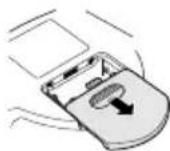
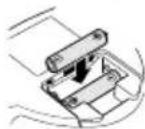
- While pressing the ⚙ mark on the battery cover on the back of the unit with your finger, slide off the cover in the direction of the arrow.
- Insert two AAA batteries with the polarities in correct alignment, as indicated in the battery compartment.
- Slide and securely close the battery cover.

Battery life and replacement
When the battery replacement symbol flashes, replace both batteries with new ones.
Disposal of used batteries should be carried out in accordance with the national regulations for the disposal of batteries.
As the batteries may leak and damage the main unit, please note the following points:
- Remove the batteries from this unit when you are not going to use it for a long period of time (approximately three months or more).
- Replace the worn batteries with new ones immediately.
- Do not use manganese and alkaline batteries together.
- Do not use new and worn batteries together.
3.3 Setting the personal data before taking a measurement
Step 1: Push the O/I button.
All the display segments turn on
Step 2: Push the Set button to enter the setting mode.

Step 3: Setting height (range: 100.0 cm to 199.5 cm).
- The height value 160.0 cm flashes and HEIGHT is indicated.
- Push the ▼/▲ button to set the height value. The height value increases by increments of 0.5 cm each time the
▲ button is pressed or decreases each time the ▼ button is pressed. By pushing the button for more than 1 second, the height values change at a faster rate. - Push the Set button to set the height value. The display changes to the weight setting screen.
Step 4: Setting weight (range: 10.0 kg to 199.8 kg).
- The weight value 60 kg flashes and WEIGHT ◀ is indicated.
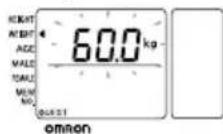
- Push the ▼/▲ button to change the weight value. The weight value increments by 0.2 kg each time the
▲ button is pressed or decreases each time the ▼ button is pressed. By holding the button for more than 1 second, the weight values change at a faster rate.
- Push the Set button to set the weight value. The display changes to the age setting screen.
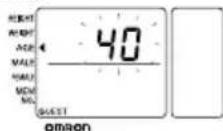
Step 5: Setting age (range: 18 to 70 years old).
- The age value 40 flashes and the AGE ◀ is indicated.
-
Push the ▼/▲ button to change the age. The age values change by 1 year. By holding the button for more than 1 second, the age values change at a f
-
Push the Set button to set the age value. The display changes to the gender setting screen.
Step 6: Setting gender (male/female).
- The gender male flashes and
MALE ◀ is indicated. - Push the ▼/▲ button to change the gender. The display of male or female flashes alternately.
- Push the Set button to set the gender.
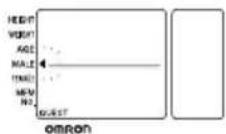
Now all the set items are stored, READY is displayed.
Step 7
Continue with the next paragraph: to carry out the measurement, paragraph 3.4.
3.4 To take a measurement
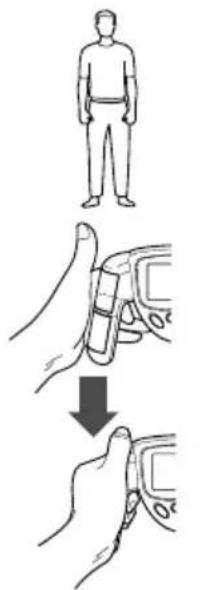
Step1: Stand with both feet slightly apart.
Step 2: Hold the grip electrodes.
Wrap your middle finger around the groove of the handle. Place the palm of your hand on the top and the bottom electrodes. Put your thumbs up, resting on top of the unit.
Step 3: Hold your arms straight out, at a 90 degree angle to your body. Do not move during the measurement.
Step 4: Confirm the ready to measure display.
The READY indicator turns on.
Step 5: Push the START button. The START display turns on.
Step 6: Immediately after having pushed the Start button, hold the electrodes correctly with both hands as shown on the right. The unit automatically detects that it is held and starts measuring.
Step 7:
During measuring, the display shown to the right turns on and the arrows rotate from LOW to TOO HIGH.
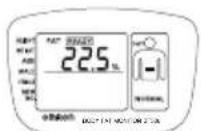
As soon as measurement is finished the FAT% is displayed on the left display, while indicating the interpretation of this value (NORMAL >> TOO HIGH) on the right display. After approx. 5 seconds, both displays change to BMI (Body Mass Index).
Every 5 seconds, the displays change from FAT% to BMI and vice-versa.
You can start another measurement when the READY indicator turns on.
For an explanation how to interpret the measurement results in detail, please refer to chapter 4.
Step 8: Push the O/I button to turn the power off.
If you do not push the O/I button, the unit will turn off automatically, approximately three minutes after displaying the measurement results.
text_image
Diagram illustrating a step-by-step procedure for using a device to adjust the body part, with human and hand diagrams showing progressive changes.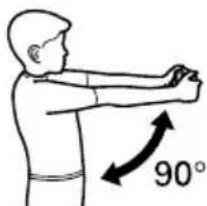
text_image
90°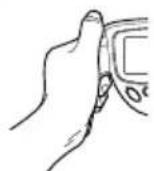


text_image
23.1 含蓄能功能 BCC-STAT-MONITOR STOCK3.5 Setting and using personal memory number
The Omron BF 306 body fat monitor has a memory function. This function enables you to store the data for 9 persons.
Push the O/I button
All the display segments turn on
When you want to set the personal memory number and store personal data:
Select the personal memory number.
- Push the ▼/▲ button and select a personal number from 1 to 9.
- Push the Set button.
The personal number turns on and changes to height setting mode. - Set the personal data - continue with step 3 paragraph 3.3 "Setting personal data".

text_image
HEIGHT WEIGHT AGE MALE FEMALE MEM NO. omronTaking a measurement by using your personal memory (be sure the device is on):
Search your personal memory number
- Push the ▼/▲ button to select your memory number
- Push the Set button.
The memory number is indicated and your personal data is displayed. - Carry out the measurement.
Refer to "To take the measurement" paragraph 3.4
3.6 To change any values
- Push the Set button to go to the personal data you want to change.
- Push the ▼/▲ button to change the setting.
By pushing both the ▼/▲ buttons at the same time, the current flashing display will reset to the initial value.
How to delete all 9 personal data values from the memory
- Push the ▲ button and select the memory No. 1.
- Push the SET button for 2 seconds.
- All personal data is deleted and all.
- The display segments turn on.
(Same state as when the O/I button is pushed.)
If you leave the set items on the screen without confirmation, in approximately 1 minute the display will change to the initial values or the to values before setting.
After 1 minute, the unit will automatically turn off.
If your age, weight, or height has changed, correct the value accordingly.
4. HOW TO INTERPRET MEASURED RESULTS
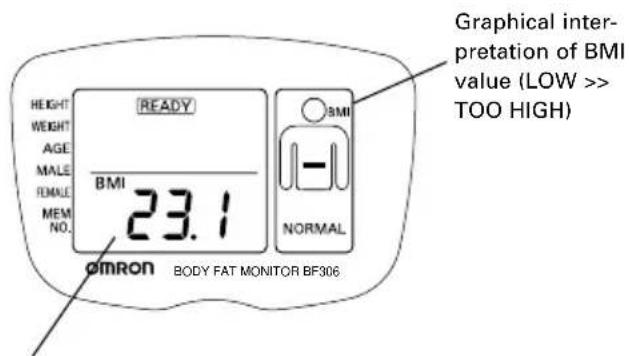
4.1 BMI Value
text_image
HEIGHT WEIGHT AGE MALE FEMALE MEM NO. 23.1 OVERN BODY FAT MONITOR BF306 OVERN OVERN OVERN OVERN OVERN OVERN OVERN OVERN OVERN OVERN OVERN OVERN OVERN OVERN OVERN OVERN OVERN OVERN OVERN OVERN OVERN OVERN OVERN OVERN OVERN OVERN OVERN OVERN OVERN OVERN OVERN OVERN OVERN OVERNBMI is an internationally used index to show the body condition by checking the balance between the height and the weight.
It is calculated by the following formula:
BMI = weight / height ^2
BMI BMI value\*
< 18.5 LOW
18.5 and < 25 NORMAL
25 and < 30 HIGH
30 TOO HIGH
* The above mentioned indices refer to the values for obesity proposed by the WHO (World Health Organization)
4.2 Body fat percentage

text_image
FAT READY 22.5 % HEIGHT WEIGHT AGE MALE FEMALE MEM NO. omron BODY FAT MONITOR BF306 FAT NORMAL Graphical inter- pretation of measured FAT%, based on Deurenberg's* table belowDisplays the body fat mass as the percentage of body weight.
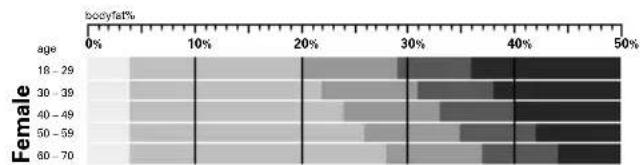
heatmap
| Age Group | Female | Body Fat (%) | |---|---|---| | 18-29 | 18-39 | 0 | | 18-29 | 30-39 | 0 | | 18-29 | 40-49 | 0 | | 18-29 | 50-59 | 0 | | 18-29 | 60-70 | 0 | | 30-39 | 18-39 | 0 | | 30-39 | 30-39 | 0 | | 30-39 | 40-49 | 0 | | 30-39 | 50-59 | 0 | | 30-39 | 60-70 | 0 | | 40-49 | 18-39 | 0 | | 40-49 | 30-39 | 0 | | 40-49 | 40-49 | 0 | | 40-49 | 50-59 | 0 | | 40-49 | 60-70 | 0 | | 50-59 | 18-39 | 0 | | 50-59 | 30-39 | 0 | | 50-59 | 40-49 | 0 | | 50-59 | 50-59 | 0 | | 50-59 | 60-70 | 0 | | 60-70 | 18-39 | 0 | | 60-70 | 30-39 | 0 | | 60-70 | 40-49 | 0 | | 60-70 | 50-59 | 0 | | 60-70 | 60-70 | 0 | | Overall (Body Fat) = -1%

text_image
Obesity judgment Low Normal High Too highReferences:
Deurenberg* P, Yap M, van Staveren WA.
Body mass index and percent body fat: a meta-analysis among different ethnic groups.
International Journal of Obesity 1998;22:1164-1171
WHO
Obesity: Preventing and managing the global epidemic.
Report on a WHO Consultation on Obesity, Geneva, 3-5 June, 1997
WHO/NUT/NCD/98.1, Geneva 1998
* Paul Deurenberg, PhD
Associate Professor in Nutrition, Wageningen University, The Netherlands
Visiting Professor University 'Tor Vergata', Rome, Italy Nutrition Consultant in Singapore
5. TROUBLESHOOTING
5.1 Possible causes of inaccurate measurements.
Measuring postures that should be avoided
Measurement in the following positions may not provide accurate measurement.
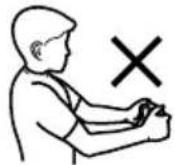
Elbows are bent.

natural_image
Simple line drawing of a person performing a stretching exercise with a 'X' mark above the arm (no text or symbols on the figure itself)Moving your body or arms during measurement.

Arms held at an angle, either too low or too high.

Measuring while lying down or sitting.
How to hold the grips.
In the following cases, the electric resistance may not be measured correctly.
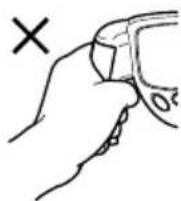

Your fingers are not properly gripping the electrodes.
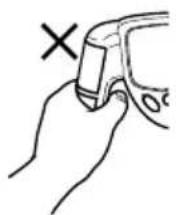
When holding the grips, the hands are positioned unevenly towards the top or the bottom.
5.2 Explanation of error codes
Error display Cause What to do (the next
| button to push) | ||
 | Electrodes were not firmly grasped. rectly | Grasp the grips cor- and measure. (Start button) |
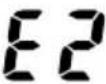 | Measurement posture grip was not stable. m | Measure without or moving your arms. (Start button) |
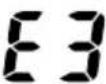 | Hands are dry. Slightly | moisten hands with a wet towel, then measure. (Start button) |
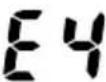 | The values of body fat percentage and weight, age, and BMI are outside the gender again. (Set measurable range. button) | |
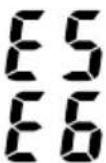 | Abnormal operation P | Press the O/l button again and start measurement. If this error occurs again, consult the nearest Omron dealer. |
5.3 Troubleshooting
Trouble What to inspect How to repair
| When the O/I button is pushed, nothing is displayed. | Are the batteries worn out? | Replace both batteries with new 5 ones |
| Is the battery polarity correct? | Insert the batteries correctly. | |
| The value of body fat percentage displayed is ab-normally high (or low). | Is the measurement posture correct? | Measure again in correct posture. |
| An error (E1 to E6) is displayed and the measurement is impossible. | Please refer to "Explanation of Error Codes". (see above) | |
| The results differ extremely for each measurement. | Please refer to "How to Obtain a Correct Measurement" | |
| Other conditions. | Push the O/I button again and restart from the beginning | |
If you are unable to obtain a correct measurement after taking the above-mentioned troubleshooting steps, please contact the nearest OMRON dealer.
5.4 Important information regarding Electro Magnetic Compatibility (EMC)
With the increased number of electronic devices such as PC's and mobile (cellular) telephones, medical devices in use may be susceptible to electromagnetic interference from other devices. Electromagnetic interference may result in incorrect operation of the medical device and create a potentially unsafe situation. Medical devices should also not interfere with other devices.
In order to regulate the requirements for EMC (Electro Magnetic Compatibility) with the aim to prevent unsafe product situations, the EN60601-1-2 standard has been implemented. This standard defines the levels of immunity to electromagnetic interferences as well as maximum levels of electromagnetic emissions for medical devices.
This medical device manufactured by OMRON Healthcare conforms to this EN60601-1-2:2001 standard for both immunity and emissions.
Nevertheless, special precautions need to be observed:
- Do not use mobile (cellular) telephones and other devices, which generate strong electrical or electromagnetic fields, near the medical device. This may result in incorrect operation of the unit and create a potentially unsafe situation. Recommendation is to keep a minimum distance of 7m . Verify correct operation of the device in case the distance is shorter.
Further documentation in accordance with EN60601-1-2:2001 is available at OMRON Healthcare Europe at the address mentioned in this instruction manual. Docu mentation is also available at www.omron-healthcare.com.
Correct Disposal of This Product (Waste Electrical & Electronic Equipment)

This marking shown on the product or its literature, indicates that it should not be disposed with other household wastes at the end of its working life. To prevent possible harm to the environment or human
health from uncontrolled waste disposal, please separate this from other types of wastes and recycle it responsibly to promote the sustainable reuse of material resources.
Household users should contact either the retailer where they purchased this product, or their local government office, for details of where and how they can take this item for environmentally safe recycling.
Business users should contact their supplier and check the terms and conditions of the purchase contract. This product should not be mixed with other commercial wastes for disposal.
This product does not contain any hazardous substances.
6. SPECIFICATIONS
Model: OMRON BF306 Body Fat Monitor
Display: Body fat percentage (4.0% to 50.0%)
BMI (7.0 to 90.0)
Fat% interpretation levels: low,
normal, high, too high
BMI interpretation levels: low, normal, high, too high
Accuracy (S.E.E.): 4.1 %
Input data: Height: 100.0 cm. to 199.5 cm.
Weight: 10 kg to 199.8 kg
Age: 18 to 70 years old
Gender: Male / Female
Number of personal
memories: 9 memory numbers
Power supply: 2 AAA batteries
Battery life: Approximately 1 year (when used twice a day)
Operating temperature
and humidity: +10°C to +40°C, 30% to 85% RH
Storage temperature
and humidity: -20°C to +60°C, 10% to 95% RH
External
dimensions: Approx. 197 (L) x 128 (H) x 49 mm (W)
Weight: Approx. 230 g (not including batteries)
Package includes: 2 AAA batteries, main unit, instruction manual, warranty card
This OMRON product is produced under the strict quality system of OMRON Healthcare Co. Ltd., Japan.
Specifications may be changed without prior notice.
C€0197

= Type BF

Read the instructions in this manual carefully.
This device fulfills the provisions of the EC directive 93/42/EEC (Medical Device Directive).
| Manufacturer OMRON | HEALTHCARE Co., Ltd.53, Kunotsubo, Terado-cho, Muko, Kyoto,617-0002 JAPAN |
| EU-representative OMR | ON HEALTHCARE EUROPE B.V.Scorplus 33, 2132 LR Hoofddorp, THE NETHERLANDSwww.omron-healthcare.com |
| Production facility | OMRON (DALIAN) CO., LTD.Dalian, CHINA |
| Subsidiary | OMRON HEALTHCARE UK LTD.Opal Drive, Fox Milne, Milton Keynes, MK15 0DG, U.K. |
| OMRON MEDIZINTECHNIKHANDELSGESELLSCHAFT mbHJohn-Deere-Str. 81a, 68163 Mannheim, GERMANYwww.omron-medizintechnik.de | |
| OMRON SANTÉ FRANCE SAS14, rue de Lisbonne, 93561 Rosny-sous-Bols Cedex, FRANCE |
Made in China