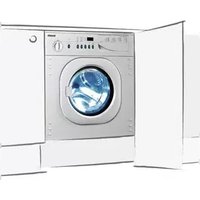
BWR1206 - Washing machine BAUMATIC - Free user manual and instructions
Find the device manual for free BWR1206 BAUMATIC in PDF.


| Product Type | Fully integrated washing machine |
| Brand | Baumatic |
| Model | BWR1206 |
| Capacity | 6 kg |
| Maximum Spin Speed | 1200 rpm |
| Number of Wash Programs | 15 |
| Display | LCD display with countdown timer |
| Appliance Dimensions (H x W x D) | 825 x 595 x 565 mm (excluding décor strip) |
| Aperture Dimensions (H x W x D) | 868 x 600 x 580 mm |
| Energy Rating | B |
| Wash Performance Rating | B |
| Spin Performance Rating | B |
| Electrical Supply | 230 V ~ 50 Hz, 13 A |
| Water Connection | Hot and cold fill |
| Drum Material | Stainless steel |
| Child Lock | Yes (activates by pressing Soak and Delay Start simultaneously) |
| Delay Start Timer | Up to 24 hours |
| Extra Rinse Option | Yes |
| Soak (Anti-crease) Option | Yes |
| Door Safety Lock | Yes (automatic lock during cycle) |
| Adjustable Feet | Yes (4 adjustable feet with lock nuts) |
| Error Code Display | Yes (messages like Err1, Err2, etc.) |
| Drain Pump Filter Cleaning | Recommended every 20 washes |
| Maintenance Wash | Intense 90°C program with small detergent before first use |
Frequently Asked Questions - BWR1206 BAUMATIC
User questions about BWR1206 BAUMATIC
0 question about this device. Answer the ones you know or ask your own.
Ask a new question about this device
Download the instructions for your Washing machine in PDF format for free! Find your manual BWR1206 - BAUMATIC and take your electronic device back in hand. On this page are published all the documents necessary for the use of your device. BWR1206 by BAUMATIC.
USER MANUAL BWR1206 BAUMATIC
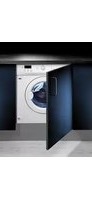
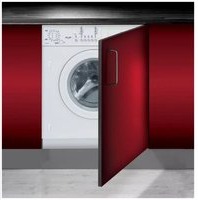
BWR1005/BWR1206 Fully integrated washing machine
Instruction manual
USER MANUAL FOR YOUR BAUMATIC
BWR1005/BWR1206 Fully integrated washing machine
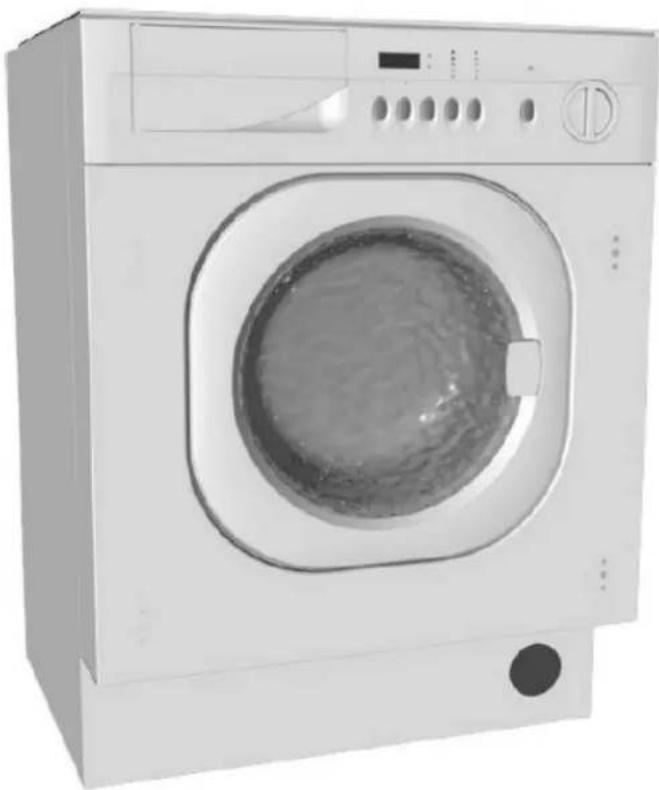
natural_image
Front view of a white washing machine with a circular vent and control panel (no visible text or symbols)
NOTE: This User Instruction Manual contains important information, including safety & installation points, which will enable you to get the most out of your appliance. Please keep it in a safe place so that it is easily available for future reference.
DD 14/07/09
Contents
| Environmental note | 4 | ||
| Important safety information | 5 - 6 | ||
| Specifications | 7 | -8 |
| Description of the appliance | ||||||||||||||||||||||||||||||||||||||||||||||||||||||||||||||||||||||||||||||||||||||||||||||||||||||||||
| C | o | n | t | r | o | l | ||||||||||||||||||||||||||||||||||||||||||||||||||||||||||||||||||||||||||||||||||||||||||||||||||||
| Detergent | drawer | 1 | ||||||||||||||||||||||||||||||||||||||||||||||||||||||||||||||||||||||||||||||||||||||||||||||||||||||||
| Preparing the wash cycle | 12 | |
| Preparing your garments for washing | 12 | |
| A selection of wash care symbols | 13 | |
| Detergents and conditioners | 14 |
| Program | table | 15 - 16 | ||||||||||
| Wash | program | guidance | 16 | |||||||||
| Selecting a wash program | 16 - 17 | |||||||||||
| At the end of a wash cycle | 17 | |||||||||||
| Pausing | a | wash | program | 18 | ||||||||
| Cancelling | a | wash | program | 18 | ||||||||
| Spin | selection | button | 19 | |||||||||
| Temperature | selection | button | 19 | |||||||||
| S | o | a | k | o | p | t | i | o | n | b | u | |
| Extra | rinse | option | button | 20 | ||||||||
| D | e | l | a | y | s | t | a | r | t | b | u | |
| C | h | i | l | d | l | o | c | k | ||||
| Maintenance and cleaning | 22 - 23 | ||||||||
| I | n | d | a | i | l | y | u | s | e |
| Control panel and washing machine cabinet | 22 | ||||||||
| Detergent drawer | 22- | 23 | |||||||
| The washing machine drum | 23 | ||||||||
| D | o | o | r | ||||||
| Error code failure system | 24 - 25 | |
| General | troubleshooting | 26 |
| Poor | wash results | |
| Cleaning the drain pump filter | 28 - 29 | |
| Installation | 29 - 36 | ||||||||
| Unpacking and removing the transit bolts | 29 - 30 | ||||||||
| Positioning and levelling the appliance | 31 - 32 | ||||||||
| Fitting | the | décor | strip | 32 | |||||
| Connecting to the mains water supply | 32 - 34 | ||||||||
| W | a | t | e | r | o | u | t | l | e |
| Fitting | the | furniture | door | ||||||
| Power | supply | 36 | |||||||
| Before first use maintenance wash | 37 | ||||||||
| Contact details | 38 |
Environmental note
Note: Before discarding an old appliance, switch off and disconnect it from the power supply. Cut off and render any plug useless. Cut the cable off directly behind the appliance to prevent misuse. This should be undertaken by a competent person. Disable the door lock to make sure that children cannot get stuck inside the appliance.
This appliance is marked according to the European directive 2002/96/EC on Waste electrical and Electronic Equipment (WEEE). By ensuring this product is disposed of correctly, you will help prevent potential negative consequences for the environment and human health, which could otherwise be caused by inappropriate waste handling of this product.
The symbol

accompanying the product, indicates that this appliance may not be treated as household waste. Instead it shall be handed over to the applicable collection point for the recycling of electrical and electronic equipment.
Disposal must be carried out in accordance with local environmental regulations for waste disposal.
For more detailed information about treatment, recovery and recycling of this product, please contact your local city office, your household waste disposal service or the shop where you purchased the product.

natural_image
Symbol of a trash bin crossed with two crossed lines, no text or numbers present- The packaging materials that Baumatic uses are environmentally friendly and can be recycled.
- Please discard all packaging material with due regard for the environment.
Important safety information

Your safety is of the utmost importance to Baumatic. Please make sure that you read this instruction booklet before attempting to install or use the appliance. If you are unsure of any of the information contained in this booklet, please contact the Baumatic Technical Department.
General Safety
- Repairs to your appliance must only be carried out by a Baumatic engineer or one of its authorised service agents. Any attempt by an inexperienced person to repair the appliance, could result in injury or damage to your washing machine.
- If you notice that the mains cable is damaged. The appliance must not be used. The same applies if you notice that the worktop, control panel or base area is damaged. As this could allow access to the internal components of the machine.
- The appliance should be turned off and isolated from the mains supply, before either cleaning or maintenance work is attempted.
- The mains cable must not be used to pull the plug out of the electrical socket.
- The machine should not be sprayed with water.
- The glass of the porthole door may become hot during the higher temperature wash programs.
- The machine should be allowed to cool before carrying out an emergency drain or cleaning the drain filter.
- It is possible for small animals to chew either mains cables or water hoses, which could cause an electric shock hazard.
Installation
- The installation instructions contained within this user manual should be followed.
- It is obligatory for the completed installation to comply with all relevant building regulations and local water authority requirements.
Before the first use of the appliance, we advise that the intense 90°C wash program is completed. No garments should be placed inside the machine; however a small amount of detergent must be used.
During Use
- It is recommended that the appliance is unplugged and the water supply is turned off after the machine is used.
- This appliance is only designed to wash normal domestic washloads. If you use your washing machine in any other way or it is incorrectly used, then Baumatic accepts no liability for any damage that might be caused and any guarantee will be void.
- No attempt should be made to alter or modify the specifications of this appliance.
- The detergents that you place in this appliance should be suitable for automatic washing machines. With regards to dosage levels, the detergent manufacturer's recommendations should be followed.
- You should not wash garments that have been in contact with flammable materials.
- Your washing machine should not be used for dry cleaning.
- If you use either dyes or bleaching agents inside this machine, then you should consult with the manufacturer of these products to make sure they are suitable for use in your washing machine. Baumatic cannot be held responsible for any damage that may result.
Child Safety
- Your washing machine should only be used by adults. You should not allow children in the area of the machine unsupervised. You should not let them touch the controls or play with the appliance.
- It could be possible for a child or pet to gain access to the washing machine through the porthole door. Therefore please check the drum before using the appliance.
- Any packaging that is removed from the machine should be kept away from children.
- All detergents should be kept out of children's reach in a safe place.
Specifications
Product and aperture dimensions

| Appliance | dimensions | Aperture | dimensions | |||
| Height: | 825 (excluding | mm décor | strip) | 868 | mm | |
| Width : | 595 | mm | 600 | m | ||
| Depth: | 565 | mm | 580 | mr | ||
Product specifications
- 15 wash programs
- 6 kg wash load
- 1000 rpm maximum spin speed (BWR1005)
- 1200 rpm maximum spin speed (BWR1206)
○ LCD display - Delay start timer with remain time indicator
- 2 Option buttons: Extra rinse
S o a k - Spin and temperature selection buttons
- Door safety lock
○ Child lock - Stainless steel drum
- Adjustable feet
- Error code failure system
| Energy efficiency | (BWR1005) | (BWR1206) | |||||||||
| E | n | e | r | g | y | r | a | t | i | n | |
| W | a | s | h | p | e | r | f | o | r | m | |
| Water | extraction | performance | B | B | |||||||
Electrical details
Rated voltage: 230 Vac 50 Hz
Supply connection: 13 A (double pole switched fused outlet with
3 m m c o n t
Description of the appliance
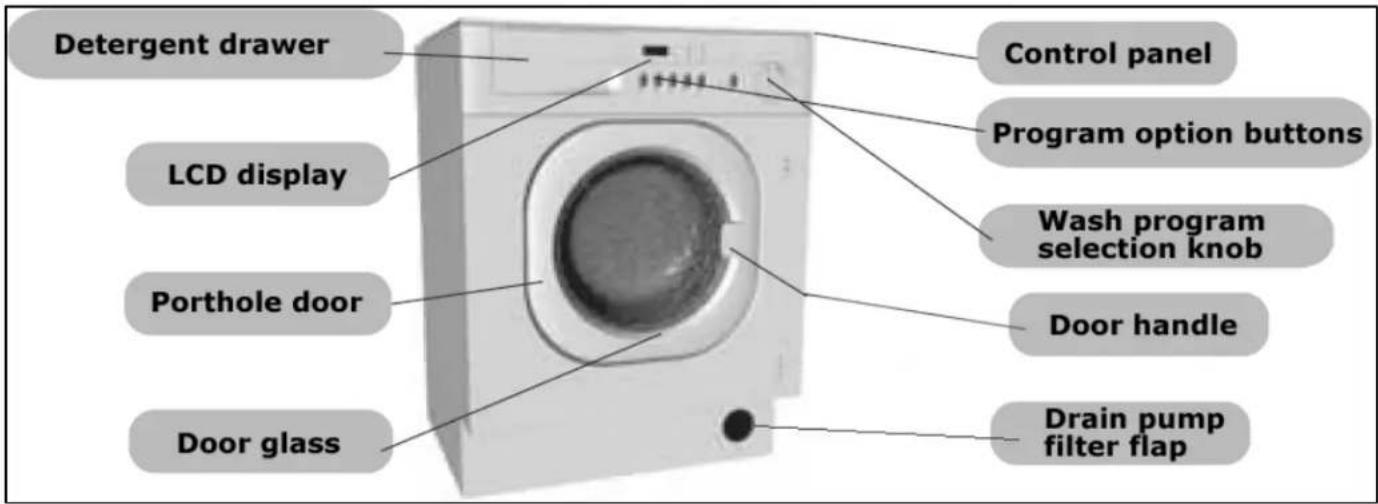
Control panel
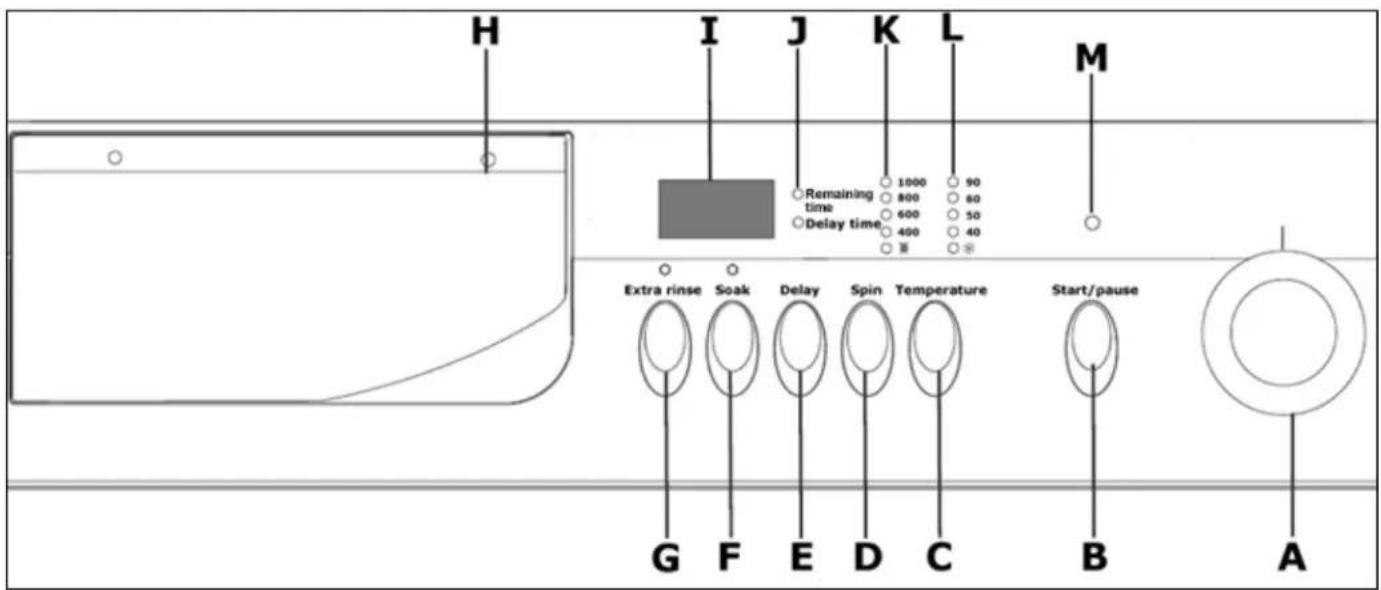
A Wash program selection knob
B Start/pause button
C Temperature selection button
D Spin selection button
E Delay start button
F Soak option button
G Extra rinse option button
H Detergent drawer
I LCD display
J Timer indicator neons
K Spin speed indicator neons
L Wash temperature indicator neons
M Start/pause indicator neon
Wash program selection knob
○ Turning the control knob anti-clockwise or clockwise allows you to select the wash program of your choice.
Start/pause button
Once a wash program has been selected, this button should be pressed to start the wash cycle. Or to pause a wash cycle that is in progress.
Temperature selection button
- Press this button to select the temperature that you require for a particular wash program.
Spin selection button
- Press this button to select the spin speed that you require for a particular wash program.
Delay start button
- Press this button to delay the start of the wash program for a maximum of 24 hours.
Soak option button
- Press this button to select the "anti-crease" wash program option.
When the wash cycle reaches the final rinse, instead of draining the water, it will suspend the clothing in water. This option allows you to spin the wash load at a later time.
Extra rinse option button
- Press this button to select the "extra rinse" wash program option.
- The appliance will then perform an additional rinse.
LCD display
- The LCD display will show how much time a wash cycle has until it completes.
- If the delay start button has been pressed, then the LCD display will show the remaining time until the wash cycle will commence.
Detergent drawer

1) Pre wash section
This compartment should have detergent placed in, if you are going to select a wash program that has a pre wash as part of it.
2) Main wash section
This compartment should have detergent placed in it (you should also put a water softening agent in this section, if you use one). The detergent will be added to the drum at the start of the main wash program.
3) Conditioner section
This compartment should be used for liquid conditioners (fabric softener, starch). They will be added to the wash load during the final rinse.
IMPORTANT: Liquid detergent should not be placed in sections 1 or 2 of the detergent drawer.
Preparing the wash cycle
Preparing your garments for washing
- Your washing should be sorted out, according to the fabric type and the wash care symbol that is printed on the garment's wash care label. (see separate section on wash care symbols).
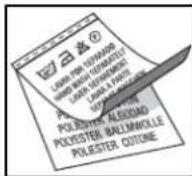
- Your washing should also be sorted out according to the degree of soiling.

- Check all pockets on a garment to make sure that they are empty.
- Remove any detachable metal items (badges, paperclips, safety pins etc).
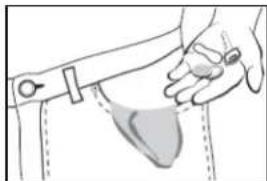
natural_image
Illustration of a hand holding a small object, possibly a device or tool, with no visible text or symbols.- Zips should be closed, duvet covers and pillow cases should be buttoned up and any loose straps should be tied up. This will help to prevent other garments from getting damaged during the wash.
- Woollens and knitted coloured fabrics should be turned inside out before being washed in the appliance.
○ Small delicate items (tights, baby socks) should be placed in either a washing net or a zipped pillow case.
- Curtains should be handled with particular care. All plastic hooks or metal strips must be removed before being washed in the appliance.
- Coloured items and whites should be washed in separate wash cycles.
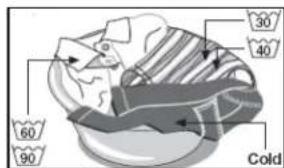
- New garments often contain an excess of dye, therefore it is advisable to wash them separately for their first wash.
o Garments should be unfolded and shook out before being placed inside the machine.
A selection of wash care symbols

- The wash care symbols should be used to help you to select the most suitable wash program. They will also help you to sort your laundry into different loads, depending on the fabric type and the highest temperature which the garment can be washed at.
- If the wash care label does not appear in the above table, then please refer to the washing machine program chart. This gives more detailed descriptions of the types of fabric that are suitable to be washed using a particular wash program.
Detergents and conditioners
The amount of detergent that you need to use in your appliance, will depend on
- The degree of soiling. Lightly soiled garments in general require less detergent.
- The size of the wash load. A smaller wash load will require a reduction in the amount of detergent.
The hardness of your tap water. The harder your water is, then the more detergent you will need to use. The detergent manufacturers normally give guidance as to how much extra detergent should be used, depending on the hardness of the water.
Liquid detergent
- If you are using liquid detergent, then it should be placed inside the dosing device supplied by the detergent manufacturer.
○ IMPORTANT: Liquid detergent should not be placed in sections 1 or 2 of the detergent drawer. - All instructions on the detergent packaging should be followed.
Water softening agents
If your tap water is hard, then it may be prudent to utilise a water softening agent. This will help to ensure that the appliance does not become clogged with hard water deposits. You may also find that it will allow you to lessen the amount of detergent that you are using.

When using any detergent or water softening agent, the recommendations of the manufacturer should be followed.
| Wash cycle information | Recommended laundry | Wash temperatures | Default program setting | Default program time | Detergent | Remarks | ||||
| 1 | 2 | 3 | ||||||||
| Cotton | 1 | Prewash | Heavily-soiled laundry | *, 40°C, 50°C, 60°C and 90°C | 1200 rpm (BWR1206)1000 rpm (BWR1005)60°C | 2 hours59 minutes | ★ | ★ | ○ | |
| 2 | Intense | Medium-soiled laundry | *, 40°C, 50°C, 60°C and 90°C | 1200 rpm (BWR1206)1000 rpm (BWR1005)60°C | 2 hours49 minutes | × | ★ | ○ | ||
| 3 | Normal | White cotton fabrics | *, 40°C, 50°C and 60°C | 1200 rpm (BWR1206)1000 rpm (BWR1005)60°C | 1 hour49 minutes | × | ★ | ○ | ||
| 4 | Quick | Fast colours and lightly soiled cotton fabrics | * and 40°C | 1200 rpm (BWR1206)1000 rpm (BWR1005)40°C | 1 hour31 minutes | × | ★ | ○ | ||
| Synthetics | 5 | Intense | Fast colours and heavily soiled laundry | *, 40°C, 50°C and 60°C | 1000 rpm60°C | 1 hour31 minutes | × | ★ | ○ | |
| 6 | Normal | Fast colours and moderately soiled laundry | *, 40°C and 50°C | 1000 rpm50°C | 1 hour16 minutes | × | ★ | ○ | ||
| 7 | Quick | Fast colours and lightly soiled synthetic fabrics | * and 40°C | 1000 rpm40°C | 1 hour1 minute | × | ★ | ○ | ||
| Delicates | 8 | Wool | Woollen fabrics | * and 40°C | 600 rpm40°C | 50 minutes | × | ★ | ○ | Max. spin speed 600 rpm |
| 9 | Cashmere | Cashmere fabrics | * and 40°C | 400 rpm40°C | 50 minutes | × | ★ | ○ | Max. spin speed 600 rpm | |
| 10 | Silk | Silk fabrics | * and 40°C | 400 rpm40°C | 50 minutes | × | ★ | ○ | Max. spin speed 600 rpm | |
| 11 | Super quick | Very lightly soiled cotton,linen and synthetic fabrics | * and 40°C | 1000 rpm40°C | 29 minutes | × | ★ | × | ||
| Spins and rinses | 12 | Rinse hold | Cotton, linen and synthetic fabrics | *, 40°C, 50°C and 60°C | 40°CNO SPIN | 45 minutes | × | ★ | × | Separate coloured and white garments |
| 13 | Rinses | * | 1000 rpm (BWR1206)800 rpm (BWR1005)* | 26 minutes | × | × | ○ | |||
| 14 | Spins | * | 1200 rpm (BWR1206)1000 rpm (BWR1005)* | 10 minutes | × | × | × | |||
| 15 | Drain | * | NO SPIN* | 3 minutes | × | × | × | |||
| 0 | Power off | Disconnect the power | ||||||||
- Indicates that softener can be added if required.
★ - Indicates that detergent MUST be added.
✗ - Indicates that detergent MUST not be added.
Wash program guidance
- The default setting column shows the wash temperature and spin speed that the appliance will automatically select for a particular wash program. It is possible to override these settings, using the spin selection button and temperature selection button.
- IMPORTANT: You should make sure that the spin speed and temperature that you select are appropriate for the garments that you are washing.
- The wash cycle times that are quoted and shown by the LCD display, are intended as a guide only. Please note that factors external to the machine, e.g. the temperature of your water supply, your water pressure etc. can affect the time it takes for the wash cycle to complete.
- If you select the soak option, the machine will not spin the clothing at the end of a wash cycle. If you pick this option, then the machine will stop with water inside of the drum.
- Important: Before opening the door of the appliance, you MUST select the drain program to clear this water.
Selecting a wash program
√ Load your laundry and put detergent in the relevant compartment(s) of the soap drawer.
√ Close the porthole door firmly.
√ Select the most appropriate wash program for the garments that you are washing, by turning the program selector knob.
- The washing machine will automatically select a spin speed and wash temperature for the wash program that you have chosen.
- The spin speed indicator neon will light to confirm the spin speed that has been chosen. The wash temperature indicator neon will light to confirm the wash temperature that has been chosen.
√ If you press the spin selection button, then you can adjust the spin speed. The spin speed indicator neon will light next to the spin speed that you have chosen.
√ If you press the temperature selection button, then you can adjust the wash temperature. The wash temperature indicator neon will light next to the wash temperature that you have chosen.
√ Select any program options that you require (soak, extra rinse, delay start) by using the relevant buttons. For more information, please refer to pages 19 - 20.
- Any program option that you select, will affect the length of time that the wash cycle will take to complete.
√ Press the Start/pause button.
○ After approximately 5 seconds, you will hear your washing machine start the wash cycle.
- Throughout the wash cycle, the LCD display will countdown the remaining time of the wash cycle that is in progress.
If there is a power failure or the plug is pulled out of the socket when a wash cycle is in progress. Once power has been restored, the wash program will continue.
At the end of a wash cycle
- The washing machine will stop automatically when it has completed a wash cycle.
- The LCD display will show the word "End".
- At the end of the drain program, the door will remain locked for 2 – 3 minutes before it is possible to open the door and take out the garments.
○ If the spin speed indicator neon next to the ⚙ symbol is lit, then at the end of the wash program, the washing machine will not have spun the wash load.
Pausing a wash program
√ Press the Start/pause button whilst a wash cycle is in progress and the appliance will go into pause status.
- In pause status, the Start/pause indicator neon will flash.
√ Press the Start/pause button again and the wash cycle will continue.
Cancelling a wash program
√ Press the Start/pause button whilst a wash program is in progress and the appliance will go into pause status.
- Turn the wash program selection knob until it is at the off position (zero).

Before opening the porthole door, you MUST drain the appliance; otherwise there may still be water in the drum when you open the door.
√ Turn the wash program selection knob to the drain program (number 15) then press the Start/pause button.
- The appliance will then drain the water that is left in the drum.
- The washing machine will stop automatically when it has completed a wash cycle.
- The LCD display will show the word "End".
- At the end of the drain program, the door will remain locked for 2 – 3 minutes before it is possible to open the door and take out the garments.
Spin selection button
- If you press the spin selection button, then the spin speed will reduce downwards from the one selected automatically for a particular wash program.
- The spin speed indicator neon will light next to the spin speed that has been selected.
- If the spin speed indicator neon next to the ⚙ symbol is lit, then at the end of the wash program, the washing machine will not spin the wash load.
Temperature selection button
- If you press the temperature selection button, then the wash temperature will reduce downwards from the one selected automatically for a particular wash program.
- The wash temperature indicator neon will light next to the wash temperature that has been selected.
- If the wash temperature indicator neon next to the ⚙ symbol is lit, then the wash cycle will be performed in cold water and not heated.
Soak option button
- If you press the soak option button, the indicator neon above it will light.
- When the wash cycle reaches the final rinse, instead of draining the water away, it will suspend the wash load in water.
- When you want to spin the wash load, press the soak option button again. The indicator neon will go out and the spin stage of the wash cycle will take place.
○ IMPORTANT: This option can be utilised on synthetic and delicate wash programs (programs 5 – 11).
Extra rinse option button
- If you press the extra rinse option button, the indicator neon above it will light.
- If you select this option, an additional rinse will be performed for the selected wash program.
- IMPORTANT: This option can be utilised on cotton, synthetic, wool, cashmere and silk wash programs (programs 1 – 10).
Delay start button
- If you press the delay start button, then you can program the wash cycle to commence at a period of time in the future.
- You should select your wash program as normal, but instead of pressing the Start/pause button to get the wash cycle to commence. You should press the delay start button.
- Each time the delay start button is pressed, the length of time until the wash cycle commences will increase by 30 minutes. The minimum delay start is 2 hours 30 minutes.
- It is possible to delay the start of the wash cycle by a maximum of 24 hours.
- Press the Start/pause button and the countdown time will commence. The delay time indicator neon will light and the LCD display will countdown the remaining time until the wash cycle commences.
Once the delay start time has been reached, the wash program that you have previously selected will start. The remaining time indicator neon will light and the LCD display will countdown the remaining time of the wash cycle that is in progress.
Child lock
- Your appliance has a child lock option, if this is set, it will mean that nobody can affect the operation of the wash program once it has started.
- The child lock should be activated, once a wash program and any program options that you wish to use have been selected.
- Press the Start/pause button to commence the wash cycle. Then press the soak option button and the delay start button simultaneously.
- The word "LOCt" will appear on the LCD display, alternating with the remaining program time.
- When the child lock is engaged, all other buttons on the control panel are disabled.
- To switch the child lock off, you should again press the soak option button and the delay start button simultaneously.
Maintenance and cleaning
In daily use
√ Once a wash cycle has completed, you should pull out the detergent drawer slightly, so it can dry out.
√ Leave the porthole door ajar for a short while after a wash cycle has completed. This should help to prevent stagnant smells and to protect the door seal.
√ Close the water tap.
√ We suggest that you disconnect the appliance from your mains supply, when it is not in use.
Control panel and washing machine cabinet.
IMPORTANT: Do not use any abrasive cleaner or household polish on either the control panel or operating parts.
√ Wipe over the control panel and the external surface of the machine using a brand new damp cloth with warm water.
√ If you ever spill any liquid detergent or conditioner from the detergent drawer onto the washing machine cabinet, then these should be cleaned up immediately as they could be corrosive.
Detergent drawer
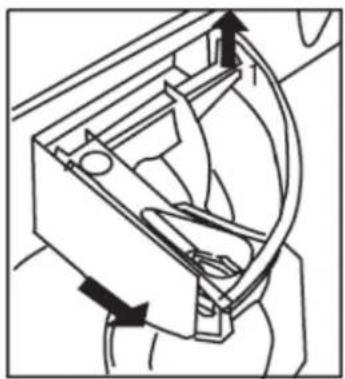
Occasionally the detergent drawer should be cleaned.
natural_image
Mechanical diagram showing a mechanical component with arrows indicating direction (no text or symbols)○ Swing open the detergent drawer and then remove the drawer by pulling it forward.

natural_image
Line drawing of a mechanical device with a handle and internal compartments (no text or symbols)- Use warm water and a brush to thoroughly clean the three compartments of the detergent drawer.
- Clean the area that the detergent drawer slides into with a brush.
○ Replace the detergent drawer by placing it back into the slot. Then slide the drawer fully back into position.
The washing machine drum
The drum of your washing machine is constructed from stainless steel. However if there are objects that can rust placed inside the drum, then it is possible for the drum to become stained.
IMPORTANT: Do not use a descaling agent, iron/steel wool or scouring agents to clean the drum of your appliance.
√ Remove any rust stains on the drum with an appropriate stainless steel cleaning agent.
Door
√ You should regularly check to see if any deposits have formed, or there are any foreign bodies in the rubber door gasket. This sits inside the opening of the porthole door.
Error code failure system
If your appliance senses that it is not operating correctly, then an error code may appear in the LCD display.
Some of the error codes can possibly be remedied by the customer and the steps outlined below should be followed.
BEFORE COMPLETING ANY MAINTAINEANCE ON THE APPLIANCE, IT SHOULD BE DISCONNECTED FROM YOUR MAINS POWER SUPPLY.
Err1
- Door is not shut properly
√ You should regularly check to see if any deposits have formed, or there are any foreign bodies in the rubber door gasket. This sits inside the opening of the porthole door.
Err2
- Drainage error, water has not emptied within 4 minutes.
√ Clean the drain pump filter and check that the outlet hose is not blocked or kinked.
Err3
o Temperature sensor short circuit or open circuit.
√ Contact the Baumatic Customer Care Department.
Err4
○ Machine does not fill to the specified level within 8 minutes.
√ Check that the inlet hose is not kinked or blocked and that the water tap the machine is connected to is fully open.
Err5
○ Machine has filled to an abnormal level.
√ Contact the Baumatic Customer Care Department.
Err7
- Motor error
√ Contact the Baumatic Customer Care Department.
natural_image
Illustration of a classic office telephone with keypad and keypad (no text or symbols)If a fault code reappears after following the advice given on the preceding page, you should turn the wash program selection knob to the off position. Disconnect the appliance from your mains supply. Then arrange for an engineer to attend the appliance. You should contact the Baumatic Customer Care Department on (0118) 933 6911.
DO NOT ATTEMPT TO REPAIR THE APPLIANCE YOURSELF.
Please note that if an engineer is asked to attend whilst the product is under guarantee and finds that the problem is not the result of an appliance fault, then you may be liable for the cost of the call out charge.
The appliance must be accessible for the engineer to perform any necessary repair. If your appliance is installed in such a way that an engineer is concerned that damage will be caused to the appliance or your kitchen, then he will not complete a repair.
This includes situations where appliances have been tiled in, sealed in with sealant, have wooden obstructions placed in front of the appliance, like plinths. Or any installation other than the one specified by Baumatic Ltd. has been completed.
Please refer to the conditions of guarantee that appear on the warranty card that you receive with the appliance.
IMPORTANT: Baumatic Ltd. operates a policy of continuous improvement and reserves the right to adjust and modify its products without prior notification.
General troubleshooting
Water under the washing machine
- Tighten the drain pump filter.
- Check the drain and inlet hose and make sure that they are fully tightened.
Washing machine vibrates during the spin cycle
- Check that the transit bolts have been removed (see installation instructions).
○ Make sure that the washing machine is installed on a flat and level floor. - Ensure that all four feet are resting firmly on the floor, by pressing down on each corner and making sure that the appliance is stable.
- If it is unstable then follow the "Positioning and levelling the appliance" section.
Poor spin results
- Clean the drain pump (see "Cleaning the drain pump filter" section).
Water in the detergent dispenser
Although there will be some water residue left in the detergent drawer after a wash cycle has completed. If the drawer is full of water then you may need to clean the detergent drawer.
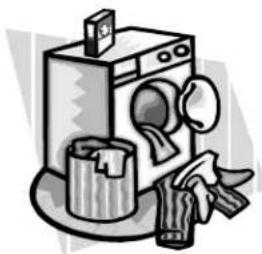
Poor wash results
natural_image
Illustration of a washing machine with a bucket and cleaning tool (no text or symbols)
My garments are looking grey and there are limescale deposits present in the drum of my washing machine.
- There is not enough detergent being added.
- The incorrect detergent is being used.
- Stains are not being pre-treated.
- The correct wash program or wash temperature was not selected.

I have followed the advice given above, but my garments are still coming out with grey stains on them.
- The garments are soiled with oils, ointments or grease and were washed without enough detergent.
- The wash temperature selected was too low.
Fabric conditioner has come into contact with the garments. If this happens try to wash out these stains as quickly as you can and try to avoid getting conditioner on the garments in future.

the final rinse, I can still see foam.
- Modern detergents can result in there still being foam in the final rinse, this does not mean that the washing is not being rinsed properly.

There is white residue on my garments when I remove them from the appliance.
- Modern detergents can contain insoluble contents, and white residue after a wash cycle is not necessarily a sign of the garments not being rinsed properly.
- You should shake out the garment or brush it off. In future possibly turn the garment inside out before it is washed. You may wish to move from a powder detergent and switch to a liquid detergent instead.
Cleaning the drain pump filter

IMPORTANT: Switch off your washing machine and disconnect the plug from your mains supply.
You should clean out the filter approximately every twenty washes. If the drain pump filter is not cleaned regularly, then your appliance may find it difficult to pump out water efficiently.
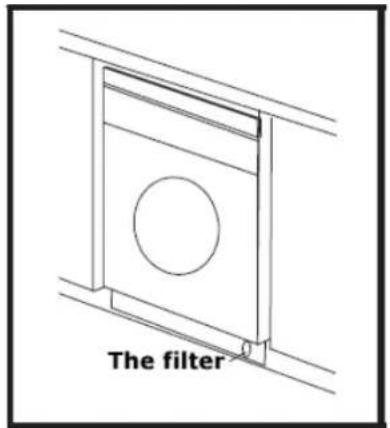
- Locate the drain pump filter in the bottom right hand corner of the appliance.
natural_image
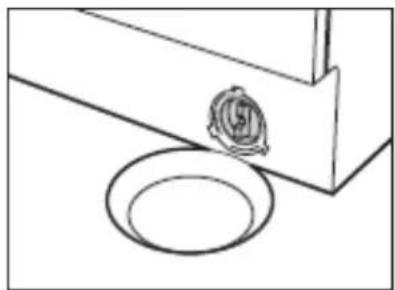
Simple line drawing of a mechanical component with a circular base and a rose on top (no text or symbols)- Place a container under the drain pump filter, to collect any excess water that may come out of the drain pump when it is removed.
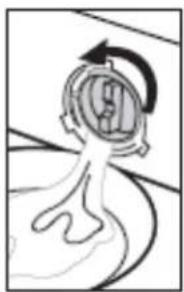
natural_image
Simple line drawing of a mechanical component with an arrow indicating rotation (no text or symbols)Turn the filter a quarter turn anti clockwise, water will start to come out of the drain pump. Continue to turn the filter anti clockwise until you reach a half turn, more water will come out of the drain pump.
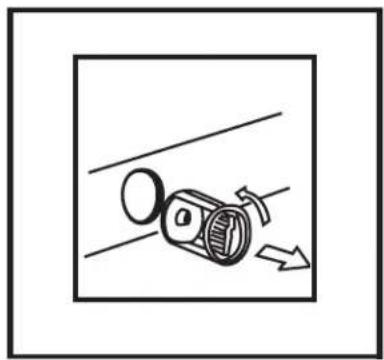
natural_image
Diagram of a mechanical device with a rotating component and directional arrow, no text or symbols present- When all the water has drained out of the washing machine, turn the filter several times anti clockwise, until it can be removed completely.
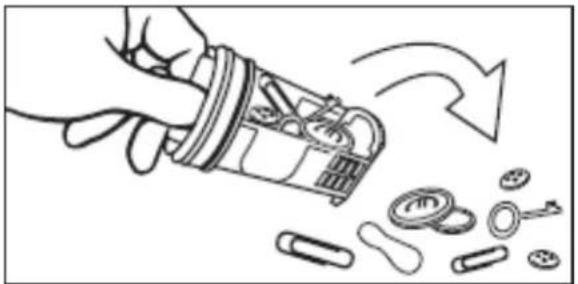
natural_image
Illustration of a hand holding a battery with an arrow indicating rotation or process (no text or symbols)- Remove the filter and rinse out the filter under the tap.
- Remove any debris from the filter.
- Remove any debris that is in the area of the appliance that you removed the drain pump filter from.
- Screw the filter clockwise back into position, making sure that it is fully tightened. You should keep turning until you cannot turn it any further.
○ IMPORTANT: Do not perform this operation if the appliance has stuck on a cycle, until the water inside of the machine has cooled sufficiently. Otherwise the water that comes out of the drain pump filter may still be hot.
Installation

IMPORTANT: THIS INSTALLATION MUST BE COMPLETED BY A SUITABLY QUALIFIED PERSON. BAUMATIC ONLY SANCTION THE INSTALLATION GIVEN IN THIS INSTRUCTION MANUAL. YOU SHOULD KEEP THE TRANSIT PACKAGING, IN CASE YOU NEED TO TRANSPORT THE MACHINE IN THE FUTURE.
Unpacking the machine and removing the transit bolts
IMPORTANT: The transit bolts MUST be removed before your washing machine is used for the first time.
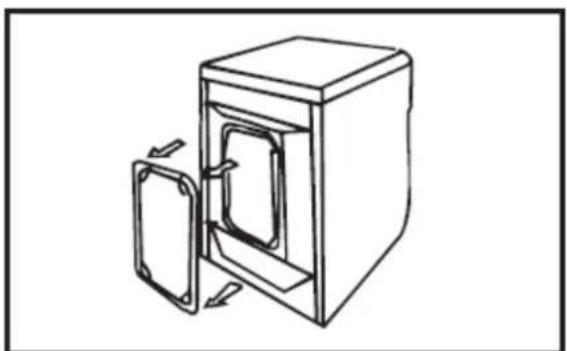
natural_image
Line drawing of a door opening into a cabinet (no text or symbols)- Remove the back plate from the rear of the appliance.
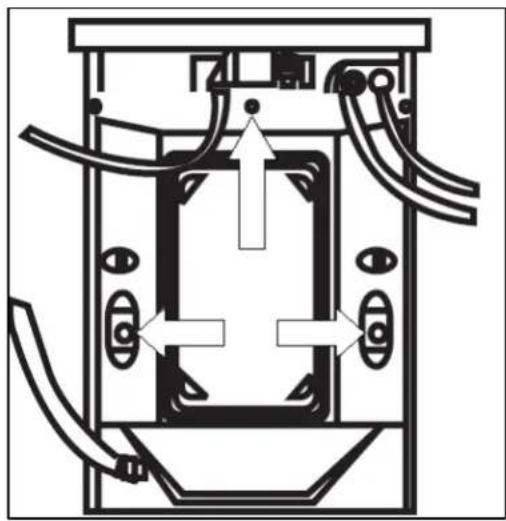
natural_image
Technical diagram of a mechanical or electrical component with no visible text, numbers, or symbols- The location of the three transit bolts are shown in the diagram opposite.
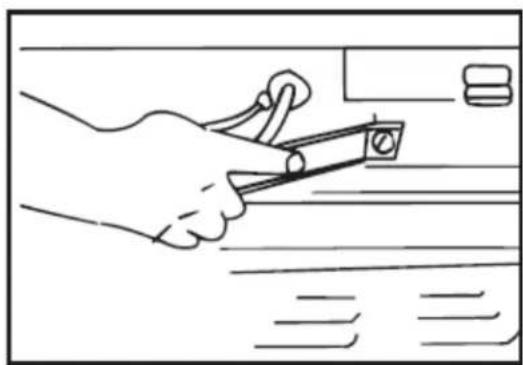
natural_image
Line drawing of a hand using scissors to cut a piece of paper (no text or symbols present)- You should use a spanner to loosen and remove the top transit bolt first.
- There is also a transit bar across the top of the appliance which should be removed.
- Use a spanner to loosen and remove the two remaining transit bolts.

natural_image
Line drawing of a hand holding a lock or latch (no text or symbols)- You should also remove the rubber grommets from the holes; these are exposed once the transit bolts are removed.
○ Replace the back plate on the rear of the appliance.
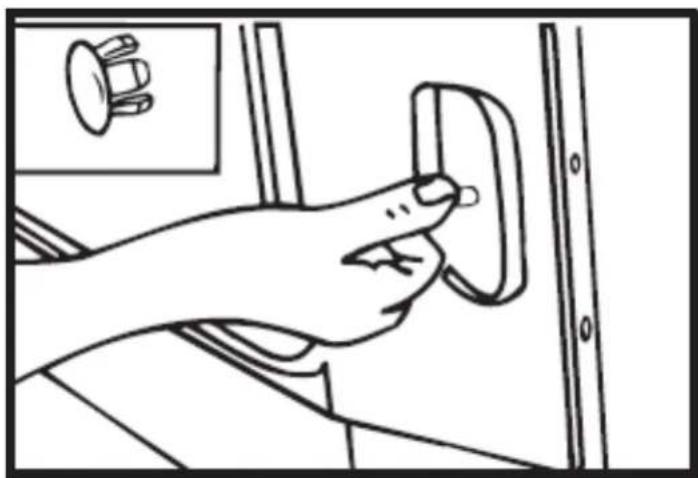
natural_image
Line drawing of a hand pressing a button on a door panel (no text or symbols)○ Insert the plastic caps that are supplied, into the holes that you have removed the transit bolts from.
Positioning and levelling the appliance
√ Place the washing machine on a solid and level floor surface.
√ DO NOT PLACE THE WASHING MACHINE ON A CARPET.

natural_image
Line drawing of a hand holding a spiral-shaped object, possibly a tool or device (no text or symbols present)√ Loosen the adjustable feet that are positioned on the base of the appliance.
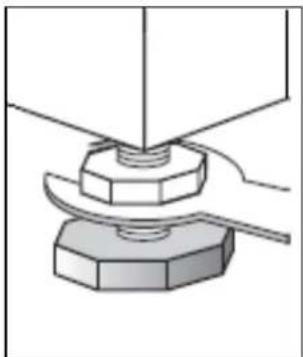
natural_image
Mechanical assembly diagram showing a bolt pressing into a hexagonal base (no text or symbols)√ Slacken off the lock nut on each of the washing machine feet using a spanner.
natural_image
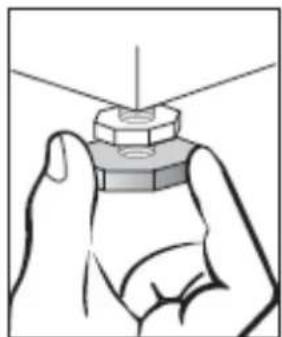
Illustration of a hand holding a mechanical component with a pointed tip (no text or symbols)√ Adjust the feet to level off the washing machine.
natural_image
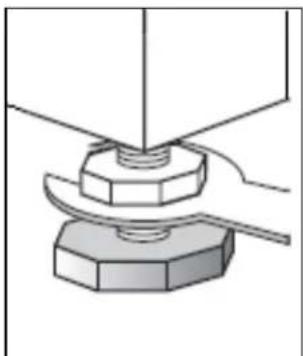
Mechanical assembly diagram showing a bolt pressing into a hexagonal base (no text or symbols)√ Once levelled correctly, you should tighten the lock nut back up on each of the washing machine feet using a spanner.
IMPORTANT: When the washing machine is positioned in the location where it will be used. Make sure that all four feet are resting firmly on the floor, by pressing down on each corner and checking that the appliance stands still.
If you are fitting the optional décor strip (see below). You should take into account the height that this will add to the appliance, when adjusting the levelling feet.
natural_image
Technical diagram showing two layered structures with hatched fill and alignment markers (no text or symbols)- Your appliance is supplied with an optional décor strip that can be fitted to the top of the appliance.
√ You should screw the décor strip to the front edge of the appliance, using the screws provided.
Connecting to the mains water supply

natural_image
Illustration of a coiled flexible hose with two connectors (no text or symbols)- Your appliance is a hot and cold fill machine. Ideally you should connect an inlet hose to the hot water inlet valve and the cold water inlet valve.
- If you only have a cold water supply available, you should connect the two hoses to the cold water outlet, by using a "Y" connection piece.
○ Alternatively, there is a blanking cap supplied with the appliance, you can securely tighten this over the hot water valve. The washing machine will adjust to allow the correct amount of water through the cold inlet hose.
natural_image
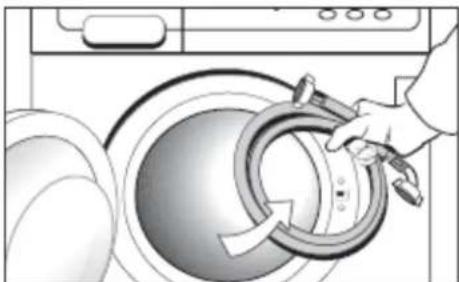
Illustration of a hand holding a washing machine with a circular component, no text or symbols present- The water inlet hoses will be inside the drum of your washing machine, when you receive the appliance.
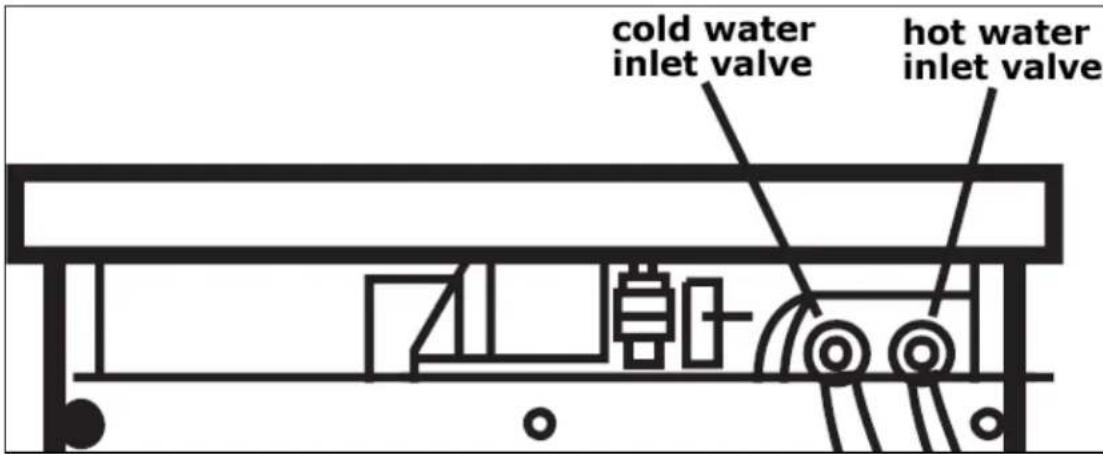
When you are facing the rear of the appliance, you will see two water inlet valves next to each other. The cold water inlet valve is on the left hand side and the hot water inlet valve is on the right hand side.
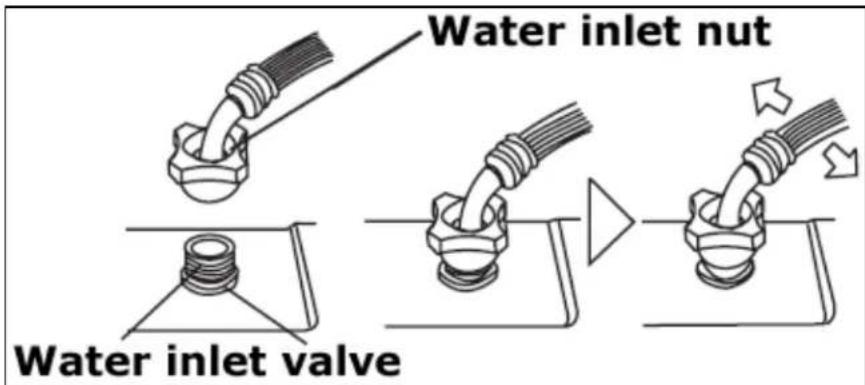
√ Place the water inlet hose on the water inlet valve at the rear of the washing machine.
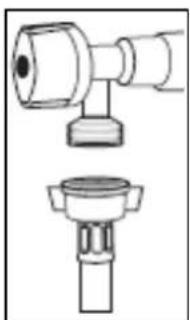
√ Connect and fully tighten the inlet hoses to the threaded inlet valve that is located at the rear of the washing machine. On the end of the water inlet hoses there are connectors that have a nut on it, you should use these to secure the hoses.
natural_image
Technical line drawing of a mechanical component with two views (top and side), no text or symbols present.√ Connect the other end of the inlet hoses to your mains water supply
○ IMPORTANT: If you are using both inlet hoses, then you must ensure that you connect the inlet hoses to the correct taps. The cold water inlet valve must be connected to your cold water tap. The hot water inlet valve must be connected to your hot water tap.
√ IMPORTANT: There should be a filter sitting inside the end of the inlet hoses that connects to your mains water supply. The inlet hoses may leak if this filter is missing. This filter is supplied with the appliance, you should contact Baumatic to obtain one, if it is missing.
√ Tighten the inlet hoses to your mains supply fully, but do not over tighten as this may distort the filter that sits in the end of the inlet hoses.
√ Test for any leaks.
Water outlet

√ Secure the drain hose, so that it cannot move whilst the washing machine is in use.
√ Place the end of the drain hose on your drain pipe. Push it a short way down into your drain pipe.
√ IMPORTANT: Do not insert the drain hose too deeply into the water pipe, as this may cause siphoning.
√ NEVER EXTEND THE DRAINAGE HOSE FROM ITS ORIGINAL LENGTH.
Fitting the furniture door
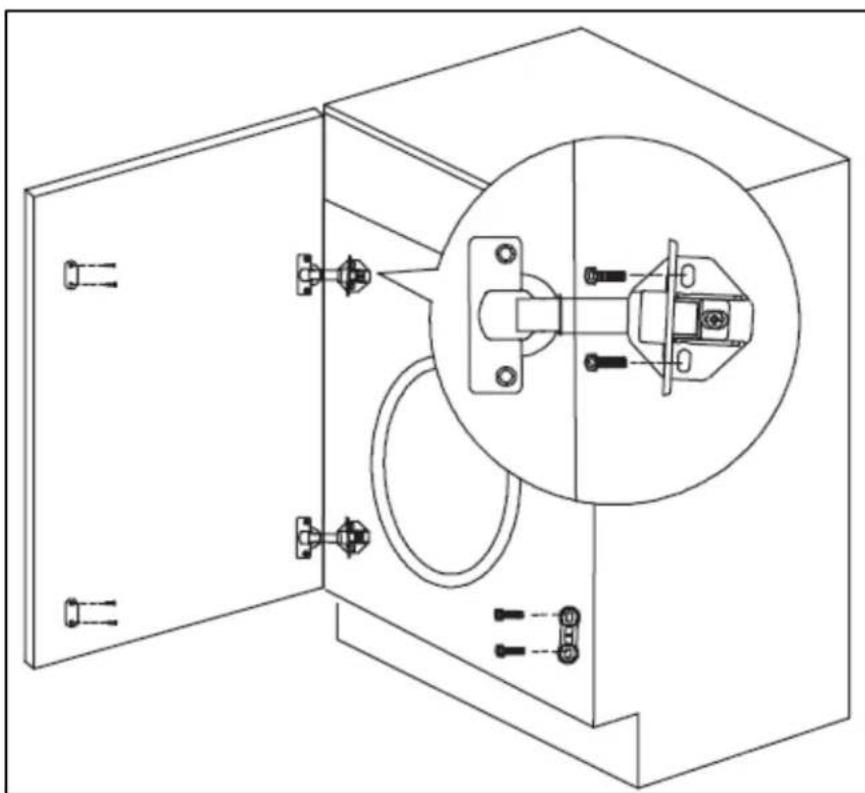
- Please refer to the building in template for instructions on how to fit your integrated appliance and connect the furniture door to the product.
natural_image
Technical line drawing of a cabinet with an inset close-up showing internal components (no text or symbols)o Mount the furniture door to the cabinet of the washing machine, using the hinges supplied.
- Fix the magnet assembly to the front of the washing machine and the furniture door.
Power supply
natural_image
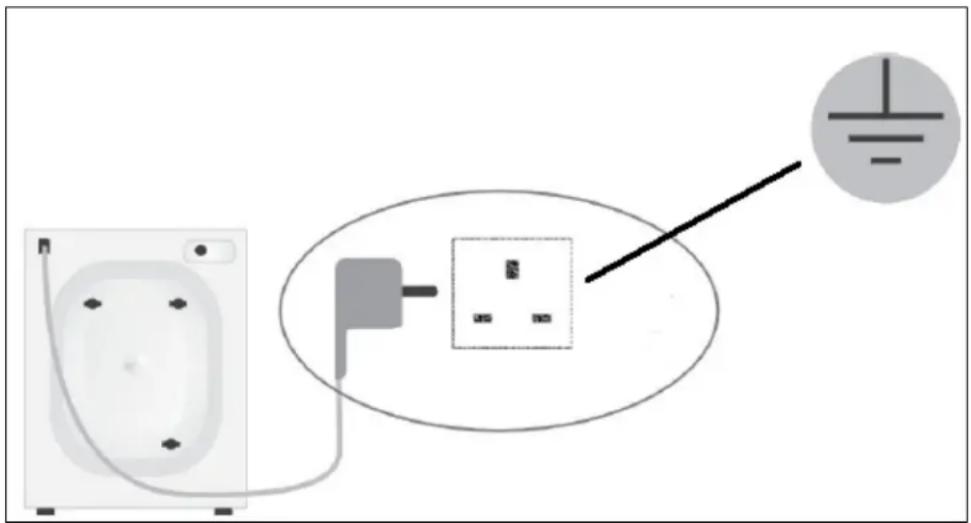
Electrical wiring diagram showing connections between a socket, power plug, and a terminal block (no text or symbols)√ IMPORTANT: As your appliance is a built in product, the electrical socket must still be accessible once the appliance is installed.
√ Consult the rating plate, located on the back of the appliance BEFORE making the electrical connections. Ensure that the voltage reaching the plug, is the same as that on the rating plate.
√ DO NOT REMOVE THE RATING PLATE AS THE INFORMATION ON IT IS IMPORTANT.
√ The moulded plug that is supplied with the appliance must be placed into an earthed and insulated socket.
√ Broken or damaged power leads must only be replaced by a suitably qualified person. A power lead of a similar type must be used in replacement.
√ Power lead type - H 0 V V - F 3G 1,5.
√ IMPORTANT: We do not recommend that this appliance is connected to an extension lead.
Before first use maintenance wash
- When your washing machine has been correctly installed, we recommend that you perform a maintenance wash cycle.
- This will check that all aspects of the installation are correct; it will also remove any deposits that may have been left on the drum by the manufacturing process.
- Select the intense 90°C wash program.
○ A small quantity of detergent should be used during this maintenance wash.
Certificate of compliance

Compliance with the following Directives:73/23/EEC, 89/336/EEC, 92/75/EEC The Manufacturer declares that its product complies with the general safety, hygienic and environmental protection requirements pursuant to the European Community Directives and that the specific documents applicable to the said product, especially the European Community Declaration of Conformity issued by the manufacturer may be viewed in offices of the competent authorities and may be obtained through the Manufacturer.
Baumatic®
United Kingdom
Baumatic Ltd., Baumatic Buildings, 6 Bennet Road, Reading, Berkshire RG2 0QX United Kingdom
Sales Telephone
(0118) 933 6900
Sales Fax
(0118) 931 0035
Service Telephone
(0118) 933 6911
Service Fax
(0118) 986 9124
Spares Telephone
(01235) 437244
Technical Advice Telephone
(0118) 933 6933
E-mail:
sales@baumatic.co.uk
technical@baumatic.co.uk
Website:
www.baumatic.co.uk
Republic of Ireland
01-6266798
Czech Republic
Baumatic CR spol s.r.o.
Amperova 495
46215, Librec
Czech Republic
+420 800 185 263
www.baumatic.cz
Slovak Republic
Baumatic Slovakia, s.r.o.
Skultetyho 1
831 04 Bratislava 3
Slovakia
+421 255 640 618
Germany
Baumatic GmbH
Janderstrasse 9
Mannheim, 68199
Germany
+4962 112 9190
www.baumatic.de
Italy
Baumatic Italia S.R.L.
Via Caltana 129
Campodarsego (Padova), 35011
Italy
+3904 9920 2297
www.baumatic.it
Holland
Baumatic Benelux B.V.

- BWR1005/BWR1206 Fully integrated washing machine
- USER MANUAL FOR YOUR BAUMATIC
- Contents
- Environmental note
- Important safety information
- General Safety
- Installation
- During Use
- Child Safety
- Specifications
- Product specifications
- Electrical details
- Description of the appliance
- Control panel
- Wash program selection knob
- Start/pause button
- Temperature selection button
- Spin selection button
- Delay start button
- Soak option button
- Extra rinse option button
- LCD display
- Detergent drawer
- 1) Pre wash section
- 2) Main wash section
- 3) Conditioner section
- Preparing the wash cycle
- Preparing your garments for washing
- A selection of wash care symbols
- Detergents and conditioners
- Liquid detergent
- Water softening agents
- Wash program guidance
- Selecting a wash program
- If there is a power failure or the plug is pulled out of the socket when a wash cycle is in progress. Once power has been restored, the wash program will continue.
- At the end of a wash cycle
- Pausing a wash program
- Cancelling a wash program
- Before opening the porthole door, you MUST drain the appliance; otherwise there may still be water in the drum when you open the door.
- Child lock
- Maintenance and cleaning
- In daily use
- Control panel and washing machine cabinet.
- The washing machine drum
- Door
- Error code failure system
- BEFORE COMPLETING ANY MAINTAINEANCE ON THE APPLIANCE, IT SHOULD BE DISCONNECTED FROM YOUR MAINS POWER SUPPLY.
- Err1
- Err2
- Err3
- Err4
- Err5
- Err7
- DO NOT ATTEMPT TO REPAIR THE APPLIANCE YOURSELF.
- General troubleshooting
- Water under the washing machine
- Washing machine vibrates during the spin cycle
- Poor spin results
- Water in the detergent dispenser
- Poor wash results
- My garments are looking grey and there are limescale deposits present in the drum of my washing machine.
- I have followed the advice given above, but my garments are still coming out with grey stains on them.
- the final rinse, I can still see foam.
- There is white residue on my garments when I remove them from the appliance.
- Cleaning the drain pump filter
- Unpacking the machine and removing the transit bolts
- Positioning and levelling the appliance
- Connecting to the mains water supply
- Water outlet
- Fitting the furniture door
- Power supply
- Before first use maintenance wash
- Certificate of compliance
- Baumatic®
- United Kingdom
- Sales Telephone
- Sales Fax
- Service Telephone
- Service Fax
- Spares Telephone
- Technical Advice Telephone
- E-mail:
- Website:
- Republic of Ireland
- Czech Republic
- Slovak Republic
- Germany
- Italy
- Holland
Brand : BAUMATIC
Model : BWR1206
Category : Washing machine