DX-28.88KC - Wine cellar Dunavox - Free user manual and instructions
Find the device manual for free DX-28.88KC Dunavox in PDF.


User questions about DX-28.88KC Dunavox
0 question about this device. Answer the ones you know or ask your own.
Ask a new question about this device
Download the instructions for your Wine cellar in PDF format for free! Find your manual DX-28.88KC - Dunavox and take your electronic device back in hand. On this page are published all the documents necessary for the use of your device. DX-28.88KC by Dunavox.
USER MANUAL DX-28.88KC Dunavox
COMPRESSOR WINE COOLER
Model No.: DX-16.46K / DX-20.62K / DX-28.88K
natural_image
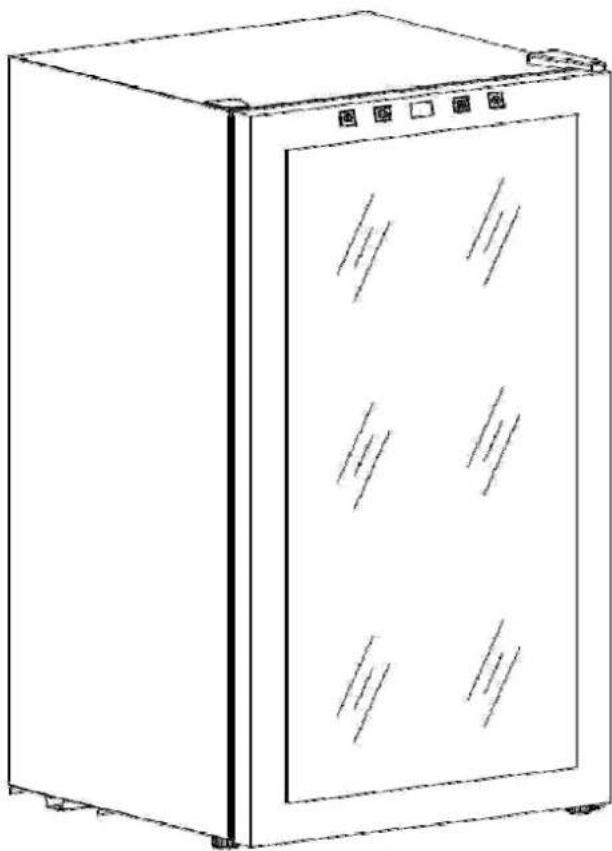
Line drawing of a stainless steel refrigerator with six compartments (no text or symbols)Operation Manual
Index
I. General Safety Precautions....1
II. Technical Data....2
III. Illustrated Structure....3
IV. Electric Principle Diagram.... 3
V. Operation 4
VI. Particular Precautions.... 5
VII. Maintenance....5
VIII. Troubleshooting.... 6
I. GENERAL SAFETY PRECAUTIONS
- Do not install the winecooler 48 hours after shipping (moving)!
- Do not place the appliance on floor heated area!
● After removing the chiller from the package, make sure it is in good condition. In case of doubt, do not use it and contact an authorized service center.
● Plastic bags, nails, etc. should be kept out of reach of children. Read the operation manual carefully and check that the rating data on the rating nameplate corresponds to your power supply.
● This chiller should only be used for wine storage. The manufacturer will not be held responsible for any damage due to improper use or repairs made by unqualified personnel.
- Before cleaning the chiller, make sure it is unplugged. Never clean the unit with an acid preparation, medical solution, dilution, gasoline, oil or any other kind of chemical substance that could damage the chiller.
● Repair should only be made by authorized service centers.
Caution
-
To reduce the risk of fire, replace only with same type fuse.
-
Free standing installation only
-
Do not use extension cords.
-
Danger: Risk of child entrapment. Before throwing away your old chiller, you must noted:
a) Take off the door;
b) Leave the shelves in place, so that children may not easily climb inside.
II. TECHNICAL DATA
| Model DX-16.46K DX-20.62K DX-28.88K | ||||
| Volume (liter) 46L 62L 88L | ||||
| Material | Case Iron Iron Iron | |||
| Door Glass Glass Glass | ||||
| Unit Dimension(W×D×H)(mm) | 430x480x510 430x480x640 430x480x825 | |||
| Packaging Dimension(W×D×H)(mm) | 460x515x530 460x540x660 460x515x845 | |||
| Net Weight (Kg) 18 | 22 | 26 | ||
| Gross Weight (Kg) | 19 | 24 | 28 | |
| Power Consumption(KW·h/24h) | 0.52 | 0.858 | 0.858 | |
| Refrigerant | R600a R600a R600a | |||
| Temperature Range | 4-18°C | 4-18°C | 4-18°C | |
| Rated Voltage | AC 220V | AC 220V | AC 220V | |
| Rated Frequency | 50Hz | 50Hz | 50Hz | |
| Input power | 85W | 85W | 85W | |
III. ILLUSTRATED STRUCTURE

text_image
Technical diagram of a multi-level refrigerator with numbered labels pointing to different internal compartments.- Control Panel
- Light
-
Display Shelf
-
Hinge Cover
-
Chrome Shelf
- Foot
IV. ELECTRIC PRINCIPLE DIAGRAM
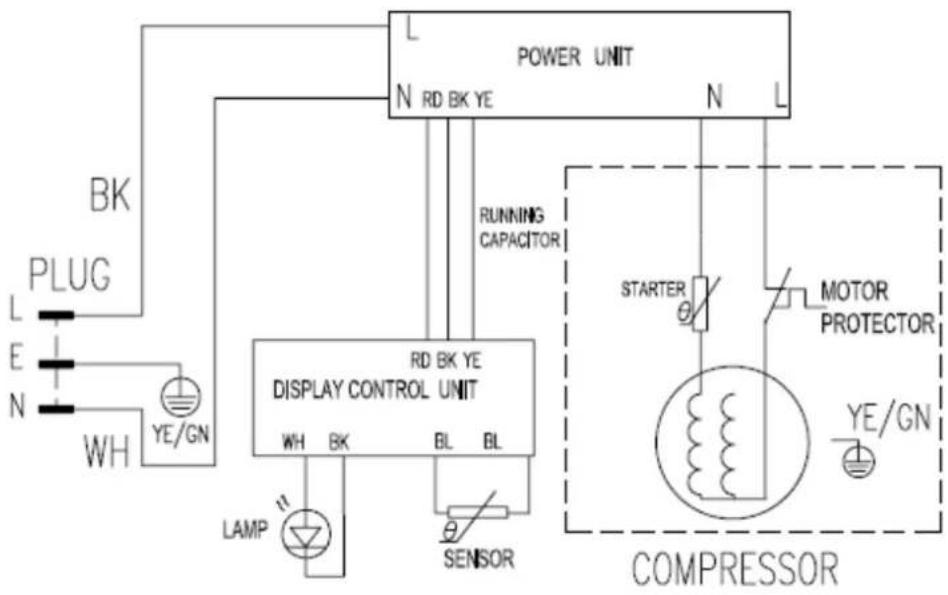
flowchart
graph TD
    A["PLUG"] -->|L| B["BK"]
    B --> C["POWER UNIT"]
    C --> D["N RD BK YE"]
    D --> E["RUNNING CAPACITOR"]
    E --> F["DISPLAY CONTROL UNIT"]
    F --> G["LAMP"]
    G --> H["SENSOR"]
    H --> I["MOTOR PROTECTOR"]
    I --> J["STARTER"]
    J --> K["COMPRESSOR"]
    style A fill:#f9f,stroke:#333
    style C fill:#ccf,stroke:#333
    style F fill:#cfc,stroke:#333
    style I fill:#fcc,stroke:#333
- This cooler has touch control panel which locates on the upper side of glass door. The image as following:




- You could touch 📐 to turn ON / OFF the interior light, and to transform the 📞 display between Fahrenheit and Celsius.
- There are a pair of ▲ and ▼ touch panel. You could touch ▲ to increase the temperature and touch ▼ to reduce it.
Noted: Control Panel Lock
- Your wine chiller is equipped with an AUTOMATIC control panel lock function. This function will prevent any unwanted changes to your temperature or power settings.
- The lock function will activate automatically 12 seconds after the last time a button is pushed on the control panel.
- To unlock the control panel lock, press and hold the down arrow button and up arrow button for 3 seconds, then the control panel will beep and blink that indicates the control panel is active and the settings can be changed.
Noted: The recommended temperature settings are as following
| Sparkling Wine 4°C – 8°C 39°F - 47°F | |
| Rose Wine 10°C – 11°C 50°F - 52°F | |
| Dry/White Wine | 9°C – 14°C |
| Red Wine | 15°C – 18°C |
| Conservation | 10°C – 14°C |
VI. PARTICULAR PRECAUTIONS
- In order to function at its highest potential, this wine cooler needs to be placed on flat floor, with 2cm spaces at each side and 10cm space at the backside.
● Use the adjustable iron case to place the cellar fully horizontal.
● Avoid direct sunshine and high temperature. - Do not place heavy articles on the top of the cellar.
VII. MAINTENANCE
● Shut off power supply before cleaning cabinet.
● Take out wine and shelves, and then clean the cabinet with soda water first and with clean water last.
- Do not use soap or detergent for the cabinet.
● Clean the cellar regularly.
VIII. TROUBLESHOOTING
| Symptoms Possible cause Solutions | ||
| No cooling | Plug not put inLow voltageFuse broken | Put in the plugEnsure normal voltageChange fuse |
| Temperature inside not cold enough | The chiller is placed too close to a heat sourceBad ventilationFans don’t work;The door is not closed tightly or opened too frequently or for too long time | Keep the chiller away from sunshine or other heat sourcePlace the chiller in the area with good ventilation and keep things away from the fansCheck whether the plug is connected or change the fanClose the door tightly and don’t open the door too frequently or for too long time |
| Peculiar smell inside chiller | Check whether there is anything sour inside | Wrap the source or take it out |
| Inside light flashes | Set temperature higher than inner temperature | Adjust the adjustor |
| Frost on the cold sink | Too much humidity or too low temperature inside the case | Output the plug, stop the power, and defrost by hand, connect power again when the ice thaws |