MC-2102 - Receiver MCINTOSH - Free user manual and instructions
Find the device manual for free MC-2102 MCINTOSH in PDF.


User questions about MC-2102 MCINTOSH
0 question about this device. Answer the ones you know or ask your own.
Ask a new question about this device
Download the instructions for your Receiver in PDF format for free! Find your manual MC-2102 - MCINTOSH and take your electronic device back in hand. On this page are published all the documents necessary for the use of your device. MC-2102 by MCINTOSH.
USER MANUAL MC-2102 MCINTOSH
MC2102 Power Amplifier

text_image
McIntosh MC2108 POWER AMPLIFIER METER Watts Limits Power HOLD NATIE DCI 205 1 1 10 100 Power Output NATIE DCI 21 1 1 10 100 Power Output POWER REMOTE OFF ONMC2102
IMPORTANT SAFETY INSTRUCTIONS!
PLEASE READ THEM BEFORE OPERATING THIS EQUIPMENT.
The lightning flash with arrowhead, within an equilateral triangle, is intended to alert the user to the presence of uninsulated “dangerous voltage” within the product’s enclosure that may be of sufficient magnitude to constitute a risk of electric shock to persons.

text_image
CAUTION RISK OF ELECTRIC SHOCK DO NOT OPENAVIS RISQUE DE CHOC ELECTRIQUE - NE PAS OUVRIR.
The exclamation point within an equilateral triangle is intended to alert the user to the presence of important operating and maintenance (servicing) instructions in the literature accompanying the appliance.
WARNING - TO REDUCE RISK OF FIRE OR ELECTRICAL SHOCK, DO NOT EXPOSE THIS EQUIPMENT TO RAIN OR MOISTURE.
NO USER-SERVICEABLE PARTS INSIDE. REFER SERVICING TO QUALIFIED PERSONNEL.
To prevent the risk of electric shock, do not remove cover or back. No user serviceable parts inside.
General:
- Read these instructions.
- Keep these instructions.
- Heed all warnings.
- Follow all instructions.
-
Warning: To reduce risk of fire or electrical shock, do not expose this equipment to rain or moisture. This unit is capable of producing high sound pressure levels. Continued exposure to high sound pressure levels can cause permanent hearing impairment or loss. User caution is advised and ear protection is recommended when playing at high volumes.
-
Caution: to prevent electrical shock do not use this (polarized) plug with an extension cord, receptacle or other outlet unless the blades can be fully inserted to prevent blade exposure.
-
Unplug this equipment during lightning storms or when unused for long periods of time.
-
Only use attachments/accessories specified by the manufacturer.
Installation:
- The equipment shall be installed near the AC Socket Outlet and the disconnect device shall be easily accessible.
- Do not block any ventilation openings. Install in accordance with the manufacturer's instructions.
- Do not install near any heat sources such as radiators, heat registers, stoves, or other equipment (including amplifiers) that produce heat.
- Do not use this equipment near water.
- Do not expose this equipment to dripping or splashing and ensure that no objects filled with liquids, such as vases, are placed on the equipment.
- Use only with the cart, stand, tripod, bracket, or table specified by the manufacturer, or sold with the equipment. When a cart is used, use caution when moving the cart/equipment combination to avoid injury from tip-over.

Connection:
- Connect this equipment only to the type of AC power source as marked on the unit.
-
Protect the power cord from being walked on or pinched particularly at plugs, convenience receptacles, and the point where they exit from the equipment.
-
Do not defeat the safety purpose of the polarized or grounding-type plug.
A polarized plug has two blades with one wider than the other. A grounding type plug has two blades and a third grounding prong. The wide blade or the third prong are provided for your safety. If the provided plug does not fit into your outlet, consult an electrician for replacement of the obsolete outlet. - Do not overload wall outlets, extension cords or integral convenience receptacles as this can result in a risk of fire or electric shock.
- To completely disconnect this equipment from the AC Mains, disconnect the power supply cord plug from the AC receptacle.
Care of Equipment:
-
Clean only with a dry cloth.
-
Do not permit objects or liquids of any kind to be pushed, spilled and/or fall into the equipment through enclosure openings.
-
Unplug the power cord from the AC power outlet when left unused for a long period of time.
Repair of Equipment:
- Refer all servicing to qualified service personnel. Servicing is required when the equipment has been damaged in any way, such as power-supply cord or plug is damaged, liquid has been spilled or objects have fallen into the equipment, the equipment has been exposed to rain or moisture, does not operate normally, or has been dropped.
- Do not attempt to service beyond that described in the operating instructions. All other service should be referred to qualified service personnel.
- When replacement parts are required, be sure the service technician has used replacement parts specified by McIntosh or have the same characteristics as the original part. Unauthorized substitutions may result in fire, electric shock, or other hazards.
- Upon completion of any service or repairs to this product, ask the service technician to perform safety checks to determine that the product is in proper operating condition.
Thank You
Your decision to own this McIntosh MC2102 Power Amplifier ranks you at the very top among discriminating music listeners. You now have “The Best.” The McIntosh dedication to “Quality,” is assurance that you will receive many years of musical enjoyment from this unit.
Please take a short time to read the information in this manual. We want you to be as familiar as possible with all the features and functions of your new McIntosh.
Please Take A Moment
The serial number, purchase date and McIntosh dealer name are important to you for possible insurance claim or future service. The spaces below have been provided for you to record that information:
Serial Number: ____
Purchase Date: ____
Dealer Name: ____
Technical Assistance
If at any time you have questions about your McIntosh product, contact your McIntosh dealer who is familiar with your McIntosh equipment and any other brands that may be part of your system. If you or your dealer wish additional help concerning a suspected problem, you can receive technical assistance for all McIntosh products at:
McIntosh Laboratory, Inc.
2 Chambers Street
Binghamton, New York 13903
Phone: 607-723-1545
Fax: 607-723-3636
Customer Service
If it is determined that your McIntosh product is in need of repair, you can return it to your dealer. You can also return it to the McIntosh Laboratory Service Department. For assistance on factory repair return procedure, contact the McIntosh Service Department at:
McIntosh Laboratory, Inc.
2 Chambers Street
Binghamton, New York 13903
Phone: 607-723-3515
Fax: 607-723-1917
Copyright 2001 © by McIntosh Laboratory, Inc.
Table of Contents
Safety Instructions 2
Thank You and Please Take a Moment.... 3
Technical Assistance and Customer Service .... 3
Table of Contents and General Notes 4
Introduction 4
Performance Features 4
Dimensions 5
Installation of Tubes and Tube 6
Location and Ventilation 7
Installation in a Custom Cabinet 8
Rear Panel Connections and Switch 9
How to Connect for Stereo 10
How to Connect for Mono Parallel 12
How to Connect for Mono Bridge 14
Front Panel Displays and Controls 16
How to Operate 17
Specifications 18
Packing Instructions 19
General Notes
-
Caution: To prevent electrical shock make sure that the AC POWER CORD IS NOT CONNECTED TO THE MC2102 when inserting or removing Vacuum Tubes, as there are hazardous voltages present at the pins of the Tube Sockets.
-
When Vacuum Tubes are installed or removed, reattach the Tube Cover with the Original Tube Cover Screws.
-
If the MC2102 has been On, please allow the Hot Vacuum Tubes to cool first before removing them.
-
The following Connecting Cable is available from the McIntosh Parts Department:
Power Control Cable Part No. 170-202
Six foot, 2 conductor shielded, with two 1/8 inch stereo mini phone plugs.
-
For additional connection information, refer to the owner's manual(s) for any component(s) connected to the MC2102.
-
It is very important that loudspeaker cables of adequate size be used, so that there will be minimum power loss. The size is specified in Gauge Numbers or AWG, (American Wire Gauge). The smaller the Gauge number, the larger the wire size.
Connection Terminals will accept up to a 8 AWG wire size: If your loudspeaker cables are 50 feet (38.1m) or less, use at least 14 Gauge. If your loudspeaker cables are 100 feet (76.2m) or less, use at least 12 Gauge.
- Pin configuration for the XLR Balanced Input connectors on the MC2102:
PIN 1: Shield or ground
PIN 2: + input
PIN 3: - input
Introduction
Now you can take advantage of traditional McIntosh standards of excellence in the MC2102 Power Amplifier. Two 100 watt high current output channels will drive any high quality loudspeaker system to its ultimate performance.
The MC2102 reproduction is sonically transparent and absolutely accurate. The McIntosh Sound is “The Sound of the Music Itself.”
Performance Features
●Power Output
The MC2102 consists of two separate power amplifier channels, each capable of 100 watts into 2, 4 or 8 ohm loudspeakers in stereo. It may also be operated in mono at 200 watts into 1, 2, 4, 8 or 16 ohm loudspeakers.
●Bifilar Wound Transformers and Output Circuit
The Power Output Sections utilize the famous McIntosh Patented Unity Coupled Circuit with a Bifilar Wound Output Transformer for low distortion, extended frequency response and cool operating output tubes.
●Balanced and Unbalanced Inputs
Balanced connections guard against induced noise and allow long cable runs without compromising sound quality.
●Illuminated Power Meters
Two accurate, peak responding output meters continuously indicate the power delivered by each channel. A Peak Hold Meter Mode indicates the maximum power reached over a given time span. The meter illumination can be turned off so as not to detract from the listening environment, if desired.
●Gold Plated Connectors and Tube Socket Contacts
Gold Plated Input Jacks and Output Binding Posts provide trouble free connections. Ceramic tube sockets with gold plated contacts provide protection from atmospheric contamination. Output Tube Sockets include Air-Pipe cooling at their bases.
●Glass Front Panel and Super Mirror Chassis Finish
The famous McIntosh Illuminated Glass Front Panel and the Stainless Steel Chassis with Super Mirror Finish ensures the pristine beauty of the MC2102 will be retained for many years.
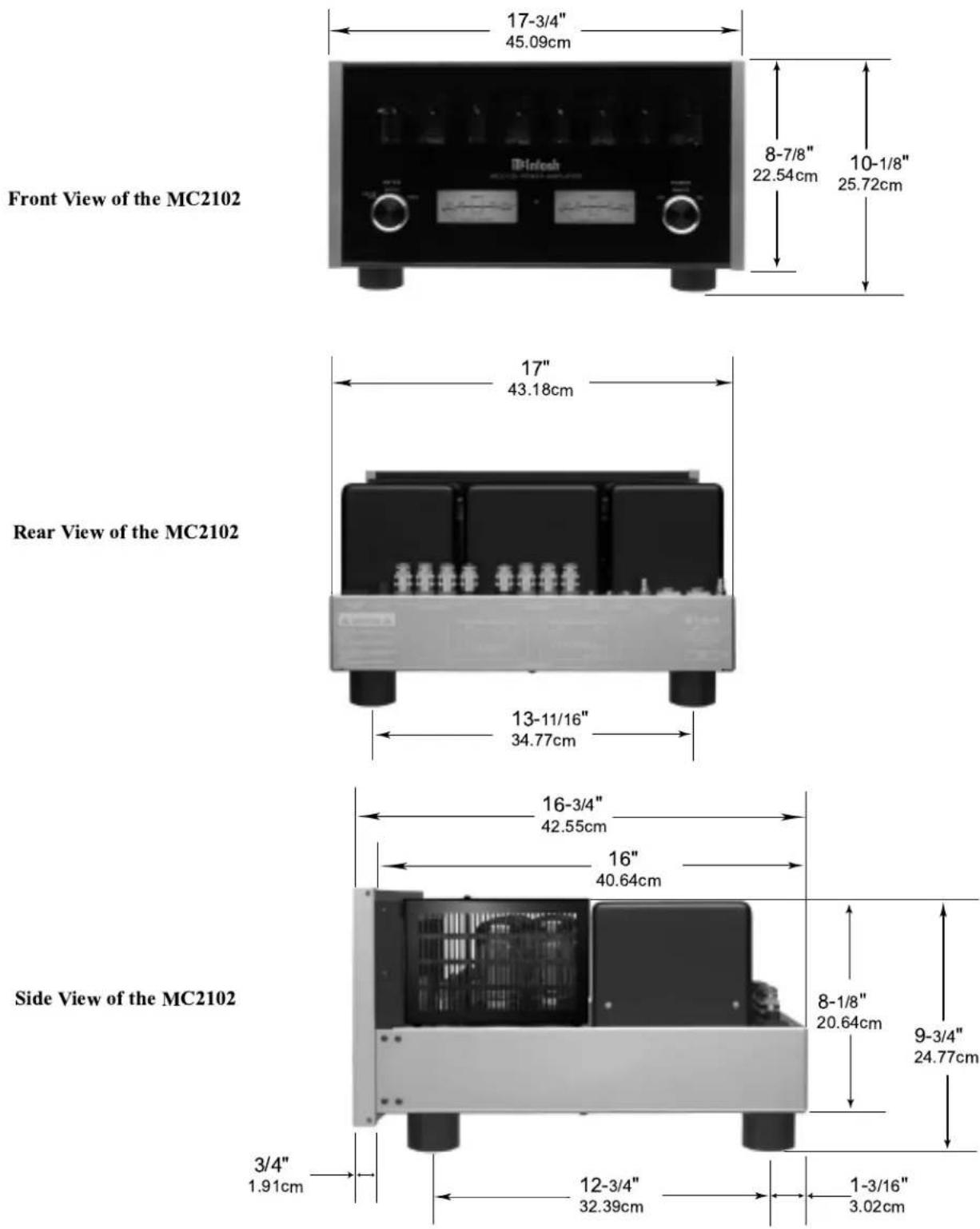
MC2102 Dimensions
The following dimensions can assist in determining the best location for your MC2102. There is additional information on page 8 pertaining to installing the MC2102 into cabinets.
Installation of Tubes and Tube Cover
Caution: To prevent electrical shock make sure that the AC POWER CORD IS NOT CONNECTED TO THE MC2102 when inserting or removing Tubes, as there are hazardous voltages present at the pins of the Tube sockets.
Your MC2102 has gone through an extensive series of performance tests during the manufacturing process. The MC2102 is supplied with the actual Tubes that were used to test and confirm the performance of this amplifier. To protect the Vacuum Tubes from possible shipping damage, they are packed in four layers of foam and placed into the Tube Cover. It is secured to the MC2102 Chassis.
Note: Gloves or a soft cloth will prevent "fingerprinting" of the Tubes during their installation.
-
Orient the MC2102 so the Front Panel is facing you.
-
Using an appropriate screwdriver, rotate the two Tube Cover Screws counterclockwise, for approximately five turns, until the Tube Cover can be removed from the MC2102 Chassis and the screws are still attached to the cover. Refer to figure 1.
-
Orient the Tube Cover to the wide opening along one side of its longer dimension. Refer to figure 2.
-
Remove the first layer of foam to expose the Tubes. Refer to figure 3.
-
Carefully remove the Tubes from the remaining pieces of foam and temporarily place them in a safe location.
-
Remove the remaining foam from the Tube Cover and retain all four pieces for possible future use.
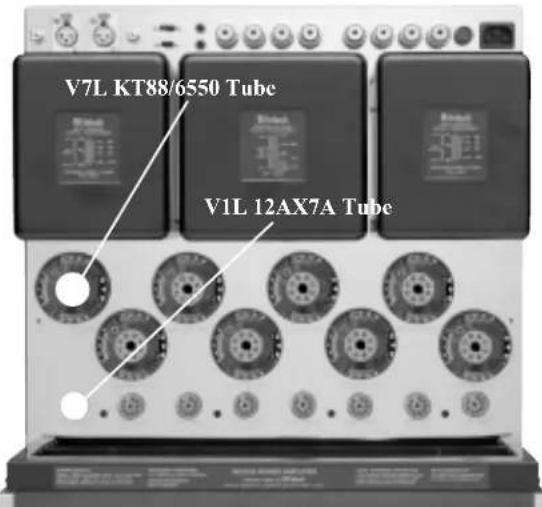
The MC2102 Chassis has nomenclature screened on it to specify both the circuit location and Tube type for each channel, refer to figure 4.
Note: It is extremely important to insert the Tubes in the correct location.
Power Output Tubes:
-
Orient the Chassis so that the Front Panel of the Amplifier is facing you.
-
Locate a KT88 or 6550 Power Output Tube.
-
On the top left side of the amplifier, locate the Tube Socket that has the nomenclature V7L KT88/6550 next to it on the chassis.
-
Orient the Tube so that the key on the base of the Tube is aligned with the corresponding key on the Tube Socket.
-
Carefully insert the Tube into the socket until the base of the Tube is fully seated in the Tube Socket.
-
Repeat the above the steps for the remaining 7 Power Output Tubes.

text_image
Tube Cover Fastening Screw Locations Tube CoverFigure 1

text_image
Tube Cover with Layers of Foam and TubesFigure 2

text_image
Power Output Tubes Small Signal TubesFigure 3
text_image
V7L KT88/6550 Tube V1L 12AX7A TubeFigure 4
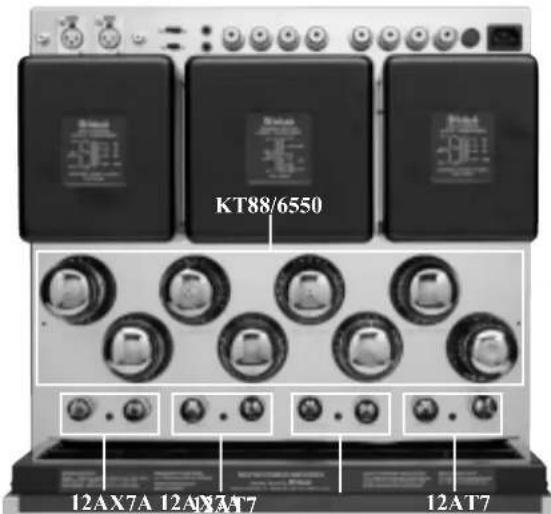
There are two different types of Small Signal Tubes (12AX7A and 12AT7) used in each channel. Tube type can be found on the outside of the Tube. The MC2102 will not function if they are inserted into the wrong socket.
Small Signal Tubes:
- Locate a 12AX7A Tube.
- On the top left side of the amplifier, locate the Tube Socket that has the nomenclature V1L 12AX7A next to it on the chassis. Refer to figure 4 and 5.
- Orient the Tube so that the area where no pins are located on the base of the Tube is aligned with the corresponding area on the Tube Socket.
- Carefully insert the Tube into the socket until the base of the Tube is fully seated in the Tube Socket.
- Repeat the above steps for the remaining three 12AX7A Tubes.
- Locate a 12AT7 Tube.
- On the top left side of the amplifier, locate the Tube Socket that has the nomenclature V3L 12AT7A next to it on the chassis.
- Insert the Tube, following the same procedures as in steps 3 and 4.
- Repeat the steps 6-9 for the remaining three 12AT7 Tubes.
Caution: To prevent electrical shock make sure that the MC2102 Tube Cover is installed before connecting the AC Power Cord.
Before operating the MC2102, locate the previously removed Tube Cover and perform the following steps: Installing the Tube Cover:
- The Tube Cover has a wide opening along one side of its longer dimension. Orient this wide opening so that it is facing towards you.
- Carefully place the Tube Cover onto the MC2102 while at the same time aligning the screws with the openings on the MC2102 Chassis. Refer to figure 6.
- Using an appropriate screwdriver secure the Tube cover to the chassis, approximately five turns, do not over tighten the screws.
Location and Ventilation
Adequate ventilation extends the trouble free life of the MC2102. The suggested minimum space for operating the MC2102 is 24 inches (60.96cm) in width, 22 inches (55.88cm) depth, and 22.5 inches (57.15cm) in height. Always allow air to flow through the ventilation holes on the bottom of the amplifier and a means for the warm air to escape at the top, refer to figure 7. For installation of the MC2102 into a cabinet, refer to the next page.
text_image
KT88/6550 12AX7A 12AX3A7 12AT7Figure 5

text_image
Tube Cover Fastening Screw Locations Tube CoverFigure 6

text_image
Warm Air Cool AirFigure 7
The MC2102 can be placed upright on a table or shelf, standing on its four feet. It also can be custom installed in a piece of furniture or cabinet of your choice. The four feet may be removed from the bottom of the MC2102 when it is custom installed as outlined below. The four feet together with the mounting screws should be retained for possible future use if the MC2102 is removed from the custom installation and used free standing. The required panel cutout, ventilation cutout and unit dimensions are shown.
Always provide adequate ventilation for your MC2102. Cool operation ensures the longest possible operating life for any electronic instrument. Do not install the MC2102 directly above a heat generating component such as a high powered amplifier. If the MC2102 is installed in a cabinet, a quiet running ventilation fan can be a definite asset in maintaining the coolest possible operating temperature.
A custom cabinet installation should provide the following minimum spacing dimensions for cool operation. Allow at least 12 inches (30.48cm) above the top, 2 inches (3.81cm) below the bottom and 3 inch (7.62cm) on each side of the amplifier, so that airflow is not obstructed. Allow 22 inches (55.88cm) depth behind the front panel. Allow
1 inch (2.54cm) in front of the mounting panel for knob clearance. Be sure to cut out a ventilation hole in the mounting shelf according to the dimensions in the drawing.
MC2102 Front Panel
Custom Cabinet Cutout

text_image
17-1/4" 43.82cm 8-1/4" 20.96cm Panel cutout Cabinet Front Panel 12" 30.48cm Opening for Ventilation Cutout Opening for Custom Mounting Support Shelf 1-7/8" 4.76cm 13-11/16" 34.77cm 9-3/16" 23.34cm View tMC2102 Side View in Custom Cabinet
MC2102 Bottom View in Custom Cabinet

text_image
Main Fuse holder, refer to information on the back panel of your MC2102 to determine the cor- rect fuse size and rating MODE switch selects STEREO, PARAL- LEL or BRIDGE MONO Modes of operation MODE switch selects between the BAL- ANCED or UNBAL- ANCED INPUTS UNBALANCED INPUTS for audio cables from a preamplifier or control center audio outputs Connect the MC2102 power cord to a live AC outlet. Refer to information on the back panel to deter- mine the correct volt- age RIGHT OUTPUT Connections for loudspeakers LEFT OUTPUT Connections for loudspeakers POWER CONTROL IN receives turn On/Off signals from a McIntosh component and the POWER CONTROL OUT sends that turn On/Off signal to the next McIntosh component BALANCED INPUTS for audio cables from a preamplifier or control center audio outputsHow to Connect for Stereo
Caution: The supplied AC Power Cord should not be connected to the Rear Panel of the MC2102 Amplifier until after the Loudspeaker Connections have been made and the supplied protective Terminal Connections Cover has been installed. Failure to observe this could result in Electric Shock.
-
For Remote Power Control, connect a power control cable from the Control Center or Preamplifier Power Control Out to the MC2102 Power Control In.
-
Connect cables from the Balanced Outputs of a McIntosh Preamplifier or Control Center to the MC2102 Left and Right Balanced Inputs.
Note: An optional hookup is to use unbalanced cables.
- Prepare the Loudspeaker Hookup Cables that attach to the MC2102 Power Amplifier Output Terminals by choosing one of the methods below:
Bare wire cable ends:
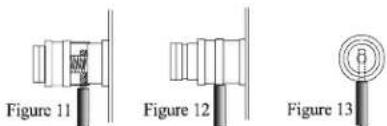
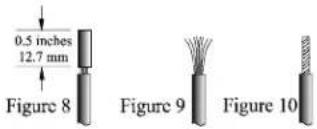
Carefully remove sufficient insulation from the cable ends, refer to figures 8, 9 & 10. If the cable is
stranded, carefully twist the strands together as tightly as possible.
Note: If desired, the
twisted ends can
be tinned with solder to keep the strands together, or attach spade lug and/or banana connector.
Spade lug or prepared wire connection:
Insert the spade lug connector or prepared section of
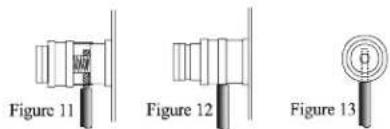
the cable end into the terminal side access hole, and tighten the terminal cap un-
text_image
Figure 11 Figure 12 Figure 13til the cable is firmly clamped into the terminal so the wires cannot slip out. Refer to figures 11, 12 & 13.
Banana plug connection:
Insert the banana plug into the hole at the top of the terminal. Tighten the top portion of the terminal post to secure the banana plug in place.
Note: The use of Banana Plugs is for use in the United States and Canada only.
- Locate the Terminal Connection Cover and pass the Loudspeaker Hookup Cables thru
the Loudspeaker Cable Openings located near the top of the Terminal Cover.
- Connect the Loudspeaker Hookup Cables to the output terminals that match the impedance of your loudspeakers, being careful to observe the correct polarities. Output impedance connections of 2 ohm, 4 ohm and 8 ohm are provided. If the impedance of your loudspeakers is in-between the available connections, use the nearest lower impedance connection.
WARNING: Loudspeaker terminals are hazardous live and present a risk of electric shock. For additional instruction on making Loudspeaker Connections contact your McIntosh Dealer or McIntosh Technical Support.
-
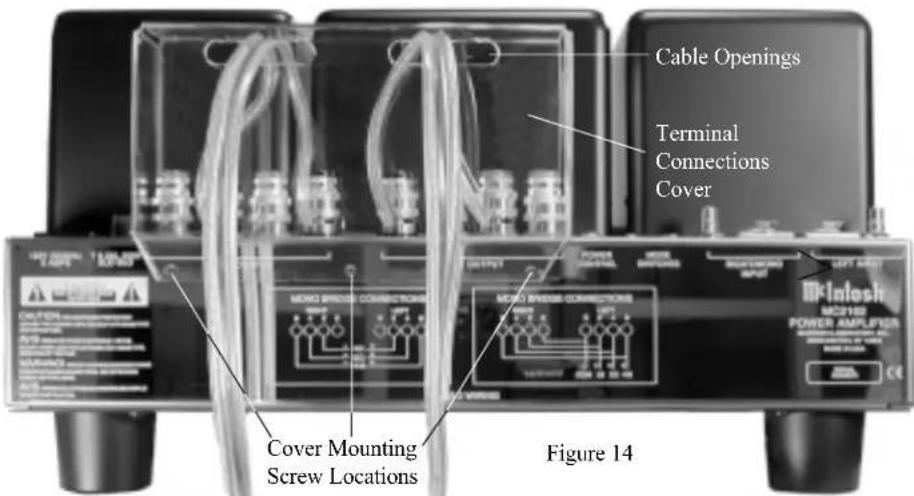
Remove the three Phillips Head Mounting Screws (10-32 x 1/2 inch) from the Rear Panel of the MC2102. Refer to figure 14.
-
Place the Terminal Connection Cover over the top of the RIGHT and LEFT OUTPUT Terminal Connectors. Note: Any excess of Loudspeaker Hookup Cable may be pulled back thru the Terminal Connection Cover, which will aid in seating the cover to the Top Rear of the Chassis.
-
Attach the supplied Terminal Connections Cover with the three Phillips Head Mounting Screws (10-32 x 1/2 inch) to the Rear Panel of the MC2102 Amplifier. Refer to figure 14.
-
Rotate the MC2102 POWER SWITCH to the OFF Position and connect the supplied power cord to an active AC outlet.

text_image
Cable Openings Terminal Connections Cover MOOD SWORD CONNECTIONS MOOD SWORD CONNECTIONS MOOD SWORD CONNECTIONS MOOD SWORD CONNECTIONS MOOD SWORD CONNECTIONS MOOD SWORD CONNECTIONS MOOD SWORD CONNECTIONS MOOD SWORD CONNECTIONS MOOD SWORD CONNECTIONS MOOD SWORD CONNECTIONS MOOD SWORD CONNECTIONS MOOD SWORD CONNECTIONS MOOD SWORD CONNECTIONS MOOD SWORD CONNECTIONS MOOD SWORD CONNECTIONS COOLI POWER AMPLIFIER MOOD SWORD CONNECTIONS MOOD SWORD CONNECTIONS MOOD SWORD CONNECTIONS MOOD SWORD CONNECTIONS MOOD SWORD CONNECTIONS MOOD SWORD CONNECTIONS MOOD SWORD CONNECTIONS MOOD SWORD CONNECTIONS MOOD SWORD CONNECTIONS MOOD SWORD CONNECTIONS MOOD SWORD CONNECTIONS MOOD SWORD CONNECTIONS MOOD SWORD CONNECTIONS MOOD SWORD CONNECTIONS MCC-INTOSH MCC-VIO POWER AMPLIFIER MOOD SWORD MOOD SWORD MOOD SWORD MOOD SWORD MOOD SWORD MOOD SWORD MOOD SWORD MOOD SWORD MOOD SWORD MOOD SWORD MOOD SWORD MOOD SWORD MOOD SWORD MOOD SWORD MOOD SWORD MOOD SWORD MOOD SWORD MOOD SWORD MOOD SWORD MOOD SWORD MOOD STERM MOOD STERM MOOD STERM MOOD STERM MOOD STERM MOOD STERM MOOD STERM MOOD STERM MOOD STERM MOOD STERM MOOD STERM MOOD STERM MOOD STERM MOOD STERM MOOD STERM MOOD STERM MOOD STERM MOOD STERM MOOD STERM MOOD STERM MOOD S TERMMcIntosh C200C Controller McIntosh C200P Preamplifier

text_image
Dishah CIS CONTROLLER To AC Outlet Right Loudspeaker 4 ohm Left Loudspeaker 4 ohmHow to Connect for Mono Parallel
Caution: The supplied AC Power Cord should not be connected to the Rear Panel of the MC2102 Amplifier until after the Loudspeaker Connections have been made and the supplied protective Terminal Connections Cover has been installed. Failure to observe this could result in Electric Shock.
- For Remote Power Control, connect a power control cable from the Control Center or Preamplifier Power Control Out to the MC2102 Power Control In.
- Connect a cable from the Balanced Output of a McIntosh Preamplifier or Control Center to the MC2102 Balanced RIGHT/MONO Input.
Note: An optional hookup is to use unbalanced cable.
- Prepare the Loudspeaker Hookup Cable; one four inch (10.16 cm) and one ten inch (25.4 cm) Jumper Cables that attach to the MC2102 Power Amplifier Output Terminals by choosing one of the methods below:
Bare wire cable ends:
Carefully remove sufficient insulation from the cable ends, refer to figures 8, 9
& 10. If the cable is stranded, carefully twist the strands together as tightly as possible.
text_image
0.5 inches 12.7 mm Figure 8 Figure 9 Figure 10Note: If desired, the twisted ends can be tinned with solder to keep the strands together, or attach spade lug and/or banana connector.
Spade lug or prepared wire connection:
Insert the spade lug connector or prepared section of the cable end into the terminal side access hole, and tighten the terminal cap until the cable is firmly clamped into the terminal so the
text_image
Figure 11 Figure 12 Figure 13wires cannot slip out. Refer to figures 11, 12 & 13.
Banana plug connection:
Insert the banana plug into the hole at the top of the terminal.
Tighten the top portion of the terminal post to secure the banana plug in place.
Note: The use of Banana Plugs is for use in the United States and Canada only.
- Connect the prepared four inch (10.16 cm) Jumper Cable between the two COM Output terminals and the ten inch (25.4 cm) Jumper Cable between the appro-
priate Impedance Output Terminal as outlined in the table located on the next page.
- Locate the Terminal Connection Cover and pass the Loudspeaker Hookup Cable thru the Loudspeaker Cable Opening located near the top of the Terminal Cover.
- Connect the Loudspeaker Hookup Cable to the output terminals that match the impedance of your loudspeaker, as outlined in the table located on the next page and be careful to observe the correct polarities. Output impedance connections of 1 ohm, 2 ohm and 4 ohm are provided. If the impedance of your loudspeakers is in-between the available connections, use the nearest lower impedance connection.
WARNING: Loudspeaker terminals are hazardous live and present a risk of electric shock. For additional instruction on making Loudspeaker Connections contact your McIntosh Dealer or McIntosh Technical Support.
- Remove the three Phillips Head Mounting Screws (10-32 x 1/2 inch) from the Rear Panel of the MC2102. Refer to figure 14.
- Place the Terminal Connection Cover over the top of the RIGHT and LEFT OUTPUT Terminal Connectors. Note: Any excess of Loudspeaker Hookup Cable may be pulled back thru the Terminal Connection Cover, which will aid in seating the cover to the Top Rear of the Chassis.
- Attach the supplied Terminal Connections Cover with the three Phillips Head Mounting Screws (10-32 x 1/2 inch) to the Rear Panel of the MC2102 Amplifier. Refer to figure 14.
- Rotate the MC2102 POWER SWITCH to the OFF Position and connect the supplied power cord to an active AC outlet.
text_image
Cable Openings Terminal Connections Cover MOSI102 POWER AMPLIATION MOCSING POWER AMPLIATION OFF-LOCK MOCSING CONNECTIONS MOCSING CONNECTIONS MOCSING CONNECTIONS MOCSING CONNECTIONS MOCSING CONNECTIONS MOCSING CONNECTIONS MOCSING CONNECTIONS MOCSING CONNECTIONS MOCSING CONNECTIONS MOCSING CONNECTIONS MOCSING CONNECTIONS MOCSING CONNECTIONS MOCSING CONNECTIONS MOCSING CONNECTIONS MOCSING CONNECTIONS MOCSING CONNECTIONS MOCSING CONNECTIONS MOCSIN 14McIntosh C200C Controller McIntosh C200P Preamplifier

text_image
CD-ROM CD-ROM CONTROLLER CD-ROM CD-ROM CD-ROM CD-ROM CD-ROM CD-ROM CD-ROM CD-ROM CD-ROM CD-ROM CD-ROM CD-ROM CD-ROM CD-ROM CD-ROM CD-ROM CD-ROM CD-ROM CD-ROM CD-ROM CD-ROM CD-ROM CD-ROM CD-ROM CD-ROM CD-ROM CD-ROM CD-ROM CD-ROM CD-ROM CD-ROM CD-ROM CD-ROM CD-ROM
natural_image
Black electronic speaker tower with three speakers and two side fans (no visible text or labels)4 ohm Loudspeaker
| Mono Parallel Hookup Connections | ||
| Speaker Impedance | Speaker Negative (-) Connection | Speaker Positive (+) Connection |
| 1 ohm | Left and Right Com Connection | Left and Right Output2 ohm Connection |
| 2 ohm | Left and Right Com Connection | Left and Right Output4 ohm Connection |
| 4 ohm | Left and Right Com Connection | Left and Right Output8 ohm Connection |
How to Connect for Mono Bridge
Caution: The supplied AC Power Cord should not be connected to the Rear Panel of the MC2102 Amplifier until after the Loudspeaker Connections have been made and the supplied protective Terminal Connections Cover has been installed. Failure to observe this could result in Electric Shock.
-
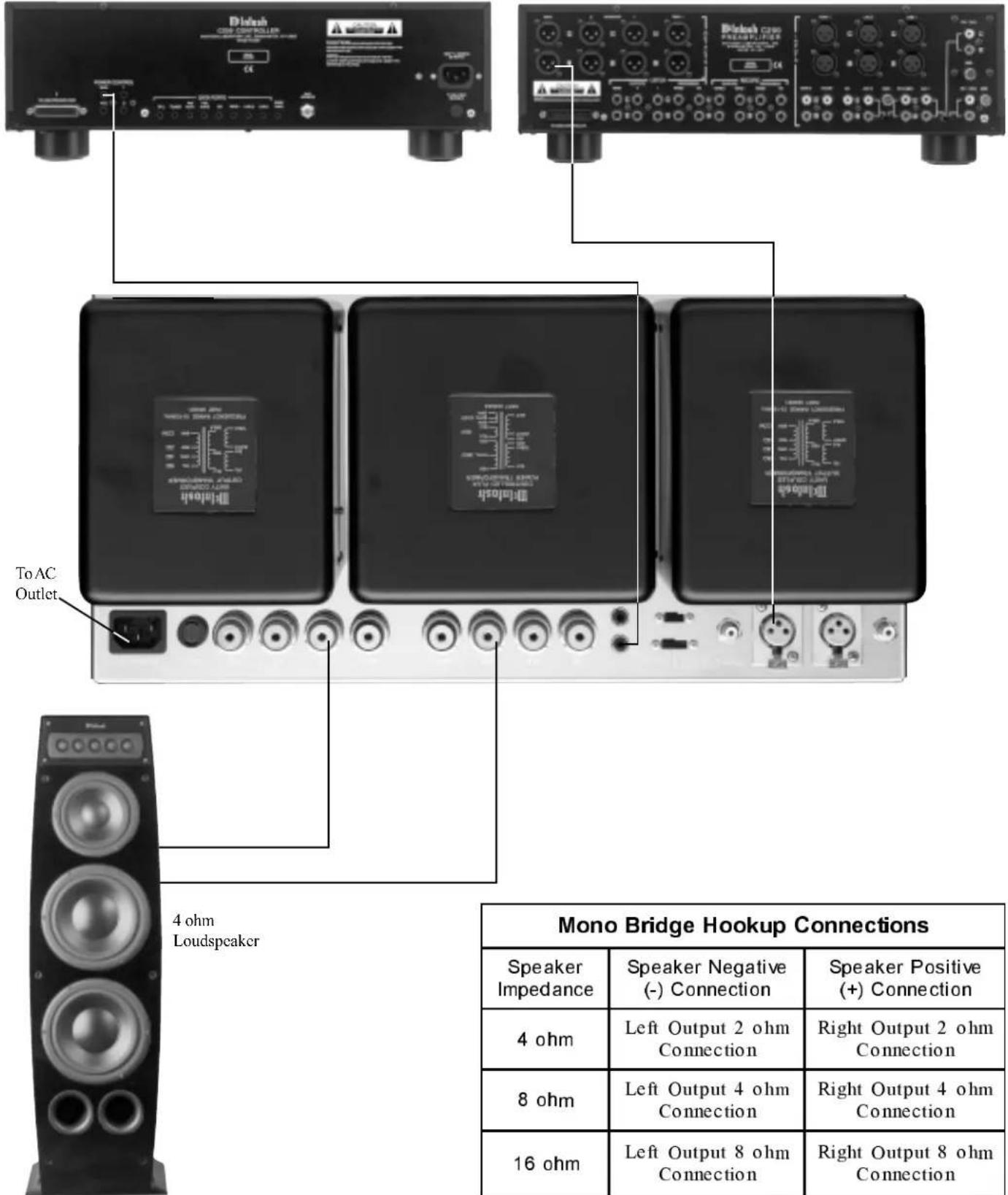
For Remote Power Control, connect a power control cable from the Control Center or Preamplifier Power Control Out to the MC2102 Power Control In.
-
Connect a cable from the Balanced Output of a McIntosh Preamplifier or Control Center to the MC2102 Balanced RIGHT/MONO Input.
Note: An optional hookup is to use unbalanced cable.
- Prepare the Loudspeaker Hookup Cable that attach to the MC2102 Power Amplifier Output Terminals by choosing one of the methods below:
Bare wire cable ends:
Carefully remove sufficient insulation from the cable ends, refer to figures 8, 9 & 10. If the cable is
stranded, carefully twist the strands together as tightly as possible.
Note: If desired, the
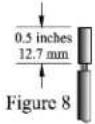
Figure 9

twisted ends can be tinned with solder to keep the strands together, or attach spade lug and/or banana connector.
Spade lug or prepared wire connection:
Insert the spade lug connector or prepared section of the cable end into the terminal side access hole, and
tighten the terminal cap until the cable is firmly clamped into the terminal so the
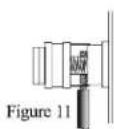


wires cannot slip out. Refer to figures 11, 12 & 13.
Banana plug connection:
Insert the banana plug into the hole at the top of the terminal. Tighten the top portion of the terminal post to secure the banana plug in place.
Note: The use of Banana Plugs is for use in the United States and Canada only.
-
Locate the Terminal Connection Cover and pass the Loudspeaker Hookup Cable thru the Loudspeaker Cable Opening located near the top of the Terminal Cover.
-
Connect the Loudspeaker Hookup Cable to the output terminals that match the impedance of your loudspeaker, as outlined in the table located on the next page and be careful to observe the correct polarities. Output impedance connections of 4 ohm, 8 ohm and 16 ohm are provided. If the impedance of your loudspeakers is in-between the available connections, use the nearest lower impedance connection.
WARNING: Loudspeaker terminals are hazardous live and present a risk of electric shock. For additional instruction on making Loudspeaker Connections contact your McIntosh Dealer or McIntosh Technical Support.
-
Remove the three Phillips Head Mounting Screws (10-32 x 1/2 inch) from the Rear Panel of the MC2102. Refer to figure 14.
-
Place the Terminal Connection Cover over the top of the RIGHT and LEFT OUTPUT Terminal Connectors. Note: Any excess of Loudspeaker Hookup Cable may be pulled back thru the Terminal Connection Cover, which will aid in seating the cover to the Top Rear of the Chassis.
-
Attach the supplied Terminal Connections Cover with the three Phillips Head Mounting Screws (10-32 x 1/2 inch) to the Rear Panel of the MC2102 Amplifier. Refer to figure 14.
-
Rotate the MC2102 POWER SWITCH to the OFF Position and connect the supplied power cord to an active AC outlet.

text_image
Cable Openings Terminal Connections Cover MOI-INFO POWER AMPLIFIER MOI-INFO POWER AMPLIFIER MOI-INFO MOI-INFO MOI-INFO MOI-INFO MOI-INFO MOI-INFO MOI-INFO MOI-INFO MOI-INFO MOI-INFO MOI-INFO MOI-INFO MOI-INFO MOI-INFO MOI-INFO MOI-INFO MOI-INFO MOI-INFO MOI-INFO MOI-INFO MOI-IFM CO CO CO CO CO CO CO CO CO CO CO CO CO CO CO CO CO CO CO CO CO CO CO CO CO CO CO CO CO CO CO CO CO CO CO CO CO CO CO CO CO CO CO CO CO CO CO CO CO CO Covr Mounting Screw Locations Figure 14McIntosh C200C Controller McIntosh C200P Preamplifier
text_image
To AC Outlet 4 ohm Loudspeaker Mono Bridge Hookup Connections Speaker Impedance Speaker Negative (-) Connection Speaker Positive (+) Connection 4 ohm Left Output 2 ohm Connection Right Output 2 ohm Connection 8 ohm Left Output 4 ohm Connection Right Output 4 ohm Connection 16 ohm Left Output 8 ohm Connection Right Output 8 ohm Connection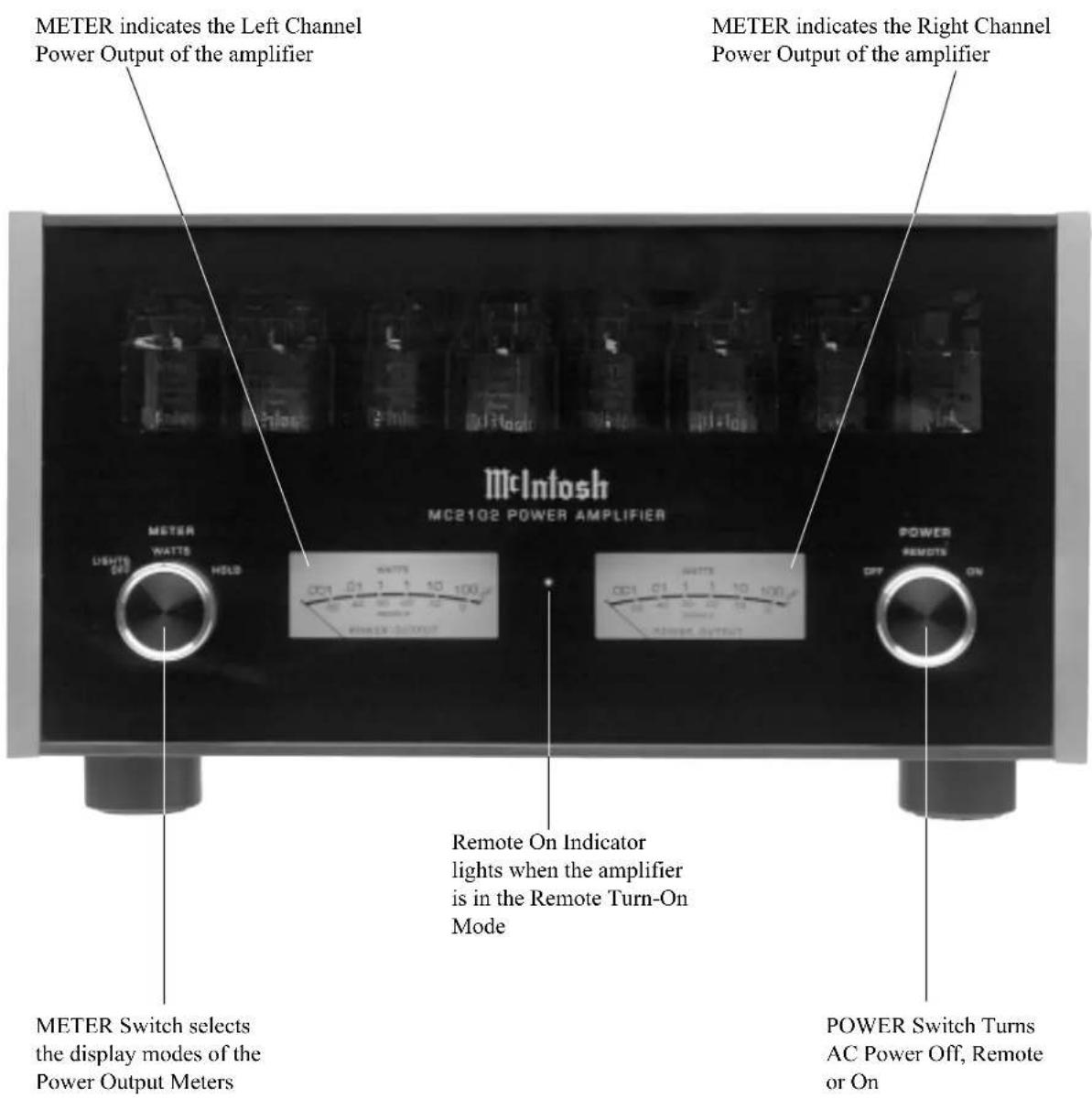
text_image
METER indicates the Left Channel Power Output of the amplifier METER indicates the Right Channel Power Output of the amplifier McIntosh MC2102 POWER AMPLIFIER METER WATTS HOLD UNITED OUT WATTS OFF POWER OUTPUT METER Remote On Indicator lights when the amplifier is in the Remote Turn-On Mode POWER SWITCH TURNS AC Power Off, Remote or On METER Switch selects the display modes of the Power Output MetersHow to Operate the MC2102
Power On
To have the MC2102 automatically turn On or Off when a
McIntosh Control Center turns On or Off, rotate the power switch to the REMOTE Position. For manual operation, rotate the power switch to the ON or OFF Position as desired. Refer to figure 15.

text_image
POWER REMOTE OFF ONFigure 15
Note: There must be a power control connection between the MC2102 and the McIntosh
Control Center, in order for the remote power turn-on to function.
Meter Selection
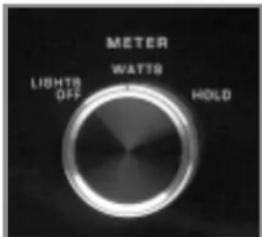
Rotate the meter mode switch to select the meter operation mode you desire. Refer to figures 16 and 17.
Lights Off - Meter lights are
turned off and the meters will con- tinue to indicate the power output.
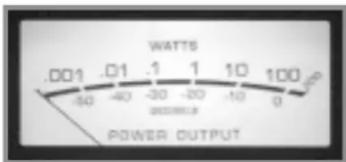
Watts- The meters respond to all the musical information being produced by the
text_image
METER WATTS HOLD LIGHTS OFFFigure 16
amplifier. They indicate to an accuracy of at least 95% of the power output with only a single cycle of a 2000Hz tone burst.
Hold - The meter pointer is locked to the highest power peak in a sequence of peaks. It is electronically held to this power level until a
higher power peak passes through the amplifier.
The meter pointer will
text_image
WATTS .001 .01 1 1 10 100 -50 -40 -30 -20 -10 0 POWER OUTPUTFigure 17
then rise to the newer higher indication. If no further power peaks are reached, the meter pointer will very slowly return to its rest position or lower power level.
Note: The MC2102 Power Output Meters indicate the wattage delivered to the loudspeakers. When in Mono Parallel or Mono Bridge Modes, the actual power output is a combination of both the Right and Left Meter Indications.
Mode Switchs
The STEREO/PARALLEL/BRIDGE MONO Mode Switch, which is located on the Top
Rear Panel of the MC2102, allows you to select either STEREO, MONO PARALLEL or MONO BRIDGE Modes of Operation. Refer to figure 18.
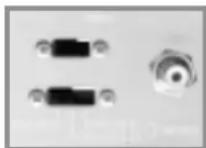
Figure 18
Note: There is additional information pertaining to all three modes of operation:
"How to Connect for Stereo" on pages 10 and 11.
"How to Connect for Mono Parallel" on pages 12 and 13.
"How to Connect for Mono Bridge" on pages 14 and 15.
The Input Mode Switch, which is located on the Top Rear Panel of the MC2102, allows you to select either the UN-BALANCED or BALANCED Input Connectors. Refer to figure 18.
Specifications
Power Output Stereo
Minimum sine wave continuous average power output per channel, all channels operating is:
100 watts into 2 ohm load
100 watts into 4 ohm load
100 watts into 8 ohm load
Power Output Mono Parallel
Minimum sine wave continuous average power output is:
200 watts into 1 ohm, 2 ohm or 4 ohm load
Power Output Mono Bridge
Minimum sine wave continuous average power output is:
200 watts into 4 ohm, 8 ohm or 16 ohm load
Rated Power Band
20Hz to 20,000Hz
Total Harmonic Distortion
Maximum Total Harmonic Distortion at any power level from 250 milliwatts to rated power output is:
0.5% for 2, 4 or 8 ohm loads (Stereo)
0.5% for 1, 2 or 4 ohm loads (Mono Parallel)
0.5% for 4, 8 or 16 ohm loads (Mono Bridge)
Frequency Response
+0, -0.25dB from 20Hz to 20,000Hz
+0, -3dB from 10Hz to 70,000Hz
Sensitivity
2.5Volt unbalanced inputs
5.0Volt balanced inputs
A-Weighted Signal To Noise Ratio
100dB
Intermodulation Distortion
Maximum Intermodulation Distortion if instantaneous peak output does not exceed twice the rated output, for any combination of frequencies from
20Hz to 20,000Hz is:
0.5% for 2, 4 or 8 ohm loads (Stereo)
0.5% for 1, 2 or 4 ohm loads (Mono Parallel)
0.5% for 4, 8 or 16 ohm loads (Mono Bridge)
Input Impedance
20,000 ohms unbalanced inputs
40,000 ohms balanced inputs
Wide Band Damping Factor
Greater than 18
Power Requirements
100 Volts, 50/60Hz at 6.0 amps
110 Volts, 50/60Hz at 5.5 amps
120 Volts, 50/60Hz at 5.0 amps
220 Volts, 50/60Hz at 2.5 amps
230 Volts, 50/60Hz at 2.5 amps
240 Volts, 50/60Hz at 2.5 amps
Note: Refer to the rear panel of the MC2102 for the correct voltage.
Tube Compliment
4 - 12AX7A Inputs and Phase Inverters
4 - 12AT7 Voltage Amplifier and Drivers
8 - KT88/6550 Power Output
Dimensions
Front Panel: 17-3/4 inches (45.54cm) wide, 10-1/8 inches (25.72cm) high. Depth behind front mounting panel is 16 inches (40.64cm). Clearance required in front of the Front Panel is 1 inch (2.54cm) for knobs.
Weight
88 pounds (40 kg) net, 121 pounds (54.9 kg) in shipping carton
Packing Instructions
In the event it is necessary to repack the equipment for shipment, the equipment must be packed exactly as described and shown below.
The MC2102 Vacuum Tubes must be removed from the Amplifier Tube Sockets and placed into the inside openings of the four layer foam packing material. The foam with the tubes located inside are placed into the Amplifier Tube Cover and secured to the Chassis. Failure to do this will result in damage to the Vacuum Tubes and possibly the MC2102.
Four 1/4 - 20 x 2-1/4 inch cap screws and flat washers must be used to fasten the unit securely to the Shipping Skid. This will ensure the proper equipment location in the Inner Carton. Failure to do this will result in shipping damage.
Use the original shipping carton and interior parts only if they are all in good serviceable condition. If a shipping carton or any of the interior part(s) are needed, please call or write Customer Service Department of McIntosh Laboratory. Please see the Part List for the correct part numbers.
Quantity Part Number Description
1 034052 Shipping carton top
1 034051 Shipping carton bottom
2 034054 Foam Pad (top and bottom)
2 034186 Foam Pad (front and rear)
2 034187 Foam Pad (sides)
2 034180 Foam pack tube (ends)
2 034179 Foam pack tube (inside with tube cutouts)
1 034136 Inner carton top
1 034137 Inner carton bottom
1 034008 Bottom pad
1 034161 Shipping skid
4 101212 1/4 - 20x2-1/4 cap screw
4 104058 Flat washer

text_image
SHIPPING CARTON TOP FOAM PAD TOP AND BOTTOM (2X) INSIDE BOX FOAM PAD SIDE (2X) FOAM PAD FRONT AND REAR (2X) SHIPPING CARTON BOTTOM IMPORTANT (Read Above) IMPORTANT (Read Above) INNER CARTON TOP FOAM PAD INNER CARTON MC2102 UNIT TUBE COVER WITH FOAM PACK TUBE INSIDE (2X) FOAM TUBE END (2X) SHIPPING SKID Flat WASHER (4X) 1/4 - 20 X 2-1/4 CAP SCREW (4X) INNER CARTON BOTTOMMcIntosh®
McIntosh Laboratory, Inc.
2 Chambers Street
Binghamton, NY 13903