DSC300D - Shredder Ativa - Free user manual and instructions
Find the device manual for free DSC300D Ativa in PDF.


User questions about DSC300D Ativa
0 question about this device. Answer the ones you know or ask your own.
Ask a new question about this device
Download the instructions for your Shredder in PDF format for free! Find your manual DSC300D - Ativa and take your electronic device back in hand. On this page are published all the documents necessary for the use of your device. DSC300D by Ativa.
USER MANUAL DSC300D Ativa
SHREDDER USER MANUAL
natural_image
Line drawing of a portable washing machine with lid and side panel (no text or symbols)Table of Contents
Thank you for your purchase. It is important that you refer to the setup instructions that pertain to the model you have purchased.
Warranty & Return Information....3
Identity Theft Protection Tips for Consumers...... 4
How to Use Your Shredder
Setup - Tilt / Pullout basket models....5
How to Maintain Your Shredder......6
Clearing a Jam....7
Overheating....7
Staples and Paperclips....7
Warnings....8

text_image
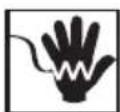
WARNING ALERTA • PRODUCT IS NOT INTENDED FOR USE BY CHILDREN (PRODUCT IS NOT A TOY). • AVOID TOUCHING THE DOCUMENT FEED OPENING WITH HANDS. • AVOID CLOTHING TOUCHING THE DOCUMENT FEED OPENING. • AVOID HAIR TOUCHING THE DOCUMENT FEED OPENING. • AVOID CONTACT WITH WATER. • KEEP AEROSOL PRODUCTS AWAY. • EI PRODUCTO NO ES PENSADO PARA EL USO POR CHILDREN (EL PRODUCTO NO ES UN JUGUETE). • EVITE DE TOCAR LA APERTURA DE LA ALIMENTACIÓN DE DOCUMENTO CON LAS MANOS. • EVITE DE ARROPAR TOCANDO LA APERTURA DE LA ALIMENTACIÓN DE DOCUMENTO. • EVITE EL PELO QUE TOCA LA APERTURA DE LA ALIMENTACIÓN DE DOCUMENTO. • EVITE EL CONTACTO CON AGUA. • PRODUCTOS DEL MANTIENE AREOSOL AUSENTES.Limited Warranty-Product Two Year / Cutter Lifetime
WHAT THIS WARRANTY COVERS: This limited warranty covers the original purchase of new product used for normal commercial, personal or household use. Office Depot, Inc. (ODP) warrants its products will be free from defects in materials and workmanship (normal wear and tear excepted), for two (2) year from the date of purchase, except as provided below. ODP shall further provide a lifetime warranty on the cutting cylinders of the product from the date of purchase, except as provided below. ODP, at its option, will replace with a comparable product or with cutting cylinders (as applicable), free of charge, or provide a store credit for the approximate retail value of the item as determined by ODP, if the product or cutting cylinders fail under normal use as a result of such defect.
WHAT THIS WARRANTY DOES NOT COVER: This warranty does not apply to damage caused by fire, accident, negligence, misuse, improper cleaning or other circumstances not directly attributable to manufacturing defects.
LIMITATION OF DAMAGES: ODP PROVIDES THIS LIMITED WARRANTY IN LIEU OF ALL OTHER WARRANTIES EITHER EXPRESS OR IMPLIED. EXPRESSLY EXCLUDED ARE ALL WARRANTIES OF FITNESS FOR A PARTICULAR PURPOSE OR MERCHANTABILITY. ODP'S SOLE OBLIGATION AND THE USER'S EXCLUSIVE REMEDY UNDER THIS WARRANTY SHALL BE LIMITED TO THE REPLACEMENT AT ODP'S SOLE DISCRETION AND COST, OF PRODUCT OR COMPONENTS.
IN NO EVENT SHALL ODP, ITS AFFILIATES, SUBSIDIARIES OR PARENT COMPANIES BE RESPONSIBLE FOR CONSEQUENTIAL, SPECIAL, OR INCIDENTAL DAMAGES ARISING OUT OF A CLAIM OF DEFECTIVE PRODUCT EVEN IF ODP HAS BEEN ADVISED OF THE POSSIBILITY OF SUCH DAMAGES.
SOME STATES OR PROVINCES DO NOT ALLOW THE EXCLUSION OF IMPLIED WARRANTIES OR LIMITATIONS ON HOW LONG AN IMPLIED WARRANTY LASTS OR THE EXCLUSION OR LIMITATION OF INCIDENTAL OR CONSEQUENTIAL DAMAGES SO THE ABOVE LIMITATIONS MAY NOT APPLY TO YOU. THIS WARRANTY GIVES YOU SPECIFIC LEGAL RIGHTS, AND YOU MAY ALSO HAVE OTHER RIGHTS WHICH MAY VARY BY STATE OR PROVINCE.
THIS WARRANTY APPLIES ONLY TO THE U.S. AND CANADA.
Return Instructions
Please call 1-866-707-9502 for product support and warranty claims.
Identity Theft Protection Tips for Consumers
How can you prevent becoming a victim of identity theft? While no one can totally prevent this crime from occurring, here are some positive steps to take which will decrease your risk.
- Carefully destroy papers you throw out. Be especially careful with those containing sensitive or identifying information. Use your shredder for destroying documents.
- Check your credit reports at least once a year.
- Always guard your Social Security Number (SSN). Don't carry your Social Security Card with you.
- Do not put your SSN or driver's license number on your personal checks.
- Guard all of your personal information. Never give your SSN to anyone unless they have a good reason for needing it.
- Watch out for people who may try to eavesdrop to overhear the information you give out verbally.
- Never provide information to telephone solicitors unless you have initiated the call.
- Immediately delete (and don't reply to) any suspicious email requests, especially if they are asking for passwords or other unique, identifying information.
- Use a P.O. Box or locked mailbox for all mail correspondence.
- Reduce the number of preapproved credit card offers you receive by calling 1-888-5OPT OUT (they will ask for your SSN).
- Request a credit freeze if you live in a state that allows this option.
How to Use Your Shredder
Setup - Tilt / pullout basket models
Install casters on bottom of unit (if applicable). Mount the shredder head securely on the rim of the cabinet. Insert the inclined receptacle into the cabinet. The elevation on the front side underneath the receptacle must be fixed exactly inside the corresponding cavity on the bottom of cabinet. Close the receptacle by simply pushing it toward the cabinet. Connect the power cord to any standard 120 volt AC outlet.
Note: Some shredders include a built-in safety mechanism that requires the shredder to be correctly mounted on the supplied wastebasket and the pullout basket to be completely closed. Lining the wastebasket with a plastic bag will interfere and may keep the shredder from functioning properly.
Caution: All shredders have very sharp, exposed blades on the underside. Please use care when mounting the shredder on to the cabinet.
If your shredder came with casters, they may need to be installed by inserting the pegs into the four holes on the bottom of the cabinet.
SPECIFICATIONS:
| Shredding Capacity Shred Type Shred | Size Throat Width | |||
| DMC120D | 12 Sheet | Particle Cut | 3 mm x 9 mm0.12 in x 0.35 in | 240 mm9.45 in |
| DXC240D | 24 Sheet | Crosscut | 4 mm x 40 mm0.16 in x 1.57 in | 240 mm9.45 in |
| DXC180D | 18 Sheet Crosscut | 4 mm x 40 mm0.16 in x 1.57 in | 240 mm9.45 in | |
| DSC300D | 30 Sheet Stripcut | 6 mm0.24 in | 240 mm9.45 in | |

text_image
Feed Opening DVD / CD Credit Card Slot LCD Panel Tilt / Pullout BasketHow to Maintain your Shredder
Use Shredder Lubricant Regularly
- Only use lubricants specifically designed for your shredder, such as shredder lubricant, shredder lubricant sheets or shredder lubrication pouches.
• NEVER use spray lubricants. - Follow directions on the shredder lubricant, shredder lubricant sheets or shredder lubrication pouches.
- Do not touch the cutting surface.
- Continue to recycle waste paper in a normal manner.
When Using Shredder Lubricant Sheets or Pouch
Never tear or open a shredder lubricant sheet. Please, empty waste basket prior to use. Shred one shredder lubricant sheet by feeding sheet in the direction on the arrows, directly into the paper feed entrance as per the instructions that came with your shredder. After shredding the lubricant sheet run the shredder in reverse for 10 seconds for optimal performance. Align the first lubricant sheet to the left of the shredder throat. The next time you use a shredder lubricant sheet align the pouch to the right of the shredder throat. Continue to alternate between aligning the pouches to the left and right to ensure the entire cutting mechanism remains well lubricated. Re-lubricate your shredder by shredding a lubrication sheet after 30 minutes of shredding, or, a minimum of twice per month to maintain maximum performance.
When Using Bottled Shredder Lubricant
Apply shredder lubricant directly into the paper feed entrance (Figure 2) and shred paper or apply a stripe of lubricant across a sheet of paper (Figure 3), then shred the paper as per the instructions that came with your shredder. After applying lubricant and shredding paper, run the shredder in reverse for 10 seconds for optimal performance. Reapply lubricant after 30 minutes of shredding or a minimum of twice per month to maintain maximum performance. Store in a cool dry place. Recycle empty bottle whenever possible or dispose of it in normal trash.
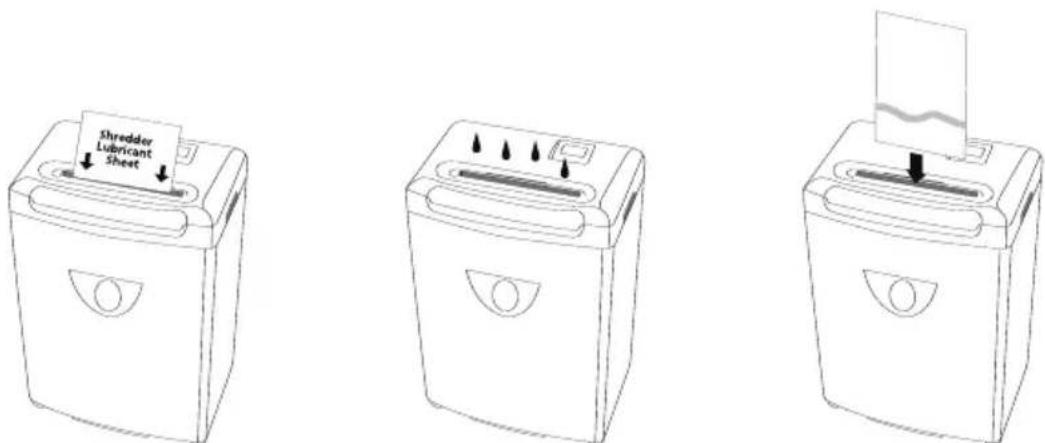
Figure 1 Figure 2 Figure 3
How to Maintain your Shredder
Clearing a Jam
If paper is not inserted properly into the shredder, or if the sheet capacity is exceeded, a jam may result. The shredder will automatically stop until the jam is cleared. Move the switch to the REVERSE (REV) position, and remove the excess paper from the top and pull it out.
TO PREVENT ANY INJURIES, DO NOT PLACE YOUR HANDS NEAR THE FEED OPENING.
Once the paper is cleared, normal shredding operation can resume. If the shredder jams while in reverse, press the switch to the FWD position and let shredder run to clear the jammed paper. If jam does not clear, slide the switch back and forth between the REV and FWD until the jam is cleared. If the jam cannot be cleared following this procedure, unplug the unit and carefully remove the jammed paper manually.
Overheating
If your shredder overheats, the unit will automatically shut off and all functions will cease in order to protect the motor. Turn off and unplug the shredder from the outlet. Allow enough time for the motor to cool down. The shredder will not resume normal function until the temperature of the motor cools down to a safe temperature. Then plug the shredder back into the outlet, turn the unit back on and resume normal operation.
Make sure to empty waste basket to avoid overloading the basket and damaging the cutting mechanism.
Staples and Paperclips
Shredders are designed primarily to shred paper and single credit cards or CDs (as indicated).
Although our shredders are safe to shred the occasional standard staple, you should remove them if possible. Also, industrial or non-standard, large size staples must be removed. Paperclips should not be shredded at any time, as they significantly reduce the life of the shredder. Please remove staples and paperclips from paper before shredding.
Warnings
- CAUTION: KEEP THIS DEVICE AWAY FROM CHILDREN AND PETS! Place the paper shredder in an area less accessible to children.
- DO NOT PLACE FINGERS TOO CLOSE TO THE FEED SLOT AS SERIOUS INJURY MAY OCCUR. Paper shredders can pull children's fingers into the shredder mechanism.
- AVOID GETTING JEWELRY, HAIR OR LOOSE CLOTHING NEAR THE FEED SLOT. If wearing a tie or long necklace, use caution to keep items away from the shredder opening.
- Connect the cord to any standard 120 volt AC outlet.
- RISK OF FIRE. NEVER dispose of flammable chemicals or materials that have come into contact with flammable chemicals (for example, nail polish, acetone, gasoline) in the shredder basket.
- ALWAYS turn the shredder off and unplug the power cord from the AC outlet before cleaning it, moving it, or emptying the wastebasket.
- NEVER place the shredder near water or any heat source.
- ALWAYS keep wastebasket emptied so that the shredder's output is not impeded.
- NEVER use any petroleum based or flammable oils or lubricants in or around the machine as some oils can combust causing serious injury. Lubricants specifically designed for shredders are acceptable.
- NEVER spray any aerosol-based products in or around the shredder.
- NEVER shred envelopes, labels or anything with glue or any sticky substance as this will lead to paper jams.
- AVOID shredding paperclips.
- DO NOT use the shredder if the power cord is damaged in any way.
- DO NOT attempt to service this product yourself as doing so may expose you to sharp cutting blades and/or electricity and will void the manufacturer's warranty.
- NEVER let the wastebasket get full. This will lead to shredded material being pulled back up into the shredder and cause jams.


AVOID CONTACT WITH WATER
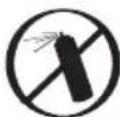
KEEP AEROSOL PRODUCTS AWAY

ELECTRIC SHOCK HAZARD