ST.150 - Turntable Stanton - Free user manual and instructions
Find the device manual for free ST.150 Stanton in PDF.


User questions about ST.150 Stanton
0 question about this device. Answer the ones you know or ask your own.
Ask a new question about this device
Download the instructions for your Turntable in PDF format for free! Find your manual ST.150 - Stanton and take your electronic device back in hand. On this page are published all the documents necessary for the use of your device. ST.150 by Stanton.
USER MANUAL ST.150 Stanton
IMPORTANT SAFETY INSTRUCTIONS
- Read these instructions.
- Keep these instructions.
- Heed all warnings.
-
Follow all instructions.
-
Do not use the apparatus near water.
-
Clean only with dry cloth.
-
Do not block any ventilation openings. Install in accordance with the manufacturer's instructions.
-
Do not install near any heat sources such as radiators, heat registers, stoves, or other apparatus (including amplifiers) that produce heat.
-
Do not defeat the safety purpose of the polarized or grounding-type plug. A polarized plug has two blades with one wider than the other. A grounding-type plug has two blades and a third grounding prong. The wide blade or the third prong is provided for your safety. If the provided plug does not fit into your outlet, consult an electrician for replacement of the obsolete outlet.
-
Protect the power cord from being walked on or pinched particularly at plugs, convenience receptacles, and the point where they exit from the apparatus.
-
Only use attachments/ accessories specified by the manufacturer.
-
Use only with a cart, stand, tripod, bracket or table specified by the manufacturer, or sold with the apparatus. When a cart is used, use caution when moving the cart/apparatus combination to avoid injury from tip-over.
-
Unplug this apparatus during lighting storms or when unused for long periods of time.
-
Refer all servicing to qualified service personnel. Servicing is required when the apparatus has been damaged in any way, such as power-supply cord or plug is damaged, liquid has been spilled or objects have fallen into the apparatus, the apparatus has been exposed to rain or moisture, does not operate normally, or has been dropped.
-
Mains plug is used as disconnect device and it should remain readily operable during intended use. In order to disconnect the apparatus from the mains completely, the mains plug should be disconnected from the mains socket outlet completely.
-
Caution marking is located at the bottom of apparatus.
-
Please keep the unit in a good ventilation environment.
WARNING
To reduce the risk of fire or electric shock, do not expose this apparatus to rain or moisture. The apparatus shall not be exposed to dripping or splashing and that no objects filled with liquids, such as vases, shall be placed on the apparatus.


CAUTION: To reduce the risk of electric shock, do not remove any cover. No user-serviceable parts inside. Refer servicing to qualified service personnel only.

The lightning flash with arrowhead symbol within the equilateral triangle is intended to alert the use to the presence of un-insulated “dangerous voltage” within the product’s enclosure that may be of sufficient magnitude to constitute a risk of electric shock.

The exclamation point within the equilateral triangle is intended to alert the user to the presence of important operation and maintenance (servicing) instructions in the literature accompanying this appliance.
CAUTION
To prevent electric shock, do not use this polarized plug with an extension cord, receptacle or other outlet unless the blades can be fully inserted to prevent blade exposure.
AVERTISSEMENT
Remove all the parts from the box. Please check to make sure the following items are included with the main unit in the carton:
(1) Platter
(2) Slip mat
(3) Counterweight
(4) 45-rpm adapter
(5) Stanton Cartridge and Headshell
(6) AC cord
(7) RCA cable
(8) Target light
(9) Operating instructions
CONNECTIONS
- Connect the power cord to an AC outlet.
- Connect the RCA cable to the PHONO input of your mixer. You can also use a line input by setting the phono/line switch at the rear of the turntable to Line.
Note: This turntable has separate analog and digital circuits. If you are looking for a purely analog signal, use the Phono output. For access to the Key correction feature use the Line output or S/P DIF output.
TONE ARM AND CARTRIDGE SETTINGS
The major cause of problems in sound and skipping on the vinyl is the lack of proper set up of the needle and turntable adjustments. The needle is designed to operate at a specific angle to the vinyl. The ST-150 has several adjustments to correctly position the needle to the vinyl.
The first adjustment is the correct installation of the cartridge.
Your cartridge is to be mounted into the headshell as pre the mounting instructions included with the cartridge. The Stanton 500,680 and 890 series of cartridges require the use of the two screw mounting into the headshell. For your convenience, some of these products can be purchased already mounted and pre-adjusted from your local Stanton dealer. If you are using these 1/2" mounted products with a headshell in a mobile application or you are doing heavy scratching, you may want to use an extra shell weight. The Master series of products (Trackmaster, Groovemaster, etc.) are designed with their own mounting that eliminates the need for a separate headshell and the wiring to the cartridge. The body of the cartridge should be parallel with the centerline of the headshell-tone arm, when viewed from the front to the back.
The second adjustment is at the installation of the cartridge-head-shell assembly into the tone arm tube lock. Holding the tone arm tube in one hand, insert the cartridge-headshell into the tube lock with the other hand. Turn the lock ring clockwise (when viewed from the rear) until the headshell is locked tightly into the tone arm. Remove the needle protector from the cartridge and place the needle on record. View the needle from the front and insure that the needle is perpendicular to the record surface. If some adjustment is needed, simply loosen the lock ring and rotate the cartridge-headshell until the needle is perpendicular to the record surface. Then re-tighten the lock ring.
The third adjustment is the needle (or stylus) pressure. Start with the cartridge-headshell assembly mounted into the tone arm. Remove any needle protectors provided. With tone arm free, adjust the tone arm counterweight by rotating the rear section until the tone arm floats in a balanced condition above the record or mat. Do not allow the needle to drop onto the mat or the turntable platter during this adjustment. You might damage the needle tip. Now, carefully hold the tone arm in one hand while rotating the numbered ring on the front of the counter-weight with the other hand to the "0" setting. Next, without touching the numbered ring, Rotate the rear counterweight until the desired needle pressure reading is next to the line on top of the tone arm tube, See the instructions. Included with your cartridge for proper settings.
The fourth and last adjustment is that of the tone arm height. This will set the tone arm pivot and needle relation with the vinyl. Unlock the tone arm base located in the base of pivot assembly. Rotate the height adjust ring in the pivot base to read the correct setting for the height adjust ring in the pivot base to read the correct setting for the height of the cartridge that you are using. Check the cartridge/arm height table for the correct setting. Be certain to re-lock the pivot base when adjustment is completed.
PART NAMES & FUNCTIONS
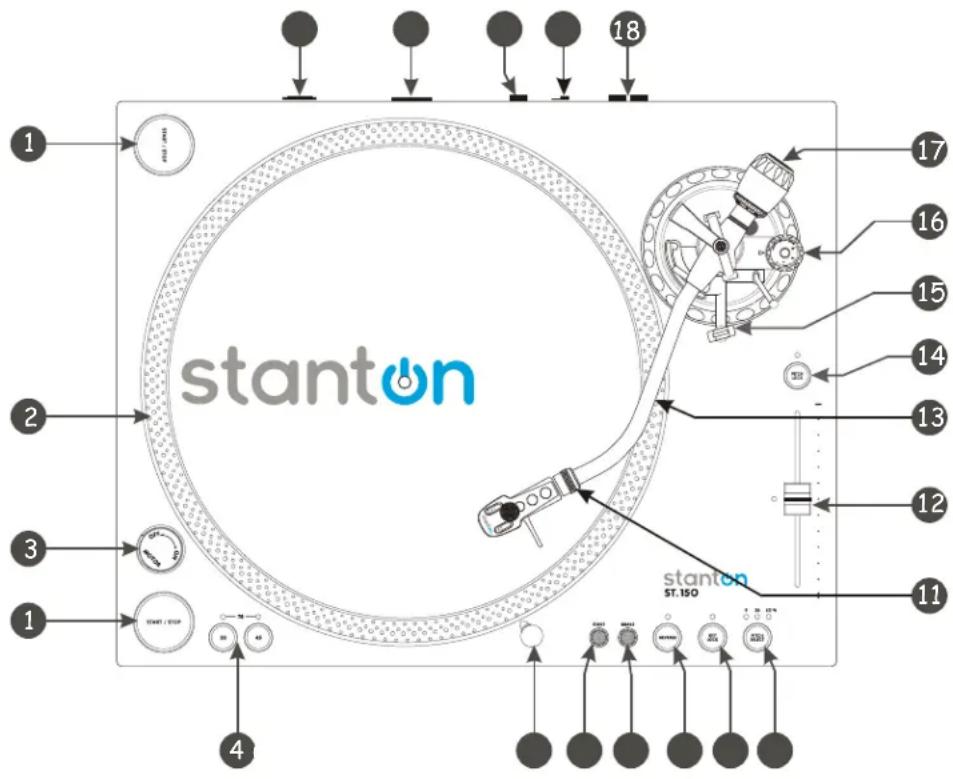
text_image
stanton ST.150 18 17 16 15 14 13 12 11 10 9 8 7 6 5 41) START/STOP
Press this button to start or stop the platter.
2) STROBE DOTS
The dots around the edge of the platter are used in conjunction with the light located inside the motor ON/OFF switch. While the platter is in rotation, the dots help to indicate the speed of rotation. The speed is lower than the displayed speed (33,45,78) when the dots are flowing to the right. It is higher than the displayed speed (33,45,78) when the dots are flowing to the left. When the strobe is stopped, the platter is rotating at the displayed speed.
As opposed to fully analog turntables, this is not the power switch. This switch only turns on or off the motor. Rotate clockwise to turn on the motor. The platter will not start spinning until the start/stop button has been pressed. Rotate counter-clockwise during playback (off position) for a slow winding down effect.
4) PLATTER REVOLUTION SPEEDS (rpm)
33 rpm - Press 33
45 rpm - Press 45
78 rpm - Press 33 and 45 buttons simultaneously. To return to 33 or 45-rpm play mode, just press the desired button.
5) TARGET LIGHT
Insert target light to the deck and it will light up..
6) START
The Start time is adjustable from 0.2\~6 sec.
7) BRAKE
The Brake time is adjustable from 0.2\~6 sec.
8) REVERSE
This button is used to reverse the direction of the platter rotation.
9) KEY LOCK
Press to enable key lock. When key lock is on, the pitch slider will only affect the speed of the platter. The key (tone) will remain at 0%
Note: Key lock processing is only available when the LINE output is used.
10) PITCH SELECT
Press the button to switch between +/-8%, +/-25%, or +/-50% pitch range.
Attach the headshell by inserting into the front end of the tone arm. Turn the locking nut clockwise with the head shell firmly held horizontally.
12) PITCH SLIDER
The pitch slider is used to speed up or slow down the turntable platter.
13) TONE ARM
This is a fully manual tone arm. To start playback, gently place the stylus on the record using the headshell finger support. Do not drop the stylus onto the record as it may cause damage to the diamond tip and to the record.
14) PITCH ON/OFF
The ON setting will allow use of the pitch adjust. When set of OFF, the pitch control will be locked at 0%.
15) TONE ARM BASE
The tone arm base includes the height adjustment and tone arm rest. See itone arm and cartridge settings for proper adjustments.
16) ANTI SKATE KNOB
When a record is playing, a force is generated drawing the stylus towards the center of the record. Set this knob to the same value as the stylus pressure to offset this force.
17) COUNTERWEIGHT
Use this to balance the tone arm and to adjust the stylus pressure. See itone arm and cartridge settings for proper adjustments.
18) LINE OUT L & R
This is the standard analog output (RCA jacks) which can be connected either to a phono or line input on any DJ mixer, depending on the setting of the phono / line selector.
Note: Key lock processing is only available when the LINE output is used.
19) PHONO/LINE SWITCH
Note: Key lock and Digital output processing is only available when the LINE output is used.
20) DIGITAL OUT
Use this output to connect your ST-150 to any SPDIF in equipped digital device such as a CD-R or Computer.
21) POWER CORD CONNECTOR
Used to connect the included power cord.
22) POWER SWITCH
This switch turns the power on or off, including the motor and audio signal.
SPECIFICATIONS
TURNTABLE SECTION
Starting Torque: More than 4.5kgf.com
Motor: 16pole, 3phase, brushless DC motor
Platter: 332mm dia. Aluminum diecast
Pitch: +/-8%,+/-25%,+/-50%
Brake: Electronic Brake
TONE ARM SECTION
Tone arm type Static balanced S -shaped tonearm
straight with detachable headshell
Effective Arm Length 230mm
Tracking Force Adjust Range 0-3g
Applicable Cartridge Weight 13-18g
Frequency Response 20 - 20 KHz
Channel Separation More than 15 dB
Channel Balance Within 2.5dB at 1 KHz
Wow & Flutter: Less than 0.1% WRMS
(JIS WTD) with 33 1/3rpm
S/N ratio: More than 60dB (DIN-B)
Needle Pressure range 2-5g
GENERAL SPECIFICATIONS
| Dimensions: | 450(W) x 353 (D) x 146 (H)mm |
| Weight: | 16.4Kg |
| Power supply: | Single Voltage:AC 100V, 50Hz (For Japan)AC 110V, 60Hz (For Taiwan)AC 120V, 60Hz (For U.S.A.,Canada,Mexico)AC 220V, 50Hz (For United Arab Emirates,Chile,Argentina)AC 220V, 60Hz (For Philippines)AC 230V, 50Hz (For Europe,New Zealand,South Africa,Singapore,Israel)AC 240V, 50Hz (For Australia,U.K.) |
| Power consumption: | 14W |
Ground lift Operation
Due to the variety of power sources available to the DJ, Stanton has included a ground lift switch to be used on the ST-150/STR8-150 turntables. This will allow the DJ to have the capability of charging the grounding scheme of the phono cartridge to avoid ground hum that may occur when using the turntable. The ST-150/STR8-150 Turntable has been designed to operate with third pin safety ground, and should always be used when available. NEVER REMOVE THIRD PIN GROUND FROM THE POWER CORD PROVIDED, IF NECESSARY, USE THE APPROPRIATE ADAPTER FOR PLUGGING INTO OUTLETS WHICH DONOT PROVIDE THIRD PIN GROUND TERMINALS.
For best operation of the ground lift, the following rules should be applied
When third pin safety ground is used, set the ground lift switch to the lift position. This position will isolate the cartridge ground from connection to earth ground.
When third point safety ground is unavailable, set the ground lift switch to the connected position. This will place the cartridge ground in connection with the chassis ground, but since third pin grounding is not used, the cartridge ground will not be in connection with earth.
WARRANTY
Thank you for choosing one of Gibson Pro Audio's brands (Stanton, KRK, or Cerwin Vega!).
Your satisfaction is extremely important to us. We proudly stand behind the quality of our work and appreciate that you put your trust in us. Registering your merchandise will help us guarantee that you are kept up to date on our latest advances.
To Register Merchandise Purchased from an Authorized Gibson Pro Audio Dealer in the U.S.:
Please go to: http://www.gibson.com and register online.
Or you may send your warranty card to:
Gibson Customer Service
309 Plus Park Blvd.
Nashville, TN 37217
If you have any questions you may contact customer service at:
1-800-4GIBSON (1-800-444-2766)
e-mail: service@gibson.com
FOR MERCHANDISE PURCHASED FROM AN AUTHORIZED GIBSON PRO AUDIO DISTRIBUTOR OUTSIDE OF THE US, PLEASE CONTACT THE DISTRIBUTOR FROM WHOM YOU PURCHASED YOUR MERCHANDISE FOR TO REGISTER YOUR WARRANTY AND FOR HANDLING AND RESOLUTION OF ALL WARRANTY-RELATED ISSUES.
Gibson Pro Audio Warranty
If at any time your Gibson Pro Audio product (which includes Stanton, KRK, or Cerwin Vega! brands) malfunctions as a result of faulty materials or workmanship, Gibson Pro Audio or one of Gibson Pro Audio's Authorized Service Centers in the US will repair the defect(s) or replace the merchandise, as it deems appropriate at its sole discretion.
Warranty Period (from date of Purchase as listed on the Bill of Sale):
Stanton
One (1) year for all Stanton products.
KRK
Three (3) years from all studio monitors.
One (1) year all headphones, computer audio devices, including room correction devices.
Cerwin Vega!
Five (5) years for all passive speaker systems.
Three (3) years for all active speaker systems.
One (1) year for mixers.
Gibson will warrant all replacement parts and repairs for ninety (90) days from the date of original shipment.
In the unlikely event that your merchandise is destroyed, lost or damaged beyond repair while in the possession of Gibson or one of Gibson Pro Audio's Authorized Service Centers for repair, Gibson will replace that merchandise with one of the same or most similar style of a value not in excess of the original purchase price of your merchandise. Any insurance covering the merchandise, including but not limited to collector's value insurance, must be carried by owner at owner's expense.
For the fastest and safest merchandise return, please use the original shipping carton and packaging materials. Gibson cannot be responsible for any damages incurred during the shipping process due to poor or inadequate packing.
THIS WARRANTY IS EXTENDED TO THE ORIGINAL RETAIL PURCHASER ONLY AND MAY NOT BE TRANSFERRED OR ASSIGNED TO SUBSEQUENT OWNERS. IN ORDER TO VALIDATE YOUR WARRANTY, AND AS A CONDITION PRECEDENT TO WARRANTY COVERAGE HEREUNDER, YOU MUST REGISTER YOUR WARRANTY WITHIN FIFTEEN (15) DAYS FOLLOWING THE ORIGINAL DATE OF PURCHASE.YOUR PROOF OF PURCHASE OR SALES RECEIPT MUST ACCOMPANY ALL REQUESTS FOR WARRANTY COVERAGE.
This warranty is subject to the following limitations:
THIS WARRANTY DOES NOT COVER
- Any merchandise that has been altered or modified in any way or upon which the serial number has been tampered with or altered.
- Any merchandise whose warranty card has been altered or upon which false information has been given.
- Any merchandise that has been damaged due to misuse, negligence, or improper operation.
- Any merchandise that has been damaged by accident, flood, fire, lightening, or other acts of God.
- Shipping damage of any kind.
- Any merchandise that has been subjected to extremes of humidity or temperature.
- Any merchandise that has been purchased from an unauthorized dealer, or upon which unauthorized repair or service has been performed.
GIBSON MAKES NO OTHER EXPRESS WARRANTY OF ANY KIND WHATSOEVER. ALL IMPLIED WARRANTIES, INCLUDING WARRANTIES OF MERCHANTABILITY AND FITNESS FOR A PARTICULAR PURPOSE, EXCEEDING THE SPECIFIC PROVISIONS OF THIS WARRANTY ARE HEREBY DISCLAIMED AND EXCLUDED FROM THIS WARRANTY. SOME STATES AND/OR COUNTRIES DO NOT ALLOW THE EXCLUSION OR LIMITATION OF IMPLIED WARRANTIES SO THAT THE ABOVE MAY NOT APPLY TO YOU.
GIBSON SHALL NOT BE LIABLE FOR ANY SPECIAL, INDIRECT CONSEQUENTIAL, INCIDENTAL OR OTHER SIMILAR DAMAGES SUFFERED BY THE PURCHASER OR ANY THIRD PARTY, INCLUDING WITHOUT LIMITATION, DAMAGES FOR LOSS OF PROFITS OR BUSINESS OR DAMAGES RESULTING FROM USE OR PERFORMANCE OF THE MERCHANDISE, WHETHER IN CONTRACT OR IN TORT, EVEN IF GIBSON OR ITS AUTHORIZED REPRESENTATIVE HAS BEEN ADVISED OF THE POSSIBILITY OF SUCH DAMAGES, AND GIBSON SHALL NOT BE LIABLE FOR ANY EXPENSES, CLAIMS, OR SUITS ARISING OUT OF OR RELATING TO ANY OF THE FOREGOING.
FOR MERCHANDISE PURCHASED FROM AN AUTHORIZED GIBSON PRO AUDIO DISTRIBUTOR OUTSIDE OF THE US, PLEASE CONTACT THE DISTRIBUTOR FROM WHOM YOU PURCHASED YOUR MERCHANDISE FOR THE HANDLING AND RESOLUTION OF ALL WARRANTY ISSUES. FOR THESE PURCHASES, THE ABOVE-DESCRIBED WARRANTY IS NOT APPLICABLE.
How to Obtain Warranty Service
Warranty Service outside the United States:
To initiate a warranty repair, please contact the Authorized Gibson Pro Audio distributor from whom you purchased your merchandise, and follow the distributor's return/warranty policy.
Warranty Service for Merchandise Purchased from an Authorized Gibson Pro Audio Dealer in the U.S:
In the event of malfunction of your Gibson Pro Audio merchandise, the Dealer or Owner must call Customer Service @ 1-800-4GIBSON (1-800-444-2766) and obtain a Return Authorization number from the customer service agent. No merchandise may be returned to Gibson without such prior Return Authorization, and the Return Authorization number must be written on the outside of the shipping package. The Customer Service agent will provide the address and additional shipping instructions. Owner must ship the merchandise, freight, and insurance pre-paid to the address provided by the customer service representative. Only Authorized Gibson Pro Audio Service Centers may perform warranty service and any service performed by unauthorized persons will void this warranty. Gibson disclaims liability for defects or damage caused by services performed by unauthorized persons or non-warranty service not performed by Gibson or an Authorized Gibson Pro Audio Service Center.
When contacting Gibson, you must include a complete written description of the malfunction of the merchandise. If non-warranty work is required or recommended, a quotation will be issued and must be approved by you before any non-warranty work is commenced. You should consider quotations obtained for non-warranty work immediately and advise the Authorized Gibson Pro Audio Service Center or Gibson of your wishes. You are not required to purchase non-warranty work in order to obtain service on materials covered by this warranty. Following its inspection of merchandise upon its arrival, Gibson or the Authorized Gibson Pro Audio Service Center will advise you or your dealer of the approximate date of completion. The repaired merchandise or part will be returned to you or your dealer, freight collect insured.
No representative or other person is authorized to assume for Gibson any liability except as stated in this warranty. This warranty gives you specific rights which vary from state to state or from country to country.
For further information, write:
Customer Service Dept.,
Gibson Customer Service
309 Plus Park Blvd.
Nashville, TN 37217
Or call:
1-800-4GIBSON
Microsoft® Windows™ is a registered trademark of Microsoft® Corp. Apple® OSX™ is a registered trademark of Apple® Corp. Virtual DJ™ is a registered trademark of Atomix™ Productions
Giltsuri
http://www.gibson.com