
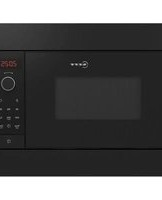
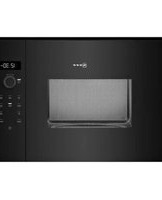
C54L60W3 - Microwave Oven NEFF - Free user manual and instructions
Find the device manual for free C54L60W3 NEFF in PDF.


| Product Type | Built-in Microwave Oven |
| Brand | Neff |
| Model | C54L60W3 |
| Appliance Dimensions (H x W x D) | 382 mm x 595 mm x 320 mm |
| Cooking Compartment Dimensions (H x W x D) | 220 mm x 350 mm x 270 mm |
| Oven Capacity | Approx. 20 L |
| Weight (approx.) | 25 kg |
| Power Supply | 230 V, 50 Hz |
| Maximum Total Connected Load | 1220 W |
| Microwave Power Output (IEC 60705) | 900 W |
| Microwave Power Levels | 90 W, 180 W, 360 W, 600 W, 900 W |
| Microwave Frequency | 2,450 MHz |
| Fuse Rating | Min. 10 A |
| Control Type | Electronic push-button and rotary selector |
| Functions | Microwave, 1-2-3 Series, Automatic Programmes, Memory (M1/M2) |
| Clock / Timer | Electronic clock with timer, cooking time, and time-of-day setting |
| Interior Light | Yes (oven light) |
| Door Interlock | Automatic shut-off when door is opened |
| Safety Features | Overheat protection, child lock (via demonstration mode), door seal monitoring |
| Care and Cleaning | Stainless steel front, enamel cooking compartment; clean with hot soapy water; avoid abrasives |
| Accessories Included | Glass turntable (not explicitly listed, but standard) |
| Energy Efficiency | Standby clock display can be switched off to save energy |
| Certifications | VDE approved, CE mark, Group 2 Class B (EN 55011) |
Frequently Asked Questions - C54L60W3 NEFF
User questions about C54L60W3 NEFF
0 question about this device. Answer the ones you know or ask your own.
Ask a new question about this device
Download the instructions for your Microwave Oven in PDF format for free! Find your manual C54L60W3 - NEFF and take your electronic device back in hand. On this page are published all the documents necessary for the use of your device. C54L60W3 by NEFF.
USER MANUAL C54L60W3 NEFF
natural_image
Close-up of a stainless steel oven with control knobs and a 'NEFF' logo, no visible text or symbols on the main subject.[el] Οδηγίες χρήσεως .....2
[en] Instruction manual ..... 18
[es] Instrucciones de uso ..... 33
[ru] Правила пользовани..... 49
C54L60W3 C54L60S3
C54L60N3 C54R60N3
natural_image
Simple illustration of a glass with a black X mark crossed out, symbolizing opposition or prohibition (no text or symbols present)Προσοχή!
Important safety information 18
Causes of damage.... 20
Energy and environment tips 20
Saving energy.... 20
Environmentally-friendly disposal.... 20
Your new appliance 20
Control panel 21
Operating controls.... 21
Cooking compartment 21
Before using the oven for the first time 21
Setting the clock 22
Switching the appliance on and off 22
Switching on 22
Switching off.... 22
The microwave.... 22
Notes regarding ovenware.... 22
Microwave power settings.... 22
Setting the microwave.... 22
1, 2, 3 series of operations.... 23
Ovenware 23
Setting a series of operations 23
Memory....23
Saving settings in the memory.... 23
Starting the memory function 23
Electronic clock 24
Clock display 24
Timer 24
Cooking time 24
Setting the clock 25
Changing the basic settings....25
Basic settings 25
Care and cleaning....26
Cleaning agents.... 26
Faults and repairs....26
Malfunction table.... 26
After-sales service....27
E number and FD number 27
Technical data 27
Automatic programmes 28
Setting a programme 28
Notes on the automatic programmes.... 28
Tested for you in our cooking studio....29
Defrosting, heating up and cooking with the microwave..... 29
Microwave tips 32
Test dishes in accordance with EN 60705....32
Solo microwave cooking 32
Solo microwave defrosting 32
Additional information on products, accessories, replacement parts and services can be found at www.neff-
international.com and in the online shop www.neff- eshop.com
⚠️ Important safety information
Read these instructions carefully. Only then will you be able to operate your appliance safely and correctly. Retain the instruction manual and installation instructions for future use or for subsequent owners.
This appliance is only intended to be fully fitted in a kitchen. Observe the special installation instructions.
Check the appliance for damage after unpacking it. Do not connect the appliance if it has been damaged in transport.
Only a licensed professional may connect appliances without plugs. Damage caused by incorrect connection is not covered under warranty.
This appliance is intended for domestic use only. The appliance must only be used for the preparation of food and drink. The appliance must be supervised during operation. Only use this appliance indoors.
This appliance may be used by children over the age of 8 years old and by persons with reduced physical, sensory or mental
capabilities or by persons with a lack of experience or knowledge if they are supervised or are instructed by a person responsible for their safety how to use the appliance safely and have understood the associated hazards.
Children must not play with the appliance. Children must not clean the appliance or carry out general maintenance unless they are at least 8 years old and are being supervised.
Keep children below the age of 8 years old at a safe distance from the appliance and power cable.
Risk of fire!
- Combustible items stored in the cooking compartment may catch fire. Never store combustible items in the cooking compartment. Never open the appliance door if there is smoke inside. Switch off the appliance and unplug it from the
mains or switch off the circuit breaker in the fuse box.
■ Using the appliance for anything other than its intended purpose is dangerous and may cause damage, e.g. heated slippers and grain or cereal pillows may catch fire, even several hours later. The appliance must only be used for the preparation of food and drink.
- Food may catch fire. Never heat food in heat-retaining packages.
Do not leave food heating unattended in containers made of plastic, paper or other combustible materials.
Do not select a microwave power or time setting that is higher than necessary. Follow the information provided in this instruction manual.
Never use the microwave to dry food. Never defrost or heat food with a low water content, e.g. bread, at too high a microwave power or for too long.
- Cooking oil may catch fire. Never use the microwave to heat cooking oil on its own.
Risk of explosion!
Liquids and other food may explode when in containers that have been tightly sealed. Never heat liquids or other food in containers that have been tightly sealed.
Risk of serious damage to health!
■ The surface of the appliance may become damaged if it is not cleaned properly. Microwave energy may escape. Clean the appliance on a regular basis, and remove any food residue immediately. Always keep the cooking compartment, door seal, door and door stop clean; see also section Care and cleaning.
- Microwave energy may escape if the cooking compartment door or the door seal is damaged. Never use the appliance if the cooking compartment door or the door seal is damaged. Contact the after-sales service.
- Microwave energy will escape from appliances that do not have any casing. Never remove the casing. For any maintenance or repair work, contact the after-sales service.
Risk of electric shock!
■ Incorrect repairs are dangerous. Repairs may only be carried out and damaged power cables replaced by one of our trained after-sales technicians. If the appliance is defective, unplug the
appliance from the mains or switch off the circuit breaker in the fuse box. Contact the after-sales service.
■ The cable insulation on electrical appliances may melt when touching hot parts of the appliance. Never bring electrical appliance cables into contact with hot parts of the appliance.
■ Penetrating moisture may cause an electric shock. Do not use any high-pressure cleaners or steam cleaners.
- A defective appliance may cause electric shock. Never switch on a defective appliance. Unplug the appliance from the mains or switch off the circuit breaker in the fuse box. Contact the after-sales service.
■ The appliance is a high-voltage appliance. Never remove the casing.
Risk of burns!
■ Accessories and ovenware become very hot. Always use oven gloves to remove accessories or ovenware from the cooking compartment.
■ Alcoholic vapours may catch fire in the hot cooking compartment. Never prepare food containing large quantities of drinks with a high alcohol content. Only use small quantities of drinks with a high alcohol content. Open the appliance door with care.
- Foods with peel or skin may burst or explode during, or even after, heating. Never cook eggs in their shells or reheat hard-boiled eggs. Never cook shellfish or crustaceans. Always prick the yolk when baking or poaching eggs. The skin of foods that have a peel or skin, such as apples, tomatoes, potatoes and sausages, may burst. Before heating, prick the peel or skin.
■ Heat is not distributed evenly through baby food. Never heat baby food in closed containers. Always remove the lid or teat. Stir or shake well after the food has been heated. Check the temperature of the food before it is given to the child.
■ Heated food gives off heat. The ovenware may become hot. Always use oven gloves to remove ovenware or accessories from the cooking compartment.
■ Airtight packaging may burst when food is heated. Always observe the instructions on the packaging. Always use oven gloves
to remove dishes from the cooking compartment.
Risk of scalding!
- When you open the appliance door, hot steam may escape. Open the appliance door with care. Keep children at a safe distance.
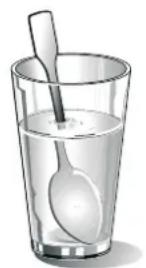
■ Water in a hot cooking compartment may create hot steam. Never pour water into the hot cooking compartment. - There is a possibility of delayed boiling when a liquid is heated. This means that the liquid reaches boiling temperature without the usual steam bubbles rising to the surface. Even if the container only vibrates a little, the hot liquid may suddenly boil over and spatter. When heating, always place a spoon in the container. This will prevent delayed boiling.
Risk of injury!
- Scratched glass in the appliance door may develop into a crack. Do not use a
glass scraper, sharp or abrasive cleaning aids or detergents.
■ Unsuitable ovenware may crack. Porcelain or ceramic ovenware can have small perforations in the handles or lids. These perforations conceal a cavity below. Any moisture that penetrates this cavity could cause the ovenware to crack. Only use microwave-safe ovenware.
Causes of damage
Caution!
■ Heavily soiled seal: If the seal is very dirty, the appliance door will no longer close properly during operation. The fronts of adjacent units could be damaged. Always keep the seal clean.
- Operating the microwave without food: Operating the appliance without food in the cooking compartment may lead to overloading. Never switch on the appliance unless there is food in the cooking compartment. An exception to this rule is a short crockery test (see the section "Microwave, suitable crockery").
Microwave popcorn: Never set the microwave power too high. Use a power setting no higher than 600 watts. Always place the popcorn bag on a glass plate. The disc may jump if overloaded.
Energy and environment tips
Here you can find tips on how to save energy when baking and roasting and how to dispose of your appliance properly.
Saving energy
Only preheat the oven if this is specified in the recipe or in the operating instruction tables.
Use dark, black lacquered or enamelled baking tins. They absorb the heat particularly well.
Open the appliance door as little as possible during cooking, baking or roasting.
It is best to bake several cakes one after the other. The cooking compartment is still warm. This may reduce the baking time for the second cake.
For longer cooking times, you can switch the oven off 10 minutes before the end of the cooking time and use the residual heat to finish cooking.
Environmentally-friendly disposal
Dispose of packaging in an environmentally-friendly manner.

This appliance is labelled in accordance with European Directive 2012/19/EU concerning used electrical and electronic appliances (waste electrical and electronic equipment - WEEE). The guideline determines the framework for the return and recycling of used appliances as applicable throughout the EU.
Your new appliance
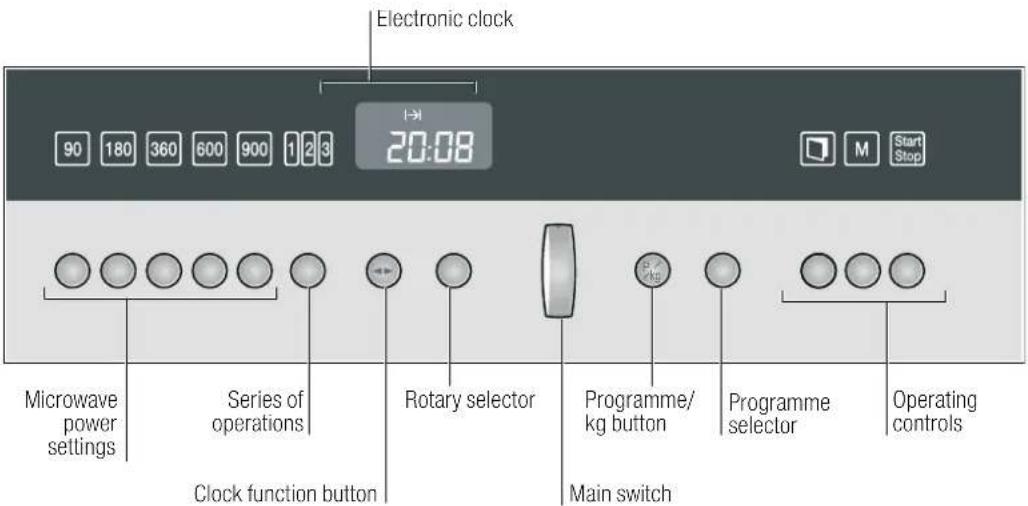
Use this section to familiarise yourself with your new appliance. The control panel and the individual operating controls are explained.
Control panel
After-sales service products
You can obtain suitable care and cleaning agents and other accessories for your domestic appliances from the after-sales
service, specialist retailers or (in some countries) online via the e-Shop. Please specify the relevant product number.
| Cleaning cloths for stainless steel surfaces | Article no. 311134 Reduces the build-up of dirt. Impregnated with a special oil for perfect maintenance of your appliance's stainless-steel surfaces. | |
| Oven/grill cleaning gel Article no. 463582 For cleaning the cooking compartment. The gel is odourless. | ||
| Microfibre cloth with honeycomb structure | Article no. 460770 | Especially suitable for cleaning delicate surfaces, such as glass, glass ceramic, stainless steel or aluminium. The microfibre cloth removes liquid and grease deposits in one go. |
Operating controls
Each of the operating controls will be explained below in the same order as they appear on your control panel (from left to right).
| Operating controls | Use |
| 90 Selects 90 watt microwave power | |
| 180 Selects 180 watt microwave power | |
| 360 Selects 360 watt microwave power | |
| 600 Selects 600 watt microwave power | |
| 900 Selects 900 watt microwave power | |
| Selects a series of operations | |
| Clock function buttonsSelect the desired clock function | |
| Rotary selector Makes settings within a clock function. | |
| Main switch Switches your appliance on and off. | |
| P_kg | Selects automatic programmes |
| Programme selector | Sets the programme or weight. |
| Opens the appliance door. | |
| M | Selects the memory |
| Operating controls | Use |
| Press briefly = starts/pauses operationPress and hold = cancels operation |
Microwave power settings and operating controls
When you press a button, the relevant item lights up on the display.
Pop-out selectors
Rotary and programme selectors can be pushed in and popped out. Press the selector to push it in or pop it out.
Cooking compartment
Your appliance has a cooling fan.
Cooling fan
The appliance is equipped with a cooling fan. The fan may run on even if the oven has been switched off.
Notes
■ The cooking compartment remains cold during microwave operation. The cooling fan will still switch on. The fan may run on even when microwave operation has ended.
■ Condensation may appear on the door window, interior walls and floor. This is normal and does not adversely affect microwave operation. Wipe away the condensation after cooking.
Before using the oven for the first time
In this section, you can read about
How to set the clock once your appliance has been connected
to the mains
Setting the clock
0:00 and the ◀▶⊗ symbols light up in the clock display.
-
Turn the rotary selector to set the time of day.
-
Press the ◀ clock function button.

Your setting is applied.
Changing the clock
To subsequently change the clock time, press the ◀clock function button repeatedly until the ◀ and ☑ symbols light up. Use the rotary selector to change the time of day.
Note: In order to reduce the energy consumption of your appliance in standby, you can switch off the clock display. Refer to the section entitled Electronic clock.
Switching the appliance on and off
Switch your microwave oven on and off using the main switch.
Switching on
- Press the main switch.
The appliance switches on. The Ⓓ symbol lights up.
- Select a function:
■ 90, 180, 360, 600 or 900 W button for a microwave power setting
■ 123 button = series of operations
■ Pkg button = automatic programmes
■ M button = memory programme
You can read how to make settings in the individual sections.
Switching off
Press the main switch. The Ⓐ symbol goes out. The appliance switches off, and the clock appears again.
The microwave
Microwaves are converted to heat in foodstuffs. You will find information about ovenware and how to set the microwave.
Note: In the Tested for you in our cooking studio section, you will find examples for defrosting, heating and cooking with the microwave oven.
Notes regarding ovenware
Suitable ovenware
Suitable dishes are heat-resistant ovenware made of glass, glass ceramic, porcelain, ceramic or heat-resistant plastic. These materials allow microwaves to pass through.
You can also use serving dishes. This saves you having to transfer food from one dish to another. You should only use ovenware with decorative gold or silver trim if the manufacturer guarantees that they are suitable for use in microwaves.
Unsuitable ovenware
Metal ovenware is unsuitable. Metal does not allow microwaves to pass through. Food in covered metal containers will remain cold.
Caution!
Creation of sparks: metal – e.g. a spoon in a glass – must be kept at least 2 cm from the oven walls and the inside of the door. Sparks could destroy the glass on the inside of the door.
Ovenware test
Do not switch on the microwave unless there is food inside. The following ovenware test is the only exception to this rule.
Perform the following test if you are unsure whether your ovenware is suitable for use in the microwave:
-
Heat the empty ovenware at maximum power for 12 to 1 minute.
-
Check the temperature occasionally during that time.
The ovenware should still be cold or warm to the touch.
The ovenware is unsuitable if it becomes hot or sparks are generated.
Microwave power settings
Use the button to set the desired microwave power.
90 W for defrosting delicate foods
180 W for defrosting and continued cooking
360 W for cooking meat and heating delicate foods
600 W for heating and cooking food
900 watts for heating liquids
Notes
■ When you press a button, the selected power lights up.
■ The microwave power can be set to 900 watts for a maximum of 30 minutes. With all other power settings a maximum cooking time of 1 hour 30 minutes is possible.
Setting the microwave
Example: microwave power 600 W, cooking time 10 minutes
- Press the main switch.
The appliance is ready for operation and the Ⓓ symbol lights up.
- Press the button for the microwave power setting you require. The selected power setting lights up and a suggested cooking time is displayed.
- Set the cooking time using the rotary selector.
- Press the Start Step button.
Operation begins. The cooking time starts counting down in the display.
The cooking time has elapsed.
A signal sounds. The microwave operation has finished. You can stop the audible signal by pressing the ◀▶ button. Switch off with the main switch or make new settings.
Changing the cooking time
Change the cooking time using the rotary selector.
Changing the microwave power setting
Press the button for the new microwave power setting. Use the rotary selector to set the cooking time and restart.
Cancelling operation
Press and hold the Start Slot button for a few seconds and switch off the main switch.
Note: If you open the appliance door during cooking, the fan may continue running.
1, 2, 3 series of operations
You can use the series of operations function to set up to three different consecutive settings and then start.
In this section, you can find out how to set a series of operations.
Ovenware
Always use microwave-safe, heat-resistant ovenware.
Setting a series of operations
Prerequisite: switch on the main switch. Your appliance is ready for operation and the ① symbol lights up
- Press the 123 button.
The 1 for the first operation in the series lights up. - Set the first microwave power setting and cooking time.
- Press the 123 button again.
The ☐ for the second operation in the series lights up. - Set the second microwave power setting and cooking time.
- Press the 123 button again.
The lights up for the third operation in the series. - Set the third microwave power setting and cooking time.
- Press the Start Step button.
Operation begins. In the clock display, the total cooking time is displayed and the currently activated operation is lit.
The cooking time has elapsed
A signal sounds. The series of operations has finished. To stop the signal, press the ◀ clock function button. Switch off the appliance or make new settings.
Opening the appliance door during operation
Operation is suspended. The cooling fan may continue to run. After closing the door, press the button. Operation continues.
Changing the setting
Changes can only be made before operation begins. Press the button to go to the desired setting, and make the changes.
Cancelling operation
Press the illuminated button for the set microwave power setting. Make new settings or switch off the appliance.
Pausing operation
Press the Start Step button briefly. Operation is suspended. Press the Start Step button again, operation continues.
Memory
The memory gives you the option of saving your own settings and calling them up again. You have two memory locations available, namely "M1" and "M2". The memory is useful if you prepare one meal particularly frequently.
In this section, you can read about
■ how to save the memory
■ how to start the memory
Saving settings in the memory
Example: use the "M1" memory location.
- Press the main switch.
The Ⓓ symbol lights up. Your appliance is ready for operation. - Press the button for the microwave power setting you require. The power setting lights up and a suggested cooking time is displayed.
-
Set the cooking time using the rotary selector.
-
Press and hold the ☐ button for a few seconds.
An audible signal sounds and "M1" appears on the clock display for the first memory location.
You can select "M1" or "M2" using the programme selector. -
Press and hold the ☐ button for a few seconds.
A signal sounds. The setting is saved and can be started at any time.
Saving another setting
Enter and save the new setting. The old settings are overwritten.
Note: The programmes which have been set remain stored even if there is a power cut.
Note: You can also store the series of operations option.
Starting the memory function
You can start cooking at any time using the settings saved for your dish.
- Press the main switch.
The Ⓑ symbol lights up. Your appliance is ready for use. - Press and hold the M button for a few seconds.
- Select "M1" or "M2" using the programme selector.
- Press the Start Stop button.
The memory function starts. The cooking time counts down in the display.
Note: Once operation has started, you can no longer change the memory location.
Note: Saved settings are retained even after a power cut.
The cooking time has elapsed
A signal sounds. The memory function has finished. You can stop the audible signal early by pressing the ◀ clock function button. Press the main switch to switch off the appliance, or make new settings.
Pausing operation
Press the [Start Stop] button or open the appliance door. Operation is suspended. After closing the door, press the [Start Stop] button again. Operation continues.
Cancelling the setting
Press and hold the 📄 button for a few seconds. The setting is cancelled. Make new settings or switch the appliance off at the main switch.
Electronic clock
Your appliance has various clock functions.
In this section, the following are explained:
■ The clock display
■ how to set the timer
■ how your appliance is automatically switched off (cooking time)
■ how to set or change the clock.
Clock display
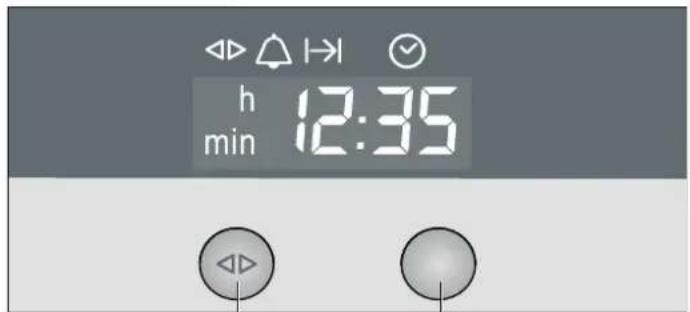
Clock function button Rotary selector
Clock function Use
Timer You can use the timer as an egg timer or a kitchen timer. The appliance does not switch on or off automatically
I→I Cooking time The appliance switches off automatically after a set cooking time I→I (e.g. 1:30 hours)
Clock Setting the clock
Notes
■ Between the times 22:00 and 5:59 the clock display is dimmed if you do not make any settings in that period or no clock function is activated.
■ When the Timer △ and Cooking time I→I clock functions are in use, a signal sounds after the settings have elapsed and the corresponding symbol flashes. To stop the audible signal before it finishes, press the clock function ◀ button
If you wish to cancel a setting, turn the set time back to 0:00 and switch the appliance off.
■ The setting can be corrected using the rotary selector if necessary.
Switching the clock display on and off
- Press and hold the clock function button ◀ for a few seconds.
The clock display is switched off. If a clock function is active, the associated symbol remains illuminated. - Press and hold the clock function button ◀ for a few seconds.
The clock display switches on.
Timer
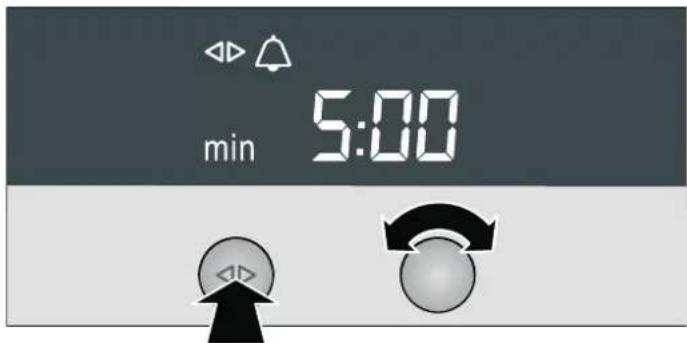
- Press the ◀clock function button repeatedly until the ◀ and △ symbols light up.
- Set the duration using the rotary selector (e.g. 5:00 minutes). The setting is applied automatically. Then the clock is displayed again and the minute minder starts counting down.
Cooking time
Automatic switch-off after a cooking time setting has elapsed.
- Set the grill or a microwave power setting.
-
Press the clock function button until the ◀ and I→I symbols light up.
-
Set the cooking time using the rotary selector. (e.g. 1:30 hours). The setting is applied automatically

- Press the Slap button.
The set cooking time counts down.
The cooking time has elapsed
A signal sounds. The appliance stops heating. The display shows 0:00. You can cancel the audible signal before it has finished by pressing the ◀ button.
Changing the cooking time
Change the cooking time using the rotary selector.
Cancelling the cooking time
Using the rotary selector, turn the cooking time back to 0:00. The change is applied after a few seconds. The cooking time has been cancelled.
Checking time settings
If several time-setting options have been set, the corresponding symbols appear in the display. The ◇ symbol is in the foreground in front of the time function symbol.
To check the kitchen timer 🔒, cooking time I→I or clock time ⏻, press the ◀▶ button repeatedly until the ◀▷ symbol is in front of the appropriate time function. The relevant value will appear for a few seconds in the clock display.
Setting the clock
You can only change the clock when no other clock function is active.
-
Press the clock function ◀ button repeatedly until the ◀ and ⏰ symbols light up.
-
Turn the rotary selector to set the time of day.

- Press the ◀ clock function button. Your setting is applied.
Changing the clock
e.g. from British Summer Time to Greenwich Mean Time. Make the settings as described in steps 1 and 2.
Changing the basic settings
Your appliance has various basic settings which you can change at any time.
Basic settings
In the table, you will find all the basic settings and options for changing them.
| Basic setting Options Explanation | |||
| c1 | Audible signal duration: 1= short = 10 seconds | Audible signal duration: 2= medium = 2 minutes 3= long = 5 minutes | Signal after the cooking time has elapsed |
| c2 | Button tone: 1= on | Button tone: 2= off | Confirmation tone when a button is pressed |
Press the main switch. The appliance is ready for operation and the Ⓑ symbol lights up.
- Press and hold the _k6 button for a few seconds.
The first basic setting appears on the clock display. - Press the 5kg button repeatedly until the required basic setting is shown.
- Make the desired setting using the programme selector.
- Finally, press and hold the % button for a few seconds. All settings are applied.
You can change the settings at any time.
Care and cleaning
With careful care and cleaning your microwave oven will retain its looks and remain good order. We will explain here how you should care for and clean your appliance correctly.
Risk of electric shock!
Penetrating moisture may cause an electric shock. Do not use any high-pressure cleaners or steam cleaners.
Risk of burns!
Never clean the appliance immediately after switching off. Let the appliance cool down.
⚠️ Risk of injury!
Scratched glass in the appliance door may develop into a crack. Do not use a glass scraper, sharp or abrasive cleaning aids or detergents.
Notes
■ Slight differences in colour on the front of the appliance are caused by the use of different materials, such as glass, plastic and metal.
■ Shadows on the door panel which look like streaks, are caused by reflections made by the oven light.
■ Enamel is baked on at very high temperatures. This can cause some slight colour variations. This is normal and does not affect their function. The edges of thin trays cannot be completely enamelled. As a result, these edges can be rough. This will not impair the anti-corrosion protection.
■ Unpleasant odours, e.g. after fish has been prepared, can be removed very easily. Add a few drops of lemon juice to a cup of water. Place a spoon into the container as well, to prevent delayed boiling. Heat the water for 1 to 2 minutes at maximum microwave power.
Cleaning agents
To ensure that the different surfaces are not damaged by using the wrong cleaning agent, observe the information in the table. Do not use
■ sharp or abrasive cleaning agents,
■ metal or glass scrapers to clean the glass in the appliance door,
■ metal or glass scrapers to clean the door seal,
■ any coarse scouring pads or cleaning sponges,
■ cleaning agents with high concentrations of alcohol.
Wash new sponge cloths thoroughly before use.
Area Cleaning agents
| Appliance front Hot soapy water: | |
| Clean using a dish cloth and then dry with a soft cloth. Do not use glass cleaners or metal or glass scrapers for cleaning. | |
| Stainless steel Hot soapy water: | |
| Clean using a dish cloth and then dry with a soft cloth. Remove flecks of limescale, grease, starch and albumin (e.g. egg white) immediately. Corrosion can form under such residues. Special stainless steel cleaning agents can be obtained from the after-sales service or from specialist retailers. | |
| Cooking compartment made of stainless steel | Hot soapy water or a vinegar solution: Clean using a dish cloth and then dry with a soft cloth. If the oven is very dirty: use oven cleaner, but only when cooking compartment is cold. It is best to use a stainless-steel sponge. Do not use oven spray or other aggressive oven cleaners or abrasive materials. Scouring pads, rough sponges and pan cleaners are also unsuitable. These scratch the surface. Allow the interior surfaces to dry thoroughly. |
| Door panels Glass cleaner: | |
| Clean with a dish cloth. Do not use a glass scraper. | |
| Door sealDo not remove. | Hot soapy water: Clean with a dish cloth; do not scrub. Do not use a metal or glass scraper for cleaning. |
Faults and repairs
It is not always necessary to call the after-sales service.
Sometimes, you can find a remedy yourself. You will find some tips for troubleshooting in the following table.
Malfunction table
Problem Possible cause Remedy/information
| The appliance does not work Faulty circuit breaker Look in the fuse box and check that the circuit breaker for the appliance is in working order. | |
| Plug not plugged in Plug in the plug | |
| Power cut Check whether the kitchen light works. | |
| Incorrect operation Switch off the circuit breaker in the fuse box.Reconnect it after approx. 10 seconds. | |
| Three zeros appear in the display. | Power cut Reset the clock. |
| The appliance is not in operation. A cooking time appears in the dis-play. | The button was not pressed after the setting had been made. Press the button or switch the appliance off. |
Problem Possible cause Remedy/information
| The microwave does not switch on. | The door was not fully closed. Check whether food residues or foreign objects are trapped in the door. Make sure that the seal surfaces are clean. Check whether the door seal is twisted. | |
| The button has not been pressed. | Press the button. | |
| It takes longer than before for the food to heat up. | The microwave power setting is too low. Select a higher power setting. | |
| A larger amount than usual has been placed in the appliance. | Double the amount = almost double the time | |
| The food was colder than usual. Stir or turn food during cooking. | ||
| A signal sounds. The colon in the display is flashing. | The appliance is in demonstration mode. | 1. Press the button.2. Press and hold the button for 3 seconds.The demonstration mode is deactivated. |
Error messages
You can take remedial action yourself for some error messages.
Error message Possible cause Remedy/Note
| Error message "E723" appears in the display. | The door is not properly closed. | Open the appliance with the ☐ button and close it again. |
| Error message "Er1", "Er4", "Er18" or "E305" appears in the display. | Technical malfunction. Call the after-sales service. | |
| Error message "Er11" appears in the display. "Button jammed" | The buttons are dirty or the mechanism has jammed. | Press all the buttons several times. Clean the buttons with a dry cloth. Open and close the appliance door. If this does not help, consult the after-sales service. |
After-sales service
Our after-sales service is there for you if your appliance needs to be repaired. We will always find the right solution in order to avoid unnecessary visits from a service technician.
E number and FD number
When calling us, please give the product number (E no.) and the production number (FD no.) so that we can provide you with the correct advice. The rating plate bearing these numbers can be found on the right-hand side when you open the appliance door. To save time, you can make a note of the number of your appliance and the telephone number of the after-sales service in the space below, should it be required.
E no.
FD no.
After-sales service

Please note that there will be a fee for a visit by a service technician in the event of a malfunction, even during the warranty period.
Please find the contact data of all countries in the enclosed customer service list.
To book an engineer visit and product advice
GB 0844 8928989
Calls from a BT landline will be charged at up to 3 pence per minute. A call set-up fee of up to 6 pence may apply.
IE 01450 2655
Trust the expertise of the manufacturer, and rest assured that the repair will be carried out by trained service technicians using original spare parts for your domestic appliance.
This appliance corresponds to the standards EN 55011 and CISPR 11. It is a Group 2, Class B product.
Group 2 means that microwaves are produced for the purpose of heating food. Class B states that the appliance is suitable for private households.
Technical data
| Power supply | 230 V, 50 Hz |
| Maximum total connected load | 1220 W |
| Microwave power setting | 900 W (IEC 60705) |
| Microwave frequency | 2,450 MHz |
| Fuse | min. 10 A |
| Dimensions (HxWxD) | |
| - appliance | 382 mm x 595 mm x 320 mm |
| - cooking compartment | 220 mm x 350 mm x 270 mm |
| VDE approved | yes |
| CE mark | yes |
Automatic programmes
You can use the automatic programmes to defrost food with the greatest of ease and prepare dishes quickly and easily. You select the programme and enter the weight of your food. The automatic programme makes the optimum setting. You can select from 7 programmes.
Setting a programme
Once you have selected a programme, set the oven as follows.
Example in the picture: programme 2 with a weight of 1 kilogramme.
Switch on the main switch.
- Press the _ka button.
The first programme number appears on the clock display.
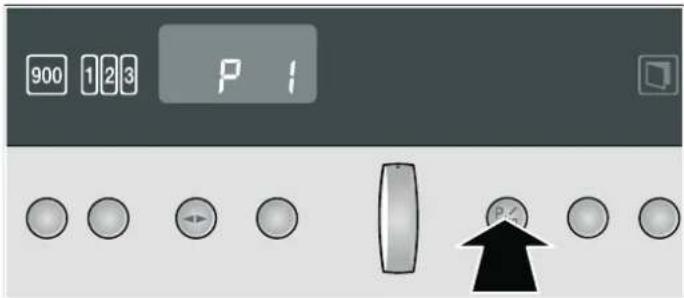
- Use the programme selector to select the required programme.

- Press the 12 button again.
0.50 kg is suggested as the weight in the clock display.

- Set the weight using the programme selector.

- Press the 📄 button.
The programme starts. The cooking time counts down and the I→I symbol appears.
The programme has ended
A signal sounds. The appliance stops heating. 00:00 appears in the display. Press the button and switch off the main switch. You can stop the audible signal early by pressing the clock function button.
Changing the programme
Once you have started the programme, the programme number and weight cannot be changed.
Changing the cooking time
With automatic programmes, you cannot change the cooking time.
Cancelling the programme
Press and hold the Start button for a few seconds and switch off the main switch. The appliance is switched off.
Notes on the automatic programmes
Notes
■ Take the food out of its packaging and weigh it. If it is not possible to enter the exact weight, you should round it up or down.
For the programmes, always use microwave-proof cookware, e.g. made of glass or ceramic. Observe the accessories tips in the programme table.
■ Place the food in the cold appliance.
■ It is not possible to set a weight outside the weight range.
■ With many dishes, a signal sounds after a certain time. Turn or stir the food.
A table of suitable types of food with appropriate weight ranges and the accessories required can be found in the section after the notes.
Defrosting
Notes
As far as possible, freeze and store food flat and in portion-sized quantities at -18 °C.
■ Place the frozen food on a flat dish, e.g. a glass or porcelain plate.
■ After defrosting in the appliance, leave the food to continue defrosting for a further 10 to 30 minutes until it reaches an even temperature.
- Liquid will be produced when meat, poultry or fish is defrosted. Drain off this liquid when turning meat and poultry and under no circumstances use it for other purposes or allow it to come into contact with other foods.
■ Place beef, lamb and pork on the cookware fatty-side down first.
- Bread should only be defrosted in the required amounts, as it quickly becomes stale.
■ After turning, remove any minced meat that has already defrosted.
■ Whole poultry should be placed in the cookware breast-side down and poultry portions skin-side down.
Potatoes
Notes
■ Boiled potatoes: cut into equal sized pieces. Add a little salt and 2 tablespoons of water for every 100 g of potatoes.
- Potatoes boiled in their skins: use potatoes of equal size. Wash the potatoes and prick the skin several times. Place the wet potatoes in a dish. Do not add water.
Rice
Notes
- Rice foams a lot during cooking. Therefore, use a high-sided dish with a lid. Enter the uncooked weight (without liquid). Add two to two and a half times the amount of liquid to the rice.
■ Do not use boil-in-the-bag rice.
Vegetables
Notes
■ Fresh vegetables: cut into pieces of equal size. Add 2 tablespoons of water for every 100 g vegetables.
■ Frozen vegetables: this programme is only suitable for blanched, not pre-cooked vegetables. It is not suitable for frozen vegetables in cream sauce. Add 1 to 2 tablespoons of water per 100 g. Do not add water to spinach or red cabbage.
Resting times
Some dishes need to rest in the oven after the programme has ended.
Dish Resting time
| Vegetables approx. 5 minutes |
| Potatoes approx. 5 minutes. First pour off the remaining water. |
Rice 5 to 10 minutes
Programme table
| Progr. no. Suitable food Weight range in kg Cookware | |||
| Defrost | |||
| P1 | Meat and poultry - Joints - Flat pieces of meat - Mince - Chicken, poulard, duck | 0.2 - 2.0 kg Shallow cookware without lid | |
| P2 | Fish: whole fish, fish fillet, fish cutlet | 0.1 - 1.0 kg | Shallow cookware without lid |
| P3 | Bread and cake* Bread, whole, round or long, bread in slices, sponge cake, yeast cake, fruit flan | 0.2 - 1.5 kg Shallow cookware without lid | |
| Cooking | |||
| P4 | Potatoes Boiled potatoes, potatoes boiled in their skins | 0.2 - 1.0 kg Dish with lid | |
| P5 | Rice | 0.05 - 0.3 kg | High-sided dish with lid |
| P6 | Fresh vegetables Cauliflower, broccoli, carrots, kohlrabi, leeks, peppers, courgettes | 0.15 - 1.0 kg | Dish with lid |
| P7 | Frozen vegetables Cauliflower, broccoli, carrots, kohlrabi, red cabbage, spinach | 0.15 - 1.0 kg | Dish with lid |
Observe the signals for stirring and turning.
* Cream cakes, buttercream cakes, cakes with frosting, icing or gelatine are unsuitable.
Tested for you in our cooking studio.
Here you will find a selection of recipes and the ideal settings for them. We show you which microwave power setting is best for your dish and there are tips about cookware and preparation.
Notes
■ The values in the table always apply to food placed into the cooking compartment when it is cold and empty. Only preheat the appliance if the table specifies that you should do so.
■ The times specified in the tables are only guidelines. They depend on the quality and consistency of the food.
■ Additional accessories may be obtained from specialist retailers or from the after-sales service.
■ Always use an oven cloth or oven gloves when taking accessories or cookware out of the cooking compartment.
Defrosting, heating up and cooking with the microwave
The following tables provide you with numerous options and settings for the microwave.
The times specified in the tables are only guidelines. They may vary according to the ovenware used, the quality, temperature and consistency of the food.
Time ranges are often specified in the tables. Set the shortest time first and then extend the time if necessary.
It may be that you have different quantities from those specified in the tables. A rule of thumb can be applied:
Double the amount - almost twice the cooking time, Half the amount - half the cooking time.
Stir or turn the food several times during the heating time. Check the temperature.
Defrosting
Notes
-
Place the frozen food in an open container on the cooking compartment floor.
■ Turn or stir the food once or twice during the defrosting time. Large pieces of food should be turned several times. -
Liquid will be produced when meat, poultry or fish is defrosted. Drain off this liquid when turning meat and poultry and under no circumstances use it for other purposes or allow it to come into contact with other foods.
Leave defrosted items to stand at room temperature for a further 10 to 30 minutes so that the temperature can even out. The giblets can be removed from poultry at this point.
| Defrosting Weight Microwave power setting in watts, cooking time in minutes | Notes | |
| Meat, whole pieces of beef, veal or pork (on the bone or boned) | 800 g 180 W, 15 mins + 90 W, 15-25 mins Turn several times | |
| 1 kg 180 W, 20 mins + 90 W, 20-30 mins | ||
| 1.5 kg 180 W, 25 mins + 90 W, 25-30 mins | ||
| Meat in pieces or slices of beef, veal or pork | 200 g 180 W, 5-8 mins + 90 W, 5-10 mins Separate the defrosted parts when turning | |
| 500 g 180 W, 8-11 mins + 90 W, 10-15 mins | ||
| 800 g 180 W, 12-15 mins + 90 W, 15-20 mins | ||
| Minced meat, mixed 200 g 90 W, 10-15 mins Turn several times, remove meat | which has already defrosted | |
| Poultry or poultry portions 600 g 180 W, 8 mins + 90 W, 10-15 mins Turn several times | ||
| Fish fillet, fish steak or slices 400 g 180 W, 5 mins + 90 W, 10-15 mins Separate defrosted parts. | ||
| Whole fish | 300 g 180 W, 3 mins + 90 W, 10-15 mins Turn during defrosting. | |
| 600 g 180 W, 8 mins + 90 W, 15-20 mins | ||
| Vegetables, e.g. peas | 300 g 180 W, 10-15 mins | |
| Fruit, e.g. raspberries | 300 g 180 W, 6-9 mins | Stir carefully during defrosting and separate any defrosted parts. |
| 500 g 180 W, 8 mins + 90 W, 5-10 mins | ||
| Butter, defrosting | 125 g 180 W, 1 min + 90 W, 1-2 mins | Remove all packaging. |
| 250 g 180 W, 1 min + 90 W, 2-4 mins | ||
| Loaf of bread | 500 g 180 W, 8 mins + 90 W, 5-10 mins | Turn during defrosting. |
| 1 kg 180 W, 12 mins + 90 W, 10-20 mins | ||
| Cakes, dry, e.g. sponge cake | 500 g 90 W, 10-15 mins | Only for cakes without icing, cream or crème pâtissière, separate the pieces of cake. |
| 750 g 180 W, 5 mins + 90 W, 10-15 mins | ||
| Cakes, moist, e.g. fruit flan, cheese-cake | 500 g 180 W, 5 mins + 90 W, 15-20 mins Only for cakes without icing, cream or gelatine | |
| 750 g 180 W, 7 mins + 90 W, 15-20 mins | ||
Defrosting, heating up or cooking frozen food
Notes
■ Take ready meals out of the packaging. They will heat up more quickly and evenly in microwaveable ovenware. The different components of the meal may not require the same amount of time to heat up.
- Food which lies flat will cook more quickly than food which is piled high. You should therefore distribute the food so that it is as flat as possible in the ovenware. Different foodstuffs should not be placed in layers on top of one another.
■ Always cover the food. If you do not have a suitable cover for your ovenware, use a plate or special microwave foil.
■ Stir or turn the food 2 or 3 times during cooking.
■ After heating, allow the food to stand for a further 2 to 5 minutes so that it can achieve an even temperature.
■ Always use an oven cloth or oven gloves when removing plates from the oven.
This will help the food retain its own distinct taste, so it will require less seasoning.
Note: Place the ovenware on the cooking compartment floor.
| Defrosting, heating up or cooking frozen food | Weight | Microwave power setting in watts, cooking time in minutes | Notes |
| Menu, plated meal, ready meal (2-3 components) | 300-400 g | 600 W, 8-13 mins | |
| Soup | 400 g | 600 W, 8-12 mins | |
| Stew | 500 g | 600 W, 10-15 mins | |
| Meat in sauce, e.g. goulash | 500 g | 600 W, 10-15 mins | Separate the pieces of meat when stirring |
| Fish, e.g. fillet steaks | 400 g | 600 W, 10-15 mins | Add water, lemon juice or wine as desired |
| Defrosting, heating up or cooking frozen food | Weight Microwave power setting in watts, cooking time in minutes | Notes | |
| Side dishes, e.g. rice, pasta 250 g 600 | W, 3-7 mins Add a little liquid | ||
| 500 g 600 W, 8-12 mins | |||
| Vegetables, e.g. peas, broccoli, carrots | 300 g | 600 W, 7-11 mins | Pour water into the dish so that it covers the base |
| 600 g 600 W, 14-17 mins | |||
Creamed spinach 450 g 600 W, 10-15 mins Cook without additional water
Heating food

Risk of scalding!
There is a possibility of delayed boiling when a liquid is heated. This means that the liquid reaches boiling temperature without the usual steam bubbles rising to the surface. Even if the container only moves a little, the hot liquid can suddenly boil over and spatter. When heating liquids, always place a spoon in the container. This will prevent delayed boiling.
natural_image
Illustration of a glass filled with water and a spoon (no text or symbols)
natural_image
Crossed glass with black lines indicating a warning or rejection symbol (no text or numbers present)Caution!
Metal - e.g. a spoon in a glass - must be kept at least 2 cm from the oven walls and the inside of the door. Sparks could irreparably damage the glass on the inside of the door.
Notes
Take ready meals out of the packaging. They will heat up more quickly and evenly in microwaveable ovenware. The different components of the meal may not require the same amount of time to heat up.
■ Always cover the food. If you do not have a suitable cover for your container, use a plate or special microwave foil.
■ Stir or turn the food several times during the heating time. Check the temperature.
■ After heating, allow the food to stand for a further 2 to 5 minutes so that it can achieve an even temperature.
■ Always use an oven cloth or oven gloves when removing plates from the oven.
Note: Place the ovenware on the cooking compartment floor.
| Heating food Weight Microwave power setting in watts, cooking time in minutes | Notes | ||
| Menu, plated meal, ready meal (2-3 components) | 600 W, 5-8 mins - | ||
| Drinks | 125 ml | 900 W, 12 -1 mins | Place a spoon in the glass; do not overheat alcoholic drinks; check occasionally while heating |
| 200 ml | 900 W, 1-2 mins | ||
| 500 ml | 900 W, 3-4 mins | ||
| Baby food, e.g. baby bottle | 50 ml | 360 W, approx. 12 min | Bottles without teat or lid; shake or stir well after heating and ensure that you check the temperature |
| 100 ml | 360 W, 12 -1 mins | ||
| 200 ml | 360 W, 1-2 mins | ||
| Soup 1 cup | 175 g each | 600 W, 1-2 mins - | |
| Soup, 2 cups 350 g each | 600 W, 2-3 mins - | ||
| Meat in sauce | 500 g | 600 W, 7-10 mins | Separate the slices of meat |
| Stew | 400 g | 600 W, 5-7 mins - | |
| 800 g | 600 W, 7-8 mins - | ||
| Vegetables, 1 portion | 150 g | 600 W, 2-3 mins - | |
| Vegetables, 2 portions | 300 g | 600 W, 3-5 mins - | |
Cooking food
Notes
- Food which lies flat will cook more quickly than food which is piled high. You should therefore distribute the food so that it is as flat as possible in the ovenware. Different foodstuffs should not be placed in layers on top of one another.
- Cook the food in ovenware with a lid. If you do not have a suitable lid for your ovenware, use a plate or special microwave foil.
This will help the food retain its own distinct taste, so it will require less seasoning.
■ After cooking, allow the food to stand for a further 2 to 5 minutes so that it can achieve an even temperature.
■ Always use an oven cloth or oven gloves when removing plates from the oven.
| Cooking food | Weight | Microwave power setting in watts, cooking time in minutes | Notes |
| Whole chicken, fresh, no giblets | 1.2 kg | 600 W, 25-30 mins | Turn halfway through the cooking time |
| Fish fillet, fresh | 400 g | 600 W, 7-12 mins | - |
| Meat loaf 750 g 600 W, 25-30 mins Add 6 tbsp water. | |||
| Fresh vegetables 250 g 600 W, 5-10 mins Cut vegetables into pieces of equal size; | |||
| 500 g 600 W, 10-15 mins | Add 1 to 2 tbsp water per 100 g of vegetables; Stir during cooking | ||
| Potatoes 250 g 600 W, 8-10 mins Cut the potatoes into pieces of equal size; | |||
| 500 g 600 W, 10-15 mins | Add 1 to 2 tbsp water for every 100 g; Stir during cooking | ||
| 750 g 600 W, 15-22 mins | |||
| Rice 125 g 600 W, 4-6 mins + | 180 W, 14-16 mins | Add double the amount of liquid | |
| 250 g 600 W, 6-8 mins + 180 W, 14-16 mins | |||
| Sweet foods, e.g. blancmange (instant) | 500 ml 600 W, 5-7 mins Stir the blancmange thoroughly 2 to 3 times during cooking using an egg whisk. | ||
| Fruit, compote 500 g 600 W, 9-12 mins - | |||
Microwave tips
| You cannot find any information about the settings for the quantity of food you have prepared. | Increase or reduce the cooking times using the following rule of thumb:Double the amount = almost double the cooking timeHalf the amount = half the cooking time |
| The food has become too dry. | Next time, set a shorter cooking time or select a lower microwave power setting. Cover the food and add more liquid. |
| When the time has elapsed, the food is not defrosted, hot or cooked. | Set a longer time. Large quantities and food which is piled high require longer times. |
| When the time has elapsed, the food is overheated at the edge but not done in the middle. | Stir it during the cooking time and next time, select a lower microwave power setting and a longer cooking time. |
| After defrosting, the poultry or meat is defrosted on the outside but not defrosted in the middle. | Next time, select a lower microwave power setting. If you are defrosting a large quantity, turn it several times. |
Test dishes in accordance with EN 60705
The quality and correct operation of microwave appliances are tested by testing institutes using these dishes.
In accordance with EN 60705, IEC 60705, DIN 44547 and EN 60350 (2009)
Solo microwave cooking
| Dish | Microwave power setting in watts, cooking time in minutes | Note |
| Custard, 1,000 g | 600 W, 11-12 mins + 180 W, 8-10 mins | Pyrex dish |
| Sponge, 475 g | 600 W, 7-9 mins | Pyrex dish, dia. 22 cm. |
| Meat loaf, 900 g | 600 W, 25-30 mins | Pyrex loaf dish, 28 cm long |
Solo microwave defrosting
| Dish | Microwave power setting in watts, cooking time in minutes | Note |
| Meat, 500 g | Programme 1, 500 g or 180 W, 8 mins + 90 W, 7-10 mins | Pyrex dish, dia. 24 cm |
natural_image
Two glass glasses: one with a spoon inside, the other with a black X symbol (no text or labels)¡Atención!
natural_image
Simple illustration of a glass with a black X mark, no text or symbols present.Внимание!
- Προσοχή!
- ⚠️ Important safety information
- Risk of fire!
- Risk of explosion!
- Risk of serious damage to health!
- Risk of electric shock!
- Risk of burns!
- Risk of scalding!
- Risk of injury!
- Causes of damage
- Caution!
- Energy and environment tips
- Saving energy
- Environmentally-friendly disposal
- Your new appliance
- After-sales service products
- Operating controls
- Microwave power settings and operating controls
- Pop-out selectors
- Cooking compartment
- Cooling fan
- Notes
- Before using the oven for the first time
- Setting the clock
- Changing the clock
- Switching the appliance on and off
- Switching on
- Switching off
- The microwave
- Notes regarding ovenware
- Suitable ovenware
- Unsuitable ovenware
- Ovenware test
- Microwave power settings
- Setting the microwave
- The cooking time has elapsed.
- Changing the cooking time
- Changing the microwave power setting
- Cancelling operation
- 1, 2, 3 series of operations
- Ovenware
- Setting a series of operations
- The cooking time has elapsed
- Opening the appliance door during operation
- Changing the setting
- Pausing operation
- Memory
- Saving settings in the memory
- Saving another setting
- Starting the memory function
- Cancelling the setting
- Electronic clock
- Clock function Use
- Switching the clock display on and off
- Timer
- Cooking time
- Cancelling the cooking time
- Checking time settings
- Changing the basic settings
- Basic settings
- Care and cleaning
- ⚠️ Risk of injury!
- Cleaning agents
- Faults and repairs
- Malfunction table
- Error messages
- After-sales service
- E number and FD number
- To book an engineer visit and product advice
- Automatic programmes
- Setting a programme
- The programme has ended
- Changing the programme
- Cancelling the programme
- Notes on the automatic programmes
- Defrosting
- Potatoes
- Rice
- Vegetables
- Resting times
- Tested for you in our cooking studio.
- Defrosting, heating up and cooking with the microwave
- Defrosting, heating up or cooking frozen food
- Heating food
- Cooking food
- Test dishes in accordance with EN 60705
- ¡Atención!
- Внимание!
Brand : NEFF
Model : C54L60W3
Category : Microwave Oven