
MSE23 - Microwave Oven HITACHI - Free user manual and instructions
Find the device manual for free MSE23 HITACHI in PDF.


| Brand | Hitachi |
| Model | MSE23 |
| Product Type | Microwave Oven |
| Oven Capacity | 23 Liters |
| Outside Dimensions (HxWxD) | 288 mm x 486 mm x 410 mm |
| Oven Cavity Dimensions (HxWxD) | 221 mm x 314 mm x 347 mm |
| Net Weight | Approx. 13.9 kg |
| Input Power | 230-240 V ~ 50 Hz, 1250 W |
| Output Power (Microwave) | 800 W |
| Microwave Frequency | 2450 MHz |
| Power Levels | 5 (10%, 30%, 50%, 80%, 100%) |
| Maximum Microwave Cooking Time | 99 minutes 99 seconds |
| Turntable | Glass tray with turntable ring assembly |
| Grill Stand | Included |
| Control Type | Digital keypad with LED display |
| Clock Setting | 12/24 hour format, programmable |
| Delay Start | Yes, up to 23:59 |
| Speedy Cooking | 30-second increments up to 12 minutes at 100% power |
| Defrost by Weight | 100 g - 2000 g (dEF1) |
| Speed Defrost | 100 g - 1200 g (dEF2) |
| Auto Menu Cooking | 9 auto menus: Auto Reheat, Vegetable, Fish, Meat, Pasta, Potato, Pizza, Soup, Porridge |
| Multi-Section Cooking | Up to 2 sections (defrost must be first) |
| Child Lock | Yes, press STOP/CLEAR for 3 seconds |
| Safety Certifications | Earthed, 13A fuse, BS1362 approved |
| Cleaning | Mild detergent, soft cloth; do not use abrasives |
| Accessories Included | Glass tray, turntable ring assembly, grill stand, instruction manual |
Frequently Asked Questions - MSE23 HITACHI
User questions about MSE23 HITACHI
0 question about this device. Answer the ones you know or ask your own.
Ask a new question about this device
Download the instructions for your Microwave Oven in PDF format for free! Find your manual MSE23 - HITACHI and take your electronic device back in hand. On this page are published all the documents necessary for the use of your device. MSE23 by HITACHI.
USER MANUAL MSE23 HITACHI
HITACHI Inspire the Next
Model name
MSE23

IMPORTANT:
Read the safety instructions and precautions carefully before using the microwave oven.
Keep all documents relating to the microwave oven in a safe place.
Contents
Safety Precautions....3
Electrical Connection....4
Important Safety Instructions....5
Do's And Don'ts....6
Other helpful instructions....8
Cleaning and Care....9
Setting up Your Oven....10
Countertop Installation....11
Installation....11
Operation Instructions....12
Questions and Answers....16
Containers....17
Technical Specifications....18
SAFETY PRECAUTIONS
Please read the following precautions to prevent microwave leakage
PRECAUTIONS WHEN USING YOUR MICROWAVE OVEN
Because the door on your microwave oven has been carefully designed to contain the microwave energy, the precautions below are important
- Do not tamper with or attempt to defeat the safety interlocks which are operated by the door mechanism, or to make any irregular attempt to cause the appliance to operate with the door open
- Do not place any object between the oven front face and the door or allow dirt or cleaner residue to accumulate on sealing surfaces
- Do not operate the oven if it is damaged until it has been repaired by a fully qualified service technician. It is particularly important that the door closes properly and that there is no damage to the:
(a) Door (bent)
(b) Hinges and latches (broken or loosened)
(c) Door seals and door seal areas (broken or cracked) - It is dangerous for this oven to be adjusted or repaired by anyone other than a properly qualified and trained service technician
- Do not operate the oven empty. The appliance should not be operated without food in the oven, operation in this manner is likely to damage the appliance
IMPORTANT SAFETY INSTRUCTIONS
- Microwave heating of beverages can result in delayed eruptive boiling, therefore care must be taken when handling the container.
- The contents of feeding bottles and baby food jars shall be stirred or shaken and the temperature checked before consumption, in order to avoid burns
- This microwave oven is designed for freestanding use only and must not be placed in a built-in cabinet.
ELECTRICAL CONNECTION
For your safety please read the following information
Warning: This appliance must be earthed.
The appliance must be connected to a 230-240 volts 50 cycle AC supply by means of a three pin socket, suitably earthed and should be protected by a 13 amp fuse in the plug.
The appliance is supplied with a standard 13 amp 3 pin mains plug fitted with a 13 amp fuse. Should the fuse require replacement, it must be replaced with a fuse rated at 13 amp and approved to BS1362.
The plug contains a removable fuse cover that must be refitted when the fuse is replaced. In the event of the fuse cover being lost or damaged, the plug must not be used until a replacement cover has been obtained.
If the moulded mains plug is unsuitable for the socket outlet in your home or is removed for any other reason, then the fuse should be removed and the cut off plug disposed of safely to prevent the hazard of electric shock.
There is a danger of electric shock if the cut off plug is inserted into any 13 Amp socket outlet.
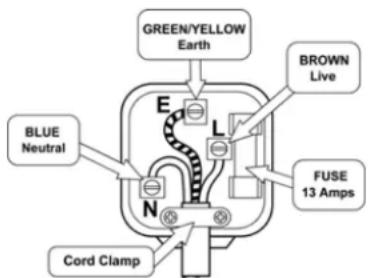
How to wire a 13 amp plug.
Important
The wires in the mains lead on this appliance are coloured in accordance with the following code:
Green and Yellow - Earth
Blue – Neutral
Brown – Live
As the colours may not correspond with the markings identifying the terminals in your plug proceed as follows.
The green and yellow wire must be connected to the terminal in the plug which is marked with the letter E or with the earth symbol 1= or coloured green and yellow.
The blue wire must be connected to the terminal marked N or coloured black.
The brown wire must be connected to the terminal marked L or coloured red.
IMPORTANT SAFETY INSTRUCTIONS
When using electrical appliances basic safety precautions should be followed, including the following:
WARNING – To reduce the risk of burns, electric shock, fire, injury to persons or exposure to excessive microwave energy
- Read all instructions before using the appliance
- Read and follow the specific 'Safety Precautions' found on page 2
- This appliance must be earthed. Connect only to properly earthed outlet
- Install or locate this appliance in accordance with the provided installation instructions
- Some products such as whole eggs and sealed containers – for example, closed glass jars, narrow necked containers – may explode and should not be heated in this oven
- Use this appliance only for its intended use as described in this manual
- As with any appliance, close supervision is necessary when used by children
- Do not operate this appliance if it has a damaged cord or plug, if it is not working properly, or if it has been damaged or dropped
- This appliance should be serviced by a fully trained technician Contact nearest authorised service facility for examination, repair or adjustment
- Do not cover or block any openings on the appliance
- Do not use outdoors
- Do not immerse cord or plug in water
- Keep cord away from heated surfaces
- Do not let cord hang over the edge of a table or counter
- Use only mild non-abrasive soaps or detergents applied with a sponge or soft cloth when cleaning surfaces of door and oven. See ‘CLEANING AND CARE’ of your microwave oven on page 7
- To reduce the risk of fire in the oven cavity
(a) Do not overcook food. Carefully attend appliance if paper, plastic, or other combustible materials are placed inside the oven to facilitate cooking
(b) Do not use recycled kitchen paper as it may contain metal particles
(c) Remove wire twist-ties from paper or plastic bags before placing bags in the oven
(d) If materials inside the oven should ignite, keep oven door closed, turn off oven and disconnect the power cord, or shut off power at the fuse or circuit breaker panel - Microwave heating of beverages can result in delayed eruptive boiling, therefore care must be taken when handling the container.
- The contents of feeding bottles and baby food jars shall be stirred or shaken and the temperature checked before consumption, in order to avoid burns.
- This microwave oven is designed for freestanding use only and must not be placed in a built-in cabinet.
SAVE THESE INSTRUCTIONS
DO'S AND DON'TS
To use the microwave oven safely, be sure to observe the following rules
| Do not remove the cabinetThe cabinet contains high voltage wiring, and it is dangerous |
| Do not insert anything in to the holes of the safety catches, air outlets, air inlets, the small holes inside the oven, or the holes at the rear of the applianceThe insertion may cause not only the failure of the switches and internal parts but there is also the danger of an electric shock |
| Do not run the microwave oven when the turntable is emptyThe door, turntable, and other roller ring will be overheated and the life of the magnetron, an important part of the microwave oven, will be shortened |
| Do not cover the air outlets or inlets on the cabinet, nor place anything on the cabinetThe microwave oven may be damaged because the internal parts cannot be cooled sufficiently. Also, the item placed on the cabinet may be overheated and become dangerous |
| Do not boil eggs in the microwave ovenThe eggs will explode because of the build up of pressure within the shell. When cooking poached or baked eggs, pierce egg yolk with a pointed knife |
If the microwave oven is out of order or damaged, do not try to repair it by yourself. Contact the nearest fully trained, qualified service technician
GB
COOKING UTENSILS
Utensils should be checked to ensure that they are suitable for use in the microwave oven. The following chart summarises the proper use of cooking utensils in your oven.
Cooking utensils
Microwave
| Heat resistant glass, glass ceramic | Yes | |
| Ceramic, china | Yes | |
| Metal cookware | No | |
| Non resistance glass | No | |
| Microwave plastic | Yes | |
| Plastic wrap | Yes | |
| Paper (cup, plates, towels) | Yes | |
| Straw, wicker and wood | No | |
Microwave
- Most glass, glass ceramic, and heat resistant glassware utensils are excellent. Those with metal trim should not be used in a microwave oven.
- Paper napkins, towels, plates, cups, cartons and cardboard can be used in the microwave oven. Do not use recycled paper products since they may contain impurities which may cause sparks and / or fires when used in cooking.
- Plastic dishes, cups, freezer bags, and plastic wraps may be used in the microwave oven. Follow the manufacturers instructions or the information given in a microwave cookbook when using plastics in the microwave oven.
- Metal utensils and utensils with metallic trim should not be used in the microwave oven.
If the use of aluminium foil, skewers, or utensils containing metal in the oven is specified in the recipe, allow at least 2.5 cm clearance between the metal object and the interior oven wall. If arcing (sparks) occurs, remove immediately.
Notes:
- Care should be taken when removing utensils or the glass turntable, as they may become hot during cooking
- Only use a thermometer that is designed or recommended for use in the microwave oven.
- Ensure the turntable is in place when you operate the oven.
OTHER HELPFUL INSTRUCTIONS
For best results and more enjoyable cooking, please read these comments thoroughly.
For Best Results:
- When determining the time for a particular food, begin by using short times and checking the cooking process frequently. It is easy to overcook food because microwaves cook very quickly.
- Small quantities of food, or foods with low water content may dry out and become hard if cooked too long.
Defrosting Frozen Food:
- Foods that have been frozen can be placed directly in the oven for thawing. (Be certain to remove any metallic ties or wraps).
- Defrost according to the Defrosting Tips found in this manual.
- For areas of the food thawing faster than others, cover with small pieces of aluminium foil. This helps slow down or stop the defrosting process in the covered areas.
- Some foods should not be completely thawed before cooking. For example, fish cooks so quickly that it is sometimes better to begin cooking while still slightly frozen.
- It may be necessary to increase or decrease the cooking time in some recipes, depending on the starting temperature of the food.
NOTE:
Air from the vent may become warm during cooking.
Browning:
There are a few foods which are not cooked long enough in the microwave oven to brown and may need additional colour.
Coatings such as paprika, and browning agents such as Worcestershire sauce may be used on chops, meat patties or chicken pieces.
Roasts, poultry or ham, cooked for 10-15 minutes or longer, will brown without extra additives when cooking in combination mode.
CLEANING AND CARE
- It is important that the oven is cleaned frequently to avoid food splashes from becoming ‘baked on’
- Clean the microwave oven after turning off the power and pulling out the plug
| Oven(Ceiling, walls, bottom, and inside of door) | Each time food has been cooked, wipe off the dirt or food splashes as soon as possibleGreasy spots should be wiped off with a cloth soaked in mild detergentIf dirt is left in the oven for a long time, it cannot be wiped off easily, it will hold the smell of the food and may cause corrosion or rustingAlso arcing may occur and the side cover may be scorched because the microwaves are concentrated on the food splashesIf the side cover becomes too dirty to be cleaned, consult your nearest store and replace itCheck the microwave oven for any visible damage, such as a misaligned door, damaged door seals around the door or dents inside the oven cavity or on the door. Ensure that the door and door sealing areas are clean before use, clean with a mild detergent, water and a soft cloth. Do not use scouring pads, powder or other abrasive materials | |
| Roller Ring | Always keep the roller ring cleanWhen it is soiled with food splashes or grease, remove the food splashes or grease using a sponge or cloth soaked with mild detergent and wash it in waterIf food splashes are left on the roller ring, arcing may occur because the microwaves are concentrated on the food splashesKeep the roller ring in position in the oven except when it is to be cleaned | |
| Turntable | When the turntable is soiled with grease or food splashes, remove the dirt with a sponge soaked in mild detergent, wash it in water and dry it | |
| Cabinet | Wipe the cabinet with a soft clothWhen the cabinet is heavily soiled, wipe it with a cloth soaked in mild detergent thoroughly with a clean damp clothDo not splash water on the air outlets | |
| CAUTIONS | Do not rub the oven and accessories with a wire brush or sharp-edged toolThe surface may become scratched | Do not apply oven cleaner, benzene, or thinner to the surface of the panel or doorThe letters on the panel may fade, and the surface may lose gloss or may corrode |
SETTING UP YOUR OVEN
Names of Oven Parts and Accessories
Remove the oven and all materials from the carton and oven cavity.
Your oven comes with the following accessories:
Glass tray 1
Turntable ring assembly 1
Instruction Manual 1
Grill stand 1
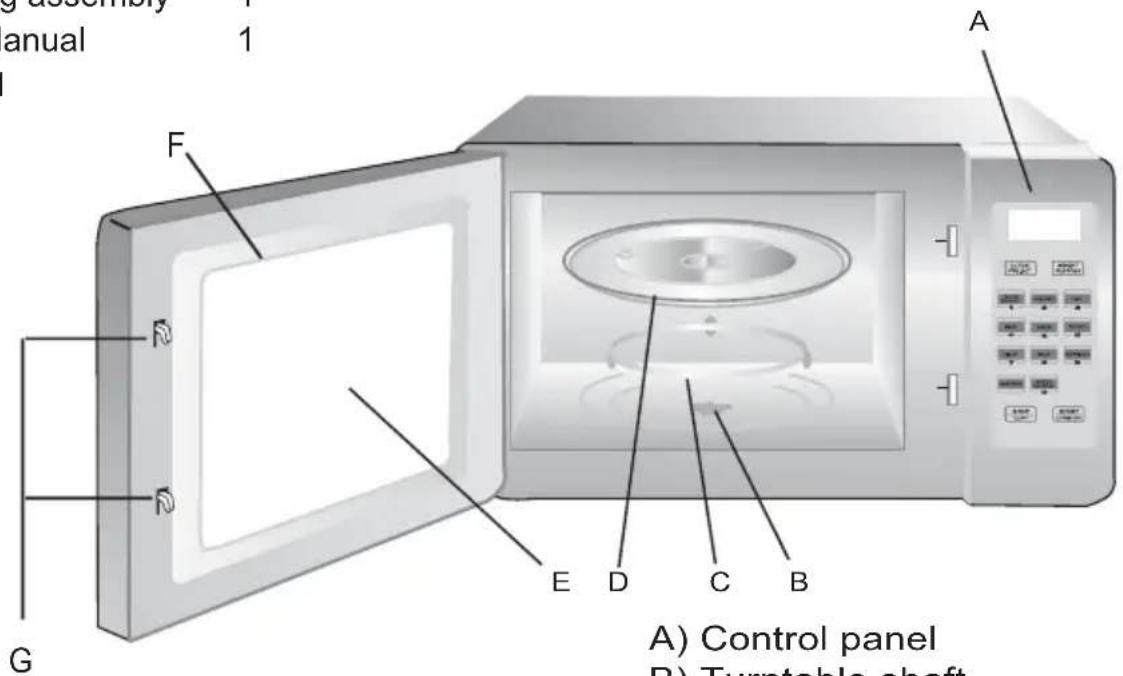
A) Control panel
B) Turntable shaft
C) Turntable ring assembly
D) Glass tray
E) Observation window
F) Door assembly
G) Safety interlock system
Turntable Installation
Hub (underside)
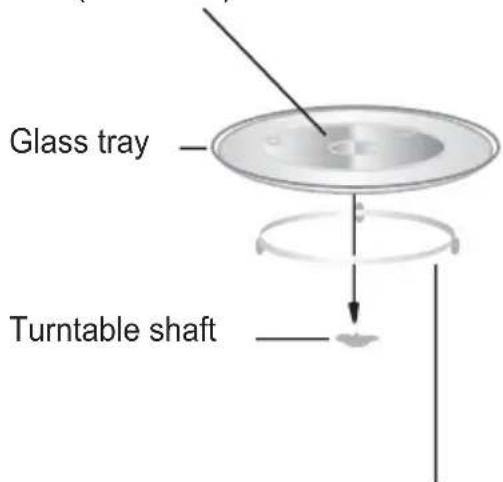
Turntable ring assembly
a. Never place the glass tray upside down. The glass tray should never be restricted.
b. Both glass tray and turntable ring assembly must always be used during cooking.
c. All food and containers of food are always placed on the glass tray for cooking.
d. If glass tray or turntable ring assembly cracks or breaks, contact your nearest authorized service center.
Countertop Installation
Remove all packing material and accessories. Examine the oven for any damage such as dents or broken door. Do not install if oven is damaged.
Cabinet: Remove any protective film found on the microwave oven cabinet surface.
Do not remove the light brown Mica cover that is attached to the oven cavity to protect the magnetron.
INSTALLATION
Remove all the packaging from the oven and check for any damage, for example, deformation or breakage of the door, gaps around the door or dents on the cabinet or door.
Should any damage be found, do not use the microwave oven but contact a fully qualified service agent. The servicemen will check the damage and repair the oven if necessary.
| PLACE OF INSTALLATIONPlace the microwave oven on a level and sturdy surfaceIf the surface is not level the door may not open automatically | Do not place the microwave oven near a gas appliance which produces heat or steam or near the sink where the water may splash on it Heat, steam or water may cause parts failure and damage |
| Allow an ample space between the microwave oven and wallThe wall may be soiled with the excess steam mist from the air outlets at the rear. Do not place the microwave ovennear a curtain. Allow a space of 7cm or more from the top surface, 3cm either side, and a minimum of 5cm at the rear for ventilation during cooking of the microwave oven. | Place the microwave oven more than three metres away from radios, TVs and antenna linesThe microwave oven may cause noise interference or distort the picture |
| Air inlets and air outlets should be kept free at all times to allow for ventilation. | Do not place the power cored across the oven or against a hot surface. |
Operation Instructions
1. Clock Setting
When the microwave oven is first plugged in, the LED will display "0:00".
The input time should be within 0:00--23:59;
Example: To set 12:12.
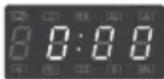
(1) Press the "CLOCK/PRE-SET" button, the hour figures will flash, and the indicator for clock "☐" will light.
(2) Press the number buttons of "1", "2", "1", "2" in order.
(3) Press "CLOCK/PRE-SET" to finish clock setting. The indicator for clock " will go out,":" will flash, and the time will be displayed.

Note: In the process of clock setting, if "STOP/CLEAR" is pressed or if there is no operation within 1 minute, the oven will go back to the previous status automatically.
2. Delay Start
Example: to start a cooking at 12:12.
(1) Set the clock first. (See Clock Setting)
(2) Set the cooking program (defrost should not be set here); Please do not press "START/EXPRESS COOK" at the last step.
(3) Press "CLOCK/PRE-SET" to display the current clock. The hour figures flash:
(4) Press "1", "2", '1", '2";
(5) Press "START/EXPRESS COOK" to confirm the setting. The unit will turn back to the clock state.
(6) (See Clock Setting) time arrives.
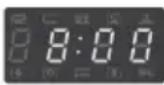
Note: (1) If the setting is not within the range 0:00–23:59, the setting will be invalid;
(2) In the process of setting, if "STOP/CLEAR" is pressed or there is no operation within 1 minute, the unit will go back to the previous state automatically;
(3) The clock must be set before delay cooking. If the pre-set cooking has not been programmed and only time to start cooking is set, the whole set will be regarded as an alarm clock setting and 5 beeps will be sound when the pre-set time is reached.
3. Microwave Cooking
Select different microwave power level and set cooking time. There are five power levels available. Refer to Chart 1. The maximum microwave cooking time is 99 minutes and 99 seconds. Keep on pressing "MICROWAVE" to choose the power.
Microwave Power Chart
| Press "Microwave" Microwave Power Display | ||
| Once | 100% | 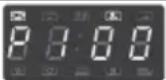 |
| Twice | 80% | 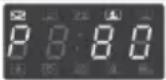 |
| Thrice | 50% |  |
| 4 times | 30% |  |
| 5 times | 10% | 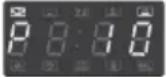 |
Example: Choose 50% power for 10 minutes.
(1) Press " MICROWAVE "three times, " [icon] and " [icon] will light.
(2) Press the number buttons "1", "0", "0", "0";
(3) Press "START/EXPRESS COOK" to start cooking, the time will count down. "", " [icon] and " [icon]" will flash.

4. Speedy Cooking:
When the unit is in waiting state, repeatedly press "START/EXPRESS COOK" to increase cooking time with 100% microwave power. Each additional press will increase the cooking time by 30 seconds until the accrued time reaches 1 minute 30 seconds then, each press will increase cooking time by 1 minute, the maximum cooking time is 12 minutes.
Example: Set 3 minutes speed cooking:
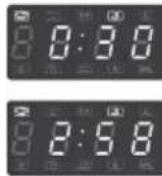
(1) Press " START/EXPRESS COOK " once to start cooking, LED will display "0:30", " " and " " will light.
(2) Press " START/EXPRESS COOK " another 4 times, the cooking time will be 3 minutes.
5. Defrost By Weight
Example: Defrost beef 500g in weight:
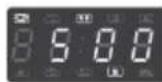
(1) Press "WEIGHT DEFROST", LED will display "dEF1", "☐" and "☐" will light.
(2) Press "5", "0", "0" "g" will light, the range of defrosting weight is 100g-2000g.
(3) Press "START/EXPRESS COOK" to start defrosting, "g" will go out, "☐" and "*" will flash.

6. Speed Defrost
Example: Defrost beef 500g in weight.
(1) Press "SPEED DEFROST", LED displays "dEF2", "☐" and "***" will light
(2) Press "5" "0" "0" "g" will light, the range of defrosting weight is 100g-1200g.
(3) Press "START/EXPRESS COOK" to start defrosting, "g" will go out, "☐" and "*" will flash.


7. Auto Menu Cooking
The numeral pads 1—9 is matching with nine different cooking modes;
| Pad | Display | Cook | Pad | Display | Cook | Pad | Display | Cook |
| 1 |  | Auto Reheat | 4 | 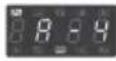 | Meat | 7 |  | Pizza |
| 2 | 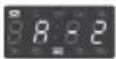 | Vegetable | 5 |  | Pasta | 8 |  | Soup |
| 3 |  | Fish | 6 |  | Potato | 9 | 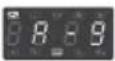 | Porridge |
Example: Cook vegetable 350g in weight:
(1) Press "VEGETABLE" button, " [REDACTED] and " AUTO COOK" will light.
(2) Press "VEGETABLE" button twice to choose weight, LED will display "350", "g", "☐" and "AUTO COOM" will light.
(3) Press " START/EXPRESS COOK " to start cooking, "g" will go out, time counts down, " [REDACTED] and " AUTO COOK " will flash.

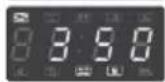
Refer to chart 2 for the automatic modes.
Chart 2:
| Menu | Weight(g) | Press Times | Display |
| A-1 Auto Reheat | 150 | Once | 1.50 |
| 250 | Twice | 2.50 | |
| 350 | Thrice | 3.50 | |
| 400 | 4 times | 4.60 | |
| A-2 Vegetable | 150 | Once | 1.50 |
| 350 | Twice | 3.50 | |
| 500 | Thrice | 5.60 | |
| A-3 Fish | 150 | Once | 1.50 |
| 250 | Twice | 2.50 | |
| 350 | Thrice | 3.50 | |
| 400 | 4 times | 4.60 | |
| 450 | 5 times | 4.50 | |
| A-4 Meat | 150 | Once | 1.50 |
| 300 | Twice | 3.60 | |
| 450 | Thrice | 4.50 | |
| 600 | 4 times | 6.60 | |
| A-5 Pasta | 50(with cold water 450g) | Once | 1.50 |
| 100(with cold water 800g) | Twice | 1.60 | |
| 150(with cold water 1200g) | Thrice | 1.50 | |
| A-6 Potato | 1(approximately 200g) | Once | 1.60 |
| 2(approximately 400g) | Twice | 2.60 | |
| 3(approximately 600g) | Thrice | 3.60 | |
| A-7 Pizza | 1(approximately 80g) | Once | 1.60 |
| 2(approximately 160g) | Twice | 2.60 | |
| 3(approximately 250g) | Thrice | 3.60 | |
| A-8 Soup | 500 | Once | 5.60 |
| 750 | Twice | 7.50 | |
| 1000 | Thrice | 10.60 | |
| A-9 Porridge | 550 | Once | 5.50 |
| 1100 | Twice | 11.60 |
8. Query Function
(1) In one stage cooking state, press "MICROWAVE", the current microwave power will be displayed for 3 seconds. After three seconds, the oven will turn back to the former state.
(2) In pre-set or cooking state, press "CLOCK/PRE-SET" to display the preset time or present time. will flash in the display for 2-3 seconds, then and the oven will turn back to the clock display.
(3) In cooking state, press "CLOCK/PRE-SET" to inquire the current time.
9. Multi-section cooking
At most 2 sections can be input for cooking. In multi-section cooking, if one section is defrosting, then defrosting shall be placed in the first section.
Note: Auto cooking cannot work in the multi-section cooking.
Example: If you want to cook the food with 100% microwave power for 10 minutes+ 80% microwave power for 15 minutes. Do the following:
1) Press "MICROWAVE" once to choose 100% microwave power;
2) Press number keys "1", "0", "0", "0" to set the cooking time;
3) Press "MICROWAVE" twice to choose 80% microwave power;
4) Press number keys "1", "5", "0", "0" to set the cooking time;
5) Press "START/EXPRESS COOK" to start cooking.
10. Lock-out Function for Children
Lock: In waiting state, press " STOP/CLEAR " for 3 seconds, there will be a long beep denoting entering the child-lock state and LED will display "
Lock quitting: In locked state, press "STOP/CLEAR" for 3 seconds, there will be a long "beep" denoting that the lock is released.
11. Cooking End Reminding Function
When cooking ends, there will be 5 beeps.
12. Display Specification
(1) In waiting state, LED will display clock and " : " will flash.
(2) In function setting state, LED will display the related setting.
(3) In the operation and suspending state, LED will display the residual cooking time.
GB
QUESTIONS AND ANSWERS
Q. What is wrong when the oven light will not glow?
A. *Light bulb has blown.
* Door not closed.
Q. Why is steam coming out of the air exhaust vent and / or why is water dripping from the bottom of the door?
A. Steam is normally produced during cooking operations. This microwave oven has been made to vent this steam out of the side and top vents, occasionally this steam condenses on the door and water then drips out at the bottom of the door. This is quite normal and safe.
Q. Does microwave energy pass through the viewing screen in the door?
A. No. The metal screen reflects the energy to the oven cavity. the holes, or ports are made to allow light to pass, they do not let microwave energy through.
Q. Will the microwave oven be damaged if it operates while empty?
A. Yes. Never run it empty.
Q. Why do eggs sometimes pop?
A. When baking or poaching eggs, the yolk may pop due to steam build-up inside the yolk membrane. To prevent this, simply pierce the yolk with a toothpick before cooking. Never cook eggs without piercing their shells.
Q. Why is standing time recommended after the cooking operation has been completed?
A. Standing time is very important.
With microwave cooking, the heat is in the food, not in the oven. Many foods build up enough internal heat to allow the cooking process to continue, even after the food is removed from the oven. Standing time for joints of meat, large vegetables and cakes is to allow the inside to cook completely, without overcooking the outside.
Q. Why does my oven not always cook as fast as the microwave cooking guide says?
A. Check your cooking guide again, to make sure you've followed directions exactly and to see what might cause variations in cooking times. Cooking guide times and heat settings are suggestions, to help prevent over cooking the most common problem in getting used to a microwave oven. Variations in the size, shape and weights and dimensions could require longer cooking time. Use your own judgement along with the cooking guide suggestions to check whether the food has been properly cooked just as you would do with a conventional cooker.
Q. Why do sparks and crackling (arcing) occur in the oven?
A. There may be several reasons why sparks and crackling (arcing) within the cavity happens.
* You have left a fork or other metal utensils in the oven.
* You are using dishes with metal parts or trim (silver or gold).
* You are using a large amount of metal foil.
* You are using a metal twist tie.
CONTAINERS
| Container Type Explanation Microwave | ||
| Heat resisting glassware | Glass containers with high heat-resisting properties such as Pyrex and Corning are the most suitable for the microwave oven | YES |
| Normal glassware | Glass containers that may be broken easily by the sudden increase of temperature should be used carefully Table glassware can be used for drinks, fruits, and sweets Lead crystal is unsuitable NOTE: Do not use plates or receptacles made of coloured glass or ones having metallic decorations, since these can be damaged | YES |
| Heat resisting ceramic ware | Ceramic ware and glazed earthenware are suitable | YES |
| Normal ceramic ware | Containers having cracks, scratches or metal brims cannot be used | YES |
| Polypropylene containers | Polypropylene containers can be used if the temperature of the food does not exceed 100C | YES |
| Other containers | Melamine, styrol, and urea resin containers absorb the microwaves and easily become hot or are weak against heat | NO |
| Metal ware, iron skewers, wire nets etc | Since the micro waves cannot pass through these items, they cannot be used for microwave cooking Metal skewers and aluminium foil may be used partially for some types of cooking, but they must not touch the walls of the oven | NO |
| Plastic films | Plastic films that can resist temperature of 120C or higher can be used if the temperature of the food is not estimated to exceed 100C Note, however, that plastic film is not suitable for wrapping meat or foods with a high or fat or sugar content as it may melt when heated | YES |
| Bamboo ware, wooden ware etc | These containers may burn if they are heated for a long time (They can be used for microwave cooking for a short time) | YES |
How to test that a dish can be used in the microwave
First, put the dish on the turntable without food, and place a glass containing approximately 100 cc of water on the dish. Then select HIGH POWER and heat the water for 15 to 30 seconds. If the dish does not become warm it can be used in the microwave oven; if it becomes warm it cannot be used
Before You Call For Service
Refer to the following short checklist. You may find that the problem you are experiencing has nothing to do with the microwave oven itself. A couple of quick checks may save you an unnecessary service call.
Problem
The oven doesn't work at all.
Check the following
The mains plug is securely plugged into the power socket. The door is firmly closed. The cooking time is set on the timer selector control. The fuse in the mains plug has not blown. The mains circuit breaker in the home has not tripped.
Problem
"Arcing" or sparking in the oven interior.
Check the following
Any dishes, trays etc which are made of metal or have metal trims must not be used in the microwave oven.
Metal skewers should be covered with food and make sure they don't touch the sides of the oven interior when rotating. If "arcing" occurs again, remove skewers until food is cooked.
Remove any other metal cookware.
TECHNICAL SPECIFICATION
Input Power: 230-240V\~50Hz, 1250W Output Power: 800W Microwave Frequency: 2450MHz Outside Dimensions: 288mm(H)x486mm(W)x410mm(D) Oven Cavity Dimensions: 221mm(H)x314mm(W)x347mm(D) Oven Capacity: 23Liters Net Weight: Approx.13.9kg

natural_image
Symbol of a trash bin crossed out by two crossed lines, with no text or labels present.Waste electrical and electronic products must not be disposed of with household waste. Please refer to the retailer from whom you purchased this item for disposal instructions.
Packaging materials should be recycled using local facilities.
- HITACHI Inspire the Next
- IMPORTANT:
- Contents
- SAFETY PRECAUTIONS
- PRECAUTIONS WHEN USING YOUR MICROWAVE OVEN
- IMPORTANT SAFETY INSTRUCTIONS
- ELECTRICAL CONNECTION
- Warning: This appliance must be earthed.
- How to wire a 13 amp plug.
- SAVE THESE INSTRUCTIONS
- DO'S AND DON'TS
- GB
- COOKING UTENSILS
- Microwave
- Notes:
- OTHER HELPFUL INSTRUCTIONS
- For Best Results:
- Defrosting Frozen Food:
- NOTE:
- Browning:
- CLEANING AND CARE
- SETTING UP YOUR OVEN
- Names of Oven Parts and Accessories
- Turntable Installation
- Countertop Installation
- INSTALLATION
- Operation Instructions
- Clock Setting
- Delay Start
- Microwave Cooking
- Speedy Cooking:
- Defrost By Weight
- Speed Defrost
- Auto Menu Cooking
- Query Function
- Multi-section cooking
- Lock-out Function for Children
- Cooking End Reminding Function
- Display Specification
- QUESTIONS AND ANSWERS
- How to test that a dish can be used in the microwave
- Before You Call For Service
- Problem
- Check the following
- TECHNICAL SPECIFICATION
Brand : HITACHI
Model : MSE23
Category : Microwave Oven