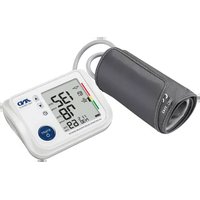
UA-1020 - Sphygmomanometer A&D Médical - Free user manual and instructions
Find the device manual for free UA-1020 A&D Médical in PDF.


| Product Type | Digital Blood Pressure Monitor |
| Model | UA-1020 |
| Brand | A&D Medical |
| Measurement Method | Oscillometric |
| Measurement Range | Pressure: 0-299 mmHg; Systolic: 60-279 mmHg; Diastolic: 40-200 mmHg; Pulse: 40-180 beats/min |
| Accuracy | Pressure: ±3 mmHg; Pulse: ±5% |
| Dimensions | Approx. 140 (W) x 60 (H) x 105 (D) mm |
| Weight | Approx. 285 g (excluding batteries) |
| Power Supply | 4 x 1.5V batteries (R6P, LR6 or AA) or AC adapter (TB-233C, not included) |
| Battery Life | Approx. 1000 measurements (AA alkaline, 180 mmHg, 23°C) |
| Memory | Last 90 measurements |
| Clock | Built-in with date and time, adjustable |
| Special Features | IHB/AFib indicator, WHO classification indicator, TriCheck mode (3 consecutive measurements), pressure bar indicator, auto inflation/deflation |
| Cuff Sizes | Large adult (31-45 cm, CUF-F-LA); Adult (17-32 cm, CUF-G-A) |
| Operating Conditions | +10 to +40°C, 15-85% RH, 800-1060 hPa |
| Storage Conditions | -20 to +60°C, 10-95% RH, 700-1060 hPa |
| Ingress Protection | Device: IP20; Cuff: Type BF |
| Useful Life | Device: 5 years; Cuff: 2 years; AC adapter: 5 years (when used 6 times/day) |
| Accessories (sold separately) | Large adult cuff (CUF-F-LA), adult cuff (CUF-G-A), AC adapter (TB-233C) |
| Maintenance & Cleaning | Clean with dry soft cloth or cloth dampened with water and neutral detergent; avoid alcohol, benzene, thinner; inspect every 2 years |
| Safety Precautions | Not for infants or pregnant women; keep 30 cm away from wireless devices; avoid use near flammable gases; consult doctor if mastectomy; not water resistant |
Frequently Asked Questions - UA-1020 A&D Médical
User questions about UA-1020 A&D Médical
0 question about this device. Answer the ones you know or ask your own.
Ask a new question about this device
Download the instructions for your Sphygmomanometer in PDF format for free! Find your manual UA-1020 - A&D Médical and take your electronic device back in hand. On this page are published all the documents necessary for the use of your device. UA-1020 by A&D Médical.
USER MANUAL UA-1020 A&D Médical
Digital Blood Pressure Monitor
Model UA-1020
Instruction Manual
Original
Preliminary Remarks 2
Precautions....2
Contraindications.... 3
Parts Identification....4
Symbols....5
Operation Mode....7
Using the Monitor 8
Installing / Changing the Batteries 8
Connecting the Air Hose 9
Connecting the AC Adapter 9
Adjusting the Built-in Clock 10
Selecting the Correct Cuff Size 11
Applying the Arm Cuff 11
How to Take Accurate Measurements 12
Measurement....12
After Measurement 12
Measurements 13
Normal Measurement....13
Measurement with the SET Pressure 14
Measurement with the Desired Systolic Pressure ..... 14
Notes for Accurate Measurement 15
TriCheck™ Measurement 15
Recalling the Memory Data 17
What Is The IHB/AFib Indicator? 18
What Is The AFib? 18
Pressure Bar Indicator 18
WHO Classification Indicator 18
About Blood Pressure....19
What is Blood Pressure? 19
What is Hypertension and How is it Controlled? ...... 19
Why Measure Blood Pressure at Home?...... 19
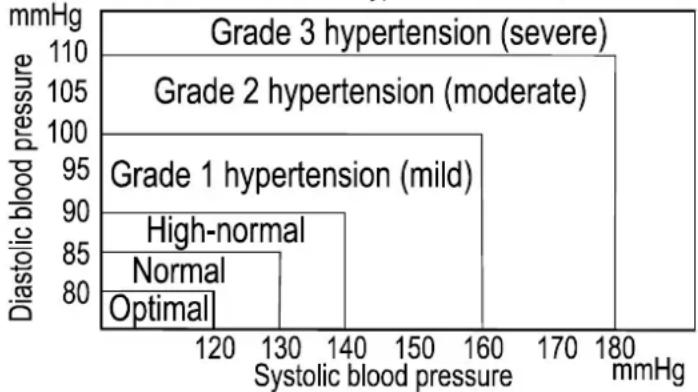
WHO Blood Pressure Classification 19
Blood Pressure Variations....19
Troubleshooting 20
Maintenance 21
Technical Data 21
Dear Customers
Congratulations on purchasing a state-of-the-art A&D blood pressure monitor, one of the most advanced monitors available today. Designed for ease of use and accuracy, this device will facilitate your daily blood pressure regimen.
We recommend that you read through this manual carefully before using the device for the first time.
Preliminary Remarks
☐ This device conforms to the European Directive 93/42 EEC for Medical Products. This is made evident by the C0123 mark of conformity.
(0123: The reference number to the involved notified body)
☐ The device is designed for use on adults, not newborns or infants.
□ Environment for use. The device is for use to operate by yourself in the home healthcare environment.
☐ This device is designed to measure blood pressure and pulse rate of people for diagnosis.
Precautions
☐ Precision components are used in the construction of this device. Extremes in temperature, humidity, direct sunlight, shock or dust should be avoided.
☐ Clean the device and cuff with a dry, soft cloth or a cloth dampened with water and a neutral detergent. Never use alcohol, benzene, thinner or other harsh chemicals to clean the device or cuff.
☐ Avoid tightly folding the cuff or storing the hose tightly twisted for long periods, as such treatment may shorten the life of the components.
☐ Take care to avoid accidental strangulation of babies or infants with the hose.
☐ Do not twist the air hose during measurement. This may cause injury due to continuous cuff pressure.
☐ The device and cuff are not water resistant. Prevent rain, sweat and water from soiling the device and cuff.
□ Measurements may be distorted if the device is used close to televisions, microwave ovens, cellular telephones, X-ray or other devices with strong electrical fields.
☐ Wireless communication devices, such as home networking devices, mobile phones, cordless phones and their base stations, walkie-talkies can affect this blood pressure monitor.
Therefore, a minimum distance of 30 cm should be kept from such devices.
☐ Used equipment, parts and batteries are not treated as ordinary household waste, and must be disposed of according to the applicable local regulations.
☐ When the AC adapter is used, make sure that the AC adapter can be readily
removed from the electrical outlet when necessary.
☐ When reusing the device, confirm that the device is clean.
☐ Do not modify the device. It may cause accidents or damage to the device.
☐ To measure blood pressure, the arm must be squeezed by the cuff hard enough to temporarily stop blood flow through the artery. This may cause pain, numbness or a temporary red mark to the arm. This condition will appear especially when measurement is repeated successively. Any pain, numbness, or red marks will disappear with time.
☐ Measuring blood pressure too frequently may cause harm due to blood flow interference. Check that the operation of the device does not result in prolonged impairment of blood circulation, when using the device repeatedly.
□ Clinical testing has not been conducted on newborn infants and pregnant woman. Do not use on newborn infants or pregnant woman.
☐ If you have had a mastectomy, please consult a doctor before using the device.
☐ Do not let children use the device by themselves and do not use the device in a place within the reach of infants. It may cause accidents or damage.
☐ There are small parts that may cause a choking hazard if swallowed by mistake by infants.
☐ Do not touch the batteries, the DC jack and the patient at the same time. That may result in electrical shock.
☐ Unplug the AC adapter when not in use during the measurement.
☐ Use of accessories not detailed in this manual may compromise safety.
☐ Should the battery short-circuit, it may become hot and potentially cause burns.
☐ Allow the device to adapt to the surrounding environment before use (about one hour).
☐ Do not inflate without wrapping the cuff around the upper arm.
Contraindications
The following are precautions for proper use of the device.
☐ Do not apply the cuff to an arm with other medical electrical equipment attached. The equipment may not function properly.
☐ People who have a severe circulatory deficit in the arm must consult a doctor before using the device, to avoid medical problems.
☐ Do not self-diagnose the measurement results and start treatment by yourself. Always consult your doctor for evaluation of the results and treatment.
☐ Do not apply the cuff on an arm with an unhealed wound.
☐ Do not apply the cuff on an arm receiving an intravenous drip or blood transfusion. It may cause injury or accidents.
☐ Do not use the device where flammable gases such as anesthetic gases are present. It may cause an explosion.
☐ Do not use the device in highly concentrated oxygen environments, such as a high-pressure oxygen chamber or an oxygen tent. It may cause a fire or explosion.
Parts Identification
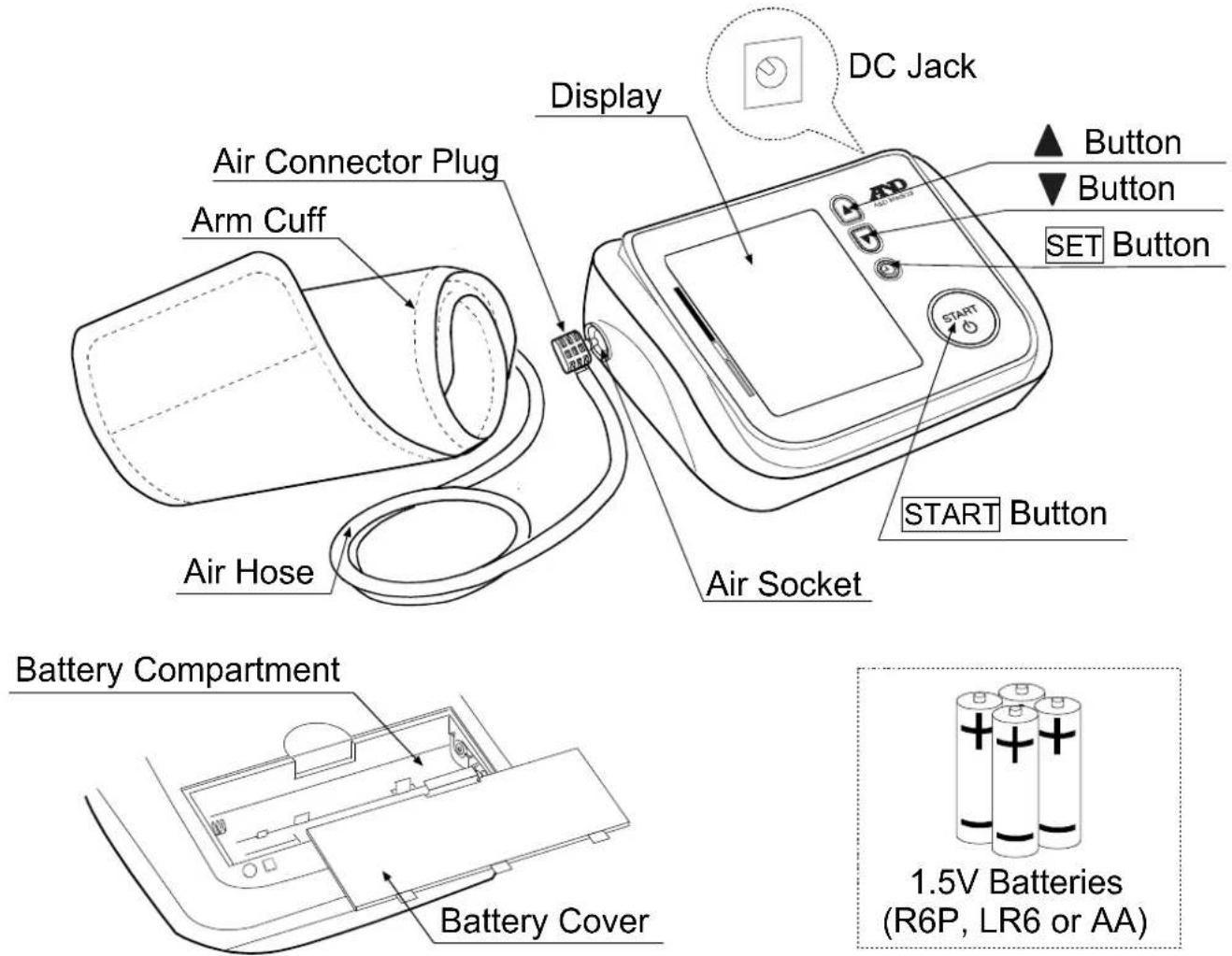
Display

English 4
Symbols
Symbols that are printed on the device case
| Symbols | Function / Meaning |
| Standby and Turn the device on. | |
| ⊕R6(LR6,AA)⊖ | Battery installation guide |
| Direct current | |
| SN | Serial number |
| 2010 | Date of manufacture |
 | Type BF: Device, cuff and tubing are designed to provide special protection against electrical shocks. |
| CE0123 | EC directive medical device label |
 | WEEE label |
| Manufacturer | |
| EC REP | EU-representative |
 | Refer to instruction manual / booklet |
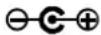 | Polarity of DC jack |
| IP | International protection symbol |
| [AOCT] | Keep dry |
Symbols that appear on the display
| Symbols | Function / Meaning Recommended Action | |
 | Appears while measurement is in progress. It blinks when the pulse is detected. | Measurement is in progress.Remain as still as possible. |
 | IHB/AFib symbolAppears when an irregular heartbeat is detected.It may light when a very slight vibration like shivering or shaking is detected. | —— |
 | TriCheckTM modeTakes three consecutive measurements automatically and displays the average values of the three measurements. | —— |
 | Appears when a body or arm movement is detected. | The reading may yield an incorrect value. Try the measurement again.Remain still during measurement. |
 | Appears during measurement when the cuff is applied loosely. | The reading may yield an incorrect value. Apply the cuff correctly, and try the measurement again. |
 | Previous measurements stored in MEMORY. | —— |
 | Average data | —— |
 | FULL BATTERYThe battery power indicator during measurement. | —— |
 | LOW BATTERYThe battery power is low when it blinks. | Replace all batteries with new ones when the mark blinks. |
 | Unstable blood pressure due to movement during measurement. | Try the measurement again.Remain still during measurement. |
| The systolic and diastolic values are within 10 mmHg of each other. | Apply the cuff correctly, and try the measurement again. | |
| The pressure value did not increase during the inflation. | ||
 | The cuff is not applied correctly. | |
| E | PUL DISPLAY ERRORThe pulse is not detected correctly. | |
 | Blood pressure monitor internal error | Remove the batteries and press the START button, and then install the batteries again. If the error still appears, contact the dealer. |
 | ||
| SYS | Systolic blood pressure in mmHg | —— |
| DIA | Diastolic blood pressure in mmHg | —— |
| PUL | Pulse per minute | —— |
| AM | Appears when the average data is displayed.Data taken between 4:00 and 9:59 | —— |
| PM | Appears when the average data is displayed.Data taken between 18:00 and 1:59 | —— |
| AUTO 180 210 240 | Pressure settingsIndicates the pressure value previously set by the user. | —— |
Operation Mode
1. Normal Measurement
Press the START button. Blood pressure is measured and the data is stored in memory. This device can store the last 90 measurements in memory.
2. Recalling the Data
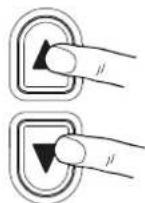
Press the ▲ or ▼ button to recall the data in memory. The average of all measurements is displayed, as indicated in the figure at the right.
Then, each time the ▼ button is pressed, the memory data is displayed as follows.
![graph TD A["Average of all AM (morning) measurements taken between 4:00 and 9:59."] --> B["Average of all PM (evening) measurements taken between 18:00 and 1:59."] B --> C["Most recent data (No.n, in the example, No.35)"] C --> D["Last data (No.1)"]](/content/2026/06/1240707/images/7e3d67c92a4f70d967a4cc97440260e50cc7263e34b5c7002ac9a5a483b789fd.jpg)
For details on recalling the data, refer to "Recalling the Memory Data".

3. Deleting all Data Stored in Memory
Press both the ▲ and ▼ buttons. The Ⓙ mark and the battery indicator appear. Press and hold both the ▲ and ▼ buttons until the illuminated ⿕ mark starts blinking to delete all data stored in memory.
4. Measurement with the Desired Systolic Pressure
Refer to page 14 for measurement with the desired systolic pressure.
Using the Monitor
Installing / Changing the Batteries
- Remove the battery cover.
- Remove the used batteries and insert new batteries into the battery compartment as shown, taking care that the polarities (+ and -) are correct. Use only R6P, LR6 or AA batteries.
- Attach the battery cover.

CAUTION
☐ Insert the batteries as shown in the battery compartment. If installed incorrectly, the device will not work.
☐ When ☐ (LOW BATTERY marb) links on the display, replace all batteries with new ones. Do not mix old and new batteries. It may shorten the battery life, or cause the device to malfunction.
Replace the batteries two seconds or more after the device turns off.
If □ (LOW BATTERY mark) appears even after the batteries are replaced, make a blood pressure measurement. The device may then recognize the new batteries.
☐ (LOW BATTERY mark) does not appear when the batteries are drained.
☐ The battery life varies with the ambient temperature and may be shorter at low temperatures. Generally, four new LR6 batteries will last approximately for one year when used twice for measurement each day.
☐ Use the specified batteries only. The batteries provided with the device are for testing monitor performance and may have a limited life.
☐ Remove the batteries if the device is not to be used for a long time. The batteries may leak and cause a malfunction.
Using the Monitor
Connecting the Air Hose
Insert the air connector plug into the air socket firmly.

Connecting the AC Adapter
Insert the AC adapter plug into the DC jack.
Next, connect the AC adapter to an electrical outlet.
AC adapter plug

□ Use the specified AC adapter. (Refer to page 22.)
☐ When disconnecting the AC adapter from the electrical outlet, grasp and pull the AC adapter body out of the outlet.
☐ When disconnecting the AC adapter plug from the blood pressure monitor, grasp and pull the AC adapter plug out of the monitor.
Using the Monitor
Adjusting the Built-in Clock
Adjust the clock prior to use.
- Press the SET button until the year starts blinking.
- Select the year using the ▲ or ▼ button. Press the SET button to set the current year and move to month/day selection. The date can be set anywhere between the years 2010 and 2059.
- Select the month using the ▲ or ▼ button. Press the SET button to set the current month and move to day selection.
- Select the day using the ▲ or ▼ button. Press the SET button to set the current day and move to hour/minute selection.
- Select the hour using the ▲ or ▼ button. Press the SET button to set the current hour and move to minute selection.
- Select the minute using the ▲ or ▼ button. (Press the SET button to go to the pressure setting mode. For details, refer to page 14.) Press the START button to turn the device off.
Note: After three minutes of non-operation, the device will turn off automatically.
When the clock has not been set, the clock display indicates dashes as shown to the right.
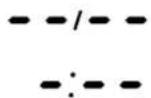
When using the device for the first time, the clock is not adjusted.
When the device is disconnected from the power supply for more than 30 seconds, the set date, time and pressure value will be erased.
When the set date, time and pressure value are erased, please adjust again.
☐ Holding down the ▲ or ▼ button will change the value continuously.
![graph TD A["Press"] --> B["Year 20:10"] B --> C["Month 6:20"] C --> D["Day 7:20"] D --> E["Hour 8:00"] E --> F["Minute 9:00"] F --> G["Turn off"] G --> H["START"] H --> I["AUTO 180 210 240"] style A fill:#fff,stroke:#333 style B fill:#fff,stroke:#333 style C fill:#fff,stroke:#333 style D fill:#fff,s…](/content/2026/06/1240707/images/5f5c631b4326736624d1b9c54b71e1f4f09f10d6eef630ccd945be9b6465a81f.jpg)
Using the Monitor
Selecting the Correct Cuff Size
Using the correct cuff size is important for an accurate reading. If the cuff is not the proper size, the reading may yield an incorrect blood pressure value.
☐ The arm size is printed on each cuff.
☐ The arm cuff is a consumable. If it becomes worn, purchase a new one.
| Arm Size Recommended Cuff Size Catalog Number | |
| 31 cm to 45 cm Large adult cuff CUF-F-LA | |
| 17 cm to 32 cm Adult cuff CUF-G-A | |
Arm size: The circumference of the biceps.
Applying the Arm Cuff
- Wrap the cuff around the upper arm, about 1-2 cm above the inside of the elbow, as shown.
Place the cuff directly against the skin, as clothing may cause a faint pulse, and result in a measurement error.
- Constriction of the upper arm, caused by tightly rolling up a shirtsleeve, may prevent accurate readings.
Do not roll up shirtsleeve tightly.


Symbols that are printed on the cuff
| Symbols | Function/Meaning | Recommended Action |
| ● | Artery Position Mark | Set the ● mark on the artery of the upper arm or in line with the ring finger on the inside of the arm. |
| REF | Catalog Number | ____ |
| LOT | Lot Number | ____ |
Using the Monitor
How to Take Accurate Measurements
For the most accurate blood pressure measurement:
☐ Sit comfortably on a chair. Rest your arm on the table. Do not cross your legs. Keep your feet flat on the floor and straighten your back.
☐ Relax for about five to ten minutes before measurement.
☐ Place the center of the cuff at the same level as your heart.
□ Remain still and keep quiet during measurement.
☐ Do not measure immediately after physical exercise or a bath. Rest for twenty or thirty minutes before taking the measurement.
□ Try to measure your blood pressure at the same time every day.
Measurement
During measurement, it is normal for the cuff to feel very tight. (Do not be alarmed).
After Measurement
After measurement, press the START button to turn the device off. Remove the cuff and record your data.
Note: The device has an automatic power shut-off function, which turns the device off approximately one minute after measurement.
Allow at least three minutes between measurements on the same person.
Measurements
Before measurement, refer to "Notes for Accurate Measurement" on page 15.
Normal Measurement
-
Place the cuff on the arm (preferably the left arm). Sit quietly during measurement.
-
Press the \$TART button.
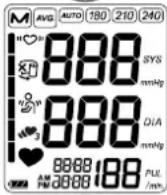
All of the display segments are displayed.
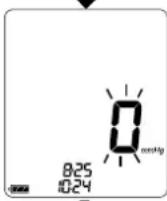
Zero (0) is displayed blinking briefly.
The display changes, as indicated in the figure at the right, as the measurement begins. The cuff starts to inflate. It is normal for the cuff to feel very tight. A pressure bar indicator is displayed, on the left edge of the display, during the inflation.
Note: If you wish to stop inflation at any time, press the START button again.
- When inflation is complete, deflation starts automatically and ♥ (heart mark) blinks, indicating that the measurement is in progress. Once the pulse is detected, the mark blinks with each pulse beat.
N olf antappropriate pressure is not obtained, the device starts to inflate again automatically. To avoid re-inflation, refer to "Measurement with the SET Pressure" on the next page.
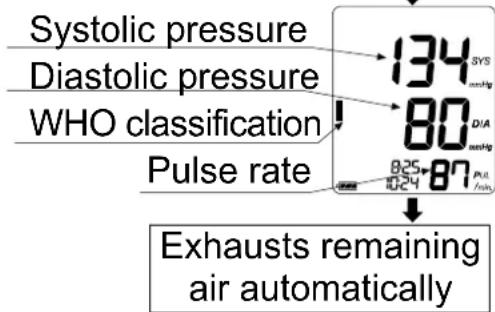
- When the measurement is complete, the systolic and diastolic pressure readings and pulse rate are displayed.
The cuff exhausts the remaining air and deflates completely.
- Press the \$TART button to turn the device off.
After one minute of non-operation, the device will turn off automatically.
Note: Allow at least three minutes between measurements on the same person.
At heart level
Press
All of the display segments displayed
Zero display Starts inflation
Pressurizing
Measurement in progress

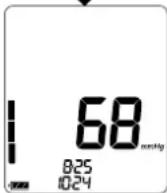
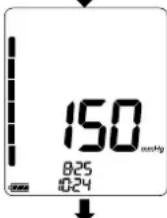
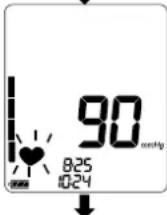
Measurements
The UA-1020 is designed to detect the pulse and to inflate the cuff to a systolic pressure level automatically.
If re-inflation occurs repeatedly, use the following methods.
Measurement with the SET Pressure
During the blood pressure measurement, re-inflation may occur.
A fixed pressure value can be set to avoid re-inflation.
- At step 6 of the clock adjustment procedure (refer to page 10), press the SET button to go to the pressure setting mode. The current setting blinks.
- Press the ▲ or ▼ button to select a pressure value about 30 mmHg or more above your expected systolic pressure from the following.
AUTO : Automatic pressurization (default value)
180 : Pressure value of 180 mmHg (fixed)
210 : Pressure value of 210 mmHg (fixed)
240 : Pressure value of 240 mmHg (fixed)
![graph TD A["AUTO"] --> B["180"] B --> C["210"] C --> D["240"] D --> E["or▼"] F["AUTO"] --> G["180"] G --> H["210"] H --> I["240"] I --> J["START"] I --> K["TriCheck™ setting mode"] J --> L["Turn off"] K --> M["End"]](/content/2026/06/1240707/images/b0363590507fcdc860648c055f7109f9b54585cdbd13b31044213267b8ef9d0a.jpg)
- Press the SET button to go to the TriCheck™ setting mode.
Press the START button to turn the device off. After three minutes of non-operation, the device will turn off automatically.
The next measurement will be performed with the new pressure value.
Measurement with the Desired Systolic Pressure
Use this method when re-inflation occurs repeatedly even if the pressure value is set to 240 in the procedure above or when the results are not displayed even if the pressure decreases to 20 mmHg or less.
-
Place the cuff on the arm (preferably the left arm). At heart level
-
Press and hold the START button until a number about 30 to 40 mmHg higher than your expected systolic pressure appears.
-
When the desired number is reached, release the START button to start measurement. Continue to measure your blood pressure as described on the previous page.
Press and hold the button

Release the button at the desired systolic pressure
233
Refer to the previous page for measurement
Notes for Accurate Measurement
☐ Sit down in a comfortable position. Place your arm on a table with your palm facing upward and the cuff at the same level as your heart.
☐ Relax for about five to ten minutes before taking a measurement. If you are excited or depressed by emotional stress, the measurement will reflect this stress as a higher (or lower) than normal blood pressure reading and the pulse reading will usually be faster than normal.
☐ An individual's blood pressure varies constantly, depending on what you are doing and what you have eaten. What you drink can have a very strong and rapid effect on your blood pressure.
☐ This device bases its measurements on the heartbeat. If you have a very weak or irregular heartbeat, the device may have difficulty determining your blood pressure.
☐ Should the device detect a condition that is abnormal, it will stop the measurement and display an error symbol. Refer to page 6 for the description of symbols.
☐ This device is intended for use by adults. Consult with your physician before using this device on a child. A child should not use this device unattended.
☐ The automatic blood pressure monitor's performance may be affected by excessive temperature or humidity, or altitude.
TriCheck ™ Measurement
The TriCheck TM mode takes three consecutive measurements automatically and displays the average values of the three measurements.
Selecting the TriCheck™ Mode
-
In the pressure setting mode, press the SET button to enter the TriCheck™ setting mode. The current setting blinks.
-
Press the ▲ or ▼ button to turn the TriCheck™ mode ON or OFF. ON: TriCheck™ mode OFF: Normal measurement mode (default value)
-
Press the START or SET button to turn the device off. After three minutes of non-operation, the device will turn off automatically.
In the pressure setting mode,

The current setting blinks

Measurement Using the TriCheck™ Mode
- Press the START button.
All of the display segments are displayed.
Zero (0) is displayed blinking briefly and the first measurement starts.
- When the measurement is complete, the systolic and diastolic pressure readings and pulse rate are displayed, then a one-minute countdown starts for the second measurement.
- After one minute, the second measurement starts.
- When the measurement is complete, the average readings of the first and second measurements are displayed, then a one-minute countdown starts for the third measurement.
- After one minute, the third measurement starts.
- When the measurement is complete, the average readings of the three measurements are displayed and stored in memory.
Notes:
□ During the measurement, the TriCheck™ symbol is displayed.
☐ To cancel the measurement, press the START button. In this case, no data is stored in memory.
☐ When the cuff fit error symbol appears during the first measurement, cancel the measurement, reapply the cuff correctly and start a new measurement.
☐ After measurement, the average data of the three measurements is stored in memory.
No data will be stored, when canceling the measurements, before completion of the third measurement.
![graph TD A["At heart level"] --> B["Press"] B --> C["First measurement"] C --> D["Second measurement"] D --> E["Third measurement"] A --> F["All of the display segments displayed"] F --> G["One minute after"] G --> H["Results of the first measurement"] H --> I["Average of the first and second measur…](/content/2026/06/1240707/images/eef71a28145744433f8a5ce316c4db2e4f72fb5d47d4ccf5818bc75b07f33044.jpg)
Average of the three measurements
Recalling the Memory Data
Note: This device stores the last 90 measurements in memory.
-
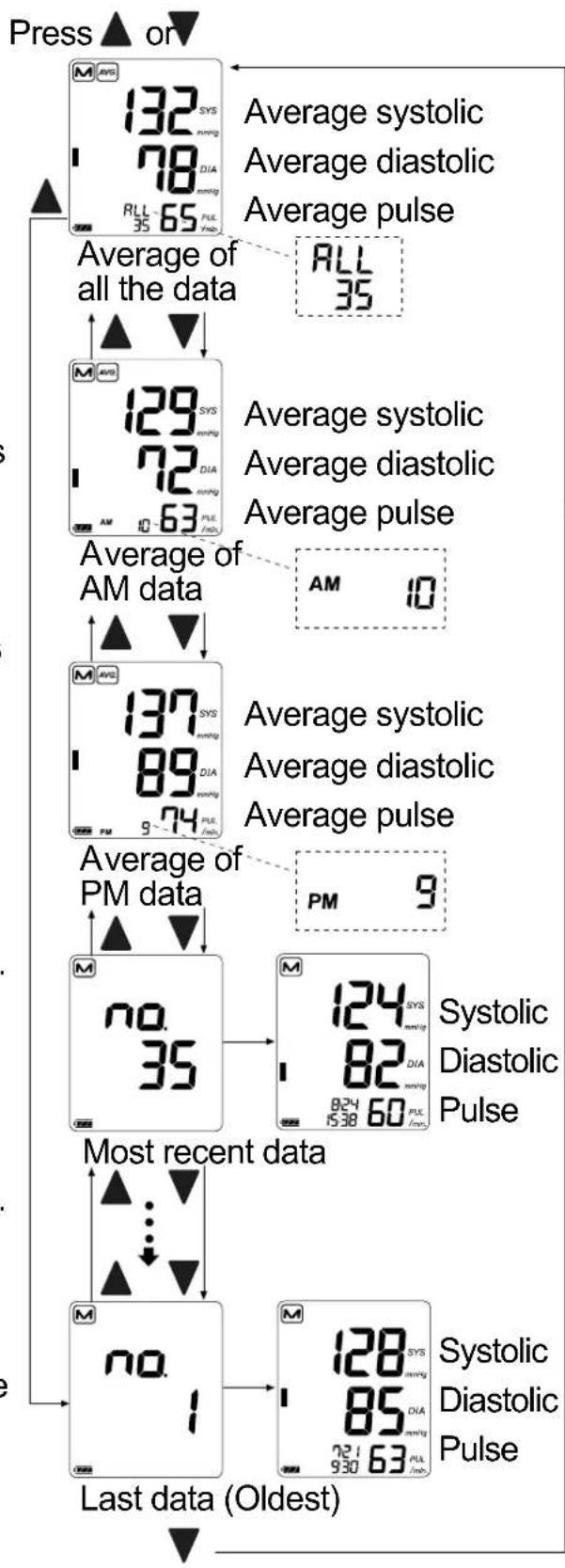
Press the ▲ or ▼button. The average of all measurements and the number of data are displayed. (If no data, "0" is displayed. Press the ▲, ▼ or START button to turn the device off.)
-
Each time the ▼ button (or the ▲ button to display the data in the reverse order) is pressed, the memory data is displayed as follows. Average of all AM (morning) measurements taken between 4:00 and 9:59. (In the example, 10 measurements. If no data, “--” is displayed.) ↓ Average of all PM (evening) measurements taken between 18:00 and 1:59. (In the example, 9 measurements. If no data, “--” is displayed.) ↓ Most recent data (No.n, in the example, No.35) Three seconds after the data number display, the measurement data is displayed. ... ↓ Last data (No.1)
-
After the last data is displayed, press the ▼ button to return the average display of all measurements.
-
Press the START button to turn the device off. After one minute of non-operation, the device will turn off automatically.
What Is The IHB/AFib Indicator?
When the monitor detects an irregular rhythm during the measurements, the IHB/AFib indicator will appear on the display with the measurement values.
Note: We recommend contacting your physician if you see this IHB/AFib indicator frequently.
What Is The AFib?
The heart contracts due to electrical signals occurring in heart and sends blood through the body. Atrial fibrillation (AFib) occurs when the electrical signal in the atrium becomes confused and leads to disturbances in the pulse interval. AFib can cause blood to stagnate in the heart, which can easily create clots of blood, a cause of stroke and heart attack.
Pressure Bar Indicator
The indicator monitors the progress of pressure during measurement.
![graph LR A["Pressurizing"] --> B["Releasing air"] B --> C["Inflation complete"] C --> D["Inflation in progress"] D --> E["Measurement in progress"]](/content/2026/06/1240707/images/3960c3c5745ce8e481fc0963a341b49a112085d2bda38de0b42ac0273a628715.jpg)
WHO Classification Indicator
Each segment of the bar indicator corresponds to the WHO blood pressure classification described on the next page.
WHO Classification Indicator
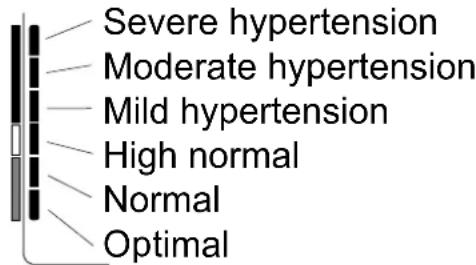
■ : The indicator displays a segment, based on the current data, corresponding to the WHO classification.
Example:

Moderate hypertension
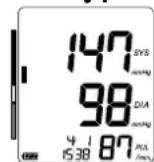
Mild hypertension

High normal
About Blood Pressure
What is Blood Pressure?
Blood pressure is the force exerted by blood against the walls of the arteries. Systolic pressure occurs when the heart contracts. Diastolic pressure occurs when the heart expands. Blood pressure is measured in millimeters of mercury (mmHg). One's natural blood pressure is represented by the fundamental pressure, which is measured first thing in the morning while one is still at rest and before eating.
What is Hypertension and How is it Controlled?
Hypertension, an abnormally high arterial blood pressure, if left unattended, can cause many health problems including stroke and heart attack. Hypertension can be controlled by altering lifestyle, avoiding stress, and with medication under a doctor's supervision.
To prevent hypertension or keep it under control:
☐ Do not smoke Exercise regularly ☐
☐ Reduce salt and fat intake Have regular physical checkups
□ Maintain proper weight
Why Measure Blood Pressure at Home?
Blood pressure measured at a clinic or doctor's office may cause apprehension and can produce an elevated reading, 25 to 30 mmHg higher than that measured at home. Home measurement reduces the effects of outside influences on blood pressure readings, supplements the doctor's readings and provides a more accurate, complete blood pressure history.
WHO Blood Pressure Classification
Standards to assess high blood pressure, without regard to age, have been established by the World Health Organization (WHO), as shown in the chart.
Blood Pressure Variations
An individual's blood pressure varies greatly on a daily and seasonal basis. It may vary by 30 to 50 mmHg due to various conditions during the day. In hypertensive individuals, variations are even more pronounced. Normally, the blood pressure rises while at work or play and falls to its lowest levels during sleep. So, do not be overly concerned by the results of one measurement.
Reference Material: Journal of Hypertension 1999, Vol 17 No.2
Take measurements at the same time every day using the procedure described in this manual to get to know your normal blood pressure. Regular readings give a more comprehensive blood pressure history. Be sure to note the date and time when recording your blood pressure. Consult your doctor to interpret your blood pressure data.

Troubleshooting
| Problem Possible Reason Recommended Action | ||
| Nothing appears on the display, even when the device is turned on. | Batteries are drained. | Replace all batteries with new ones. |
| Battery terminals are not in the correct position. | Reinstall the batteries with negative and positive terminals matching those indicated on the battery compartment. | |
| The cuff does not inflate. | Battery voltage is too low. (LOW BATTERY mark) blinks. If the batteries are drained completely, the mark does not appear. | Replace all batteries with new ones. |
| The device does not measure. Readings are too high or too low. | The cuff is not applied properly. | Apply the cuff correctly. |
| You moved your arm or body during measurement. | Make sure you remain still and quiet during measurement. | |
| The cuff position is not correct. | Sit comfortably and still. Place your arm on a table with your palm facing upward and the cuff at the same level as your heart. | |
| —— | If you have a very weak or irregular heartbeat, the device may have difficulty in determining your blood pressure. | |
| Other | The value is different from that measured at a clinic or doctor's office. | Refer to “Why Measure Blood Pressure at Home?”. |
| —— | Remove the batteries. Place them back properly and try the measurement again. | |
Note: If the actions described above do not solve the problem, contact the dealer. Do not attempt to open or repair this product, as any attempt to do so will make your warranty invalid.
Maintenance
Do not open the device. It uses delicate electrical components and an intricate air unit that could be damaged. If you cannot fix the problem using the troubleshooting instructions, contact the authorized dealer in your area or our customer service department. The A&D customer service will provide technical information, spare parts and units to authorized dealers.
The device was designed and manufactured for a long service life. However it is generally recommended to have the device inspected every 2 years, to ensure proper functioning and accuracy. Please contact the authorized dealer in your area or A&D for maintenance.
Technical Data
Type UA-1020
Measurement method Oscillometric measurement
Measurement range Pressure: 0 - 299 mmHg
Systolic pressure: 60 - 279 mmHg
Diastolic pressure: 40 - 200 mmHg
Pulse: 40 - 180 beats / minute
Measurement accuracy Pressure: ±3 mmHg
Pulse: ±5 %
Power supply 4 x 1.5V batteries (R6P, LR6 or AA) or AC adapter (TB-233C) (Not included)
Number of measurements Approx. 1000 measurements, when AA alkaline batteries are used, with pressure value of 180 mmHg at room temperature of 23°C
Classification Internally powered ME equipment (Supplied by batteries) /
Class II (Supplied by adapter) Continuous operation mode
Clinical test According to ISO81060-2 : 2013
EMD IEC 60601-1-2: 2014
Memory Last 90 measurements
Operating condition +10 to +40 °C / 15 to 85 %RH / 800 to 1060 hPa
Transport / Storage conditions -20 to +60 °C / 10 to 95 %RH / 700 to 1060 hPa
Dimensions Approx. 140 [W] x 60 [H] x 105 [D] mm
Weight Approx. 285 g, excluding the batteries
Ingress protection Device: IP20
Applied part Cuff Type BF

Useful life Device: 5 years (when used six times a day)
Cuff: 2 years (when used six times a day)
AC adapter: 5 years (when used six times a day)
Accessory AC adapter The adapter is to connect the blood pressure monitor to a power source at home.
TB-233C Please contact your local A&D dealer for purchasing.
The AC adapter is required to be inspected or replaced periodically.
Symbols that are printed on the AC adapter
| Symbols | Function / Meaning | g |
| For indoor use only | ||
| Class II device | ||
| Thermal fuse | ||
| Fuse | ||
| CE | EC directive device label | |
| EAC | EAC certification device label | |
| ⊖⊖⊖ | Polarity of AC adapter plug | |
Accessories sold separately Cuff
| Catalog Number | Cuff Size | Arm Size |
| CUF-F-LA | Large adult cuff | 31 cm to 45 cm |
| CUF-G-A | Adult cuff | 17 cm to 32 cm |
AC adapter
| Catalog Number | Plug (Outlet type) |
| TB-233C Type C | |
Note: Specifications are subject to change without prior notice.
IP classification is the degrees of protection provided by enclosures in accordance with IEC 60529. This device is protected against solid foreign objects of 12 mm diameter and greater such as a finger. This device is not protected against water.
AND

A&D Company, Ltd.
1-243 Asahi, Kitamoto-shi, Saitama 364-8585, JAPAN
Telephone: [81] (48) 593-1111 Fax: [81] (48) 593-1119
EC REP
Emergo Europe B.V.
Prinsessegracht 20, 2514 AP The Hague, The Netherlands
Tel: [31] (70) 345-8570 Fax: [31] (70) 346-7299
A&D INSTRUMENTS LIMITED
Unit 24/26 Blacklands Way, Abingdon Business Park, Abingdon, Oxfordshire OX14 1DY
United Kingdom
Telephone: [44] (1235) 550420 Fax: [44] (1235) 550485
A&D ENGINEERING, INC.
1756 Automation Parkway, San Jose, California 95131, U.S.A.
Telephone: [1] (408) 263-5333 Fax: [1] (408)263-0119
A&D AUSTRALASIA PTY LTD
32 Dew Street, Thebarton, South Australia 5031, AUSTRALIA
Telephone: [61] (8) 8301-8100 Fax: [61] (8) 8352-7409
( Business-Center "Vereyskaya Plaza-2" 121357, Russian Federation, Moscow, Vereyskaya Street 17 )
тел.: [7] (495) 937-33-44 факс: [7] (495) 937-55-66
A&D Technology Trading(Shanghai) Co. Ltd 爱安德技研贸易(上海)有限公司
(32CD, World Plaza, No.855 South Pudong Road, China (Shanghai) Pilot Free Trade Zone, 200120, China)
电话: [86] (21) 3393-2340 传真: [86] (21) 3393-2347
A&D INSTRUMENTS INDIA PRIVATE LIMITED ऐई इन्स्ट्रयमेन्टस इणिडया प्रा0 लिमिटेड
(509, Udyog Vihar, Phase-V, Gurgaon - 122 016, Haryana, India)
फोन : 91-124-4715555


- DIGITAL BLOOD PRESSURE MONITOR
- MODEL UA-1020
- DEAR CUSTOMERS
- PRELIMINARY REMARKS
- PRECAUTIONS
- CONTRAINDICATIONS
- SYMBOLS
- OPERATION MODE
- NORMAL MEASUREMENT
- RECALLING THE DATA
- DELETING ALL DATA STORED IN MEMORY
- MEASUREMENT WITH THE DESIRED SYSTOLIC PRESSURE
- USING THE MONITOR
- INSTALLING / CHANGING THE BATTERIES
- CAUTION
- CONNECTING THE AIR HOSE
- CONNECTING THE AC ADAPTER
- ADJUSTING THE BUILT-IN CLOCK
- SELECTING THE CORRECT CUFF SIZE
- APPLYING THE ARM CUFF
- HOW TO TAKE ACCURATE MEASUREMENTS
- MEASUREMENT
- AFTER MEASUREMENT
- MEASUREMENTS
- MEASUREMENT WITH THE SET PRESSURE
- NOTES FOR ACCURATE MEASUREMENT
- TRICHECK ™ MEASUREMENT
- SELECTING THE TRICHECK™ MODE
- MEASUREMENT USING THE TRICHECK™ MODE
- NOTES
- RECALLING THE MEMORY DATA
- WHAT IS THE IHB/AFIB INDICATOR
- WHAT IS THE AFIB
- PRESSURE BAR INDICATOR
- WHO CLASSIFICATION INDICATOR
- ABOUT BLOOD PRESSURE
- WHAT IS BLOOD PRESSURE
- WHAT IS HYPERTENSION AND HOW IS IT CONTROLLED
- WHY MEASURE BLOOD PRESSURE AT HOME
- WHO BLOOD PRESSURE CLASSIFICATION
- BLOOD PRESSURE VARIATIONS
- MAINTENANCE
- TECHNICAL DATA
- AND
Brand : A&D Médical
Model : UA-1020
Category : Sphygmomanometer