KS634S - Saw BLACK & DECKER - Free user manual and instructions
Find the device manual for free KS634S BLACK & DECKER in PDF.


User questions about KS634S BLACK & DECKER
0 question about this device. Answer the ones you know or ask your own.
Ask a new question about this device
Download the instructions for your Saw in PDF format for free! Find your manual KS634S - BLACK & DECKER and take your electronic device back in hand. On this page are published all the documents necessary for the use of your device. KS634S by BLACK & DECKER.
USER MANUAL KS634S BLACK & DECKER
natural_image
Technical line drawing of a hand tool with multiple components, no text or symbols presentKS629 KS630
KS631 KS632
KS633 KS634
KS635 KS638
Congratulations!
On the purchase of your Black & Decker jigsaw.
To ensure the best results from your jigsaw please read these safety and usage instructions carefully. If you have any questions or queries after reading this manual please do not hesitate to call your local service and information centre (the number is towards the back of this manual).
Contents
Page 4 Safety instructions
Page 5 Double insulation
Electrical safety
Mains plug replacement
Extension cables
Unwanted tools and the environment
The Black & Decker guarantee
After sales service for your Black & Decker product
Page 6 Our after sales service policy
Accessories
Technical data
Features
Fitting the blade
Page 7 Blade support roller
Operating your jigsaw
Saw shoe adjustment for angular cutting
Dust blowing
Dust extraction
Electronic speed regulation
Page 8 Scrolling
Handy hints
Cutting laminates
Pocket cutting
Cutting metal
Cleaning
Page 9 EC declaration of conformity
Black & Decker phone numbers and addresses
Guarantee card
Jigsaws user manual
SAFETY INSTRUCTIONS
Warning! When using electric tools, the following basic safety precautions should always be taken to reduce the risk of fire, electric shock and personal injury. Read all these instructions before attempting to operate the product and save this booklet.
For safe operation:
- Keep the work area clean. Cluttered areas and benches invite injuries.
- Consider the work area environment. Do not expose the power tool to rain and do not use in damp or wet locations. Keep the work area well lit. Do not use the power tool where there is a risk to cause fire or explosion.
- Guard against electric shock. Avoid body contact, where possible, with earthed or grounded surfaces (e.g. pipes, radiators, ranges and refrigerators).
- Keep children away. Do not let visitors touch the tool or extension cord. All visitors should be kept away from the work area.
- Store idle tools. When not in use, tools should be stored in a dry, high or locked place, out of reach of children.
- Do not force the tool. It will do the job better and more safely at the rate for which it was intended.
- Use the right tool. Do not force small tools or attachments to do the job of a heavy duty tool. Do not use the tool for purposes not intended; for example, do not use a circular saw to cut tree limbs or logs.
- Dress properly. Do not wear loose clothing or jewellery as they can be caught in moving parts. Rubber gloves and non-skid footwear are recommended when working outdoors. Wear protective hair covering to contain long hair.
- Use safety glasses. Use a face or dust mask as well, if the operation is dusty or if the tool is being used in enclosed spaces.
- Connecting dust extraction equipment. If devices are provided for the connection of dust extraction and collection ensure these are connected and properly used, especially in confined areas.
- Do not abuse the cord. Never carry the tool by its cord or yank it to disconnect it from the socket. Keep the cord away from heat, oil and sharp edges.
- Secure the work. Use clamps or a vice to hold the work. It is safer than using a hand and it frees both hands to operate the tool.
-
Do not overreach. Keep proper footing and balance at all times.
-
Maintain the tool with care. Keep a cutting tool sharp and clean for better and safer performance. Follow the instructions for lubricating and changing accessories. Inspect the tools cord periodically and, if damaged, have repaired by an authorised service facility. Inspect the extension cord periodically and replace if damaged. Keep the handles dry, clean and free from oil and grease.
- Disconnect the tool when not in use, before servicing and when changing accessories such as blades, bits and cutters.
- Remove adjusting keys and wrenches. Form the habit of checking to see that keys and adjusting wrenches are removed from the tool and replaced in the storage area before switching on.
- Avoid unintentional starting. Do not carry a plugged-in tool with a finger on the switch. Ensure the switch is off when plugging in.
- Use an outdoor extension cord. When a tool is used outdoors, only use an extension cord intended for outdoor use and so marked.
- Stay alert. Watch what you are doing, use common sense and do not operate the tool when tired.
- Check damaged parts. Before further use of the tool, a guard or other part that is damaged should be carefully checked to determine whether it will operate properly and perform its intended function. Check for alignment of moving parts, free running of moving parts, breakage of parts, mounting and any other conditions that may affect its operation. A guard or other part that is damaged should be properly repaired or replaced by an authorised service centre unless otherwise indicated in the product booklet. Have defective switches replaced by an authorised service centre. Do not use the tool if the switch does not turn it on and off.
- Warning! The use of any accessory or attachment, other than recommended in the product booklet, may present a risk of personal injury.
- Have the tool repaired by a qualified person. The electrical tool is in accordance with the relevant safety requirements. Repairs should only be carried out by qualified persons using original spare parts, otherwise, this may result in considerable danger to the user.
Save these instructions!
DOUBLE INSULATION

The tool is double insulated. This means that all the external metal parts are electrically insulated
from the mains power supply. This is done by placing insulation barriers between the electrical and mechanical components making it unnecessary for the tool to be earthed.
Note: Double insulation does not take the place of normal safety precautions when operating the tool. The insulation system is for added protection against injury resulting from a possible electrical insulation failure within the tool.
ELECTRICAL SAFETY
Be sure the supply is the same as the voltage given on the rating plate. The tool is fitted with a two-core cable and plug.
MAINS PLUG REPLACEMENT (UK ONLY)
Should the mains plug need replacing and you are competent to do this, proceed as instructed below. If you are in doubt, contact a Black & Decker service centre or a qualified electrician.
- Disconnect the plug from the power supply.
- Cut off the plug and dispose of safely. A plug with bared copper conductors is very dangerous if engaged in a live socket outlet.
- Only fit BS1363A approved plugs fitted with the correctly rated fuse.
Note: Fuses do not give personal protection against electric shock.
- The cable wire colours, or a letter, will be marked at the connection point of most good quality plugs.
Attach the wires to their respective points in the plug (see diagram). Brown is L (live) and blue is N (neutral).

text_image
Fit a plug approved to BS1363A Connect blue to N (neutral) Make sure that the outer sheath of the cable is held firmly by the clamp E L N Connect brown to L (live) Fit a 5 amp fuse 240 volts AC only. Never use a light socket- Before replacing the top cover of the plug ensure that the cable restraint is holding the outer sheath of the cable firmly and that the two leads are correctly fixed at the terminal screws. If the fuse cover is missing or damaged do not use the plug.
For replacement or detachable fuse covers, contact a Black & Decker service centre.
Warning! Never connect live or neutral wires to the earth pin marked E or 12
MAINS PLUG REPLACEMENT (AUSTRALIA AND NEW ZEALAND ONLY)
Should the mains plug or cordset of the product be damaged, it must only be replaced by an authorised Black & Decker service agent because special purpose tools are required.
EXTENSION CABLES
Up to 30m (100ft) of Black & Decker 2-core extension cable (or 3-core extension cordset, in Australia and New Zealand) can be used without undue loss of power.
Note: An extension cable should not be used unless absolutely necessary. Use of an improper extension cable could result in a risk of fire and electric shock. If an extension cable must be used, make sure it is properly wired, contains the correct rated fuse as recommended in its literature and is in good electrical condition.
UNWANTED TOOLS AND THE ENVIRONMENT

Should you find one day that the tool needs replacement or is of no further use, think of the protection of the environment. Black & Decker service agents will accept old tools and will dispose of them in an environmentally safe way.
THE BLACK & DECKER GUARANTEE (UK, AUSTRALIA AND NEW ZEALAND ONLY)
If the Black & Decker product becomes defective due to faulty materials and workmanship, within 24 months from the date of purchase, we guarantee to either replace all defective parts or at our discretion, replace the unit free of charge provided that:
- The product is returned to us or our authorised repairers with evidence of date of purchase.
- The product has not been used for trade, professional or hire purposes.
- The product has not been subjected to misuse or neglect.
- The product has not sustained any damage through foreign objects, substances or accidents.
• Repairs have not been attempted by anyone other than our authorised repair agents.
This guarantee is offered as an extra benefit and is additional to the customers statutory rights.
ENGLISH
AFTER SALES SERVICE FOR THE BLACK & DECKER PRODUCT (UK, AUSTRALIA AND NEW ZEALAND ONLY)
Black & Decker offers a nationwide network of authorised service agents. The use of other than genuine Black & Decker accessories and parts may damage or reduce the performance of your Black & Decker product and may also endanger the user. The terms and conditions of the warranty may also be effected.
THE AFTER SALES SERVICE POLICY (UK, AUSTRALIA AND NEW ZEALAND ONLY)
It is our aim that all Black & Decker customers should be totally satisfied with their Black & Decker product and after sales service, but if help or advice is needed please contact a local Black & Decker authorised repair agent manager who will be happy to help. Full details of our unique after sales service can be obtained from any of our Black & Decker authorised repair agents.
ACCESSORIES
The performance of any power tool is dependant upon the accessory used. Black & Decker accessories are engineered to high quality standards and are designed to enhance the performance of your tool. Buying a Black & Decker accessory will ensure that you get the very best from your Black & Decker tool.
TECHNICAL DATA
The level of sound pressure of the tool is in accordance with EEC legislation. It is recommended that you take appropriate measures for the protection of your hearing if the sound level seems uncomfortable. This normally equates to a sound pressure in excess of 85dB (A).
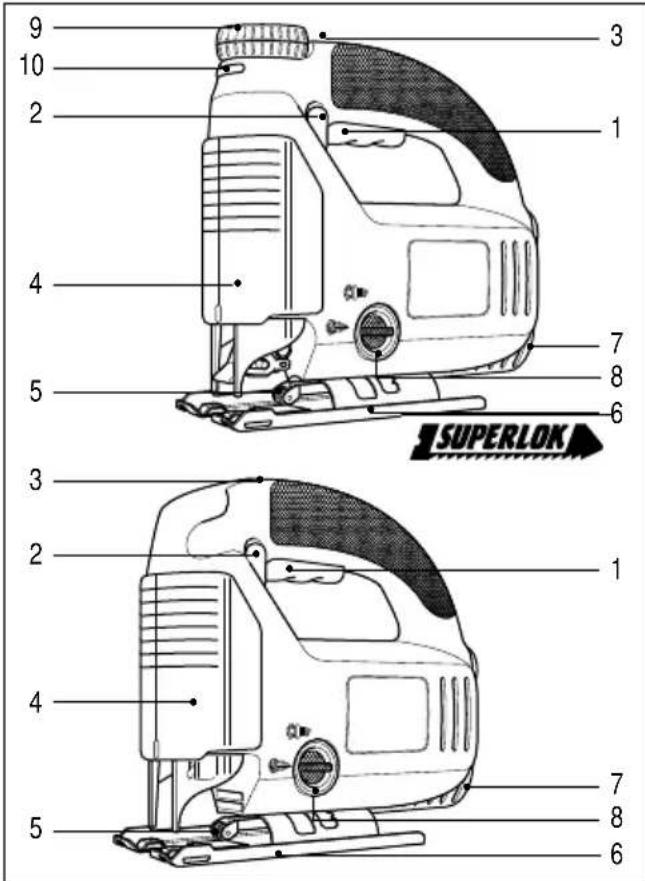
FEATURES
- Trigger switch
- Lock-on button
- Variable speed wheel
- Dust shroud
- Blade support roller
- Shoe plate
- Dust extraction
- Variable dust blowing control
- Scroller knob
- Scroller lock button
Your jigsaw includes some or all of these features.
Note: This user manual also covers catalogue numbers with a letter suffix. Refer to your carton for details of your product.
text_image
9 10 2 4 5 3 2 4 5 3 1 7 8 6 SUPERLOK 7 8 6FITTING THE BLADE
Manual blade change models (only use these blade types
Disconnect your jigsaw from the power supply.

natural_image
Illustration of hands using a tool to adjust or install a mechanical component (no text or symbols visible)Slacken the two screws and ensuring blade teeth are facing forward, push blade shank as far as possible into the sawblade holder. Slightly tighten screws alternately to
position the blade, then fully tighten screws. To release, turn both screws one turn anti-clockwise.
Superlok blade change models (only use this blade type
Disconnect your jigsaw from the power supply.
natural_image
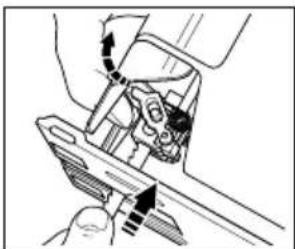
Mechanical assembly diagram showing a hand operating a tool with arrows indicating motion (no text or symbols)Lift the lever. Ensuring the blade teeth are facing forward and the blade is positioned towards the back of the blade holder insert the blade shank as far as possible into the saw blade
holder. Release lever and the blade will be clamped securely in place. To release the blade, lift the lever.
ENGLISH
All models
Note: To achieve a greater accuracy of cut, ensure back of blade is touching blade support roller. See 'Blade suport roller' for instructions on how to change position of blade support roller.
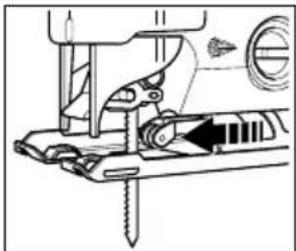
To provide greater support and accuracy when cutting, your jigsaw is fitted with a blade support roller. This support should be adjusted so that the roller touches the back of the blade when cutting.
natural_image
Mechanical sewing machine diagram showing needle insertion and adjustment mechanism (no text or symbols)To do this, loosen the front screw on the base of the shoe. Push the blade support forward until the roller touches the back edge of the blade. Retighten the screw. Lubricating the
guide roller (5) from time to time with a drop of oil will extend the life of the roller.
For scroller jigsaws only
Note: When using your jigsaw in the scrolling mode, the blade support roller needs to be retracted to allow free movement of the blade.

natural_image
Mechanical assembly diagram showing a tool interacting with a component (no text or symbols visible)To do this, untighten the front screw on the base of the shoe and retract the support. Re-tighten the screw.
To switch your jigsaw on, fully squeeze the on/off trigger switch (1). To switch your jigsaw off, release the trigger switch (1). When plugging your jigsaw in, ensure the trigger switch is in the OFF position. When continuous operation is required, squeeze the trigger and depress the lock on button (2) and release the trigger. To disengage the lock, squeeze and release the trigger. Always disengage the lock before disconnecting from the power supply.
SAW SHOE ADJUSTMENT FOR ANGULAR CUTTING
The shoe plate (6) can be angled up to 45^ on either side. To do this, disconnect your jigsaw from the power supply.

natural_image
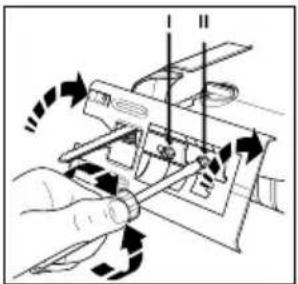
Hand operating a computer interface with scroll arrows (no text or symbols visible)Raise or remove the dust shroud (4) and loosen both screws on the shoe plate with a screwdriver. Pull the shoe plate backward a little, and set the desired angular
natural_image
Diagram of a hand operating a mechanical device with directional arrows indicating motion (no text or symbols present)adjustment according to the scale or push the shoe plate forward for fixed locks at 0°, 15°, 30°, or 45°. Tighten the screws to secure. Although the scale and notches are accurate for most purposes it is advisable for very
accurate angle cutting to use a protractor to set the shoe. Make a test cut on some scrap material to check the accuracy of the angle. To reset the shoe for a square cut, slacken the clamp screws and move the shoe until it is approximately 90° to the blade, and then, whilst applying slight forward pressure on the shoe, retighten the clamp screws. If necessary, re-adjust the bade support roller using only the front screw.
DUST BLOWING

natural_image
Line drawing of a hand using a circular tool to press down a mechanical component (no text or symbols visible)To aid visibility when cutting, your jigsaw is fitted with a facility which will blow dust away from surface of material being cut. To utilise, lift up or remove dust visor and ensure the variable
blower control is pointing towards the symbol.
DUST EXTRACTION
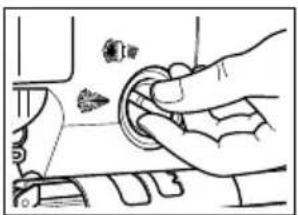
Your jigsaw with a hose adapter (accessory part), can be fitted to most portable vacuum cleaners.
natural_image
Hand inserting a small object into a device (no text or symbols visible)To utilise this facility push adapter into the aperture at the rear of jigsaw and fit vacuum hose in or over the adapter, depending on the hose size. The dust shroud should be attached and in a downwards position and the variable blower control on the side of the jigsaw should point towards the symbol.

natural_image
Diagram showing mechanical components with arrows indicating motion or force direction (no text or symbols)ELECTRONIC SPEED REGULATION
For electronic models only
natural_image
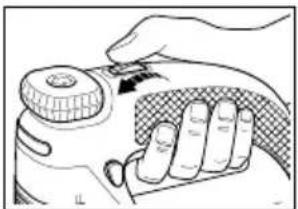
Illustration of a hand holding a small device with a knob, no text or symbols presentThe electronic speed control wheel (3) is used to programme the required saw speed depending on the material being worked.
ENGLISH
The correct speed for a particular material can be obtained from the following table:
Material Electronic speed regulation
Wood 6 - max
Metal 2 - 3
Aluminium 3 - 5
PVC 3 - 4
Ceramic 3 - 5
Note: After using your jigsaw for extended periods on stroke settings 1-4, run the saw for 3 minutes at maximum speed to aid cooling.
SCROLLING
For scroller jigsaws only
Before use, remember to retract the blade support roller and ensure the shoe is in the forward position.
The scrolling feature enables you to have maximum control whilst following complex cut lines.

natural_image
Illustration of a hand holding a device with a knob and scroll, showing motion direction (no text or symbols)To operate, press the button (10) on the front of your jigsaw and the scroller knob (9) will spring upwards. Pull the knob up to its full extent. Your jigsaw is now ready for scrolling mode. Using one
hand to guide the jigsaw, turn the scroller knob to guide the blade along the line of cut. The blade will turn a full 360°.

text_image
270° 180° 0° 90°The orientation of the blade can be locked in any one of 4 positions - 0°, 90°, 180°, 270° to enable straight cutting in awkward areas. To lock the blade in any of these four positions, push the button in
on the front of the unit, and push the knob down. When the button is released the blade is locked in position.
To reset, push the button on the front of the jigsaw.
For straight line cutting, press the button on the front of your jigsaw and push the knob down and replace the blade support roller to touch the back of the blade.
HANDY HINTS
Cutting laminates
The blades of your jigsaw cut on the upstroke so any tendency for edge splintering will occur on the face of the material nearest the saw shoe. When sawing thin wood or plastic laminates, use a fine tooth metal cutting blade and cut from the back surface of the material. To minimise the risk of chipping the edges of plastic laminate, clamp a piece of scrap wood or hardboard to both sides of the laminate to form a sandwich, and saw through the complete assembly.
Always select the right blade for the job.
Pocket cutting
The saw blade can be inserted directly into a wood surface without first drilling a pilot hole, thus eliminating a drilling operation.
First measure and clearly mark the surface to be cut. Then tip your jigsaw forward so that the rounded tips of the shoe rest on the work surface but with the blade well clear of it. Switch your jigsaw on and move the saw down until the moving blade is exactly over the chosen point of entry. Lower the rear of the shoe down towards the work slowly, maintaining a firm pivoting pressure on the shoe tips with the blade exactly on the required line. Do not move your jigsaw forward along the cut line until the saw blade has completely entered the material and the shoe comes to rest flat on its surface.
Cutting metal
Your jigsaw can be used for cutting light gauge ferrous sheet and non-ferrous metals such as copper, brass, aluminium, etc.
It is advisable when cutting thin sheet to clamp a backing sheet of soft wood or plywood to the work as this will enable you to obtain a clean cut without vibration and the possibility of tearing the metal. Both metal and wood backing are sawn together. Do not force the cutting blade into the metal as this will reduce the life of the blade and possibly damage the motor. Cutting thin metal will take longer than cutting even a relatively thick piece of wood, so do not be tempted to speed up the operation by forcing the saw. Spread a thin film of oil along the proposed cutting line before commencing to saw metal. Always select the right blade for the job.
Cleaning
Disconnect your jigsaw from the power supply. Use only mild soap and a slightly damp cloth to clean your jigsaw. Many household cleaners contain chemicals which could seriously damage the plastic. Also, do not use petrol, turpentine, lacquer or paint thinners or similar products. Never let any liquid get inside the tool and never immerse any part of your jigsaw into liquid.
EC DECLARATION OF CONFORMITY
We declare that units: KS638SE, KS635S, KS634S, KS633E, KS632E, KS631, KS630, KS629 conform to 89/392/EEC, 89/336/EEC, EN55014, 73/23/EEC,
EN55104, EN50144, EN61000
A weighted sound pressure 96dB (A)
A weighted sound power 88dB (A)
Hand/arm weighted vibration <2.5m/s²

Brian Cooke - Director of Engineering
Black & Decker Ltd, Spennymoor, County Durham
DL16 6JG United Kingdom
The Black & Decker policy is one of continuous improvement to our product and as such we reserve the right to change the product specification without prior notice.
| Australia Black & Decker (A'asia) Pty Ltd Tel: 03 9213 8200286-288 Maroondah Highway Fax: 03 9726 7150North Croydon, Victoria 3136 | |
| New Zealand Black & Decker Tel: 09 579 7600483 Great South Road, Penrose, Auckland Fax: 09 579 8200 | |
| South Africa Black & Decker South Africa (Pty) Ltd Tel: 011 314 4431Suite no 107, PostNet X65, Halfway House 1685 Fax: 011 314 4435 | |
| United Kingdom Black & Decker Tel: 01753 574277210 Bath Road, Slough Tlx: 848317 BAND MHBerkshire SL1 3YD | Fax: 01753 551155 |
| Date of your purchase: |
| Address of the dealer where your jigsaw was purchased: |
| Name:__________ | Yes | No |
| House number or name and street:__________ | Was your jigsaw a gift? | |
| Was your jigsaw your first purchase? | ||
| Town:__________ | Was your jigsaw bought as a replacement? | |
| County or state:__________ | What was the price of your jigsaw?__________ | |
| Postcode:__________ | ||
| Country:__________ | Address of the dealer where your jigsaw was purchased:__________ | |
| Product catalogue number: KS __/ __ | ||
| □ Data protection act: Tick this box if you prefer not to receive information from Black & Decker or other companies. | ||
GUARANTEE CARD
Australia: Call 1900 937766 (the maximum call charge is \$2.00 excluding tax) New Zealand: Call 0900 97766 (the maximum call charge is \$2.00 excluding tax)
South Africa: Black & Decker South Africa (Pty) Ltd, Suite no 107, PostNet X65, Halfway House 1685
United Kingdom & Ireland: PO Box 821, Slough, Berkshire, SL1 3AR
Please complete this section immediately after the purchase of your jigsaw and post it to the Black & Decker address in your country (above).
If you live in Australia or New Zealand, please register your purchase by phone.