BO 241 - Oven GAGGENAU - Free user manual and instructions
Find the device manual for free BO 241 GAGGENAU in PDF.


User questions about BO 241 GAGGENAU
0 question about this device. Answer the ones you know or ask your own.
Ask a new question about this device
Download the instructions for your Oven in PDF format for free! Find your manual BO 241 - GAGGENAU and take your electronic device back in hand. On this page are published all the documents necessary for the use of your device. BO 241 by GAGGENAU.
USER MANUAL BO 241 GAGGENAU
Safety while Baking 4
Damage to the Appliance 4
Operating for the First Time 5
Avoiding Damage to the Appliance and the
Cabinet 5
Oven 5
Cabinet Fronts near the Oven 5
Features of your New Oven 6
Oven 6
Display and Controls 7
Keys 7
Accessories 8
Heating Modes 9
First Settings after Installation 10
Note 10
Choosing the Time Format 10
Setting the Clock 10
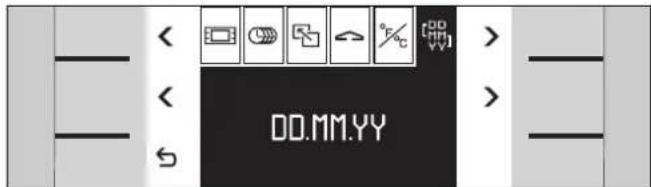
Setting the Date 10
Temperature Unit °C or °F 11
Exiting Menu and Saving Settings 11
Activating the Oven 12
Standby 12
Activating the Oven 12
Setting the Oven 13
Setting the Temperature and Cooking Mode 13
Current Oven Temperature Display 13
Meat Probe 14
Programming the Meat Probe 14
Note 15
Cleaning 15
Recommended Temperature Values 15
Baking Table 16
Roasting Table 17
Grilling Table 19
Tips and Tricks 20
Baking 20
Further Tips for Baking 21
Rising Dough (Fermenting) 21
Tips for Roasting and Grilling 21
Defrosting 21
Timer 22
Calling up the Timer Menu 22
Timer 22
Stopwatch 23
Cooking Time Duration 24
Cooking Time End 25
Extended Timer 26
Setting the Program 26
Note 26
Child Lock 27
Activating the Child Lock 27
Deactivating the Child Lock 27
Note 27
Additional Functions 28
Safety Deactivation 28
Fast Heating up 28
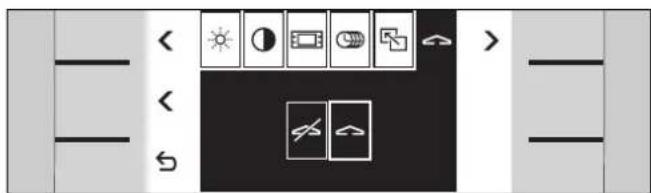
Changing the Basic Settings 29
Note 29
Example: Changing the Standby Screen 29
The Following Settings Can Be Changed 30
Care and Manual Cleaning 32
Safety Notes 32
Cleaning the Oven Interior 32
Cleaning the Glass Front 32
Cleaning the Door Seal 32
Cleaning the Accessories 32
Cleaning the Baking Stone 32
Catalytic Cleaning 33
Before Starting Catalytic Cleaning 33
Setting the Program 33
Delaying the Switch-off Time 34
Note 34
Trouble Shooting 35
Error Messages 35
Exhibition Mode 35
Power Cut 36
Replacing the Oven Lights 37
Replacing the Ceiling Light 37
Replacing the Side Light 37
Before Use
The appliance is only guaranteed safe to use if installed by a specialist in accordance with the installation instructions. The installer is liable for any damage resulting from incorrect installation.
The appliance may only be connected by a licensed specialist. The local electricity supplier's regulations and construction regulations apply.
Read the instruction manual carefully before operating the appliance. Only then will you be able to operate your appliance safely and correctly. Keep the instruction and installation manual for future reference.
Do not connect the appliance if it has been damaged.
Intended Use
This appliance is intended only for domestic use. Only use the appliance to prepare meals. Do not use the appliance to heat up the room in which it is installed.
Never allow children to play with the appliance.
Do not let adults or children operate the appliance unsupervised:
- if they are mentally or physically unable to use the appliance safely and correctly
- if they don't have the knowledge and experience to use the appliance safely and correctly.
Safety while Baking
Warning, risk of burns! Do not touch hot heating elements or interior surfaces of oven. Keep children away.
Warning, risk of fire! Do not store flammable products in the oven. Only leave the parts needed inside the oven during use.
Warning, if preparing food with alcoholic beverages (for example rum, cognac, wine, etc.). Remember that alcohol evaporates at high temperatures. It is possible that vapours released by the alcohol can catch fire.
Warning, risk of fire! Oil and fat can ignite quickly. Remove cooking oil and fat deposits before the next use.
Warning! Hot steam can escape during use. Do not touch the ventilation openings.
Warning! Hot steam can escape when opening the oven door.
Warning, risk of burns! The inside of the door gets very hot during operation; observe appropriate caution when opening the appliance. The open door can swing back.
Do not trap connecting cables of electrical appliances in the hot oven door. The cable insulation can melt. Risk of short-circuiting!
Damage to the Appliance
If the appliance is damaged, switch off the corresponding household fuse. Call after-sales service.
Incorrect repairs are dangerous. Repairs must be carried out by one of our experienced after-sales engineers.
Operating for the First Time
Remove the packaging from the appliance and dispose of it according to local regulations. Be careful to remove all accessories from the packaging. Keep packaging elements and plastic bags away from children.
Check the appliance for transport damage after unpacking it. Do not connect the appliance if it has been damaged.
The appliance must be connected by an authorised specialist. No warranty claims can be lodged for any damage resulting from incorrect connection. Observe the installation instructions.
Heat the empty oven for an hour at 240 °C before using it for the first time. This will eliminate any 'newness' smells.
Before operating the appliance fit the included grease filter to the inside rear wall.

This appliance is labelled in accordance with the European Directive 2002/96/EG concerning used electrical and electronic appliances (waste electrical and electronic equipment – WEEE). The guideline
determines the framework for the return and recycling of used appliances as applicable.
Avoiding Damage to the Appliance and the Cabinet
Oven
Remove fruit acids such as the juice of lemons or plums etc. after every baking operation. The acid can cause spots on the oven's enamel.
Never splash water into a hot oven. This could damage the enamel.
Do not place the baking tray directly onto the bottom of the oven. Do not place utensils (for example a roaster) directly onto the bottom of the oven. Do not line the bottom of the oven with aluminium foil. This will cause a build-up of heat which can damage the enamel.
Do not cover the ventilation openings of the oven.
Do not take off the door seal. A damaged door seal must be changed immediately.
The socket for the separate heating element for the roaster and the baking stone (special accessory) can be found in the middle of the back panel at the bottom. During normal operation, please leave the cover in the socket.
Cabinet Fronts near the Oven
After taking the food out of the oven, allow the oven to cool down with the door closed. Do not leave the oven door half open, the hot air can cause damage to adjacent cabinets. The cooling fan will continue to run for a while and will then switch off automatically.
Oven
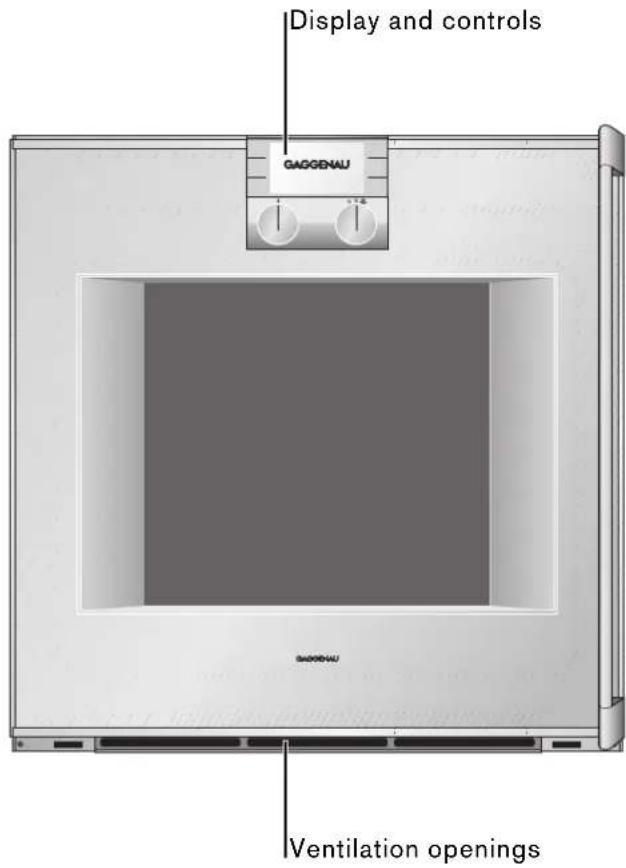
text_image
Display and controls GAGGENAU Ventilation openings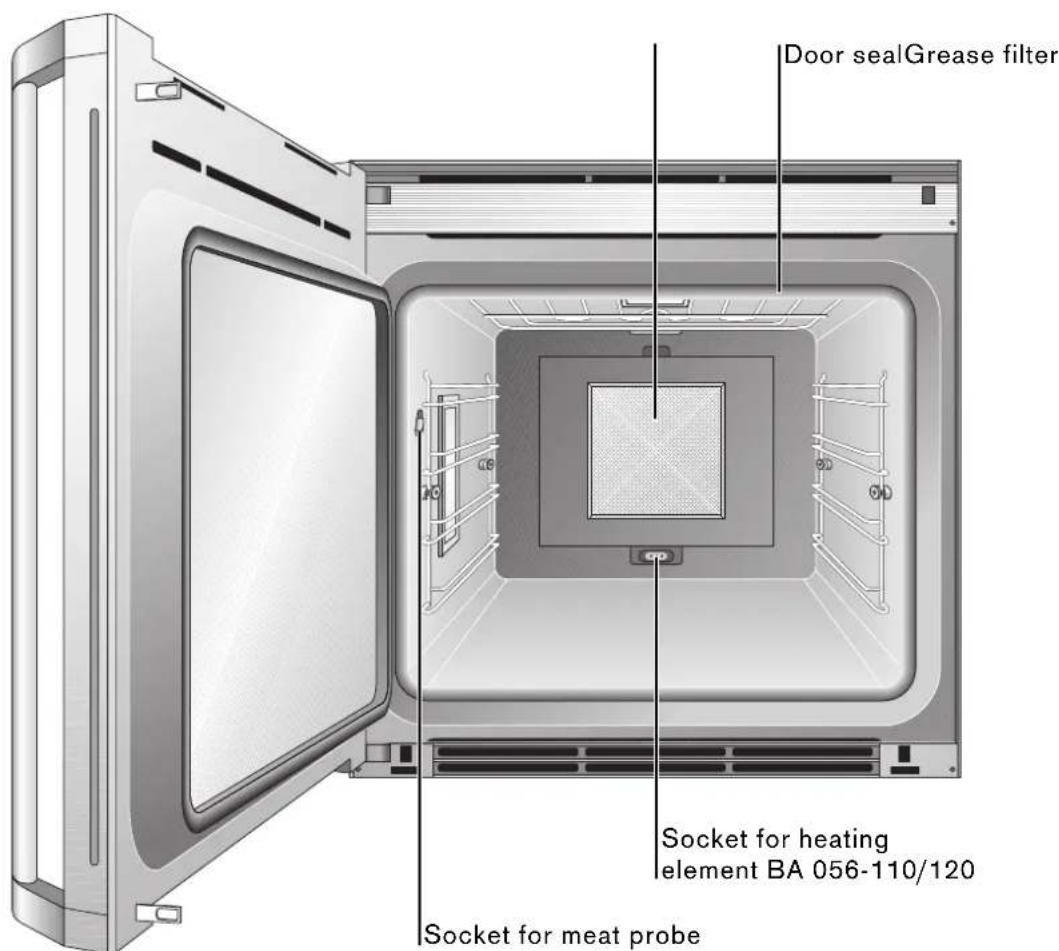
text_image
Door sealGrease filter Socket for heating element BA 056-110/120 Socket for meat probeDisplay and Controls
Display
In the top part of the display is the status bar or a call up menu. The lower part shows the different settings.
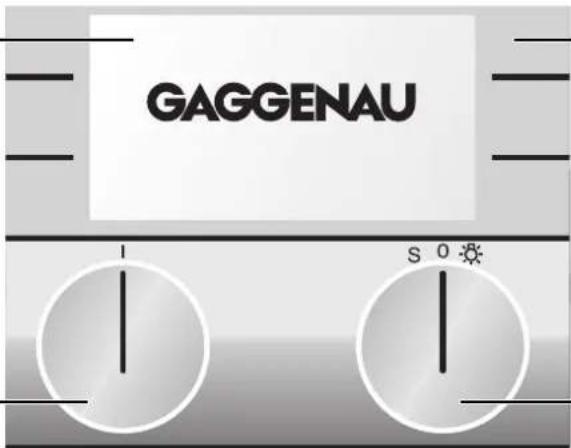
text_image
GAGGENAU S 0Touch keys
The keys on the left and right beside the display are touch sensitive. The function of the keys depends on the chosen setting. The icon beside the key shows the function of the key.
Function selector
Use the left knob to select the cooking mode you will use to prepare your meal or the catalysis function. You can turn the knob to the right or left.
Temperature selector
You can set a temperature between 50 and 300 °C or the catalysis function. You can turn the knob to the right or left. To switch on the light in the oven, turn the temperature selector one position to the right. The light in the oven remains off if the temperature is set below 70 °C.
Keys
Symbol Function
move right
< move left
← save selected values / start
C cancel
+ increase values
- decrease values
① timer menu
basic settings menu
i call up additional info
child lock activate
child lock deactivate
① extended timer
II timer stop
▶ timer start
Accessories
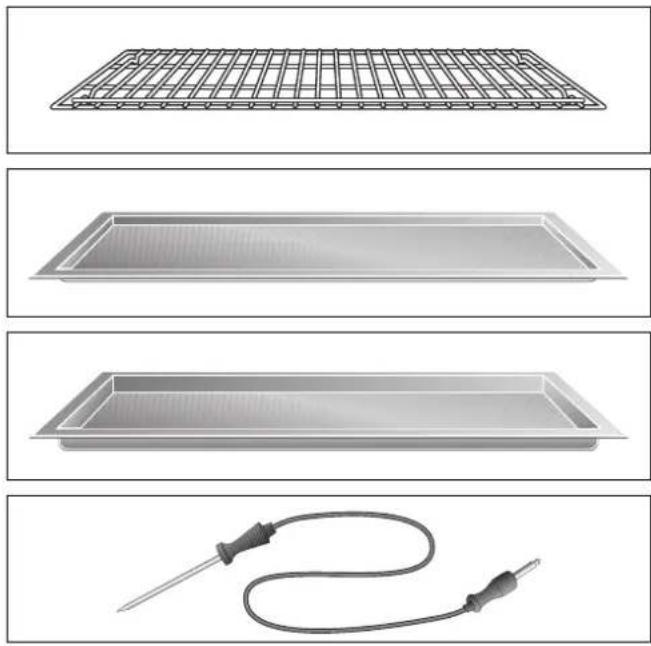
natural_image
Four technical illustrations of heating elements: a grid-patterned tray, a rectangular tray with heat sink, a rectangular tray with coiled cable, and a probe (no text or symbols)As standard, your appliance comes with the following accessories:
- Wire rack for cake tins, roasts, grilled pieces and crockery
Always insert the wire rack with the double crossbrace to the front.
● Baking tray for cakes, biscuits and pastries - Grilling tray for roasts or as a grease collecting tray
- Meat probe
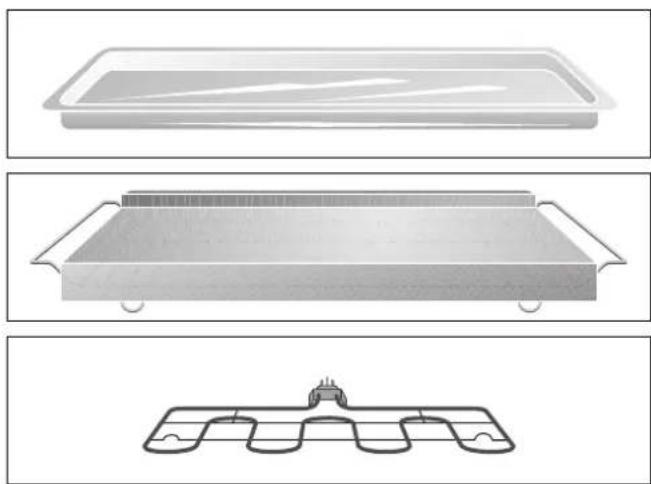
You can order the following special accessories:
• Glass tray for gratins and fruit cake
● Baking stone with wire rack and wooden pizza spatula for pizza and bread
Additionally you will require the heating element.
• Heating element 230 V
Heating element 400 V
Heating element for baking stone
natural_image
Three technical illustrations of a rectangular tray or container with internal compartments, shown from different angles (top, middle, bottom) without any text or symbols.Display Heating mode Use
| 165° | Hot air For cakes, biscuits and puff pastry on several levels |
| 165° | Economy Energy saving hot air mode for cakes, (the oven light is off) small pastries or gratins |
| 165° | Hot air and bottom heat Additional heat from beneath for moist cakes, for example fruit cakes |
| 170° | Bottom heat Further baking, for example for fruit cakes, for preserving or for food in a bain-marie |
| 170° | Top and bottom heat For cakes in tins or on trays, gratins or roasts |
| 170° | Top heat Direct heat from the top, for example to brown meringue on a fruit cake |
| 190° | Grilling with hot air Evenly distributed heat for meat, poultry or whole fish |
| 300° | Grilling Grilling flat pieces of meat, sausages or fish fillets melting cheese, gratins |
| 300° | Baking stone operation Heated baking stone for crispy pizza, bread (only with special accessories) or bread rolls like from a solid stone oven |
| 220° | Roaster operation Heated cast roaster for large quantities of meat, (only with special accessories) gratin or the Christmas turkey |
| 38° | Dough proofing Raising yeast dough, the perfect temperature setting is 38 °C |
| 45° | Defrosting Even and gentle defrosting between 40 - 60 °C depending on the food |
| 300° | Catalysis Catalytic cleaning function |
First Settings after Installation
When your new oven has been connected, the first settings menu appears on the display.
You can set the
- time format,
- clock,
- date,
- temperature unit.
Note
The first settings menu appears only after the appliance has been connected or if the appliance is without electricity for several days.
Refer to the chapter basic settings if you wish to change these parameters at any time.
text_image
< AM PM ✓ 31 °C > < < = AM PM 24h >Choosing the Time Format
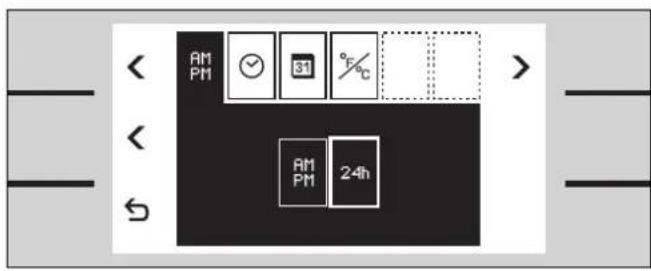
The time fomat setup menu appears on the screen.
The time fomat can be either 12 hour format (AM/PM) or 24 hour format. The 24 hour format is pre-selected.
You can change the time format using the centre < key.
text_image
< - ← AM PM 24h 08 30 +Setting the Clock
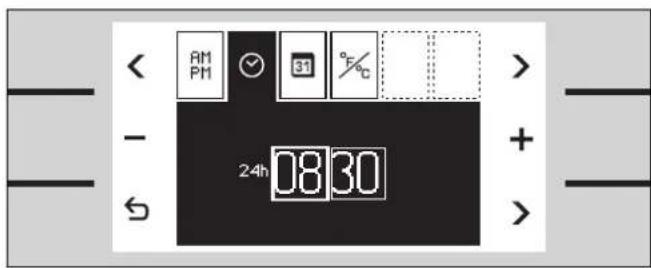
1 Using the menu key > select the clock function ⊙.
08:30 appears on the screen.
2 Using the +/− keys set the correct time.
Use the arrow key > bottom right to change from hours to minutes.
text_image
AM PM 31 °C + - 10 0726 DD MM VY +Setting the Date
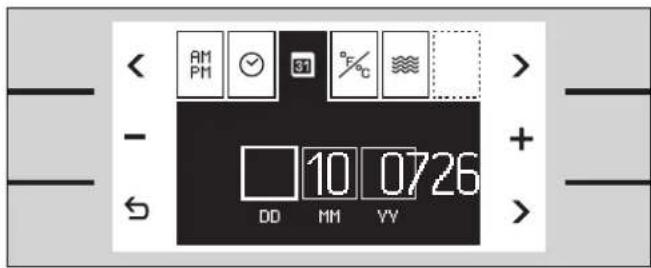
1 Using the menu key > select the date function 31.
26.10.07 appears on the screen.
2 Using the +/ - keys enter day, month, year.
Use the arrow key > bottom right to change from day/month/year.

text_image
< AM PM ✓ &1 °F °C > < ← °F °CTemperature Unit °C or °F
1 Using the menu key > select the temperature unit function %. °C is pre-selected.
2 You can change the temperature unit using the middle < key.
Exiting Menu and Saving Settings
Touch the ⬆ key to exit the menu. All settings are saved.
The oven is on standby. The standby screen appears.
GAGGENAU
13:30
Standby
The oven remains on standby when no operating mode is selected or the child lock is activated.
The keys are not activated. The display is not lit.
Note:
You can choose between different standby screens. GAGGENAU and the clock is pre-selected. Refer to the chapter basic settings if you want to change the standby screen.
Note:
The display contrast depends on the vertical viewing angle. You can adjust the contrast of the display in the basic settings.
Activating the Oven
To leave standby do one of the following:
- touch a key
• open or close the oven door
• turn the temperature knob
• turn the function knob
Now you are able to set the required function. Read the relevant chapter on how to activate the required function.
Note:
The standby screen reappears after one minute if no further function is chosen. The display light goes off.
Setting the Oven
The main operations of your oven are easily set using the knobs.
Using the right knob you can set the temperature. To switch on the light in the oven, turn the temperature knob one position to the right.
The temperature range is 50 - 300 °C.
Exception:
Fermenting 30 - 50 °C
Defrosting 40 - 60 °C
Roaster operation 50 - 220 °C
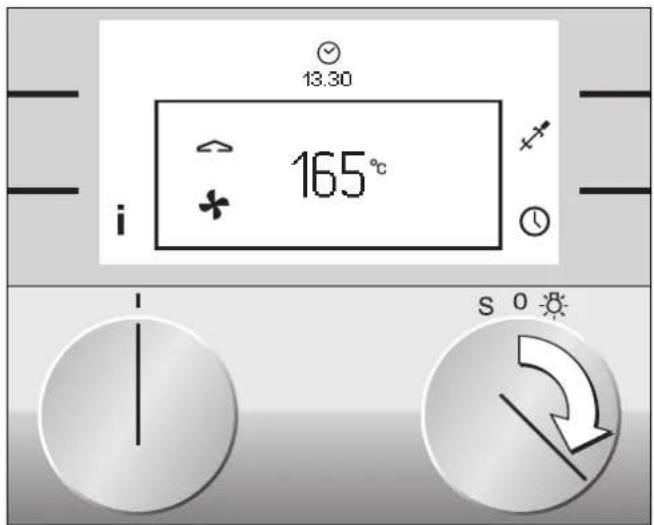
Using the left knob you can set the cooking mode. The top position is hot air.
text_image
13.30 165° i S 0Setting the Temperature and Cooking Mode
1 Set the temperature knob to the required temperature.
Temperature and cooking mode symbol appear on the display. The light in the oven goes on.
To select another cooking mode:
2 Turn the function knob until the required cooking mode appears on the screen.
The heating up symbol ⇌ appears until the required temperature is reached. The symbol appears again when the oven heats during operation.
A signal sounds when the selected temperature is reached. Press any key to switch off the signal.
Note: You can deactivate the heating up signal in the basic settings.
The temperature and cooking mode can be changed at any time.
When the meal is ready switch the oven off using the temperature knob. The oven light goes off. The standby screen appears.

text_image
166°Current Oven Temperature Display
The current oven temperature is briefly shown when you press the i info key. Using the ⬆ key you can return to the standard screen.
Note:
Depending on the heating mode, a slight temperature variation after heating up during use is normal.
Meat Probe
natural_image
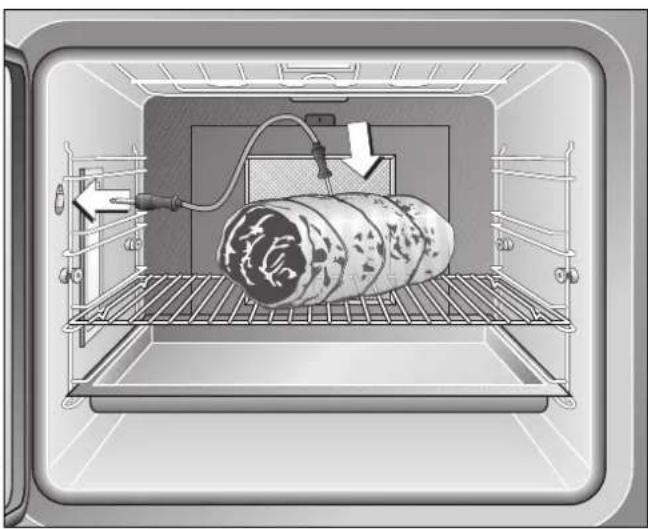
Interior view of an oven with a rolled food item on a rack, showing a pipe and control panel (no text or symbols)The meat probe enables you to cook your meat exactly as you want it.
Using the meat probe, during the cooking process you can measure the core temperature of the interior of the food you are preparing exactly between 1 °C and 99 °C.
Fully insert the tip of the meat probe in the middle of the food, at its thickest point. The tip should not be inserted into fat and should not touch any dishes, bones or fatty tissue.
In the case of poultry, do not insert the tip of the meat probe in the middle (hollow) but between the belly and the thigh.
When you connect the meat probe to the socket in the oven, the Ⓜ symbol appears on the display.
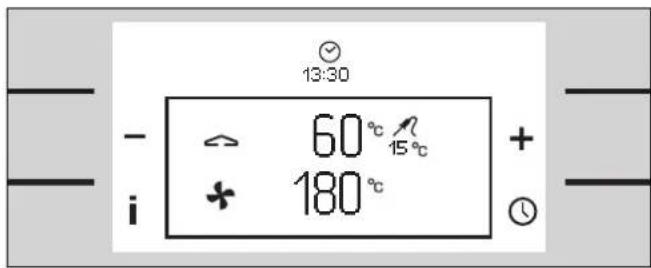
The smaller temperature display on the top shows the measured temperature from the meat probe.
text_image
- i 60° C 15°C + 180°C 13:30Programming the Meat Probe
You can program the desired core temperature for your meal. The appliance switches off automatically, when the programmed temperature has been reached.
1 Insert the tip of the meat probe into the meat.
2 Connect the meat probe to the socket.
3 Using the + / - keys set the correct core temperature. The suggested temperature is 60^ .
The larger temperature display on the top shows the programmed temperature, the smaller display shows the measured temperature from the meat probe.
A signal sounds when the programmed core temperature has been reached. The appliance stops heating.
Switch the temperature knob off and open the oven door. Remove the meat probe before taking the food from the oven.
⚠ Danger, risk of burns! Use an oven glove. The meat probe gets very hot during use.
Note
Pull the meat probe from the socket if you want to end the programming.
If you program meat probe and timer simultaneously, the program that reaches the entered value first will switch off the oven.
Only use the included original meat probe. You can order the meat probe as a spare part.
Only use the meat probe up to a temperature of 250 °C .
Remove the meat probe from the oven when it is not in use.
Remove the meat probe from the oven during catalytic cleaning.
Cleaning
Only rub the meat probe with a moist cloth. The meat probe is not dishwasher-proof.
Recommended Temperature Values
| Beef | |
| Roast beef / fillet of beef / entrecôte | |
| blood rare 45-47 °C | |
| rare 50-52 °C | |
| medium-rare 58-60 °C | |
| well-done 70-75 °C | |
| Beef roast 80-85 °C | |
| Pork | |
| Roast pork 72-80 °C | |
| Back of pork medium-rare 65-70 °C | |
| well-done 75 °C | |
| Meat loaf 85 °C | |
| Fillet of pork 65-70 °C | |
| Veal | |
| Fillet of veal rare 50-52 °C | |
| medium-rare 58-60 °C | |
| well-done 70-75 °C | |
| Roast veal | well-done 75-80 °C |
| Breast of veal, stuffed | |
| 75-80 °C | |
| Back of veal | medium-rare 58-60 °C |
| well-done 65-70 °C | |
| Venison | |
| Back of venison | |
| Leg of venison | |
| Back of venison steaks | |
| Back of hare | |
| Poultry | |
| Chicken | |
| 85 °C | |
| Guinea fowl | |
| 75-80 °C | |
| Goose,turkey, duck | |
| 80-85 °C | |
| Duck breast medium-rare 55-60 °C | |
| well-done 70-80 °C | |
| Ostrich steak | |
| 60-65 °C | |
| Lamb | |
| Leg of lamb | medium-rare 60-65 °C |
| well-done 70-80 °C | |
| Back of lamb | medium-rare 55-60 °C |
| well-done 65-75 °C | |
| Mutton | |
| Leg of mutton medium-rare 70-75 °C | |
| well-done 80-85 °C | |
| Back of mutton | medium-rare 70-75 °C |
| well-done 80 °C | |
| Fish | |
| Fillet | |
| 62-65 | |
| Whole | |
| 65 | |
| Tureen | |
| 62-65 | |
| Other | |
| Bread | |
| 90 °C | |
| Pâte | |
| 72-75 | |
| Tureen | |
| 60-70 | |
| Foie gras | |
| 45 °C | |
| Cakes and biscuits | Level from below bottom heat Temp. °C Temp. °C Temp. °C Temp. °C Min. | Baking | ||||
| Swiss roll 2 210 7-9 | ||||||
| Flan base 2 165-175 30-35 | ||||||
| Fruit flan on yeast dough | 2 | 165 | 165-175 | 40-45 | ||
| Fruit flan on short-crust pastry | 2 | 165 | 165 | 165 | 165-175 | 40-45 |
| Small flaky pastry cakes | 1+3/2* | 180 | 180 | 190 | 15-20 | |
| Cheesecake (high) | 2 | 165 | 165 | 165 | 165-170 | 90-100 |
| Cheesecake slices (flat) | 2 | 165 | 165 | 165 | 165-175 | 45-50 |
| Sponge cake (round) | 2 | 160-170 | 160-175 | 170-175 | 50-60 | |
| Loaf cake | 2 | 160-170 | 160-175 | 170-175 | 50-60 | |
| Yeast dough ring cake (tall) | 1 | 160-175 | 165-175 | 40-50 | ||
| Biscuits | 1+3/2* | 160-175 | 160-175 | 165-170 | 15-20 | |
| ‘Hefezopf’ | 2 | 165 | 165-170 | 30-40 | ||
| Cake on baking tray (dry top) | 2 | 165-170 | 165-170 | 165-170 | 40-50 | |
| Cake on baking tray (moist top)2 | 165-170 | 165-170 | 170 | 165-170 | 40-50 | |
| Cream puffs | 1+3/2* | 180 | 180 | 180-190 | 20-25 | |
| Mixed-grain bread** | 2 | 200/170 | 210/170 | 40-50 | ||
* In the economy and hot air modes you can bake simultaneously on several levels.
** Preheat the appliance to the specified temperature. Switch back to the second temperature when inserting the food.
Note: The values given above should be looked upon as recommended values. We advise you to always preheat the oven.
For baking yeast dough we recommend the hot air circulation mode.
The recommended mode is printed in bold.
Dish Level from Hot air Grill and Top and Cooking Meat below hot air bottom heat time probe Temp. °C Temp. °C Temp. °C Minutes temp. °C
| Beef | ||||||
| Roast beef 1,5 kg* | 2 | 180 | 180 | 60-90 | ||
| Roast beef rare 1,5 kg** | 2 | 230/180 | 230/180 | 45-50 | 45-50 | |
| Roast beef medium 1,5 kg** | 2 | 230/180 | 230/180 | 60-70 | 55-65 | |
| Roast beef well done 1,5 kg** | 2 | 230/180 | 90-100 | 70-80 | ||
| Pork | ||||||
| Pork roast 1,5 kg** | 2 | 230/180 | 230/180 | 60-70 | 75-80 | |
| Pork roast with rind 1,5 kg*** | 2 | 180/200 | 180/200 | 60-70 | 75-80 | |
| Smoked pork 1,5 kg** | 2 | 180/160 | 40-50 | 65-70 | ||
| Leg of pork*** | 2 | 150/200 | 150/200 | 50-60 | 80-85 | |
| Collared roast** | 2 | 230/180 | 230/180 | 60-70 | 75-80 | |
| Veal | ||||||
| Roast veal** | 2 | 230/180 | 230/180 | 60-70 | 75-80 | |
| Leg of veal*** | 2 | 150/180 | 150/180 | 50-60 | 75 | |
| Loin of veal | 2 | 160-170 | 20 | 70-75 | ||
| Stuffed breast of veal* | 2 | 120-130 | 120 | 75-80 | ||
* First brown the meat all-round in the casserole on the cooker.
** Brown the meat at a high heat level, switch back to a lower temperature after 15-20 minutes.
*** Cook the meat at a low temperature, set the temperature higher for the last 15-20 minutes.
Note: The values given above should be looked upon as recommended values. We advise you to always preheat the oven.
The recommended mode is printed in bold.
| Dish Level from Hot air Grill and Top and Cooking Meatbelow hot air bottom heat time probeTemp. °C Temp. °C Temp. °C Minutes temp. °C |
Venison
| Roast boar* 2 170-180 60-90 | |||||
| Leg of venison* | 2 | 170-180 | 60-80 | 75-80 | |
| Saddle of venison | 2 | 165-175 | 170-180 | 20-25 | 65-70 |
| Leg of lamb* | 2 | 180-200 | 35-45 | 65-75 | |
Poultry
| Duck 2-3 kg** | 2 | 160/190 | 160/190 | 100-120 | 80-85 | |
| Duck breast | 2 | 160 | 160 | 15-20 | 70 | |
| Goose 2-3 kg** | 2 | 160/190 | 160/190 | 100-120 | 85-90 | |
| Turkey 3-4 kg** | 2 | 160/190 | 160/190 | 120-180 | 85-90 | |
| Roast chicken | 2 | 180 | 180 | 50-60 | 85 |
* First brown the meat all-round in the casserole on the cooker.
** Brown the meat at a high heat level, switch back to a lower temperature after 15-20 minutes.
Note: The values given above should be looked upon as recommended values. We advise you to always preheat the oven. The recommended mode is printed in bold.
Dish Level from No Temp. Grill Grill and hot air Cooking below pre- °C Minutes Minutes Time heat 1.side 2.side 1.side 2.side Minutes
| Sliced pork belly | 3 | 180-200 | 6 | 4 | 5 | 5 | 10 | |
| Kebab | 3 | 190 | 8 | 8 | 16 | |||
| Fried sausage | 3 | 200 | 5 | 4 | 9 | |||
| Merguez (grilled sausage) | 3 | 200 | 6 | 6 | 12 | |||
| Roast chicken* | 2 | X | 180 | 30 | 30 | 60 | ||
| Leg of chicken | 3 | 180 | 20 | 20 | 15 | 15 | 30-40 | |
| Spare Ribs | 3 | 180-200 | 15 | 15 | 12 | 12 | 24-30 | |
| Leg of pork** | 2 | 150/200 | 50-60 | |||||
| Trout | 3 | 180-200 | 8 | 8 | 16 | |||
| Vegetable kebabs | 3 | 200 | 7 | 7 | 14 | |||
| Shrimp kebabs | 3 | 175 | 7 | 7 | 14 | |||
| Preparing au gratin | ||||||||
| Toasted sandwich | 3 | 190 | 5-7 | |||||
| Crème caramel*** | 4 | X | 250 | |||||
| Crème brulée*** | 4 | X | 250 | |||||
| Cake with meringue*** | 3 | 200 | ||||||
Important: Only grill with the oven door closed.
For grilling use the wire rack that fits the grilling tray (accessory or special accessory, depending on the version) to collect dripping fat.
* In the case of appliances featuring a rotary spit, you are advised to use the spit in the grill mode.
** Do not turn the leg of pork. Set the temperature high for the last 15-20 minutes.
*** You should bake this dish au gratin until it has reached the level of browning you require.
Note: The values given above should be looked upon as recommended values.
The recommended mode is printed in bold.
Baking
What to do if... The solution
| ...a cake baked in a tray is too light at the bottom? Insert the tray on a lower level and remove all other trays from the oven. | |
| ...a cake baked in a form is too light at the bottom? Do not insert the baking form in the oven on the tray, but on the wire rack. | |
| ...a cake/small cakes and pastries are too dark Insert the cake/pastries at a higher level.at the bottom? | |
| ...a cake is too dry? Set the oven temperature to a slightly higher value.Preheat the oven. | |
| ...a cake is too moist on the inside or if meat is Set the baking or roasting temperature to a slightly not cooked on the inside? lower value. Important: baking or roasting times cannotbe shortened by selecting higher temperatures. It is better to choose a slightly longer baking or roasting time and to allow the dough to bake longer. | |
| ...a cake baked with hot air in a form or a Do not place the baking form directly in front of the rear rectangular form is too dark at the back? wall of the oven, but in the middle. | |
| ...a cake sinks? Use less fluid the next time or set the oven temperatureto a value that is lower by 10 degrees. Pay attention to the stirring times specified in the recipe. Do not open the oven door too soon. | |
| ...a cake has risen in the middle and is lower Do not grease the edge of the spring form. After at the edges? baking, carefully loosen the cake with a knife. | |
| ...a cake is too dark at the top? Insert it on a lower level, select a lower temperatureand bake the cake for a slightly longer time. | |
| ...a cake is too dark at the bottom? Insert it at a higher level and choose a lower temperature the next time. | |
| ...a fruit cake is too light at the bottom and Use the deeper grilling tray for baking.the fruit juices spill over? | |
| ...a cake is too dry at the bottom? | Use a toothpick to make small holes in the finished cake. Then sprinkle fruit juice or an alcoholic beverage over it. The next time, choose a temperature that is higher by 10 degrees and shorten the baking time. |
| ...bread or a cake looks good from the outside,but is too moist on the inside? | The next time, use slightly less fluid and bake slightly longer at a lower temperature. In the case of cakes with a moist covering, first bake the base, sprinkle almonds or breadcrumbs over it and then add the covering.Pay attention to recipes and baking times. |
| ...you have baked on several levels and your cake on the top tray is darker thanon the bottom one? | If you select a slightly lower temperature, your cakes and pastries will be browned more evenly. Trays inserted at the same time need not be ready at the same time. Allow the bottom trays to bake for 5-10 minutes longer and insert them at an appropriately earlier time. |
| ...biscuits stick to the tray? | Briefly reinsert the tray in the oven and remove the biscuits immediately. |
| ...a cake does not come out of the tin easily? | Carefully loosen the edge with a knife. Turn out the cake again and cover the form several times with a cold wet cloth. The next time, grease the form well and additionally sprinkle breadcrumbs into it. |
Further Tips for Baking
You are advised to use dark metal baking forms. You may also use light baking forms in the hot air mode. In this case, the baking time is longer.
The values in the cooking tables apply to the preheated oven. The temperature and duration depend on the quantity and consistency of the dough. This is why the tables list temperature ranges. You are advised to begin with the lowest temperature the first time. If required, set it higher the next time. A lower temperature ensures more even browning.
To find out if your cake has baked properly, insert a wooden stick at the highest point of the cake after expiry of the baking time specified in the recipe. The cake is ready if dough no longer sticks to the wood.
Rising Dough (Fermenting)
Use the fermenting mode. Set the temperature to 38^ C.
For large amounts of dough (for example bread) set the temperature between 38-40 °C. The dough will rise evenly from the middle to the edge.
For small pieces of dough (for example bread rolls) set the temperature between 40-45 °C.
Tips for Roasting and Grilling
You can use any heat-resistant dishes. Place dishes in the middle of the wire rack. You can also use the grilling tray for large roasts.
After removing glass dishes, place them on a dry kitchen cloth or cooling grill. Do not place them on a cold or wet support surface. The glass could crack.
Before serving, allow the roast to rest for 10 minutes with the oven switched off and closed. This keeps the roast juicy.
Always grill in the closed oven. If possible, grilled pieces should be equally thick, at least 2 to 3 cm. When this is the case, they will brown evenly and will stay nice and juicy. Never grill steaks salted! Place pieces for grilling directly on the wire rack.
Poultry becomes particularly crispy brown if you coat it with butter, salt water, dripped-off fat or orange juice.
For roasting use the wire rack that fits the grilling tray (accessory or special accessory, depending on the version). Put a small amount of water into the grilling tray. This ensures that the juices of the meat are collected and the oven stays clean.
In the case of duck or goose, pierce the skin under the wings to allow the fat to drain off.
What to do, if...
... a roast has become dark and parts of the crust are burnt? Check the insertion height and the temperature.
... a roast looks good, but the sauce is burnt? The next time, choose a smaller roasting dish and add more fluid.
... a roast looks good, but the sauce is too light and has become watery? The next time, choose a larger roasting dish and use less fluid.
... the table does not list a weight for the roast? Choose the next lowest weight in the list and prolong the roasting time.
Defrosting
Use the defrosting mode. Set the temperature between 40-60 °C.
Insert the wire rack with the frozen food on the second level. Insert the grilling tray below to collect the liquid. Important: pour away the defrosting liquid.
Defrost large pieces of meat (roasts, chicken, etc.) between 45-50 °C, otherwise the outer part may start to brown.
You can defrost small or flat pieces between 50-55 °C.
Timer
Using the timer menu you can set the following:
timer
stopwatch
- cooking time duration (not during stand-by)
Ⓐ cooking time end (not during stand-by)
Calling up the Timer Menu
Touch the key beside the symbol Ⓑ to call up the timer menu.
If the appliance is on standby, touch any key. Now the display is activated. The info i and timer Ⓤ symbols are shown.
Touch the key next to the timer symbol Ⓤ. The timer menu appears.
Timer
The timer counts down independently of all other settings of the appliance. You can enter a maximum value of 90 minutes.
text_image
GAGGENAU i 13:30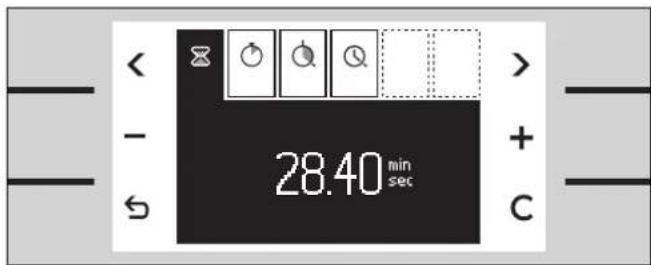
text_image
28.40 min sec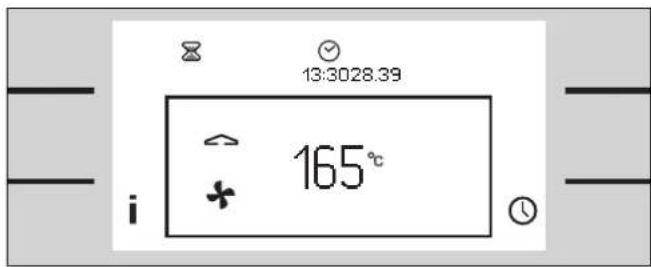
text_image
13:3028.39 165°Setting the Timer
1 Call up the timer menu. The timer function ☒ is shown on the display.
2 Using + or - set the desired duration.
3 Start using the key.
The timer menu is closed. The symbol ☒ and the elapsing time are shown in the status bar.
A signal sounds when the time has elapsed. Touch the ⏻ key to switch off the signal.
Note
To cancel an active timer:
Call up the timer menu, select the timer function ☒ and touch the C key.
Stopwatch
The stopwatch will count the elapsed time up to 90 minutes.
The pause function pauses the stopwatch.
The stopwatch runs independently of all other settings of the appliance.
text_image
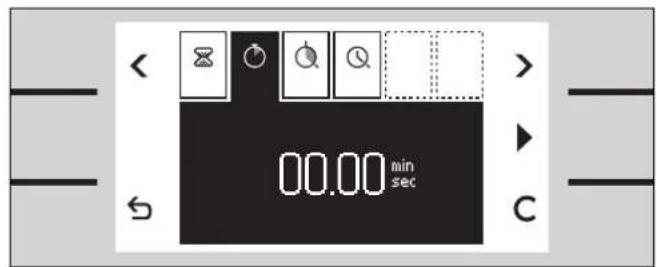
00.00 min sec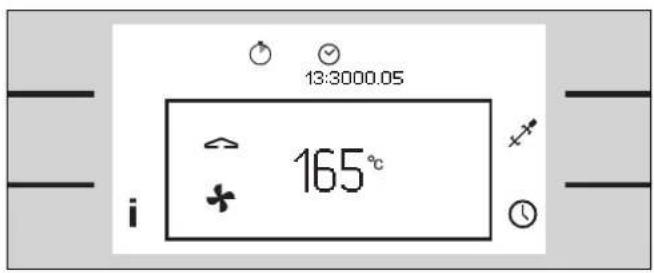
text_image
13:3000.05 165° iStarting the Stopwatch
1 Call up the timer menu.
2 Using < or > select the stopwatch function ⬇.
3 Start using the ▶ key.
The timer menu is closed. The symbol Ⓧ and the elapsing time are shown in the status bar.
A signal sounds when the time has elapsed. Touch the ⏻ key to switch off the signal.
The timer menu is closed immediately when you touch the ↩ key.

text_image
06.40min sec CPausing the Stopwatch
1 Call up the timer menu.
2 Using < or > select the stopwatch function Ⓞ.
3 Touch the II key. The counter stops. The key reverts to start ▶.
4 Start again using the ▶ key. The counter continues.
After 90 minutes the time reverts to 00:00 minutes. The symbol Ⓧ in the status bar disappears. The stopwatch is switched off.
Note
To cancel the stopwatch: Call up the timer menu, select the stopwatch function Ⓧ and touch the C key.
Cooking Time Duration
If you set a cooking time duration for your meal, the appliance switches off automatically after the selected time.
This enables you to leave the kitchen while the meal is being prepared.
You can select a cooking time between 1 minute and 23 hours 59 minutes.
Select the temperature and heating mode and place your meal in the oven.

text_image
< - ← 00:40 h min + C
text_image
00:4013:30 165°Switching off Automatically
1 Call up the timer menu.
2 Using
3 Using + or - set the required cooking time.
4 Start the program using the key.
The timer menu is closed. Temperature and heating mode are shown on the display. The elapsing time is shown in the status bar.
After the time has elapsed the appliance switches off. A signal sounds. Touch the ⏻ key or open the appliance door to switch off the signal.
Note
To cancel the cooking time:
Call up the timer menu. Touch the C key, then touch to confirm.
To change the cooking time:
Call up the timer menu. Change the time with + or -, then touch ≡ to confirm.
To stop the program:
Switch the temperature knob off.
Cooking Time End
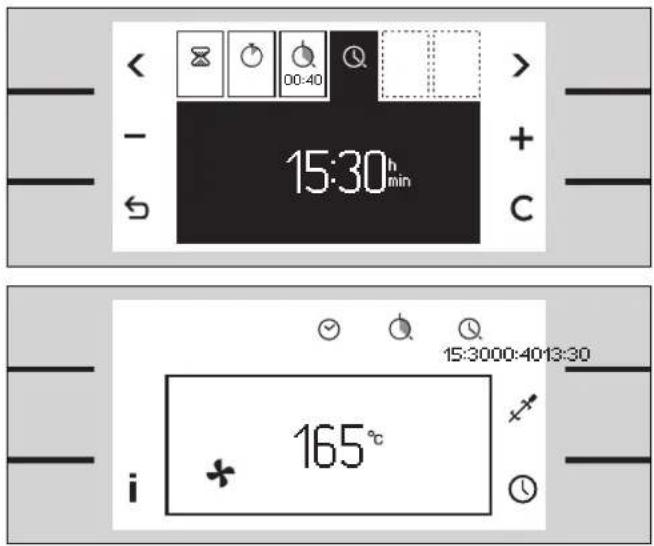
You can program a cooking time end. Example: it is 13:30. The meal will take 40 minutes to cook and must be ready at 15:30.
Set the cooking time duration and set the cooking time end to 15:30. The electronics will calculate the start time. The appliance will start automatically at 14:50 and switch off at 15:30.
Please note that food which can easily go off should not stay in the oven too long.
Note:
Always set the desired temperature, heating mode and cooking time duration first. Only by setting these values can the cooking time end be programmed.
text_image
15:30h min + C 15:3000:4013:30 165° iSwitching on and off Automatically
1 Set the required cooking time.
2 Using > select cooking time end Ⓐ. The switch off time appears on the display.
3 Using + set a later switch-off time.
4 Start using the ↕ key. The timer menu is closed.
Temperature and operating mode appear on the display. The status bar appears. The appliance is on standby and will start automatically. After the cooking time duration it will switch off.
After the time has elapsed the appliance switches off. A signal sounds. Touch the ⏻ key, open the appliance door or switch off the temperature selector to switch off the signal.
Note
To cancel the cooking time:
Call up the timer menu. Touch the C key, then touch
to confirm. Cooking time duration and end are cancelled.
To stop the program:
Switch the temperature knob off.
If the ⚙ symbol flashes:
You have not set the cooking time duration. Always set the cooking time duration first.
Extended Timer
This function keeps the oven at a temperature of 85^ C in the top and bottom heat mode.
You can keep food warm 24 to 74 hours, without switching the oven on or off.
Please note that food which can easily go off should not stay in the oven too long.
Supposition:
The entended timer key 🔒 is available. You have to make the entended timer key available in the basic settings. See chapter basic settings.

text_image
13:30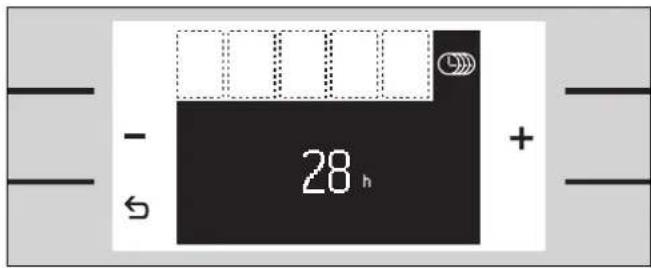
text_image
- 28 h +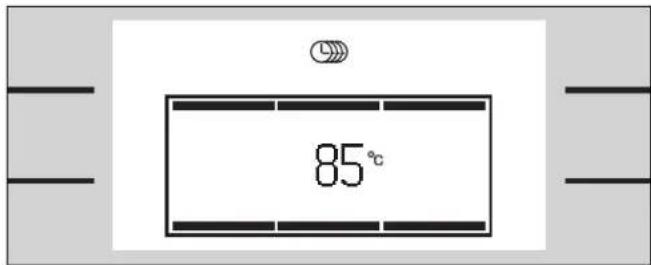
text_image
85°Setting the Program
1 Turn the temperature knob one position to the right to the light position.
2 Touch the key beside the symbol Ⓤ. The suggested value of 28 h appears on the display.
3 Using + or - set the desired duration.
4 Start using the key.
The cooking mode and temperature appear on the display. The oven light stays off. The keys are locked. The display lighting is switched off. The softkey tone is switched off.
At the end of the programmed time the oven stops heating. The display is empty. Switch the temperature knob off.
Note
If you cannot find the Ⓤ key:
You have to make the extended timer key available. See chapter basic settings - extended timer.
To stop the program:
Switch the temperature knob off.
Child Lock
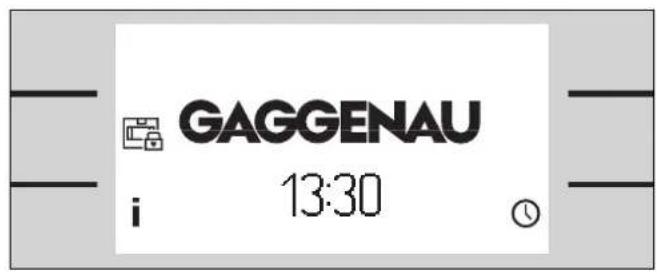
The oven has a child lock. It prevents the oven being turned on unintentionally.
Supposition:
You have to make the child lock available in the basic settings. See chapter basic settings.
text_image
GAGGENAU i 13:30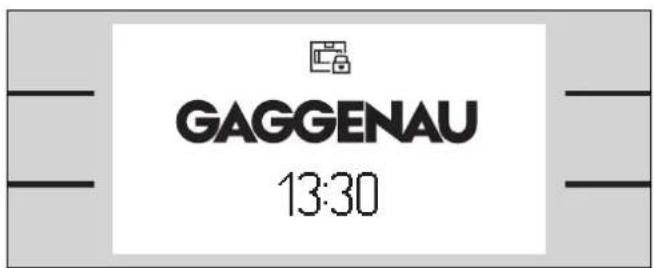
text_image
GAGGENAU 13:30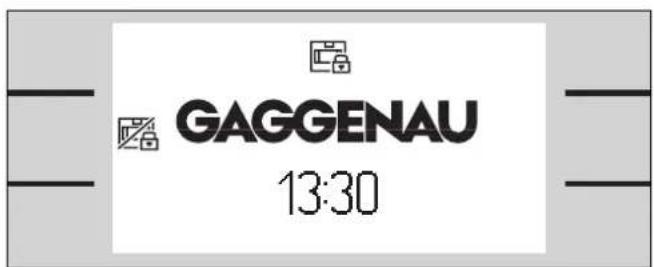
text_image
GAGGENAU 13:30Activating the Child Lock
Supposition:
The temperature knob is in the OFF position.
1 Touch any key. The symbol 📄 appears beside the centre left key.
2 Touch the key ☐ for at least 6 seconds.
The child lock is active, the controls are locked.
The standby screen appears. The symbol 📄 appears in the status bar.
Deactivating the Child Lock
1 Touch any key. The symbol 📄 appears beside the centre left key.
2 Touch the key ☑ for at least 6 seconds.
The child lock is deactivated. You can operate the appliance as usual.
Note
If you cannot find the ☐ key beside the centre key: Call up the basic settings menu. Select the child lock function. Select "child lock available" ☐.
If the child lock key is no longer required: Call up the basic settings menu. Select the child lock function. Select "child lock not available"
Additional Functions
Safety Deactivation
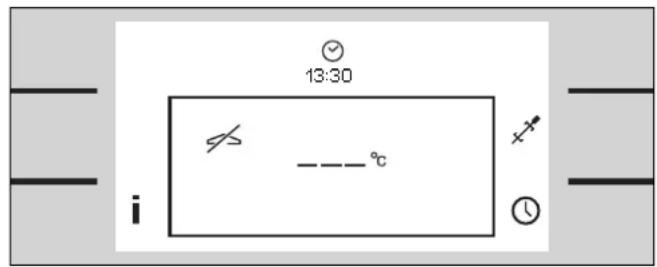
For your protection the appliance has a safety deactivation. The safety deactivation switches off the heat if the oven is left on for more than 12 hours without the controls being touched.
Three dashes appear on the display. Switch the temperature knob off. Then you can operate the appliance as usual.
Fast Heating up
This mode heats up the oven particularly fast.
You can activate the fast heating up in the basic settings menu.
If you have selected fast heating up, always heat up the empty oven before putting the dish in the oven.
text_image
13:30 i - - - °CChanging the Basic Settings
Your appliance has several basic settings.
You can customize these settings:
Turn the temperature knob one position to the right to the light position.
- Call up the basic settings menu with the ↗ key.
- Use the top < or > keys to move between the settings.
- Use the centre keys to change the selected setting. You can change several settings individually without leaving the menu.
- Touch the ◊ key to exit the menu. All settings are saved.
Note
The status bar only shows six options.
Use the top < or > keys to move to the required option. You can scroll back- or forward with these keys.
If no key has been touched for 60 seconds the menu disappears. The standby screen appears. All settings are saved.
text_image
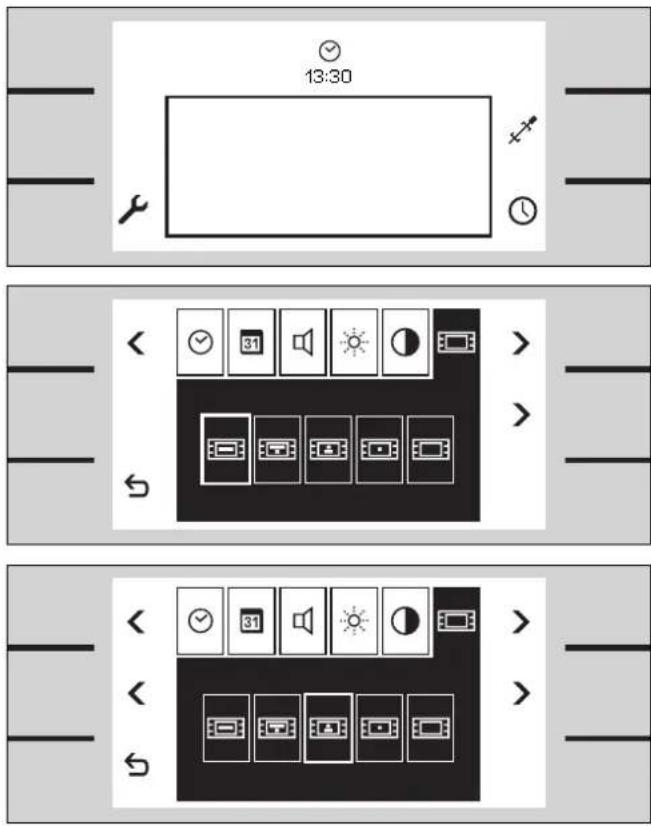
13:30 < 31 > < 31 > < 31 >Example: Changing the Standby Screen
1 Call up the basic settings menu by turning the temperature knob one position to the right to the light position.
Touch the key next to the ⚡ symbol. The menu appears.
2 Use the menu key > to select the function standby screen ☐.
3 Use the middle keys < or > to select the required setting. The selected screen appears briefly.
Now you can change further settings or exit the menu with the ↻ key.
The Following Settings Can Be
Changed
Time format
• 12 hour format (AM/PM) or 24 hour format

text_image
< RH FW 31 24h > > < RH FW 31 24h > > + > < RH FW 31 24h > > + > 10 0726 DD HM YY > > + > < RH FW 31 24h > > + > < RH FW 31 24h > > + > < RH FW 31 24h > > + > < RH FW 31 24h > > + > 51 0726 DD HM YY > > + > 51 0726 DD HM YY > > + > 51 0726 DD HM YY > > + > 51 0726 DD HM YY > > + > 51 0726 DD HM YY > > + > 51 0726 DD HM YY > > + > 51 0726 DD HM YY > > < RH FW 31 24h > > + > 51 0726 DD HM YY > > + > 51 0726 DD HM YY > > + > 51 0726 DD HM YY > > + > 51 0726 DD HM YY > > + > 51 0726 DD HM YY > > + > 51Clock
Hours / minutes
Use the arrow key > bottom right to change from hours to minutes.
Date
Day / month / year
Use the arrow key > bottom right to change from day to month to year.
Key tones volume
In 8 levels
Adjust the volume of the key tones. The signal volume cannot be adjusted.
Display brightness
In 8 levels
Display contrast
In 8 levels
The display contrast depends on the viewing angle.
Standby screen
Gaggenau / Gaggenau with clock / clock and date / clock / empty display
The selected screen appears briefly.
Extended timer
• Extended timer key not available / available
Reset all parameters to the factory setting
No / yes
Immediately confirm a reset with the Ⓧ key.
text_image
< < 5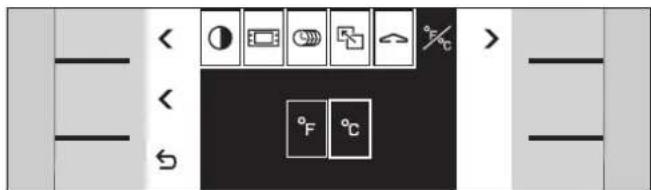
text_image
< < ~
text_image
< < > DD.MM.YY [00 MM YY]
text_image
< < ~
text_image
< < > >
text_image
< °C DCD WO E S > > ←Exhibition mode
The setting "exhibition mode not active" must be selected and must not be changed. The appliance does not heat up during exhibition mode .
You can only change this setting 3 minutes after the appliance has been connected to the electricity.
Temperature unit
- °F or °C
Date format
Day.month.year or day/month/year or month/day/year
Heating up with / without signal
- rapid heating up with signal / normal heating up with signal / rapid heating up without signal / normal heating up without signal
The signal sounds when the oven has heated up.
Key tones
Sound 1 (beep) / sound 2 (click) / key tones off
Choose the key tones.
The signal tone cannot be changed.
Child lock
- Child lock key not available / available
Safety Notes
⚠ Warning! Do not clean the hob using high pressure cleaners or steam jets.
⚠ Warning, risk of burns! Before cleaning, wait until the appliance has cooled down.
Cleaning the Oven Interior
Clean the oven with a cloth/sponge and a small amount of hot soapy water. Avoid residues burning in. After cleaning, leave the door open until the oven has dried.
Do not scrape off baked-in remainders of food. Instead, moisten them with a wet cloth and detergent.
Fruit juices from moist cakes dripping onto the oven interior can damage the enamel. Remove such soiling as soon as the oven has cooled down sufficiently.
Do not use non-suitable cleaning agents:
- scouring cleaning agents
- nitro polishing agents
- cleaners containing chloride
- abrasive sponges or objects
Note: Only use oven cleaner on the enamel in the oven interior. Do not let the oven cleaner come into contact with the door seal. Do not spray oven cleaner onto the door frame.
Cleaning the Glass Front
Clean the glass front with a soft cloth and glass cleaner. Do not wipe the glass front with a soaking wet cloth as water might enter behind the glass.
Do not use aggressive, scouring cleaning agents or glass scrapers. They can scratch the surface and destroy the glass.
Only clean the display with a soft cloth. Do not wipe the display with a soaking wet cloth as water might enter behind the screen.
Cleaning the Door Seal
Always keep the door seal clean and free of food remains.
Do not use aggressive cleaning agents (e.g. oven cleaner) on the door seal. They can destroy the door seal.
Do not remove the door seal.
Cleaning the Accessories
Clean accessories (baking tray, wire grill and grill pan) with hot soapy liquid.
Soak baked-in remainders and clean with a brush.
Cleaning the Baking Stone
(special accessory)
Remove coarse soiling from the baking stone. Turn the baking stone round before using it again. This will burn off most residues from the bottom side.
Note: Do not clean the baking stone with water and detergents! Moisture inside the baking stone can cause cracking.
Catalytic Cleaning
The rear and top interior parts of the oven are coated with catalytic special enamel. The high temperatures during catalytic cleaning remove soiling.
The bottom and side interior parts, the inside of the door and the glass panel are not cleaned during catalytic cleaning.
The duration of the catalytic cleaning is 3 hours.
Before Starting Catalytic Cleaning
- Remove coarse soiling and food remains from the oven.
- Manually clean the bottom and side interior parts, the door seal, the inside of the door and the glass panel. The catalysis does not clean these parts.
- Remove all loose interior parts (for example wire rack or meat probe) from the oven. No objects should be left in the oven!
- Close the oven door.

text_image
16:30 h min
text_image
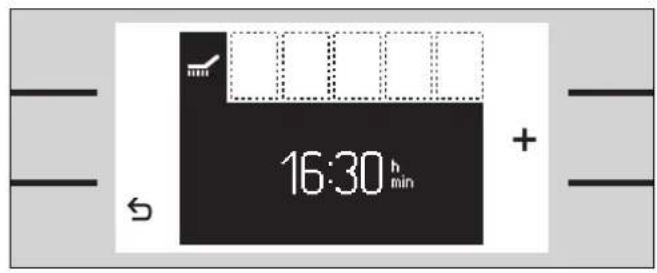
02-5913:30 300° iSetting the Program
1 Turn the temperature knob and the function knob one position to the left.
2 The catalysis menu appears. The switch off time appears on the display.
3 Press ↩ to start.
The catalysis menu disappears. The √ symbol and the catalysis temperature appear on the display. The status bar shows the duration of the catalysis.
text_image
16:30 h min
text_image
21:0003:0013:30 i - - - °CDelaying the Switch-off Time
If you want the catalysis to run at a later time (for example during the night), you can change the switch-off time. In this way you can use your oven during the day as usual.
Make the settings as described in 1 and 2.
3 Press the + key to change the switch-off time.
4 Press the ↕ key to confirm.
After confirmation the √ symbol appears on the display. The status bar shows the switch-off time of the catalysis. Three dashes instead of the temperature are shown on the display. After the start of the catalysis the temperature appears on the display.
A signal is sounded at the switch-off time. Exception: There is no signal between 22.00 and 8.00.
The catalytic cleaning has ended. Switch off the temperature knob.
Allow the oven to cool down fully.
Note
The duration of the catalytic cleaning cannot be changed.
If the pyrolysis does not start and the ☑ or ⚡ symbol flashes on the display: Check if the door is fully closed and the meat probe has been removed.
If you want to stop the catalytic cleaning: Switch off the temperature knob.
Trouble Shooting
In case of a malfunction first check the household fuses. If the power supply is functioning correctly contact your dealer or Gaggenau after-sales service.
Please specify the E number and FD number of the appliance when calling our after-sales service. You find these numbers on the rating plate of the appliance.
Repairs may only be carried out by authorised technicians, in order to guarantee the electrical safety of the appliance.
⚠ Warning! Incorrect repairs may result in serious injury to the user.
All poles of the appliance must be disconnected from the electricity when being repaired (switch off the household fuse or the circuit breaker in the fuse box).
Non compliance with these recommendations results in the warranty coverage becoming invalid.
text_image
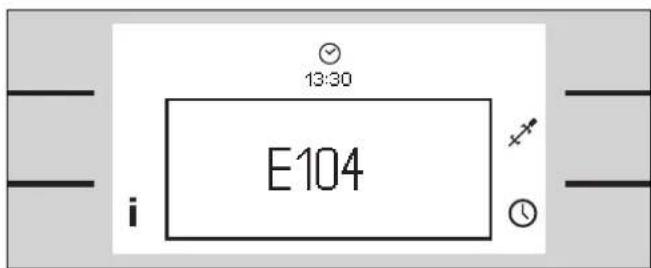
13:30 E104Error Messages
If a malfunction occurs and the appliance does not heat up, an error code will flash on the display.
If E003, E303, E115 or E215 flashes on the display the appliance is too hot. Switch off the appliance and let it cool down.
If a different error code flashes on the display call the after-sales service. Please specify the error code and the appliance type. You find the appliance type on the rating plate.
Switch off the temperature knob.
Note:
The short timer and stop clock can still be used.

text_image
GAGGENAU 13:30Exhibition Mode
If the symbol appears on the standby screen, exhibition mode is activated. The appliance does not heat up.
Disconnect the appliance from the electricity for a few seconds (switch off the household fuse or the circuit breaker in the fuse box). Within 3 minutes after reconnecting the appliance go to the basic settings menu and deactivate exhibition mode.
text_image
13:30 i -°CPower Cut
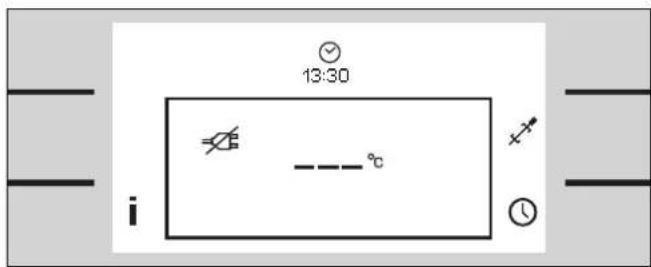
The appliance bridges a power cut of up to 5 minutes. The operation continues.
After a longer power cut the appliance will switch off the operation. The ⚫ symbol appears on the display and three dashes instead of the temperature.
Switch off the temperature knob and switch the appliance back on.
The "first settings" menu reappears if the appliance is without electricity for several days. You have to set the clock.
Note: The basic settings remain stored even if the appliance is without electricity for several days.
Replacing the Oven Lights
If an oven light fails, it must be replaced. Heat-resistant replacement bulbs can be obtained from the after-sales service or specialist shops. Only use these bulbs.
⚠ Warning, risk of burns! Oven lights get very hot during use. Only replace the oven light when it is cold.
Disconnect the appliance from the electricity before replacing the light (switch off the household fuse or the circuit breaker in the fuse box).

natural_image
Diagram of a computer monitor with an open case containing a tray and a screw, showing a rotation arrow (no text or symbols)Replacing the Ceiling Light
1 Loosen the screw on the lamp cover. Tilt down the lamp cover.
2 Pull out the bulb. Push the new bulb in firmly. Make sure that the pins are in the correct position. Note: Only use a heat-resistant halogen bulb of the same type (60 W / 230 V / G9). Do not touch the halogen lamp with your hands. Use a dry cloth.
3 Tilt the lamp cover up and screw it back on.
4 Switch the circuit breaker back on.
Replacing the Side Light
natural_image
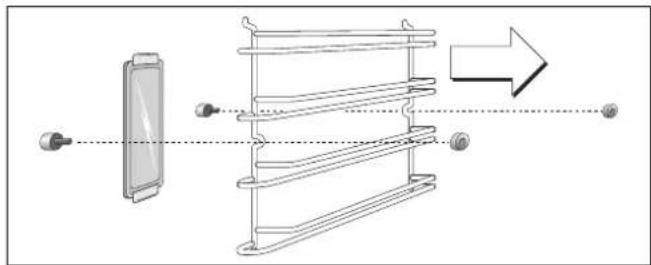
Diagram showing a device with a screen and a ladder structure, connected by a dashed line to an arrow (no text or symbols present)1 Place a tea towel in the oven to prevent damage.
2 Pull out the shelf after undoing the knurled nuts.
3 Push the top mounting bracket back and remove the glass cover.
4 Pull out the bulb. Push the new bulb in firmly. Make sure that the pins are in the correct position. Note: Only use a heat-resistant halogen bulb of the same type (10 W / 12 V / G4). Do not touch the halogen lamp with your hands. Use a dry cloth.
5 Insert the glass cover under the bottom mounting bracket and press it down firmly on the top. The sloping edges must face to the interior of the oven.
6 Remove the tea towel and switch the circuit breaker back on.
You must replace a damaged glass cover. Suitable glass covers may be obtained from the after-sales service.
