A3 (2001) - Car AUDI - Free user manual and instructions
Find the device manual for free A3 (2001) AUDI in PDF.


User questions about A3 (2001) AUDI
0 question about this device. Answer the ones you know or ask your own.
Ask a new question about this device
Download the instructions for your Car in PDF format for free! Find your manual A3 (2001) - AUDI and take your electronic device back in hand. On this page are published all the documents necessary for the use of your device. A3 (2001) by AUDI.
USER MANUAL A3 (2001) AUDI
text_image
Audi A3 Quick reference guideDear Audi Driver,
The aim of this quick reference guide is to introduce you to the main features and controls of your vehicle.
This quick reference guide cannot replace the information contained in the Owner's Manual; it is therefore important that you also read the notes and warnings in the Owner's Manual.
We wish you safe and enjoyable motoring with your new Audi.
AUDI AG

text_image
you safe and enjoyable with your new Audi.LOCKING AND UNLOCKING THE VEHICLE
The central locking system locks and unlocks all the doors, the boot lid and the tank flap. It can be operated with the remote control or by turning the key in the lock.
Operating the radio-activated remote control
Press the appropriate button for about 1 second.
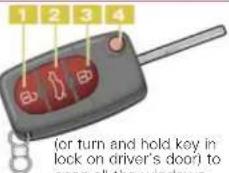
1 Unlocking button Open one of the doors or the boot lid within about 60 seconds, otherwise the vehicle will lock itself again automatically.
2 Unlocking button for boot lid
Press the button for at least 1 second.
3 Locking button The turn signals will flash briefly when the car is locked to confirm that the doors and the boot lid are closed properly.
4 Folding out the master key Press the release button.
Folding away the master key Press the button and fold the key away. Note: Press and hold unlocking button on remote control
text_image
(or turn and hold key in lock on driver's door) to open all the windows.Press and hold locking button on remote control (or turn and hold key in lock on driver's door) to close all the windows and the sun roof.
Warning: The doors and windows cannot be opened from inside the vehicle if it has been locked from the outside.
Anti-theft alarm
The alarm system is automatically set when the car is locked. The alarm system is switched off automatically when you unlock the vehicle with the remote control.
Note: If you unlock the vehicle by inserting the key in the driver's door, the ignition must be switched on within 15 seconds, otherwise the alarm will be triggered. If you unlock the boot lid by turning the key in the slot, the alarm will be triggered immediately.
ADJUSTING FRONT SEATS
1 Adjusting head restraints
Move the head restraint up or down.
2 Releasing backrests - Easy entry feature
(two door models only) Lift the release catch and tip the backrest forwards. The seat is raised slightly and moves forwards with the backrest.
3 Adjusting angle of backrest
Lean forwards and turn adjuster wheel.
4 Adjusting seat height The seat height is adjusted by pulling or pushing the lever.
5 Adjusting lumbar support (Ergomatic)
Press the appropriate section of the control to increase or decrease the thickness of the padding in the backrest.

text_image
Diagram of car seatbelt with numbered labels and red directional arrows indicating movement or force6 Moving seat backwards or forwards
Lift the handle and move the seat.
Adjusting belt height
Slide the guide up or down. Tug the belt to check that the catch is engaged properly.
REAR SEAT

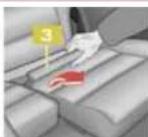
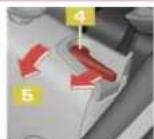
Folding down rear seat
The rear backrest is split into two sections. The seat cushions can be folded down either separately or together. Remove the rear head restraints. Lift the seat cushion 1 forward using the strap 2. Take hold of the back of the seat cushion 3 and tilt it upright. Push the release lever 4 in direction indicated (arrow), and fold down the backrest 5. If the car has a one-piece rear seat, press both release levers to fold the backrest down.
Setting up rear seat
Return the rear backrest 5 to an upright position and make sure that it has engaged properly. Move the seat cushion 1 back into place. First push it all the way in at the back, then press it down at the front so that it engages securely. Hold the centre seat belt while doing this to prevent it from being caught between the seat cushion and backrest. Refit the rear head restraints.
SAFETY
Seat belts must be worn on every journey, even on short trips in town. This applies to the front and rear seats. To ensure that the seat belts, belt tensioners and airbags are fully effective, note the following points:
Adjust seat and sit in correct position
The front seats should not be positioned too close to the steering wheel or dashboard. Maintain a distance of at least 25 cm from the steering wheel. It is important to sit in a normal, upright position and set the backrest so it is fully against your back. The top of the head restraint should be at eye level (or higher). Put
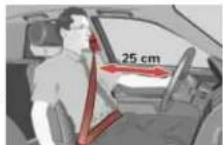
your feet in a comfortable position in the footwell.
Wear the seat belt correctly
Make sure that the shoulder section of the belt is positioned over the centre of the shoulder, and move the lap section as far down over the hips as possible. The belts should always be worn so that they fit tightly (see illustration).
Safety of children in the vehicle
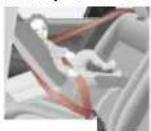
Category 1 Category 2 Category 0

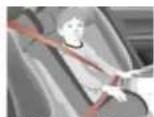
Children under 12 should travel on the rear seat. They must be protected by a child restraint system which complies with the European standard ECE R 44 and is suitable for the child's weight and height. The safest place for the child restraint system is behind the front passenger's seat. Make sure that the system is properly secured. The retractor mechanism of the seat belts can be locked to secure a child safety seat. Please observe the notes in the Audi Owner's Manual and refer to the manufacturer's instructions for the child seat.
Category 0 or 0+: For babies up to about 9 months/10 kg and infants up to about 18 months/13 kg.
Category 1: For small children up to about 4 years of age/18 kg.
Category 2: For children up to about 7 years/25 kg.
Category 3: Children over 7 years of age but less than 1.5 metres tall are best protected by a booster cushion in conjunction with the three-point seat belt.
INSTRUMENTS AND WARNING/INDICATOR LAMPS
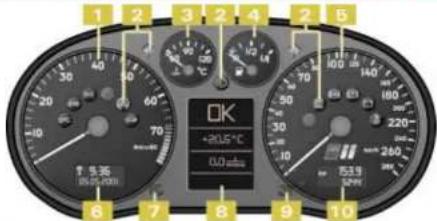
text_image
1 2 3 2 4 2 5 OK +20.5℃ 0.0 mm 7 8 9 10 6 7 8 10 5331 Rev counter
2 Warning and indicator lamps
EPC Engine management ^1 or
70 Glow plugs (on diesel models) ^11
Trailer turn signals
Side lights/headlights
Electronic stability program (ESP)/ traction control system (ASR)
Electronic immobilizer
ID Main beam headlights
Turn signals, hazard warning lights
Fault in engine management system
AIR BAG Airbag system
Anti-lock brake system
P Handbrake engaged
Alternator
Seat belt reminder
3 Coolant temperature gauge
4 Fuel gauge
5 Speedometer
6 Digital clock and date
7 Control button:
• To check distance to next service
Press the button briefly with the ignition on and the vehicle stationary.
• To check the auto-check control display
Press the button twice with the ignition on and the vehicle stationary.
- To call up driver information Press the button if one of the red symbols flashes.
• To activate mileage recorder display and digital clock
Press the button when the ignition is off.
- Toset speed warning 1 Press the button briefly when the desired speed is indicated on the speedometer. To clear the speed limit, press the button for at least 1 second.
- To set the digital clock/date
Keep pulling the button briefly until the desired display appears. Turn the button to alter the time/ date.
8 Display:
- Warning symbols or auto-check control
OK No faults detected
Fault in brake system
J Fault in cooling system
Engine oil pressure too low
Fuel level low
Brake pads worn
Check engine oil level
Engine oil sensor faulty ^1
Door or tailgate not shut
Battery voltage too high or too low ^1
/ [make light faulty]
Bulb failure: dipped headlights or rear lights
Washer fluid level low
- Speed warning 1 or 2 (km/h or mph)
Dynamic headlight range control faulty"
• Radio/ telephone information
- Outside temperature
- On-board computer
1/100 km Instantaneous fuel consumption
km Fuel range
h Driving time
100 km Average fuel consumption
Average speed
• Service Indicator Shortly before a service is due, the display will briefly show the word Service, together with the number of miles/km until the service is due.
• Navigation/ telematics information
- Selector lever position (on vehicles with automatic gearbox)
9 Reset button for trip recorder
10 Mileage recorder Top display: trip recorder Bottom display: total mileage
If one of the red symbols lights up while you are driving, stop the car, switch off the engine and refer to the Owner's Manual. If one of these warning symbols lights up while you are driving, please take the vehicle to an Audi workshop straightaway.
SUN ROOF

Turn the control to the appropriate position to open and close the sun roof:
1 Toslide roof open
0 to close roof
To tilt roof up at the rear: Turn the control to position 0
and press the control. To move it down again: Pull the control briefly.
FILLING THE TANK

Opening the tank flap
Open the tank flap as illustrated. Unscrew the filler cap and hook it onto the tank flap.
Stickers for:
1 Fuel grade
2 Tyre pressures
text_image
Interior view of a Audi car with numbered diagnostic panels and dashboard controls1 Electric windows
Press the switch briefly to move window all the way down. Lift the switch briefly to move the window all the way up. The window can be stopped in any position by briefly pressing the switch again.
On 4-door models, the rear windows can be deactivated by pressing the safety switch.
2 Electric adjustment for exterior mirrors
Selector knob:
I Off
□ / L Left exterior mirror
☐ / R Right exterior mirror
Retract both exterior mirrors
On 2-door models, press the adjuster to move the mirror surface in the desired direction. On 4-door models, turn the knob. The mirrors are heated when the ignition is on.
3 Door handle
4 Central locking switch
Press the lower half of the switch to lock the vehicle centrally from the inside. Press the top half of the switch to unlock the vehicle.
8 Light switch; turn signal and headlight dip lever
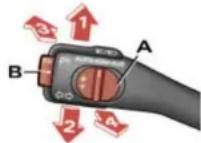
1 R light turn signals (With ignition off: right parking light on) 2 Left turn signals (With ignition off: left parking light on) 3 Main beam headlight 4 Headlight flasher
Cruise control system To activate the system: slide control A to ON/ EIN position. Press button B to store the current speed and maintain this speed constantly. To switch off cruise control temporarily: press either the brake pedal or clutch pedal, or slide control A to OFF/ AUS. To resume the programmed cruising speed, slide switch A to RES/ AUFN.
To switch off cruise control completely: slide control A all the way over to OFF/ AUS until the click stop engages.
9 Horn 10 Air outlets with thumbwheels
11 Instruments and warning/indicator lamps
See also overleaf.
12 Switch for ASR (traction control system)
ESP (electronic
stability program)
13 Switch for hazard warning lights
14 Cup holder
Press the catch to open the lid.
15 Radio
16 Lockable glove box
17 Thumbwheel for seat heating (front left seat)
18 Switch for rear window heater
19 Air conditioner controls:
- + Temperature setting
AUTO Automatic mode
-※+ Blower speed
Defrost windows
Standard setting for all seasons:
Select a temperature of 22 °C and switch the automatic mode on.
20 Thumbwheel for seat heating (front right seat)
21 Ashtray, cigarette lighter and electrical socket
22 Gear lever/ selector lever
Selector lever positions on vehicles with automatic gearbox
P - P arking lock R - R reverse gear N - Neutral
D - Dr i v e
To move the selector lever out of position P or N, press the interlock button on the selector lever handle and the brake pedal simultaneously.
Note: Use the foot brake to hold the vehicle when stationary with the engine running (in all selector lever positions other than P and N).
Warning: Do not move the selector lever to positions P or R when the vehicle is moving.
Manual gearshift program (Tiptronic)
The Tiptronic program enables you to change gear manually.
To do this, move the selector lever out of position D into the Tiptronic gate on the right. Press the selector lever forwards briefly to shift up a gear, or push the lever back to shift down a gear.
23 Storage compartment or switches for navigation system and telematics
24 Handbrake
25 Windscreen wiper and washer lever
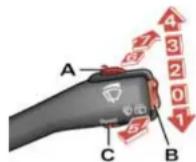
Windscreen:
0 Off
1 B rief wipe
2 l n termittent wipe The wiper intervals can be varied in stages by turning control A.
3 S low wiper speed
4 Fast wiper speed
5 Automatic wash and wipe
Pull lever towards you and hold.
Rear window:
6 l n termittent wipe Press lever towards dashboard.
7 Automatic wash and wipe
Press lever as far as it will go towards dashboard and hold.
Function selector switch
for on-board computer Press the top or bottom of rocker switch B to show the various displays in turn. Press and hold button C to reset display to zero.
Selector button for display modes
Press button C repeatedly to select the following displays: on-board computer (single journey memory and total journey memory), navigation system and telematics, or to switch the display off.
26 Ignition lock
27 Compartment for Service Wallet
28 Lever for adjustable steering column
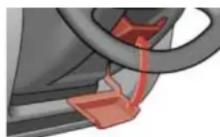
Pull lever down and adjust the position of the steering column as required. Then push the lever back up as far as it will go.
29 Bonnet release lever Please refer to Owner's Manual.
30 Switch in door pillar (driver's side)
This switch deactivates the interior monitor for the anti-theft alarm system.
5 Thumbwheel for instrument lighting
6 Thumbwheel for head-light range control
7 Light switch
○ Lights off
≥00≤ Side lights
Main or dipped beam headlights
Turn switch to dipped beam position. Then pull out to
1st stop:
0 Front fog lights
- 2nd stop:
0 Front fog lights and
0‡ Rear fog light