Ka (2011) - Car FORD - Free user manual and instructions
Find the device manual for free Ka (2011) FORD in PDF.


User questions about Ka (2011) FORD
0 question about this device. Answer the ones you know or ask your own.
Ask a new question about this device
Download the instructions for your Car in PDF format for free! Find your manual Ka (2011) - FORD and take your electronic device back in hand. On this page are published all the documents necessary for the use of your device. Ka (2011) by FORD.
USER MANUAL Ka (2011) FORD
COF TUN X5 GD:Layout 1 10-10-2010 11:21 Pages
GB
The information contained in this publication was correct at the time of going to print. In the interest of development the right is reserved to change specifications, design or equipment at any time without notice and without increasing any obligations.
This publication, or part thereof, may not be reproduced nor translated without our approval. Errors and omissions excepted. © Ford Motor Company 2008
All rights reserved.
603.81.825

text_image
FordKa Owner's handbook Feel the difference FordOwner's handbook
Feel the difference

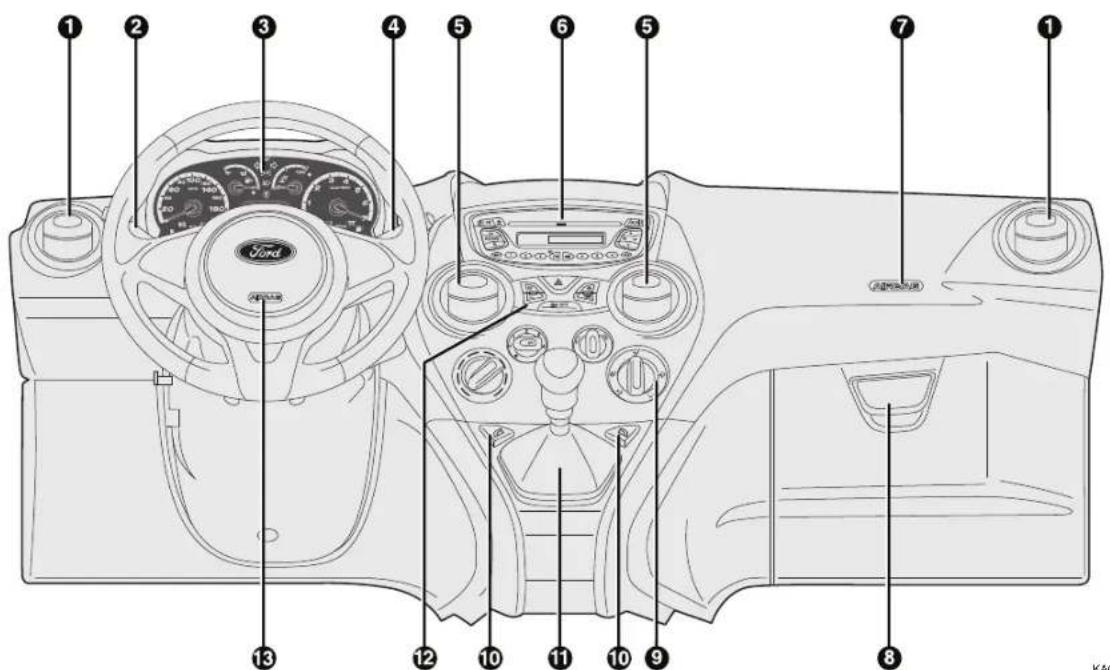
DASHBOARD (LEFT-HAND DRIVE)
The presence and position of controls, instruments and gauges may vary depending on the versions.
text_image
Diagram of a Ford car dashboard with numbered parts for identification and assembly reference.KA00177m
- Side air vent – 2. Left steering column stalk: external lights – 3. Instrument panel and warning lights – 4. Right steering column stalk: windscreen wiper, washer, trip computer controls – 5. Central air vents – 6. Oddment/Car radio compartment – 7. Passenger side air bag – 8. Oddment compartment – 9. Heating/ventilation/climate controls – 10. Power windows controls – 11. Gear lever – 12. Control plate – 13. Driver side air bag
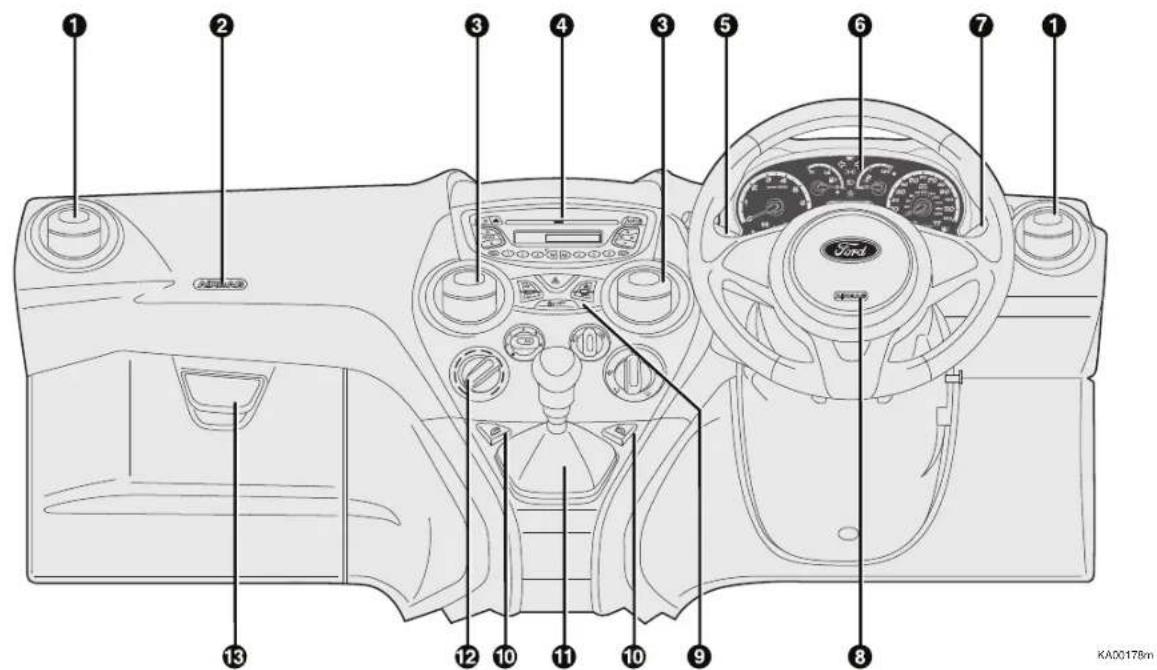
DASHBOARD (RIGHT-HAND DRIVE)
The presence and position of controls, instruments and gauges may vary depending on the versions.
text_image
Diagram of a car dashboard with numbered parts for identification and assembly reference.- Side air vent – 2. Passenger side air bag – 3. Central air vents – 4. Oddment/Car radio compartment – 5. Left steering column stalk: external lights – 6. Instrument panel and warning lights – 7. Right steering column stalk: windscreen wiper, washer, trip computer controls – 8. Driver side air bag – 9. Control plate – 10. Power windows controls – 11. Gear lever – 12. Heating/ventilation/climate control – 13. Oddment compartment
603.95.157 PP KA EN led trip 15-10-2010 13:49 Pagina 3
ON BOARD PANEL AND INSTRUMENTS
text_image
A B C D 90 100 120 60 km/h 140 40 780 20 180 200 23.55 18:30 1 6 7 EKA00161m
Versions with digital display

text_image
A B C D 60 100 120 km/h 140 40 160 20 180 200 Liu 13 Nov 123-5pm 2018:30 A E NEW/245KAD0162m
Versions with multifunction display
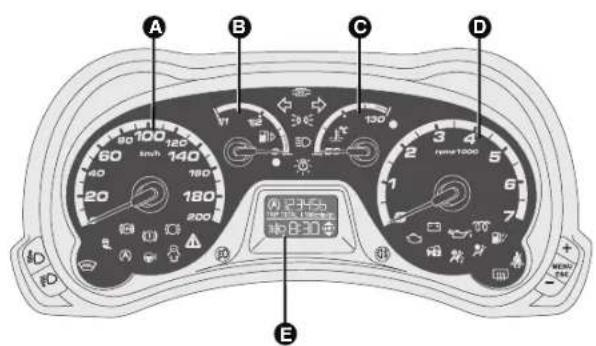
Left-hand drive versions
A Speedometer (speed indicator).
B Fuel gauge with reserve warning light.
C Engine coolant temperature gauge with excess temperature warning light.
D Rev. counter.
E Digital display.
Warning lights 00 and 24 are only provided on Diesel versions.
603.95.157 PP KA EN led trip 15-10-2010 13:49 Pagina 4


text_image
QUICK START
text_image
A B C D 123456 8:30 E MENU EN KA00163mVersions with digital display

text_image
A B C D E Lun 13 Nov 2:10 12:34.5m 20T 8:30 A MENU 2:40 KA00164mVersions with multifunction display
Right-hand drive versions
A Rev. counter.
B Fuel gauge with reserve warning light.
C Engine coolant temperature gauge with excess temperature warning light.
D Speedometer (speed indicator).
E Digital display.
Warning lights 00 and 24 are only provided on Diesel versions.
DIGITAL DISPLAY
STANDARD SCREEN
The standard screen shows the following information:
A Headlight aiming position (only with dipped beam headlights on)
B Time (always displayed, even with key extracted and front doors closed)
C Gear Shift Indication
D Odometer (display of covered km or miles)
E Auto-Start-Stop function indication
Note With key removed (when opening one of the front doors) the display will turn on and show for a few seconds the km or mi covered.
CONTROL BUTTONS
+ To scroll the displayed menu and the related options upwards or to increase the displayed value.
MENU Press briefly to display ESC in the menu and/or go to next screen or confirm the required menu option. Hold pressed to go back to the standard screen.

text_image
E A 123456 TRIP TOTAL | 100kmip/gh 3:30 8:30 SHIFT A B C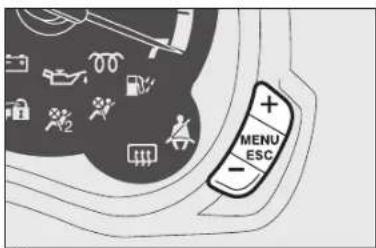
text_image
MENU ESC- To scroll the displayed menu and the related options downwards or to decrease the displayed value.
SETUP MENU
The menu comprises a series of functions arranged in a cycle which can be selected through buttons + and – to access the different select operations and settings (setup) given in the following paragraphs.
The setup menu can be activated by pressing briefly button MENU ESC.
Single presses on the + and - buttons will scroll the setup menu options.
Management modes differ according to the option selected.
The menu includes the following functions:
(*) Function activated only by taking car to dealership.
MULTIFUNCTION DISPLAY (where provided)
The car can be equipped with the multifunction display that, depending on previous settings, shows useful information when driving.
"STANDARD" SCREEN
The standard screen shows the following information:
A Outside temperature
B Time (always displayed, even with key extracted and front doors closed)
C Auto-Start-Stop function indication
D Gear Shift Indication
E Odometer (covered km or miles)
F Date
G Headlight aiming position (only with dipped beam headlights on)
Note When one of the front doors is opened, the display turns on and shows the time and distance covered (in km or mi) for a few seconds.
CONTROL BUTTONS
+ To scroll the displayed menu and the related options upwards or to increase the displayed value.

text_image
G F E Lun 13 Nov 2 123456 km 20°C 8:30 A SHIFT A B C D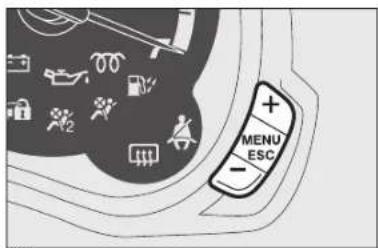
text_image
MENU ESCMENU Press briefly to display ESC in the menu and/or go to next screen or confirm the required menu option. Hold pressed to go back to the standard screen.
- To scroll the displayed menu and the related options downwards or to decrease the displayed value.
SETUP MENU
The menu comprises a series of functions arranged in a cycle which can be selected through buttons + and - to access the different select operations and settings (setup) given in the following paragraphs. There is a submenu for some items (clock adjustment and units of measurement). The setup menu can be activated by pressing briefly button MENU ESC.
Single presses on buttons + or - will scroll the setup menu options. Operating modes are different according to the characteristics of the option selected.
The menu includes the following functions:
- MENÙ
- SPEED BEEP
- TRIP B DATA
- SET TIME
- SET DATE
- SEE RADIO
- MEASUREMENT UNIT
- LANGUAGE
- WARNING VOLUME
- KEY VOL.
- PASSENGER AIR BAG (*)
- COURTESY LIGHTS
- EXIT MENU
(*) Function activated only by taking car to dealership.
603.95.157 PP KA EN led trip 15-10-2010 13:49 Pagina 7
text_image
A B C KA00206m
text_image
Diagram of car interior showing seatbelt and dashboard with numbered labels
text_image
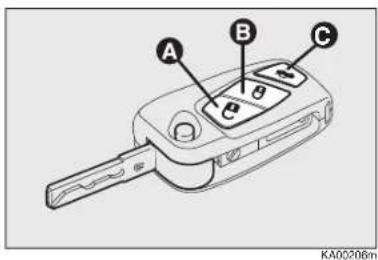
φ TRIP KA00017mLOCKING AND RELEASING WITH REMOTE CONTROL
Press the release button A to open the door.
Press the lock button B to activate the central locking.
Press the button C pressing twice for a few seconds to open the tailgate.
STEERING WHEEL
It can be adjusted vertically (where provided).
For adjustment, bring the lever downward to position 2 then position the wheel and lock it bringing lever to position 1.
TRIP COMPUTER
General information
The Trip computer is used to display information on car operation when the key is turned to MAR-ON. This function includes two separate trips, namely "Trip A" and "Trip B".
The "Trip A" displays:
Range
Distance
□ Average consumption
□ Instantaneous consumption
□ Average speed
☐ Trip time (driving time).
The "Trip B" displays:
Distance B
□ Average consumption B
□ Average speed B
□ Trip time B (driving time)
□ Reset trip B

text_image
Diagram showing two labeled parts (① and ②) of a device with directional arrows indicating movement or force.EXTERNAL LIGHTS
The left-hand stalk operates most of the external lights. The external lights can only be switched on when the ignition key is on MAR-ON. The instrument panel and the various dashboard controls will come on with the external lights.
LIGHTS OFF
Knurled ring turned to position O.
SIDE LIGHTS
Turn the knurled ring to position ⚙️.
DIPPED BEAM HEADLIGHTS
Turn the knurled ring to position ☑D.
MAIN BEAM HEADLIGHTS
With knurled ring in position 3D, push the stalk forward toward the dashboard (steady position).
text_image
E A B C D KA0011mFLASHING THE HEADLIGHTS
You can flash the beams pulling the stalk toward the steering wheel (unstable position).
DIRECTION INDICATORS
Bring the lever to the (stable) position: up (position 1): activates the right direction indicator;
down (position 2): activates the left direction indicator.
WINDOW WASHING
WINDSCREEN WASHER/WIPER
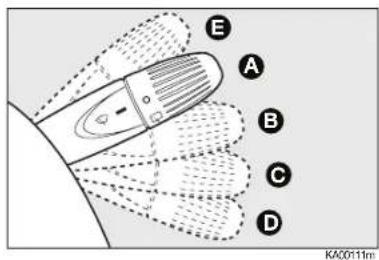
The stalk has five different positions (four speed levels):
A windscreen wiper off.
B intermittent operation.
C continuous slow operation.
D continuous fast operation.
E fast temporary operation (spring-return position).
"Smart washing" function
Pull the stalk towards the steering wheel (unstable position) to operate the windscreen washer. The front window wiper is automatically activated and finishes three strokes after the control has been released, m aking a further stroke to remove the residual drops.
REAR WINDOW WASHER/WIPER
Turn the knurled ring to ☐ to operate the rear window wiper. Pushing the stalk towards the dashboard (unstable position) will activate the rear window washer. The rear window wiper is automatically activated and finishes three strokes after the control has been released, making a further stroke to remove the residual drops. With the windscreen wiper in use, if reverse gear is engaged, the rear window wiper is automatically activated.
603.95.157 PP KA EN led trip 15-10-2010 13:49 Pagina 9
natural_image
Technical diagram of a mechanical component with concentric circles and arrows indicating motion or assembly (no text or symbols)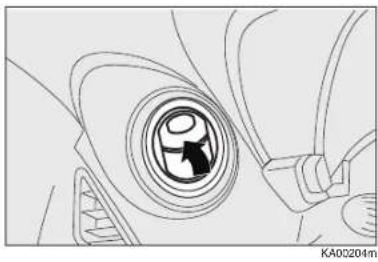
natural_image
Line drawing of a car's wheel and side arm (no text or symbols)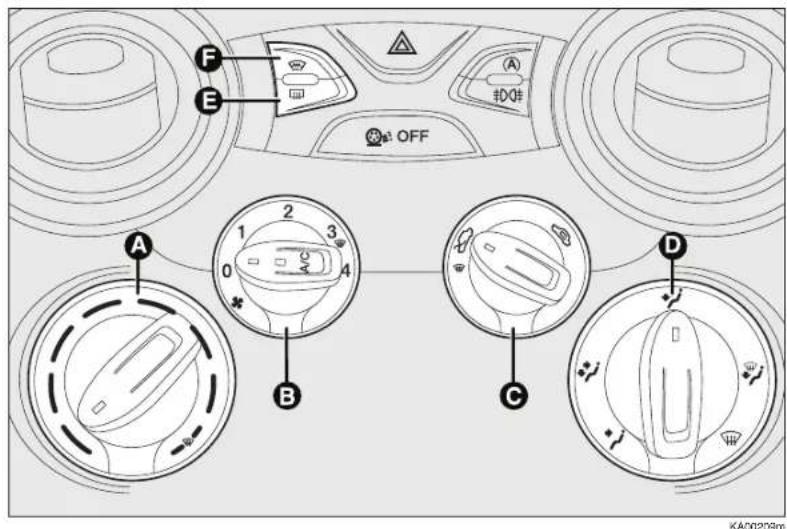
text_image
A B C D E F OFF KA00239mAIR VENTS
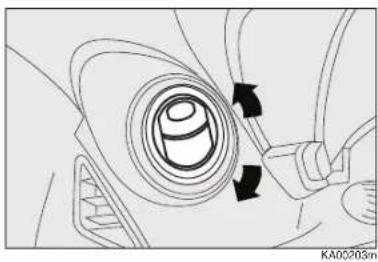
Adjustment: move the vent, directing it as required.
Opening: to open the vent, press in the point shown by the arrow.
MANUAL CLIMATE CONTROL
A Air temperature knob (red-hot/blue-cold).
B Fan speed knob and climate control system activation/deactivation.
C Air recirculation knob.
D Air distribution knob.
E Heated rear window activation/deactivation button.
F Heated windscreen activation/deactivation button.
603.95.157 PP KA EN led trip 15-10-2010 13:49 Pagina 10
text_image
N M E F B A/C AUTO OFF C D G H L IKA00191m
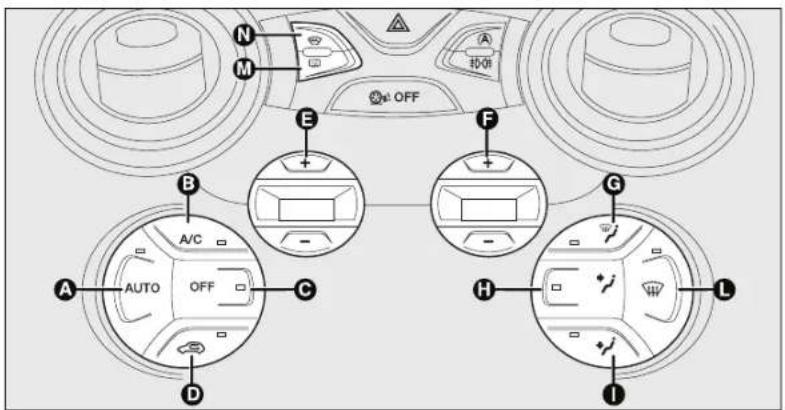
AUTOMATIC CLIMATE CONTROL
Button AUTO - A
Activation of the automatic function of the climate control system
A/C button - B
compressor activation/deactivation
OFF button - C
Switching off the system

button - D
Air recirculation on/off
Buttons +, -, E
Setting desired temperature
Buttons +, -, F
Adjusting fan speed
Buttons 🎨 ✉ -G H I
Air distribution manual selection

Button - L
Front windows quick
demisting/defrosting.
Heated rear window
defrosting/demisting
Press button M to activate the function.
Heated windscreen
defrosting/demisting
Press button N to activate the function.
natural_image
Interior view of a car gear shift lever with labeled component A (no text or symbols beyond label)KA00060m
USING THE MANUAL GEARBOX
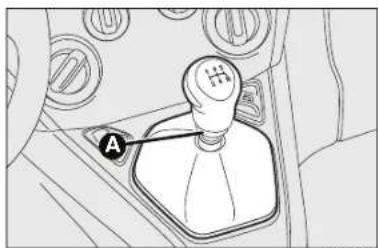
To engage the gears, press the clutch pedal fully and shift the gear lever into one of the required positions (the diagram is shown on the lever knob).
To engage reverse R from neutral, raise ring A under the knob and at the same time move the gearshift lever rightwards and then backward.

text_image
A DOI OFF KA00205mCONTROLS
FRONT FOG LIGHTS AND REAR FOG LAMPS (where provided)
To turn on the front/rear fog lights, use the button A as follows:
I° Pressing: front fog lights on
2° Pressing: rear fog lamps on
3° Pressing: lights/lamps off.
When the front fog lights are on, the warning light 0 turns on in the instrument panel; when the rear fog lamps are on, the warning light 0 turns on in the instrument panel.
The front fog lights are activated when the dipped headlights are on.
AUTO-START-STOP SYSTEM
INTRODUCTION
The Auto-Start-Stop device automatically stops the engine each time the vehicle is stationary and starts it again when the driver wants to resume driving.
This improves the efficiency of the vehicle by reducing fuel consumption, the emission of harmful gases and noise pollution.
The system operates every time the car is started.
Note if climate comfort is to be favoured, the Start&Stop system can be disabled, for a continuous operation of the climate control system.
OPERATING MODES
Engine stopping mode
With the vehicle stationary, the engine stops with the gearbox in neutral and the clutch pedal released.
Note The Auto-Start-Stop function is automatically turned off if the speed of 10 km/h is not exceeded for about 2 seconds, to prevent the engine from being repeatedly stopped when driving at walking pace.
The engine being stopped is signalled by a symbol @ the display.
Engine restarting mode
Depress the clutch pedal to restart the engine.
MANUAL ACTIVATION AND DEACTIVATION
The device can be activated/deactivated by the button (A) the dashboard (see "Controls" paragraph).
603.95.157 PP KA EN led trip 15-10-2010 13:49 Pagina 12
ENGINE STOPPING FAILURE CONDITIONS
With the device activated, for reasons of comfort, limiting emissions and safety, the engine does not stop in certain conditions, including:
□ engine still cold;
☐ fault in the components or sensor of the Auto-Start-Stop system;
☐particularly cold outside temperatures, where the appropriate indication is provided;
☐ reduced braking system vacuum, e.g. following the brake pedal being pressed repeatedly;
☐ battery not sufficiently charged;
□ heated rear window activated;
□ heated windshield;
☐ windscreen wipers working at maximum speed for a long time;
☐ particulate filter regeneration in progress (diesel engines only);
□ driver's door not shut;
□ driver's seat belt not fastened;
□ reverse gear engaged (for example, for parking manoeuvres);
□automatic climate control is on and a comfortable temperature has not yet been reached or MAX – DEF function enabled;
□ during the first period of use, to initialise the system.
In the above cases, a message appears in the display and, where provided, the warning light blinks (A)
SEATS
FRONT SEATS
Fore/aft adjustment
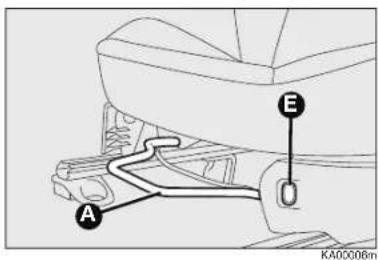
Lift lever A and push the seat forwards and backwards.
Heated seats
Press the button E to switch the function on/off.
Backrest angle adjustment
Turn knob B.
Height adjustment
Operating lever C it is possible to lift or lower the rear area of the cushion to achieve the most comfortable driving position.
603.95.157 PP KA EN led trip 15-10-2010 13:49 Pagina 13
text_image
A E D KA00006m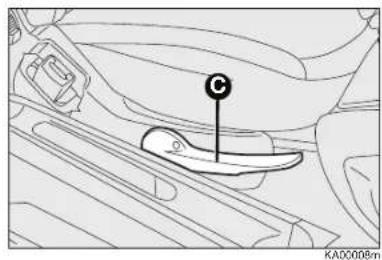
text_image
C KA0008m
text_image
② ① D ③ ⑥ ⑤ D ④ KA00018m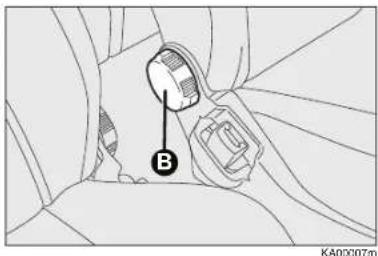
text_image
B KA00007mDriver side, where equipped with position memory
To return the seat to its initial position, slide the seat back and press on the backrest to lock the seat (movement ④); operate lever D (movement ⑤) and raise the backrest (movement ⑥) until it clicks home.
ATTENTION Using lever D before locking the seat in its original position causes the original seat position to be lost. In this case, adjust the seat position by means of the lengthwise adjustment according to the instructions in paragraph "Lengthwise adjustment".
Driver side and passenger side where not equipped with position memory
To return the seat to its initial position, slide the seat back and press on the backrest to lock the seat (movement ④); operate lever D (movement ⑤) and raise the backrest (movement ⑥) until it clicks home. Adjust lengthwise according to the instructions in paragraph "Lengthwise adjustment".

ATTENTION
All adjustments must be made with the car
stationary.
603.95.157 PP KA EN led trip 15-10-2010 13:49 Pagina 14
QUICK START

text_image
A B KA00019mREAR SEATS
Backrest release
☐ For versions with joint seat, lift handles A and B and guide the backrest onto the cushion.
☐ For versions with split seats, lift handle A or B to release respectively the left or right part of the backrest and guide the backrest onto the cushion.
Taking the seat back in the standard use position
Proceed as follows:
☐ move the seat belts to the side, making sure that they are correctly extended and not twisted;
☐ raise the seat backrests and push them back until hearing the locking click of both retainers.

text_image
A B KA00035inFRONT POWER WINDOW CONTROLS (where provided)
The two buttons are located besides the gearshift lever (one for each side); they control:
A To open/close the left front window.
B To open/close the right front window.

text_image
A B C KA00043mFUEL TANK CAP
The cap B is provided with a loss prevention device C which secures it to the lid A.
Using the ignition key, undo the cap B turning it anticlockwise.
FORD AUDIO
GENERAL FUNCTIONS
Turning
the system on: ON/OFF button pressed
Off: ON/OFF button long
pressed
HOW TO PAIR YOUR MOBILE PHONE
IMPORTANT This operation should only be carried out with the car stationary.
To pair your mobile phone, proceed as follows:
☐ Press ⬆ and say “Settings” then, at the end of the Ford Audio message say “Pairing”.
☐ The system will show the phone pairing PIN number on the multifunction display. For the next two steps, consult your mobile phone manual regarding Bluetooth® pairing.
☐ On your mobile phone, search for devices equipped with Bluetooth® technology (the setting on your mobile phone might be called Search or New Device). Find “Ford Audio” in this list (the name that identifies the Ford Audio system in your vehicle) and select it.
☐ When the mobile phone requests it, enter the PIN displayed on the instrument panel display with your mobile phone keypad. If pairing is successful, the system will say "Connecting" and at the end the display will show, as confirmation, the ID of the paired mobile phone.
It is essential to wait until you see this confirmation message on the display. Pressing /MAIN or /ESC before the message is displayed may cancel the pairing process. If the registration fails, an error message will appear; in this case, you will need to repeat the procedure.
☐ After registering the mobile phone, when you first connect, Ford Audio will say "Welcome". In the subsequent registration procedures or connection of the same phone, this message will not be said anymore.
☐ Ford Audio asks you if you want to copy the mobile phone phonebook just registered on the Ford Audio system. You are advised to copy the phonebook.
To proceed with copying, say "Yes"; if you do not want to copy the phonebook, say "No".
☐ On some compatible mobile phones the names in the directory are not copied automatically, but have to be transferred by the user using the mobile phone keypad.
If Ford Audio asks you to do this, perform this procedure following the instructions specific to your mobile phone and press ↘/MAIN when you have finished.
603.95.157 PP KA EN led trip 15-10-2010 13:49 Pagina 16

Print no. 603.95.157 - 11/2010 - 1st Edition
001-025 Ford KA EN:001-025 Ford KA IT 14-10-2010 11:20 Pagina 1
Instruction handbook
Thank you for choosing Ford. We recommend that you read this instruction handbook carefully to better understand your vehicle features. The better you understand, the better you will feel safe and enjoy driving it.
Note The instruction handbook describes the product features and options available in the whole range, sometimes even before they are actually available. Options not installed on your vehicle can be actually described.
Note Use and handle your vehicle always complying with all regulations and laws in force.
Note Hand the instruction handbook over to the new owner if the vehicle is sold. Indeed, it is an integral part of it.
KNOWING YOUR CAR
DASHBOARD (LEFT-HAND DRIVE) 3
DASHBOARD (RIGHT-HAND DRIVE) 4
SYMBOLS 5
THE FORD CODE SYSTEM 5
THE KEYS 6
ON-BOARD PANEL AND INSTRUMENTS 10
DIGITAL DISPLAY 13
MULTIFUNCTION DISPLAY 16
TRIP COMPUTER 24
SEATS 26
HEAD RESTRAINTS 27
STEERING WHEEL 28
REAR VIEW MIRRORS 29
TEMPERATURE COMFORT 30
HEATING AND VENTILATION 31
MANUAL CLIMATE CONTROL SYSTEM 32
AUTOMATIC CLIMATE CONTROL SYSTEM 34
EXTERNAL LIGHTS 37
WINDOW WASHING 38
ROOF LIGHT 40
CONTROLS 41
INTERIOR FITTINGS 43
DOORS 45
POWER WINDOWS 46
BOOT 47
BONNET 49
HEADLIGHTS 51
ABS SYSTEM 53
ESP SYSTEM 54
EOBD SYSTEM 57
PARKING SENSORS 58
AUTO-START-STOP SYSTEM 60
RADIO 64
ACCESSORIES PURCHASED BY THE OWNER ..... 65
REFUELLING THE CAR 66
PROTECTING THE ENVIRONMENT 67
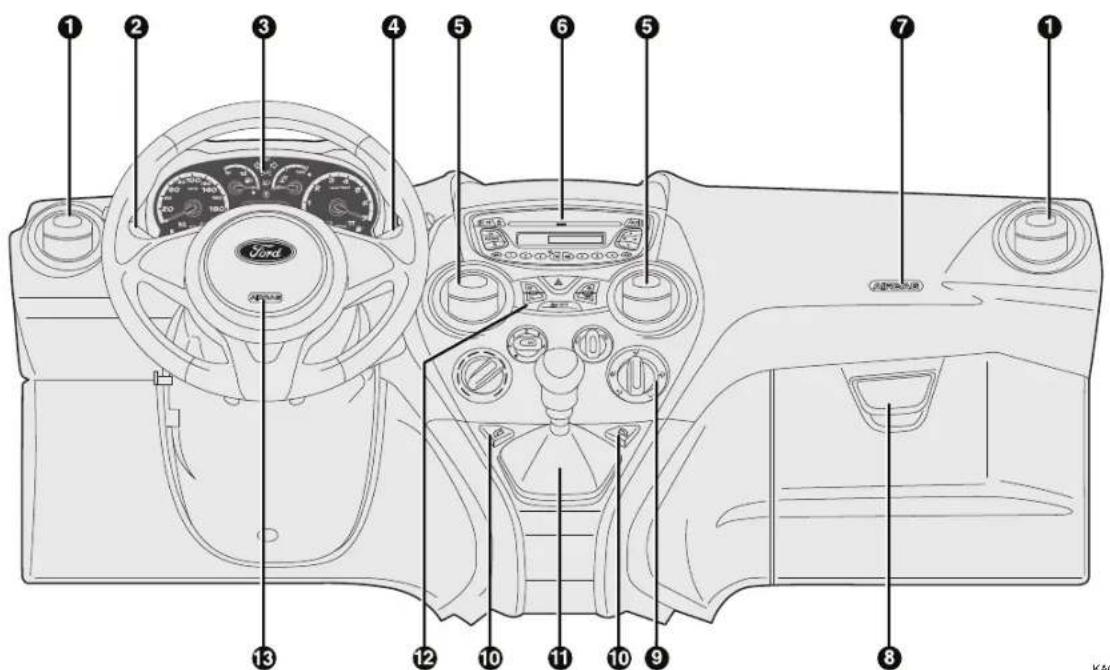
DASHBOARD (LEFT-HAND DRIVE)
The presence and position of controls, instruments and gauges may vary depending on the versions.
text_image
① ② ③ ④ ⑤ ⑥ ⑦ ⑧ ⑨ ⑩ ⑪ ⑫ ⑬ ⑭ ⑮ ⑯ ⑰ ⑱ ⑲ ⑳ ⑴ ⑵ ⑶ Ford ASX50120000000000000000000000000000000000000000000000000000000000000000000000000000000000000000000000000000fig. 1
KAC0177m
1. Side air vent – 2. Left steering column stalk: external lights – 3. Instrument panel and warning lights – 4. Right steering column stalk: windscreen wiper, rear window washer, trip computer controls – 5. Central air vents – 6. Oddment/Car radio compartment – 7. Passenger side airbag – 8. Oddment compartment – 9. Heating/ventilation/climate controls – 10. Power windows controls – 11. Gear lever – 12. Control plate – 13. Driver side airbag.
DASHBOARD (RIGHT-HAND DRIVE)
The presence and position of controls, instruments and gauges may vary depending on the versions.

text_image
Diagram of a Ford car interior with numbered components for identification- Side air vent – 2. Passenger side airbag – 3. Central air vents – 4. Oddment/Car radio compartment – 5. Left steering column stalk: external lights – 6. Instrument panel and warning lights – 7. Right steering column stalk: windscreen wiper, rear window washer, trip computer controls – 8. Driver side airbag – 9. Control plate – 10. Power windows controls – 11. Gear lever – 12. Heating/ventilation/climate controls – 13. Oddment compartment.
SYMBOLS
Special coloured labels have been attached near or actually on some of the components of your vehicle. These labels bear symbols that remind you of the precautions to be taken as regards that particular component.
THE FORD CODE SYSTEM
To further protect your car from theft, it has been fitted with an engine immobilising system. It is automatically activated when the ignition key is removed.
Each time the car is started by turning the ignition key to MAR - ON, the Ford CODE system control unit sends an acknowledgement code to the engine control unit to deactivate the inhibitor.
If, during ignition, the code is not correctly recognized, the light lights up on the instrument panel.
In this case, turn the key to STOP and then back to MAR-ON; if the lock continues, possibly try with the other keys provided with the car. Contact
a Ford Dealership if you still cannot start the engine.
IMPORTANT Each key has its own code which must be stored by the system electronic control unit. Contact the Ford Dealership to have new keys (up to eight) stored with the code.
Warning light 📋 coming on when driving
☐ If the warning light ☐ turns on, this means that the system is running a self-diagnosis (for example due to a voltage drop).
☐ If the problem persists, contact the Ford Dealership.

Violent shocks may damage the electronic components inside the key.
THE KEYS
CODE CARD (optional, for versions/markets, where provided) fig. 3
The car is delivered with two copies of the ignition key and with the CODE card which bears the following:
A the electronic code.
B the mechanical key code to be given to the Ford Dealership when ordering duplicate keys.
IMPORTANT In order to ensure perfect efficiency of the electronic devices contained inside the keys, they should never be exposed to direct sunlight.

All the keys and the CODE card must be handed over to the new owner when selling the car.

text_image
Ford CODE ELECTRONIC KEYCODE MECHANICAL KEYCODE A Bfig. 3
KA00121m

text_image
A FordKA00002m
KEY WITHOUT REMOTE CONTROL fig. 4
The metal insert A operates:
□ the ignition switch;
□ the door and tailgate (where provided);
□ the fuel cap lock/release.
text_image
Diagram of a car key with labeled parts A and B, showing a key inserted into a device.fig. 5
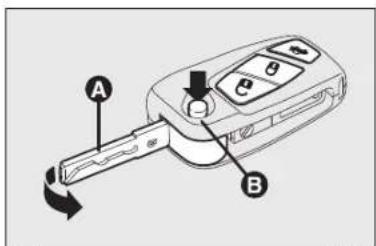
KEY WITH REMOTE CONTROL (where provided) fig. 5
The metal insert A operates:
□ the ignition switch;
□ the door locks;
□ the fuel cap lock/release.
Press button B to open/close the metal insert.
Door release
Short pressing of 🔒 button: release of the doors, timed activation of the interior roof lights, lighting up of the turn signals and activation of courtesy lights (greeting lights) for versions/markets, where provided).
Door lock is automatically released if the fuel cut-off system trips.
When releasing the doors by means of the remote control, if a door is not opened within 45 seconds, the system automatically re-locks the doors.
Door locking
Short pressing of 🔒: button: remote locking of doors with deactivation of the internal roof light and dual flashing of direction indicators (where present).
If one or more doors are open, the doors will not be locked. This is indicated by a rapid flashing of the direction indicators (where applicable). If the luggage compartment is open, the doors will not be locked.
Remote tailgate opening
Press button twice to release (open) the tailgate remotely.
Tailgate opening is indicated by flashing of direction indicators.
REQUEST FOR ADDITIONAL REMOTE CONTROLS
The system can recognise up to 8 keys with incorporated remote control. Should a new remote control be necessary, contact a Ford Dealership and be ready to show the CODE card, a personal identity document and the car's ownership documents.
REPLACING THE BATTERY OF THE KEY WITH REMOTE CONTROL fig. 6
To replace the battery, proceed as follows:
☐ press button A and open the metal insert B;
□ turn the screw C to using a fine screwdriver;
☐ take out the battery case D and replace the battery E, respecting its polarity;
□ refit the battery case D inside the key and lock it turning the screw C to 🔒.

text_image
Diagram of a car keychain with labeled parts A, B, C, D, E and directional arrows indicating movement or change.fig. 6

Used batteries are harmful to the environment.
You can dispose of them either in the correct
containers as specified by law or by taking them to a Ford Dealership, which will deal with their disposal.

text_image
STOP HOLT MAR AVVfig. 7
STEERING LOCK
Engagement
When the key is at STOP, remove the key and turn the steering wheel until it locks.
Disengagement
Move the steering wheel slightly as you turn the ignition key to MAR-ON.
IGNITION SWITCH fig. 7
The key can be turned to 3 different positions:
☐ STOP: engine off, key can be removed, steering column locked. Some electrical devices (e.g. sound system, central door locking system, etc.) can operate.
☐ MAR – ON: driving position.
All electrical devices can operate.
□ AVV: engine starting.
The ignition device is fitted with a safety system that forces the driver to return the ignition key to STOP before repeating the starting operation, if the engine does not start up.

WARNING
Never extract the key while the vehicle is moving.
The steering wheel would automatically lock as soon as you try to turn it. This holds true for vehicles being towed as well.
It is absolutely forbidden to carry out whatever after-market operation involving steering system or steering column modifications (e.g.: installation of anti-theft device) that could badly affect performance and safety, cause the lapse of warranty and also result in non-compliance of the car with homologation requirements.
ON-BOARD PANEL AND INSTRUMENTS
text_image
A B C D 60 140 130 20 180 200 1235b 30:8:30 $fig. 8 – Versions with digital display
KA00161m
text_image
A B C D 60 100 180 140 120 100 40 20 180 800 Lun 15 Nov 2:30 12:30 24:30 A E + - MORO ESCfig. 9 – Versions with multifunction display
KA00162m
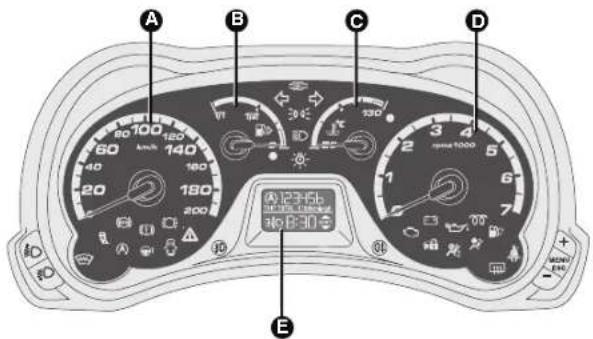
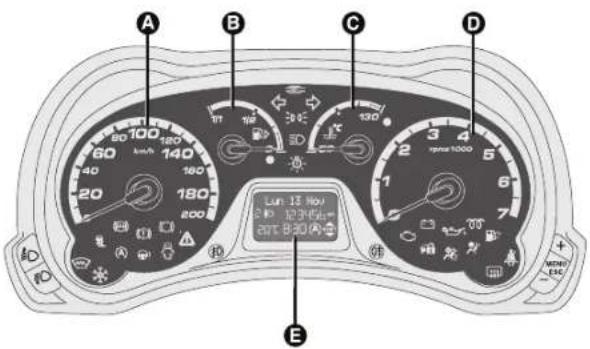
Left-hand drive versions
A Speedometer (speed indicator)
B Fuel gauge with reserve warning light.
C Engine coolant temperature gauge with excess temperature warning light.
D Rev counter
E Digital display.
Warning lights 00 and 24 are only provided on Diesel versions.
001-025 Ford KA EN:001-025 Ford KA IT 14-10-2010 11:20 Pagina 11

text_image
A B C D rpm3 1000 2 3 4 5 6 7 8 9 10 11 12 13 14 15 16 17 18 19 20 21 22 23 24 25 26 27 28 29 30 31 32 33 34 35 36 37 38 39 40 41 42 43 44 45 46 47 48 49 50 51 52 53 54 55 56 57 58 59 60 61 62 63 64 65 66 67 68 69 70 71 72 73 74 75 76 77 78 79 80 81 82 83 84 85 86 87 88 89 90 91 92 93 94 95 96 97 98 99 100 101 102 103 104 105 106 107 108 109 110 111 112 113 114 115 116 117 118 119 120fig. 10 – Versions with digital display
KAD0163m

text_image
A B C D 2 3 4 5 6 7 8 9 10 11 12 13 14 15 16 17 18 19 20 21 22 23 24 25 26 27 28 29 30 31 32 33 34 35 36 37 38 39 40 41 42 43 44 45 46 47 48 49 50 51 52 53 54 55 56 57 58 59 60 61 62 63 64 65 66 67 68 69 70 71 72 73 74 75 76 77 78 79 80 81 82 83 84 85 86 87 88 89 90 91 92 93 94 95 96 97 98 99 100 Lun 13 Nov 12:345b 20T 8:30 A E MENC ESCfig. 11 – Versions with multifunction display
KA00164m
Right-hand drive versions
A Rev. counter.
B Fuel gauge with reserve warning light.
C Engine coolant temperature gauge with excess temperature warning light.
D Speedometer (speed indicator)
E Digital display.
Warning lights 00 and 10 are only provided on Diesel versions.
Instrument background colour and type may vary according to the version.
TACHOMETER
This shows the speed of the vehicle.
REV COUNTER
This indicates the engine rpm.
FUEL LEVEL GAUGE
This shows the amount of fuel in the tank.
The reserve warning light turns on to indicate that approximately 5 litres of fuel are left in the tank.
Do not travel with the fuel tank almost empty: any gaps in fuel delivery could damage the catalytic converter.
ENGINE COOLANT TEMPERATURE INDICATOR
This shows the temperature of the engine coolant fluid and starts working when the fluid temperature exceeds approx. 50°C.
The warning light may light up (and a message on the multifunction display may appear in certain versions) to indicate that the coolant temperature is too high; in this case, stop the engine and contact the Ford Dealership.
DIGITAL DISPLAY
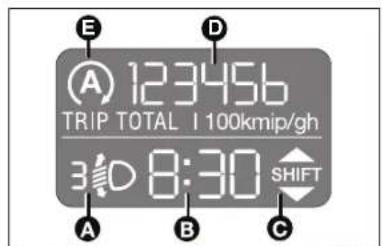
STANDARD SCREEN fig. 12
The standard screen shows the following information:
A Headlight aiming position (only with dipped beam headlights on).
B Time (always displayed, even with key extracted and front doors closed)
C Gear Shift Indication
D Odometer (display of covered km or miles)
E Auto-Start-Stop function indication
Note With key removed (when opening one of the front doors) the display will turn on and show for a few seconds the kilometres or miles covered.
GEAR SHIFT INDICATION


On vehicles with a manual gearbox, the gear shift indicator suggests gear changes to the driver (shift up or shift down) through a special display on the control panel.
text_image
E A 123456 TRIP TOTAL I 100kmip/gh 3:00 8:30 SHIFT A B Cfig. 12
This suggestion to change gear is designed to improve consumption and ensure the best driving style.
NB The indication on the instrument panel remains on until the driver changes gear or until the driving conditions return to a situation where a gear change is not required, to reduce consumption.
CONTROL BUTTONS fig. 13
+ To scroll the displayed menu and the related options upwards or to increase the displayed value.
MENU Press briefly to display the menu and/or go to next screen or confirm the required menu option. Hold pressed to go back to the standard screen.

text_image
MENU ESCfig. 13
To scroll the displayed menu and the related options downwards or to decrease the displayed value.
NB Buttons + and - activate different functions according to the following situations:
Setup menu
- within the menu, they allow you to scroll up and down through the options; - during settings operations, they increase or decrease values.
SETUP MENU
The menu comprises a series of functions arranged in a cycle which can be selected through buttons + and - to access the different select operations and settings (setup) given in the following paragraphs.
The menu can be activated by pressing briefly button MENU ESC.
Single presses on the + and - buttons will scroll the setup menu options.
Handling modes differ with each other according to the characteristic of the option selected.
The menu includes the following functions:
- HOUR
- BUZZ
- SPEED
- UNIT
- P BAG (*)
(*) Function activated only by taking car to dealership.
Selecting a menu option
- press briefly button MENU ESC to select the main menu option to set;
- press the + and - buttons (with single presses) to select the new setting;
- briefly press button MENU ESC to store the new setting and to go back to the previously selected submenu option.
Selecting "Set Clock"
- briefly press button MENU ESC to select the first value to change (hours);
- press the + and - buttons (with single presses) to select the new setting;
- briefly press button MENU ESC to store the new setting and go to the next setup menu option (minutes);
– after setting the values with the same procedure, go back to the previous menu item.
Hold down the MENU ESC button:
- to quit the setup menu if you are in the menu;
- to quit to the menu if you are setting an option;
- to save only the settings already stored (and confirmed by pressing the MENU ESC button).
The setup menu page is timed. Only the changes stored by the user by briefly pressing the MENU ESC button are saved when the menu is automatically closed.
Setting the clock (Hour)
This function is used to set the clock.
To perform the adjustment proceed as follows:
- briefly press button MENU ESC,
"hours" will flash on the display; - press the button + or - for setting;
- briefly press button MENU ESC,
"minutes" will flash on the display; - press the button + or - for setting;
- briefly press button MENU ESC to go back to the menu screen or press the button for long to go back to the standard screen without storing settings.
Adjusting the beeper volume (Buzz)
This function is used to adjust the volume of the buzzer triggering in the event of failure/warning indications and when MENU ESC + and - buttons are pressed.
To set the desired volume, proceed as follows:
- briefly press button MENU ESC, the display will show the wording (bUZZ);
- press + or - to select the required volume (adjustable over 8 levels).
- briefly press button MENU ESC to go back to the menu screen or press the button for long to go back to the standard screen without storing settings.
Speed limit setting (Speed)
With this function, it is possible to set the car speed limit (km/h or mph). When this limit is exceeded, the driver is immediately alerted (see section "Warning lights and messages").
To set the desired speed limit, proceed as follows:
- briefly press button MENU ESC, the message (SPEEd) and the previously set unit (km/h) or (mph) will be displayed;
- press + or - to activate (On) or deactivate (OFF) the speed limit;
- when the function is activated (On) pressing buttons + or - select the speed limit and press MENU ESC to confirm selection.
Note Selection is possible between 30 and 200 km/h, or 20 and 125 mph depending on the selected unit, see paragraph "Unit of measure".
The setting will increase/decrease by five units each time +/- is pressed. Hold the button +/- pressed to increase/decrease the setting rapidly and automatically. Complete the setting by briefly pressing the button when you approach the required value.
- briefly press button MENU ESC to go back to the menu screen or press the button for long to go back to the standard screen without storing settings.
To cancel the setting, proceed as follows: - briefly press button MENU ESC: (On) will flash on the display;
- press the button -, "Off" flashes on the display;
- briefly press button MENU ESC to go back to the menu screen or press the button for long to go back to the standard screen without storing settings.
Setting the distance unit (Unit)
With this function it is possible to set the unit.
To perform the adjustment proceed as follows:
- briefly press button MENU ESC, the display will show the wording (Unit) and the previously set unit (km) or (mi);
- press + or - to select the required distance unit.
- briefly press button MENU ESC to go back to the menu screen or press the button for long to go back to the standard screen without storing settings.
Front passenger's airbag and side bag activation/deactivation (where provided) (P BAG) (\*)
This function is used to activate/deactivate the front passenger's airbag.
Proceed as follows:
☐ press button MENU ESC and, after displaying the message (P BAG OFF) (to deactivate) or the message (P BAG On) (to activate) by pressing buttons + or -, re-press MENU ESC;
☐ the confirmation request message will be displayed;
☐ press + or - to select YES (confirming activation/deactivation) or no (to abort);
□ briefly press MENU ESC to confirm setting and go back to the menu screen or hold the button down to go back to the standard screen without saving.
(*) Function activated only by taking car to dealership.
MULTIFUNCTION DISPLAY (where provided)
The car can be equipped with the multifunction display that, depending on previous settings, shows useful information when driving.
"STANDARD" SCREEN fig. 14
The standard screen shows the following information:
a Outside temperature
B Time (always displayed, even with key extracted and front doors closed)
C Auto-Start-Stop function indication
D Gear Shift Indication
E Odometer (covered km or miles).
F Date
G Headlight aiming position (only with dipped beam headlights on)
Note. When opening one of the front doors, the display turns on and shows the time and the kilometres or miles covered for a few seconds.

text_image
G F E Lun 13 Nov 2 10 123456 km 20°C 8:30 A SHIFT A B C Dfig. 14
text_image
MENU ESCfig. 15
GEAR SHIFT INDICATION


On vehicles with a manual gearbox, the gear shift indicator suggests gear changes to the driver (SHIFT UP or SHIFT DOWN) via a special display on the control panel. This suggestion to change gear is designed to improve consumption and ensure the best driving style.
NB The indication on the instrument panel remains on until the driver changes gear or until the driving conditions return to a situation where a gear change is not required to reduce consumption.
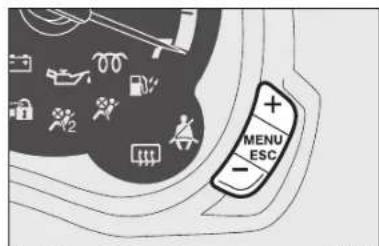
CONTROL BUTTONS fig. 15
+ To scroll the displayed menu and the related options upwards or to increase the value displayed.
MENU Press briefly to display ESC the menu and/or go to next screen or confirm the required menu option.
Hold pressed to go back to the standard screen.
- To scroll the displayed menu and the related options downwards or to decrease the value displayed.
Note Buttons + and - activate different functions according to the following situations:
Controlling the car interior lights
- on the standard screen, they control brightness of instrument panel, radio and automatic climate control system.
Setup menu
– within the menu, to scroll the menu options upwards and downwards;
– to increase or decrease values during settings.
SETUP MENU
The menu comprises a series of functions arranged in a cycle which can be selected through buttons + and - to access the different select operations and settings (setup) given in the following paragraphs. A submenu is provided for some items (Setting the clock and Set units).
The setup menu can be activated by pressing briefly button MENU ESC. Single presses on buttons + or - will scroll the setup menu options.
Operating modes are different according to the characteristics of the option selected.
The menu includes the following functions:
- MENÙ
- SPEED BEEP
- TRIP B DATA
- SET TIME
- SET DATE
- SEE RADIO
- MEASUREMENT UNIT
- LANGUAGE
- WARNING VOLUME
- KEY VOL.
- PASSENGER AIRBAG (*)
- COURTESY LIGHTS
- EXIT MENU
(*) Function activated only by taking car to dealership.
Selecting an option from the main menu without a submenu:
- press briefly button MENU ESC
to select the main menu option to set; - press buttons + or - (with a single press) to select the new setting;
- press briefly button MENU ESC
to store the new setting and go back to the main menu option previously selected.
Selecting an option from the main menu with a submenu:
- briefly press button MENU ESC to display the first submenu option;
- press + or - (with single presses) to scroll all the submenu options.
- press briefly button MENU ESC to select the displayed submenu option and to open the relevant setup menu;
- press + or - (with single presses) to select the new setting for this submenu option.
- briefly press button MENU ESC to store the new setting and to go back to the previously selected submenu option.
Selecting "Set Date" and "Set time":
- briefly press button MENU ESC to select the first value to change (e.g. hours/minutes or year/month/day).
- press buttons + or - (with a single press) to select the new setting;
- briefly press button MENU ESC to store the new setting and go to the next setup menu option:
if this is the last one you will go back to the previously selected option of the main menu.
Press the button MENU ESC for long:
- to quit the set up menu if you are in the main menu;
- to return to the main menu if you are at another point of the menu (e.g.: at submenu option setting level, at submenu level or at main menu option setting level);
- to save only the settings already stored (and confirmed by pressing the MENU ESC button).
The setup menu page is timed. Only the changes saved by the user by briefly pressing MENU ESC are saved when the menu are automatically closed.
Speed Beep (Speed limit)
This function is used to set the car speed limit (km/h or mph); the driver is immediately alerted when this limit is exceeded (see chapter "Warning lights and messages").
To set the desired speed limit, proceed as follows:
- briefly press button MENU ESC, the display will show the message (Speed Buzz);
- press button + or - to select speed limit activation (On) or deactivation (Off);
- if the function has been activated (On), press buttons + or - to select the required speed limit and then press MENU ESC to confirm.
Note. The speed may be set in the range from 30 to 200 km/h, or from 20 to 125 mph according to the previously chosen unit (see "Setting the distance unit" paragraph) described below. The setting will increase/decrease by five units each time the button +/- is pressed. Hold the button +/- pressed to increase/decrease the setting rapidly and automatically. Complete the setting by single pressing the button when you approach the required value.
- briefly press button MENU ESC to go back to the menu screen or press the button for long to go back to the standard screen without storing settings.
To cancel the setting, proceed as follows:
- briefly press button MENU ESC: (On) will flash on the display;
- press the button -, "Off" flashes on the display;
- briefly press button MENU ESC to go back to the menu screen or press the button for long to go back to the standard screen without storing settings.
This function can be used to activate (On) or deactivate (Off) the Trip B display (partial trip).
For further information see "Trip computer".
Proceed as follows to switch the function on and off:
- briefly press button MENU ESC : (On) or (Off) will flash on the display (according to previous setting);
- press the button + or - to select;
- briefly press button MENU ESC to go back to the menu screen or press the button for long to go back to the standard screen without storing settings.
Setting the time (Clock)
This function enables the clock to be set through two submenus: "Time" and "Format".
To carry out the adjustment, proceed as follows:
- briefly press button MENU ESC, the display will show the two sub-menus "Time" and "Mode";
- press the button + or - to switch between the two submenus;
- select the required option and then briefly press button MENU ESC;
- if selecting "Time", briefly press button MENU ESC, "hours" will flash on the display;
- press the button + or - for setting;
– briefly press button MENU ESC,
"minutes" will flash on the display; - press the button + or - for setting;
- briefly press button MENU ESC, the display will show the two sub-menus "Time" and "Mode";
- press the button + or - to switch between the two submenus;
- select the required option and then briefly press button MENU ESC;
- if selecting "Time", briefly press button MENU ESC, "hours" will flash on the display;
– briefly press button MENU ESC,
"minutes" will flash on the display; - press the button + or - for setting;
- when accessing the "Format" submenu: briefly pressing button MENU ESC makes the display mode flash;
- press the button + or - to select "24h" or "12h".
When you have made the required settings, briefly press button MENU ESC to go back to the menu screen or press the button for long to go back to the standard screen without storing settings.
- hold MENU ESC down to go back to the standard screen or main menu, depending on where you are in the menu.
Set date (Setting the date)
Using this function you can update the date (day – month – year).
Proceed as follows to update:
– briefly press button MENU ESC:
"day" (dd) will flash on the display;
- press the button + or - for setting;
- briefly press button MENU ESC:
"month" (mm) will flash on the display;
- press the button + or - for setting;
- briefly press button MENU ESC:
"year" (yyyy) will flash on the display;
- press the button + or - for setting.
NB The setting increases or decreases by one unit each time + or - is pressed. Hold down the button to increase/ decrease the setting rapidly and automatically. Complete the setting by briefly pressing the button when you approach the required value.
- briefly press button MENU ESC to go back to the menu screen or press the button for long to go back to the standard screen without storing settings.
See radio (Repeat audio information)
With this function the display shows information about the sound system.
- Radio: selected radio station frequency or RDS message, automatic tuning activation or AutoSTore;
– Audio CD, MP3 CDs: track number; - CD Changer: CD number and track number;
To show the sound system information on the display (On) or clear it (Off), proceed as follows:
– briefly press button MENU ESC (On) or (Off) will flash on the display (according to previous setting);
- press the button + or - to select;
- briefly press button MENU ESC to go back to the menu screen or press the button for long to go back to the standard screen without storing settings.
Unit of measurement (Set unit of measurement)
With this function it is possible to set the units through three submenus: "Distances", "Consumption" and "Temperature".
To set the desired measurement unit, proceed as follows:
- briefly press button MENU ESC to display the three sub-menus;
- press the button + or - to switch between the three submenus;
- select the required sub-menu and then briefly press button MENU ESC;
- if selecting "Distance": briefly press MENU ESC and the display will show "km" or "mi" (depending on the previous setting);
- press the button + or - to select;
- if selecting "Consumption"(where provided): briefly press MENU ESC and the display will show "km/l", "l/100 km" or "mpg" (depending on the previous setting);
If the set distance unit is "km", the fuel consumption unit will be displayed in km/l or l/100 km.
If the distance unit set is "mi" the fuel consumption unit will be displayed in "mpg".
- press the button + or - to select;
- if selecting
"Temperature": briefly press MENU ESC and the display will show
“°C” or “°F” (depending on the previous setting);
- press the button + or - to select;
When you have made the required adjustments, briefly press MENU ESC to go back to the menu screen or hold the button down to go back to the main menu without saving.
- hold MENU ESC pressed to go back to the standard screen or main menu according to the position in the menu.
Language (Language selection)
After setting, display messages can be shown in different languages: Italian, German, English, Spanish, French, Portuguese, Polish and Dutch.
To set the desired language, proceed as follows:
- briefly press button MENU ESC: the previously set "language" will flash on the display;
- press the button + or - to select;
– briefly press button MENU ESC to go back to the menu screen or press the button for long to go back to the standard screen without storing settings.
Warning volume (Adjusting the failure/warning buzzer volume)
With this function the volume of the buzzer which accompanies the display of any failure/warning can be adjusted according to 8 levels.
To set the desired volume, proceed as follows:
- briefly press button: MENU ESC; the previously set volume "level" will flash on the display;
- press the button + or - for setting;
- briefly press button MENU ESC to go back to the menu screen or press the button for long to go back to the standard screen without storing settings.
Adjusting the button volume (Button Vol.)
This function may be used to adjust the volume of the beep accompanying the activation of buttons MENU ESC, + and - can be adjusted according to 8 levels.
To set the desired volume, proceed as follows:
- briefly press button: MENU ESC; the previously set volume "level" will flash on the display;
- press the button + or - for setting;
- briefly press button MENU ESC to go back to the menu screen or press the button for long to go back to the standard screen without storing settings.
Passenger front and side airbag activation/deactivation and side bag protection (chest/pelvis) (where present)
This function is used to activate/deactivate the front passenger's airbag.
Proceed as follows:
- press button MENU ESC and press MENU ESC again after the message (Bag pass: Off) (to deactivate) or (Bag pass: On) (to activate) is displayed by pressing buttons + and −;
– the confirmation request message is displayed;
- press buttons + or -
to select (Yes) (confirming activation/deactivation) or (No) (to abort);
- briefly press MENU ESC to confirm setting and go back to the menu screen or press the button for long to go back to the standard screen without storing settings.
Courtesy lights (Greeting lights)
This functions allows the side lights and number plate lights to be turned on for 25 seconds when the doors or boot are opened using the remote control, with the following exceptions:
- interruption 5 seconds following door closure
- Interruption after a lock command from the remote control
- Interruption after a lock or activation command from the remote control
For activation/deactivation, proceed as follows:
– briefly press button MENU ESC: (On) or (Off) will flash on the display (according to previous setting);
- press the button + or - to select;
- briefly press button MENU ESC to go back to the menu screen or press the button for long to go back to the standard screen without storing settings.
Exit Menu
This is the last function that closes the cycle of settings listed in the menu screen.
Briefly press button MENU ESC to go back to the standard screen without storing settings.
Press button - to return to the first menu option (Speed Beep).
TRIP COMPUTER
General information
The “Trip computer” is used to display information on car operation when the key is turned to MAR-ON. This function is composed of separate trips, called “Trip A” and “Trip B” which can monitor the entire mission (journey) in a reciprocally independent manner.
Both functions can be reset (reset means start of a new journey).
"Trip A" is used to display the figures relating to:
- Range
- Distance
– Average consumption
– Current consumption
– Average speed
– Travel time (driving time).
"Trip B" shall be used to display the figures relating to:
- Distance B
– Average consumption B
– Average speed B
– Trip time B (driving time). - Reset trip B
Note "Trip B" may be excluded.
"Range" and "Instant consumption" parameters cannot be reset.
Values displayed
Range
This value shows the distance that the car can still cover before needing fuel, assuming that driving conditions are kept unvaried. The display will show the reading “----” when the following events take place:
- range value lower than 50 km (or 30 mi)
- car parked with engine running for a long period.
IMPORTANT The range can be affected by several factors: driving style (see “Driving style” in the “Starting and driving” section), type of route (motorway, towns and cities, mountain roads, etc.), conditions of use (load, tyre pressures, etc.). Trip planning must therefore take the above into account.
Distance travelled
This value shows the distance covered from the start of the new journey.
Average consumption
This value shows the approximate average fuel consumption from the start of the new journey.
Instantaneous consumption
This indicates the fuel consumption. The value is constantly updated. The message “----” will appear on the display if the car is parked with the engine running.
Average speed
This value shows the car average speed based on the overall time elapsed since the start of the new journey.
Journey time
Time elapsed since the start of the new journey.
TRIP button fig. 16
Button TRIP, set on the right steering column stalk, shall be used (with ignition key on MAR-ON) to display and to reset the previously described values to start a new mission:
– brief press to access the various parameter displays;
- hold down to reset and then start a new journey.

text_image
TRIPfig. 16
New mission
This begins after a reset:
- “manual” resetting by the user, by pressing the relevant button;
- “automatic” resetting, when the “Trip distance” reaches 9999.9 km or when the “Travel time” reaches 99.59 (99 hours and 59 minutes);
– after disconnection/reconnection of the battery.
IMPORTANT The reset operation when "Trip A" details are being displayed resets the information associated with this function only.
IMPORTANT The reset operation in the presence of the screens concerning the “Trip B” makes it possible to reset only the information associated with this function.
Start of journey procedure
With ignition key on MAR-ON, press and hold the button TRIP pressed for over 2 seconds to reset.
Exit Trip
The TRIP function is over when all the values have been displayed or holding the button MENU ESC pressed for longer than 1 second.
SEATS
FRONT SEATS

WARNING
All adjustments must be made with the car
stationary.
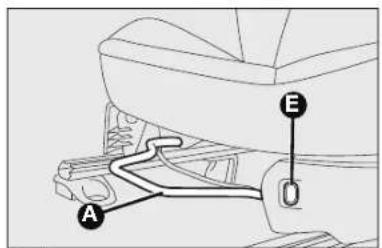
Horizontal adjustment fig. 17
Lift lever A and push the seat forwards and backwards.

WARNING
Once you have released the adjustment lever,
always check that the seat is locked on the guides by trying to move it back and forth. Failure to lock the seat in place could result in the seat moving suddenly and the driver losing control of the car.
Seat heating, fig. 17 (where provided)
Press the button E to switch the function on/off.
IMPORTANT If this function is activated with engine off the battery will run down.
text_image
A Efig. 17
text_image
Diagram of car interior showing a hand cursor labeled 'C' pointing to the handle areafig. 19

text_image
Bfig. 18

text_image
② ① D ③ ⑥ ⑤ D ④fig. 20
Backrest angle adjustment fig. 18
Turn knob B.
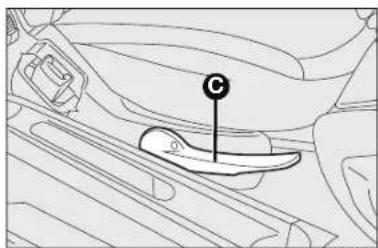
Seat height adjustment (where provided) fig. 19
Operating lever C it is possible to lift or lower the rear area of the cushion to achieve the most comfortable driving position.
Backrest tilting fig. 20
To tilt the seat, operate lever D (movement ①) and push the backrest forward to lock (movement ②); release lever D and push the backrest to slide the seat forward (movement ③), applies only to seats with easy entry).
Driver side, where equipped with position memory
To return the seat to its initial position, slide the seat back and press on the backrest to lock the seat (movement ④) operate lever D (movement ⑤) and raise the backrest (movement ⑥) until it clicks home.
ATTENTION Using lever D before locking the seat in its original position causes the original seat position to be lost. In this case, adjust the seat position by means of the reach adjustment fig. 17.
Driver side and passenger side where not equipped with position memory
To return the seat to its initial position, slide the seat back and press on the backrest (movement ④) operate lever D (movement ⑤) and raise the backrest (movement ⑥) until it clicks home. Adjust reach using lever A-fig. 17.

WARNING
All adjustments must be made with the car
stationary.
text_image
A B fig. 21 KA00019mThe type of reattachment manoeuvre has been chosen to guarantee the safety of the occupant. If the mechanism detects an obstacle (e.g. a handbag) and cannot restore the seat to its original position, it allows the reattachment of the seat, positioning the backrest only, ensuring that the guides are attached.
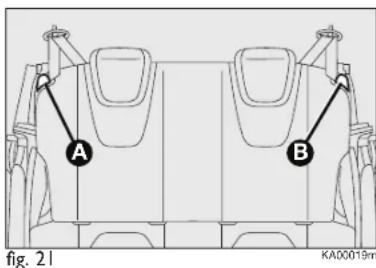
REAR SEATS fig. 21
Backrest release
☐ For versions with joint seat, lift handles A and B and guide the backrest onto the cushion.
☐ For versions with separate seats, lift handle A or B to release respectively the left or right part of the backrest and guide the backrest onto the cushion.
HEAD RESTRAINTS
FRONT fig. 22
Head restraints are height adjustable; operate as follows.
☐ Upwards adjustment: lift the head restraint until it locks.
☐ Downward adjustment: press the button A and lower the head restraint.

WARNING
All adjustments must be carried out only with the vehicle stationary and engine off. Head restraints must be adjusted so that the head, rather than the neck, rests on them. Only in this case can they protect your head correctly.
To make the best use of the head restraint's protective action, adjust the backrest so that your torso is upright and keep your head as close as possible to the head restraint.

natural_image
Line drawing of a car seatbelt with labeled component A, no text or symbols present
text_image
① ② fig. 24 KA00185m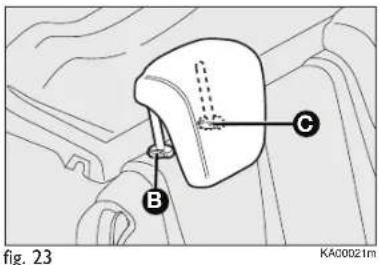
text_image
Fig. 23 KA00D21mTo lower the backrest, press button B. The particular head restraint shape deliberately interferes with the correct passenger's back leaning on the backrest in order to force him/her to lift the head restraint and use it correctly.
IMPORTANT Rear seat passengers shall always set the head restraints in "fully drawn out" position.
REAR HEAD RESTRAINTS (where provided) fig. 23
To lift out rear head restraints: press at the same time buttons B e C set on both sides and take them out. The rear head restraint must be removed with the backrest released and tilted toward the passenger compartment To restore the backrest to its service condition, raise until it clicks.
STEERING WHEEL
It can be adjusted vertically (where provided).
For adjustment, bring the lever fig. 24 downward to position 2 then position the wheel and lock it bringing lever to position 1.

WARNING
Any adjustments must be carried out only with stationary and engine off.
REAR VIEW MIRRORS
REAR VIEW MIRROR fig. 25
The mirror is fitted with a safety device that causes its release in the event of a violent impact with the passenger. It can be moved using the lever A to two different positions: normal or antiglare.
DOOR MIRRORS
With manual adjustment fig. 26a
From the inside of the car, operate lever A to adjust the mirror.
With electrical adjustment fig. 26b
Proceed as follows:
☐ use the switch B to select the mirror;
☐ adjust the mirror using the joystick A in the four directions.

natural_image
Diagram of a car front mirror with labeled point A, shown in technical sketch (no text or symbols beyond label)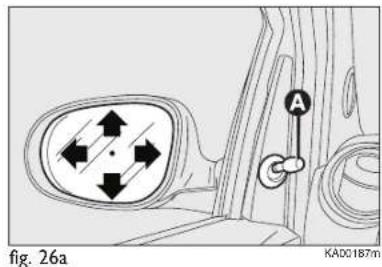
text_image
fig. 26a KA00187mWhen required (for example when the mirror causes difficulty in narrow spaces) it is possible to fold the mirror moving it from position 1 open, to position 2 closed.

text_image
A B Fig. 26b KA00186m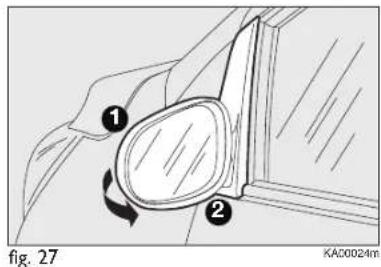
text_image
1 2 fig. 27 KA00024m
WARNING
When driving, the mirrors shall always be in position 1.

WARNING
As door mirrors are curved, they may slightly alter option of distance.
TEMPERATURE COMFORT
VENTS fig. 28
I. Vents for demisting/defrosting the windscreen
2. Orientable, adjustable central vents
3. Orientable, adjustable side vents
4. Fixed vents for side windows
5. Lower vents

text_image
Diagram of car interior with numbered components and airflow indicators, likely for vehicle or automotive control.fig. 28
KADD18Bm
HEATING AND VENTILATION
CONTROLS fig. 29
A Air temperature knob (red-hot/blue-cold)
B Fan speed knob
C Air recirculation knob
- internal air recirculation
- air intake from outside
IMPORTANT It is advisable to activate air recirculation in queues or in tunnels to prevent the introduction of polluted air. However, it is better not to use the function for long periods, particularly if there are many people on board, to prevent the windows from misting inside.
D Air distribution knob
^y toward the body and the side windows
• toward the body, the side windows and the feet
√ toward the feet only
toward the feet and the windscreen
toward the windscreen only.
E Heated rear window activation/deactivation button. When the function is active, a warning light ☐ on the instrument panel is on.

text_image
F E OFF A 1 2 3 0 4 B C Dfig. 29
KA00208m
In order to maintain battery efficiency, the function is automatically deactivated after about 4 minutes.
F Heated rear window activation/deactivation button (possible only with engine started). When the function is active, a warning light on the instrument panel is on. In order to maintain battery efficiency, the function is automatically deactivated after about 20 minutes.
Fast front window demisting/defrosting
Proceed as follows:
□ rotate knob A to red section;
□ rotate knob C to ;
□ rotate knob D to ;
□ rotate knob B to 4 (max. fan speed).
MANUAL CLIMATE CONTROL SYSTEM (where provided)
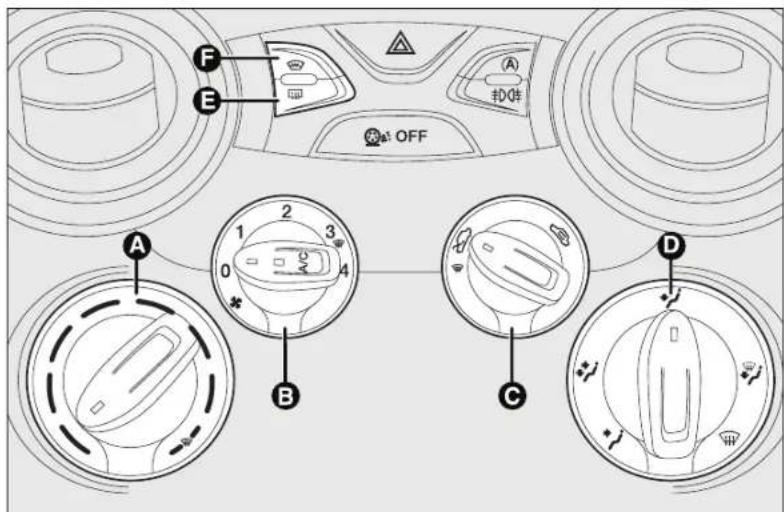
CONTROLS fig. 30
A Air temperature knob (red-hot/blue-cold)
B Fan speed knob and climate control system activation/deactivation. Press the knob to activate the climate control system; the LED on the knob switches on. This enables rapid cooling of the passenger compartment.
C Air recirculation knob
- internal air recirculation
- air intake from outside
IMPORTANT It is advisable to activate air recirculation in queues or in tunnels to prevent the introduction of polluted air. However, it is better not to use the function for long periods, particularly if there are many people on board, to prevent the windows from misting inside.
text_image
OFF A B C D E F (A) 扣件fig. 30
KAD0209m
D Air distribution knob
^2 toward the body and the side windows
toward the body, the side windows and the feet
√ toward the feet only
toward the feet and the windscreen
toward the windscreen only.
E Heated rear window activation/deactivation button. When the function is active, a warning light on the instrument panel is on.
In order to maintain battery efficiency, the function is automatically deactivated after about 20 minutes.
F Heated rear window activation/deactivation button (possible only with engine started). When the function is active, a warning light on the instrument panel is on. In order to maintain battery efficiency, the function is automatically deactivated after about 4 minutes.
Fast front window and front side windows demisting/defrosting (MAX-DEF)
Proceed as follows:
□ rotate knob A to red section;
□ rotate knob C to 📄;
□ rotate knob D to ☑;
□ rotate knob B to 4 (max. fan speed).
IMPORTANT The climate control system is very useful for fast demisting because it dries the air. Adjust the controls as described above and press knob B to switch the climate control system on: the LED on the knob will light up.
SYSTEM MAINTENANCE
In winter, the climate control system must be turned on at least once a month for about 10 minutes. Have the system inspected at a Ford Dealership before the summer.
ADDITIONAL HEATER (where provided)
This device speeds up passenger compartment warming when it is very cold. The additional heater turns off automatically after reaching the required comfort conditions.
Automatic climate control system (where provided)
The additional heater turns on automatically depending on the environmental conditions and with engine started.
Manual climate control system
The supplementary heater is activated automatically by turning A knob to the end of the red section and setting the fan (knob B) to at least the first speed.
IMPORTANT The heater only works if the outside temperature and engine coolant temperature are low. The heater will not activate if the battery voltage is too low.
AUTOMATIC CLIMATE CONTROL SYSTEM (where provided)
The automatic climate control system automatically regulates the following depending on the temperature set by the user:
☐ the temperature of the air conveyed to the passenger compartment;
☐ fan speed (continuous air flow variation);
☐ air distribution inside the passenger compartment;
☐ compressor activation/deactivation (to cool/dehumidify air);
□ air recirculation on/off.
All the above functions can be changed manually by selecting the required function(s). Manual setting of a function does not impair the automatic control of the other functions even if the AUTO button LED is off.
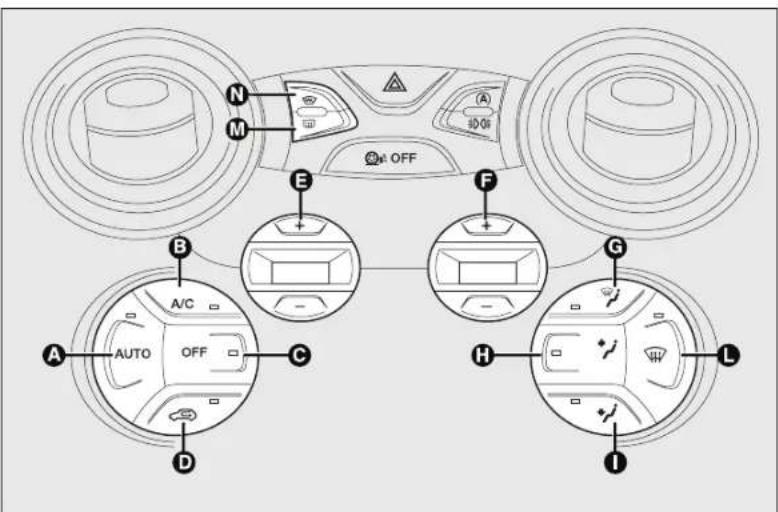
text_image
N M OFF E F B A/C AUTO OFF C D G H Lfig. 31
KAD0191m
CONTROLS fig. 31
Button AUTO - A
Activation of the automatic function of the climate control system
Pressing the AUTO button and setting the required temperature, the system adjusts air temperature, quantity and distribution into the passenger compartment and controls the compressor operation.
A/C button – B compressor activation/deactivation
Pressing the button, with LED on, the compressor and the LED switch off.
When the compressor is off:
☐ the system deactivates air recirculation to avoid window misting;
☐ it is not possible to supply into the passenger compartment air with a temperature lower than external air temperature (the temperature indicated on the display blinks when the system does not ensure the achievement of the required comfort conditions);
☐ it is possible to manually reset the fan speed (with compressor enabled, ventilation cannot go below one bar shown on the display).
Button OFF - C System switching off
Pressing the OFF button the system is switched off.
With the system off, the climate control system conditions are as follows:
□ all LEDs off;
☐ set temperature display off;
□ air recirculation off;
□ compressor off;
□ fan off.
In this condition, it is possible to enable or disable air recirculation without system activation.
Button 📄 - D Air recirculation on/off button
It is advisable to activate internal air recirculation in queues or in tunnels to prevent the introduction of polluted air.
LED on button ON = recirculation ON.
LED on button OFF = recirculation OFF.
At low temperatures or if the compressor is off, the recirculation is forced to off to avoid misting.
IMPORTANT It is inadvisable to use air recirculation on cold days as it would considerably increase the possibility of windows misting up inside.
Buttons +, -, E Setting desired temperature
Pressing the button + the temperature in the passenger compartment rises until the value HI is reached (maximum heating).
Pressing the button- the temperature in the passenger compartment decreases until the value LO is reached (maximum cooling).
IMPORTANT Specifically, if the heating fluid is not sufficiently warm, the fan will not start up at the maximum speed immediately to limit introducing excessively cool air into the passenger compartment.
Buttons +, -, F Adjusting fan speed
Pressing the buttons + or - respectively, the fan speed displayed on the display bars increases or decreases.
The fan can be cut off only if the compressor has been switched off (B button).
To restore automatic fan speed control, press the AUTO button.
Buttons / / \* - G H I Air distribution manual selection
By pressing the buttons, one of the five possible air flow distribution patterns can be selected:
to the windscreen and front side window vents to demist or defrost them.
air flow to the central and side dashboard vents to ventilate the chest and the face during the hot season.
to the front seat footwell vents. Due to the natural tendency of heat to spread upwards, this type of distribution warms the passenger compartment up as quickly as possible, providing an immediate feeling of warmth.
^* /+/* distribution between feet area vents (warmer air) and dashboard vents (cooler air).
+ 12 distribution between feet area vents and windscreen/side front window vents. This type of distribution achieves effective heating of the passenger compartment and prevents the windows from misting up.
The set air distribution is shown by the LEDs on the selected buttons.
To restore the automatic air distribution control, press the AUTO button.
Button 📋 - L
Front window fast demisting/defrosting button
When the button ⏻ is pressed the system activates all the functions required for fast demisting/defrosting:
☐ compressor switching-on (if the weather conditions are suitable);
☐ air recirculation switching-off;
☐ maximum air temperature setting (HI);
☐ fan speed enabling depending on the coolant temperature;
☐ air flow conveying to the windscreen and front side windows;
□ heated rear window on.
☐ heated windscreen on (if present).
IMPORTANT The function stays on for approximately 3 minutes once the coolant is sufficiently warm
DEMISTING/DEFROSTING HEATED REAR WINDOW
Press button M to activate this function. Activation is indicated by lighting of warning light ☐ on the instrument panel.
This function is timed and it will turn off automatically after 20 minutes. Press button M again to disable the function in advance.
IMPORTANT Do not affix decals on the inside of the rear window over the heating filaments to avoid damage that might cause it to stop working properly.
DEMISTING/DEFROSTING HEATED WINDSCREEN
Press button N to activate this function. Activation is indicated by lighting of warning light ☐ on the instrument panel.
This function is timed and it will turn off automatically after 4 minutes. Press button N again to disable the function in advance.
SYSTEM SERVICING
In winter, the climate control system must be turned on at least once a month for about 10 minutes.
Have the system inspected at a Ford Dealership before the summer.

The system uses RI34a coolant fluid which does not pollute the environment in the event of accidental
leakage. Never use R12 fluid which is not compatible with the system components.
EXTERNAL LIGHTS
The left-hand stalk operates most of the external lights. The external lights can only be switched on when the ignition key is on MAR-ON. The instrument panel and the various dashboard controls will come on with the external lights.
Lights off fig. 32
Ring nut turned to position O.
SIDE LIGHTS fig. 32
Turn the ring nut to position ⚙️.
The warning light ≥0.05 on the instrument panel comes on.
DIPPED BEAMS fig. 32
Turn the ring nut to position .
The warning light ≧00 in the instrument panel comes on.

text_image
Fig. 32 KA00108mHIGH BEAMS fig. 32
With knurled ring in position ☐, push the stalk forward toward the dashboard (steady position). The warning light ☐ on the instrument panel will come on. Pulling the stalk towards the steering wheel, the high beams are turned off and the low beams on.
FLASHING fig. 32
You can flash the beams pulling the stalk toward the steering wheel (unstable position). The warning light ☐ on the instrument panel will come on.
text_image
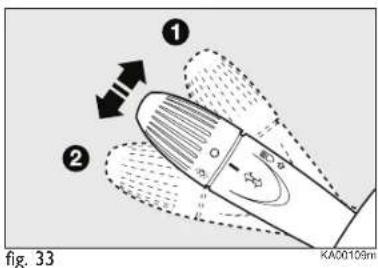
① ② fig. 33 KA00109mDIRECTION INDICATORS fig. 33
Place the lever in the (stable) position: up (position 1): activates the right direction indicator;
down (position 2): activates the left direction indicator.
The warning light or flash on the instrument panel.
Indicators are switched off automatically when the steering wheel is straightened.
Lane change function
If you wish to signal a lane change, place the left lever in the unstable position for less than half a second. The direction indicator on the selected side flashes three times and then switches off automatically.
"FOLLOW ME HOME" DEVICE
This allows the space surrounding the car to be lit up for a certain period of time.
Activation
With the ignition key on STOP or removed, pull the stalk towards the steering wheel within 2 minutes from when the engine is turned off.
Each time the stalk is moved, the lights stay on for an extra 30 seconds up to a maximum of 210 seconds; then the lights are switched off automatically.
Every time the stalk is operated, the warning light ≥0≤0 on the instrument panel switches on. The display will show the time of activation.
The warning light comes on when the stalk is pulled for the first time and stays lit until the function switches itself off automatically. Each time the stalk is activated it increases the time that the lights remain on.
Deactivation
Keep the stalk pulled towards the steering wheel for more than two seconds.
WINDOW WASHING
The right stalk fig. 34 controls windscreen wiper/washer and heated rear window wiper/washer operation.
WINDSCREEN WASHER/WIPER
The device can only work when the ignition key is at MAR-ON.
The stalk has five different positions (four speed levels):
A windscreen wiper off.
B intermittent operation.
C continuous slow operation.
D continuous fast operation.
E fast temporary operation (spring-return position).
The temporary fast function lasts as long as you manually keep the stalk in that position. The stalk returns to position A when it is released, automatically stopping the windscreen wipers.
"Smart washing" function
Pull the lever towards the steering wheel (unstable position) to operate the windscreen washer.
Keep the lever pulled to activate both the windscreen washer jet and the windscreen wiper with a single movement; the latter turns on automatically if you keep the lever pulled for over half a second.

text_image
E A B C Dfig. 34
The windscreen wiper stops operating a few strokes after releasing the stalk; a further “cleaning stroke”, after a few seconds, completes the wiping operation.

Never use the windscreen wipers to remove layers of snow or ice from the windscreen. In these
conditions, the windscreen wipers may be submitted to excessive effort resulting in the motor protection cutting in and wiper operation being inhibited for a few seconds. If rear window wiper operation is not reset, contact the Ford Dealership.
REAR WINDOW WASHER/WIPER
The device can only work when the ignition key is at MAR-ON.
Turn the knurled ring to ☐ to operate the rear window wiper.
With the windscreen wiper on, turn the ring nut to ☐ to turn on the rear window wiper. In this case the wiper works (in the different positions) timed with the windscreen wiper, but at half speed. With the windscreen wiper on, engaging reverse gear will automatically turn the rear window wiper on, in continuous slow operation.
Operation stops when reverse is disengaged.

Do not use the rear window wiper to remove layers of snow or ice. In these conditions, the rear window
wipers may be submitted to excessive effort resulting in the motor protection cutting in and wiper operation being inhibited for a few seconds. If the function is not reset, contact the Ford Dealership.
"Smart washing" function
Pushing the stalk towards the dashboard (unstable position) will activate the rear window washer.
Keep the stalk pressed, with just one movement, to operate the rear window washer jet and the rear window wiper itself; the latter automatically turns on if you keep the stalk pressed for more than half a second.
The rear window wiper stops working a few strokes after the lever is released; after a few seconds, a further cleaning stroke completes the wiping operation.
ROOF LIGHT
FRONT ROOF LIGHT
The lens can be set to three positions:
□ right side pressed: light always off
☐ left side pressed: light always on
☐ central position (neutral): the light turns on and off when the doors are opened or closed.
IMPORTANT Before getting out of the car, make sure the switch is on the central position: ensure that lights are off with doors closed in order to avoid draining the battery.
On same versions, light switching on and off occur only when the front driver side door is opened or closed.
When the doors are released with the remote control, a timer will be activated for about 10 seconds. When locking the doors using the remote control, the roof light goes off.
Roof light timing (lens central position)
Three different switching-on modes are provided:
☐ when opening one door
a three-minute timing will start,
to be repeated each time one door
is opened;
☐ when removing the key from the ignition switching within two minutes from engine switch off, a 10 second timing is set;
□ approximately 10-second timing will start when opening the doors (by both remote control or key into driver's door lock).
Three modes are provided for switching off:
☐ when closing all doors, the 3-minute timing will go off and a 10-second one will start. This timing will go off when turning the key to MAR-ON;
□ when locking the doors (by both remote control or key into driver's door lock), the roof light goes off.
☐ the courtesy lights are turned off in any case after 15 minutes to preserve battery duration
LUGGAGE COMPARTMENT ROOF LIGHT
For versions fitted with boot light, it will turn on automatically when opening the tailgate and it will turn off at closing. The boot light has a 15 minute timer.
CONTROLS
HAZARD WARNING LIGHTS fig. 35
They turn on by pressing switch A, regardless of the position of the ignition key.
With the device on, warning lights and light up in the instrument panel.
To switch off, press button A again.
The use of hazard lights is governed by the Highway Code of the country you are in. Comply with legal requirements.
AUTO-START-STOP MANUAL ACTIVATION AND DEACTIVATION
For the manual activation and deactivation of the Auto-Start-Stop system B-fig. 35 refer to section "Auto-Start-Stop System" in this Owner Handbook.

text_image
A B C OFFfig. 35
Emergency braking
During emergency braking, the hazard warning lights come on automatically and warning lights ⇔ and ➔ in the panel come on at the same time.
The function switches off automatically when the nature of the braking changes.
This function complies with the relevant legislations currently in force.
FRONT/REAR FOG LIGHTS fig. 35 (where provided)
To turn on the front/rear fog lights, use the button C as follows:
I° Pressing: front fog lights on
2° Pressing: rear fog lamps on
3° Pressing: lights/lamps off.
When the front fog lights are on, the warning light turns on the instrument panel; when the rear fog lamps are on, the warning light turns on in the instrument panel.
The front fog lights are activated when the dipped headlights are on.
FUEL CUT-OFF SYSTEM
This intervenes in the case of an impact causing:
☐ cutting off fuel supply with resultant engine switching-off;
□ automatically unlocking the doors;
☐ switching on of all interior lights.
When the system has been triggered, the message “Fuel cut off, see handbook” is displayed.
Carefully check the car for fuel leaks, for instance in the engine compartment, under the car or near the tank area.
After an impact, turn the ignition key to STOP to avoid draining the battery.
The following procedure should be carried out to restore the correct operation of the vehicle:
□ turn the ignition key to MAR-ON;
□ activate the right indicator;
□ deactivate the right indicator;
□ activate the left indicator;
☐ deactivate the left indicator;
□ activate the right indicator;
□ deactivate the right indicator;
□ activate the left indicator;
□ deactivate the left indicator;
□ turn the ignition key to STOP.
The procedure is guided by the direction indicator warning lights on the control panel.

WARNING
If, after an impact, you smell fuel or notice leaks
from the fuel system, do not reset the system to avoid the risk of fire.
INTERIOR FITTINGS
CIGAR LIGHTER (where provided) fig. 36

WARNING
The cigar lighter gets very hot. Handle it carefully
and make sure that children do not touch it: risk of fire and/or burns. Always check that the cigar lighter is switched off.
SUN VISORS
They are located at the sides of the driving rear view mirror.
They can be adjusted forwards and sideways.
A courtesy mirror is applied to the back of the driver's side sun visor.
natural_image
Line drawing of a mechanical component with a circular button and internal features (no text or symbols)fig. 36
KA00122m

natural_image
Diagram of a car interior showing a vehicle's seat and dashboard (no text or symbols)KAD0040m
PASSENGER'S SIDE GLOVE COMPARTMENT fig. 37
To open the glove compartment, operate opening device A.

WARNING
Do not travel with the glove compartments open: risk of
passenger's injury in case of accident.

text_image
Diagram of a car interior showing labeled parts with arrows indicating motion or movement, numbered 1 and 2.fig. 38
KA00031m
ODDMENT COMPARTMENT UNDER THE SEAT
(where provided) fig. 38
In some versions, under the passenger seat there is an oddment compartment.
To access the oddment compartment, lift the front area of the cushion 1 to release it, then lift the back of the cushion 2 (on backrest side).
To close the oddment compartment, lower and insert under the backrest the rear of the cushion without forcing, then press on the front of the cushion until it snaps in position.
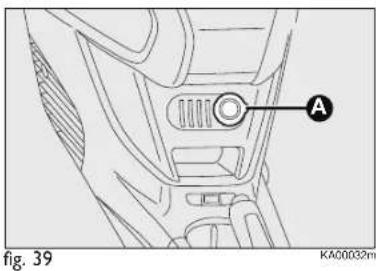
text_image
A fig. 39 KA00032mGLASS/BOTTLE HOLDER
Seats are present on the central tunnel for housing glasses and/or cans.
CURRENT SOCKET (where provided) fig. 39
The current socked is located on the central tunnel and is powered with ignition key on MAR-ON.
To use the socket, open the protection lid A.
Correct operation is ensured only if the connected devices are provided with homologated plugs, present on all the components of the Lineaccessori Ford.
IMPORTANT With the engine off and ignition key in MAR-ON, the extended use (for instance for over one hour) of accessories which drain much current may reduce battery efficiency and therefore cause misfiring.
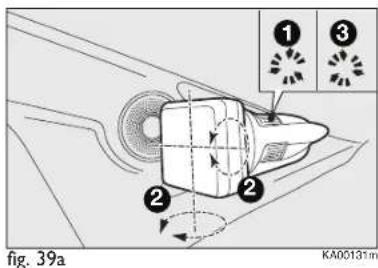
text_image
① ③ ② ② fig. 39a KA00131mADJUSTMENT MODE FOR COMMUNICATION CONSOLE BRACKET fig. 39a (where provided)
Proceed as shown in the figure for the adjustment.

Accessories with a maximum power of 180 W (maximum electrical input 15 A) can be connected to the socket.
DOORS
LOCK/RELEASE FROM OUTSIDE fig. 40
To unlock
Rotate the key to 1 and pull the handle upward.
With central locking (where provided), the doors are unlocked simultaneously when the key is turned.
With remote control (where provided), press the button 🔒 to open the doors.

WARNING
Before opening a door, ensure that you can do the conditions.
Open the doors only when the car is stationary.

text_image
fig. 40 KA00033mTo lock
Rotate the key to 2 with fully closed door.
With central control (where provided), it is necessary that all doors are fully closed.
With remote control (where provided), press the button 🔒 to close the doors.
If one of the doors is not shut properly, simultaneous locking is disabled.
IMPORTANT If one of the doors is not properly closed or if there is a failure in the system, the central locking will not engage. If the operation is repeated 10/11 times in quick succession, the device is excluded for approximately 30 seconds.

text_image
A fig. 41 KA00192mLOCK/RELEASE FROM INSIDE fig. 41
To unlock
Pull the control lever A.
With central locking, operating the lever A on driver side releases all door locks.
For versions without central locking, each door is released independently.
To lock
With central locking push control lever A toward the door. Operating the lever A on driver side or the passenger side centrally locks the doors.
With a mechanic lock, without central locking, the doors are locked by operating the individual control levers on each door.
POWER WINDOWS
FRONT POWER WINDOWS (where provided) fig. 42
They operate normally with ignition key on MAR-ON and for about 3 minutes after positioning the key on STOP or removing.
The two buttons are located besides the gearshift lever (one for each side); they control:
A opening/closing of the left front window;
B opening/closing of the right front window;
Holding the button pressed for a few seconds, the window automatically raises or lowers (only with key at MAR-ON). On the passenger side button, the automatic device operates only to lower the glass.

WARNING
Improper use of the power windows may be dangerous.
Before and during their operation ensure that any passengers are not at risk from the moving glass either by personal objects getting caught in the mechanism or by being hit by it directly.

text_image
Diagram of a car gear shift lever with labeled parts A and Bfig. 42

WARNING
When leaving the car, always remove the ignition
key to avoid the risk of injury of people still on board due to accidental operation of the power windows.
MANUAL WINDOW WINDERS
On some versions windows are operated by window winders.
To open/close, operate the handle.
BOOT
TAILGATE OPENING
By means of the key without remote control fig. 43a
To release the lock, use the metal insert of the ignition key A. Tailgate opening is eased by the action of the side gas struts.
Some versions, opening the tailgate will switch the boot light on: the light will go off automatically when closing the tailgate.
The light will stay on for about 15 minutes after turning the key to STOP: if during this time, a door or the tailgate is opened, the light will switch on again for 15 minutes.
By means of key with remote control (where provided)
Press button twice.
The direction indicators will blink twice when the tailgate is opened.
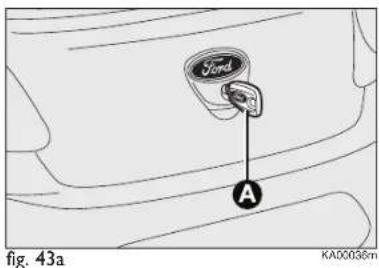
text_image
Ford A fig. 43a KA00036mElectric key (soft touch) fig. 43b (for versions/markets, where provided)
On some versions, the tailgate (when released) can be opened only from outside the car operating on the opening electric button B.
The tailgate can be opened at any time, if the doors are unlocked.
To open it, enable the button, opening one of the front doors or unlocking the doors by the remote control or using the key without remote control.
If the boot is not shut properly the instrument panel warning light (if any) will come on.

text_image
Ford B fig. 43b KA00180mTAILGATE CLOSURE
To close, lower the tailgate by pressing near the lock until you hear it click.

WARNING
Never exceed the maximum allowed load in the boot (see "Technical Specifications"). Make sure that the objects are well arranged in the boot so that they will not be projected forwards following sudden braking.
Do not travel with the tailgate open: exhaust gas may enter the passenger compartment.
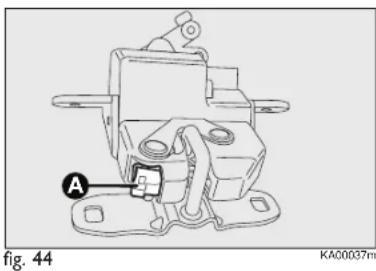
natural_image
Technical line drawing of a mechanical component with labeled section A (no text or symbols beyond label)WARNING
If you are travelling in areas with few filling
stations and you want to transport fuel in a spare tank, comply with the law by using only an approved, suitably secured tank. In the event of a collision the fire risk is increased all the same.
Take care not to knock objects on the roof rack when opening the tailgate.
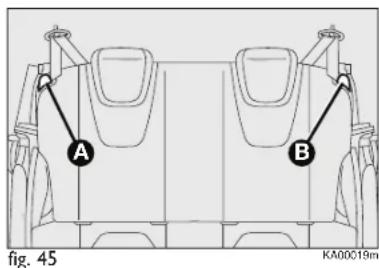
text_image
A B fig. 45 KA00019mOPENING THE TAILGATE IN AN EMERGENCY fig. 44
To open the tailgate from the passenger's compartment if the car battery is flat or the electric tailgate lock is faulty, proceed as follows (see "Extending the boot" in this chapter):
☐ remove the rear head restraints;
□ tilt the backrests;
☐ to achieve tailgate automatic unlock, from inside the boot, operate lever A.
EXTENDING THE BOOT
Partial extension (50/50) (where provided) fig. 45
The split rear seats allow partial or total boot extension.
Proceed as follows:
☐ Lift out rear seat head restraints (where provided) with backrest released and tilted toward the passenger compartment;
□ check that the seat belt is not twisted;
☐ lift handle A or B-fig. 45 to release either the left or right part of the backrest and guide the backrest down onto the cushion.
IMPORTANT To return the backrest to its correct position, we recommend to operate from the external doors.
Total extension
Tilting the rear seat completely forwards allows maximum loading volume.
Proceed as follows:
☐ remove the rear seat head restraints (where provided);
☐ check that the seat belts are not twisted;
☐ operate levers A and B-fig. 45 to release the backrests and guide them onto the cushion.
IMPORTANT To return the backrest to its correct position, we recommend to operate from the external doors.
047-068 Ford KA EN:047-063 Ford KA IT 14-10-2010 11:26 Pagina 49
Repositioning the rear seat
Raise the seat backrests and push them back until hearing the locking click of both retainers.
Position the seat belt buckles up.
IMPORTANT When returning the backrest to the position of use, make sure it is correctly fastened and you hear the lock click.
Make sure the backrest is properly secured at both sides to prevent it moving forward in the event of sharp braking that may cause injuries to passengers.
REMOVING THE PARCEL SHELF
To remove the rear shelf, release it from its two side pins and pull it out.
BONNET
Opening fig. 46-47-48
Proceed as follows:
☐ pull lever A in the direction of the arrow;
☐ move to the right the lever B as shown in figure;
☐ lift the bonnet and at the same time release the support rod C from its locking device D, then insert the end of the rod in the seat E of the bonnet (bigger hole) and push to safety position (smaller hole), as shown in figure.

WARNING
The bonnet may drop suddenly if the supporting
rod is not positioned properly. Perform these operations when the car is stationary only.
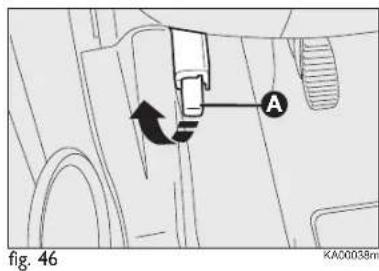
text_image
A fig. 46 KA00038m
text_image
Bfig. 47

WARNING
Before lifting the bonnet, ensure that the wiper arm ted from the windscreen.

WARNING
With hot engine, operate with caution inside the
engine compartment to avoid burns. Do not place your hands close to the fan: it might start working even with the ignition key removed. Wait for engine cooling.

text_image
Technical diagram of a car engine showing labeled parts E, C, and D with structural componentsfig. 48
KA00114m

WARNING
Pay attention to scarves, ties and other loose fitting
garments. If they accidentally touch moving parts, they may get dragged with serious risks for those who wear them.
Closing fig. 48
Proceed as follows:
☐ hold the bonnet up with one hand and with the other remove rod C from seat E and fit it back into its catch D;
☐ Lower the bonnet to approximately 20 centimetres from the engine compartment and let it drop. Make sure that the bonnet is completely closed and not only fastened by the safety catch by trying to open it. If it is not fully closed, open the bonnet and repeat the procedure. Do not simply press it.

WARNING
For safety reasons, the bonnet must always be properly closed while the car is travelling. Make sure that the bonnet is properly closed and that the lock is engaged. If you discover that the bonnet is not perfectly closed during travel, stop immediately and close the bonnet in the correct manner.
HEADLIGHTS
HEADLIGHT BEAM AIMING
The correct aiming of the headlights is important for the comfort and safety of not only the driver but all other road users. This is also covered by a specific rule of the highway code.
The headlights must be correctly aimed to guarantee the best visibility conditions for all drivers while travelling with headlights on.
Contact a Ford Dealership to have the headlights properly adjusted.
Check beam aiming every time the load or its distribution changes.

text_image
A Bfig. 49
KA00040m
BEAM ADJUSTMENT fig. 49
The car is fitted with electric adjustment of the beams, operating with ignition key at MAR-ON and dipped headlights on.
When the car is loaded, it slopes backwards. This means the headlight beam rises.
In that case, it is necessary to perform beams adjustment with buttons A and B.
The display supplies a visual indication of positions.
Correct positions depending on the load
Position 0 – one or two passengers on front seats.
Position I – four passengers.
Position 2 – four passengers + load in the boot.
Position 3 - driver + maximum admitted load in the boot.
ADJUSTING THE HEADLIGHTS WHEN ABROAD
Dipped headlights are adjusted to drive in the country where the vehicle was originally purchased. When travelling in countries with opposite driving direction, to avoid dazzling the drivers on the other side of the road, you need to cover areas of the headlight according to the Highway code of the country you are travelling in.
ALIGNMENT OF FRONT FOG LIGHTS (where provided)
Contact a Ford Dealership to have the headlights properly adjusted.
ABS SYSTEM
This system, an integral part of the braking system, which prevents the wheels from locking when braking, makes the most of road grip and gives the best control when emergency braking under difficulty road conditions.
The EBD system (Electronic Braking Force Distribution) completes the system allowing the brake force to be distributed between the front and rear wheels.
IMPORTANT To get the maximum efficiency of the braking system, a bedding-in period of about 500 km is needed: during this period it is better to avoid sharp, repeated and prolonged braking.
ABS SYSTEM INTERVENTION
The driver can feel that the ABS system has come into action because the brake pedal pulsates slightly and the system gets noisier: it means that the car speed should be altered to suit the type of road surface.

WARNING
When the ABS cuts in and you feel the brake pedal, do not raise your foot, so it pressed; in doing so you in the shortest amount possible depending on vent road conditions.

WARNING
The ABS system exploits the tyre-road grip at best, but it cannot improve it. Therefore, you should take great care when driving on slippery surfaces without taking unnecessary risks.
FAILURE WARNINGS
ABS failure
This is indicated by the turning on of warning light (ans) on the instrument panel together with the dedicated message on the multifunction display (where provided), (see section "Warning lights and messages").
In this case, the braking system will still be effective, although without the extra capacity offered by the ABS system. Drive carefully to the nearest Ford Dealership to have the system checked.
EBD failure
EBD failure is indicated by the turning on of warning lights ( ^③ ) and ( ^① ) on the instrument panel together with the dedicated message on the reconfigurable multifunction display, see section “Warning lights and messages”.
In this case, the rear wheels may suddenly lock and the vehicle may swerve when braking sharply. Drive carefully to the nearest Ford Dealership to have the system checked.

WARNING
If warning light (①) only lights up on the instrument
panel, (with a message on the reconfigurable multifunction display, where provided), immediately stop the car and contact the nearest Ford Dealership. Leakage of hydraulic fluid from the braking system will compromise the operation of the braking system, whether it is of the conventional type or with ABS.
ESP SYSTEM (Electronic Stability Program) (where provided)
This is an electronic system controlling car stability in the event of tyre grip loss, helping to maintain directional control.
The ESP system is therefore particularly useful when grip conditions of road surfaces change.
With the ESP, the car is provided with ASR (traction control with interventions on brakes and engine), HILL HOLDER (device for starting on gradients without using the brakes), MSR (control of engine braking torque when shifting gear down) and HBA (automatic increase of braking pressure in the case of emergency braking).
SYSTEM INTERVENTION
It is signalled by the blinking of the warning light on the instrument panel, to inform the driver that the car is in critical stability and grip conditions.
System engagement
The ESP system comes on automatically when the vehicle is started and cannot be turned off.
Failure warnings
In the event of a failure, the ESP system will be automatically switched off and warning light will appear on the instrument panel along with a message on the reconfigurable multifunction display (where provided). The LED on the ASR OFF button will light up. Contact Ford Dealership.

WARNING
Do not take unnecessary risks, even if your vehicle
is fitted with an ESP system. Your driving style must always be suited to the road conditions, visibility and traffic. The driver is ultimately responsible for road safety.
HILL HOLDER SYSTEM (where provided)
It is integral to the ESP system. It automatically activates with the following conditions:
☐ uphill: car at a standstill on a road with a gradient higher than 2%, engine
running, clutch and brake pedal pressed, gearbox in neutral or engaged gear other than reverse.
☐ downhill: car at a standstill on a road with a gradient higher than 2%, engine running, clutch and brake pedal pressed and reverse gear engaged.
When setting off the ESP system control unit will keep brake force on wheels until the torque necessary for starting is reached, or in any case for max. 2 seconds in order to pass easily from the brake pedal to the accelerator pedal.
When two seconds have elapsed, without starting, the system is automatically deactivated, gradually releasing the braking pressure. During this release stage, the typical mechanical brake release noise can be heard, indicating that the car is about to move.
Failure warnings
A system failure is indicated by the turning on of warning light ☐ on the instrument panel together with the dedicated message on the multifunction display (where provided), see section "Warning lights and messages".

WARNING
The Hill Holder system is not a parking brake, therefore do not leave the car without activating the handbrake, switching off the engine, and engaging first gear.

WARNING
If the space-saver wheel is used, the ESP system keeps operating. Always remember that the space-saver wheel, being smaller than the original wheel, provides less grip.
For the correct operation of the ESP and ASR systems, the tyres must absolutely be the same make and type on all wheels, in perfect conditions and, above all, of the type, make and size specified.
ASR SYSTEM
(Antislip Regulation) (where provided)
This is integral to the ESP system and automatically intervenes if one or both drive wheels slip, helping the driver to control the car.
The action of the ASR system is particularly helpful in the following circumstances:
☐ slipping of the inner wheel when cornering due to the effect of dynamic load changes or excessive acceleration;
□ too much power transmitted to the wheels also in relation to the conditions of the road surface;
□ acceleration on slippery, snowy or icy surfaces;
☐ in the event of loss of grip on a wet surface.

text_image
A 扣05 OFF C fig. 50 KA00193mMSR system (engine braking torque control)
This is an integral part of the ASR system that, in the event of a sudden gear downshifting, cuts in and provides torque to the engine thus preventing excessive drive wheel drive which, especially in poor grip conditions, can lead to loss of stability.
Switching the ASR system on/off fig. 50
The ASR can work only when the ignition key is on MAR-ON.
Whilst driving, the ASR can be switched off and subsequently switched on again by pressing the C ASR OFF button.
When the system is active, a message on the reconfigurable multifunction display (where provided) is displayed.
When the system is not active, the LED on the button ASR OFF turns on and a message on the reconfigurable multifunction display (where provided) is displayed. When the ASR is switched off whilst driving, the next time the car is started up the ASR is automatically switched on by the system.
When travelling on snowy roads with snow chains, it may be helpful to turn the ASR off: in fact, in these conditions, slipping of the drive wheels when moving off makes it possible to obtain better traction.
EOBD SYSTEM
The EOBD system (European On Board Diagnosis) carries out a continuous diagnosis of the components of the car related to emissions. It also alerts the driver, by turning on the warning light ☐ on the instrument panel (together with relevant message on the multifunction display, where provided), when these components are no longer in peak conditions (see section "Warning lights and messages").
The goal of the system is to:
☐ keep the system efficiency under control;
☐ warn when a failure causes emissions levels to increase;
□ warn of the need to replace deteriorated components.
The system also has a diagnosis connector that can be interfaced to suitable instruments, to read the error codes stored in the control unit together with a series of specific parameters for engine operation and diagnosis.
This check can also be carried out by traffic control authorities.
IMPORTANT After eliminating the problem, to check the system completely, Ford Dealerships are obliged to run a bench test and, if necessary, road tests which may also call for a long journey.

Go to a Ford Dealership as soon as possible if the warning light ☐ does not light up when the key is
turned to MAR-ON or if, during car travel, the warning light comes on either steady or blinking (along with a message on the display).
The operation of the warning light
may be checked by the traffic control authorities using specific devices. Always comply with the traffic regulations in force in the country where you are driving.
PARKING SENSORS (where provided)
Parking sensors are located in the rear bumper fig. 51 and their function is to inform the driver, through an intermittent buzzer, about the presence of obstacles behind the car.
ACTIVATION
The sensors are automatically activated when the reverse gear is engaged. As the distance from the obstacle behind the car decreases, the beeping becomes more frequent.

natural_image
Line drawing of a car's front bumper with motion lines indicating sound or vibration (no text or symbols)fig. 51
BUZZER WARNING
When reverse gear is engaged and there is an obstacle behind the car a buzzer is activated and the signal varies as the distance of the obstacle from the bumper varies.
The beep frequency:
☐ becomes louder as the distance between car and obstacle decreases;
☐ becomes continuous when the distance between the car and the obstacle is less than around 30 cm and stops immediately if the distance increases;
☐ is constant if the distance is unvaried; if this situation concerns the side sensors, the buzzer will stop after about 3 seconds to avoid, for example, warning indications in the event of manoeuvres along walls.
If several obstacles are detected by the sensors, only the nearest one is considered.
FAILURE WARNINGS
Parking sensor failures, if any, will be indicated when engaging reverse by the turning on of the instrument panel warning light △ together with the message on the multifunction display, where provided (see section "Warning lights and messages").

For correct operation, sensors must always be clean from mud, dirt, snow or ice. Be careful not
to scratch or damage the sensors while cleaning them. Avoid using dry, rough or hard cloths. The sensors should be washed using clean water with the addition of car shampoo if necessary. When using special washing equipment such as high pressure jets or steam cleaning, clean the sensors very quickly keeping the jet more than 10 cm away.
GENERAL WARNINGS
☐ When parking, watch out for obstacles that may be above or under the sensors.
Sometimes, objects placed close to the car are not detected and could therefore cause damage to the car or be damaged themselves.
Some of the conditions that could affect the performance of the parking system are described below:
☐ Reduced sensor sensitivity and a reduction in the parking assistance system performance could be due to the presence on the surface of the sensor of: ice, snow, mud, thick paint.
☐ The sensor may detect a non-existent obstacle (echo interference) due to mechanical interferences, for example when washing the vehicle, rain (strong wind), hail.
☐ Signals sent by the sensor may be altered by the presence in the vicinity of ultrasound system (e.g. the air brakes of trucks or air hammers).
☐ The performance of the parking assistance system could be affected by the position of the sensors, e.g. by altering attitude (due to wear of shock absorbers and suspension) or by changing tyres, overloading the car or setting special geometries that require the car to be lowered.

WARNING
Parking manoeuvres however are always er's responsibility. While vring, always make sure people (especially children) als are in the area ed. The parking sensors gned to assist drivers: ase, you must always utmost attention during ally dangerous manoeuvres, en carried out at low speed.

WARNING
When repainting the bumpers or touching up paint in the sensor area, contact Ford Authorised Services only. Incorrect paint application could affect the operation of the parking sensors.
AUTO-START-STOP SYSTEM
INTRODUCTION
The Auto-Start-Stop device automatically stops the engine each time the vehicle is stationary and starts it again when the driver wants to resume driving.
This improves the efficiency of the vehicle by reducing fuel consumption, the emission of harmful gases and noise pollution.
The system operates every time the car is started.
Note if climate comfort is to be favoured, the Start&Stop system can be disabled, for a continuous operation of the climate control system.
OPERATING MODES
Engine stopping mode
With the vehicle stationary, the engine stops with the gearbox in neutral and the clutch pedal released.
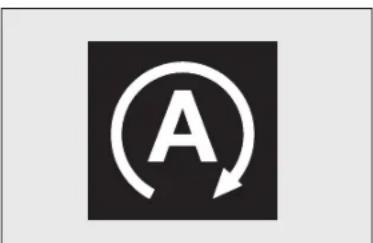
text_image
Afig. 52
KA00168m
Note The Auto-Start-Stop function is automatically turned off if the speed of 10 km/h is not exceeded for about 2 seconds, to prevent the engine from being repeatedly stopped when driving at walking pace.
The engine being stopped is signalled by a symbol fig. 52 on the display.
Engine restarting mode
Depress the clutch pedal to restart the engine.

text_image
A €0.00fig. 53
KA00169m
MANUAL ACTIVATION AND DEACTIVATION
The device can be activated/deactivated through the button in the dashboard
A-fig. 53. The system is usually on; if the warning light fig. 52 on the instrument panel is on, the system is off. In addition, on the versions where provided, additional information concerning the deactivation or activation of the Auto-Start-Stop is given through a message in the display.
ENGINE STOPPING FAILURE CONDITIONS
With the device activated, for reasons of comfort, limiting emissions and safety, the engine does not stop in certain conditions, including:
□ engine still cold;
☐ failure in the components or sensor of the Auto-Start-Stop system
☐ particularly cold outside temperatures, where the appropriate indication is provided;
☐ reduced braking system vacuum, e.g. following the brake pedal being pressed repeatedly;
☐ battery not sufficiently charged;
□ heated rear window activated;
□ heated windscreen;
☐ windscreen wipers working at maximum speed for a long time;
☐ particulate filter regeneration in progress (diesel engines only);
□ driver's door not shut;
□ driver's seat belt not fastened;
□ reverse gear engaged (for example, for parking manoeuvres);
□ automatic climate control is on and a comfortable temperature has not yet been reached or MAX – DEF function enabled;
□ during the first period of use, to initialize the system.
In the above cases, a message appears in the display and, where provided, the warning light fig. 52 flashes.
RESTARTING CONDITIONS
For reasons of comfort, limiting harmful emissions and safety purposes, the power unit can restart automatically without any action on the part of the driver if certain conditions are met, including:
□ engine still cold;
☐ battery not sufficiently charged;
☐ windscreen wipers working at maximum speed for a long time;
☐ reduced braking system vacuum, e.g. following the brake pedal being pressed repeatedly;
□ catalytic converter temperature too low;
☐ car moving, for example in cases when driving on roads with a gradient;
□ stopping the engine through the Auto-Start-Stop system for more than about three minutes.
□ automatic climate control system for establishing a comfortable temperature or enabling the MAX - DEF function.
With a gear engaged, the engine can be automatically restarted only by fully depressing the clutch pedal. The driver is asked to perform this operation through a message in the digital display and, where provided, by the icon
fig. 52 in the digital display flashing
Note If the clutch is not pressed, when three minutes have elapsed since the engine was stopped, the engine can only be restarted using the key.
Note: In cases when the engine stops and this is not desired, due for example to the clutch pedal being released sharply with a gear engaged, if the Auto-Start-Stop system is activated, the engine can be restarted by fully depressing the clutch pedal or by placing the gear lever in neutral.
SAFETY FUNCTIONS
In engine cut-out conditions through the Auto-Start-Stop system, if the driver unfastens his seat belt and opens the driver's door or the passenger door, the engine can only be restarted using the key.
The driver is notified of this condition both by a buzzer and through an information message in the digital display and, where provided, by the icon fig. 52 in the digital display flashing.
"ENERGY SAVING" FUNCTION
If, after the engine has been automatically restarted, the driver does not take any action for a period of about three minutes, the Auto-Start-Stop system will definitively stop the engine to avoid fuel consumption. The engine can only be started using the key in such cases.
Note In any case, it is possible to keep the engine running by deactivating the Auto-Start-Stop system.
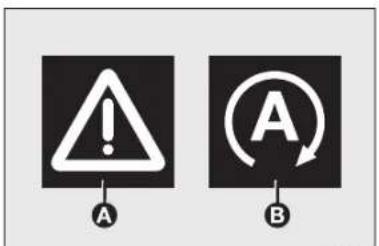
text_image
A A Bfig. 54
KA00170m
OPERATING IRREGULARITIES
In the case of malfunction the Auto-Start-Stop system is deactivated. The driver is informed of the problem by the general failure warning light A-fig. 54, where provided, coming on together with an information message and the system failure symbol B-fig. 54 in the instrument panel.
In this case, contact a Ford Dealership.
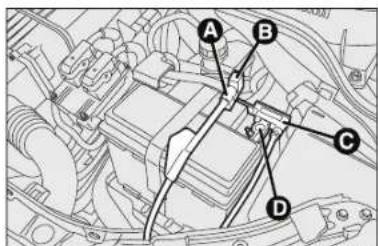
text_image
Technical diagram of an automotive engine bay with labeled components A, B, C, and Dfig. 55
KA00179(m)
INACTIVITY OF THE CAR Fig. 55
If the vehicle is inactive, special care must be taken to disconnect the battery electrical power supply. Proceed as follows: detach the connector A-fig. 55 (by pressing button B) from sensor C for monitoring the battery status installed on the battery negative pole D. This sensor should never be disconnected from the pole except if the battery is replaced.
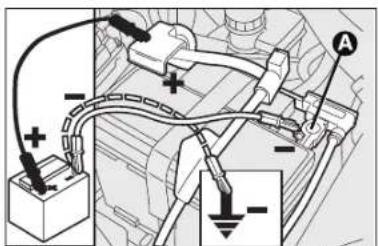
text_image
Diagram showing car battery connections with positive and negative polarity indicators and labeled points A and Bfig. 56
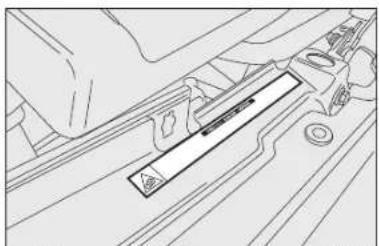
natural_image
Technical line drawing of a mechanical component with no visible text or symbolsfig. 57

WARNING
When replacing the battery, always contact a Ford
Dealership. Replace the battery using a new one of the same type (HEAVY DUTY) and having the same specifications.
JUMP STARTING fig. 56
When jump starting, never connect the negative lead (-) of the auxiliary battery to the negative pole A-fig. 56 of the car battery, rather to an engine/gearbox earth point.
WARNINGS

WARNING
Before opening the bonnet, make sure that the car is
switched off and the key is in the STOP (OFF) position.
Follow the instructions on the plate near the front crossmember fig. 57. It is advisable to extract the key when there are other people in the car.
Get off the vehicle only after having removed the ignition key or having rotated it to the STOP (OFF) position. When refuelling, make sure that the car is switched off with the key in the STOP (OFF) position.
SOUND SYSTEM (where provided)
For the operation of the radio with CD/MP3 player (where provided), read the instructions for use given in the supplement attached to the Owner Handbook.

If a radio is installed after car purchase, refer to the Ford Dealership for tips to safeguard battery durability.
Excessive loadless absorption damages the battery and may void the battery warranty.
SETUP SYSTEM (where provided)
The radio setup system is composed of:
– radio supply leads;
– front speaker power leads;
- aerial lead;
- radio housing;
- aerial on car roof.
[Non-Text]
RADIO (where provided)
Speakers for Basic Audio specification
Front speakers
No. 2 tweeters dia. 38 mm;
No. 2 mid-woofer speakers with dia. 165 mm.
Rear speakers
No. 2 full-range speakers with dia. 130 mm.
Speakers for HiFi Audio specification (if fitted)
Front speakers
No. 2 tweeters dia. 38 mm;
No. 2 mid-woofer speakers with dia. 165 mm.
Rear speakers
No. 2 full-range speakers with dia. 130 mm;
No. I amplifier.
No. I bass box.
AUX-IN SOCKET (where fitted)
This is located on the central console for connection of an external source (e.g. MP3).
ACCESSORIES PURCHASED BY THE OWNER
If, after buying the car, you decide to install electrical accessories that require a permanent electric supply (alarm, satellite antitheft system, etc.) or accessories that in any case burden the electric supply, contact Ford Dealership, whose qualified personnel, besides suggesting the most suitable devices belonging to Lineaccessori Ford, will also evaluate the overall electric absorption, checking whether the car's electric system is able to withstand the load required, or whether it needs to be integrated with a more powerful battery.
ELECTRICAL/ELECTRONIC DEVICE INSTALLATION
Electrical and electronic devices installed after buying the vehicle and available as after-sales must carry the following label:


Ford Motor Company authorises the installation of transceiving devices provided that they are installed according to rules of good engineering practice respecting the manufacturer's indications by a specialised centre.
IMPORTANT Installation of devices resulting in modifications of vehicle characteristics may cause driving license seizing by traffic control authorities and also the lapse of the warranty for defects due to the above mentioned modification or either directly or indirectly related to it.
Ford Motor Company shall not be liable for damage caused by the installation of accessories either not supplied or recommended by Ford Motor Company. and/or installed in compliance with the provided instructions.
RADIO TRANSMITTERS AND MOBILE PHONES
Radio transmission equipment (e.g.: ETACS mobile phones, CB radio systems and so on) should not be used inside the vehicle unless a separate aerial roof-mounted is fitted.
IMPORTANT The use of similar devices inside the passenger compartment (without an external aerial) may, in addition to potential damage to the health of the passengers, cause malfunctions in the vehicle electronic systems, compromising the safety of the vehicle.
In addition, transmission and reception of these devices may be affected by the shielding effect of the vehicle body.
As far as the use of EC-approved mobile phones is concerned (GSM, GPRS, UMTS), follow the usage instructions provided by the mobile phone manufacturer.
REFUELLING THE CAR
PETROL ENGINES
Use unleaded petrol only, with octane number (R.O.N.) not lower than 95.
IMPORTANT An inefficient catalytic converter leads to harmful exhaust emissions, thus contributing to air pollution.
IMPORTANT Never use leaded petrol, even in small amounts or in an emergency, as this would damage the catalytic converter beyond repair.
DIESEL ENGINES
Operation at low temperatures
If the outside temperature is very low, diesel thickens due to the formation of paraffin clots with consequent defective operation of the fuel supply system.
In order to avoid these problems, different types of diesel fuel are distributed according to the season: summer type, winter type and arctic type (cold/mountain areas).
When using or parking the vehicle for a long time in the mountains or cold areas, it is advisable to refuel using locally available diesel fuel.
In this case, it is also advisable to keep the tank over 50% full.

For diesel engines, use only diesel fuel for motor vehicles in accordance with EN590 European specifications.
The use of other products or mixtures may damage the engine beyond repair and consequently invalidate the warranty, due to the damage caused. If you accidentally introduce other types of fuel into the tank, do not start the engine and empty the tank. If the engine has run, even for a very short time, you will need to have the entire fuel system emptied in addition to the tank.
REFUELLING CAPACITY
To fill the tank completely, top-up twice after the first click of the fuel delivery gun. Further top-ups could cause failures in the fuel feeding system.

text_image
Technical diagram of a mechanical device with labeled components A, B, and Cfig. 58

WARNING
Do not bring naked flames or lit cigarettes near to
the fuel tank opening: fire risk. Keep your face away from the fuel filler to prevent breathing in harmful vapours.
FUEL FILLER CAP fig. 58
The cap B is provided with a loss prevention device C which secures it to the lid A.
Using the ignition key, undo the cap B turning it counterclockwise. The sealing may cause a slight pressure increase in the tank. A little breathing off, while slackening the cap is absolutely normal. When refuelling, fasten the cap to the device inside the flap as shown in the diagram.
PROTECTING THE ENVIRONMENT
The following devices are used for reducing petrol fuel engine emissions:
□ three-way catalytic converter;
□ oxygen sensors;
☐ evaporation control system.
In addition, do not let the engine run, even for a test, with one or more spark plugs disconnected.
The following devices are used for reducing diesel fuel engine emissions:
□ oxidising catalytic converter;
□ exhaust gas recirculation system (EGR);
☐ diesel particulate filter (DPF).

WARNING
The catalytic converter develops high temperature during operation. Do not park the vehicle on grass, dry leaves, pine needles or other flammable material: fire hazard.
DIESEL PARTICULATE FILTER (DPF) (for 1.3L Duratorq versions)
The Diesel Particulate Filter is a mechanical filter, integral with the exhaust system, that physically traps particulates present in the exhaust gases of diesel engines.
The diesel particulate filter has been adopted to eliminate almost all particulates in compliance with current/future legal regulations.
During normal use of the vehicle, the engine control unit records a set of data (e.g.: travel time, type of route, temperatures, etc.) and it will then calculate how much particulate has been trapped by the filter.
Since this filter physically traps particulate, it should be regenerated (cleaned) at regular intervals by burning carbon particles.
The regeneration procedure is controlled automatically by the engine management control unit according to the filter conditions and car use conditions.
There may be a limited increase in the engine idle speed during the regeneration, a limited increase in fumes and high temperatures at the exhaust.
These are not failures; they do not impair vehicle performance or damage the environment. If the dedicated message is displayed, refer to paragraph "Warning lights and messages".
SAFETY
SEAT BELTS 70
SBR SYSTEM 70
PRETENSIONERS 71
CARRYING CHILDREN SAFELY 73
FITTING UNIVERSAL CHILD SEAT 74
ASSEMBLY SETUP ISOFIX CHILD SEAT 77
FRONT AIR BAGS 79
SIDE BAGS (Side bag – Window bag) 81
SEAT BELTS
USING THE SEAT BELTS fig. 1
The belt should be worn keeping the torso straight and rested against the backrest.
To fasten the seat belts, hold the tongue A and insert it into the buckle B, until hearing the locking click. On removal, if it jams, let it rewind for a short stretch, then pull it out again without jerking.
To unfasten seat belts, press button C. Guide the belt while it is rewinding to prevent it from twisting. Through the reel, the belt automatically adapts to the body of the passenger wearing it, allowing freedom of movement.

WARNING
Never press button C when travelling.
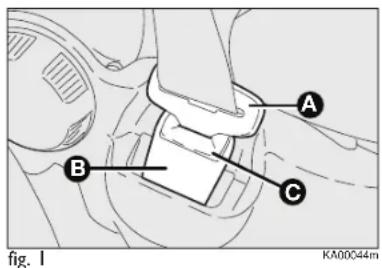
text_image
A B C fig. 1 KA00044mThe reel may lock when the car is parked on a steep slope: this is normal. Furthermore, the reel mechanism locks the belt if it is pulled sharply or in the event of sudden braking, collisions and high-speed bends.
The rear seat is fitted with inertia seat belts with three anchor points and a reel.

WARNING
Remember that, in the event of a violent collision,
back-seat passengers not wearing seat belts represent a serious danger to the front-seat passengers as well as to themselves.
SBR SYSTEM
The car is provided with the SBR (Seat Belt Reminder) system, which warns the driver and the front passenger if the seat belt is not buckled, as follows:
□ warning light 4 turns on steady and continuous activation of the beeper for the first 6 seconds;
□ warning light ◀ blinks and intermittent activation of the beeper for the next 90 seconds;
Contact a Ford Dealership to deactivate/reactivate the SBR system.
the SBR system can be reactivated through the display set-up menu if the vehicle is equipped with a multifunction display.
The display shows the dedicated message.
PRETENSIONERS
To increase the efficiency of seat belts, the car is fitted with pretensioners which, in the event of a violent frontal impact, rewind the belt a few centimetres ensuring that it adheres perfectly to the occupant before the restraining action begins. The seat belt locks to indicate that the device has intervened; the seat belt cannot be drawn back up even when is guided it manually.
This car is equipped with a second pretensioner (in the kick plate area). Its activation is signalled by the shortening of the metal cable.
IMPORTANT To obtain the highest degree of protection from the action of the pretensioning device, wear the seat belt keeping it tight to the chest and pelvis.
A slight discharge of smoke may be produced during the activation of the pretensioner which is not in harmful and does not involve any fire hazard. The pretensioner does not require any maintenance or lubrication. Anything that modifies its original conditions invalidates its efficiency.
If due to unusual natural events (floods, sea storms, etc.) the device has been affected by water and mud, it must necessarily be replaced.

WARNING
The pretensioner can only be used once. Go to a Ford
Dealership to have it replaced after it has been deployed.

Operations which lead to knocks, vibrations or localised heating (over 100°C for a max
of 6 hours) in the area around the pretensioners may cause damage or trigger them. These devices are not affected by vibrations caused by irregularities of the road surface or low obstacles such as kerbs, etc. Contact a Ford Dealership for any assistance.
LOAD LIMITERS
To increase passenger safety, the front seat belt reels contain a load limiter which allows controlled sag in such a way as to dose the force acting on the chest and shoulders during the belt restraining action in the event of front collisions.
GENERAL INSTRUCTIONS FOR USING THE SEAT BELTS
The driver must comply with (and have all car passengers follow) any local regulations in force concerning the use of seat belts. Always fasten the seat belts before starting.
Seat belts must also be worn by pregnant women: the risk of injury in the event of an accident is greatly reduced for them and the unborn child if they are wearing a seat belt. Pregnant women must position the lower part of the belt very low down so that it passes over the pelvis and under the abdomen (as indicated in fig. 2).

natural_image
Line drawing of two seated individuals wearing seatbelt covers, viewed from the side (no text or symbols)
WARNING
For maximum safety, keep the back of your seat
upright, lean back into it and make sure the seat belt fits closely across your chest and pelvis. Always fasten the seat belts on both the front and the rear seats. Travelling without wearing seat belts will increase the risk of serious injury and even death in the event of an accident.
Under no circumstances should the components of the seat belts and pretensioners be tampered with or removed. Any operations must be carried out by qualified and authorised personnel only. Always go to a Ford Dealership.
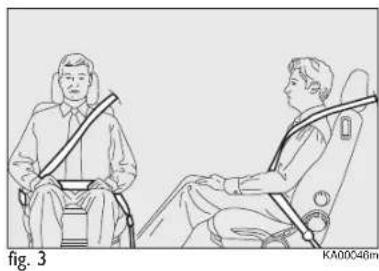
natural_image
Line drawing of two individuals seated in car seats, one wearing a seatbelt and the other with a belt (no text or symbols)IMPORTANT The belt must not be twisted. The upper part must pass over the shoulder and cross the chest diagonally. The lower part must fit the hips (as shown in fig. 3) rather than the abdomen of the passenger. Never use devices (clips, pegs, etc.) to hold the seat belt away from your body.
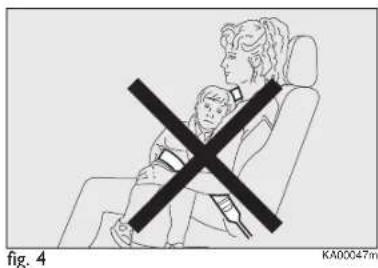
text_image
fig. 4 KA00047mIMPORTANT Each belt shall be used by one person only: never travel with a child sitting on the passenger's lap with a single belt to protect them both (fig. 4). In general, do not place any objects between the person and belt.

WARNING
If the belt has been subjected to heavy stress,
for example after an accident, it should be changed completely together with the anchors, anchor fastening screws and pretensioner. In fact, even if the belt has no visible defects, it could have lost its resilience.
SEAT BELTS MAINTENANCE
For keeping the seat belts in efficient conditions, observe the following:
□ always use the belts with the strap well stretched and never twisted; make sure that it is free to run without impediments;
□ after a serious accident, replace the belt even if it does not appear damaged. Always replace the belt if the pretensioners were deployed;
☐ to clean the belts, wash by hand with water and mild soap, rinse and leave to dry in the shade. Never use strong detergents, bleach, paints or any other substance which could damage the belt fibres;
☐ prevent the reels from getting wet: their correct operation is only guaranteed if water does not get inside;
☐ replace the seat belt when showing significant wear or cut signs.
CARRYING CHILDREN SAFELY
For optimal protection in the event of a collision, all passengers must be seated and wearing adequate restraint systems.
This is even more important for children.
This prescription is compulsory in all EC countries according to the Directive EEC-R44.
Compared with adults, a child's head is proportionally larger and heavier than the rest of the body, while muscles and bone structure are not fully developed.
Therefore, correct restraint systems are necessary which are different from adult seat belts.
The results of research on the best child restraint systems are contained in the European Standard ECE-R44, which enforces the use of restraint systems classified into five groups:
Group 0 - 0-10 kg in weight
Group 0+ -0-13 kg in weight
Group 1 9-18 kg in weight
Group 2 15-25 kg in weight
Group 3 22-36 kg

WARNING
SERIOUS DANGER: never place cradle child seats facing backwards on the front passenger's seat of cars fitted with passenger's air bag. Deployment of

the air bag in an accident could cause fatal injuries to the baby. It is advisable always to carry children on the rear seat which is the most protected position in the event of an accident. Never fit child seats systems on the front seat if the car is provided with passenger's air bag: as the air bag could even cause fatal injury regardless of the severity of the collision which caused its deployment. If necessary, children can stay on the front seat, but only if the passenger's airbag can be disabled. In this case be sure to verify that the air bag is actually deactivated, observing the warning light on the dashboard (see "Front air bag – passenger side" in paragraph "Front air bags"). Move the passenger's seat as far back as possible to avoid contact between the child seat and the dashboard.
All child restraint devices must bear the certification data, together with the control mark, on a label solidly fixed to the seat which must never be removed.
Over 1.50 m in height, from the point of view of restraint systems, children are considered as adults and wear the seat belts normally.
Lineaccessori Ford includes child seats for each weight group.
These devices are recommended having been specifically designed for Ford cars.

text_image
0-13 kgfig. 5
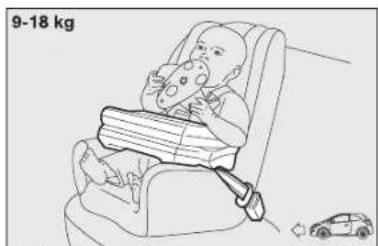
text_image
9-18 kgfig. 6
FITTING UNIVERSAL CHILD SEAT (WITH SAFETY BELTS)
GROUPS 0 and 0+
Babies up to 13 kg must be carried facing backwards on a cradle seat, which, supporting the head, does not induce stress on the neck in the event of sharp decelerations.
The cradle is restrained by the car seat belts, as shown in fig. 5 and in turn it must restrain the child with its own belts.
GROUP I
From 9 to 18 kg of weight, children may be carried facing forward. Some types of seat are equipped with a front cushion that enables the car seat belt to restrain both child and seat fig. 6.

WARNING
The figures are only examples for fitting purposes. To install the child restraint, refer to the instructions supplied with the same. Some child restraint systems for weight group 0 and I have a rear attachment to the car seat belts and its own seat belts for securing the child. Due to their weight, they may be dangerous if incorrectly mounted (e.g. if fastened to the car seat belts with a cushion in between). Follow the assembly instructions carefully.
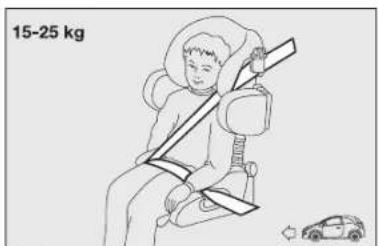
text_image
15-25 kgfig. 7
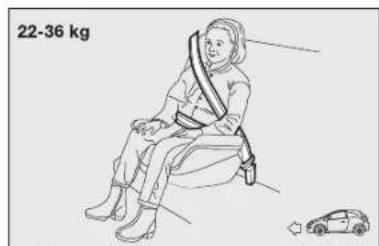
text_image
22-36 kgfig. 8

WARNING
The figures are only examples for fitting purposes. Refer to the instructions supplied with the child restraint.
GROUP 2
Children from 15 to 25 kg may use the car seat belts directly fig. 7.
The child seat is now needed only to position the child correctly with respect to the belts so that the diagonal section crosses the child's chest and never the neck, and the lower part is snug on the pelvis not the abdomen.
GROUP 3
For children from 22 kg to 36 kg the size of the child's chest no longer requires a support to space the child's back from the backrest.
Fig. 8 shows proper child seat positioning on the rear seat.
Children over 1.50 m in height can wear seat belts like adults.
PASSENGER SEAT COMPLIANCE WITH REGULATIONS ON UNIVERSAL CHILD SEAT USE
Ford complies with the new European Directive 2003/20/EC which governs the arrangement possibilities for child restraints on the various seats of the car as shown in the following table:
| Group Weight range front rear | Passenger Passenger |
| Group 0, 0+ up to 13 kg U U | |
| Group 1 9-18 kg U U | |
| Group 2 15-25 kg U U | |
| Group 3 22-36 kg U U |
Key:
U = suitable for child restraint systems of the “Universal” category, according to European Standard EEC-R44 for the specified “Groups”.
Below is a summary of the safety rules to be followed for carrying children.
☐ Install the child seats on the rear seat, which is the most protected position in the event of an accident.
If the passenger's air bag is deactivated, always check the amber warning light ✗ on the instrument panel to make sure that it has actually been deactivated.
☐ Carefully follow the instructions supplied with the child restraint system which are mandatory by law. Keep the instructions in the car along with the other documents and this handbook. Do not use second-hand child seats without instructions.
□ Always check the seat belt is well fastened by pulling the webbing.
☐ Only one child is to be strapped to each retaining system.
□ Always check the seat belts do not fit around the child's throat.
☐ While travelling, do not let the child sit incorrectly or release the belts.
☐ Never carry children on your lap, even newborns. No one can hold a child in the case of an accident.
☐ In case of an accident, replace the child seat with a new one.

WARNING
In cars fitted with passenger's air bag never place child restraint systems on the front seat, since children must never travel on the front seat.
ASSEMBLY SETUP ISOFIX CHILD SEAT
Provision has been made on the car to mount a Universal Isofix child restraint system, a new European standardised system for carrying children safely.
Isofix systems can be fitted alongside a traditional restraint system.
An example of child seat is shown in fig. 9. The Universal Isofix child seat covers weight group I. Specific Isofix child seats cover the other weight groups. These seats must be designed, tested and type-approved specifically for this car (refer to the list of cars attached to the child seat).
Due to its different anchoring system, the child's seat shall be anchored to the proper lower metal rings A-fig. 10, set between rear seat back and cushion. After removing the rear shelf, secure the upper belt (provided with the child's seat) to ring B-fig. 11 set between the rear backrest and the boot floor. Do not use the ring B to secure other objects.
Remember that in case of Universal Isofix child seats, you can use all seats approved with the marking ECE R44/03 "Universal Isofix".

natural_image
Line drawing of a car seatbelt with directional arrows indicating movement (no text or symbols)fig. 9
KA00052m
The Universal Isofix "Duo Plus" child seat is available from Lineaccessori Ford.
For any further details on installation/use, refer to the instruction manual for the child seat.
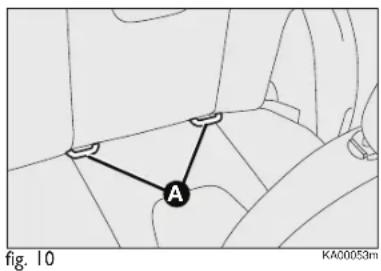
text_image
A fig. 10 KA00053m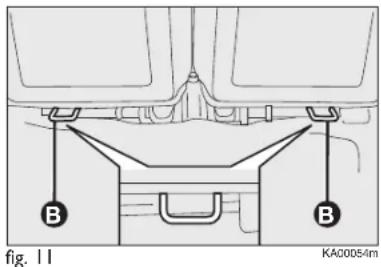
text_image
B B fig. 11 KA00054m
WARNING
Fit the child seat when the car is stationary.
The child seat is correctly anchored to the brackets when you hear the click. Follow the instructions for assembly, disassembly and positioning that the manufacturer must supply with the child seat.
PASSENGER SEAT COMPLIANCE WITH REGULATIONS ON UNIVERSAL ISOFIX CHILD SEAT USE
The table below shows the different installation possibilities of Universal Isofix restraint systems on the seats fitted with Isofix fasteners, in accordance with European standard EEC 16.
Weight group Child seat Class Isofix position
| Isofix size | |||
| Group 0 up to 10 kg | Facing backwards | E | X |
| Group 0+ up to 13 kg | Facing backwards | E | X |
| Facing backwards | D | X | |
| Facing backwards | C | X | |
| Group I from 9 up to 18 kg | Facing backwards | D | X |
| Facing backwards | C | X | |
| Facing forwards | B | IUF | |
| Facing forwards | BI | IUF | |
| Facing forwards | A | X |
IUF: suitable for Isofix child restraint systems which face forwards, universal class (fitted with third upper fastener), approved for the weight group.
IL: suitable for special child restraint systems. Isofix type suitable and tested for this type of car. The seat may be fitted by moving the front seat forward.
X: Isofix position not suitable for Isofix child seats in this group of weight and/or class.
AIR BAG
The vehicle is equipped with front air bags for driver and passenger and front side air bags (side bag – window bag) (where specified).
FRONT AIR BAGS
The front air bags (for driver and passenger) have been designed to protect the passengers sitting on the front seats in the event of head-on crashes of medium-high severity, by placing the bag between the person and the steering wheel or dashboard.
Therefore non-activation in other types of collisions (side collisions, rear shunts, roll-overs, etc.) is not a system malfunction.
An electronic control unit will make the bag inflate in the event of a frontal impact.
The bag will inflate instantaneously placing itself between the front occupants body and the structures which could cause injury. It will deflate immediately afterwards.
Driver and passenger front air bags are not a replacement of but complementary to the belts, which you are recommended to always wear, as specified by law in Europe and most non-European countries.
In the event of an impact, those not wearing a seat belt will move forward and come into contact with the bag which is still inflating. The protection offered by the air bag cushion is reduced in such a case.
Front air bags may not be activated in the following situations:
☐ in collisions against highly deformable objects not affecting the car front surface (e.g. bumper collision against guard rail, etc.);
☐ car wedging under other vehicles or protective barriers (e.g. trucks or guard rails);
they may not provide any additional protection compared with seat belts, so their activation would not be worthwhile. In these cases, non-deployment of the air bag does not necessarily indicate a system malfunction.

WARNING
Do not apply stickers or other objects on
the steering wheel, on the dashboard in the passenger side air bag area, on side upholstery on roof and on the seats.
Never put objects (e.g. mobile phones) on the passenger's side dashboard since they could interfere with correct inflation of the air bag and also cause serious injury to the passengers.
The driver's and passenger's front air bags have been designed and calibrated to protect front seat occupants wearing seat belts.
The volume of the front air bags at max. inflation fills most of the space between the steering wheel and the driver and between the dashboard and the passenger.
The air bags are not deployed in the event of minor front collisions (for which the restraining action of the seat belts is sufficient).
Safety belts must always be used. In the event of frontal crash they ensure the correct positioning of the occupant.

natural_image
Top-down line drawing of a car dashboard with steering wheel and dashboard (no text or symbols)FRONT AIR BAG ON DRIVER'S SIDE fig. 12
It consists of an instantly inflating bag contained in a special recess in the centre of the steering wheel.

text_image
AIRBAG Fig. 13 KA00195mFRONT AIR BAG ON PASSENGER'S SIDE fig. 13
This consists of an instantly inflating bag contained in a special recess in the dashboard: this bag has a larger volume than that of the driver's.

WARNING
SERIOUS DANGER: never place cradle child seats facing backwards on the front passenger's seat of cars fitted with passenger's air bag. Deployment of
the air bag in an accident could cause fatal injuries to the child. Always deactivate the passenger air bag when placing a child seat on the front seat. Move the passenger's seat as far back as possible to avoid contact between the child seat and the dashboard. Although this is not mandatory by law, the air bag should be immediately reactivated when children are no longer carried to ensure better protection to adults.
MANUAL DEACTIVATION OF PASSENGER'S FRONT AIR BAG AND SIDE BAG (where provided)
Whenever a child needs to be carried on the front seat, the passenger's front air bag and the Side Bag (where provided) must be deactivated. This function may be activated only by taking car to dealership.
The instrument panel warning light ⚡2 will stay on glowing steadily until reactivating the passenger's front air bag and the Side Bag (where provided).
WARNING To deactivate the passenger's front air bag and the Side Bag (where provided), refer to paragraphs "Digital display" and "Multifunction display" in section "Your car".
SIDE BAGS
(Side bag - Window bag) (where provided)
SIDE BAG fig. 14
It consists of an instant-inflating cushion housed in the front seat backrest. It protects the chest and the hips of the passengers in the event of side crash of medium-high severity.
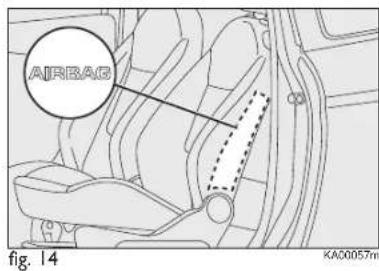
text_image
AIRBAG fig. 14 KA00057m
text_image
AIRBAG fig. 15 KA00058mWINDOW BAGS fig. 15
They consist of two "curtain" cushions housed behind the side upholstery of the roof and covered by specific finishing to protect the head of the front passengers in the event of side crash, thanks to their wide surface.
IMPORTANT The best protection in the event of side crash is achieved maintaining a correct position on the seat. This allows the correct deployment of the window bag.
IMPORTANT The front air bags and/or side bags may be deployed if the car is subject to heavy collisions or accidents involving the underbody area, such as for example violent shocks against steps, kerbs or low obstacles, falling of the car in big holes or sags in the road.
IMPORTANT A small amount of dust will be released when the air bags are deployed. The dust is harmless and does not indicate the beginning of a fire. Furthermore, the surface of the deployed bag and the interior of the car may be covered with dusty residue. This dust can irritate skin and eyes. Wash with mild soap and water in the event of exposure.
IMPORTANT Should an accident occur in which any of the safety devices are activated, take the vehicle to a Ford Dealership to have the activated devices replaced and to have the whole system checked.
Every control, repair and replacement operation concerning the air bags must be carried out only by a Dealership. If the car changes ownership, the new owner must be informed of the method of using air bags and the above warnings and also be given this “Owner Handbook”.
IMPORTANT Pretensioners, front air bags and side bags are deployed according to different logics on the basis of the type of collision. Non-deployment of one of the devices does not necessarily indicate a system malfunction.

WARNING
Do not rest your head,
arms or elbows on the door, on the windows and on the window bag area to avoid injuries during inflation.
Never lean your head, arms or elbows out of the window.
GENERAL WARNINGS

WARNING
If when turning the key to MAR-ON the warning light
A does not turn on or if it stays on when travelling, there could be a failure in safety systems; in this event air bags or pretensioners may not be deployed in case of impact or, in a minor number of cases, they could deploy accidentally. Contact a Ford Dealership immediately to have the system checked before driving off.

WARNING
Do not cover the front seat backrest with covers if ag is fitted.

WARNING
Do not travel with objects in your lap, in front of your
chest, or keeping between your lips pipes, pencils, etc.. In the event of collision with air bag activation, you may be seriously injured.

WARNING
Always drive keeping your hands on the steering wheel
crown so that, in the event of air bag activation, it can inflate without finding obstacles. Do not drive with your body bent forward. Keep the backrest in straight position, resting correctly your back on it.

WARNING
It someone tried to steal or damage your car, and in the event of floods, have the air bag system checked by the Ford Dealership.

WARNING
With ignition key inserted, at MAR-ON, even if the engine is off, the air bags can activate also with the car stopped, if it is hit by another vehicle. For this reason, children must never occupy the front seat, even if the car is not moving. We remind you that if the key is inserted and turned to STOP, no safety device (air bag or pretensioner) is activated following a collision; non-deployment in such cases is consequently not the sign of a failure.

WARNING
When the key is turned to MAR-ON, the warning light 2 , turns on, flashing for a few seconds, to remind you that the passenger air bag will activate in the event of a collision, then it turns off.

WARNING
The front air bags deploy in the event of more severe collisions than those required for deploying the pretensioners. When the impact is within the two deployment thresholds, it is normal that pretensioners only are engaged.

WARNING
Do not wash the seats with pressurised water jets or steam (manually or at the automatic washing stations).

WARNING
The air bag does not replace seat belts, but increases their efficiency. Furthermore, since front air bags are not deployed in low speed collisions, side collisions, rear-end shunts or roll-overs, the passengers are only protected by the seat belts which must be fastened at all times.
085-094 Ford KA EN:081-090 Ford KA IT 14-10-2010 11:32 Pagina 85
STARTING AND DRIVING
STARTING THE ENGINE 86
HANDBRAKE 88
USING THE MANUAL GEARBOX 89
FUEL SAVING 90
SNOW TYRES 92
SNOW CHAINS 93
CAR INACTIVITY 93
STARTING THE ENGINE
The car is fitted with an electronic engine lock device: if the engine fails to start, see the paragraph "The Ford CODE system" in the section "Knowing your car".
The engine may be noisier during the first few seconds of operation, especially after a long period of inactivity. This is characteristic of hydraulic tappets, the timing system chosen for petrol engine versions to reduce the number of servicing interventions and does effects neither functionality nor reliability of your car.

In the first period of use, we recommend to avoid excessive stress for the car (for instance excessive
accelerations, extended travel at maximum speed, sudden braking etc.).

With engine off, do not leave the key in the ignition switch on MAR-ON to prevent draining
the battery.

WARNING
It is dangerous to have the engine running indoors.
The engine consumes oxygen and engine exhaust contains carbon dioxide, carbon monoxide and other toxic gasses.

WARNING
Remember that the brake servo and power steering
are not operational until the engine has been started, therefore much effort than usual is required on the brake pedal and steering wheel.
PROCEDURE FOR PETROL VERSIONS
Proceed as follows:
□ engage the handbrake;
☐ place the gearshifting lever in neutral;
☐ press the clutch pedal all the way down without touching the accelerator;
□ turn the ignition key to AVV and let it go as soon as the engine starts.
If the engine does not start at the first attempt, return the ignition key to STOP before repeating starting.
If, when the ignition key is at MAR-ON, warning light remains lit together with warning light turn the key to STOP and then back to MAR-ON; if the warning light remains on, try with the other keys provided with the car.
Contact a Ford Dealership if you still cannot start the engine.
PROCEDURE FOR DIESEL VERSIONS
Proceed as follows:
☐ engage the handbrake;
☐ put the gearshifting lever into neutral;
□ turn the ignition key at MAR-ON: the warning light 00 on the instrument panel will turn on;
☐ wait for the warning light 70 to turn off. The hotter the engine is, the quicker this will happen;
☐ press the clutch pedal all the way down without touching the accelerator;
□ turn the ignition key to AVV as soon as the warning light 00 turns off. Waiting too long will waste the work done by the glow plugs.
Release the key as soon as the engine starts.
IMPORTANT With cold engine, the accelerator must be entirely released when turning the ignition key to position AVV.
If the engine does not start at the first attempt, return the ignition key to STOP before repeating starting.
If, when the ignition key is at MAR-ON, the instrument panel warning light remains lit, turn the key to STOP and then back to MAR-ON; if the warning light remain on, try with the other keys provided with the car.
Contact the Ford Dealership if you still cannot start the engine.

Warning light 70 will flash for 60 seconds after starting or during prolonged cranking to indicate a fault
with the glow plug heating system. Use the car normally if the engine starts and contact the Ford Dealership as soon as possible.
HOW TO WARM UP THE ENGINE AFTER IT HAS JUST STARTED
Proceed as follows:
□ drive off slowly, letting the engine turn at medium speed. Do not accelerate abruptly;
☐ do not demand maximum performance for the first few kilometres. Wait until the engine coolant gauge starts moving.

Never bump start the engine by pushing, towing or coasting downhill.
This could cause a flow
of fuel into the catalytic converter and damage it beyond repair.
STOPPING THE ENGINE
Turn the ignition key to STOP while the engine is idling.
IMPORTANT After a taxing drive, you should allow the engine to "catch its breath" before turning it off by letting it idle to allow the temperature in the engine compartment to fall.

A quick burst on the accelerator before turning off the engine serves absolutely no practical
purpose; it wastes fuel and is especially damaging to turbocharged engines.
HANDBRAKE
The handbrake lever is located between the two front seats.
Pull the lever upwards to operate the handbrake.

WARNING
The car must be braked after a few snaps of the
lever, otherwise, contact the Ford Dealership for regulation.
When the handbrake lever is pulled up and the ignition key is at MAR-ON, the instrument panel warning light (!) will turn on.
Proceed as follows to release the handbrake:
☐ slightly lift the handbrake and press release button A - fig. 1;
□ keep button A pressed and lower the lever. The warning light ⏻ on the instrument panel will turn off.
Press the brake pedal when carrying out this operation to prevent the car from moving accidentally.
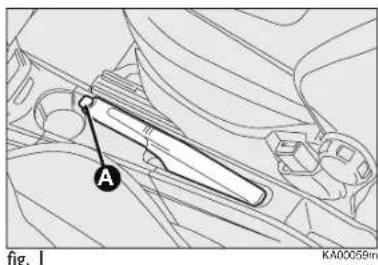
text_image
A fig. 1 KA00059mPARKING
Proceed as follows:
□ Stop the engine and engage the handbrake.
☐ Engage a gear (on a slope, engage first gear if the vehicle is parked uphill or reverse if it is parked downhill) and leave the wheels steered.
Block the wheels with a wedge or a stone if the car is parked on a steep slope.
Do not leave the key in the ignition switch at MAR-ON to prevent draining the battery. Always remove the key when leaving the car.
Never leave children in the unattended car. Always remove the ignition key when leaving the car and take it out with you.
USING THE MANUAL GEARBOX
To engage the gears, press the clutch pedal down fully and shift the gear lever into one of the required positions (a diagram is shown on the knob fig. 2).
For cars provided with 6 speed gearbox, to engage the sixth gear, operate the lever with a pressure toward the right to avoid involuntary engagement of fourth gear. Similar action to pass from sixth to fifth gear. IMPORTANT The car can only be put into reverse gear when it has stopped moving completely. With the engine running, wait for at least 2 seconds with the clutch pedal fully pressed before engaging reverse to prevent damage to the gears and grating.
To engage reverse R from neutral, lift the sliding ring A under the knob and shift the lever to the right and back.
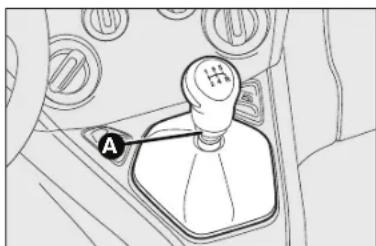
natural_image
Diagram of a car gear shift lever with labeled component A (no text or symbols beyond label)fig. 2
IMPORTANT The clutch pedal should be used only to change gear. Do not drive with your foot resting on the clutch pedal, however lightly. For versions/markets where provided, the electronic clutch control could cut in by interpreting the incorrect driving style as a fault.

WARNING
Press the clutch pedal fully to change gears correctly. Therefore, the floor area under the pedals should be clear: ensure that any rubber mats are flat and do not interfere with the pedals.

Do not drive with your hand resting on the gear lever, because this pressure, even if light, can wear out the
inner components of the gearbox over time.
FUEL SAVING
Here are some useful tips to save fuel and minimise harmful emissions of CO_2 and other pollutants (nitric oxides, unburnt hydrocarbons, fine dusts etc...).
GENERAL CONSIDERATIONS
Car maintenance
Have checks and adjustments carried out in accordance with the "Scheduled Servicing Plan".
Tyres
Check the pressure of the tyres routinely at an interval of no more than 4 weeks: if the pressure is too low, consumption levels increase as resistance to rolling is higher.
Unnecessary loads
Do not travel with an overloaded boot. The weight of the car (especially when driving in town) and its ride greatly affects consumption and stability.
Accessories installed on longitudinal bars
Remove accessories like: roof racks, ski racks, luggage container, etc. from the roof if they are no longer used. These accessories lower air penetration and adversely affect consumption levels. When transporting particularly large objects, use a trailer if possible.
Electrical devices
Use electrical devices only for the amount of time needed. The heated rear window, additional headlights, windscreen wipers and heater fan need a considerable amount of energy, therefore a higher requirement of current involves an increase of fuel consumption (up to +25% in the urban cycle).
Climate control system
Climate control leads to higher fuel consumption (on average up to +20%). If the temperature outside permits, try and use the air vents.
Devices for aerodynamic control
The use of non-certified devices for aerodynamic control may adversely affect air drag and consumption levels.
DRIVING STYLE
Starting
Do not warm the engine with the car at a standstill or at idle or high speed: under these conditions the engine warms up much more slowly, increasing electrical consumption and emissions. It is therefore advisable to move off immediately, slowly, avoiding high speeds: in this way the engine will warm up more quickly.
Unnecessary actions
Avoid accelerating when stopped at traffic lights or before switching off the engine. This and also double declutching is absolutely pointless on modern cars and also increases consumption and pollution.
Gear selection
As soon as the conditions of the traffic and road allow, use a higher gear. Using a low gear for faster acceleration will increase consumption.
In the same way improper use of a high gear increases consumption, emissions and engine wear.
085-094 Ford KA EN:081-090 Ford KA IT 14-10-2010 11:32 Pagina 91
Max. speed
Fuel consumption considerably increases with speed. Maintain a constant speed, avoiding unnecessary braking and acceleration, which cost in terms of both fuel and emissions.
Acceleration
Accelerating violently will greatly affect consumption and emissions: acceleration should be gradual.
CONDITIONS OF USE
Cold starting
Short journeys and frequent cold starts will prevent the engine from reaching optimal running temperature. This results in a significant increase in consumption levels (from +15 to +30% on the urban cycle) and emissions.
Traffic and road conditions
Rather high consumption levels are linked to situations with heavy traffic, for instance when travelling in queues with frequent use of the lower gears or in cities with many traffic lights. Winding mountain roads and rough road surfaces also adversely affect consumption.
Stops in traffic
During prolonged hold-ups (e.g. level crossings) the engine should be switched off.
SNOW TYRES
Use snow tyres of the same size as the normal tyres provided with the car.
The Ford Dealership will be happy to provide advice concerning the most suitable type of tyre for the customer's requirements.
For the type of tyre to be used, inflation pressures and the specifications of snow tyres, follow the instructions given in paragraph “Wheels” in section “Technical specifications”.
The winter performance of these tyres is considerably reduced when the tread thickness is less than 4 mm. Replace them in this case.
Due to snow tyre features, under normal conditions of use or on long motorway journeys, the performance of these tyres is much lower than that of standard tyres. Limit performance according to the use for which they were certified.
IMPORTANT When using snow tyres with a maximum speed index below the one that can be reached by the car (increased by 5%), place a notice in the passenger compartment, plainly in view, which states the maximum speed allowed by the snow tyres (as per EC Directive).
All four tyres should be the same (brand and profile) to ensure greater safety when driving and braking as well as making the car more responsive.
Remember that it is inappropriate to change the rotation direction of tyres.

WARNING
You must not exceed 160 km/h on snow tyres
with a "Q" mark; in any case, make sure you stick to the rules of the highway code.
SNOW CHAINS

wheel.
WARNING
Never install snow chains on the space-saver spare
The use of snow chains should be in compliance with local regulations.
The snow chains may be applied only onto the front wheel tyres (drive wheels).
Check the tension of the snow chains after the first few metres have been driven.
IMPORTANT Snow chains cannot be fitted on the space-saver wheel. So, if a front (drive) wheel is punctured and chains are needed, a rear wheel should be fitted to the front of the car and the space-saving spare wheel should be fitted to the rear. This way with two standard wheels at the front, snow chains can be fitted to them to solve an emergency.

Keep your speed down when snow chains are fitted. Do not exceed 50 km/h.
Avoid potholes, steps and pavements and also avoid driving long distances on roads not covered with snow in order to prevent damaging the car and the roadbed.
CAR INACTIVITY
If the car is to be left inactive for longer than a month, the following precautions should be followed:
☐ park the car in covered, dry and if possible well-ventilated premises;
□ engage a gear;
☐ check that the handbrake is not engaged;
☐ disconnect battery negative terminal and check charge (see paragraph "Battery - Charge and electrolyte level check" in chapter "Maintenance and care")
☐ clean and protect the painted parts using protective wax;
085-094 Ford KA EN:081-090 Ford KA IT 14-10-2010 11:32 Pagina 94

flowchart
graph LR
    A["IN AN EMERGENCY"] --> B["WARNING LIGHTS AND MESSAGES"]
    B --> C["STARTING AND DRIVING"]
    C --> D["SAFETY"]
    D --> E["KNOWING YOUR CAR"]
☐ clean and protect the shiny metal parts using special compounds readily available;
□ sprinkle talcum powder on the rubber windscreen and rear window wiper blades and lift them off the glass;
□ slightly open the windows;
☐ cover the car with a cloth or perforated plastic sheet. Do not use sheets of non-perforated plastic as they do not allow moisture on the car body to evaporate;
☐ inflate tyres to +0.5 bar above the standard specified pressure and check it periodically;
☐ do not drain the engine cooling system.
WARNING LIGHTS AND MESSAGES
GENERAL WARNINGS 96
LOW BRAKE FLUID 96
HANDBRAKE APPLIED 96
AIR BAG FAILURE 96
FRONT PASSENGER AIR BAG DEACTIVATED ..... 97
OVERHEATED ENGINE COOLANT 97
LOW BATTERY CHARGE 98
ABS FAILURE 98
EBD FAILURE 98
LOW ENGINE OIL PRESSURE 98
DEGRADED OIL 98
ELECTRIC POWER STEERING FAILURE 99
INCOMPLETE DOOR LOCKING 99
INJECTION SYSTEM FAILURE 99
ENGINE CONTROL SYSTEM FAILURE (EOBD)
(PETROL VERSIONS) 99
DIESEL PARTICULATE FILTER CLOGGED 100
FUEL RESERVE 100
GLOW PLUGS 100
GLOW PLUG HEATING FAILURE 100
WATER IN DIESEL FILTER 101
FORD CODE PROTECTION SYSTEM FAILURE ..... 101
REAR FOG LIGHTS 101
GENERIC FAILURE INDICATION .... 101
ENGINE OIL PRESSURE SENSOR FAILURE .... 101
AUTO-START-STOP SYSTEM DEACTIVATION ..... 102
FUEL CUT-OFF INERTIA SWITCH INTERVENTION/
FUEL CUT-OFF NOT AVAILABLE 102
EXTERIOR LIGHTING FAILURE 102
PARKING SENSOR FAILURE 102
ESP SYSTEM FAILURE 102
HILL HOLDER FAILURE 102
SIDE LIGHTS AND DIPPED BEAM HEADLIGHTS .... 102
FOLLOW ME HOME 102
FOG LIGHTS 103
LEFT-HAND DIRECTION INDICATOR 103
RIGHT-HAND DIRECTION INDICATOR 103
MAIN BEAM HEADLIGHTS 103
POSSIBLE ICE ON ROAD 103
SPEED LIMIT EXCEEDED 103
LIMITED RANGE 103
ASR SYSTEM 103
WORN BRAKE PADS 104
SEAT BELTS NOT FASTENED 104
HEATED REAR WINDOW 104
HEATED WINDSCREEN 104
WARNING LIGHTS AND MESSAGES
GENERAL WARNINGS
The turning on of the warning light is accompanied by a specific message and/or buzzer sound where provided by instrument panel. These indications are concise and brief and cautionary and as such must not be considered as exhaustive and/or alternative to the information contained in the Owner Handbook, which shall always be read through carefully and thoroughly. In the event of a failure indication, always refer to the contents of this chapter.
IMPORTANT Failure indications displayed are divided into two categories: very serious and less serious failures.
Very serious failures are indicated by a repeated and prolonged warning "cycle".
Less serious failures are indicated by a limited "warning" cycle.
Press MENU ESC to stop the warning cycle in both cases.
The instrument panel warning light will stay on until the cause of the malfunction is eliminated.

HANDBRAKE APPLIED (red)
When the ignition key is moved to MAR-ON, the warning light turns on and should go off after a few seconds.
Low brake fluid
The warning light comes on when the level of the brake fluid in the reservoir falls below the minimum level due to a possible leak in the circuit.
On some versions the display shows the dedicated message.

WARNING
If the warning light Ⓙ
turns on when travelling
(on certain versions together with the message on the display) stop the car immediately and contact your Ford Dealership.
Handbrake applied
The warning light turns on when the handbrake is applied.
On certain versions, if the car is moving the buzzer will also sound.
IMPORTANT If the warning light turns on when travelling, check that the handbrake is not engaged.

AIR BAG FAILURE (amber)
Turning the ignition key to MAR-ON the warning light turns on, but it should go off after a few seconds.
The warning light stays on constantly if there is a failure in the air bag system.
On some versions the display shows the dedicated message.

WARNING
If when turning the key to MAR-ON the warning light
does not turn on or if it stays on when travelling, there could be a failure in safety systems; in this event air bags or pretensioners may not be deployed in case of impact or, in a minor number of cases, they could deploy accidentally. Contact your Ford Dealership immediately to have the system checked before driving off.

WARNING
The failure of the warning light● (warning light off)
is indicated by intermittent blinking for longer than the normal four seconds of the warning light that signals front passenger air bag deactivated.

FRONT PASSENGER AIR BAG DEACTIVATED (amber)
The warning light ⚡️ comes on when the front passenger air bag is deactivated.
With the front passenger air bag on, when the ignition key is moved to
MAR-ON, the warning light _2 comes on steadily for a few seconds; then, it continues to flash for some seconds and finally goes off.

WARNING
Warning light indicates a failure of warning light
This condition is indicated by intermittent blinking of warning light for longer than 4 seconds. In this case, the warning light may not indicate failures in the retaining system. Contact Ford Dealership immediately to have the system checked before driving off.

OVERHEATED ENGINE COOLANT (red) ℃
Turning the ignition key to MAR-ON the warning light turns on, but it should go off after a few seconds.
The warning light turns on when the engine is overheated.
If the warning light comes on when driving, proceed as follows:
☐in standard driving conditions:
stop the car, switch off the engine and check whether the water level in the reservoir is not below the MIN. mark. In this case, wait for a few minutes for the engine to cool down, then slowly and carefully open the cap, top-up with coolant and check that the level is between the MIN. and MAX. marks on the reservoir itself. Also check visually for any fluid leaks. Should the warning light turn on again at the next start-up, contact a Ford Dealership.
□If the vehicle is used under demanding conditions
(e.g. towing trailers uphill or fully loaded): slow down and, if the light stays on, stop the car. Wait for 2 or 3 minutes with the engine running and slightly accelerated to further favour the coolant circulation. Then stop the engine. Check the correct fluid level as described above.
IMPORTANT Over demanding routes, it is advisable to keep the engine on and slightly accelerated for a few minutes before switching it off.
On some versions the display shows the dedicated message.

LOW BATTERY CHARGE (red)
Turning the ignition key to MAR-ON, the warning light turns on and should go out as soon as the engine is started (with the engine running at idle speed a short delay in going out is allowed).
If the warning light stays on, immediately contact a Ford Dealership.

ABS FAILURE (amber)
Turning the ignition key to MAR-ON the warning light turns on, but it should go ter a few seconds.
The warning light will light up when the system is either not working or not available. Under these circumstances the braking system will work as normal without the extra performance offered by the ABS system. Drive carefully and go to a Ford Dealership as soon as possible.
On some versions the display shows the dedicated message.


EBD FAILURE (red) (amber)
Warning lights (1) and (2) lit at the same time with the engine running, indicate an EBD system failure or that the system is not available. Early locking of the rear wheels may occur in the event of violent braking causing the car to swerve. Drive very carefully to a Ford Dealership to have the system inspected.
On some versions the display shows the dedicated message.

LOW ENGINE OIL PRESSURE (red)
DEGRADED OIL (Duratorq versions with DPF - red)
Low engine oil pressure
When the ignition key is moved to MAR-ON, the warning light turns on but should go out as soon as the engine is started.
On some versions the display shows the dedicated message.

WARNING
If the warning light turns on when the car
is travelling (on certain versions together with the message on the display) stop the engine immediately and contact a Ford Dealership.
Degraded oil
The warning light turns on and flashes along with the message on the display when the system detects that the engine oil is degraded.
Following the first indication, whenever the engine is started, the warning light will continue to flash cyclically for 3 minutes with intervals when the warning light is OFF for 5 seconds until the oil is changed.

WARNING
If the warning light flashes, immediately
contact the nearest Ford Dealership to change the engine oil and turn off the warning light on the instrument panel. Failure to comply with this condition could invalidate the warranty.

ELECTRIC POWER STEERING FAILURE (amber)
Turning the ignition key to MAR-ON the warning light turns on, but it should go off after a few seconds.
If the warning light stays on, you will not have the steering assistance and the effort on the steering wheel will be increased; steering is still however possible. Contact a Ford Dealership.
On some versions the display shows the dedicated message.

INCOMPLETE DOOR LOCKING (red)
The warning light turns on when one or more doors
or the tailgate are not perfectly closed.
On some versions the display shows the dedicated message.
A buzzer will sound (for versions with multifunction display only) when doors are open and the car is running.

EOBD/INJECTION SYSTEM FAILURE (amber)
Under normal conditions, when the ignition key is turned to MAR-ON, the warning light comes on, but should go off as soon as the engine is started.
If the warning light remains on or comes on whilst driving, it means that the injection system is not working properly; in particular, if the warning light comes on constantly, this indicates a malfunction in the supply/ignition system that could cause excessive exhaust emissions, a possible loss of performance, poor driveability and high fuel consumption.
A specific message is displayed on certain versions.
Under these conditions, you may continue travelling at a moderate speed without demanding excessive effort from the engine. Prolonged use of the car with the warning light on may cause damage. Contact a Ford Dealership as soon as possible.
The warning light switches off if the failure disappears, but it is still stored by the system.
Petrol engines only
If the warning light is flashing, this indicates that the catalytic converter may be damaged.
If the warning light flashes, release the accelerator pedal to lower the speed of the engine until the warning light stops flashing; continue the journey at moderate speed, trying to avoid driving conditions that may cause further flashing. Finally, contact a Ford dealership as soon as possible.

Go to a Ford Dealership as soon as possible if warning light does not light up when the key is turned to
MAR-ON or if, while travelling, the warning light comes on either steady or blinking (along with a message on the display). The operation of the warning light may be checked by the traffic control authorities using specific devices. Always comply with the traffic regulations in force in the country where you are driving.

DIESEL PARTICULATE FILTER CLOGGED (1.3L Duratorq versions - amber) (versions with multifunction display)
Turning the ignition key to MAR-ON the warning light turns on, but it should go off after a few seconds.
The warning light turns on when the diesel particulate filter is clogged and the driving conditions do not enable to activate automatically the reclaiming procedure.
To enable reclaiming, i.e. cleaning the filter, keep the car running until the warning light turns off.
The display will show the dedicated message.

Turning the ignition key to MAR-ON the warning light turns on, but it should go off after a few seconds.
The warning light turns on when about 5 litres of fuel are left in the tank.
IMPORTANT The warning light will flash to indicate a system failure. Go to a Ford Dealership to have the system checked.

GLOW PLUG HEATING (1.3L Duratorq versions – amber)
GLOW PLUG HEATING FAILURE (1.3L Duratorq versions - amber)
Glow plug heating
The warning light will go on when the key is turned to MAR-ON. It will go out as soon as the glow plugs have reached a predetermined temperature. Start the engine as soon as the warning light goes out.
IMPORTANT At high ambient temperatures the warning light stays on for an extremely short time.
Glow plug heating failure
The warning light flashes if there is a failure in the heating system. Go to a Ford Dealership as soon as possible.
On some versions the display shows the dedicated message.

WATER IN DIESEL FILTER (1.3L Duratorq - versions - amber)
Turning the ignition key to MAR-ON the warning light turns on, but it should go off after a few seconds.
The warning light ☐ turns on when there is water in the diesel fuel filter.
On some versions the display shows the dedicated message.

The presence of water in the supply circuit may cause severe damage to the injection system and
irregular engine operation. If warning light lights up (on some versions the warning light along with the message), go to a Ford Dealership as soon as possible to have the system bled. If the above indications come on immediately after refuelling, water has probably been poured into the tank: turn the engine off immediately and contact a Ford Dealership.

FORD CODE - PROTECTION SYSTEM FAILURE (red)
If with the ignition key at MAR-ON, the warning light stays on, this indicates a possible failure (see "Ford Code system" in section "Knowing your car").
If with the engine running the warning light flashes, this means that the car is not protected by the engine inhibitor device (see "Ford Code system" in section "Knowing your car").
Contact a Ford Dealership to have all the keys memorised.

REAR FOG LIGHTS (amber)
The warning light comes on when the rear fog lights are turned on.

GENERIC FAILURE INDICATION (amber)
The warning light turns on in the following circumstances.
Engine oil pressure sensor failure
The warning light comes on when the engine oil pressure sensor is faulty. Go to a Ford Dealership to have the failure fixed as soon as possible.
Fuel cut-off inertia switch intervention/fuel cut-off not available
The warning light turns on when the fuel cut-off inertia switch intervenes or when the fuel cut-off system is not available.
The display will show the dedicated message.
Parking sensor failure
The warning light turns on and the message is shown on the display when a parking sensor failure is detected. In this case contact a Ford Dealership.

AUTO-START-STOP SYSTEM DEACTIVATION (amber)
The warning light turns off when the Auto-Start-Stop system is turned off by pressing the button on the dashboard. A corresponding message may be displayed on some versions.

ESP SYSTEM FAILURE (amber) HILL HOLDER FAILURE (amber)
ESP system failure
Turning the ignition key to MAR-ON the warning light turns on, but it should go off after a few seconds.
If the warning light does not go off or stays on when travelling together with the button LED ASR OFF, contact a Ford Dealership.
The display shows the dedicated message.
Note Warning light flashing when driving indicates that the ESP system is active.
Hill Holder failure
Turning the ignition key to MAR-ON the warning light turns on, but it should go off after a few seconds.
The warning light will turn on when the Hill Holder system is faulty. In this case, contact a Ford Dealership as soon as possible.
The display will show the dedicated message (where provided).

SIDE LIGHTS AND DIPPED BEAM HEADLIGHTS (green) FOLLOW ME HOME (green)
Side lights and dipped beam headlights
The warning light comes on when side/tail lights or low beams are turned on.
Follow me home
The warning light will turn on when this device is active (see "Follow me home" in section "Knowing your car").
The display shows the dedicated message.

EXTERIOR LIGHTS FAILURE (amber)
The warning light comes on when an external light failure is detected.

FOG LIGHTS (green)
The warning light comes on when the front fog lights are turned on.

LEFT-HAND DIRECTION INDICATOR
(green - intermittent)
The light (arrow) comes on when the direction indicator control lever is moved downwards or, together with the right-hand arrow, when the hazard warning light button is pressed.

RIGHT-HAND DIRECTION INDICATOR
(green - blinking)
The light comes on when the direction indicator control lever is moved upwards or, together with the left-hand arrow, when the hazard warning light button is pressed.

MAIN BEAM HEADLIGHTS (blue)
The warning light comes on when the main beams are turned on.

POSSIBLE ICE ON THE ROAD (amber) (versions with multifunction display)
This indication starts flashing when the outside temperature reaches or falls below 4^ C to warn the driver of the possible presence of ice on the road.
The display shows the dedicated message.
SPEED LIMIT EXCEEDED
The display will show the dedicated message when the car exceeds the set speed limit (see "Reconfigurable Multifunction Display" in the section "Knowing your car").
LIMITED RANGE
(versions with multifunction display)
The display will show the dedicated message to warn the driver that the driving range is less than 50 km.
ASR SYSTEM (versions with multifunction display)
The ASR system can be turned off by pressing the button ASR OFF.
The display will show the dedicated message to warn the driver that the system is off; at the same time the button LED will come on.
Pressing again the button ASR OFF, the button LED will turn off and the display will show the dedicated message to warn the driver that the system is on again.

WORN BRAKE PADS (amber)
The warning light on the dial turns on (and the message appears on the display) if the front brake pads are worn; in this case have them changed as soon as possible.

SEAT BELTS NOT FASTENED (red)
The warning light on the display will light up when the car is moving and the driver's seat belt is not correctly fastened. The warning light will go on blinking, and a steady buzzer will be emitted for the first 6 seconds when front seat belts are not properly fastened and the vehicle is running; for the next 90 seconds the warning light will continue blinking and the buzzer will become intermittent.
The SBR (Seat Belt Reminder) can only be turned off by the Ford service network. Contact a Ford Dealership to deactivate/reactivate it.
The SBR system can be reactivated through the display set-up menu if the vehicle is equipped with a multifunction display. The display will show the dedicated message.

HEATED REAR WINDOW (amber)
The warning light turns on when switching the heated rear window on.

HEATED WINDSCREEN (amber)
The warning light turns on when the heated windscreen is turned on.
105-132 Ford KA EN 14-10-2010 11:37 Pagina 105
IN AN EMERGENCY
STARTING THE ENGINE 106
CHANGING A WHEEL 108
QUICK TYRE REPAIR KIT FIX&GO AUTOMATIC ... 114
CHANGING A BULB 118
REPLACING EXTERIOR BULBS 121
REPLACING INTERIOR BULBS 124
REPLACING FUSES 126
BATTERY RECHARGING 130
RAISING THE CAR 131
TOWING THE CAR 131
105-132 Ford KA EN 14-10-2010 11:37 Pagina 106
STARTING THE ENGINE
If warning light 📄 on the instrument panel stays lit with a fixed light, contact the Ford Dealership immediately.
JUMP STARTING
If the battery is flat, it is possible to start the engine using a booster battery with the same capacity or a little higher than the flat one.

text_image
Technical diagram of an automotive engine showing internal components and a labeled section with point Afig. Ia - Duratec Versions
KA00202m
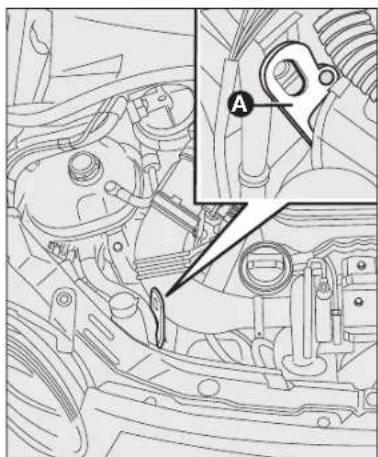
natural_image
Technical line drawing of a car engine bay with an inset showing a component labeled 'A' (no text or symbols beyond label)fig. Ib - Duratorq Versions
KA00201m

Never use a fast battery-charger to start the engine as this could damage the electronic
systems of your car, particularly the ignition and fuel supply control units.

WARNING
This procedure must be performed by qualified
personnel as incorrect actions may cause high-intensity electrical discharge. Furthermore, battery fluid is poisonous and corrosive: avoid contact with skin and eyes. Keep naked flames away from the battery. No smoking. Do not cause sparks.
Proceed as follows to start the car with a booster battery:
□ connect the positive terminals (+ near the terminal) of the two batteries with a jump lead;
□ connect a second cable to the negative terminal – of the booster battery to an earth point A on the car to be started (fig. 1a-1b);
□ start the engine;
☐ when the engine has been started, follow the sequence above in reverse order to remove the leads.
If after a few attempts the engine does not start, do not insist any further but contact a Ford Dealership.
IMPORTANT Do not directly connect the negative terminals of the two batteries: any sparks may ignite the explosive gas which could come out of the battery. If the booster battery is installed on another car, prevent any contact between metal parts of the cars and the flat battery.
BUMP STARTING
Never bump start the engine by pushing, towing or driving downhill.
This could cause a flow of fuel into the catalytic converter and damage it beyond repair.
IMPORTANT Remember that the brake servo and electrical power steering system (where provided) are not operational until the engine is started, a greater effort will therefore be required to press the brake pedal or turn the steering wheel.
CHANGING A WHEEL
GENERAL INSTRUCTIONS
The vehicle can be supplied (if requested/provided for) with a normal spare wheel or with a space-saver wheel.
For some versions/models, the vehicle is also equipped in the factory with 4 antitheft bolts (one per wheel).
To tighten/retighten the bolts, use the appropriate adaptor A-fig. 2 provided, inserting it between the bolt and wrench provided, as shown in fig. 2.
Note A duplicate of the bolts and special adaptor may be ordered from the Ford Dealership by providing the numerical reference code attached to the kit.
Wheel changing and correct use of the jack and space-saver wheel call for some precautions as listed below.

text_image
A fig 2 KA00120mfig. 2

WARNING
The space-saver wheel (where provided) is specific
to your car, do not use it on other models, nor use the spare wheel of other models on your car.
The space-saver wheel must only be used in an emergency. It shall only be used as strictly necessary and the car speed shall not exceed 80 km/h.
The space-saver wheel has an orange sticker that summarises the main cautions for use and limitations.
The sticker should never be removed or covered.
Never apply a hub cap on a space-saver wheel.
The sticker gives the following information in four languages:
Caution! For temporary use only! 80 km/h max.! Replace by standard wheel as soon as possible.
Never cover these instructions.

WARNING
Use your hazard lights, warning triangle, etc to
show that your car is stationary. Passengers should get out of the car, particularly if it is heavily loaded, and wait for the wheel to be changed away from the traffic. If parked on a slope or rough surface, chock the wheels with wedges or other suitable devices.
The driving features of the car may change when a space-saver wheel is fitted. Avoid sudden acceleration and braking, sudden steering and fast cornering. The total life of a space-saver wheel is approximately 3000 km, after which it must be replaced by another wheel of the same type. Never attempt to fit a conventional tyre on a rim designed for use as a space-saver wheel. Have the punctured wheel repaired and replaced as soon as possible. Two or more space-saver wheels should never be used together. Do not apply grease to the bolt threads before assembly: they might spontaneously unscrew.

WARNING
The jack may be used to replace wheels only on the
car that it comes with or other cars of the same model. Never use the jack for other purposes, such as lifting other car models. In no case should it be used for repairs under the car. Incorrect positioning of the jack may cause the jacked car to fall. Do not use the jack for loads higher than those shown on the label. Snow chains cannot be fitted to the space-saver wheel. So, if a front (drive) wheel is punctured and chains are needed, a rear wheel should be fitted to the front of the car and the space-saver wheel should be fitted to the rear. This way with two standard drive wheels at the front, snow chains can be fitted to them to solve an emergency.
The jack supplied with the vehicle must be used only to change a wheel in an emergency.

WARNING
Fit the wheel cap correctly to prevent it from coming notion.
Never tamper with the inflation valve. Never introduce tools of any kind between the rim and the tyre.
Check tyre and spare wheel pressures regularly, referring to the values shown in the "Technical specifications" section.
JACK
Please note that:
□ the jack weights 1.76 kg;
☐ the jack requires no adjustment;
☐ the jack cannot be repaired.
If it breaks it must be replaced with a new jack;
☐ no tool other than its cranking device may be fitted on the jack.
105-132 Ford KA EN 14-10-2010 11:37 Pagina 110

natural_image
Technical line drawing of a mechanical component with labeled section A and angle θ, no readable text or symbols beyond labelsTo change a wheel proceed as follows:
stop the car in a position so that it is not a danger for on-coming traffic and where you can replace the wheel safely. The ground must be flat and sufficiently compact;
☐ switch the engine off and pull up the handbrake.
☐ engage the first gear or reverse;
☐ lift the luggage compartment mat A-fig. 3;
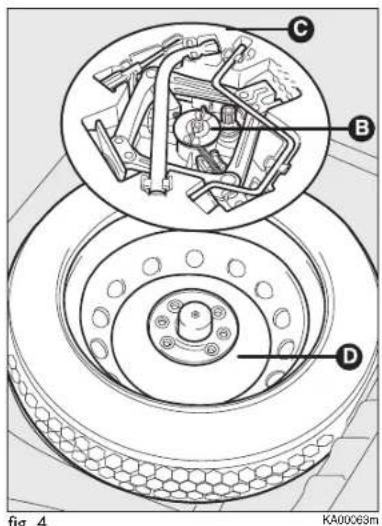
text_image
C B D fig 4 KA00063mfig. 4
☐ loosen the clamping device B-fig. 4;
☐ take out the tool container C and take it near to the wheel to be changed;
☐ take the space-saver wheel D;
☐ to remove the hub cap use the supplied screwdriver, prising on the special slit on the outer rim;
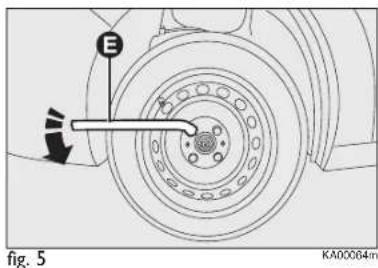
text_image
E fig. 5 KA00064m☐ for the vehicles equipped with alloy rims, remove the pressure-fitted hub cap using the supplied screwdriver;
☐ loosen by about one turn the bolts on the wheel to be replaced, using the wrench E-fig. 5;
□ turn the jack crank to open it partially;
105-132 Ford KA EN 14-10-2010 11:37 Pagina 111
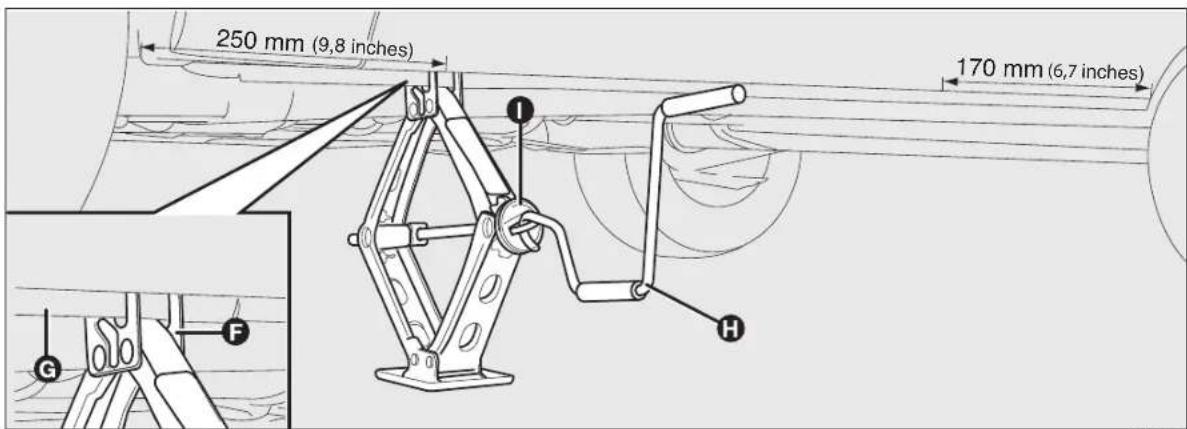
text_image
250 mm (9,8 inches) 170 mm (6,7 inches) I F G HKA00065m
fig. 6
☐ position the jack near the wheel to be replaced at a distance of approximately 250 mm (9.8 inches) from the edge of the front wheel arch if a front wheel is to be replaced, or at a distance of 170 mm (6.7 inches) from the edge of the rear wheel arch if a rear wheel is to be replaced (as shown in the figure);
☐ make sure that the groove F-fig. 6 of the jack is well in contact with the tab G of the side member;
□ warn bystanders that the car is about to be lifted. They must stay clear and not touch the car until it is back on the ground;
☐ fit the handle H into the jack device I and lift the car until the wheel to be changed is some centimetres off the ground.
When turning the jack handle make sure that it can turn freely without scraping your hand against the ground. The moving components of the jack (screws and joints) can also cause injuries: avoid touching them.
If you become soiled with the lubricating grease, wash it off thoroughly;
☐ make sure the contact surfaces on the space-saver wheel are clean so that the retaining bolts will not come loose;
KNOWING YOUR CAR
SAFETY
STARTING AND DRIVING
WARNING LIGHTS AND MESSAGES
IN AN EMERGENCY
SERVICING AND CARE
TECHNICAL SPECIFICATIONS
INDEX
105-132 Ford KA EN 14-10-2010 11:37 Pagina 112

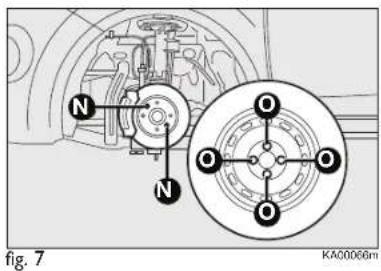
text_image
N N O O O O O O Fig. 7 KA00066m☐ fit the space-saver wheel, ensuring that the pin N-fig. 7 is aligned with one of the wheel holes O;
□ tighten the four fastening bolts;
□ turn the jack handle to lower the car and remove the jack;
□ fully tighten the bolts, passing alternatively from a bolt to the opposite one, following the order indicated in fig. 8.

text_image
fig. 8 KA00067mREFITTING THE STANDARD WHEEL
Following the procedure described previously, raise the car and remove the space-saver wheel.
Versions with steel rims
Proceed as follows:
☐ make sure the contact surfaces between standard wheel and hub are clean so that the fastening bolts will not come loose;
☐ fit the standard wheel inserting the four bolts into the holes;
☐ using the wrench provided, tighten the fastening bolts;
☐ pressure-fit the hub cap, aligning the special groove (on the cap itself) with the inflation valve;
☐ lower the car and remove the jack;
☐ using the wrench provided, fully tighten the bolts in the sequence shown previously.
Versions with alloy wheels
☐ place the wheel onto the hub and tighten the bolts using the wrench provided;
☐ lower the car and remove the jack;
☐ using the wrench provided, fully tighten the bolts in the sequence shown in fig. 8;
☐ reinstall the pressure-fitted hub cap, making sure that the reference hole on the wheel is aligned with the reference hole on the cap.
IMPORTANT If it is not fitted properly, the hub cap may detach when the vehicle is running.
After tyre replacement
□ stow the space-saver wheel D-fig. 3 in the space provided in the boot;
☐ fit the partially-open jack in its box C by forcing it slightly to prevent it from vibrating when travelling;
☐ put the tools back into their locations;
□ arrange the container and tools in the spare wheel and secure the clamping device B;
□ correctly reposition the boot mat.
IMPORTANT Do not use inner tubes with tubeless tyres. Check the inflation pressure of the tyres and the space-saver wheel regularly.
IMPORTANT If you choose to install wheels of a different type (with alloy rims instead of the steel ones or vice versa) you must change all the fixing bolts with others of a suitable size and use a specific space-saver wheel, with different specifications.
You should keep the bolts and space-saver wheel in case you decide to use the standard type of wheel later on.
REAR TYRE DAMAGE
(if the alternative space-saver wheel is available, as described in the paragraph "Wheels", chapter "Technical Data")

WARNING
In case of a tyre damage on the rear axle, please follow the instructions below very carefully.
I. Replace one of the (not damaged) front wheels with the small spare wheel according to the instructions of your handbook.
2. Follow the same instructions to replace the damaged wheel on the rear axle with the standard wheel that you have taken off in step 1.
TYRE REPAIR KIT
The vehicle may not have a spare wheel. In this case, to repair a punctured tyre use the emergency tyre repair kit. The repair kit is in the spare wheel housing.
GENERAL INFORMATION

WARNING
Depending on the type and size of the puncture,
sometimes tyres cannot be repaired or can only be partially repaired. A pressure loss in the tyre may influence the vehicle movements and make you lose control of the vehicle.

WARNING
Do not use the quick tyre repair kit if damaging is unning with flat tyre.
due to running with flat tyre.

WARNING
Do not try and repair damage other than the one visible section of the tread.

WARNING
Do not try to repair damage on the tyre shoulder.
The repair kit seals most punctures (with a max.. diameter of 6 mm - 1/4") to temporarily enable mobility.
Follow the instructions below while using the kit:
☐ Drive carefully and avoid sudden steering or maneuvers, above all if the vehicle is heavily loaded or is towing a trailer.
☐ The kit ensures a temporary emergency repair and the possibility of continuing the trip till the nearest vehicle or tyre dealer, or to drive for max. 200 km (125 mi).
☐ Do not exceed the max. speed of 80 km/h (50 mi/h).
□ Keep the kit out of the reach of children.
☐ Use the kit only at an ambient temperature between -30^ ( 22^ ) and +70^ (+158°F).
HOW TO USE THE TYRE REPAIR KIT

WARNING
The compressed air bottle may behave like an

WARNING
While using the kit, never leave the repair kit
unattended.

WARNING
Do not keep the compressor operating for longer than
10 minutes.
Note Use the repair kit only for the vehicle it has been supplied with.
105-132 Ford KA EN 14-10-2010 11:37 Pagina 115
☐ Park the vehicle at the side of the road without hindering the traffic flow, to use the kit without any hazard.
☐ In order to ensure stability to the vehicle, engage the parking brake, even if the vehicle is not on roads with a gradient.
☐ Do not try and remove foreign bodies puncturing the tyre, such as nails or screws.
☐ Leave the engine running while using the kit only if the vehicle is outdoors and not in a poorly ventilated place (for example, within a building). In this case, instead, start the compressor with the engine off.
☐ Replace the sealant bottle with a new one before the expiry date (see bottle cap).
☐ Inform all vehicle users that the tyre has been temporarily repaired with the suitable kit and that special driving caution must be used.
HOW TO INFLATE THE TYRE

WARNING
Check the tyre shoulder before inflating it. Do not inflate the tyre if it is, bulged or damaged.

WARNING
While the compressor is operating, do not stand of the tyre.

WARNING
Check the tyre shoulder. Should cracking, bulging age appear, switch pressor off and let bleed through the safety stop driving with this tyre.

WARNING
The sealant contains natural rubber latex. Avoid contact with skin and clothes. In case of contact rinse immediately with plenty of water and call a doctor.

WARNING
Should the tyre pressure not reach 1.8 bar (26 psi) in 10 minutes, the tyre may be damaged in such a way that no temporary repair is possible. In this case, stop driving with this tyre.

text_image
A 80 50 B I C H D G E Ffig. 9
KA00128m
The kit in fig. 9 includes:
A Label
B Sealant bottle
C Hose of the sealant bottle
D Bottle support
E Pressure gauge
F Power plug with cable
G Compressor switch
H Repair kit hose
I Safety valve
I. Remove the tyre repair kit from the package.
2. Remove the label A indicating the max. allowed speed of 80 km/h (50 mi/h) from the sealant bottle and place it on the dashboard in the driver's field of vision. Make sure the label does not cover anything important.
3. Remove the hose H with the safety valve I and the power plug with cable F from the kit.
4. Connect the hose H with the safety valve I to the sealant bottle B.
- Fasten the sealant bottle B on its support D.
- Remove the cap of the valve from the damaged tyre.
- Tightly screw the hose of the sealant bottle C on the valve of the damaged tyre.
- Make sure the switch of the compressor G is in position 0.
- Insert the power plug F in the socket of the cigar lighter or in an auxiliary supply socket.
- Start the engine.
II. Set the switch of compressor G in position I.
- Inflate the tyre for max. 10 minutes at a pressure between min. 1.8 bar (26 psi) and max. 3.5 bar (51 psi). Move the switch of compressor G in the position 0 and check the current pressure of the tyre with the pressure gauge E.
Note If a pressure of 1.8 bar (26 psi) cannot be reached, do not continue inflating the tyre.
Note If the sealant is pumped through the valve of the tyre, the pressure can increase up to 6 bar (87 psi), but will decrease again after about 30 seconds.
105-132 Ford KA EN 14-10-2010 11:37 Pagina 117
- Remove the power plug F from the socket of the cigar lighter or from the auxiliary supply socket.
- Quickly loosen the hose C from the tyre valve. Close the valve cap again.
- Leave the sealant bottle B on its support D.
- Make sure the kit is kept in a safe and easy to reach place. You will need the kit again when the tyre pressure is checked.
- Drive immediately for about three kilometres (two miles) so that the sealant can close the damaged spot.

WARNING
If you feel strong vibrations, an irregular steering wheel
behaviour or hear noise while driving, reduce speed and drive carefully till a place where the vehicle can be safely stopped. Check again tyre and pressure. If the tyre pressure is lower than 1 bar (14.7 psi) or if there are cracking, bulging or visible damaging, do not continue driving with the same tyre.
- Stop the vehicle after having driven approximately for three kilometres (two miles). Check and adjust the damaged tyre inflation pressure, if necessary.
- Connect the kit and read the tyre pressure on the pressure gauge E.
- Take the pressure to the indicated value (see paragraph “Inflation pressure” in section “Technical Specifications”).
- After having inflated the tyre at the right pressure set the switch of the compressor G to position 0, remove the power plug F from the socket, loosen the hose C and tighten the valve cap.
- Leave the hoses C and H connected with the sealant bottle B and put the kit in a safe place.
- Go to the nearest tyre dealer to have the damaged tyre replaced. Inform the tyre dealer that the tyre contains sealant before he removes it from the rim. Replace the sealant bottle B and the hose C after the use and as soon as possible.
Note Please note that emergency repair kits offer a temporary mobility only. Norms ruling tyre repair with a repair kit may vary depending on the country. It is recommended to refer to a specialised tyre dealer to get such information.

WARNING
Before driving, make sure that the tyre has been inflated at the recommended pressure. See Technical Specifications. Check the tyre pressure until the repaired tyre is replaced.
Empty sealant bottles may be disposed of among general domestic waste.
Give your tyre dealer the sealant residues or dispose of them according to the local disposal regulations.
CHANGING A BULB
GENERAL INSTRUCTIONS
Before changing a bulb check the contacts for oxidation;
☐ burnt bulbs must be replaced by others of the same type and power;
□ always check the headlight beam aiming after changing a bulb;
☐ when a light is not working, check that the corresponding fuse is intact before changing the bulb. For the location of fuses, refer to the "Changing a fuse" paragraph in this section.

WARNING
Modifications or repairs to the electric system that are not carried out properly or do not take the system technical specifications into account can cause malfunctions leading to the risk of fire.

WARNING
Halogen bulbs contain gas under pressure, if they break glass fragments may be thrown around.

When handling halogen bulbs just touch the metal part. If the transparent bulb is touched with the fingers,
its lighting intensity is reduced and life of the bulb may be compromised. If touched accidentally, rub the bulb with a cloth moistened with methylated spirit and allow to dry.

If possible, we recommend that you let Ford Dealership replace the bulbs. The correct operation and
aiming of the outer lights are absolutely essential for the safety of the car and of compliance with law.
IMPORTANT The headlight inner surface might be slightly misted: this should not be considered irregular rather a natural phenomenon due to low temperature and the air humidity level. Misting will disappear as soon as the headlights are turned on. The presence of drops inside the headlights indicates infiltration of water. Go to a Ford Dealership.
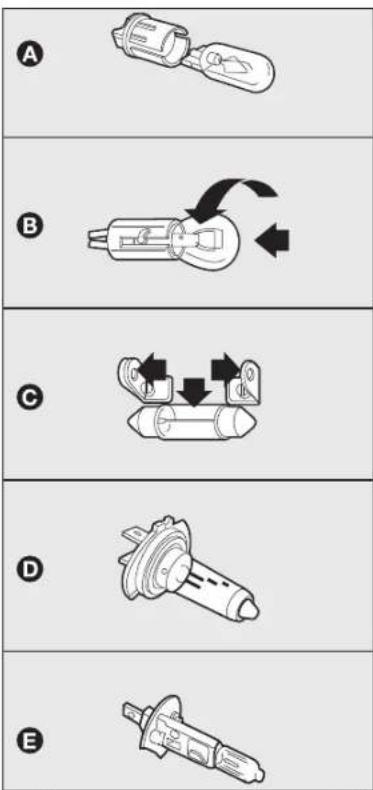
fig. 10
KA00110m
BULB TYPES fig. 10
Various types of bulbs are fitted to your car:
A Glass bulbs: they are pressure-fit. Pull to extract.
B Bayonet-type bulbs: to remove this type of bulb from its holder, press the bulb and turn it counterclockwise.
C Tubular bulbs: release them from their contacts to remove.
D Halogen bulbs: to remove the bulb, release the clip holding the bulb in place.
E Halogen bulbs: to remove the bulb, release the clip holding the bulb in place.
KNOWING YOUR CAR
SAFETY
STARTING AND DRIVING
WARNING LIGHTS AND MESSAGES
IN AN EMERGENCY
SERVICING AND CARE
TECHNICAL SPECIFICATIONS
INDEX
| Bulbs | Type | Power | Re. | figure | ||
| Main beam | H4 | 55W | D | |||
| Dipped beam | H4 | 55W | D | |||
| Front side lights/daytime running lights | W5W | 5W | A | |||
| Front direction indicators | PY21W | 21W | B | |||
| Side direction indicators | W5W | 5W | A | |||
| Rear direction indicators | PY21W | 21W | B | |||
| Rear side lights | P21/5 | 21/5W | B | |||
| Brake light | P21/5 | 21/5W | B | |||
| Reverse | P21W | 21W | B | |||
| Rear fog lamp | P21W | 21W | B | |||
| Roof light | C10W | 10W | C | |||
| Luggage compartment roof light | W5W | 5W | A | |||
| Number plate light | C5W | 5W | A | |||
| Fog lights | HI | 55W | E | |||
| Third brake light | W5W | 5W | A | |||
REPLACING EXTERIOR BULBS
For the type of bulb and relevant power rating, see "Changing a bulb".
FRONT LIGHT UNITS
The front light units contain side lights, dipped beam, main beam and direction indicator bulbs.
The bulbs are arranged inside the light unit as follows fig. 11:
A side lights
B dipped beams/main beams (double light)
C direction indicators
Working from the engine compartment, remove rubber cap D-fig. 12 to gain access to the side light bulbs; remove rubber cap E-fig. 12 to gain access to the main/dipped beam lights; turn bulb holder F-fig. 12 counterclockwise to gain access to the direction light bulbs.
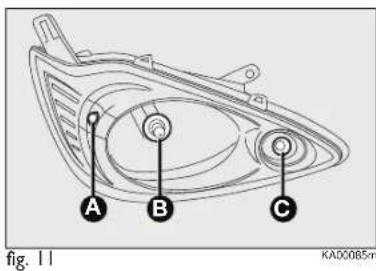
text_image
A B C KA00085m fig. 11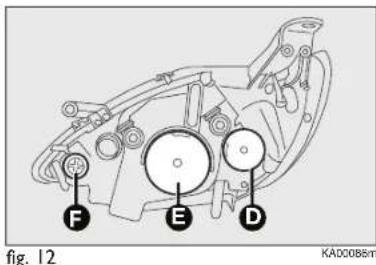
text_image
Fig. 12 F E D KAD0085mOn some versions, it is necessary to remove the headlamp completely to replace the front light cluster bulbs.
To remove the headlight proceed as follows:
□ fully steer the wheels outwards to expose the flap G-fig. 13, open the flap and unscrew the fastening device;

text_image
fig. 13 KA00117m
text_image
I H Ford fig. 14 KA00118m□ after raising the bonnet, unscrew bolts H and I located at the points shown in fig. 14;
□ remove the headlight.
105-132 Ford KA EN 14-10-2010 11:37 Pagina 122


text_image
A B fig. 15 KA00087mDIRECTION INDICATORS
Front
To change the bulb, proceed as follows:
□ turn the bulb holder clockwise
A-fig. 15 and withdraw it;
☐ remove the bulb B pushing it gently and turning counterclockwise (bayonet fitting), then replace it;
□ refit the bulb holder A by turning it clockwise and locking it properly;
Side
WARNING The intervention must be carried out taking all precautions necessary to avoid damaging the bodywork (please use a sufficiently rigid and appropriately thick plastic card).

text_image
1 fig. 16a KA00153m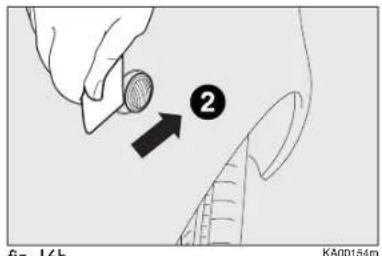
text_image
fig. 16b KA00154mfig. 16b
To change the bulb, proceed as follows:
☐ lever the lens off, by initially applying force from the front towards the back (1-fig. 16a);
☐ then lever in the opposite direction, by applying force from the back part (2-fig. 16b) and remove unit B
□ turn the bulb holder counterclockwise, remove the snap-fitted bulb and replace it;
☐ reinstall the bulb holder into the lens, then install the unit B making sure that the fixing clip has clicked.
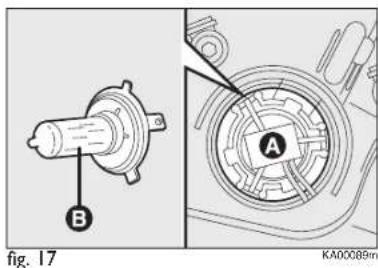
text_image
B A fig. 17 KA00089mMAIN BEAM/DIPPED HEADLIGHTS
To change the bulb, proceed as follows:
□ remove the protecting rubber cap mentioned above;
☐ press on the central electrical connector A-fig. 17 and withdraw the unit;
□ remove the bulb B and replace it;
☐ fit the new bulb, aligning the outlines of the metallic part with the grooves on the reflector;
□ refit the bulb holder catches and reconnect the electrical connector;
□ refit the cap A, ensuring that it locks into place.
105-132 Ford KA EN 14-10-2010 11:37 Pagina 123

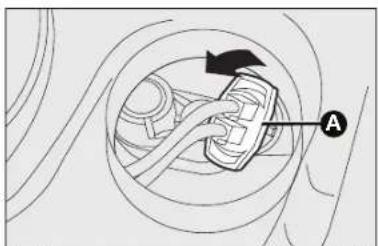
natural_image
Diagram of a car wheel with a moving car and directional arrow, no text or symbols presentfig. 18

text_image
A Afig. 19
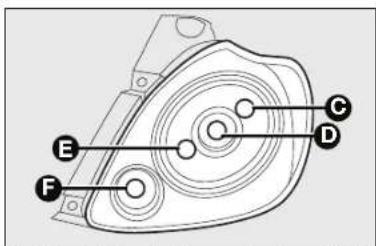
text_image
Technical diagram of a mechanical component with labeled parts E, F, D, and CFig. 21 – (left hand drive versions)
SIDE LIGHTS - TAIL LIGHTS
To change the bulb, proceed as follows:
☐ remove the protecting rubber cap mentioned above;
□ turn the bulb holder clockwise
A-fig. 18 and withdraw it;
☐ remove the snap-fitted bulb and replace it;
□ refit the bulb holder A by turning it clockwise and locking it properly;
□ reinstall the rubber cap;
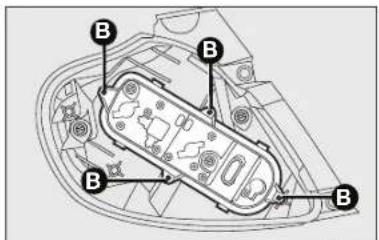
text_image
Technical diagram of a mechanical component with labeled parts marked as Bfig. 20
KAD0105m
FRONT FOG LIGHTS
(where provided)
IMPORTANT to replace the front fog lights you must contact a Ford Dealership.
REAR LIGHT CLUSTERS
To change the bulb proceed as follows:
□ open the tailgate;
□ unscrew the two fastening screws A-fig. 19 and extract the light cluster axially without rotating it;
□ extract the bulb holder from its seat after releasing the four fixing screws B-fig. 20;
☐ extract the bulbs by pushing them slightly and turning them counterclockwise.
The bulbs are arranged as follows
fig. 21:
C - Side/Brake (upper arch)
D – Direction indicators
E - Side (lower arch)
F – Reverse (right tail-light)/rear fog lamp (left light)
- Reverse gear (left tail-light)/rear fog guards (right light)
105-132 Ford KA EN 14-10-2010 11:37 Pagina 124

flowchart
graph LR
    A["INDEX"] --> B["TECHNICAL SPECIFICATIONS"]
    B --> C["SERVICING AND CARE"]
    C --> D["IN AN EMERGENCY"]
    D --> E["WARNING LIGHTS AND MESSAGES"]
    E --> F["STARTING AND DRIVING"]
    F --> G["SAFFETY"]
    G --> H["KNOWING YOUR CAR"]
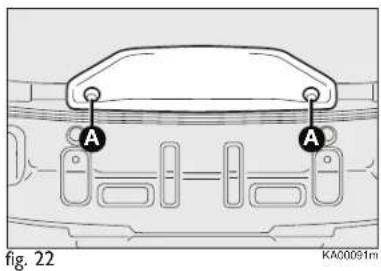
text_image
A A fig. 22 KA00091mTHIRD BRAKE LIGHT fig. 22-23
To change the bulb proceed as follows:
☐ undo the two fixing screws A;
□ withdraw the unit;
□ disconnect the electric connector B;
□ tighten the bulb holder after unscrewing the two fixing screws;
☐ remove the press-fitted bulb to be replaced and change it;
□ tighten the bulb holder and retighten both fixing screws;
□ tighten both fixing screws A.

text_image
B C fig. 23 KA00092m
text_image
Fig. 24 KA00093mNUMBER PLATE LIGHTS fig. 24
To replace the bulbs proceed as follows:
□ apply pressure to the point shown by the arrow and remove lens A;
☐ remove the press-fitted bulb to be replaced and change it;
□ remove the lamp lens.
REPLACING INTERIOR BULBS
For the type of bulb and power rating, see "Changing a bulb".
ROOF LIGHT
To change the bulbs, proceed as follows:
☐ using the screwdriver provided, extract the roof light A-fig. 25 working in the point indicated by the arrow;
105-132 Ford KA EN 14-10-2010 11:37 Pagina 125

text_image
Diagram showing a car interior with a highlighted rectangular area and directional arrows, labeled with point A.fig. 25

natural_image
Cross-sectional diagram of an electronic device showing internal components and wiring (no text or symbols)fig. 27

text_image
Technical diagram showing mechanical assembly steps with labeled components A, B, and Cfig. 29
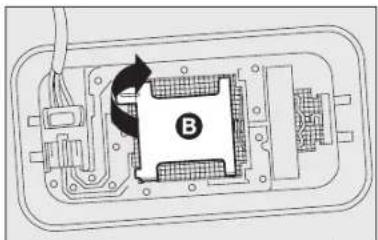
natural_image
Diagram of a mechanical or electronic component with labeled section B, showing internal structure and rotation arrow (no text or symbols beyond label)fig. 26
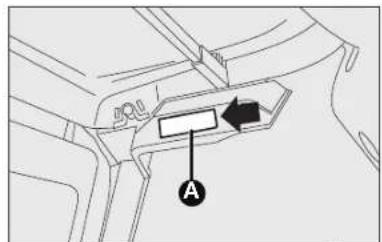
text_image
Technical diagram showing a mechanical component with labeled parts A and an arrow indicating direction or force.fig. 28
☐ open the bulb cover B-fig. 29 and replace the pressure-fit bulb C;
□ re-close the bulb cover B on the lens;
□ refit correctly the roof light pressing one side and then the other until the locking click is heard.
□ open the cover B-fig. 26 as shown;
☐ replace bulb C-fig. 27 releasing it from the side contacts, then insert the new bulb making sure it is correctly clamped between the contacts;
□ close the cap back and refit the lens.
BOOT LIGHT (if present)
To change the bulb, proceed as follows:
□ open the tailgate;
☐ using the screwdriver provided, extract the roof light A-fig. 28 working in the point shown.
REPLACING FUSES
GENERAL INFORMATION fig. 30
Fuses protect the electric system: they cut in (i.e. they blow) in the event of a failure or improper action on the system.
When a device does not work, check the efficiency of its fuse: the filament
A must be intact. If it is not, replace the blown fuse with another with the same amperage (same colour).
B intact fuse.
C fuse with damaged filament.
To facilitate fuse replacement, use the pliers D hooked to the fuse box lid on the dashboard left-hand side.
Refer to the tables on the following pages to identify the protection fuse.

fig. 30

WARNING
If a fuse blows again, contact a Ford Dealership.

Never replace a fuse with metal wires or anything else.

WARNING
Never replace a fuse with another with a higher ing; DANGER OF FIRE.

WARNING
In case of general protection fuse intervention FUSE, MIDI-FUSE, USE) contact a Ford hip.

WARNING
Before replacing a fuse, make sure that the ignition been removed and that other services are switched or disengaged.

WARNING
If the general protection fuse for safety systems
(air bag system, braking system), power unit systems (engine system, transmission system) or steering system blows, contact a Ford Dealership.
105-132 Ford KA EN 14-10-2010 11:37 Pagina 127
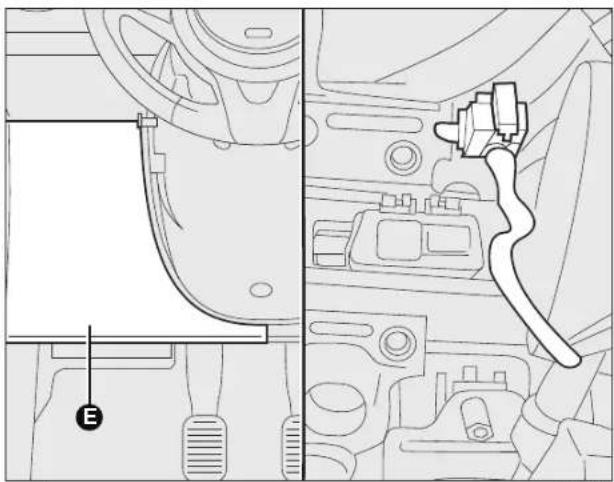
natural_image
Technical line drawing of a vehicle interior showing dashboard, steering wheel, and electrical plug (no text or symbols)fig. 31
KAD0107m
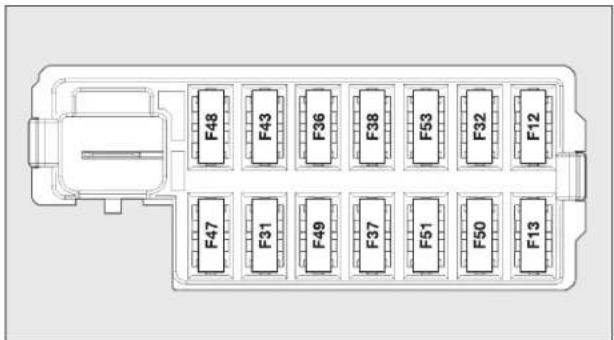
text_image
F48 F43 F36 F38 F53 F32 F12 F47 F31 F49 F37 F51 F50 F13fig. 32
KAD0100m
FUSE LOCATION
Dashboard fuses
Left-hand drive versions
To access the fuse you must remove the press-fitted cover E.
The 5-A fuse for door mirror demisting is located in the diagnostic socket area, as shown in fig. 31.
The control unit show in fig. 32 is present in the lower area, besides the pedals.
Right-hand drive versions
To gain access to the fuse box shown in fig. 32, open flap F located inside the glove compartment fig. 33.

natural_image
Interior view of a vehicle showing a battery pack with labeled component 'F' (no text or symbols beyond label)fig. 33
KA00125m
105-132 Ford KA EN 14-10-2010 11:37 Pagina 128


flowchart
graph LR
    A["INDEX"] --> B["TECHNICAL SPECIFICATIONS"]
    B --> C["SERVICING AND CARE"]
    C --> D["IN AN EMERGENCY"]
    D --> E["WARNING LIGHTS AND MESSAGES"]
    E --> F["STARTING AND DRIVING"]
    F --> G["SAFETY"]
    G --> H["KNOWING YOUR CAR"]

text_image
Technical diagram showing vehicle engine compartment with labeled parts and a corresponding keypad layout panelfig. 34
KA00101m
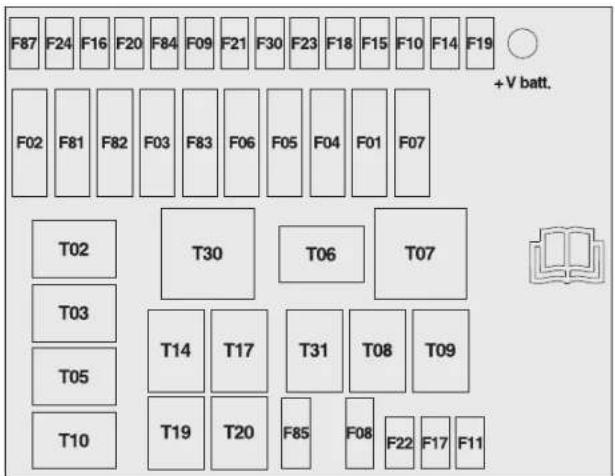
text_image
F87 F24 F16 F20 F84 F09 F21 F30 F23 F18 F15 F10 F14 F19 +V batt. F02 F81 F82 F03 F83 F06 F05 F04 F01 F07 T02 T30 T06 T07 T03 T14 T17 T31 T08 T09 T05 T19 T20 F85 F08 F22 F17 F11fig. 35
KA00102m
Engine compartment fuse box fig. 34 and 35
A second fuse box is located on the right side of the engine compartment, next to the battery; to access it press device I, release tabs M and remove cover L.
The ID number of the electrical component corresponding to each fuse can be found on the back of the cover.

If you need to wash the engine compartment, take care not to directly hit the engine compartment
fuse box with the jet of water.
FUSE SUMMARY TABLE
Dashboard control unit - fig. 32 FUSE AMPERE
| Right dipped beam power supply | F12 | 7,5 |
| Left dipped headlight and headlight alignment control unit power supply | F13 | 7,5 |
| Remote switch coils on fuse box in engine compartment (INT/A) | F31 | 5 |
| Front and rear roof lights, boot and puddle lights | F32 | 7,5 |
| Diagnosis socket, radio, climate control, EOBD | F36 | 10 |
| Brake light switch, instrument panel node | F37 | 5 |
| Door central locking | F38 | 20 |
| Windscreen/rear window washer pump | F43 | 15 |
| Driver's side electric windows | F47 | 20 |
| Passenger side electric window | F48 | 20 |
| Parking sensor, backlighting switches, electric mirrors | F49 | 5 |
| Airbag Control Unit | F50 | 7,5 |
| Radio switch, convergence, climate control, brake lights, clutch | F51 | 7,5 |
| Instrument panel node | F53 | 5 |
Engine compartment unit – fig. 35 FUSE AMPERE
| Climate control electric fan | F08 | 30 |
| Trailer | F09 | 15 |
| Horns | F10 | 15 |
| Main beam headlamps | F14 | 15 |
| Sun roof motor | F15 | 20 |
| Heated rear window, mirror defrosters | F20 | 30 |
| Fog lights | F30 | 15 |
| Front socket (with or without cigar lighter plug) | F85 | 15 |
RECHARGING THE BATTERY
IMPORTANT The battery recharging procedure is given as information only. You are recommended to go to a Ford Dealership to have this operation performed.
Charging should be slow at a low ampere rating for approximately 24 hours. Charging for a longer time may damage the battery.
Charge the battery as follows:
☐ disconnect the connector A (by pressing button B) from sensor C for monitoring the status of the battery installed on the negative battery pole D;
□ connect the positive cable to the positive battery terminal E and the negative terminal to the sensor D as shown in the figure;
□ turn on the charger. At the end of the charging process, switch the battery charger off;
□ after having disconnected the recharging device, reconnect the connector A to the sensor C as shown in the figure.

text_image
Technical diagram showing automotive battery connections with labeled components A, B, C, D and E, including a battery terminal and grounding symbol.fig. 36
KA00196m

WARNING
Battery fluid is poisonous and corrosive: avoid
contact with your skin and eyes. The battery recharging operation must be performed in a ventilated place, away from naked flames or possible sources of sparks to avoid the risk of explosion and fire.

WARNING
Don't try to recharge a frozen battery: it must be thawed first, otherwise it may explode. If the battery was frozen, have it inspected by specialised personnel before recharging to check that the internal elements are not damaged and that the casing is not cracked, which causes the risk of leakage of poisonous, corrosive gas.

105-132 Ford KA EN 14-10-2010 11:37 Pagina 131
RAISING THE CAR
If the car is to be lifted, go to a Ford Dealership which is equipped with the arm hoist or workshop lift.
TOWING THE CAR
The tow ring, which is provided with the car, is housed in the tool box, under the boot mat.
TOW RING HOOKING fig. 37
Proceed as follows:
□ release the cap A;
☐ take the tow ring B from its seat in the tool support;
□ fully tighten the ring on the front threaded pin.
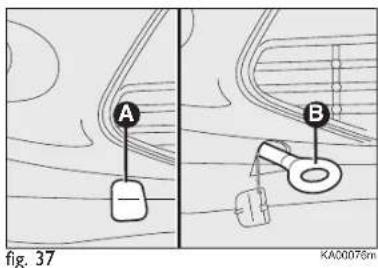
text_image
A B fig. 37 KA00076m
WARNING
Before towing, turn the ignition key to MAR-ON
and then to STOP without removing it. The steering column will automatically lock when the key is removed and the wheels cannot be steered.
105-132 Ford KA EN 14-10-2010 11:37 Pagina 132

WARNING
When towing, remember that without the help of the brake servo and electric power steering, a greater effort is required on the pedal and steering wheel. Do not use bendy cables for towing and avoid jerking. While towing, make sure not to damage parts in contact with the car. Respect the specific rules of the Highway Code when towing the car specifically in relation to the towing device and the behaviour to maintain on the road. Do not start the engine while towing the car.
133-146 Ford KA EN:131-148 Ford KA IT 14-10-2010 11:41 Pagina 133
SERVICING AND CARE
CHECKING LEVELS 134
AIR CLEANER 138
POLLEN FILTER 138
DIESEL FILTER 138
BATTERY 138
WHEELS AND TYRES 140
RUBBER HOSES 141
WINDSCREEN/REAR WINDOW WIPERS .... 142
BODYWORK 144
INTERIORS 146
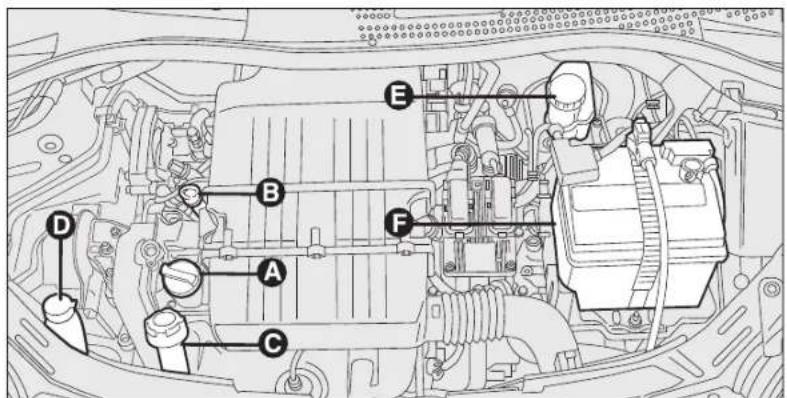
text_image
Technical diagram of a car engine bay with labeled components A through Ffig. 1 - 1.3L Duratorq versions
KA00197m

text_image
Technical diagram of a car engine bay with labeled components A through Ffig. 2 - 1.2L Duratec versions
KA00198m
CHECKING FLUID LEVELS
Left-hand drive versions
A. Engine oil filler
B. Engine oil level dipstick
C. Engine coolant
D. Windscreen washer fluid
E. Brake fluid + Clutch fluid (right-hand drive, petrol version only)
F. Battery

WARNING
Never smoke while working in the engine compartment:
gas and inflammable vapours may be present, with the risk of fire.

Be careful!, when topping up take care not to confuse the various types of fluids: they are all incompatible
with one another and could seriously damage the car.
ENGINE OIL fig.1-2
Check the oil level a few minutes (about five) after the engine has stopped, with the car parked on level ground.
Check the level is within the MIN. and MAX. marks on the dipstick B.
The range between the MIN. and MAX. marks corresponds to about 1 litre of oil.
If the oil level is near or even under the MIN line, add oil through the filler A to reach the MAX mark.
The oil level must never exceed the MAX mark.
Engine oil consumption
The maximum engine oil consumption is usually 400 grams every 1000 km.
When the car is new, the engine needs to run in, therefore the engine oil consumption can only be considered stabilised after the first 5,000 – 6,000 km.
IMPORTANT The oil consumption depends on driving style and the car usage conditions.
IMPORTANT After adding or changing the oil, let the engine turn over for a few seconds and wait a few minutes after turning it off before you check the level.

WARNING
When the engine is hot, take care when working inside the engine compartment to avoid burns. Remember that when the engine is hot, the fan may operate: danger of injury. Pay attention to scarves, ties and other loose fitting garments: they may get caught by moving components.

Do not add any oil with different specifications to those of the existing engine oil.

The used engine oil and the replaced oil filter contain substances that may be dangerous for the environment. It is advisable to have oil and filters changed by a Ford Dealership where they will be disposed of according to the law.
ENGINE COOLANT fig. I-2
The coolant level must be checked when the engine is cold and must range between the MIN. and MAX. marks on the reservoir.
If the level is low, slowly pour a mixture of 50% distilled water and 50% ARTECO Havoline XLC cooling fluid through the filler C until the level reaches MAX.
A 50-50 mixture of ARTECO Havoline XLC cooling fluid and distilled water gives freeze protection to -35^ .
For particularly harsh climate conditions, a mixture of 60% ARTECO Havoline XLC cooling fluid and 40% demineralised water is recommended.

WARNING
While topping up, be careful fluid does on engine hot parts.

The engine cooling system uses protective antifreeze fluid. Use the same fluid as in the cooling system when
topping up.
ARTECO Havoline XLC cooling fluid may not be mixed with other types of fluids. If this accidentally occurs, do not start the engine and contact a Ford Dealership.

WARNING
The engine cooling system is pressurised. If necessary, only replace the cap with another genuine one or the operation of the system may be adversely affected. Do not remove the reservoir cap when the engine is hot: you risk scalding yourself.

WARNING
When the engine is hot, take care when working inside the engine compartment: you risk scalding yourself.
WINDSCREEN/REAR WINDOW WASHER FLUID fig. 1-2
To add fluid, remove the cap D, pressing the special tab.
Check fluid level through the reservoir. Close the cap D pressing its central section.

WARNING
Do not travel if the windscreen washer
reservoir is empty: using the windscreen washer is essential for improving visibility.
Some commercial windscreen washer additives are flammable. The engine compartment contains hot parts which could cause a fire if they come into contact with these additives.
BRAKE FLUID fig. I-2
Undo the cap E: and check that the liquid contained in the reservoir is at the maximum level.
Fluid level in the reservoir must not exceed the MAX mark.
Use the brake fluid shown in the "Fluids and lubricants" table (see section "Technical Specifications") to top up.
Note Carefully clean the cap of reservoir E and the surrounding surface.
Take great care to ensure that impurities do not enter the reservoir when the cap is opened.
For topping-up, always use a funnel with integrated filter with mesh equal to or lower than 0.12 mm.
IMPORTANT Brake fluid is hygroscopic (i.e. it absorbs moisture). For this reason, if the car is mainly used in areas with a high degree of atmospheric humidity, the fluid should be replaced at more frequent intervals than specified in the “Service schedule”.

Prevent brake fluid which is highly corrosive from coming into contact with painted parts. Should this immediately wash with water.

WARNING Brake fluid is poisonous and highly corrosive.
In the event of accidental contact, immediately wash the affected parts with water and neutral soap. Then rinse thoroughly. In case of swallowing immediately call a doctor.

WARNING
The symbol Ⓐ, on the container, indicates a synthetic brake fluid, which is different from a mineral fluid. Use of a mineral type fluid will damage the special rubber seals of the braking system beyond repair.
AIR CLEANER/ POLLEN FILTER
Have the air cleaner or the pollen filter replaced by a Ford Dealership.
DIESEL FILTER
CONDENSATION DISCHARGE (Duratorq versions)

The presence of water in the supply circuit may cause severe damage to the injection system and irregular engine operation. If the warning light goes on, contact a Ford Dealership as soon as possible to have the system bled. If the above indications come on immediately after refuelling, water has probably been poured into the tank: turn the engine off immediately and contact a Ford Dealership.
BATTERY
The car is fitted with a low-maintenance battery: no top-ups with distilled water are needed in standard conditions of use.
INSPECTING THE CHARGE AND THE ELECTROLYTE LEVEL
The operations must be carried out as described in this Owner Handbook only by skilled personnel. Any top-up operations must be carried out by specialised personnel and by a Ford Dealership.

WARNING
Battery liquid is poisonous and corrosive. Avoid contact with the skin and eyes. Keep naked flames or possible sources of sparks away from the battery: risk of explosion or fire.

WARNING
Using the battery when the fluid is too low can damage it irreparably and generate a risk of explosion.
CHANGING THE BATTERY
If required, replace the battery with an original spare part with the same specifications.
If a battery with different specifications is fitted, the service intervals given in the "Scheduled Servicing Plan" will no longer be valid.
For battery maintenance, you should therefore refer to the instructions provided by the battery manufacturer.

Incorrect installation of electric and electronic devices may cause severe damage to your car. Go to a
Ford Dealership if you want to install accessories (anti-theft system, mobile phone, etc.): they will suggest the most suitable devices and advise you if a higher capacity battery needs to be installed.

Batteries contain substances that can be very dangerous for the environment. It is advisable to have the
battery changed by a Ford Dealership where it will be disposed of according to the law.

WARNING
If the vehicle must remain unused for a long time
at very low temperature, remove the battery and carry it to a warm place, to avoid freezing.

WARNING
When you must perform any operation on the
battery or near it, always protect your eyes with special goggles.
USEFUL ADVICE FOR EXTENDING THE LIFE OF YOUR BATTERY
To avoid draining your battery and make it last longer, observe the following instructions:
□ when you park the car, ensure the doors, tailgate and bonnet are closed properly, to prevent any light switching-on inside the passenger's compartment;
☐ the internal roof lights must be off. The car is however provided with an automatic system for switching-off internal lights;
☐ do not keep accessories (e.g. sound system, hazard warning lights, etc...) switched on for a long time when the engine is not running;
☐ before performing any operation on the electrical system, disconnect the negative battery cable;
☐ battery terminals shall always be perfectly tightened.
IMPORTANT If the charge level remains for a long time under 50%, the battery is damaged by sulphation, reducing its capacity and starting attitude.
The battery is also more prone to the risk of freezing (at temperatures as high as -10^ ). Refer to the paragraph “Car inactivity” in “Starting and driving” if the car is left parked for a long time.
If after buying the car, you want to install electric accessories which require permanent electric supply (anti-theft system, etc.) contact your Ford Dealership whose qualified personnel, in addition to suggesting the most suitable devices, will evaluate the overall electric absorption, checking whether the car's electric system is capable of withstanding the load required, or whether it should be integrated with a more powerful battery.
Since these devices continue absorbing energy even when the ignition key is off, they gradually run down the battery.
WHEELS AND TYRES
Check the pressure of each tyre, including the space-saver wheel, approximately every two weeks and before long journeys: the pressure should be checked with the tyre rested and cold.
It is normal for pressure to increase when the car is used. For the correct tyre inflation pressure, see "Wheels" in "Technical specifications" section.
Wrong pressure causes abnormal wear of tyres, fig. 5:
A standard pressure: tread evenly worn.
B low pressure: tread particularly worn at the edges.
C high pressure: tread particularly worn in the centre.
The tyres must be replaced when the tread is less than 1.6 mm thick. In any case, follow the laws in force in the country where you are driving.
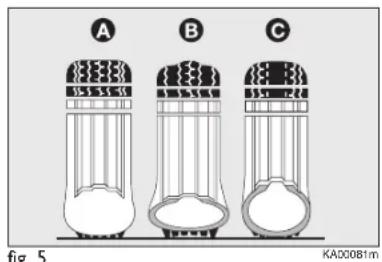
text_image
A B C fig. 5 KAD0081mWARNINGS
□ Avoid braking suddenly, burning starts and violent knocks against curbs, potholes or other obstacles if possible. Driving for long stretches
If possible. Driving for long streak over bumpy roads can damage the tyres;
☐ check the tyres regularly for cuts on the sides, swelling or irregular tread wear. In this case, go to a Ford Dealership if required;
☐ avoid overloading the car when travelling: this may cause serious damage to the wheels and tyres;
☐ if a tyre is punctured, stop the vehicle immediately and change it to avoid damage to the tyre, the rim, the suspensions and the steering system;
☐ a tyre will age even if it is not used much. Cracks in the tread and on the sidewalls are a sign of ageing.
Have the tyres checked by skilled personnel if they have been fitted for longer than six years.
Also remember to check the space-saver wheel very carefully;
☐ In the case of replacement, always fit new tyres, avoiding those with an unknown origin;
☐ if a tyre is replaced, also change the inflation valve;
☐ to allow even wear between the front and rear tyres, it is advisable to change them over every 10–15 thousand kilometres, keeping them on the same side of the car so as not to reverse the direction of rotation.

WARNING
Remember that the road holding qualities of your depend on the correct pressure of the tyres.

WARNING
If the pressure is too low, the tyre will overheat and be seriously damaged.

WARNING
Avoid switching the tyres from the right side of the o the left side and vice versa.

WARNING
Never submit alloy rims to repainting treatments
requiring the use of temperatures exceeding 150^ C. The mechanical properties of the wheels could be impaired.
RUBBER HOSES
As far as the brake system and fuel rubber hoses are concerned, follow the “Scheduled Servicing Plan” in this chapter carefully.
Ozone, high temperatures and prolonged lack of fluid in the system may cause hardening and cracking of the hoses, with possible leaks. Careful checking is therefore necessary.
WINDSCREEN/REAR WINDOW WIPERS
BLADES
Clean the rubber part regularly using special products.
Replace the blades if the rubber edge is deformed or worn. In all cases, it is advisable to replace them approximately once a year.
A few simple precautions can reduce the possibility of damage to the blades:
☐ make sure that the rubber part is not stuck to the windscreen at sub-zero temperatures. Use a de-icing product to release it if required;
☐ remove any snow from the glass: in addition to protecting the blades, this prevents effort on the motor and overheating;
☐ do not operate the windscreen and the rear screen wipers on dry glass.

WARNING
Driving with worn wiper blades is a serious hazard, because visibility is reduced in bad weather.

text_image
A B Cfig. 6
Changing the windscreen wiper blades fig. 6
Proceed as follows:
☐ lift the arm B of the wiper and position the blade C so that it forms an angle of 90^ with the arm itself;
☐ press the button A and extract from the arm B the brush C;
☐ insert the new blade making sure it is locked.
133-146 Ford KA EN:131-148 Ford KA IT 14-10-2010 11:41 Pagina 143
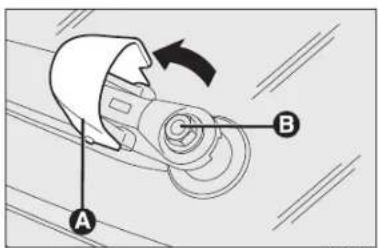
text_image
Diagram of a mechanical component with labeled parts A and B, showing a rotating arrow indicating rotation.fig. 7
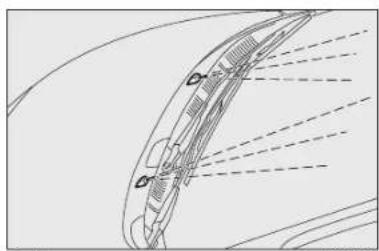
natural_image
Technical line drawing of a curved mechanical component with dashed lines indicating motion or alignment (no text or symbols)fig. 8
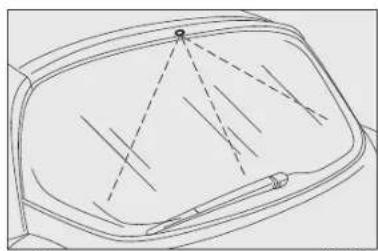
natural_image
Line drawing of a car's front panel with dashed lines indicating lanes or paths (no text or symbols)fig. 9
Changing the rear window wiper blade fig. 7
Proceed as follows:
☐ raise the cover A and remove the arm from the car, slackening the nut B that fastens it to the pivot pin;
□ position the new arm correctly and tighten the nut;
□ lower the cover.
SPRAY NOZZLES
Windscreen washer fig. 8
If the jet of fluid is inadequate, firstly check that there is fluid in the reservoir: see "Checking fluid levels" in this chapter).
Then check that the nozzle holes are not clogged, if necessary clean them using a needle.
The windscreen jets are directed by adjusting the nozzle angle.
The jets must be directed at about 13 of the height from the window upper edge.
WARNING In versions with a sun roof, make sure that the sun roof is closed before operating the front jets.
Rear window washer fig. 9
The rear window washer jets are fixed.
The nozzle holder is on the rear window.
BODYWORK
PROTECTION FROM ATMOSPHERIC AGENTS
The main causes of corrosion are the following:
□ atmospheric pollution;
☐ salty air and humidity (coastal areas, or hot humid climates);
□ seasonal environmental conditions.
The abrasive action of wind-borne atmospheric dust and sand, as well as mud and gravel raised by other cars is also not to be underestimated.
On your car, Ford implemented the best manufacturing technologies to effectively protect the bodywork against corrosion.
These include:
☐ painting products and systems which give the car particular resistance to corrosion and abrasion;
☐ use of galvanised (or pretreated) steel sheets, with high resistance to corrosion;
□ spraying the underbody, engine compartment, internal wheel arches and other parts with highly protective wax products;
□ spraying of protective plastic material in the more exposed points: underdoor, inner mudguard parts, edges, etc...;
☐ use of “open” boxed sections to prevent condensation and pockets of moisture which could cause rust inside.
BODY AND UNDERBODY WARRANTY
Your car is covered by warranty against perforation due to rust of any original element of the structure or body.
For the general terms of this warranty, refer to the Warranty Booklet.
ADVICE FOR PRESERVING THE BODYWORK
Paint
Paintwork does not only serve an aesthetic purpose, but also protects the underlying sheet metal.
Touch-up abrasions and scratches immediately to prevent the formation of rust. Only use genuine spare paint products for touch-ups (see “Bodywork paint identification plate” in the “Technical Specifications” chapter).
Standard maintenance of paintwork consists in washing the vehicle; its frequency depends on the conditions and environment where the vehicle is used. For example, in highly polluted areas, or if the roads are sprayed with salt, it is advisable to wash the car more frequently.
To correctly wash the vehicle, proceed as follows:
☐ remove the aerial from the roof to prevent damage to it if the car is washed in an automatic system;
☐ if high pressure jets or cleaners are used to wash the vehicle, hold at least 40 cm away from the bodywork to avoid damage or alteration. It should be remembered that the build up of water can damage the car over a period of time;
☐ wash the body using a low pressure jet of water;
☐ wipe a sponge with a slightly soapy solution over the bodywork, frequently rinsing the sponge;
☐ rinse well with water and dry with a jet of air or a chamois leather.
Dry the less visible parts particularly carefully, such as the door frames, bonnet and the headlight frames, where water may stagnate more easily. The car should not be taken to a closed area immediately, but left in the open so that residual water can evaporate.
Do not wash the car after it has been left in the sun or with the bonnet hot: this may alter the shine of the paintwork.
Exterior plastic parts must be cleaned in the same way as the rest of the car.
Where possible, do not park under trees; the resinous substance that many species release give the paint a dull appearance and increase the possibility of triggering rusting processes.
IMPORTANT Bird droppings must be washed off immediately and thoroughly as the acid they contain is particularly aggressive.

Detergents cause water pollution. The vehicle should be washed in areas equipped for collecting and purifying
the liquid used in the washing process.
Glasses
To clean glasses, use specific window cleaner products.
Also use clean cloths to avoid scratching the glass or damaging the transparency.
IMPORTANT Wipe the rear window inside gently with a cloth in the direction of the filaments to avoid damaging the heating device.
Engine compartment
At the end of each winter, thoroughly wash the engine compartment, taking care to avoid spraying the water jet directly onto the electronic control units and the relay/fuse box on the left side of the engine compartment (driving direction). Have this operation performed at a specialised workshop.
IMPORTANT The washing should take place with the engine cold and the ignition key in the STOP position. After the washing operation, make sure that the various protections (e.g. rubber caps and guards) have not been removed or damaged.
Front headlights
IMPORTANT Never use aromatic substances (e.g.: petrol) or ketenes (e.g.: acetone) for cleaning front headlight plastic lens.
INTERIORS
Periodically check that water is not trapped under the mats (due to water dripping off shoes, umbrellas, etc.) which could cause oxidisation of the sheet metal.

WARNING
Never use flammable products, such as petrol
ether or rectified petrol to clean the inside of the car. The electrostatic charges which are generated by rubbing during cleaning may cause a fire.

WARNING
Do not keep aerosol cans in the vehicle: these could explode. Aerosol cans must not be exposed to a temperature exceeding 50°C. When the vehicle is exposed to sunlight, inner temperature can greatly exceed this value.
SEATS AND FABRIC PARTS
Remove dust with a soft brush or a vacuum cleaner.
Rub the seats with a sponge moistened with a solution of water and neutral detergent.
PLASTIC PARTS
It is advisable to clean interior parts with a moist cloth and a solution of water and mild neutral soap. To remove grease and tough stains, use products designed specifically for cleaning plastics. These have no solvents and have been designed so that they do not alter the appearance and colour of the components.
IMPORTANT Never use alcohol or petroleum to clean the instrument panel.
TECHNICAL SPECIFICATIONS
IDENTIFICATION DATA 148
ENGINE CODES – BODYWORK VERSIONS ..... 150
ENGINE 151
POWER SUPPLY 152
TRANSMISSION 152
BRAKES 153
SUSPENSION 153
STEERING 153
WHEELS 154
DIMENSIONS 157
PERFORMANCE 158
WEIGHTS 159
CAPACITIES 160
FLUIDS AND LUBRICANTS 161
FUEL CONSUMPTION 163
CO _2 EMISSIONS 164
IDENTIFICATION DATA
It is advisable to take note of the identification codes. The following identification codes fig. 1 are printed and shown on the plates:
1Tyre pressure plate.
2 Vehicle Data Plate.
3 Body marking (VIN)
4 VIN plate.

natural_image
Technical line drawings of a car showing front, side, and top views (no text or symbols)
text_image
FORD E A F B G C1 Kg H C2 Kg J C3 Kg K C4 Kg L D M fig. 2 KA00135mC2 Gross towing mass
C3 Maximum permissible front axle load
C4 Maximum permissible rear axle load
M Emission value (only diesel)
D Model or body type codes
L Exhaust emission level codes
K Body colour codes
J Interior trim codes
H Final drive ratio codes
G Gearbox codes
F Engine codes
E Driver side
IDENTIFICATION DATA PLATE
fig. 2
This is stuck on the front right door pillar and shows the following data:
A National type approval or complete vehicle.
B VIN plate
CI Gross vehicle mass
147-164 Ford KA EN:145-162 Ford KA IT 14-10-2010 12:10 Pagina 149

text_image
WFOLXX (TRUKR490) 7 Fig. 3 KA00126mENGINE MARKING
Engine marking is stamped on the cylinder block and includes the model and the chassis serial number.
CHASSIS MARKING fig. 3
It contains the following information:
□ Manufacturer's identification code
Bodywork type
□ Plant
Model
☐ Manufacture date: yy/mm
□ Vehicle number sequence
147-164 Ford KA EN:145-162 Ford KA IT 14-10-2010 12:10 Pagina 150
ENGINE CODE - BODYWORK VERSIONS
Versions Engine type code Bodywork version code
I.2L Duratec I69A4000 RU8ABAAIU
I.3L Duratorq I69A5000 RU8ABAAIU
KNOWING YOUR CAR
SAFETY
STARTING AND DRIVING
WARNING LIGHTS AND MESSAGES
IN AN EMERGENCY
SERVICING AND CARE
TECHNICAL SPECIFICATIONS
INDEX
ENGINE
| GENERAL INFORMATION | 1.2L Duratec | 1.3L Duratorq | |
| Engine code | 169A4000 | 169A5000 | |
| Cycle | Otto | Diesel | |
| Number and arrangement of cylinders | 4 in line | 4 in line | |
| Piston bore and stroke mm | 70.8 × 78.86 | 69.6 × 82 | |
| Total displacement cm | ^3 | 1242 | 1248 |
| Compression ratio | 11,1 ± 0,2 | 16,8:1 | |
| Max power (EEC) kW | 51 | 55 | |
| HP | 69 | ||
| corresponding speed rpm | 5500 | 4000 | |
| Max. torque (EEC) kW | 102 | 145 | |
| kgm | 10.4 | ||
| corresponding speed rpm | 3000 | 1500 | |
| Spark plugs | NGK ZKR7A-10 | - | |
| Fuel | Unleaded petrol95 R.O.N. | Diesel fuel formotor vehicles(EN 590 standard) | |
POWER SUPPLY
1.2L Duratec 1.3L Duratorq
Power supply Multipoint electronic injection Common Rail direct injection sequential, phased, returnless system with electronic control, turbo and intercooler

WARNING
Modifications or repairs to the fuel supply system that are not carried out properly or do not take the system technical specifications into account can cause malfunctions leading to fire risk.
TRANSMISSION
1.2L Duratec - 1.3L Duratorq
| Gearbox | Five forward gears and reverse with synchromesh for forward gear engagement |
| Clutch | Self-adjusting pedal without idle stroke |
| Drive | Front |
BRAKES
| 1.2L Duratec – 1.3L Duratorq | |
| Service brakes: | |
| – front | discs |
| – rear | drum, self-centring shoes with control cylinder for each wheel |
| Parking brake | controlled by hand lever, working on rear brakes |
IMPORTANT Water, ice and salt sprinkled on the roads may deposit on the brake discs reducing braking efficiency the first time the brakes are applied.
SUSPENSION
| 1.2L Duratec – 1.3L Duratorq | |
| Front | MacPherson independent wheels, mechanical cross member, shock absorbers and helical springs; stabiliser bar for versions with electric power steering. |
| Rear | torsion beam with interconnected wheels consisting of a torsion axle and two tubular arms with shock absorbers and coil springs. |
STEERING
| 1.2L Duratec – 1.3L Duratorq | |
| Type | rack and pinion with electric power steering (where provided) |
| Turning circle (kerb to kerb) m | 9.3 |
WHEELS
RIMS AND TYRES
Pressed steel or alloy rims. Tubeless radial carcass tyres. The vehicle registration document also lists all type-approved tyres.
IMPORTANT In the event of discrepancies between the information provided on this “Owner Handbook” and the “Vehicle registration document”, only the latter is valid.
For safe driving, the car must be fitted with tyres of the same make and type on all wheels.
IMPORTANT Do not use inner tubes in the case of tubeless tyres.
SPACE-SAVER WHEEL
Pressed steel wheel. Tubeless tyre.
WHEEL GEOMETRY
Front wheel toe-in measured from rim to rim: 1.8 ± 1 mm
The values refer to the car in running order.
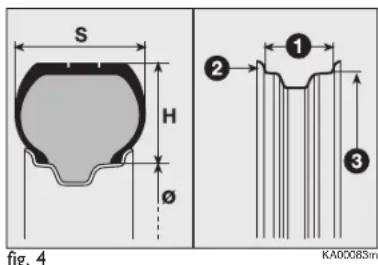
text_image
S H Ø fig. 4 ① ② ③ KA00085mREADING TYRE MARKINGS fig. 4
Example: 175/65 R 14 82T
175 = Rated width (S, distance between sidewalls in mm).
65 = Height/width ratio (H/S) in percentage.
R = Radial tyre.
14 = Rim diameter in inches (∅).
82 = Load rating (capacity).
T = Maximum speed rating.
Maximum speed index
Q = up to 160 km/h.
R = up to 170 km/h.
S = up to 180 km/h.
T = up to 190 km/h.
U = up to 200 km/h.
H = up to 210 km/h.
V = up to 240 km/h .
Maximum speed rating for snow tyres
QM + S = up to 160 km/h.
TM + S = up to 190 km/h.
HM + S = up to 210 km/h.
Load rating (capacity)
| 70 = 335 kg | 81 = 462 kg |
| 71 = 345 kg | 82 = 475 kg |
| 72 = 355 kg | 83 = 487 kg |
| 73 = 365 kg | 84 = 500 kg |
| 74 = 375 kg | 85 = 515 kg |
| 75 = 387 kg | 86 = 530 kg |
| 76 = 400 kg | 87 = 545 kg |
| 77 = 412 kg | 88 = 560 kg |
| 78 = 425 kg | 89 = 580 kg |
| 79 = 437 kg | 90 = 600 kg |
| 80 = 450 kg | 91 = 615 kg |
READING RIM MARKINGS fig. 4
Example: 6J x 15H2
6 = rim width in inches 1.
J = rim drop centre outline (side projection where the tyre bead rests) 2.
15 = rim nominal diameter in inches (corresponds to diameter of the tyre to be mounted) 3 = ∅.
H2 = shape and number of humps (contour used for withholding tubeless tyre beads on the rim).
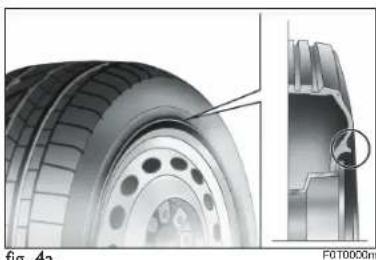
natural_image
Technical illustration of a tire assembly with cross-sectional view (no text or symbols)ng. 1a
RIM PROTECTOR TYRES fig. 4a

WARNING
Do not fit wheel caps when using caps fixed
(with springs) to the steel rim and tyres other than factory-fitted tyres provided with Rim Protector (fig. 4a).
DO NOT fit wheel caps.
Use of unsuitable tyres and wheel caps may cause sudden loss of tyre pressure.
| Versions Rims Tyres | Tyres Space-saver wheel (where provided) | ||||
| standard tyre | Snow tyre | Rim Tyre | |||
| 1.2L Duratec | 5.5Jx14 H2 ET 35 | 165/65 R14 79T | 165/65 R14 79Q | 5Bx14 H ET 31.5 | 165/65 R14 79T |
| 5.5Jx14 H2 ET 35 | 175/65 R14 82T | 175/65 R14 82Q | |||
| 6Jx15 H2 ET 40 | 195/50 R15 82T | 195/50 R15 82Q | |||
| 6.5Jx16 H2 ET 40 | 195/45 R16 84T | 195/45 R16 84Q | |||
| 1.3L Duratorq | 5.5Jx14 H2 ET 35 | 165/65 R14 79T | 165/65 R14 79Q | 4Bx14 ET 43 (*) | 135/80 B14 84P (*) |
| 5.5Jx14 H2 ET 35 | 175/65 R14 82T | 175/65 R14 82Q | |||
| 6Jx15 H2 ET 40 | 195/50 R15 82T | 195/50 R15 82Q | |||
| 6.5X16 H2 ET 40 | 195/45 R16 84T | 195/45 R16 84Q | |||
(*) Alternative space-saver wheel
COLD TYRE INFLATION PRESSURE (bar)
Add +0.3 bar to the prescribed pressure when the tyres are warm.
However, recheck that the value is correct with the tyre cold.
Tyres Versions Medium load Full load Space-saver wheel
| Front | Rear | Front | Rear | (where provided) | ||
| 165/65 R14 79T | 1.2L Duratec 2.0 2.0 2.3 2.5 | 3.02.8 (*) | ||||
| 1.3L Duratorq 2.2 2.0 2.3 2.5 | ||||||
| 175/65 R14 82T | 1.2L Duratec 2.0 2.0 2.3 2.5 | |||||
| 1.3L Duratorq 2.2 2.0 2.3 2.5 | ||||||
| 195/50 R15 82T | 1.2L Duratec 2.0 2.0 2.3 2.5 | |||||
| 1.3L Duratorq 2.2 2.0 2.3 2.5 | ||||||
| 195/45 R16 84T | 1.2L Duratec 2.0 2.0 2.3 2.5 | |||||
| 1.3L Duratorq 2.2 2.0 2.3 2.5 |
(*) Alternative space-saver wheel

text_image
E B C D A F G Ifig. 5
DIMENSIONS
Dimensions are expressed in mm and refer to the vehicle equipped with its original tyres.
Height is measured with the vehicle unladen.
Versions A B C D E F G I
| 1.2L Duratec | 3620 | 758 | 2300 | 562 | 1506(*) | 1399÷1409 (*) | 1658 | 1387÷1397(*) |
| 1.3L Duratorq | 3620 | 758 | 2300 | 562 | 1506(*) | 1399÷1409 (*) | 1658 | 1387÷1397(*) |
(*) Measurements may vary according to rim/tyre size.
147-164 Ford KA EN:145-162 Ford KA IT 14-10-2010 12:10 Pagina 158

flowchart
graph LR
    A["IN AN EMERGENCY"] --> B["SERVICING AND CARE"]
    B --> C["WARNING LIGHTS AND MESSAGES"]
    C --> D["STARTING AND DRIVING"]
    D --> E["SAFETY"]
    E --> F["KNOWING YOUR CAR"]
PERFORMANCE
Max. allowed speed after initial car use, in km/h.
| 1.2L Duratec 159 | |
| 1.3L Duratorq 160 |
WEIGHTS
| Weights (kg) | 1.2L Duratec | 1.3L Duratorq |
| Unladen weight (with all fluids, fuel tank filled to 90% and without optional equipment) | 865 | 980 |
| Payload (*) including the driver: | 455 | 435 |
| Maximum admitted loads (***) | ||
| – front axle: | 770 | 830 |
| – rear axle: | 640 | 640 |
| – total: | 1320 | 1415 |
| Maximum load on roof: | 50 | 50 |
(*) If special equipment is fitted (tow hook, etc.) the unladen vehicle weight increases, thus reducing the specified payload.
(**) Loads not be exceeded. The user is responsible for arranging goods in the luggage compartment and/or load platform within the maximum permitted loads.
CAPACITIES
| 1.2L Duratec | 1.3L Duratorq | Recommended fuels and original lubricants | |
| Fuel tank: litresincluding a reserve of: litres | 355 | 35 (▲)5 (▲) | Unleaded petrol with R.O.N.no lower than 95(▲) Diesel fuel for motor vehicles(EN 590 standard) |
| Engine cooling system:litres | 4.85 | 6.3 | ARTECO Havoline XLCcooling fluid |
| Engine sump: litres | 2.5 | 2.8 | - |
| Engine sump and filter: litres | 2.8 | 3.0 | |
| Gearbox casing/differential:litres | 1.65 | 1.65 | TUTELA CAR TECHNYX |
| Hydraulic brake circuit: kg | 0.55 | 0.55 | SUPER DOT 4 |
| Windscreen and rear windowwasher fluid reservoir: litres | 2.5 | 2.5 | - |
FLUIDS AND LUBRICANTS
RECOMMENDED PRODUCTS AND THEIR SPECIFICATIONS
Use Fluid and lubricant features Interval
| for correct car operation for replacement | ||
| Lubricants for petrol and diesel engines | SAE 5W-40 engine oil (WSS-M2C917-A) | According to Scheduled Servicing Plan |
In emergency cases where genuine products are not available, lubricants with min. performance ACEA C3 are accepted. If this is the case, the best engine performance is guaranteed. We however recommend replacing the lubricant with those recommended by your Ford Dealership.
The use of products with specifications below ACEA C3 standards could cause damage to the engine not covered under the warranty.
| Use | Fluid and lubricant features for correct car operation genuine | Fluids and lubricants | Applications |
| Lubricants and greases for drive transmission system | SAE 75W-85 grade synthetic lubricant. | TUTELA CAR TECHNYX | Manual gearboxes and differentials |
| Brake fluid | ESD-M6C57-A Super DOT 4 (BASF Hydraulan 407-1) | SUPER DOT 4 | Hydraulic brakes and hydraulic clutch controls |
| Protective agent for radiators | Protective agent with antifreeze action | ARTECO Havoline XLC cooling fluid (WSS-M97B44-D) | Cooling circuits |
FUEL CONSUMPTION
The fuel consumption figures given in the table below are determined on the basis of the type-approval tests set down by relevant European Directives.
The procedures below are followed for measuring consumption:
☐ urban cycle: cold starting followed by driving that simulates urban use of the vehicle;
□ extra-urban cycle: frequent accelerations in all gears, simulating extra-urban use of the vehicle: speed varies between 0 and 120 km/h;
☐ combined consumption: the weighting is around 37% urban cycle and 63% extra-urban cycle.
IMPORTANT The type of route, traffic situations, weather conditions, driving style, general conditions of the car, trim level/equipment/accessories, load, climate control system, roof rack, other situations that affect air drag may lead to different fuel consumption levels than those measured.
Fuel consumption according to the current directive (litres/100 km)
Versions Urban Extra-urban Combined
| I.2L Duratec 5.8 4.4 4.9 | |||
| I.3L Duratorq 4.9 3.7 4.1 |
147-164 Ford KA EN:145-162 Ford KA IT 14-10-2010 12:10 Pagina 164
CO _2 EMISSIONS
The CO_2 emission levels given in the following table refer to combined consumption.
| Versions CO | _2 emissions according to the current directive (g/km) |
| I.2L Duratec 115 | |
| I.3L Duratorq 109 |
INDEX
ABS system.... 53
ABS 53
Accessories purchased by the owner 65
Air bag 79
– driver's front air bag 80
— passenger's front air bag 80
- Side bag-Window bag 81-82
Air filter 138
ASR 56
Automatic climate control system ... 34
Auto-Start-Stop system 60
Battery 138
- changing 138
– checking the charge ...... 138
- jump starting 106
- recharging 130
- useful advice .... 139
Bodywork 150
- maintenance 144
- version codes 150
- warranty 144
Bonnet 49
Boot extension 48
Boot light 40
- bulb replacement .... 125
Boot 47
– closing 47
- extending the boot 48
- opening 47
Brake fluid level 137
Brakes 153
– fluid level 137
– specifications .... 153
Bulb (replacement) 118
– bulb types ...... 119
– general information ...... | 18
Car inactivity 93
Carrying children safely 73
Ceiling lights 40
– bulb replacement ...... 124
– control 40
Central locking 45
Changing a wheel 108
- rear tyre damaged .... 113
Chassis (marking) 149
Checking fluid levels 134
Child seats (suitability for use) ..... 76
Clutch 152
CO _2 emissions 164
Code Card 6
Control buttons 41
Controls 41
Coolant level 136
Courtesy lights 40
- boot 40
-front 40
Cup/can holders 44
Dashboard 3-4
Digital display 13
Dimensions 157
Dipped beam headlights 37
- bulb replacement 122
– control 37
Direction indicators 37
-control 37
-front bulb replacement 122
- rear bulb replacement .... 123
– side bulb replacement ..... 122
Door locking 45
Door unlocking 45
Doors 45
EBD (fault) 54
Electric windows 46
Engine compartment (washing) ..... 146
Engine coolant gauge 12
Engine oil
– checking the level ...... 135
– consumption 135
- technical specifications .... 160
Engine oil level 135
Engine 151
- identification code 150
– marking 149
– specifications .... 151
EOBD system 57
ESP system 54
Exterior lights 37
Fiat CODE (system) 5
Fix&Go (quick tyre repair kit) ..... 114
Flashing the headlights 37
Fluids and lubricants .... 161
Follow Me Home (device) 38
Ford CODE system 5
Front fog lights 41
- bulb replacement .... 123
- control button 41
Fuel consumption 163
Fuel cut-off system 42
Fuel flap 67
Fuel gauge 12
Fuel tank cap 67
Fuel 160
– fuel consumption 163
– fuel cut-off system .... 42
-gauge 12
- refuelling 160
- tank capacity 160
Fuses (changing) 126
Gearbox 89
- technical specifications .... 152
- using the manual gearbox .... 89
Handbrake 88
Hazard warning lights 41
Headrests 27
Heating and ventilation 31
Heating/ventilation system 31
Hedlamps 51
- adjusting headlights abroad ..... 52
- beam alignment .... 51
- front fog lights alignment .... 52
- headlamp alignment corrector ... 52
Hill Holder system 55
Identification data 148
Ignition switch 9
In an emergency 105
Instrument panel 10
Interior fittings 43
Interiors 146
Isofix child seat 74
Key with remote control 6
-battery replacement 8
- request for additional remote controls 8
Key without remote control ...... 6
Levels 134
Load limiters 71
Main beam headlights 37
- bulb replacement .... 122
-control 37
- flashing the headlights 37
Manual climate control system ..... 32
Mirrors 29
– electric 29
- external 29
- internal 29
MSR system 56
Multifunction display 16
Number plate light 124
Oddment compartment under the seat 43
Oddments compartment 43
On-board instruments 10
Paint 144
Parking sensors 58
Passenger compartment air vents 30
Performance 158
Plates 148
– body paint 148
- identification data .... 148
Pollen filter 138
Preparation for fitting Isofix child seat 74
Pretensioners 71
Protecting the environment ...... 67
Radio 64
Radio frequency remote control .... 6
- battery replacement 8
- request for additional remote controls 8
Radio transmitters and mobile phones 65
Raising the car 131
Rear fog lights 41
- bulb replacement .... 123
- control button 41
Rearscreen washer 39
– control 39
– fluid level 136
Rearscreen wiper 39
- blades 142
– control 39
- jets 143
Refuelling 160
Rev counter 12
Reverse light 123
Rim Protector 155
Rubber tubes 414
Safety 69
Saving fuel 90
Seat adjustment 26
Seat belts 70
– general warning ...... 71
- load limiters .... 71
- maintenance 73
-pretensioners 71
-use 70
Seats 26
- cleaning 146
Servicing and maintenance 133
– climate control system ...... 32-34
Side lights 37
- bulb replacement .... 123
Smart washing 38
Snow chains 93
Spark plugs 151
Speedometer (speed indicator) ..... 12
Starting the engine 86
- bump starting 107
– how to warm up the engine after it has just started .... 87
- ignition switch 9
-jump starting 106
– procedure for Diesel versions ... 87
– procedure for petrol versions ... 86
- stopping the engine 88
Starting up and driving 85
Steering 153
Steering wheel adjustment 28
Steering wheel lock 9
Sun visors 43
Supply 152
Suspension 153
Symbols 5
Tailgate 47
Technical specifications .... 147
Third brake light 124
Top speeds 158
Towing the car 131
Transmission 152
Trip computer 24
Tyre pressures 156
Tyres 154
– inflation pressure ...... 156
- maintenance .... 140
- reading tyre markings .... 155
- replacement 108
– Rim Protector ...... 155
– snow tyres 156
-standard equipment 156
Using the manual gearbox 89
Ventilation 31
Warning lights and messages ..... 95
Weights 159
Wheel 154
- replacement 108
- spare wheel 154
Wheel geometry 154
Wheel rims 154
- reading rim markings .... 154
When parked 88
Window cleaning 143
Windscreen and rear window wiper blades 142
Windscreen washer 38
– control 38
– fluid level ...... 136
Windscreen wiper 38
- blades 142
-control 38
-jets 143
Windscreen/rearscreen washer level.... 136
165-172 Ford KA EN 14-10-2010 12:23 Pagina 169
NOTE
165-172 Ford KA EN 14-10-2010 12:23 Pagina 170




165-172 Ford KA EN 14-10-2010 12:23 Pagina 171



INFLATION PRESSURES WHEN COLD (bar)
Add +0.3 bar to the prescribed pressure when the tyres are warm. However, recheck that the value is correct with the tyre cold.
Tyres Versions Medium load Full load Space-saver wheel
| Front | Rear | Front | Rear | (where | provided) | ||
| 165/65 R14 79T | 1.2L Duratec | 2.0 | 2.0 | 2.3 | 2.5 | 3.0 | |
| 1.3L Duratorq | 2.2 | 2.0 | 2.3 | 2.5 | |||
| 175/65 R14 82T | 1.2L Duratec | 2.0 | 2.0 | 2.3 | 2.5 | ||
| 1.3L Duratorq | 2.2 | 2.0 | 2.3 | 2.5 | |||
| 195/50 R15 82T | 1.2L Duratec | 2.0 | 2.0 | 2.3 | 2.5 | ||
| 1.3L Duratorq | 2.2 | 2.0 | 2.3 | 2.5 | |||
| 195/45 R16 84T | 1.2L Duratec | 2.0 | 2.0 | 2.3 | 2.5 | ||
| 1.3L Duratorq | 2.2 | 2.0 | 2.3 | 2.5 | |||
CHANGING ENGINE OIL (litres)
| 1.2L Duratec 1.3L Duratorq | |
| Engine sump 2.5 2.8 | |
| Engine sump and filter 2.8 3.0 |
REFUELLING (litres)
| I.2L Duratec I.3L Duratorq | |
| Tank capacity 35 35 | |
| Reserve 5 5 |
Refuel petrol-driven cars only with unleaded fuel with an octane number (RON) of at least 95 (Specification EN 228) Refuel diesel-driven cars only with diesel fuel (Specification EN 590)