SPA7220 - Speaker PHILIPS - Free user manual and instructions
Find the device manual for free SPA7220 PHILIPS in PDF.


User questions about SPA7220 PHILIPS
0 question about this device. Answer the ones you know or ask your own.
Ask a new question about this device
Download the instructions for your Speaker in PDF format for free! Find your manual SPA7220 - PHILIPS and take your electronic device back in hand. On this page are published all the documents necessary for the use of your device. SPA7220 by PHILIPS.
USER MANUAL SPA7220 PHILIPS
Always there to help you
Register your product and get support at
www.philips.com/welcome

text_image
Question? Contact PhilipsSPA7220
natural_image
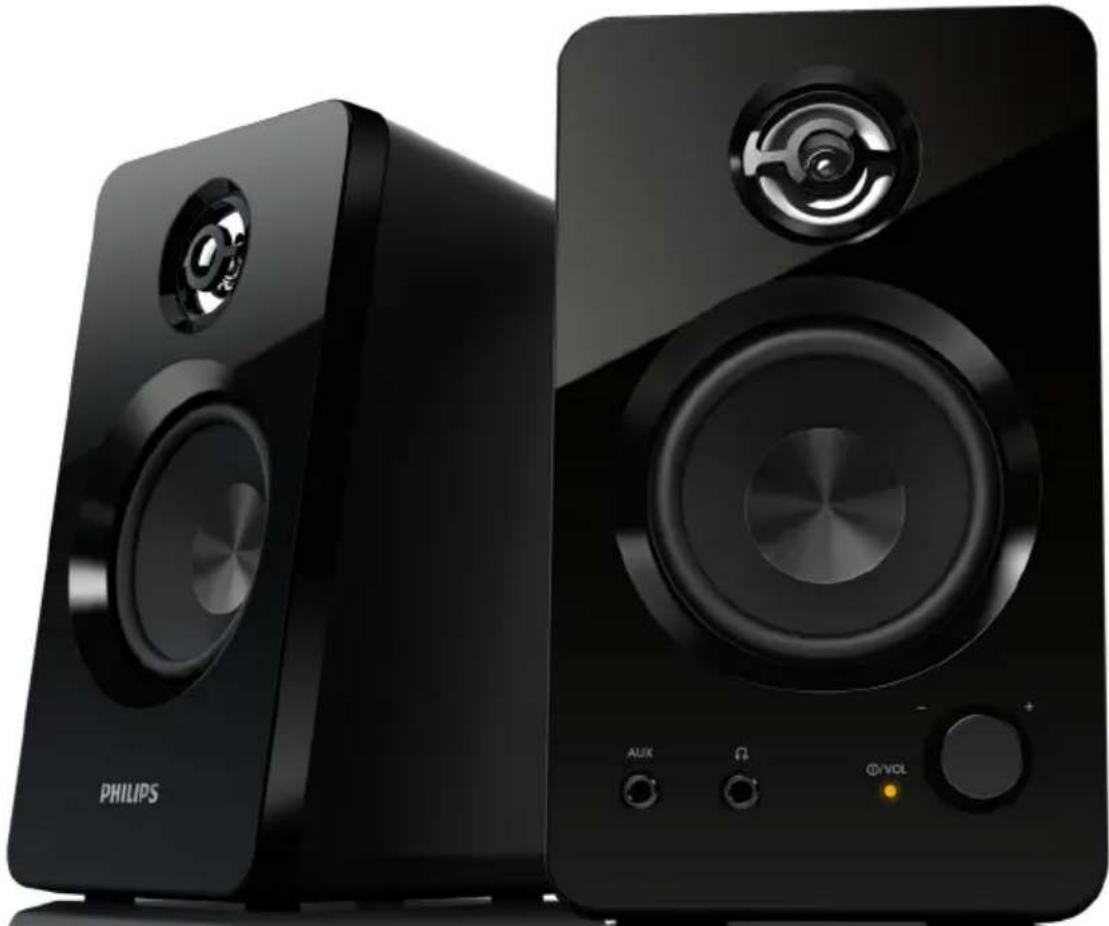
Two black Philips audio speakers with speaker stands, no visible text or symbols on the devices themselves.User manual
PHILIPS
Contents
1 Important 2
Important safety instructions 2
Hearing safety 2
2 Notice 3
Disposal of your old product 3
3 Your multimedia speaker 4
4 Installation 4
5 Get started 5
Optional function 5
6 Product information 5
Specifications 5
7 Troubleshooting 6
1 Important
Important safety instructions
• Read and follow all these instructions.
- The product shall not be exposed to dripping or splashing and no objects filled with liquids, such as vases, shall be placed on the product.
- To completely disconnect the power input, the mains plug of the product shall be disconnected from the mains.
- The mains plug of the product should not be obstructed or should be easily accessed during intended use.
- Keep this product away from direct sunlight, naked flames or other heat sources.
- Unplug the product from the power outlet during lightening storms or when unused for long periods of time.
- When you disconnect the power cord, always pull the plug instead of the cable.
- Only use attachments/accessories specified by the manufacturer.
- Where the mains plug or an appliance coupler is used as the disconnect device, the disconnect device shall remain readily operable.

Warning
• Never remove the casing of the apparatus.
- Never place this apparatus on other electrical equipment.
Hearing safety
Listen at a moderate volume.
- Using headphones at a high volume can impair your hearing. This product can produce sounds in decibel ranges that may cause hearing loss for a normal person, even for exposure less than a minute. The higher decibel ranges are offered for those that may have already experienced some hearing loss.
- Sound can be deceiving. Over time your hearing ‘comfort level’ adapts to higher volumes of sound. So after prolonged listening, what sounds ‘normal’ can actually be loud and harmful to your hearing. To guard against this, set your volume to a safe level before your hearing adapts and leave it there.
To establish a safe volume level:
• Set your volume control at a low setting.
- Slowly increase the sound until you can hear it comfortably and clearly, without distortion.
Listen for reasonable periods of time:
- Prolonged exposure to sound, even at normally ‘safe’ levels, can also cause hearing loss.
- Be sure to use your equipment reasonably and take appropriate breaks.
Be sure to observe the following guidelines when using your headphones.
- Listen at reasonable volumes for reasonable periods of time.
- Be careful not to adjust the volume as your hearing adapts.
- Do not turn up the volume so high that you can't hear what's around you.
- You should use caution or temporarily discontinue use in potentially hazardous situations.
2 Notice
Any changes or modifications made to this device that are not expressly approved by WOOX Innovations may void the user's authority to operate the equipment.
This product complies with the radio interference requirements of the European Community.

Disposal of your old product
Your product is designed and manufactured with high quality materials and components, which can be recycled and reused.

When this crossed-out wheeled bin symbol is attached to a product it means that the product is covered by the
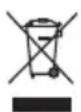
European Directive 2002/96/EC. Please inform yourself about the local separate collection system for electrical and electronic products.
Please act according to your local rules and do not dispose of your old products with your normal household waste.
Correct disposal of your old product helps to prevent potential negative consequences for the environment and human health.
Environmental information
All unnecessary packaging has been omitted. We have tried to make the packaging easy to separate into three materials: cardboard (box), polystyrene foam (buffer) and polyethylene (bags, protective foam sheet.)
Your system consists of materials which can be recycled and reused if disassembled by a specialized company. Please observe the local regulations regarding the disposal of packaging materials, exhausted batteries and old equipment.

Note
• The type plate is located on the bottom of the product.
3 Your multimedia speaker
Congratulations on your purchase and welcome to Philips!
To fully benefit from the support that Philips offers, register your product at www.philips.com/welcome.
4 Installation
text_image
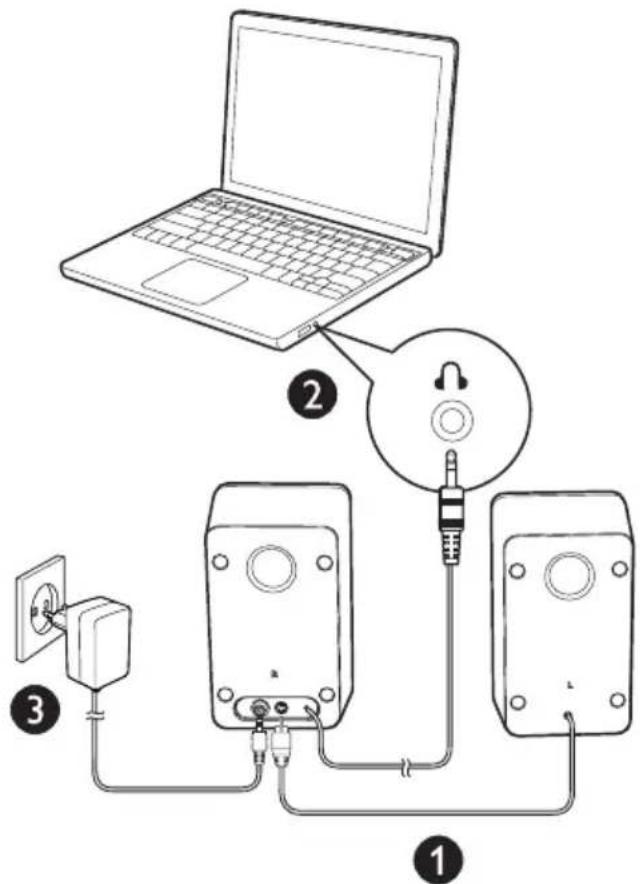
Diagram showing connections between a laptop, audio equipment, and two speakers with labeled parts.1 Insert the left speaker plug into the right speaker as indicated ( ^① ).
2 Insert the audio input plug into the audio output socket of your computer Ⓐ.
3 Connect the AC plug to AC power socket (③).
5 Get started

Note
• Make sure that the multimedia speakers are installed properly before using.
text_image
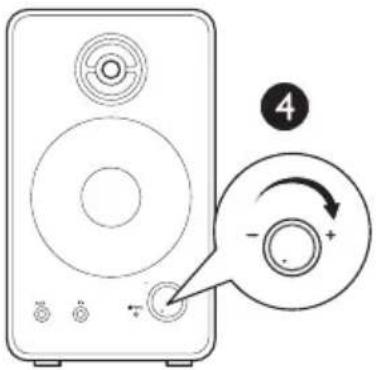
Diagram of a speaker with labeled buttons and an arrow indicating rotation around the center, marked with number 4.1 Rotate VOL knob clockwise to switch on the Multimedia Speakers (9).
→ The LED indicator is on.
2 Adjust the volume by VOL knob or by the computer application.
3 After use, switch off the speakers and unplug.
Optional function
• To listen through a headphone:
Connect a headphone (not supplied) to the socket.
• To play music from an external audio device such as an MP3 player:
1 Connect an MP3 link cable (not supplied) to the AUX socket and the headphone socket on the device.
2 Play music from the device.
6 Product information

Note
• Product information is subject to change without prior notice.
Specifications
| AC/DC Power adaptor Model: MSP-C2000IC12.0-24W-DE, PhilipsInput: 100-240V ~50/60 Hz, 0.8AOutput: 12V=2A | |
| Dimensions | |
| - Main Unit (W × H × D) | 100 × 170 × 100 mm |
| Weight | |
| - Main Unit | 1.2 kg |
System Requirements:
| PC Mac | |
| Windows® 98SE, Windows® ME, Windows® 2000, Windows® XP, or Windows® VistaTM, Windows 7 | Mac OS9/OS® X, or later |
7 Troubleshooting
To keep the warranty valid, never try to repair the system yourself.
If you encounter problems when using the product, check the following points before requesting service. If the problem remains unsolved, register your product and get support at www.philips.com/support.
No power
- Ensure that the AC power adaptor of the unit is connected properly.
- Ensure that there is power at the AC outlet.
No sound
• Make sure that the speakers are correctly installed.
• Make sure the LED lights up.
- Adjust the volume of your computer.

text_image
PHILIPSSpecifications are subject to change without notice
2013 © WOOX Innovations Limited. All rights reserved.
This product was brought to the market by WOOX Innovations Limited or one of its affiliates, further referred to in this document as WOOX Innovations, and is the manufacturer of the product. WOOX Innovations is the warrantor in relation to the product with which this booklet was packaged. Philips and the Philips Shield Emblem are registered trademarks of Koninklijke Philips N.V.