Brilliance 190BL1CS - Monitor PHILIPS - Free user manual and instructions
Find the device manual for free Brilliance 190BL1CS PHILIPS in PDF.


User questions about Brilliance 190BL1CS PHILIPS
0 question about this device. Answer the ones you know or ask your own.
Ask a new question about this device
Download the instructions for your Monitor in PDF format for free! Find your manual Brilliance 190BL1CS - PHILIPS and take your electronic device back in hand. On this page are published all the documents necessary for the use of your device. Brilliance 190BL1CS by PHILIPS.
USER MANUAL Brilliance 190BL1CS PHILIPS
text_image
Energy Efficient Solutions Energy Efficient Solutions Energy Efficient Solutions Energy Efficient Solutions Energy Efficient Solutions Energy Efficient Solutions Energy Efficient Solutions Energy Efficient Solutions Energy Efficient Solutions Energy Efficient Solutions Energy Efficient Solutions Energy Efficient Solutions Energy Efficient Solutions Energy Efficient Solutions Energy Efficient Solutions Energy Efficient Solutions Energy Efficient Solutions Energy Efficient Solutions Energy Efficient Solutions Energy Efficient Solutions Energy Efficient Solutions Energy Efficient Solutions Energy Efficient Solutions Energy Efficient Solutions Energy Efficient Solutions Energy Efficient Solutionswww.philips.com/welcome
Taking back/Recycling Information for Customers
Philips establishes technically and economically viable objectives to optimize the environmental performance of the organization's product, service and activities.
From the planning, design and production stages, Philips emphasizes the important of making products that can easily be recycled. At Philips, end-of-life management primarily entails participation in national take-back initiatives and recycling programs whenever possible, preferably in cooperation with competitors, which recycle all materials (products and related packaging material) in accordance with all Environmental Laws and taking back program with the contractor company.
Your display is manufactured with high quality materials and components which can be recycled and reused.
To learn more about our recycling program please visit
http://www.philips.com/sites/philipsglobal/about/sustainability/ourenvironment/productrecyclingservices.page
This marking on the product or on its packaging illustrates that, under European Directive 2002/96/EC governing used electrical and electronic appliances, this product may not be disposed of with normal household waste. You are responsible for disposal of this equipment through a designated waste electrical and electronic equipment collection. To determine the locations for dropping off such waste electrical and electronic, contact your local government office, the waste disposal organization that serves your household or the store at which you purchased the product.
Your new monitor contains materials that can be recycled and reused. Specialized companies can recycle your product to increase the amount of reusable materials and to minimize the amount to be disposed of.
All redundant packing material has been omitted. We have done our utmost to make the packaging easily separable into mono materials.
Please find out about the local regulations on how to dispose of your old monitor and packing from your sales representative.
تثبيت الqaعدة
2
Xا +4 0 تج NE خد Z و تلJEا H
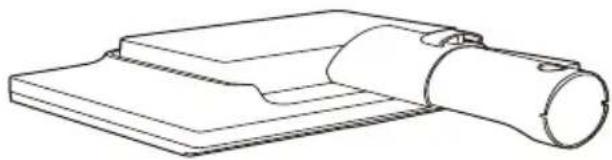
natural_image
Technical line drawing of a mechanical component with a cylindrical shaft and rectangular base (no text or symbols)natural_image
Line drawing of a hand holding a mechanical component next to a circular disc (no text or symbols)natural_image
Line drawing of a computer monitor with a stand and control panel (no text or symbols)
flowchart
graph TD
    A["3"] --> B["→"]
    A --> C["↓/▼"]
    A --> D["○/▲"]
    B --> E["1"]
    C --> F["7"]
    C --> G["6"]
    D --> H["4"]
    D --> I["2"]
    D --> J["1"]
text_image
Diagram showing connections between a server and an electrical device, with labeled ports and wiring points.The image contains a graphical symbol (a white lightning bolt) inside a black circle. There is no textual content to extract.
دخل الصوت
The image is too blurry to recognize any text content.
DVI دخل
[NO TEXT]
VGA إدخال
©
مقبس سماعة الأذن
1
اتصال USB صاعد
V
السفلي USB مجرى
A
التوصيل بالكمبيوتر
- حكام
طاقة.
- يديو
natural_image
Technical diagram of a mechanical device with a cable and connector, showing directional arrows (no text or symbols)34517!
natural_image
Line drawing of a handheld electronic device with a hand operating it, no text or symbols present
text_image
س# 812 1 3781 9natural_image
Line drawing of a hand using a pen to press down a component on a stand, with no visible text or symbols.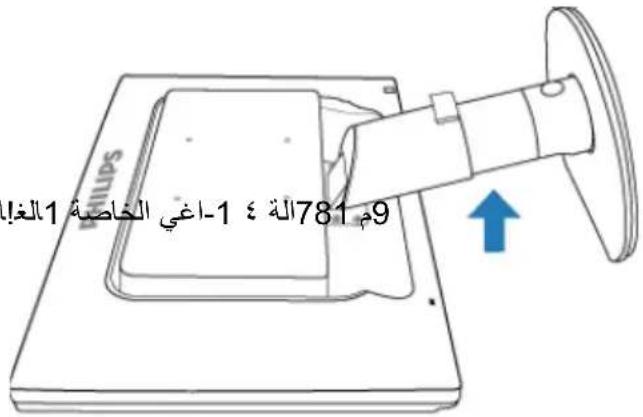
text_image
SmartImage Office Photo Move Game Economy Offtext_image
PHILIPS www.philips.com/welcome Monitor driver and software installation System requirements: • PC learning Windows 1. Vlog XP, 2006, NR. • Use to write philips Moderate as download the base service of monitor drive PhilipsControl System support and requirements: 1. Sports support/Windows 1. Vlog XP 2. Language support: WebNet, Gamesa, Snapchat, French, India, Russia, Portuguese, Simplified Chinese 3. Active Monitor Play and Play Support • Use to http://www.philips.com/schwan/ Philips Control as confirmed the basic service of SmartControl software Get Back Finishtext_image
SmartControl Premium SmartControl Premium PHILIPS Adjust COCK Eco Power Options Help Brightness Contrast Resolution Contrast Adjust the Contrast (use the shift) to keep details in lighter image areas. 1. Raise the Contrast until the numbers 1 and 2 are no longer inside. 2. Show how the Contrast to make the number 2 and 3 represents. The number 1 should remain barely visible. Contrast 30 Units Reset 1 2 3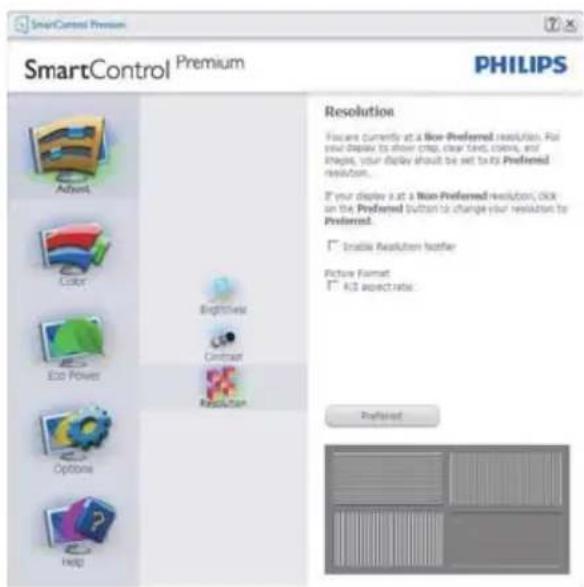
text_image
SmartControl Premium SmartControl Premium PHILIPS Resolution Focus currently at a Non-Preferred resolution. Put your display to show crop, clear text, colors, and images, your display should be set to its Preferred resolution. If your display is at a Non-Preferred resolution, click on the Preferred button to change your resolution for Preferred. Enable Resolution extensor Picture Format: 4.0 aspect ratio: Preferred(الألوان) K Color
text_image
SmartControl Premium PHILIPS SmartControl Premium Adjust Preferences Audio Auto Press Print Wizard Prests Draft Preference SmartDesktop Wizard You need to calculate your display to get the next accurate color. We encourage you to use the simple tuning process by selecting the Start Wizard button. This process involves a news of steps that will let you hate your display and save the settings. 1. Choose the Start Wizard button. 2. Follow the steps outlined in the process. 3. Save your settings for future use. Start Wizardtext_image
SmartControl Premium SmartControl Premium PHILIPS Display Gamma Gamma is a component of the pixel brightness in a display. A lower Gamma value produces brighter pixels and a higher Gamma value produces darker pixels. The default value for Gamma is 2.2. To adjust Gamma, SmartImage must be set to OFF. Click the SmartImage Off button before adjusting Gamma. 1. Use the slider to select the desired Gamma. Display Gamma 2.2 SmartImage Help Show Reset
text_image
SmartControl Premium PHILIPS Adjust Color Eco Power Options Help Calibration Your display needs to be properly calibrated in order for A to produce the wireless range in colors accurately. Calibration should always take place at the left during step in the project. Remember to recalibrate any time you make individual adjustments to image quality or whatever you move your cluster to a new location. 1. Make all other necessary adjustments to image quality list. 2. Prepare Show Me to learn how to use the calibration tool. 3. Finally, press Start to begin the calibration process. ■ Enable cover calibration Color software designed in collaboration with Joseph Haines. Protected by U.S. Patent No. 6486552 Show My Start Quick Nowtext_image
SmartControl Premium SmartControl Premium PHILIPS RGB All replaced colors are produced by mixed Red, Blue, and Green at different brightness levels. Changing a neutral White Post will give you optional RGB. If you prefer to adjust the RGB mix, please change size. ... Adjust the intensity of the Red, Blue, and Green using the white bars. NOTE: Changing the RGB values can adversely effect the displayed colors. Red 100 Green 100 Blue 100 Modify Cancel
text_image
SmartControl Premium SmartControl Premium PHILIPS Black Level Improperly adjusted Black Level will result in a size of detail in darker image areas. Adjust the Black Level for the best possible picture quality. 1. Adjust the Black level of the Red, Green, and Blue wing for the other items. Red 50 Green 50 Blue 50 Undo Reset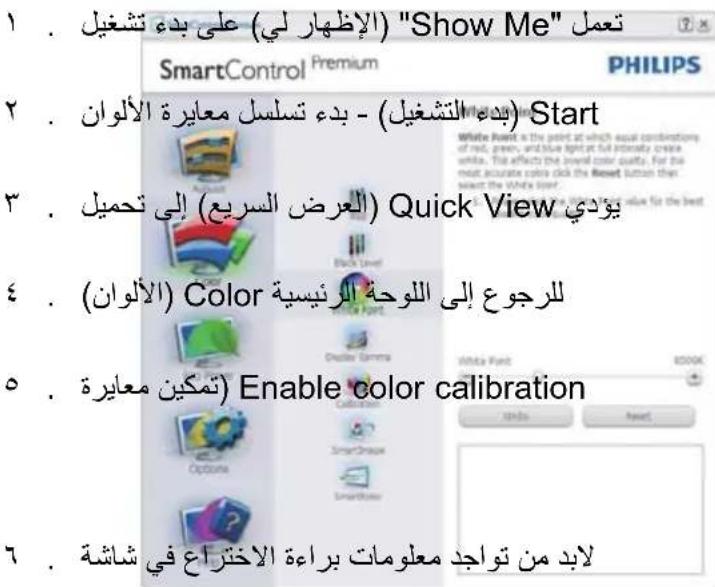
text_image
SmartControl Premium SmartControl Premium PHILIPS Power Savings Use these settings to save power consumption. Power can be saved to decreasing the brightness of the backlight. Master Backlight Brightness Use the slider to adjust the brightness of the backlight. Lower percentage of brightness will use less width of power. Use Prompt Further power savings can be realized by decreasing the backlight based on lighting conditions. Select the percentage of the backlight brightness for your lighting conditions. Right Room 25% 30% 75% 100% Left Room 15% 30% 75% 100% Master Backlight Brightness 75% Bright New Set Now Edit Power Off Nowtext_image
SmartControl Premium SmartControl Premium PHILIPS Preferences You can use the following options to configure SmartControl: Enable menu when right-clicking on desktop Enable tasks tray menu/ Run at system start-up set Transparency: 0% 30% 100% Select language: Knight SmartContext On SmartContext Off Summary Power LED Button Brightness 3natural_image
Colorful circular ring diagram with a central square, displayed on a gray background (no text or symbols)text_image
SmartControl Premium SmartControl Premium PHILIPS SmartImage Shortimage estimates your display for different screen image content. Make a selection that matches the content. Off Office Photo Movie Economy Game Test Press Adjust RGB Black Lava White Post Display Gamma Colorator SmartImage Options SmartTube Press Press Press Press Press Press Press Press Press Press Press Press Press Press Press Press Press Press Press Press Press Press Press Press Press Press Press Press Press Press Press Press Press Press Press Press Press Press Press Press Press Press Press Press Press Press Press Press Press Press press Allied, 100% of the 100% of the 100% of the 100% of the 100% of the 100% of the 100% of the 100% of the 100% of the 100% of the 100% of the 100% of the 100% of the 100% of the 100% of the 50% Press Press Press Press Press Press Press Press Press Press Press Press Press Press Press Press Press Press Press Press Press Press Press Press Press Press Press Press Press Press Press Press Press Press Press Press Press Press Press Press Press Press Press Press Press Press Press Press Press Presstext_image
SmartControl Premium SmartControl Premium PHILIPS Adjust Peripherals Audio CocX Auto-Print Edit Power Jspot Wizard Pewto Draft Server SmartDesktop Input Your display has multiple inputs (connections in back of the display) so you can hook up multiple different sources at the same time. Use the Analog Disk and Digital In buttons to select which source you'd like to view. You are currently viewing the digital image. IMPORTANT [If you switch inputs SmartControl may have the ability to control your monitor. In the case you may have to use the Jspot Select button on the front of your monitor to switch back to the original output before SmartControl functionality can be noticed. Analog In Digital In Delete Porttext_image
SmartControl Premium PHILIPS SmartControl Premium User Manual If you need help setting up or opening SmartControl, click the Tech, support button. You'll have the option to fill out an Assistance form. You can also choose to have information about your software automatically attached to the assistance form. You'll need to be online to use the features. User Manual Parts Supporttext_image
SmartControl Premium SmartControl Premium PHILIPS Version SmartControl Version 2.15 - dbone-pp-4011-08-15-1133-19 DDO/CD Communication Yes - PDF AIE Copyright: © 1963-2011 Perout Displays, Inc.text_image
SmartControl Premium SmartControl Premium PHILIPS Thrift Detresence Thrift Detresence protects your display against unauthorised removal from your computer. To static Thrift Detresence, click on On, first-time users will replace a Personal Identification Number (PSN). If the display is introduced from the computer, this PSN's needed to authorize use on another computer. Thrift Detresence Off Ontext_image
Find Windows Desktop Partition Identify Partition Align On Help Technical Support Check for Update About Exittext_image
SmartControl Premium PHILIPS SmartDesktop Select: develop partbuilding mode. Align to portion Adjust Preferences New Press Input Word Private Draft Dynamics SmartDesktop Vertical Horizontal Even Trade Vertical Right Vertical Left Vertical Bottom Horizontal Top Horizontal Off Unverifytext_image
Screenshot of a Windows desktop with icons and status bar, showing various application icons and system status.سحب وإسقط الإطارات
text_image
type a question for helptext_image
Find Windows Desktop Partition Identify Partition Align Off Exit• في
text_image
SmartDesktop Guide SmartDesktop - SmartDesktop is in SmartControl Premium. InstallSmartControl Premium and select SmartDesktop from Options. SmartControl Premium PHILIPSملاحظة
[NO TEXT]
text_image
Find Windows Desktop Partition Identify Partition Align Off Bright Light Dim Light Help Technical Support Check for Update About Exit$$ (L - W) > 7: M J 0 9 \dots \times 1 3 5. $$
$$ (9 - \text { إدخال } - 9 \text { مي) } > 7 \text { ت- } M J 0 4 9 \dots \times 1 3 5. $$
الدقة الموص M بها 2
$$ (9 - \text { إدخال } - 9 \text { مي) } > 7 \text { ت- } M 1 \cdot 9 \cdot \cdot \times 1 3 3 \cdot $$
- Restrictions on chlorinated and brominated flame retardants, plasticizers, plastics and heavy metals such as cadmium, mercury and lead (RoHS compliance).
- Both product and product packaging is prepared for recycling.
• The brand owner offers take-back options.
The requirements can be downloaded from our web site. The requirements included in this label have been developed by TCO Development in co-operation with scientists, experts, users as well as manufacturers all over the world. Since the end of the 1980s TCO has been involved in influencing the development of "T equipment in a more user-friendly direction. Our labeling system started with displays in 1992 and is now requested by users and IT-manufacturers all over the world. About 50% of all displays worldwide are TCO certified.
For more information, please visit: www.tcodevelopment.com
TCOF1058 TCO Document, Ver. 2.1

Technology for you and the planet
Congratulations!
This display is designed for both you and the planet.

The display you have just purchased carries the TCO Certified label.
This ensures that your display is designed, manufactured and tested according to some of the strictest quality and environmental requirements in the world. This makes for a high performance product, designed with the user in focus that also minimizes the impact on the climate and our natural environment.
TCO Certified is a third party verified program, where every product model is tested by an accredited impartial test laboratory. TCO Certified represents one of the toughest certifications for displays worldwide.
Some of the Usability features of the TCO Certified for displays:
- Visual ergonomics for good image quality is tested to ensure top performance and reduce sight and strain problems. Important parameters are luminance, contrast, resolution, black level, gamma curve, colour and luminance uniformity and colour rendering.
- Products are tested according to rigorous safety standards at impartial laboratories.
- Electric and magnetic fields emissions as low as normal household background levels.
- Low acoustic noise emissions (when applicable).
Some of the Environmental features of the TCO Certified for displays:
- The brand owner demonstrates corporate social responsibility and has a certified environmental management system (EMAS or ISO 14001).
- Very low energy consumption both in on-and standby mode minimize climate impact.
CE Declaration of Conformity
This product is in conformity with the following standards
• EN60950-1:2006+A11:2009+A1:2010+A12:2011 (Safety requirement of Information Technology Equipment)
• EN55022:2010 (Radio Disturbance requirement of Information Technology Equipment).
• EN55024:2010 (Immunity requirement of Information Technology Equipment).
• EN61000-3-2:2006 +A1:2009+A2:2009 (Limits for Harmonic Current Emission).
- EN61000-3-3:2008 (Limitation of Voltage Fluctuation and Flicker) following provisions of directives applicable.
• 2006/95/EC (Low Voltage Directive).
• 2004/108/EC (EMC Directive).
- 2009/125/EC (ErP Directive, EC No. 1275/2008 Implementing Directive for Standby and Off mode power consumption) and is produced by a manufacturing organization on ISO9000 level.
The product also comply with the following standards
• ISO9241-307:2008 (Ergonomic requirement, Analysis and compliance test methods for electronic visual displays).
• GS EK1-2000:2011 (GS mark requirement).
• prEN50279:1998 (Low Frequency Electric and Magnetic fields for Visual Display).
- MPR-II (MPR:1990:8/1990:10 Low Frequency Electric and Magnetic fields).
Lead-free Product

Lead free display promotes environmentally sound recovery and disposal of waste from electrical and electronic equipment. Toxic substances like Lead has been eliminated and compliance with European community's stringent RoHs directive mandating restrictions on hazardous substances in electrical and electronic equipment have been adhered to in order to make Philips monitors safe to use throughout its life cycle.
EPEAT
(www.epeat.net)

The EPEAT (Electronic Product Environmental Assessment Tool) program evaluates computer
desktops, laptops, and monitors based on 51 environmental criteria developed through an extensive stakeholder consensus process supported by US EPA.
EPEAT system helps purchasers in the public and private sectors evaluate, compare and select desktop computers, notebooks and monitors based on their environmental attributes. EPEAT also provides a clear and consistent set of performance criteria for the design of products, and provides an opportunity for manufacturers to secure market recognition for efforts to reduce the environmental impact of its products.
Benefits of EPEAT
Reduce use of primary materials Reduce use of toxic materials
Avoid the disposal of hazardous waste EPEAT'S requirement that all registered products meet ENERGY STAR's energy efficiency specifications, means that these products will consume less energy throughout their life.
Changes or modifications not expressly approved by the party responsible for compliance could void the user's authority to operate the equipment.
Use only RF shielded cable that was supplied with the monitor when connecting this monitor to a computer device.
To prevent damage which may result in fire or shock hazard, do not expose this appliance to rain or excessive moisture.
THIS CLASS B DIGITAL APPARATUS MEETS ALL REQUIREMENTS OF THE CANADIAN INTERFERENCE-CAUSING EQUIPMENT REGULATIONS.
FCC Declaration of Conformity
Declaration of Conformity for Products Marked with FCC Logo,
United States Only

This device complies with Part 15 of the FCC Rules. Operation is subject to the following two conditions: (1) this device may not cause harmful interference, and (2) this device must accept any interference received, including interference that may cause undesired operation.
Commission Federale de la Communication (FCC Declaration)
Energy Star Declaration
(www.energystar.gov)
As an ENERGY STAR ^® Partner, we have determined that this product meets the ENERGY STAR ^® guidelines for energy efficiency.
Note
We recommend you switch off the monitor when it is not in use for a long time.
Federal Communications Commission (FCC) Notice (U.S. Only)
This equipment has been tested and found to comply with the limits for a Class B digital device, pursuant to Part 15 of the FCC Rules. These limits are designed to provide reasonable protection against harmful interference in a residential installation. This equipment generates, uses and can radiate radio frequency energy and, if not installed and used in accordance with the instructions, may cause harmful interference to radio communications.
However, there is no guarantee that interference will not occur in a particular installation. If this equipment does cause harmful interference to radio or television reception, which can be determined by turning the equipment off and on, the user is encouraged to try to correct the interference by one or more of the following measures:
• Reorient or relocate the receiving antenna.
- Increase the separation between the equipment and receiver.
- Connect the equipment into an outlet on a circuit different from that to which the receiver is connected.
- Consult the dealer or an experienced radio/TV technician for help.
EN 55022 Compliance (Czech Republic Only)
This device belongs to category B devices as described in EN 55022, unless it is specifically stated that it is a Class A device on the specification label. The following applies to devices in Class A of EN 55022 (radius of protection up to 30 meters). The user of the device is obliged to take all steps necessary to remove sources of interference to telecommunication or other devices.
Polish Center for Testing and Certification Notice
The equipment should draw power from a socket with an attached protection circuit (a three-prong socket). All equipment that works together (computer, monitor, printer, and so on) should have the same power supply source.
The phasing conductor of the room's electrical installation should have a reserve short-circuit protection device in the form of a fuse with a nominal value no larger than 16 amperes (A).
To completely switch off the equipment, the power supply cable must be removed from the power supply socket, which should be located near the equipment and easily accessible.
A protection mark "B" confirms that the equipment is in compliance with the protection usage requirements of standards PN-93/T-42107 and PN-89/E-06251.
North Europe (Nordic Countries) Information
Placering/Ventilation
WARNING:
FÖRSÄKRA DIG OM ATT HUVUDBRYTARE OCH UTTAG ÄR LÄTÄTKOMLIGA, NÄR DU STÄLLER DIN UTRUSTNING PÅPLATS.
Placering/Ventilation
ADVARSEL:
S∅RG VED PLACERINGEN FOR, AT NETLEDNINGENS STIK OG STIKKONTAKT ER NEMT TILGÆNGELIGE.
Paikka/llmankierto
VAROITUS:
SIJOITA LAITE SITEN, ETTÄ VERKKOJOHTO VOIDAAN TARVITTAESSA HELPOST IRROTTAA PISTORASIASTA.
The European Energy Label informs you on the energy efficiency class of this product. The greener the energy efficiency class of this product is the lower the energy it consumes.
On the label, you can find the energy efficiency class, the average power consumption of this product in use and the average energy consumption for 1 year.
Note
The EU Energy Label will be ONLY applied on the models bundling with HDMI and TV tuners.
China RoHS
The People's Republic of China released a regulation called "Management Methods for Controlling Pollution by Electronic Information Products" or commonly referred to as China RoHS. All products produced and sold for China market have to meet China RoHS request.
flowchart
graph TD
    A["R"] --> C["B"]
    B["G"] --> C["B"]

natural_image
Simple black rectangle centered on a white background with rounded corners (no text or symbols)natural_image
Simple black vertical rectangle on white background, no text or symbols present(Windows Upgrade) Windows Update
text_image
Attention Theft Deterrence is Enabled.11500K,9300K,8200K,7500K,