Consono 35 Mk2 Connect plus - Speaker Teufel - Free user manual and instructions
Find the device manual for free Consono 35 Mk2 Connect plus Teufel in PDF.


User questions about Consono 35 Mk2 Connect plus Teufel
0 question about this device. Answer the ones you know or ask your own.
Ask a new question about this device
Download the instructions for your Speaker in PDF format for free! Find your manual Consono 35 Mk2 Connect plus - Teufel and take your electronic device back in hand. On this page are published all the documents necessary for the use of your device. Consono 35 Mk2 Connect plus by Teufel.
USER MANUAL Consono 35 Mk2 Connect plus Teufel
natural_image
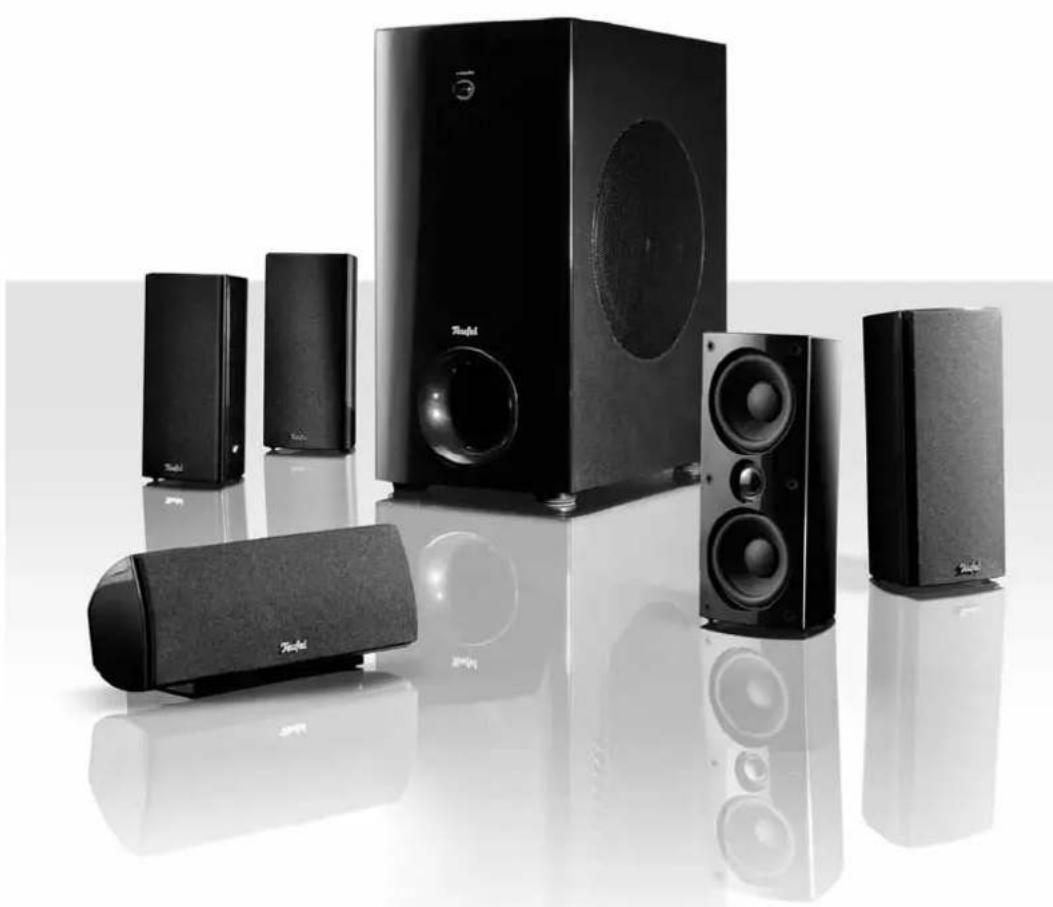
Black and white photo of a set of audio speakers including a 500x240x260 audio unit, arranged on a reflective surface (no text or symbols visible)Consono 35
Active subwoofer US 5110/1
Teufel
Technical description and operating instructions
natural_image
Black and white photo of a set of audio speakers including a 3D speaker, two speakers, and a multi-tiered speaker with sound waves (no visible text or labels)Consono 35
5.1 Home Cinema Speaker Set
Teufel
Contents
Product contents....2
General notes and information....3
Safety notes....4
Setup....5
Connection and settings ....6
Care and cleaning ....7
Troubleshooting....7
Protecting the environment....7
Technical data 8
Product Contents
① 4 x satellite speakers CS 35 FCR
② 1 x center speaker CS 35 C
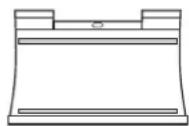
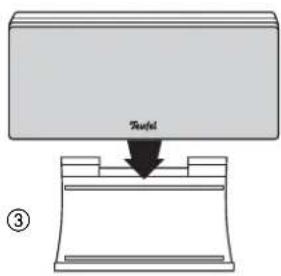
③ 1 x holder for center speaker CS 35 C
You will find the corresponding active subwoofer for this 5.1 home cinema speaker set in a separate box.
Check that all items have been delivered and that nothing is damaged.
If the delivery is incomplete or you find damage sustained in transit, do not operate the product but contact our service department (see page 3).
①

②

③
Notice
The information in this document may be changed without prior notice and in no way constitutes any liability on the part of Lautsprecher Teufel GmbH.
No part of these instructions may be reproduced in any form or be broadcasted in any way electronically, mechanically, by photocopy or recording without the written permission of Lautsprecher Teufel GmbH.
If you wish to exercise your eight-week right of return, we ask that you be absolutely sure to hold onto the packaging. We can only accept the return of the speakers WITH THE ORIGINAL PACKAGING.
Empty boxes are not available!
Complaints
In case of complaint we will need the following information to process your enquiry:
1. Invoice number
Can be found on the sales slip (enclosed with the product) or on the order confirmation received as a PDF document, e.g. 4322543
2. Serial number and/or batch number
Can be found on the back of the device, e.g. serial number: CL30000240129A-123.
Many thanks for your support!
Contact
For questions, suggestions or criticism please contact our customer service department:
10783 Berlin (Germany)
Tel.: 00800 - 200 300 40 (free of charge)
Fax: +49 (0) 30 / 300 930 930
www.teufelaudio.com
Proper use
Only use the speakers as described in these instructions. Any other use will be deemed as not in accordance with the instructions and may lead to damage to property or even persons. The manufacturer accepts no liability for damage caused by use not in accordance with the instructions.
The unit is intended for private use.

Before using the speakers for the first time please first read the safety notes and operating instructions carefully. This is the only way to use all
functions safely and reliably.
Keep the operating instructions safe and pass them on to anyone who may own the unit after you.
Caution icons
You will find the following caution icons used in these instructions :

High risk !
Failure to observe the warning may result in severe personal injury or death.
Attention
Moderate risk !

Failure to observe the warning may result in property damage.

Minor risk!
Points which should be observed when handling the unit.
Safety notes

Danger to children!
Children can become trapped in the packing fi Im when playing and suffocate.
Do not allow children to play with the unit or the packing film. Danger of suffocation.
Ensure that children do not remove small parts from the unit or take them off of the unit (e.g. control knobs or plug adapters). They could swallow the parts and choke. Never allow children to use electrical devices without supervision.

Danger to hearing!
Loud noise may lead to hearing loss.
There is a potential risk of sudden very high
noise pressure especially when activating the subwoofer which is set to full volume. This may have psychological consequences and also cause physical injury. Children and pets are particularly at risk.
Set your signal source unit volume control to a low setting.
When the volume is set high, always keep a certain distance from the unit and never place your ear directly on the speaker.
To avoid damage to health, avoid extended listening at high volume.
Danger
Danger of injury/damage!
Incorrect location may result in damage.

Never use the unit unmounted in vehicles, in unstable locations, on wobbly tripods or furniture, on underdimensioned brackets etc. The speakers could tip or fall down and cause injury to persons or be damaged.
- Arrange the speakers so that they cannot be knocked over accidentally and make sure that the cables do not pose a trip hazard.
- Ensure that any wall mounting is performed in a professional manner.
- Only use suitable wall brackets for mounting. Check the carrying capacity of the walls.
- Do not place the unit near sources of heat (e.g. heaters, ovens, other heat generating equipment such as amplifiers etc.)
Attention
Fire hazard!

Improper use may lead to damage or fire.
- Do not place open flames such as burning candles or similar on the unit.
- Ensure sufficient ventilation.
- Do not place the unit in direct sunlight.
- Only use the unit in indoor areas.
- Do not use the appliance in damp rooms and protect it from water drops and splashes. Ensure that no vases or other vessels filled with liquid are placed on or near the appliance to prevent the housing from being penetrated by liquid.
Location tips
Select a stable, level base and/or a suitable wall. Make sure that the environment is clean and free from dust. Avoid placing the unit close to sources of heat or in direct sunlight. Do not place any heavy objects on the cables or the speakers.
Center speakers
Set up the center speaker on the enclosed holder ③ in a central position directly under or beside the screen.
Front speakers
The front speakers are set up to the right and left of the screen or hung at a height of approx. 80 to 160 cm. They should be roughly in line with the center speaker and form an equilateral triangle with the listener – the so-called stereo triangle (distance from the listener = distance between the speakers). The speakers should project sound directly into the room or slightly towards the listener.
Rear speakers
The rear speakers are set up or hung next to (a) or • behind (b) the listener at a height of 1.20 m to 2.10 m. There should be at a distance of at least 100 cm to the • listener.
Subwoofer
The location of the subwoofer is arbitrary and does not affect the other speakers. A location between the front speakers is ideal often.
Wall mounting
Danger
Risk of damage!

Incorrect location may result in damage.
- Ensure that any wall mounting is performed in a professional manner.
-
Only use suitable wall brackets for mounting. Check the carrying capacity of the walls.
-
You can mount the satellite speakers on the wall using the long hole on the back of the speaker.
- You can purchase installation materials (cables, wall brackets and resonance dampers) especially designed for these speakers in our webshop (www.teufelaudio.com) in the "Accessories" area.
text_image
Treated ③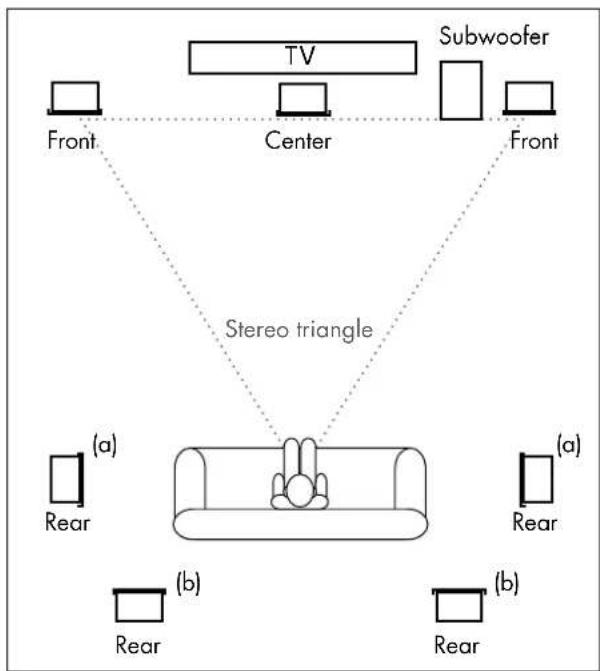
flowchart
graph TD
    TV["TV"] --> Front["Front"]
    TV --> Center["Center"]
    Subwoofer["Subwoofer"] --> Front2["Front"]
    Subwoofer --> Front3["Front"]
    Front --> Stereo["Stereo triangle"]
    Stereo --> Rear1["(a)"]
    Stereo --> Rear2["(b)"]
    Subwoofer --> Rear3["(a)"]
    Subwoofer --> Rear4["(b)"]
    Rear1 --> Rear5["(a)"]
    Rear2 --> Rear6["(b)"]
    Rear3 --> Rear7["(a)"]
    Rear4 --> Rear8["(b)"]

natural_image
Diagram of a device with a magnified inset showing internal components (no text or symbols)Danger

Danger of injury/damage!
Arrange the cables so that they do not pose a trip hazard.
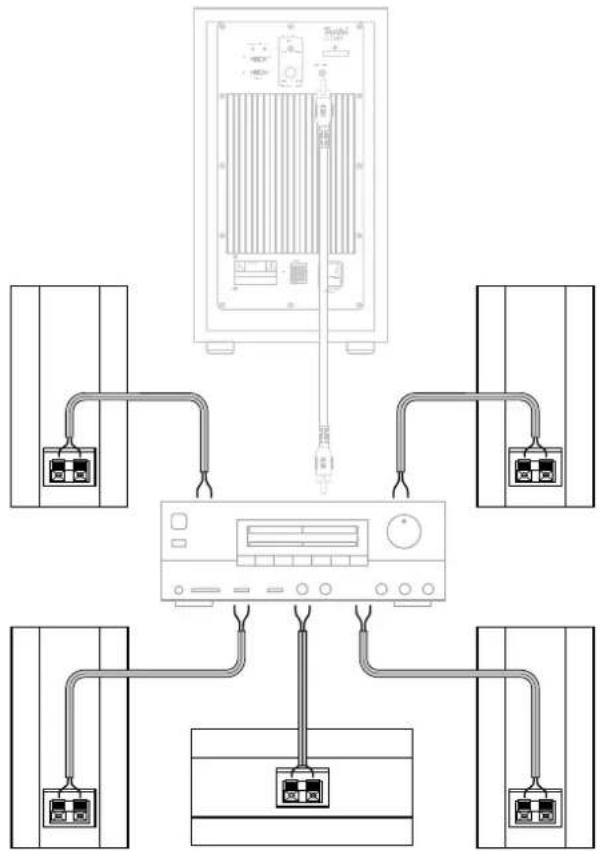
Satellite speakers
Pull the mains plug of your AV receiver out of the • socket.
Lay the speaker cable from your AV receiver to each of the speakers. This cable should be a high-quality double-wire speaker cable with marked strands. The cross-section should amount to at least 0.75 mm ^2 .
A connector comprising two terminals is located on the • back of each satellite speaker, to which you have to connect the speaker cables.
The terminals are each marked in red (+) and black (-).

Make sure the polarity is correct!
Connect the like coloured terminals with one another. Otherwise the sound quality will suffer.
The speaker connectors of your AV receiver should be marked similarly. The strands of the speaker cables are marked with different colours or shapes.
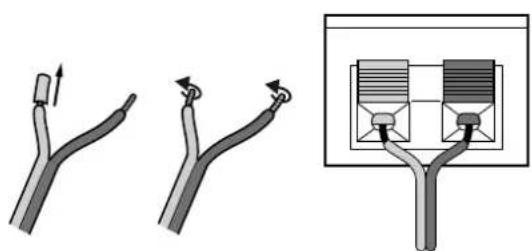
Split the single-wire down to approx. 30 mm on both 1. ends and strip off approx. 10 mm of insulation.
Twist the stripped strands so that no wire is protruding.2.
Push the red and black lever of the connector terminal 3. up and insert the stripped strand ends in the underlying opening. Releasing the lever will lock the single-wires in place.
Connect the cables to the other satellite speakers in the 4. same way.
Connect the speaker cables to your AV receiver. The 5. operating instructions of the appliance should contain notes on this.
Subwoofer
Connect the subwoofer as described in the corresponding operating instructions.
Removing the cover grills
You can remove the from the speakers by carefully reaching behind the protective grid and slowly pulling it off to the front.
When reattaching the grids, ensure that the installation • pins slide into the corresponding holes on the speaker.
Crossover frequency
The optimal crossover frequency for the Consono-35-• System is 150 Hz. To the extent possible, set your AV amplifier to this value.
flowchart
graph TD
    A["Device"] --> B["Main Display"]
    A --> C["Module 1"]
    A --> D["Module 2"]
    A --> E["Module 3"]
    A --> F["Module 4"]
    B --> G["Port 1"]
    B --> H["Port 2"]
    B --> I["Port 3"]
    B --> J["Port 4"]
    C --> K["Port 1"]
    C --> L["Port 2"]
    C --> M["Port 3"]
    C --> N["Port 4"]
    D --> O["Port 1"]
    D --> P["Port 2"]
    D --> Q["Port 3"]
    D --> R["Port 4"]
    E --> S["Port 1"]
    E --> T["Port 2"]
    E --> U["Port 3"]
    E --> V["Port 4"]
text_image
Diagram illustrating three different cable or cable joint configurations with directional arrows and a close-up of the internal structure.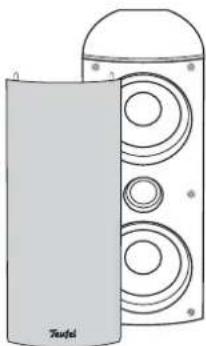
natural_image
Illustration of a speaker tower with two speakers and a dome-shaped head (no text or symbols)Care and cleaning
Clean the speakers regularly with a soft, damp microfi ber cloth. In the process, be absolutely sure to observe the following notes:
If possible use only plain water with no cleaning products. In case of stubborn marks, a mild soap solution may be used.
In no circumstances should caustic cleaning products, white spirit, thinners, petrol or similar be used for cleaning.
Troubleshooting
The following instructions should help you to solve problems. If this doesn't work, please contact our hotline (see page 3). Mind the warranty instructions.
| Problem Possible cause Solution | ||
| Playback is noisy. Generally | speaking, the system is very low-noise. In the high range area, very good-quality high-resolution speaker systems can expose the poor quality of a signal source (e.g. from MP3 fi les). | Ensure that the source is sending a clear signal. |
| The sound seems dull. The speakers have been connected with the incorrect polarity. | Make sure the speaker cables of all satellites are connected properly. | |
Protecting the environment
Disposing of the unit

Used units must not be disposed of with household waste.
If the unit is no longer operational, every consumer is required by law to dispose of used devices separate from household waste,
e. g. at a collection point run by the communal authority borough. In this way, used devices can be recycled and waste materials disposed of in an environmentally friendly manner.
For this reason, electrical equipment is labelled with the displayed symbol
Impedance:
4
ohm
Dimensions (W x H x D): 90 x 200 x 98 mm
Net weight: 820 g


This product conforms with Council of the
European Union guidelines 2004/108/EC and
2006/95/EC
Technical changes reserved!
Technical description and operating instructions

natural_image
Line drawing of two white speaker units with circular earbuds and control knobs, no text or symbols presentActive subwoofer
US 5108/1
US 5110/1
Teufel
Contents
General notes and information....3
Notice....3
Original packaging. 3
Complaints. 3
Contact 3
Proper use 3
Safety notes....4
Caution icons 4
Safety notes....4
Product contents, control elements and connections ....5
Product contents 5
Control elements and connections 5
Subwoofer back side. 5
Connection and operation....6
Signal connection....6
Connecting to a power supply 6
Automatic activation/deactivation....6
Changing the input sensitivity of the automatic activation. 6
Troubleshooting 7
Care and cleaning 7
Protecting the environment 8
Disposing of the unit 8
Technical data 8
Notice
The information in this document may be changed without prior notice and in no way constitutes any liability on the part of Lautsprecher Teufel GmbH.
No part of these instructions may be reproduced in any form or be broadcasted in any way electronically, mechanically, by photocopy or recording without the written permission of Lautsprecher Teufel GmbH.
If you wish to exercise your eight-week right of return, we ask that you be absolutely sure to hold onto the packaging. We can only accept the return of the speakers WITH THE ORIGINAL PACKAGING.
Empty boxes are not available!
Complaints
In case of complaint we will need the following information to process your enquiry:
1. Invoice number
Can be found on the sales slip (enclosed with the product) or on the order confirmation received as a PDF document, e.g. 4322543
2. Serial number and/or batch number
Can be found on the back of the device, e. g. serial number: CL30000240129A-123.
Many thanks for your support!
Contact
For questions, suggestions or criticism please contact our customer service department:
10783 Berlin (Germany)
Tel.: 00800 - 200 300 40 (free of charge)
Fax: +49 (0)30 - 300 930 930
www.teufelaudio.com
Proper use
Only use the unit as described in these instructions. Any other use will be deemed as not in accordance with the instructions and may lead to damage to property or even persons. The manufacturer accepts no liability for damage caused by use not in accordance with the instructions.
The unit is intended for private use.

Before operating the unit for the first time please read the safety notes and operating instructions carefully. This is the only way to use all functions
safely and reliably.
Keep the operating instructions safe and pass them on to anyone who may own the unit after you.
Caution icons
You will find the following caution icons used in these instructions :

High risk !
Failure to observe the warning may result in severe personal injury or death.

Moderate risk !
Failure to observe the warning may result in property damage .

Minor risk!
Points which should be observed when handling the unit.
Safety notes

Risk of electric shock!
Faulty installation of electrical equipment or mains voltage which is too high can cause
electric shocks.
The device is only suitable for use with a power supply • voltage of 220–240 V\~/50 Hz.
If the unit's case or mains cable is defective or shows other signs of visible damage, disconnect the mains adapter immediately from the socket and do not operate the device.
If the unit emits smoke or smells of burning or other unusual odours, disconnect it immediately from the power supply and do not operate it.
Never open the unit case.
Repairs may only be carried out by an authorised specialist workshop. Only use parts which conform with the original unit specifications. There are electrical and mechanical parts in this unit which are essential in order to avoid exposure to sources of danger.
Do not insert any object through the vent slots in the case.
Only use the unit in indoor areas.
Do not operate the unit in moist areas and protect it • from drops of water or splash water.
Also take care not to stand vases or other containers of liquid on or near the unit in order to avoid liquid getting into the case. If water or other foreign objects should enter the case, disconnect the device immediately from the mains power supply and remove any batteries. Send the unit to our service address.
- Never touch the mains adapter with wet hands.
- Check the unit regularly for damage.
Danger
Danger to children!

Children can become trapped in the packing film when playing and suffocate.
- Do not allow children to play with the unit or the packing film. Danger of suffocation.
- Ensure that children do not remove small parts from the unit or take them off of the unit (e.g. control knobs or plug adapters). They could swallow the parts and choke. Never allow children to use electrical devices without supervision.
Danger
Danger to hearing!

Loud noise may lead to hearing loss.
There is a potential risk of sudden very high
noise pressure especially when activating the subwoofer which is set to full volume. This may have psychological consequences and also cause physical injury. Children and pets are particularly at risk.
- Set your signal source unit volume control to a low setting.
When the volume is set high, always keep a certain • distance from the unit and never place your ear directly on the speaker.
- To avoid damage to health, avoid extended listening at high volume.
Danger
Danger of injury/damage!
Incorrect location may result in damage.
- Never use the unit unmounted in vehicles, in unstable locations, on wobbly tripods or furniture, on underdimensioned brackets etc. The speakers could tip or fall down and cause injury to persons or be damaged.
- Arrange the speakers so that they cannot be knocked over accidentally and make sure that the cables do not pose a trip hazard.
- Ensure that any wall mounting is performed in a professional manner.
- Only use suitable wall brackets for mounting. Check the carrying capacity of the walls.
- Do not place the unit near sources of heat (e.g. heaters, ovens, other heat generating equipment such as amplifiers etc.).
Attention Risk of damage!

Power overload due to lightning strike may damage or destroy the unit.
- If the unit is to be left unsupervised for a long period (e.g. during a holiday), or if a thunderstorm is forecast, disconnect it from the mains power supply.
Attention Fire hazard!

Improper use may lead to damage or fire.
Do not place open fl ames such as burning candles or similar on the unit.
Ensure suffi cient ventilation.
Do not place the unit in direct sunlight.
Do not cover the ventilation slots with curtains, cloths, • newspapers or similar. Heat build-up inside the unit can shorten the lifetime of the unit.
!
Check to be sure!
Check that all items have been delivered and that nothing is damaged.
If the delivery is incomplete or you find damage sus-•tained in transit, do not operate the unit but contact our service department (see page 3).
Product contents, control elements and connections
Product contents
1 x active subwoofer US 5108/1 or US 5110/1
1 x mains cord
Control elements and connections
Subwoofer back side
Pos Name Description
| 1 | Ph a s | Activate/deactivate phase shift (180°) for the subwoofer |
| 2 | On/Auto | Switch for automatic activation |
| 3 | P o w e | Power LED |
| 4 | L i m i | The limiter LED illuminates when the amplifi er reaches a distortion factor of 3-4 % (corresponds to an output of 120 watts at 4 ohm) |
| 5 | Auto Level | Set the input sensitivity of the automatic activation |
| 6 | Volume | Volume control for subwoofer |
| 7 | Line Input | Audio input jack |
| 8 | - | Connector jack for mains cord |
| 9 | - | Mains fuse |
| 10 | Power On/Off | Mains switch |
| 11 | Standby | Switch subwoofer on or to standbyOn: Illumination around the push-button is blueStandby: Illumination around the push-button is orange |

text_image
2 3 4 5 6 7 Power Limiter On Auto 0' Phase Auto Level Mid Low High Min Max Volume Teufel US 5108/1 Serial No. Line Input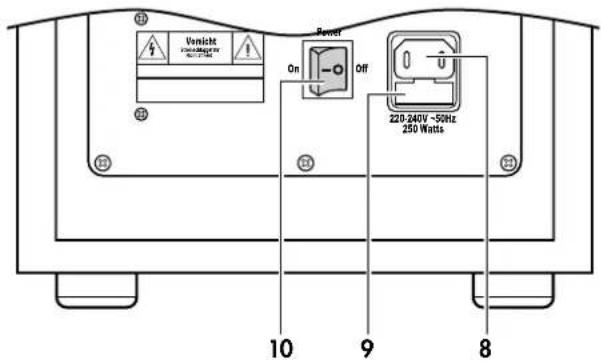
text_image
Unsicht WARNING BY 10 9 8 Power On Off 220-240V ~50Hz 250 Watts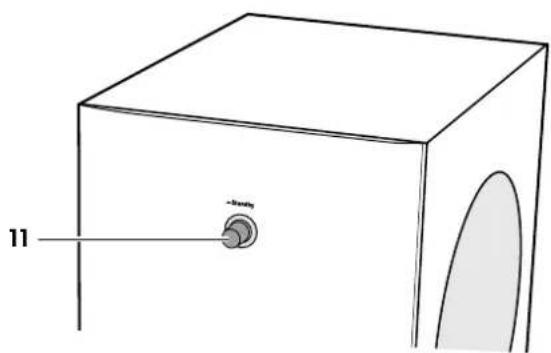
text_image
11 -bondyDanger

Danger of injury/damage!
Arrange the cables so that they do not pose a trip hazard.
Subwoofer
Signal connection
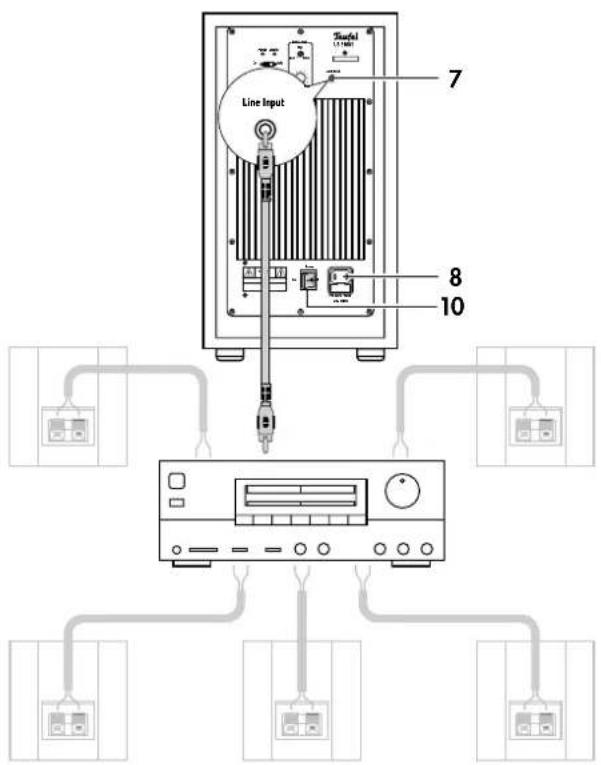
- Connect the RCA jack 7 "Line Input" on the back side of the subwoofer and the RCA jack for the subwoofer on the receiver with a mono RCA connector cable. For more information, please consult the operating instructions for your receiver.
Connecting to a power supply
- Ensure that the mains switch 10 "Power" on the subwoofer is switched off ("O OFF" position).
- Connect the mains connector jack 8 with a mains socket using the mains cord.
Satellite speakers
- Connect the satellite speakers as described in the corresponding operating instructions.
Activating and deactivating
- With the "Power" switch 10, you can turn the subwoofer on or off. If the subwoofer is on, the "Power" LED 3 will illuminate.
Automatic activation/deactivation
- Switch 2:
- Auto position: The subwoofer turns on as soon as an audio signal is present at the line input 7 (LED 3 is blue).
If no audio signal is present for 30 minutes, the subwoofer switches to standby (LED 3 is orange). - On position: The subwoofer is always on.
Changing the input sensitivity of the automatic activation
- With the control 5 "Auto Level", you can change the sensitivity of the automatic activation. This makes sense if the subwoofer doesn't turn on even if an audio signal is present and/or it is activated by a disturbing impulse. Use a narrow screwdriver to turn the controller.
Volume
- Adjust the subwoofer volume with the volume control 6 "Volume".
Phase
- With the switch 1 "Phase", you activate and deactivate the phase shift (180°) for the subwoofer, which may improve the sound under certain circumstances.
text_image
Line Input 7 8 10
text_image
1 2 3 5 6 7 Power Limiter On Mode V-100Ω 30 Phase Radio Level Mid Line High Mn Max Voltage Teufel US 5108/1 Radio to 30 Line Input Switch "42000" Power Dr. 200V 2X-2472 - 13Hz 250 MHz 10The following instructions should help you to solve problems. If this doesn't work, please contact our hotline (see page 3). Mind the warranty instructions.
| Problem Possible cause Solution | |||
| The subwoofer doesn't work. The LED 3 does not illuminate. | The subwoofer is off or doesn't have any power. | Turn on the "Power" switch 10 ("On I").Check the mains cord and socket. | |
| Fuse is defective. 1. |  Remove the mains cable.Carefully pull out the fuse holder on the mains connection jack. Remove the mains cable.Carefully pull out the fuse holder on the mains connection jack. | 2.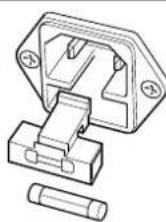 Push the old fuse out downwards. Insert a new fuse (2 A time-lag) and push the holder back. Push the old fuse out downwards. Insert a new fuse (2 A time-lag) and push the holder back. | |
| The subwoofer doesn't work, but the LED 3 is blue. | The volume has been set too low. | Increase the volume with the "Volume" control 6. | |
| The subwoofer hums. | The subwoofer is connected to another circuit than the rest of the system. | Connect the subwoofer and source device to the same electric circuit. | |
| The buzzing is caused by problems with the power supply. | Buy a line filter and connect both devices to it. | ||
| The buzzing is caused by a multi-way socket. | Use another multi-way socket or plug the subwoofer directly into the wall socket. In the case of two-pin plugs it may help to insert the plug into the socket the other way around. | ||
| The subwoofer doesn't turn on. | The sensitivity of the automatic activation has not been set high enough. | Turn the control 5 "Auto Level" towards "High". | |
| The subwoofer turns on when this is unintended. | The automatic activation has been set too high. | Turn the control 5 "Auto Level" towards "Low". | |
Care and cleaning
Clean the subwoofer regularly with a soft, damp micro-fiber cloth. In the process, be absolutely sure to observe the following notes:
Danger
Risk of electric shock!

In contact with live parts, water can lead to electric shock or short circuit.
Make sure that no liquid penetrates the unit. Disconnect the mains plug before cleaning.
Attention
Risk of damage!

Using the wrong cleaning materials may damage the delicate surface of the case.
If possible use only plain water with no cleaning products. In case of stubborn marks, a mild soap solution may be used.
In no circumstances should caustic cleaning products, white spirit, thinners, petrol or similar be used for cleaning.
Protecting the environment
Disposing of the unit

Used units must not be disposed of with household waste
If the unit is no longer operational, every consumer is required by law to dispose of used devices separate from household waste,
e. g. at a collection point run by the communal authority
borough. In this way, used devices can be recycled and waste materials disposed of in an environmentally friendly manner.
For this reason, electrical equipment is labelled with the displayed symbol
Technical data
| US5108/1 US5110/1 | |||
| Operating voltage: 220–240 V~, 50/60 Hz | 220–240 V~, 50/60 Hz | ||
| Power consumption max | .250 watts 250 watts | ||
| in standby 0.4 watts 0.4 watts | |||
| Dimensions (W x D x H): 240 mm x 365 mm x 420 mm 240 mm x 410 mm x 490 mm | |||
| Net weight: 12.8 kg | 17 kg | ||


This product conforms with Council of the European Union guidelines 2004/108/EC and 2006/95/EC
Technical changes reserved!
Teufel
For questions, suggestions or criticism please contact our customer service department:
No liability is accepted for the
accuracy of this information. Tech-
nical changes, typographical errors
and other errors reserved.