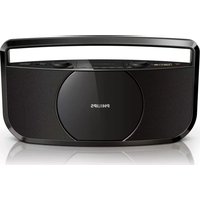
AZ1750 - Cd player/recorder PHILIPS - Free user manual and instructions
Find the device manual for free AZ1750 PHILIPS in PDF.


| Product Type | CD player/recorder with FM radio |
| Dimensions (W x H x D) | 380 x 200 x 93 mm |
| Net Weight | 1.5 kg |
| Power Supply | AC 100-240 V, 50-60 Hz, 0.35 A (adaptor Y12FE-090-0800G) or 6 x 1.5 V R14/UM2/C batteries |
| Supported Discs | CD-DA, CD-R, CD-RW (12 cm, 8 cm) |
| Audio DAC | 24 bits, 44.1 kHz |
| Frequency Response | 60 Hz - 16 kHz |
| Signal-to-Noise Ratio | > 62 dB (CD), > 50 dB (FM) |
| Total Harmonic Distortion | < 1% (CD), < 3% (FM) |
| Tuning Range | FM: 87.5 - 108 MHz |
| Playback Functions | Play, pause, stop, skip, search, repeat (1/all), shuffle, program (max 20 tracks) |
| Sound Enhancement | Dynamic Bass Boost (DBB) |
| External Input | MP3-LINK (3.5 mm jack) for external audio devices |
| Display | LCD screen for disc status |
| Antenna | FM telescopic antenna |
| Power Consumption | 5 W (operation) |
| Auto Standby | After 5 minutes of inactivity |
| Cabinet Cleaning | Soft cloth with mild detergent; avoid alcohol, ammonia, abrasives |
| Disc Cleaning | Clean from center outward with a soft cloth |
| Lens Cleaning | Use Philips CD lens cleaner or equivalent |
| Safety | Class 1 laser product; avoid exposure to beam; do not open casing |
| Environmental Compliance | RoHS, WEEE, battery directive |
Frequently Asked Questions - AZ1750 PHILIPS
User questions about AZ1750 PHILIPS
0 question about this device. Answer the ones you know or ask your own.
Ask a new question about this device
Download the instructions for your Cd player/recorder in PDF format for free! Find your manual AZ1750 - PHILIPS and take your electronic device back in hand. On this page are published all the documents necessary for the use of your device. AZ1750 by PHILIPS.
USER MANUAL AZ1750 PHILIPS
natural_image
Black Philips portable radio device with front panel and control buttons (no visible text or symbols on device body)EN User manual
1 Important
Safety
Read and understand all instructions before you use this CD sound machine. If any damage is caused by failure to follow the instructions, the warranty does not apply.
Risk of electric shock or fire!
- Never expose the product and accessories to rain or water. Never place liquid containers, such as vases, near the product. If liquids are spilt on or into the product, disconnect it from the power outlet immediately. Contact Philips Consumer Care to have the product checked before use.
- Never place the product and accessories near naked flames or other heat sources, including direct sunlight.
- Never insert objects into the ventilation slots or other openings on the product.
- Make sure that you always have easy access to the power adaptor to disconnect the product from the power outlet.
- Disconnect the product from the power outlet before lightning storms.
- When you disconnect the power adaptor, always pull the plug, never the cable.
Risk of short circuit or fire!
- Before you connect the product to the power outlet, make sure that the power voltage matches the value printed on the bottom of the product. Never connect the product to the power outlet if the voltage is different.
- Never expose the batteries to rain, water, sunshine, or excessive heat.
- Avoid force coming onto power plugs. Loose power plugs can cause arcing or fire.
Risk of injury or damage to the product!
• Visible and invisible laser radiation when open. Avoid exposure to beam.
- Do not touch the disc optical lens inside the disc compartment.
- Never place the product or any objects on power cords or on other electrical equipment.
- If the product is transported in temperatures below 5°C, unpack the product and wait until its temperature matches room temperature before connecting it to the power outlet.
Risk of overheating!
- Never install this product in a confined space. Always leave a space of at least four inches around the product for ventilation.
- Make sure that curtains or other objects never cover the ventilation slots on the product.
Risk of contamination!
- Remove batteries if they are exhausted or if the product is not to be used for an extended period of time.
- Batteries contain chemical substances, they should be disposed of properly.
Risk of swallowing batteries!
- The product may contain a coin type battery, which can be swallowed. Keep the battery out of reach of children at all times!
Risk of decreased battery life!
- Never use batteries of different brands or types at the same time.
- Never use new and old batteries at the same time.
Notice
Any changes or modifications made to this device that are not expressly approved by Philips Consumer Lifestyle may void the user's authority to operate the equipment.
Compliance
This product complies with the radio interference requirements of the European Community.
This apparatus includes this label:


Care of the environment
Your product is designed and manufactured with high quality materials and components, which can be recycled and reused.

When this crossed-out wheeled bin symbol is attached to a product it means that the product is covered by the European Directive 2002/96/EC.

Please inform yourself about the local separate collection system for electrical and electronic products.

Please act according to your local rules and do not dispose of your old products with your normal household waste. Correct disposal of your old product helps to prevent potential negative consequences for the environment and human health.
Your product contains batteries covered by the European Directive 2006/66/EC, which cannot be disposed with normal

household waste.Please inform yourself about the local rules on separate collection of batteries because correct disposal helps to prevent negative consequences for the environmental and human health.
Environmental information
All unnecessary packaging has been omitted. We have tried to make the packaging easy to separate into three materials: cardboard (box), polystyrene foam (buffer) and polyethylene (bags, protective foam sheet.) Your system consists of materials which can be recycled and reused if disassembled by a specialized company. Please observe the local regulations regarding the disposal of packaging materials, exhausted batteries and old equipment.
Copyright

The making of unauthorized copies of copy-protected material, including computer programs, files, broadcasts and sound recordings, may be an infringement of copyrights and constitute a criminal offence. This equipment should not be used for such purposes.
Specifications are subject to change without notice. Trademarks are the property of Koninklijke Philips Electronics N.V or their respective owners. Philips reserves the right to change products at any time without being obliged to adjust earlier supplies accordingly.

Note
- The type plate is located on the bottom of the CD sound machine.
2 Your CD sound machine
Congratulations on your purchase, and welcome to Philips! To fully benefit from the support that Philips offers, register your product at www.philips.com/welcome.
Introduction
With this product, you can:
• enjoy audio from discs and external devices
- listen to FM radio stations
You can enrich sound output with:
• Dynamic Bass Boost (DBB)
The product supports these media formats:


What's in the box
Check and identify the contents of the package:
- CD sound machine
• AC-DC power adaptor - MP3 link cable
- User Manual
Overview of the CD sound machine


① LCD screen
• Display the status of disc play.
②
• Turn on or off the CD sound machine.
③ TUNING
- Rotate to tune to an FM radio station.
④
- Press to open the cover of disc compartment.
⑤
- Press repeatedly to select a play mode: repeat the current track (→), repeat all tracks (→ALL), or play in sequence.
⑥
- Press to skip to the previous track.
- Press and hold to rewind a track.
⑦ ▶ II
• Start, pause, or resume disc play.
⑧ Disc compartment cover
⑨ VOLUME
- Rotate to adjust the volume level.
⑩ PROG
- Program tracks.
⑪ Source selector
- Slide to select a source: disc or FM radio.
⑫ DBB
- Press to enable or disable the DBB sound effect.
⑬
- Press to start or cancel shuffle play.
14
- Press to skip to the next track.
- Press and hold to search forward fast.
15
- Stop disc play.
⑯ FM antenna
⑰ Battery compartment cover
⑱ MP3-LINK
- Connect to the audio output socket (usually the headphone socket) of an external device.
⑲ DC 9V
- Connect to the AC-DC power adaptor.
3 Get started

Caution
- Use of controls or adjustments or performance of procedures other than herein may result in hazardous radiation exposure or other unsafe operation.
Always follow the instructions in this chapter in sequence.
Install batteries

Note
- You can use either batteries or AC power as power supply of the CD sound machine.
- No battery is packed with the accessories.

natural_image
Line drawing of a device front panel with buttons and an upward arrow indicator (no text or symbols)

1 Slide the cover of battery compartment downwards to remove it.
2 Insert six batteries (type: R-14, UM-2 or C-cells) with correct polarity (+/-) as indicated.
3 Fix the cover of battery compartment to the CD sound machine.
Connect power

natural_image
Line drawing of a device connected to a power outlet, showing internal components and wiring (no text or symbols)Connect the power adaptor to
• the DC 9V socket on the back of CD sound machine, and
• the power supply socket.

Tip
- To use batteries as the power supply, disconnect the power adaptor from the CD sound machine.
Turn on
Press ⏻
When the source selector is in the "CD" position, - is displayed.
Switch modes
Automatically switch the modes:
- After the CD sound machine keeps inactive for 5 minutes, it automatically switches to standby mode.
Manually switch the modes:
- Press ⏻ to switch the CD sound machine between working mode and standby mode.
Select a source
Slide the source selector to CD or FM.
- When an MP3 link cable is connected to the MP3-LINK socket, the system automatically switches the source to audio input through the MP3-LINK socket.
4 Play
Play CD
1 Slide the source selector to CD.
2 Press ▲ to eject the cover of disc compartment.
3 Load a disc with the printed side facing outwards.
4 Close the cover of disc compartment.
5 Press ▶to start play.
Control play
During play, follow the instructions below to control play.
Buttons Functions
| ▶II | Pause or resume play. |
| ■ | Stop play. |
| |◀◀/▶▶| | Skip to the previous/next track. |
| Press and hold to rewind a track or search forward fast within a track. | |
 | Select a play mode: repeat the current track (⇨repeat all tracks (⇨ALL), or play tracks in sequence. |
 | Start or cancel shuffle play. (unavailable for programmed tracks) |
Program tracks

Note
- You can program a maximum of 20 tracks.
- During programming, if no operation is made within 20 seconds, the system returns to stop mode without saving programmed tracks.
1 Press ■ to stop play.
2 Press PROG to activate the program mode.
→01 (the sequence number) flashes, and then PROG (program) and 00 blink.
3 Press ◀◀◀ / ▶to select a track.
4 Press PROG to program the selected track.
→ The sequence number flashes, and then PROG (program) and 00 blink.
5 Repeat steps 3 and 4 to program more tracks.
6 Press ▶to start playing the programmed tracks.
→ During play, PROG is displayed.
- To erase the program, press twice, eject the CD compartment cover, or switch to another source.
- To review the program, press once to stop play, and then press PROG repeatedly.
Listen to radio

Note
- For optimal reception, fully extend the FM antenna and adjust its position.
1 Slide the source selector to FM.
2 Rotate the TUNING knob to tune to an FM radio station.
Listen to an external device
You can use the CD sound machine as a speaker to amplify the audio input from an external device, for example, MP3 player.

1 Turn on the CD sound machine.
2 Connect the MP3 link cable to
• the MP3-LINK socket on the back of this CD sound machine, and
- the audio output socket (usually the headphone socket) on the external device.
3 Play the external device.

Note
- To play audio input from other sources, disconnect the MP3 link cable from the system.
5 Adjust sound
The following operations are applicable to all supported media.
Adjust the volume level
Rotate the -VOLUME + knob clockwise or anti-clockwise to increase or decrease the volume level.
Use the DBB sound effect
Press DBB to enable or disable dynamic bass boost.
→ If DBB is activated, DBB is displayed.
6 Product information

Note
- Product information is subject to change without prior notice.
Specifications
Disc
Laser type Semiconductor
Disc diameter 12 cm, 8 cm
Supported discs CD-DA, CD-R, CD-RW
Audio DAC 24 Bits, 44.1 kHz
Total harmonic distortion < 1%
Frequency response 60 Hz -16 kHz
S/N Ratio > 62 dB
Tuner
Tuning range FM: 87.5-108 MHz
Total harmonic distortion < 3%
Signal-to-noise ratio > 50 dB
General
AC power input 100-240 V\~, 50-60 Hz, 0.35 A
Output of AC-DC power adaptor 9 V = 800 mA
Model No. of AC-DC power adaptor Y12FE-090-0800G
Batteries 6 × 1.5 V=, R14/UM2/C cell
Operation power consumption 5 W
Dimensions (W × H × D) 380 × 200 × 93 mm
Net weight 1.5 kg
Gross weight 1.8 kg
Maintenance
Clean the cabinet
- Use a soft cloth slightly moistened with a mild detergent solution. Do not use a solution containing alcohol, spirits, ammonia or abrasives.
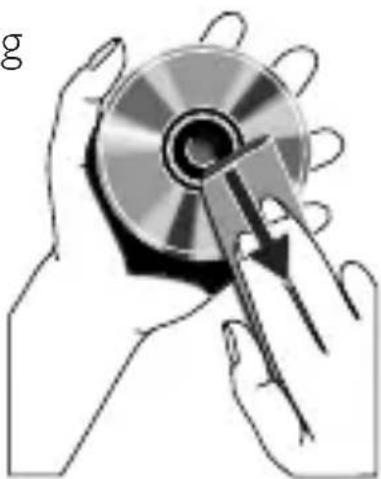
Clean discs
- When a disc becomes dirty, clean it with a cleaning cloth. Wipe the disc from the centre out.
- Do not use solvents such as benzene, thinner, commercially available cleaners, or antistatic spray intended for analogue records.
Clean the disc lens
- After prolonged use, dirt or dust may accumulate at the disc lens. To ensure good play quality, clean the disc lens with Philips CD lens cleaner or any commercially available cleaner. Follow the instructions supplied with cleaner.
natural_image
Illustration of hands holding a CD or DVD disc with a stylus, no text or symbols present7 Troubleshooting

Warning
- Never remove the casing of this apparatus.
To keep the warranty valid, never try to repair the product yourself. If you encounter problems when using this product, check the following points before requesting service. If the problem remains unsolved, go to the Philips Web page (www.philips.com/welcome). When you contact Philips, make sure that the product is nearby and the model number and serial number are available.
Write down the model number and serial number for record.
- Model number:
- Serial number:
Problem Solution
| No power. | Make sure that the power adaptor is securely connected to both the power supply and the CD sound machine. |
| Make sure that the power supply is available. | |
| Make sure that batteries are correctly inserted, and power adaptor is disconnected from the CD sound machine. | |
| No sound or poor sound. | Adjust the volume level. |
| To play audio input from a source other than MP3-LINK socket, disconnect the MP3 link cable. | |
| No response from the CD sound machine. | Disconnect and reconnect the power adaptor, and then turn on the CD sound machine again. |
| As a power-saving feature, the CD sound machine automatically switches to standby mode after it keeps inactive for 5 minutes. Press ⏻ to switch it back to working mode. | |
| No disc is detected. | Insert a disc. |
| Make sure that the printed side of the disc faces outwards. | |
| Wait until the moisture condensation at the lens is cleared. | |
| Replace or clean the disc. | |
| Use a finalized CD or a disc with supported format. | |
| Radio reception is poor. | Increase the distance between the CD sound machine and your TV or VCR. |
| Fully extend the FM antenna. | |
| Adjust the position of the FM antenna. | |
| Connect an outdoor FM antenna instead. |

All registered and unregistered trademarks are property of their respective owners.
All rights reserved.
AZ1750_12_UM_V1.0

natural_image
Recycling symbol composed of three chasing arrows forming a triangle (no text or labels)

- Important
- Safety
- Risk of electric shock or fire!
- Risk of short circuit or fire!
- Risk of injury or damage to the product!
- Risk of overheating!
- Risk of contamination!
- Risk of swallowing batteries!
- Risk of decreased battery life!
- Notice
- Compliance
- Care of the environment
- Environmental information
- Copyright
- Note
- Your CD sound machine
- Introduction
- What's in the box
- Overview of the CD sound machine
- ① LCD screen
- ②
- ③ TUNING
- ⑱ MP3-LINK
- ⑲ DC 9V
- Get started
- Caution
- Install batteries
- Connect power
- Tip
- Turn on
- Press ⏻
- Switch modes
- Automatically switch the modes:
- Manually switch the modes:
- Select a source
- Play
- Play CD
- Control play
- Program tracks
- Listen to radio
- Listen to an external device
- Adjust sound
- Adjust the volume level
- Use the DBB sound effect
- Product information
- Specifications
- Disc
- Tuner
- General
- Maintenance
- Clean the cabinet
- Clean discs
- Clean the disc lens
- Troubleshooting
- Warning
Brand : PHILIPS
Model : AZ1750
Category : Cd player/recorder