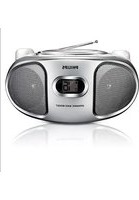
AZ102S - Cd player/recorder PHILIPS - Free user manual and instructions
Find the device manual for free AZ102S PHILIPS in PDF.


| Brand | Philips |
| Model | AZ102S |
| Product Type | CD Player/Recorder with Radio |
| Dimensions (W x H x D) | 290 x 143 x 240 mm |
| Weight | 1.62 kg |
| Power Consumption | ≤ 15 W |
| Power Supply | AC mains or 6 x 1.5V R-14/UM-2/C-cells batteries (not included) |
| Radio Bands | FM, AM |
| CD Compatibility | Audio CD, CD-R, CD-RW (not MP3, CD-ROM, etc.) |
| Playback Modes | Normal, Program (up to 20 tracks), Repeat (track/disc), Shuffle |
| Sound Adjustment | Volume control, DBB (Dynamic Bass Boost) |
| Line-in | 3.5mm input for external audio source |
| Antenna | Telescopic for FM, built-in for AM |
| Display | CD functions display |
| Accessories Included | AC power cord |
| Safety Class | Class 1 Laser Product, double insulation |
| Cleaning | Clean with dry cloth only; do not use alcohol, ammonia, benzene, or abrasives |
| Regulatory Compliance | FCC Part 15, Class B; ICES-003; 21 CFR 1040.10 |
| Warranty | 1 year limited warranty |
| Registration | Register at www.philips.com/welcome |
Frequently Asked Questions - AZ102S PHILIPS
User questions about AZ102S PHILIPS
0 question about this device. Answer the ones you know or ask your own.
Ask a new question about this device
Download the instructions for your Cd player/recorder in PDF format for free! Find your manual AZ102S - PHILIPS and take your electronic device back in hand. On this page are published all the documents necessary for the use of your device. AZ102S by PHILIPS.
USER MANUAL AZ102S PHILIPS
Register your product and get support at
www.philips.com/welcome

Thank you for choosing Philips.
Need help fast?
Read your Quick Start Guide and/or
User Manual first for quick tips that make using your Philips product more enjoyable.
If you have read your instructions and still need assistance,
you may access our online help at
www.philips.com/welcome or call
I-888-PHILIPS (744-5477)
while with your product.
(and Model / Serial number)

I-888-PHILIPS (744-5477) (English speaking)
natural_image
Simple geometric diagram with a circle and two horizontal black shapes inside (no text or symbols)7
4
8
5
natural_image
Diagram showing sunlight passing through a cloud and a barrier, with no text or symbols present.6

natural_image
Illustration of a hand holding a small object with an 'X' mark, no text or symbols present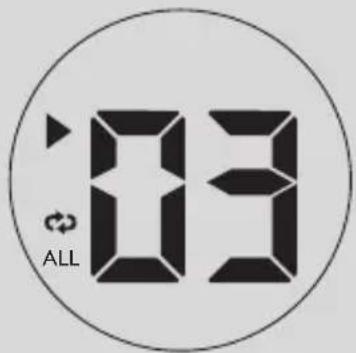

natural_image
Illustration of a hand pressing a circular button with a finger, no text or symbols presentThis product complies with the FCC-Rules, Part 15 and with 21 CFR 1040.10.
Operation is subject to the following two conditions:
- This device may not cause harmful interference, and
- This device must accept any interference received, including interference that may cause undesired operation.
Canada
English:
This digital apparatus does not exceed the Class B limits for radio noise emissions from digital apparatus as set out in the Radio Interference Regulations of the Canadian Department of Communications. This Class B digital apparatus complies with Canadian ICES-003.
Français:
Return your Product Registration Card or register online at www.philips.com/welcome today to get the very most from your purchase.
Registering your model with PHILIPS makes you eligible for all of the valuable benefits listed below, so don't miss out. Complete and return your Product Registration Card at once, or register online at www.philips.com/welcome to ensure:
\*Proof of Purchase
Returning the enclosed card guarantees that your date of purchase will be on file, so no additional paperwork will be required from you to obtain warranty service.
\*Product Safety Notification
By registering your product, you'll receive notification - directly from the manufacturer - in the rare case of a product recall or safety defect.
\*Additional Benefits
Registering your product guarantees that you'll receive all of the privileges to which you're entitled, including special money-saving offers.
PHILIPS
Congratulations on your purchase, and welcome to the "family!"
Dear PHILIPS product owner:
Thank you for your confidence in PHILIPS. You've selected one of the best-built, best-backed products available today. We'll do everything in our power to keep you happy with your purchase for many years to come. As a member of the PHILIPS "family," you're entitled to protection by one of the most comprehensive warranties and outstanding service networks in the industry. What's more, your purchase guarantees you'll receive all the information and special offers for which you qualify, plus easy access to accessories from our convenient home shopping network.
Most importantly, you can count on our uncompromising commitment to your total satisfaction.
All of this is our way of saying welcome - and thanks for investing in a PHILIPS product.
P.S. To get the most from your PHILIPS purchase, be sure to complete and return your Product Registration Card at once, or register online at:
www.philips.com/welcome
Know these
safety symbols
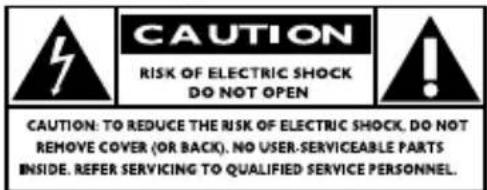
This "bolt of lightning" indicates uninsulated material within your unit may cause an electrical shock. For the safety of everyone in your household, please do not remove product covering.
The “exclamation point” calls attention to features for which you should read the enclosed literature closely to prevent operating and maintenance problems.
WARNING: To reduce the risk of fire or electric shock, this apparatus should not be exposed to rain or moisture and objects filled with liquids, such as vases, should not be placed on this apparatus.
CAUTION: To prevent electric shock, match wide blade of plug to wide slot, fully insert.
Enter below the Serial No. which is located on the rear of the cabinet. Retain this information for future reference.
Model No. ____
Serial No. ____
PHILIPS LIMITED WARRANTY ONE (1) YEAR
WARRANTY COVERAGE:
PHILIPS warranty obligation is limited to the terms set forth below.
WHO IS COVERED:
Philips warrants the product to the original purchaser or the person receiving the product as a gift against defects in materials and workmanship as based on the date of original purchase ("Warranty Period") from an Authorized Dealer. The original sales receipt showing the product name and the purchase date from an authorized retailer is considered such proof.
WHAT IS COVERED:
The Philips warranty covers new products if a defect in material or workmanship occurs and a valid claim is received by Philips within the Warranty Period. At its option, Philips will either (1) repair the product at no charge, using new or refurbished replacement parts, or (2) exchange the product with a product that is new or which has been manufactured from new, or serviceable used parts and is at least functionally equivalent or most comparable to the original product in Philips current inventory, or (3) refund the original purchase price of the product. Philips warrants replacement products or parts provided under this warranty against defects in materials and workmanship from the date of the replacement or repair for ninety (90) days or for the remaining portion of the original product's warranty, whichever provides longer coverage for you. When a product or part is exchanged, any replacement item becomes your property and the replaced item becomes Philips' property. When a refund is given, your product becomes Philips' property.
Note: Any product sold and identified as refurbished or renewed carries a ninety (90) day limited warranty.
Replacement product can only be sent if all warranty requirements are met. Failure to follow all requirements can result in delay.
WHAT IS NOT COVERED - EXCLUSIONS AND LIMITATIONS:
This Limited Warranty applies only to the new products manufactured by or for Philips that can be identified by the trademark, trade name, or logo affixed to it. This Limited Warranty does not apply to any non-Philips hardware product or any software, even if packaged or sold with the product. Non-Philips manufacturers, suppliers, or publishers may provide a separate warranty for their own products packaged with the bundled product.
Philips is not liable for any damage to or loss of any programs, data, or other information stored on any media contained within the product, or any non-Philips product or part not covered by this warranty. Recovery or reinstallation of programs, data or other information is not covered under this Limited Warranty.
This warranty does not apply (a) to damage caused by accident, abuse, misuse, neglect, misapplication, or non-Philips product, (b) to damage caused by service performed by anyone other than Philips or Philips Authorized Service Location, (c) to a product or a part that has been modified without the written permission of Philips, or (d) if any Philips serial number has been removed or defaced, or (e) product, accessories or consumables sold "AS IS" without warranty of any kind by including refurbished Philips product sold "AS IS" by some retailers.
This Limited Warranty does not cover:
• Shipping charges to return defective product to Philips.
- Labor charges for installation or setup of the product, adjustment of customer controls on the product, and installation or repair of antenna/signal source systems outside of the product.
- Product repair and/or part replacement because of improper installation or maintenance, connections to improper voltage supply, power line surge, lightning damage, retained images or screen markings resulting from viewing fixed stationary content for extended periods, product cosmetic appearance items due to normal wear and tear, unauthorized repair or other cause not within the control of Philips.
- Damage or claims for products not being available for use, or for lost data or lost software.
- Damage from mishandled shipments or transit accidents when returning product to Philips.
- A product that requires modification or adaptation to enable it to operate in any country other than the country for which it was designed, manufactured, approved and/or authorized, or repair of products damaged by these modifications.
• A product used for commercial or institutional purposes (including but not limited to rental purposes).
- Product lost in shipment and no signature verification receipt can be provided.
- Failure to operate per Owner's Manual.
TO OBTAIN ASSISTANCE IN THE U.S.A., PUERTO RICO, OR U.S. VIRGIN ISLANDS...
Contact Philips Customer Care Center at: 1-888-PHILIPS (1-888-744-5477)
TO OBTAIN ASSISTANCE IN CANADA...
1-800-661-6162 (French Speaking) 1-888-PHILIPS (1-888-744-5477) - (English or Spanish Speaking)
REPAIR OR REPLACEMENT AS PROVIDED UNDER THIS WARRANTY IS THE EXCLUSIVE REMEDY FOR THE CONSUMER. PHILIPS SHALL NOT BE LIABLE FOR ANY INCIDENTAL OR CONSEQUENTIAL DAMAGES FOR BREACH OF ANY EXPRESS OR IMPLIED WARRANTY ON THIS PRODUCT. EXCEPT TO THE EXTENT PROHIBITED BY APPLICABLE LAW, ANY IMPLIED WARRANTY OF MERCHANTABILITY OR FITNESS FOR A PARTICULAR PURPOSE ON THIS PRODUCT IS LIMITED IN DURATION TO THE DURATION OF THIS WARRANTY.
Some states do not allow the exclusions or limitation of incidental or consequential damages, or allow limitations on how long an implied warranty lasts, so the above limitations or exclusions may not apply to you.
This warranty gives you specific legal rights. You may have other rights which vary from state/province to state/province.
- Read these instructions.
- Keep these instructions.
- Heed all warnings.
- Follow all instructions.
- Do not use this apparatus near water.
- Clean only with dry cloth.
- Do not block any ventilation openings. Install in accordance with the manufacturer's instructions.
-
Do not install near any heat sources such as radiators, heat registers, stoves, or other apparatus (including amplifiers) that produce heat.
-
Do not defeat the safety
purpose of the polarized or
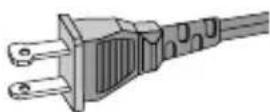
AC Polarized Plug
grounding-type plug. A polarized plug has two blades with one wider than the other. A grounding type plug has two blades and a third grounding prong. The wide blade or the third prong are provided for your safety. If the provided plug does not fit into your outlet, consult an electrician for replacement of the obsolete outlet.
-
Protect the power cord from being walked on or pinched, particularly at plugs, convenience receptacles, and the point where they exit from the apparatus.
-
Only use attachments/accessories specified by the manufacturer:
12.

Use only with the cart, stand tripod, bracket, or table specified by the manufacturer or sold with the apparatus. When a cart is used, use caution when moving the cart /apparatus combination to avoid injury from tip-over:
- Unplug this apparatus during lightning storms or when unused for long periods of time.
-
Refer all servicing to qualified service personnel. Servicing is required when the apparatus has been damaged in any way, such as power-supply cord or plug is damaged, liquid has been spilled or objects have fallen into the apparatus, the apparatus has been exposed to rain or moisture, does not operate normally, or has been dropped.
-
Where the MAINS plug or an appliance coupler is used as the disconnet device, the disconnet device shall remain readily operable.
-
Battery usage CAUTION – To prevent battery leakage which may result in bodily injury, property damage, or damage to the unit:
Install all batteries correctly, + and - as marked on the unit.
Do not mix batteries (old and new or carbon and alkaline, etc.).
Remove batteries when the unit is not used for a long time.
-
Apparatus shall not be exposed to dripping or splashing.
-
Do not place any sources of danger on the apparatus (e.g. liquid filled objects, lighted candles).
-
This product may contain lead and mercury. Disposal of these materials may be regulated due to environment considerations.
For disposal or recycling information, please contact your local authorities or the Electronic Industries Alliance: www.eiae.org.
EL 6475-S004: 03/12
Class II equipment symbol

This symbol indicates that the unit has a double insulation system
Congratulations on your purchase and welcome to Philips!
To fully benefit from the support that Philips offers, register your product at www.philips.com/welcome.
Supplied Accessories
- AC power cord
Top/front panels (See 1)
① VOLUME – adjusts volume level.
② SHUFFLE – plays all tracks in random order
③ REPEAT – repeats a track/
CD program/entire CD.
④ ▶ II – starts or pause CD playback
▶▶ ◀◀ — selects the next/previous track
— searches forwards/backwards (press and hold the button) within the current track
■ – stops CD playback;
– erases a CD program
⑤ PROG
– programs tracks and reviews the program
⑥ LIFT TO OPEN
- opens/closes the CD door.
⑦ TUNING – tunes to radio stations
⑧ Display – shows the CD functions
Back/bottom panel (See 1 and 2)
⑨ Source selector: CD, FM, AM, OFF
- selects CD or radio source of sound
- power off switch
⑩ Telescopic antenna
- improves FM reception.
⑪ AC MAINS\~ - inlet for power cord.
⑫ DBB – turns the bass enhancement on/off.
⑬ LINE-IN – inlet for external audio source.
⑭ Battery door
- Press on the arrow and push to insert 6 × 1.5V R-14/ UM-2/ C-cells.
CAUTION
- Use of controls or adjustments or performance of procedures other than those specified herein may result in hazardous radiation exposure.
- (Invisible) Laser Radiation when open. DO NOT STARE INTO BEAM.
- Use of controls or adjustments or performance of procedures other than herein may result in unsafe operation.
- Visible and invisible laser radiation. If the cover is open, do not look at the beam.
- High voltage! Do not open. You run the risk of getting an electric shock. The machine does not contain any user-serviceable parts.
- Modification of the product could result in hazardous radiation of EMC or other unsafe operation.
Power Supply
Whenever convenient, use the power supply cord if you want to conserve battery life. Make sure you remove the plug from the set and wall outlet before inserting batteries.
Batteries (not included)
1 Open the battery door and insert 6 batteries, type R-14, UM-2 or C-cells, (preferably alkaline) with the correct polarity as indicated by the "+" and "-" symbols inside the compartment.
2 Replace the battery door, making sure the batteries are firmly and correctly in place. The set is now ready to operate.
Batteries contain chemical substances, so they should be disposed of properly.
- Incorrect use of batteries can cause electrolyte leakage and will corrode the compartment or cause the batteries to burst:
- Do not mix battery types: e.g. alkaline with carbon zinc. Only use batteries of the same type for the set.
- When inserting new batteries, do not try to mix old batteries with the new ones.
- Remove the batteries if the set is not to be used for a long time.
- Perchlorate Material-special handling may apply. See www.dtsc.ca.gov/hazardouswaste/perchlorate.
Using AC power
WARNING: Always check you have completely switched off the set, before you change or disconnect power supply.
1 Check if the power voltage, as shown on the type plate located on the bottom of the set, corresponds to your local power supply. If it does not, consult your dealer or service center.
2 Connect the power cord to the AC
MAINS\~ inlet and the wall socket. The set is now connected and ready for use.
3 To switch the set off completely, withdraw the power cord from the wall socket.
4 Install the unit near the AC outlet and where the AC power plug can be easily reached.
- Disconnect the power cord from the wall socket to protect your set during heavy thunderstorms. Children could seriously injure themselves as the free end of the cable may still be live if only the connector is removed from the MAINS socket at the back of the unit.
The type plate is located on the bottom of the set.
Helpful hints:
- To avoid unnecessary energy consumption, always adjust the Source selector to OFF after using the set.
General operation
Switching on and off and selecting the function
1 To select your sound source, adjust the Source selector to: CD, FM or AM.
2 To switch off the set, adjust the Source selector to OFF position.
3 To switch to LINE IN mode, connect an external audio source to the LINE-IN inlet.
Helpful hints:
- The set switches to LINE IN mode automatically when an external audio source is connected, no matter the set is in CD, FM or AM mode.
• The LINE-IN inlet is not for earphones.
Adjusting volume and sound
Adjust the sound with the VOLUME and DBB controls.
Radio reception
1 Adjust the Source selector to FM or AM.
2 Turn TUNING to tune to a station.
Helpful hints:
To improve radio reception
- For FM, extend, incline and turn the telescopic antenna for best reception. Reduce its length if the signal is too strong.
- For AM, the set uses a built-in antenna. Direct this antenna for best reception by turning the whole set.
Playing a CD
- This CD player plays Audio Discs including CD-Recordables (CD-R) and CD-Rewritables (CD-RW).
- MP3, CD-ROM, CD-I, CDV,VCD, DVD or computer CDs are not possible for playback.
IMPORTANT!
CDs encoded with copyright protection technologies by some record companies may be unplayable by this product.
1 Adjust the Source selector to CD.
2 Open the CD door, and insert a CD with the printed side facing up, then press the CD door gently to close.
→ Display shows --, and later the total number of tracks. (See 3)
3 Press ▶II to start playback.
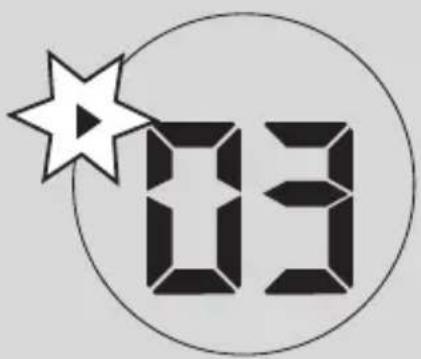
4 To pause playback, press ▶II.
→ Display: ▶ flashes. (See 4)
5 To resume, press ▶ again.
6 To stop CD playback, press ■.
Helpful hints:
CD play will also stop when:
- you open the CD door;
— you select FM, AM or OFF sound source; - the CD has reached the end.
Selecting a different track
- Press ◀◀/▶ once or repeatedly until the desired track number appears in the display.
- In the pause/stop position, press ▶II to start playback.
Finding a passage within a track
1 During playback, press and hold ◀◀ or ▶▶.
→ The CD is played at high speed and with reduced volume.
2 When you recognize the passage you want, release ◀◀ or ▶▶ to resume normal playback.
Helpful hints:
— When your searching reaches the end of the last track, the CD goes to stop mode.
Programming track numbers
You may store up to 20 tracks in the desired sequence. If you like, store any track more than once.
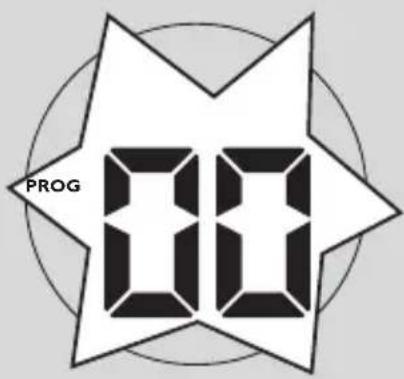
1 In the stop position, press PROG to activate programming.
→ Display: PROG and 00 flash. (See 5)
2 Press ◀◀ or ▶▶ to select your desired track number.
3 Press PROG to store the desired track number.
→ Display: PROG and 80 flash for you to program the next track..
4 Repeat steps 2 to 3 to select and store all desired tracks in this way.
→ If you attempt to store more than 20 tracks, no track can be selected and the display shows - - - -
5 To play your program, press ▶/II.
Helpful hints :
- When playback of your program comes to the stop position, your set will return to normal playback. To re-enter program mode, press PROG in the stop position.
Reviewing the program
In the stop position, press PROG repeatedly to see your stored tracks.
Erasing a program
You can erase the contents of the memory by:
- in the stop position, press PROG to enter program mode, and then press ■.
- selecting FM, AM or OFF;
- opening the CD door;
Different play modes: REPEAT. and SHUFFLE (See 6, 7)
REPEAT
You can play the current track or the whole disc repeatedly, and combine REPEAT modes with PROG (PROGRAM).
REP – plays the current track continuously. REP ALL – repeats the entire CD/program
1 To select play mode, press REPEAT once or more.
→ The display shows REP icon or REP ALL icon.
2 Press ▶II to start playback if in the stop/pause position.
3 To return to normal playback, press REPEAT repeatedly until the modes are no longer displayed.
- You can also press ■ to cancel your play mode.
SHUFFLE
You can play all the tracks in random order.
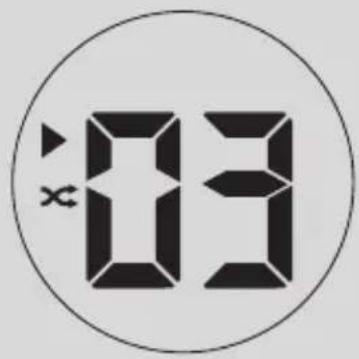
1 In the stop position, press SHUFFLE to switch on shuffle play.
→ Display shows SHUFFLE icon.
2 To switch off shuffle play, press ■.
Helpful hints:
- During the shuffle play, when REP function is selected, it will play the current shuffled track repeatedly, or when the REP ALL function is selected, it will repeat the shuffle play of the entire CD.
CD player and CD handling
- If the CD player cannot read CDs correctly, use a cleaning CD to clean the lens before taking the set to repair.
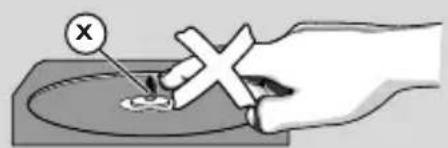
- The lens of the CD player should never be touched!
- Sudden changes in the surrounding temperature can cause condensation on the lens of your CD player. Playing a CD is then not possible. Do not attempt to clean the lens but leave the set in a warm environment until the moisture evaporates.
- A lways close the CD door to avoid dust on the lens.
- T o clean the CD, wipe in a straight line from the center towards the edge using a soft, lint-free cloth. Do not use cleaning agents as they may damage the disc.
- Never write on a CD or attach any stickers to it.
Safety information
- Place the set on a flat, hard and stable surface so that the system does not tilt.
- Where the MAINS plug or an appliance coupler is used as the disconnect device, the disconnect device shall remain readily operable.
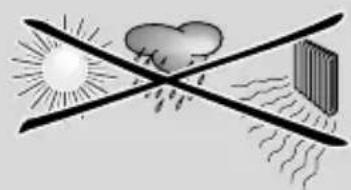
- Do not expose the set, batteries, CDs to humidity, rain, sand or excessive heat caused by heating equipment or direct sunlight.
- The apparatus shall not be exposed to dripping or splashing.
- Adequate ventilation with a minimum gap of 15cm (6 inches) between the ventilation holes and surrounding surfaces is necessary to prevent heat build-up.
- Do not cover the ventilation openings with items such as newspapers, table-cloths, curtains, etc.
- No objects filled with liquids, such as vases, shall be placed on the apparatus.
- No naked flame sources, such as lighted candles, should be placed on the apparatus.
- The mechanical parts of the set contain self-lubricating bearings and must not be oiled or lubricated.
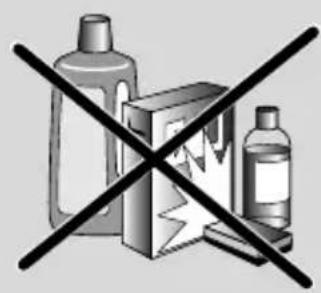
- To clean the set, use a dry cloth. Do not use any cleaning agents containing alcohol, ammonia, benzene or abrasives as these may harm the housing.
- Batteries (battery pack or batteries installed) shall not be exposed to excessive heat such as sunshine, fire or the like.
If a fault occurs, first check the points listed below before taking the set for repair.
If you are unable to remedy a problem by following these hints, consult your dealer or service centre.
WARNING:
Do not open the set as there is a risk of electric shock. Under no circumstances should you try to repair the set yourself, as this will invalidate the guarantee.
Problem
- Possible cause
- Remedy
No sound /power
- Volume not adjusted
- Adjust the VOLUME
— Power cord not securely connected - Connect the AC power cord properly
— Batteries dead/ incorrectly inserted - Insert (fresh) batteries correctly
- CD contains non-audio files
- Press ◀◀, ▶▶ once or more to skip to a CD audio track, instead of the data file.
Display does not function properly / No reaction to operation of any of the controls
- Electrostatic discharge
- Switch off and unplug the set. Reconnect after a few seconds
- No CD inserted
- Insert a CD
- CD badly scratched or dirty
- Replace/ clean CD, see Maintenance
— Laser lens steamed up - Wait until lens has cleared
- CD-R/CD-RW is blank or not finalized
- Use a finalized CD-R/CD-RW or suitable CD Audio disc only
Note:
Make sure the CD is not encoded with copyright protection technologies, as some do not conform to the Compact Disc standard.
The CD skips tracks
- CD damaged or dirty
- Replace or clean CD
- Program/shuffle is active
- Quit program/shuffle mode
Note: A CD badly scratch or dirty may result in improper operation.
Environmental information
All unnecessary packaging material has been omitted. The packaging can be easily separated into three materials: cardboard, polystyrene and plastic.
Your set consists of materials which can be recycled if disassembled by a specialized company. Please observe the local regulations regarding the disposal of packaging, dead batteries and old equipment.
Your product is designed and manufactured with high quality materials and components, which can be recycled and reused.
Never dispose of your product with other household waste. Please inform yourself about the local rules on the separate collection of electrical and electronic products and batteries. The correct disposal of these products helps prevent potentially negative consequences on the environment and human health.
Your product contains batteries, which cannot be disposed of with normal household waste. Please inform yourself about the local rules on separate collection of batteries. The correct disposal of batteries helps prevent potentially negative consequences on the environment and human health.
Please visit www.recycle.philips.com for additional information on a recycling center in your area.
Removal of the built-in battery invalidates the warranty and may destroy the product.
Specifications
Power consumption....≤ 15W
Dimensions.....290 × 143 × 240 (mm)
Weight....1,62 kg
Philips Consumer Lifestyle
A division of Philips Electronics North America Corporation
P.O. Box 10313
Stamford, CT 06904
Phone: 1-888-PHILIPS (744-5477)
Meet Philips at the Internet http://www.philips.com/welcome

natural_image
Recycling symbol composed of three chasing arrows forming a triangle (no text or labels)AZ102C
AZ102S
AZ102N
CLASS 1 LASER PRODUCT


- Need help fast?
- Canada
- English:
- Français:
- Return your Product Registration Card or register online at www.philips.com/welcome today to get the very most from your purchase.
- \*Proof of Purchase
- \*Product Safety Notification
- \*Additional Benefits
- PHILIPS
- Congratulations on your purchase, and welcome to the "family!"
- Dear PHILIPS product owner:
- P.S. To get the most from your PHILIPS purchase, be sure to complete and return your Product Registration Card at once, or register online at:
- PHILIPS LIMITED WARRANTY ONE (1) YEAR
- WARRANTY COVERAGE:
- WHO IS COVERED:
- WHAT IS COVERED:
- WHAT IS NOT COVERED - EXCLUSIONS AND LIMITATIONS:
- This Limited Warranty does not cover:
- TO OBTAIN ASSISTANCE IN THE U.S.A., PUERTO RICO, OR U.S. VIRGIN ISLANDS...
- TO OBTAIN ASSISTANCE IN CANADA...
- Supplied Accessories
- Top/front panels (See 1)
- Back/bottom panel (See 1 and 2)
- CAUTION
- Power Supply
- Batteries (not included)
- Batteries contain chemical substances, so they should be disposed of properly.
- Using AC power
- The type plate is located on the bottom of the set.
- Helpful hints:
- General operation
- Switching on and off and selecting the function
- Adjusting volume and sound
- Radio reception
- To improve radio reception
- Playing a CD
- IMPORTANT!
- Selecting a different track
- Finding a passage within a track
- Programming track numbers
- Helpful hints :
- Reviewing the program
- Erasing a program
- Different play modes: REPEAT. and SHUFFLE (See 6, 7)
- REPEAT
- SHUFFLE
- CD player and CD handling
- Safety information
- WARNING:
- Problem
- No sound /power
- Display does not function properly / No reaction to operation of any of the controls
- Note:
- The CD skips tracks
- Environmental information
- Specifications
- Philips Consumer Lifestyle
- A division of Philips Electronics North America Corporation
- P.O. Box 10313
Brand : PHILIPS
Model : AZ102S
Category : Cd player/recorder