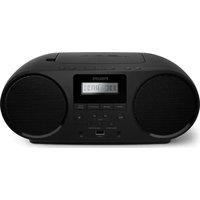
AZ1834 - Cd player/recorder PHILIPS - Free user manual and instructions
Find the device manual for free AZ1834 PHILIPS in PDF.


Pick your language and provide your email: we'll send you a specifically translated version.
| Brand | Philips |
| Model | AZ1834 |
| Product type | Portable CD player/recorder with FM/AM radio and cassette recorder |
| Dimensions | 430 mm (W) x 240 mm (H) x 190 mm (D) |
| Weight | 2.8 kg |
| Power supply | Mains 220-240 V, 50/60 Hz; Batteries: 6 x 1.5 V, type R20 |
| Power consumption | 18 W |
| Main functions | Audio CD playback, FM/AM radio, cassette recording and playback |
| FM/AM tuner | FM: 87.5 - 108 MHz; AM: 530 - 1600 kHz |
| Output power | 2 x 2 W RMS |
| Speakers | 2 broadband speakers, 10 cm |
| Connectivity | 3.5 mm headphone jack, audio input jack |
| Disc support | CD audio, CD-R, CD-RW |
| Display | LCD screen with backlight |
| Care and cleaning | Clean with a soft, dry cloth |
| Safety | Do not use near a heat source or water |
| Spare parts and repairability | For any repair, contact an authorized Philips service center |
| General information | Device intended for household use only |
Frequently Asked Questions - AZ1834 PHILIPS
How to turn on the Philips AZ1834?
Connect the device to the mains supply or insert 6 R20 batteries. Press the STANDBY button on the front panel to turn on the device. The LCD screen light comes on.
How to play a CD?
Open the CD player lid, place a disc with the printed side facing up, close the lid, then press PLAY/PAUSE. The display shows the current track.
How to tune the radio?
Press the MODE button to select the FM or AM band. Use the TUNING knob to tune to a station. Reception is optimized with the telescopic antenna extended.
How to record to a cassette?
Insert a blank cassette, select the source (CD, radio) and press REC and PLAY simultaneously. To stop, press STOP/EJECT.
How to clean the playback head?
Use a laser lens cleaning disc or a cotton swab moistened with isopropyl alcohol to clean the lens. Caution: disconnect the device from the mains before this operation.
What to do if the CD skips?
Check that the disc is not scratched or dirty. Clean it with a soft cloth from the center to the edge. Make sure the device is placed on a stable surface.
How to use the headphone jack?
Plug a 3.5 mm stereo headset into the PHONES jack. The speaker output is automatically cut off.
How to replace the batteries?
Open the battery compartment on the back of the device, remove the old batteries and insert new R20 batteries respecting the indicated polarity (+/-).
How to record a CD to a cassette?
Insert a CD and a cassette. Select the CD as the source using MODE, then press REC and PLAY. The tape recorder records the CD track being played.
The device no longer turns on, what to do?
Check the mains connection or the condition of the batteries. Check the fuse of the power cable. If the problem persists, contact the Philips after-sales service.
User questions about AZ1834 PHILIPS
0 question about this device. Answer the ones you know or ask your own.
Ask a new question about this device
No questions yet. Be the first to ask one.
Download the instructions for your Cd player/recorder in PDF format for free! Find your manual AZ1834 - PHILIPS and take your electronic device back in hand. On this page are published all the documents necessary for the use of your device. AZ1834 by PHILIPS.
USER MANUAL AZ1834 PHILIPS
KO 사용 설명서