M5 Pack - Watch SUUNTO - Free user manual and instructions
Find the device manual for free M5 Pack SUUNTO in PDF.


User questions about M5 Pack SUUNTO
0 question about this device. Answer the ones you know or ask your own.
Ask a new question about this device
Download the instructions for your Watch in PDF format for free! Find your manual M5 Pack - SUUNTO and take your electronic device back in hand. On this page are published all the documents necessary for the use of your device. M5 Pack by SUUNTO.
USER MANUAL M5 Pack SUUNTO
Types of safety precautions: 5
Safety precautions: 5
2 Welcome 7
3 Display icons and segments 9
4 Using buttons 10
5 Getting started 11
5.1 Estimating your fitness level 12
6 Using backlight and button lock 14
7 Putting on HR belt 15
8 Starting exercise 16
8.1 Troubleshooting: No HR signal 17
9 During exercise 18
9.1 During guided exercise 19
10 Weekly exercise program example: from poor to excellent level ..... 21
11 After exercise 22
11.1 After exercise with HR 22
11.2 After exercise without HR 23
11.3 Recovery rate 24
12 Rest HR and fitness test 26
12.1 Testing your fitness level 26
12.2 Testing your rest HR 27
13 Reviewing plans and history 29
13.1 Exercise plan 30
13.2 History & trend 30
13.3 Previous exercise 31
14 Adjusting settings 32
Time and personal settings 32
Target type 33
General settings 33
Pairing 34
14.1 Sleep mode and initial settings 34
14.2 Changing language 35
15 Connecting to web 36
16 Pairing POD/HR belt 37
16.1 Troubleshooting 38
17 Care and maintenance 39
17.1 Replacing battery 39
17.2 Replacing HR belt battery 41
18 Specifications 42
18.1 Technical specifications 42
18.2 Trademark 43
18.3 FCC compliance 43
18.4 CE 44
18.5 ICES 44
18.6 Copyright 44
18.7 Patent notice 44
19 Warranty 45
Warranty Period 45
Exclusions and Limitations 45
Access to Suunto warranty service 46
Limitation of Liability 46
1 SAFETY
en
Types of safety precautions:
⚠ WARNING: - is used in connection with a procedure or situation that may result in serious injury or death.
CAUTION: - is used in connection with a procedure or situation that will result in damage to the product.
NOTE: - is used to emphasize important information.
Safety precautions:
WARNING: ALLERGIC REACTIONS OR SKIN IRRITATIONS MAY OCCUR WHEN PRODUCT IS IN CONTACT WITH SKIN, EVEN THOUGH OUR PRODUCTS COMPLY WITH INDUSTRY STANDARDS. IN SUCH EVENT, STOP USE IMMEDIATELY AND CONSULT A DOCTOR.
WARNING: ALWAYS CONSULT YOUR DOCTOR BEFORE BEGINNING AN EXERCISE PROGRAM. OVEREXERTION MAY CAUSE SERIOUS INJURY.
CAUTION: DO NOT APPLY SOLVENT OF ANY KIND.
CAUTION: DO NOT APPLY INSECT REPELLENT.
CAUTION: TREAT AS ELECTRONIC WASTE.
CAUTION: DO NOT KNOCK OR DROP.
2 WELCOME
Thank you for choosing Suunto M5 heart rate monitor!
Suunto M5 heart rate monitor is your multi-sport fitness and recovery partner. Set your exercise targets and Suunto M5 provides an ideal daily workout schedule to help you achieve them. Depending on your progress, training routines or if you miss a session, Suunto M5 automatically adapts your program, in real time, providing smart fitness guidance before, during and after training. Or tells you if it's time to rest. So, whether you're exercising at home, out running, cycling or hitting the gym, you can just free your mind and enjoy your workouts.
Suunto M5 key features are designed to make your exercise as efficient as possible:
- easy to use with three buttons, big display and nine language options
- start-up fitness test
- three personal targets to choose from: improving fitness, weight management or free training
- automatically adapting training program for the next seven days, based on your personal fitness data
- instructions during workout guiding when to work harder or ease down
- next workout suggestion showing ideal duration and intensity
- recovery time
• heart rate and calories burnt
• exercise summaries
• motivating feedback -
comfortable heart rate belt that is compatible with most gym cardio equipment and Suunto Fitness Solution
-
speed and distance information with optional Suunto Foot, GPS, or Bike PODs
- personal exercise program download to your Suunto M5 from Movescount.com with an optional Suunto Movestick
This User Guide is here to help you get the most out of your exercise with Suunto M5. Read it through to make using your new Suunto M5 even more enjoyable.
Your exercise does not have to stop when your workout ends. Continue your fitness experience online and get even more out of every move at Movescount.com. With an optional Suunto Movestick you can connect your Suunto M5 to Movescount.com, upload training logs, share your progress with friends and exchange emotions and thoughts. You can also download a training program straight to your Suunto M5. Check out Movescount.com today and sign up. Get motivated and start having fun. Because that's what fitness is all about.

NOTE: Be sure to register your device at www.suunto.com/register to get the range of Suunto support.
3 DISPLAY ICONS AND SEGMENTS
en

text_image
lb7kg weight update reminder daily target reached alarm value setting button reference sounds off 12 h time button lock button reference value setting exercise progress indicators battery low information field SUUNTO4 USING BUTTONS
text_image
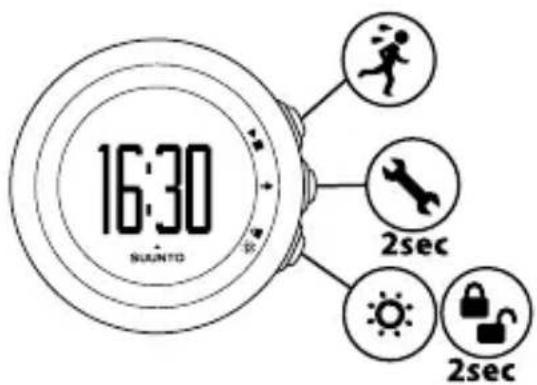
16:30 SUNTO 2sec 2secBy pressing the following buttons, you can access the following features:
▶■(PLAY/STOP):
- choose exercise, suggestion, prev. exercise, history & trend, fitness test, web connect
- start/stop exercise
- increase/move up
→ (NEXT):
- switch views
• enter/exit settings by keeping pressed
- accept/move to the next step
(LIGHT/LOCK):
• activate the backlight
- lock ▶ button by keeping pressed
• decrease/move down
5 GETTING STARTED
Start by personalizing Suunto M5 to get accurate guidance in reaching your goals. Through the personal settings, you tune your Suunto M5 according to your physical traits and activity. Many of the calculations use these settings, so it is important that you are as accurate as possible when defining the values.
Press any button to activate your Suunto M5.
To set the initial settings:
- Press any button to activate the device. Wait until the unit wakes up and says hold 2 sec. Keep ▶ pressed to enter the first setting.
- Press or to change values.
- Press to accept a value and to move to the next setting. Press to return to the previous setting.
- When you are ready, select yes () to confirm all settings. If you want to modify the settings, select no (✗)

text_image
1. hold 2 sec SUBMITO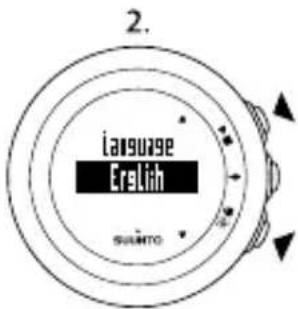
text_image
Language EreLih SANTO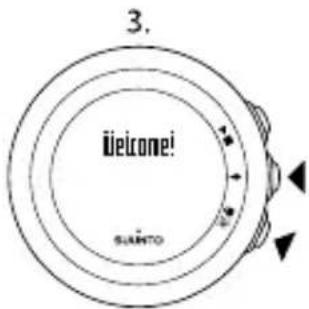
text_image
3. Welcome! SALTO
text_image
4. yes read? suartoYou can set the following initial settings:
- language: English, Deutsch, français, español, portuguese, italiano, Nederlands, svenska, suomi
-
units: metric / imperial
• time: 12 / 24 h, hours and minutes -
date
- personal settings: year of birth, sex, weight, height, (calculated BMI), fitness level
NOTE: BMI (Body Mass Index) is a number calculated from your weight and height. It indicates whether your weight is within healthy limits. However, if you are very muscular, your calculated BMI may be higher than expected, because the BMI ranges are based on average body types.
NOTE: Once you have entered your year of birth, your device automatically sets the maximum heart rate (max. HR) using the formula 207 – (0.7 x AGE) published by the American College of Sports Medicine. If you know your real max. HR, you should adjust the automatically given value to the known value.
For information about adjusting the settings at a later time, see Chapter 14 Adjusting settings on page 32.
TIP: Press → the time view to view the status of your current day exercise target, date and seconds with the time. The display returns to show only the time to save battery life, if you do not press → again after 2 minutes.
5.1 Estimating your fitness level
To get guidance during exercise, you need to estimate your current fitness level in the initial settings.
Select one of the following options:
- very poor: you prefer using the elevator or driving to walking, or sometimes walk for pleasure, and occasionally exercise sufficiently to cause heavy breathing or perspiration.
- poor: you exercise regularly 10 to 60 minutes per week in recreation or work requiring modest physical activity, such as golf, horseback riding, calisthenics, gymnastics, table tennis, bowling, weight lifting, or yard work.
- fair: you run less than one mile (1.6 km) per week or spend less than 30 min per week in comparable physical activity.
- good: you run 1 to 5 miles (1.6 - 8 km) per week or spend 30 to 60 min per week in comparable physical activity.
- very good: you run 5 to 10 miles (8 - 16 km) per week or spend 1 to 3 hours per week in comparable physical activity.
- excellent: you run over 10 miles (16 km) per week or spend over 3 hours per week in comparable physical activity.
To get even more accurate guidance, perform the fitness test, see Section 12.1 Testing your fitness level on page 26.
6 USING BACKLIGHT AND BUTTON LOCK
Press ⚫ activate the backlight.
Keep pressed to lock or unlock the button. When the button is locked, is shown on the display.

TIP: Lock the button to avoid accidentally starting or stopping your watch.

NOTE: When the button is locked during the exercise, you can still change views by pressing →
7 PUTTING ON HR BELT
Adjust the strap length so that the heart rate (HR) belt is tight but still comfortable. Moisten the contact areas with water or gel and put on the HR belt. Ensure the HR belt is centered on your chest and the red arrow is pointing up.

text_image
1 2 3 4WARNING: People who have a pacemaker, defibrillator, or other implanted electronic device use the HR belt at their own risk. Before starting the initial use of the HR belt, we recommend an exercise test under a doctor's supervision. This ensures the safety and reliability of the pacemaker and HR belt when being used simultaneously. Exercise may include some risk, especially for those who have been inactive. We strongly advise you to consult your doctor prior to beginning a regular exercise program.
NOTE: HR belts with ANT icon (♀) are compatible with ANT compatible Suunto wristop computers and with Suunto ANT Fitness Solution, while HR belts with IND icon (♀) are compatible with most exercise equipment with inductive heart rate reception. Your Suunto Dual Comfort Belt is both IND and ANT compatible.
8 STARTING EXERCISE
After the initial settings, you can start exercising. The guided exercise program is automatically used to guide you to the next fitness level, or to maintain an excellent fitness level. The guided exercise program is based on your current fitness level specified in the initial settings. If you want to exercise without guidance, select the free exercise program in the settings, see Chapter 14 Adjusting settings on page 32.
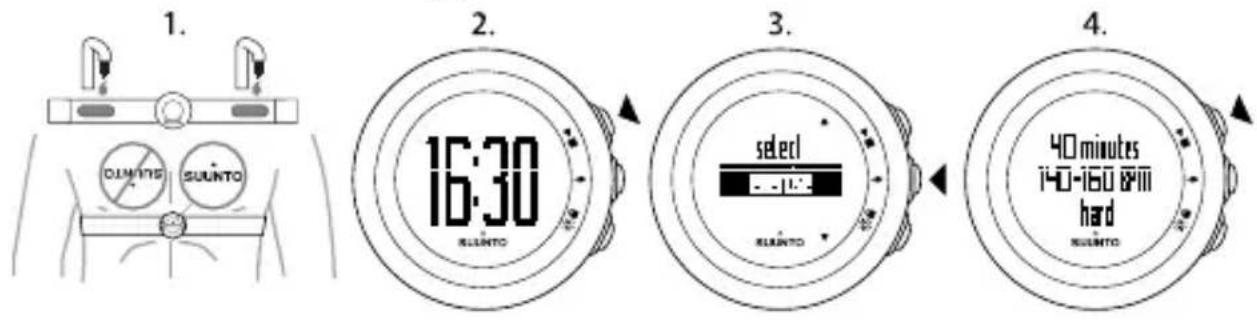
To start exercising:
-
Moisten the contact areas and put on the HR belt.
-
In the time view, press to select exercise.
-
Confirm exercise with .→
Before the exercise begins, the device shows how long your HR should stay within specific HR limits.
- Press to-tart recording your exercise.
text_image
1. 2. 3. 4. 16:30 select 40 minutes i40-160 & 9m hard SALUNTOTIP: You can use Suunto M5 as a stopwatch without the HR belt. Without the HR belt only the duration of the exercise is shown. After the exercise, you can estimate the intensity level of your exercise. Based on your estimation and the
duration, the device estimates the kcal consumption and adjusts your exercise plan and history accordingly.
en

TIP: Warm up before and cool down after exercises. These are not included in recommendations and should be done with low intensity.
8.1 Troubleshooting: No HR signal
If you lose the HR signal, try the following:
- Check that you are wearing the HR belt correctly.
- Check that the electrode areas of the HR belt are moist.
- Replace the battery of the HR belt and/or the device, if problems persist.
9 DURING EXERCISE
Suunto M5 gives you additional information to help guide you during your exercise. This information can be both helpful and rewarding.
Here are some ideas on how to use the device during exercise:
- Press to see additional information in real time.
- Keep pressed to lock the button to avoid accidentally stopping your stopwatch.
- Press ▶t■ stop the exercise.

text_image
128 18:39 SUANTO 128 135 lred SUANTO 128 135 lred SUANTOThe additional information varies depending on what information is available. If only heart rate (HR) is available:
- duration
- average HR
- calories
• HR and time (in hours and minutes)
If HR with POD is available:
- duration
- average HR
calories
• HR and time (in hours and minutes) -
speed
-
distance
- pace
If only POD is available:
- duration
- speed
- distance
- pace

TIP: Switch the sounds on or off ( during exercise by keeping pressed. You not switch the sounds on, if you have set sounds to all off in general settings, Chapter 14 Adjusting settings on page 32.

NOTE: Suunto M5 cannot receive the HR belt signal under water. However, can always follow the program by training without HR belt and estimate your rt level after the exercise.
9.1 During guided exercise
A guided exercise is part of the recommended plan to achieve your target. In a guided exercise, Suunto M5 shows your progress and guides you towards the optimal intensity level. When the arrow on the display is pointing up, you should increase the intensity. When the arrow is pointing down, you should decrease the intensity.

text_image
128 10:39 SAUNTOThe filling arrows on the outer rim tell you during the exercise how far you are from reaching your daily target. When you have reached your target, 📋s shown.
If you want to exercise without guidance, choose the free target type from the settings, see Section Target type on page 33.
NOTE: The plans follow the guidelines of the American College of Sports Medicine for exercise prescription. For more information about the plans, see Section 13.1 Exercise plan on page 30.
TIP: If you pair your Suunto M5 with a Suunto speed POD, for example GPS, Foot, or Bike POD, you get additional speed and distance information during the exercise by pressing →
10 WEEKLY EXERCISE PROGRAM EXAMPLE: FROM POOR TO EXCELLENT LEVEL
en
The following table shows the basis for recommendations provided by your device when you follow the exercise program.
| HardModerateEasyLevel hard | WeeksMaximalVe | ||||
| x21x15 min2x25 m | |||||
| x22x20 min2 x30 m | |||||
| x63x25 min2x30 m | |||||
| x62x30 min3x40 m | |||||
| good | x81x30 min2x40 m | ||||
| 2x20 min2x40 min1x50 min1x | |||||
11 AFTER EXERCISE
11.1 After exercise with HR
- Press to top the exercise.
- Select yes (▶■) to confirm stopping the exercise and to view the summary, or select no (✗) to continue the exercise.
- Press to browse through the different views of the summary.
- Keep pressed to return to the time view.

text_image
1. 135 5320 SILUNTO 2. stop? 48 SILUNTO 3. summary at 17:53 26.5.20.11 SILUNTO 4. 456 level HUI SILUNTOYou can view the following information in the summary:
• starting time and date of the exercise
• percentage completed from the target (guided exercise)
• duration of the exercise
• amount of calories burned
- average HR
- peak HR
Use optional speed and distance PODs to see information on distance and average speed.
NOTE: If your peak HR during the exercise has exceeded your maximum HR set in the device settings, the device automatically asks if you want to update your maximum HR.
TIP: You can skip the summary by keeping pressed in the first summary view. To view the previous exercise summary later, press in the time view and select prev. exercise.
TIP: During exercises using a heart rate belt, you can pause the stopwatch by pressing ▶The device saves the exercise log automatically if you do not continue the exercise by pressing ▶within one hour. To continue recording, select no ().
TIP: Hand-wash the heart rate belt regularly after use to avoid unpleasant odor.
11.2 After exercise without HR
- Press to top the exercise.
- Select yes (▶■) to confirm stopping the exercise, or no (💡) to continue the exercise.
- If you stopped the exercise, select yes (▶■) to save it. Select no (💡) if you do not want to save the exercise.
- If you saved the exercise, the device asks you to estimate your effort. Select easy, moderate, hard, very hard, or maximal with ▶ and ⚙️. Confirm with ➡

text_image
1. 5320 stop? yes no 2. 3. yes save exercise? no estimate effort U-4'1676 SUSATOBased on your estimation, the device estimates the kcal consumption and adjusts your exercise plan accordingly.
NOTE: Follow your personal feeling during the exercise when estimating your exercise effort.
You can view the following information in the summary:
• starting time and date of the exercise
• percentage of completion
• duration of the exercise
• estimated amount of calories burned
Use optional speed and distance PODs to see information on distance, pace, and average speed.
TIP: You can use the estimation feature in sports where you cannot record your HR or use your HR belt, for example swimming.
11.3 Recovery rate
After each exercise, the device shows how long it takes for you to fully recover and when you are ready for exercising on full intensity within your personal
fitness level. Check your recovery rate at any time in suggestion, see Chapter 13 Reviewing plans and history on page 29. If the recovery time is more than 24 hours, we strongly recommend you to have a rest day to avoid over-exercising. You can always follow the exercise program recommendations, even though you are not fully recovered. If you are using the free exercise type, we strongly recommend you to exercise only if your recovery time is less than 24 hours.
NOTE: Consult a professional trainer to learn more about how to utilize recovery rates (exercise and rest ratio) and to reach your targets.
12 REST HR AND FITNESS TEST
12.1 Testing your fitness level
Proceed with the fitness test (Rockport test) to evaluate your fitness level. The test helps you to follow your progress and gives up-to-date information for various calculations in the device. The fitness test usually takes 10-30 minutes, depending on your walking speed.
Find a level and even place where the distance of 1.6 km/1 mile is known (for example, 4 times around a 400 m track).

TIP: Use a treadmill or internet map services to determine a known distance.
To take the test:
- In the time view, press .▶■
- Select fitness test with 📂.
- Confirm with and wait until the device finds HR belt signal.
- Press to start the test.
- Walk 1.6 km (1 mile) as fast as possible at an even pace.
- At 1.6 km (1 mile), stop the test with .▶■

text_image
1. 16:30 SUNTO 2. select SUNTO 3. select fitneus test SUNTO 4. weak 1600m as fast as possible SUNTOWhen ready, Suunto M5 calculates your fitness index (scale 0 - 10) and shows your current fitness level:
very poor=0 - 1.9
below average=2 - 3.9
fair=4 - 4.9
good=5.0 - 5.9
very good=6.0 - 6.9
excellent=7.0 - 10.0
NOTE: If you are using a guided exercise program, the fitness test is considered an exercise and affects the target completion.
TIP: Compare your results with your previous fitness test results in history & trend, see Section 13.2 History & trend on page 30.
TIP: Perform the fitness test regularly, for example once a month, to keep your fitness level updated.
12.2 Testing your rest HR
Rest HR is your HR at rest. Test your rest HR to get even more personalized guidance from Suunto M5 and to follow the development of your fitness level. Improving fitness level usually lowers the rest HR.
To test your rest HR:
-
Moisten the contact areas and put on the HR belt.
-
Make sure your device receives the HR signal.
- Lie down and relax for three minutes.
- Check your heart rate from the device and adjust it accordingly in the personal settings.

TIP: The best time to perform the rest HR test is after a good night's sleep. If just had coffee, feel tired or stressed, do the test later.
13 REVIEWING PLANS AND HISTORY
en
You can review the following information:
- suggestion: recovery time and also the recommendation for your next exercise, if you have selected a guided exercise type in the settings
• history & trend: the cumulative information of your saved exercise sessions - prev. exercise: the information of your previous exercise
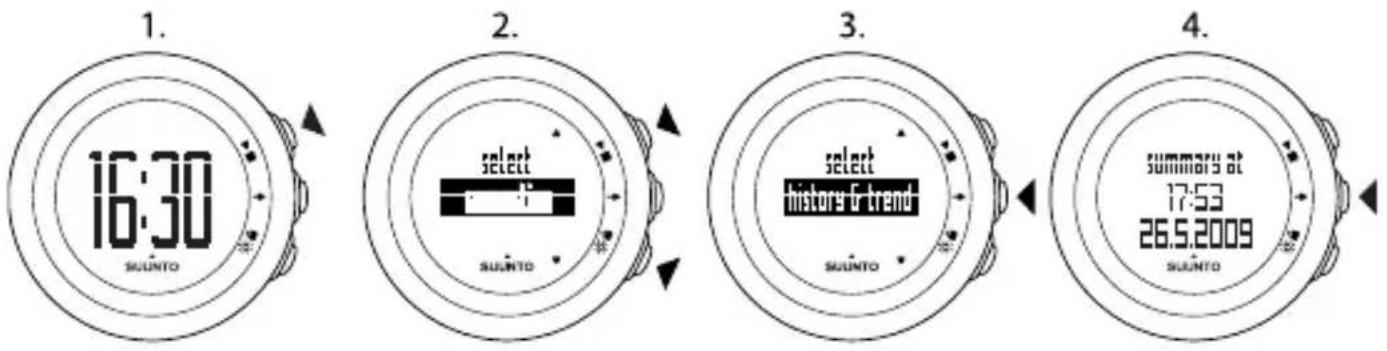
To review your plans and history:
- In the time view, press .▶■
- Select suggestion, history & trend, or prev. exercise with ▶■ or ⚙️.
- Confirm your selection with .
- Press to browse through the views. After you have browsed through all the views, the device returns to the time view.
text_image
1. 16:30 SUUNTO 2. select suunto 3. select history & trend suunto 4. summars at 17:53 26.5.2009 suunto
TIP: Keep → pressed to return to the time view.
13.1 Exercise plan
After you have set your fitness level in the initial settings, Suunto M5 offers you a long term plan with a 7-day overview, in line with the recommendations of the American College of Sports Medicine.
In suggestion you can view the following information:
- recovery time
● recommended exercise duration for the next 7 days - graph of the recommended exercises for the next 7 days
- next target for next 6 weeks (fitness and weight target)
- next recommended training time, duration, and intensity
Perform the fitness test to measure your current fitness level. Based on your current fitness level and ACSM guidelines, your Suunto M5 creates an exercise program that gradually guides you to excellent fitness level. For example, if your fitness level is below average, the exercise program guides you towards the fair fitness level first, before moving towards good. That way you can build a solid fitness base without the risk of overtraining. As your physical condition improves, the frequency, duration, and intensity of the exercise sessions recommended by your Suunto M5 will increase. After you reach the excellent fitness level, your Suunto M5 exercise program helps you in maintaining the excellent fitness level.
13.2 History & trend
History & trend shows you the cumulative information of your saved exercise sessions.
You can view the following information:
● number and duration of all saved exercises
• exercise duration and calories burned during the last 4 weeks
● percentage completed from the weekly and monthly targets
- total distance, the distance of the last 4 weeks, and the time period during which the distance was completed (if optional speed and distance POD is used)
• previous fitness test date and result
• graph of the previous 7 fitness test results

NOTE: The percentages of completed weekly and monthly targets include ay's exercise. If you have not completed today's exercise, the percentage target wer than 100% even if you have followed the recommendations.

TIP: Transfer your saved exercise sessions to Movescount.com, for example, e a month with an optional Suunto PC POD or Suunto Movestick.
13.3 Previous exercise
In prev. exercise you can view the information of your previous exercise. For more information about the views, see Section 11.1 After exercise with HR on page 22 and Section 11.2 After exercise without HR on page 23.
You can only view the details of your previous exercise from the device. However, it stores all exercise details from the previous 80 sessions, which you can view in more detail when you transfer the logs to Movescount.com.
14 ADJUSTING SETTINGS
You can adjust the settings in the time view. During exercise, you can only set the sounds on or off, keeping ▶pressed.
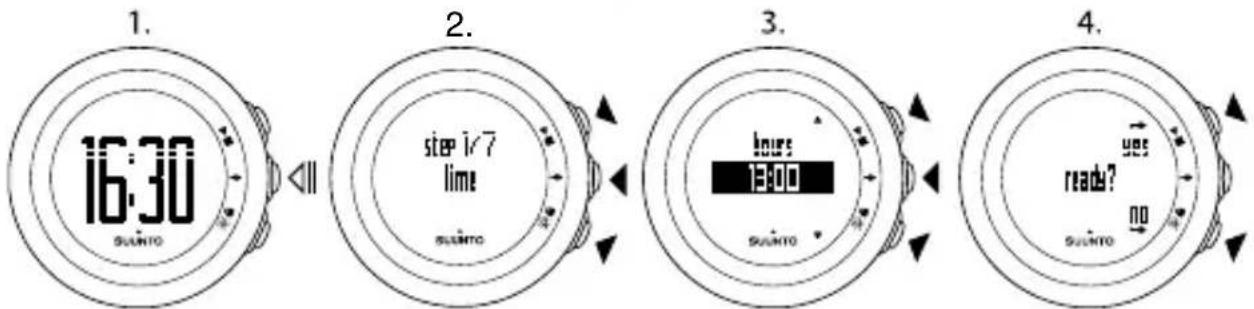
To adjust the settings:
- In the time view, keep pressed to enter the settings.
-
Press to enter the first setting. You can browse through the setting steps with ▶ and .
-
Press ▶to change the values. Press to confirm and to move to the next setting.
-
When you are ready, select yes (▶■) to confirm all settings. If you still want to modify the settings, select no (✗) to return to the first setting.
flowchart
```mermaid
graph LR
    A["16:30 SUIJTO"] --> B["Step 1/7"]
    B --> C["time 13:00"]
    C --> D["hours 13:00"]
    D --> E[ready?
You can adjust the following settings:
Time and personal settings
• time: hours and minutes
• alarm: on/off, hours, minutes
• date: year, month, weekday
- personal settings: weight, fitness level, maximum HR (max. HR), rest HR
Target type
- fitness: guides you towards your next fitness level. When you reach the excellent fitness level, the device optimizes the exercise program to maintain the excellent fitness level.
- weight: guides you towards your target weight. The device only accepts safety weight targets within the limits of normal weights based on your BMI. When you set to lose more than 3 kg (7 lbs), the device will show the recommended weight loss for the next 6 weeks until you finally reach your weight target. When you reach your weight target, the program ends and you need to set a new target to get more guidance. Until then, the device sets the target to free.
• free: exercise without guidance
NOTE: fitness and weight target types follow the guidelines of ACSM for exercise prescriptions. The device increases your fitness level automatically, if you follow the program.
General settings
sounds:
• all on: all sounds are on
- buttons off: you will hear all other sounds, except button presses
- all off: all sounds are off (when the sounds are off, is shown on the display during exercise)

NOTE: Sounds do not work while the backlight is on.
Speed/pace unit (with optional speed and distance POD):
- km/h, mph
- min/km, min/mile
Pairing
- skip: skip pairing
- belt: pair HR belt
- POD: pair a POD
14.1 Sleep mode and initial settings
To change the initial settings, you have to put the device into sleep mode.
To put the device into sleep mode:
- After the last step of general settings, when the device asks you to confirm that the setting changes are done, keep pressed until the device goes into sleep mode.
- Press any button to activate the device again.
- Set the initial settings, see Chapter 5 Getting started on page 11.

NOTE: When replacing the battery, only the time and date change. The device remembers your previous initial settings and recorded exercises.
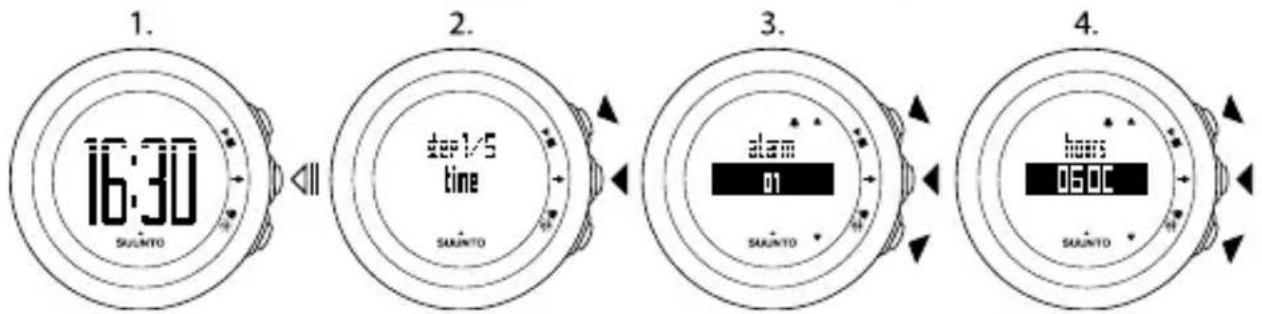
Example: adjusting alarm settings
When the alarm is on, is shown on the display.
To set the alarm on/off:
- In the time view, keep pressed to enter the settings.
-
Browse to alarm with and confirm with .
-
Set the alarm on or off with and . Confirm with .
- Set the alarm time with and . Confirm with .
flowchart
graph LR
    A["16:30\nSALUNTO"] --> B["2:1/5\ntime\nSALUNTO"]
    B --> C["3: alarm\n01\nSALUNTO"]
    C --> D["4: hours\n050C\nSALUNTO"]
When the alarm sounds, press stop (✗) to turn it off.
After you have stopped the alarm, it sounds the same time the following day.
14.2 Changing language
If you want to change the device's language or you have chosen the wrong language when setting up the device, the device needs to be put to sleep. For information on how to put the device to sleep, see Section 14.1 Sleep mode and initial settings on page 34. For more information on battery replacement, see Section 17.1 Replacing battery on page 39.
NOTE: The device remembers your previous initial settings and recorded exercises.
15 CONNECTING TO WEB
Transfer your recorded logs with an optional Suunto PC POD or Suunto Movestick to Movescount.com, and download settings and customized plans from Movescount.com to your Suunto M5.
Movescount is an online sports community that offers you a rich set of tools to manage your daily activities and create engaging stories about your experiences. Movescount offers you new ways to get inspired with other members to drive you forward!
To connect to Movescount:
- Go to www.movescount.com.
- Register and create your Movescount account.
To install Moveslink:
- Go to SETTINGS > MOVESLINK.
- Download and install Moveslink.
To transfer data:
- Plug Suunto Movestick into your computer's USB port.
- Follow the Movescount instructions on how to connect your device and transfer data to your Movescount account.

TIP: The device stores the latest 80 logs. After that it starts to overwrite the oldest logs. To avoid losing old logs and to view their details, transfer them to Movescount.com.
16 PAIRING POD/HR BELT
Pairing means that you connect two devices so that they send and receive information between each other.
Pair Suunto M5 with optional Suunto PODs (Suunto Foot POD, GPS POD, and Bike POD) to receive additional speed and distance information during exercise. Suunto M5 is compatible with Suunto Dual Comfort Belt.
The HR belt included in your Suunto M5 package is already paired. Pairing is required only if you want to change the HR belt or a speed POD with the device.
You can pair up to three Suunto speed and distance PODs simultaneously. If you pair more than three PODs, only the latest three will be paired.
To pair a POD or an HR belt:
- In the time view, keep pressed to enter the settings.
- Press to scroll to the pairing options. You can browse through the setting steps with ▶ and .
- Select POD or belt with and . Confirm with .
- Turn on your POD or HR belt (by re-inserting battery). See the POD manual for information on how to turn on the POD. Wait for the message paired.
- If the pairing fails, press to return to the pairing setting.

flowchart
graph LR
    A["16:30\nsuerto"] --> B["2.ster 7/7\npairing\nsuerto"]
    B --> C["3.pairing\ntell\nsuerto"]
    C --> D["4.paired\nsuerto"]
16.1 Troubleshooting
If HR belt pairing fails, try the following:
- Remove the battery.
- Re-insert the battery upside down to reset the HR belt and remove the battery again.
- Scroll to the device's pairing option.
- Insert the battery in the HR belt the right side up.

NOTE: You do not need to calibrate the speed and distance PODs. The Bike POD values are accurate according to regular mountain bike wheels (26 x 1.95 > inches). In city bikes, the deviation is from -2 to -3%. The Foot POD values depend on your running style and the deviation is from -5 to 5%.
17 CARE AND MAINTENANCE
Handle the unit with care – do not knock or drop it.
Under normal circumstances the device will not require servicing. After use, rinse it with fresh water, mild soap, and carefully clean the housing with a moist soft cloth or chamois.
Do not try to repair the unit yourself. Contact an authorized Suunto service, distributor or retailer for any repair. Use only original Suunto accessories - damage caused by non-original accessories is not covered by warranty.

NOTE: Never push the buttons while swimming or in contact with water.
Pressing the buttons while the unit is submerged could cause the unit to malfunction.
17.1 Replacing battery
If is displayed, a battery replacement is recommended.
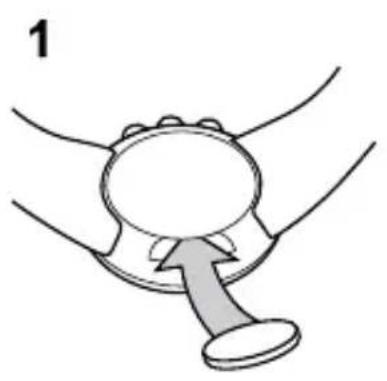
Replace the battery with extreme care to ensure your Suunto M5 remains water resistant. Careless replacement may void the warranty.
Replace the battery as illustrated here:
natural_image
Illustration of a hand holding a circular object with a handle, no text or symbols present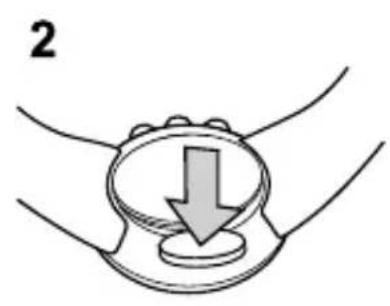
natural_image
Illustration of a hand holding a circular object with a downward arrow, no text or symbols present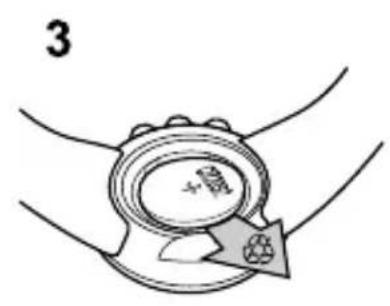
natural_image
Illustration of a hand holding a circular object with a fruit inside, being adjusted by an arrow (no text or symbols)
natural_image
Illustration of a mechanical device with rotating components and directional arrows (no text or symbols)
text_image
5 + - !
text_image
6NOTE: Carefully ensure that the plastic O ring is properly placed so that the wristop computer remains water-resistant. Careless battery replacement may void the warranty.
NOTE: Be careful with the spring in the battery compartment (see illustration). If the spring is damaged, please send your device to an authorized Suunto representative for service.
NOTE: When replacing the battery, only the time and date change. Previous initial settings and recorded exercises are restored.
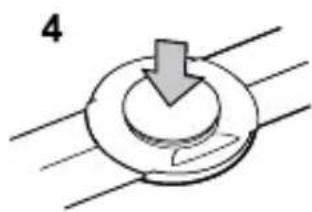
17.2 Replacing HR belt battery
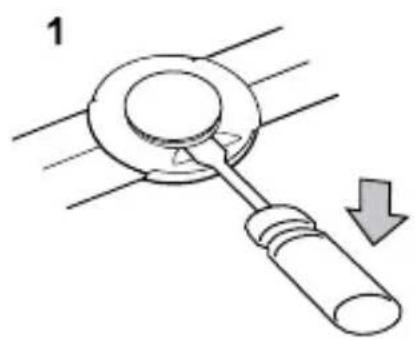
Replace the battery as illustrated here:
natural_image
Diagram of a mechanical lever with a handle and arrow indicating motion (no text or symbols)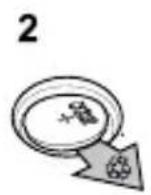

natural_image
Simple diagram of a circular component with a downward arrow, no text or symbols presentNOTE: Suunto recommends that the battery cover and the O ring are changed simultaneously with the battery to ensure that the HR belt remains clean and water resistant. Replacement covers are available with replacement batteries from your authorized Suunto dealer or web shop.
18 SPECIFICATIONS
18.1 Technical specifications
General
- Operating temperature: -10^ C to +50^ C / +14^ F to +122^ F
- Storage temperature: -30^ C to +60^ C / -22^ F to +140^ F
• Weight (device): 40 g / 1.41 oz
• Weight (HR belt): max. 55 g / 1.95 oz
● Water resistance (device): 30 m / 100 ft (ISO 2281)
• Water resistance (HR belt): 20 m / 66 ft (ISO 2281) - Transmission frequency (belt): 5.3 kHz inductive, gym equipment and 2.465 GHz Suunto-ANT compatible
- Transmission range: \~ 2 m / 6 ft
- User-replaceable battery (device / HR belt): 3V CR2032
- Battery life (device / HR belt): approximately 1 year in normal use (2.5 h / week exercise with HR and POD)
Log recorder/stopwatch
● Maximum log time: 9 hours 59 minutes and 59 seconds
- Resolution: The first 9.9 seconds are shown with 0.1 second accuracy. After 10 seconds the duration is shown with 1 second accuracy.
Totals
● Maximum number of logs in device memory: 80
- Total exercise time: 0 - 9999 h (After 9999 h back to 0 h)
- Last 4 weeks kcal and duration: 0 - 99999 kcal, duration 00:01 - 99:59 h
- Total distance and months since first distance log: 1 - 9999 km and 1 - 256 months (with optional speed and distance PODs)
- Last 4 weeks total distance and duration: 0 - 999 km and 99:59 h (with optional speed and distance PODs)
Heart rate
• Display: 30 to 240
- Rest HR: estimated at 60 bpm, adjustable from 30 to 150 bpm
Personal settings
● Birth year: 1910 - 2009
● Weight: 30 - 200 kg or 66 - 400 lb
• Height: 90 - 256 cm or 3 ft 03 in - 7 ft 06 in
18.2 Trademark
Suunto M5, its logos, and other Suunto brand trademarks and made names are registered or unregistered trademarks of Suunto Oy. All rights are reserved.
18.3 FCC compliance
This device complies with Part 15 of the FCC Rules. Operation is subject to the following two conditions: (1) this device may not cause harmful interference, and (2) this device must accept any interference received, including interference that may cause undesired operation. Repairs should be made by authorized Suunto service personnel. Unauthorized repairs will void warranty. This product has been tested to comply with FCC standards and is intended for home or office use.
18.4 CE
The CE mark is used to mark conformity with the European Union EMC directives 89/336/EEC and 99/5/EEC.
18.5 ICES
This Class [B] digital apparatus complies with Canadian ICES-003.
18.6 Copyright
Copyright © Suunto Oy 2009. All rights reserved. Suunto, Suunto product names, their logos and other Suunto brand trademarks and names are registered or unregistered trademarks of Suunto Oy. This document and its contents are proprietary to Suunto Oy and are intended solely for the use of clients to obtain knowledge and information regarding the operation of Suunto products. Its contents shall not be used or distributed for any other purpose and/or otherwise communicated, disclosed or reproduced without the prior written consent of Suunto Oy. While we have taken great care to ensure that information contained in this documentation is both comprehensive and accurate, no warranty of accuracy is expressed or implied. This document content is subject to change at any time without notice. The latest version of this documentation can be downloaded at www.suunto.com.
18.7 Patent notice
This product is protected by pending patent applications and their corresponding national rights: US 11/432,380, US 11/169,712, US 12/145,766, US 7,526,840, US 11/808,391, USD 603,521, USD 29/313,029. Additional patent applications have been filed.
19 WARRANTY
SUUNTO LIMITED WARRANTY
Suunto warrants that during the Warranty Period Suunto or a Suunto Authorized Service Center (hereinafter Service Center) will, at its sole discretion, remedy defects in materials or workmanship free of charge either by a) repairing, or b) replacing, or c) refunding, subject to the terms and conditions of this Limited Warranty. This Limited Warranty is only valid and enforceable in the country of purchase, unless local law stipulates otherwise.
Warranty Period
The Limited Warranty Period starts at the date of original retail purchase. The Warranty Period is two (2) years for display devices. The Warranty Period is one (1) year for accessories including but not limited to PODs and heart rate transmitters, as well as for all consumable parts.
Exclusions and Limitations
This Limited Warranty does not cover:
- a) normal wear and tear, b) defects caused by rough handling, or c) defects or damage caused by misuse contrary to intended or recommended use;
- user manuals or any third-party items;
- defects or alleged defects caused by the use with any product, accessory, software and/or service not manufactured or supplied by Suunto;
- replaceable batteries.
This Limited Warranty is not enforceable if item:
-
has been opened beyond intended use;
-
has been repaired using unauthorized spare parts; modified or repaired by unauthorized Service Center;
- serial number has been removed, altered or made illegible in any way, as determined at the sole discretion of Suunto;
- has been exposed to chemicals including but not limited to mosquito repellents.
Suunto does not warrant that the operation of the Product will be uninterrupted or error free, or that the Product will work with any hardware or software provided by a third party.
Access to Suunto warranty service
You must have proof of purchase to access Suunto warranty service. For instructions how to obtain warranty service, visit www.suunto.com/warranty, contact your local authorized Suunto retailer, or call Suunto Help Desk +358 2 2841160 (national or premium rates may apply).
Limitation of Liability
To the maximum extent permitted by applicable mandatory laws, this Limited Warranty is your sole and exclusive remedy and is in lieu of all other warranties, expressed or implied. Suunto shall not be liable for special, incidental, punitive or consequential damages, including but not limited to loss of anticipated benefits, loss of data, loss of use, cost of capital, cost of any substitute equipment or facilities, claims of third parties, damage to property resulting from the purchase or use of the item or arising from breach of the warranty, breach of contract, negligence, strict tort, or any legal or equitable theory, even if Suunto knew of the likelihood of such damages. Suunto shall not be liable for delay in rendering warranty service.

SUUNTO HELP DESK
Global +358 2 284 1160
USA (toll free) 1-800-543-9124
Canada (toll free) 1-800-267-7506
www.suunto.com
SUUNTO
© Suunto Oy 4/2011
Suunto is a registered trademark of Suunto Oy.
All Rights reserved.