Steam Press ESP2 - Iron press SINGER - Free user manual and instructions
Find the device manual for free Steam Press ESP2 SINGER in PDF.


User questions about Steam Press ESP2 SINGER
0 question about this device. Answer the ones you know or ask your own.
Ask a new question about this device
Download the instructions for your Iron press in PDF format for free! Find your manual Steam Press ESP2 - SINGER and take your electronic device back in hand. On this page are published all the documents necessary for the use of your device. Steam Press ESP2 by SINGER.
USER MANUAL Steam Press ESP2 SINGER
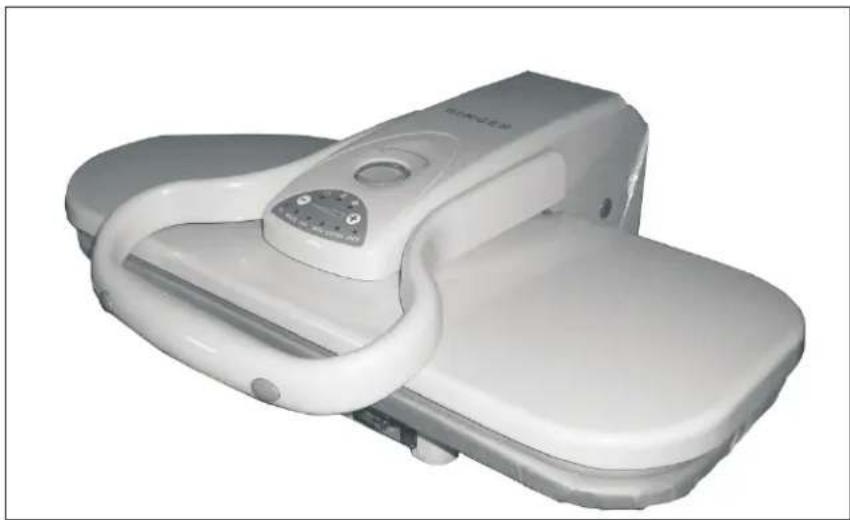
FABRIC STEAM PRESS INSTRUCTION MANUALFAB
SINGER®
natural_image
White medical pressure relief device with adjustable grip and control panel (no visible text or symbols)TABLE OF CONTENTSTABLE OF CCN
Important Safety Instructions....1-3
Getting to Know YourSteam Press ....4-5
Features of theSteam Press....6
Operation&Instructions....7
Tips Pressing....8-11
Cleaning the SteamPress....12
Storage....12
Troubleshooting....13
Please read this manual carefully before using and keep it for future reference.
IMPORTANT SAFETY INSTRUCTIONS IMPORTANT SAFETY INSTRUCTIONS
When using electrical appliances, especially when children are present, basic safety precautions should always be taken, including the following:
READ ALL INSTRUCTIONS BEFORE USING READ ALL INSTRUCTIONS BEFORE USING KEEP AWAY FROM WATER KEEP AWAY FROM WATER
DANGER-Any appliance is electrically live even when the switch is off.
To reduce the risk of death by electric shock:
- Always ∅nplug it immediately after using. 1. Always unplug it immediately after using.
- Do not place or store appliance where it can fall or be pulled into a tub or sink.
- Do not place in, or drop into water or other liquid.
- If an appliance falls into water, "unplug it" immediately. Do not reach into the water.
WARNING-To reduce the risk of burns, electrocution, fire, or injury to persons:
- This appliance should never be left unattended when plugged in.
- Close supervision is necessary when this appliance is used by or near children or the physically challenged. Unsupervised use could result in fire or personal injury.
- Use this appliance only for its intended use as described in this manual. Do not use attachments not recommended by the manufacturer.
- This appliance is not intended for use by persons (including children) with reduced physical, sensory or mental capabilities, or lack of experience and knowledge, unless they have been given supervision or instruction concerning use of the appliance by a person responsible for their safety.
IMPORTANT SAFETY INSTRUCTIONS IMPORTANT SAFETY INSTRUCTIONS
- Children should be supervised to ensure that they do not play with the appliance.
- Never operate this appliance if it has a damaged cord or plug, if it is not working properly, or if it has been dropped or damaged, or dropped into water. Do not attempt to repair the appliance. Incorrect reassembly or repair could cause a risk of fire, electric shock, or injury to persons when the appliance is used. Return the appliance to an authorized service centre for examination and repair.
- Keep the cord away from heated surfaces. Do not allow cord to contact heated surfaces. Do not pull or twist cord. Let appliance cool completely before putting away.
- This appliance has a polarized plug(one blade is wider than the other). As a safety feature, this plug will fit in a polarized outlet only one way. If the plug does not fit fully in the outlet, Reverse the plug. If it still does not fit, contact a qualified electrician. Do not attempt to defeat this safety feature.
- Never drop or insert any object into any opening.
- Do not use outdoors or operate where aerosol(spray)products are being used or where oxygen is being administered.
- Do not use an extension cord to operate appliance.
- Surfaces of this appliance may be hot when in use. Do not let eyes or bare skin touch heated Surfaces.
- Always turn the switch to the "off" position before plugging in or unplugging the unit.
- Always let the appliance cool for at least thirty minutes before storing.
- Do not move the appliance without unplugging it.
- Unplug this appliance before filling. Do not overfill.
- While emitting steam, this appliance may cause burns if it is held too close to the skin, scalp or eyes,
IMPORTANT SAFETY INSTRUCTIONS IMPORTANT SAFETY INSTRUCTIONS
or if it is used incorrectly. To reduce the risk of contact with hot water as it escapes through steam vents, test appliance before each use by holding and testing it away from body.
- Do not operate steamer without properly filling the water container.
- Never yank cord to disconnect from outlet. Instead, grasp plug and pull to disconnect.
- Burns could occur from touching hot metal parts, or proximity to hot water or steam. Do not turn unit upside down- there may be hot water in reservoir.
- To reduce likelihood of circuit overload, do not operate another high wattage appliance on the same circuit.
- Use distilled water in the appliance. 22. Use distilled water in the appliance.
- Be careful. Burns can occur from touching HOT METAL PARTS, OR PROXIMITY TO HOT WATER OR STEAM.
- Do not let the cord hang over the edge of counter.
- Always put the appliance in a secure and level place on a table or counter when using.
- This unit is for household use only. 28. This unit is for household use only.
- Do not allow cord to touch hot surfaces. Let appliance cool completely before putting away. Loop cord loosely around appliances when storing.
- This appliance must be grounded. Do not alter the plug or attempt to defeat this feature.
- Before plugging in the steam press, be sure the electrical information on the label agrees with your power supply.
SAVE THESE INSTRUCTIONSSAVE THESI
GETTING TO KNOW YOUR STEAM PRESS GETTING TO KNOW YOUR STEAM P
-
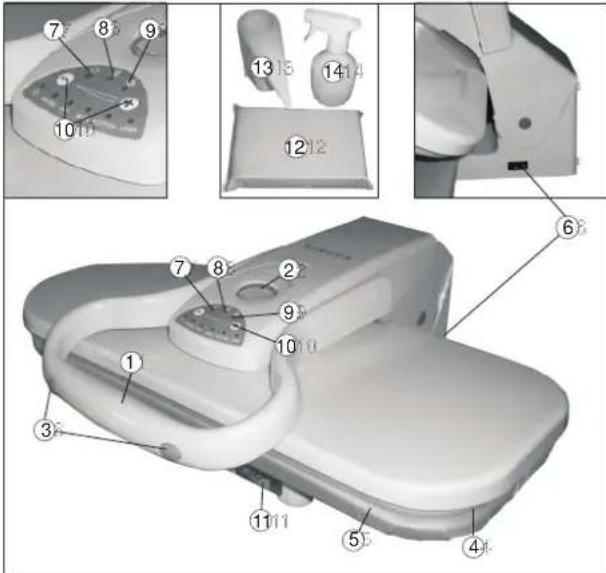
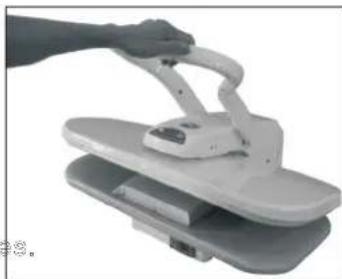
The Pressing Handle raises and lowers the Pressing Plate.
-
The Locking Knob will lock together the Pressing Plate and the Ironing Board. Use this to carry or store the Steam Press.
-
The Steam Burst Buttons on either side of the Pressing Handle produce a burst of steam when pressed.
-
The Pressing Plate it the temperature controlled surface that heats and presses the fabric.
-
The Ironing Board is the padded surface that holds the fabric during pressing. It has a removable cover that is washable.
-
The ON/OFF Switch.
-
The Power Indicator Light illuminates when On/Off Switch is Set to the "On" position, providing you with a clear visual indication that the unit is powered on.
-
The Pressing Indicator Light illuminates while the unit is heating to the selected temperature, and deactivates to provide a clear visual indication that you are ready to begin pressing.
-
The Steam Ready Indicator Light illuminates once the unit is ready to produce bursts of steam, providing you with a clear visual indication that you can begin using the Steam Burst Buttons.
text_image
Technical diagram of a medical device with numbered parts and exploded view, likely for assembly or repair instructions.GETTING TO KNOW YOUR STEAM PRESS GETTING TO KNOW YOUR STEAM P
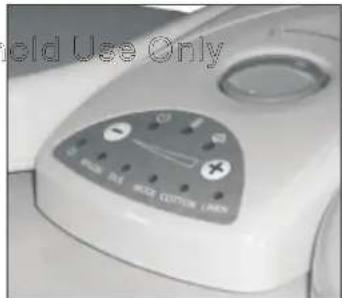
- The Temperature Control Buttons are used to select a desired temperature by cycling through the list of choices above the buttons. Push the Temperature Control Buttons until the indicator light beneath the type of material you are going to press becomes illuminated.
- The Water Tank
- The Pressing Cushion is a fabric covered pad used for pressing gathered or contoured areas such as sleeves, darts, yokes
- The Measuring Cup is designed to assist you in easily and consistently filling the Water Reservoir with the optimum amount of water. filling the Water Reservoir with the optimum amount of water.
- The Spray Bottle allows you to moisten fabrics before pressing, when helps to make the pressing process easier and more effective in certain instances.
ABOUT THE AUTO SHUT-OFF ABOUT THE AUTO SHUT-OFF
The Auto Shut- Off feature includes both an Auto Shot- Off and an Auto Wake-Up. These multiple function safety features deactivate electrical power to the heater when the Pressing Plate has been left closed against the Ironing Board for more than 10 seconds. Heater deactivation is signalled by a beeping sound. Heater Functionality is restored when the Pressing Plate is raised back up. Power to the heater will also be cut if the Pressing Plate is in the raised position without use for approximately 15 minutes (once again signaled by a beeping sound) The heating ability of the unit can only be restored in this situation by pressing the Temperature Control Buttons.
IMPORTANT: Auto Shut- Off does not mean that power to the unit is totally cut off. Power is always on, and the Power Indicator Light will Remain illuminated until On/Off Switch is set to "Off" position.
FEATURES OF THE STEAM PRESS FEATURES OF THE STEAM PRESS
Your Steam Press provides clean, professional results every time!
.Pressing surface is fourteen times larger than most hand-held irons
.Can reduce ironing time up to 50%. Can reduce ironing time up to 50%
.Multiple dry and steam settings, burst setting to remove stubborn wrinkles
.Variable temperature control.Variable temperature control
.Automatic shut off safety feature while open or closed with audible alert
.Power indicator light.Power indicator light
.Protects delicate fabrics like silk.Protects delicate fabrics like silk

natural_image
Close-up of a white ergonomic chair with handle and seat, partially lifted by a black cable (no text or symbols visible)IMPORTANT For Household Use Only IMPORTANT For Household Use Only Filling Instructions: Filling Instructions:
Do not plug the unit in until you have filled the WaterTank
- Place Digital Fabric Steam Press on a flat, level surface.
- Turn Locking Knob to "Unlock" position to unlock pressing Plate.
- Lift up Pressing Plate using Handle. It will automatically stay in lifted position.
- Pull Water Reservoir out. Note that Water Reservoir cannot be completely removed from unit; do not attempt to force it free.
- Remove Water Reservoir Cap to express Water Reservoir fill hole.
- Using Measuring Cup(included), fill Water Reservoir up to the MAX(300ml)
line with distilled water.
text_image
Cold Use Only MAX 201 MAX COTOM (MAX)- Replace Water Reservoir Cap and push filled Water Reservoir back into main unit.
*DO NOT ATTEMPT TO PULL WATER RESERVOIR OUT COMPLETELY.
-
Turn the ON/OFF Switch to the "on" position.
-
Identify the type of fabric you will press and then select the temperature setting that matches the fabric to be pressed. It is best to start with the most delicate fabrics first, as higher heat will cause damage to Nylon and Silks.
-
Lay fabric flat on Ironing Board. 3. Lay fabric flat on ironing Board.
-
Digital Fabric Steam Press is ready for use when Pressing Indicator Light deactivates. If pressing wool, you may choose to spray with a burst of steam. This function is available once Steam Burst Ready Indicator Light illuminates. NOTE: Do not activate burst of steam with unit completely closed, as this may damage unit. Best results are obtained if Pressing Plate is held open approximately 75 mm above Ironing Board before pressing Steam Button. For safety reasons, do not hold Pressing Plate open more than 75 mm when using steam burst function.
-
To press, lower Pressing Plate gently onto fabric and Ironing Board. Hold there for 6-8 seconds, then lift up Pressing Plate. Repeat until you have achieved desired crease and smoothness.
-
Once Pressing tasks are complete, immediately set On/Off Switch to "off" position.
natural_image
Exterior view of a modern office building (no signage)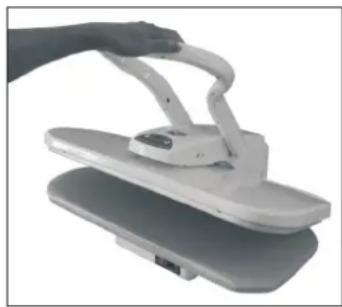
natural_image
Hand holding a white electronic device with a curved handle, placed on a gray surface (no text or symbols visible)TIPS PRESSING
STEAM BURSTSTEAM BURST
- Hold Pressing Plate approximately 3" above Ironing Board.
- Press Steam Burst Button to release a burst of steam onto fabric.
- Lowr Pressing Plate onto fabric, then raise once again.
- Repeat steps 1-3 above until fabric is smooth and wrinkle-free.
IMPORTANT NOTE IMPORTANT NOTE
FOR BEST RESULTS, PRESS BUTTON FOR 2 SECONDS AND RELEASE.
STEAMING TIPS STEAMING TIPS
Pressing Garments Pressing Garments
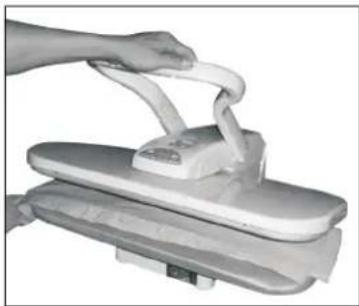
- Lay the garment on the Ironing Board.1. Lay the garment on the Ironing Board.
- Lower the steam plate and return to the open position after a few seconds.
NOTE: the unit will automatically turn off the heating plate after
10 seconds in the closed position. A beep will emit until the unit is opened. Once the unit is opened, it will return to normal operation.
Wrinkle Removal
- Lower the Steam Plate until it is slightly above the Ironing Board (about three inches).
- Activate the Burst of Steam with the buttons on the sides of the Pressing Handle.
- Wait a few seconds, and activate the Burst of Steam again.
natural_image
Hand pressing down on a flatboard with a cloth (no text or symbols visible)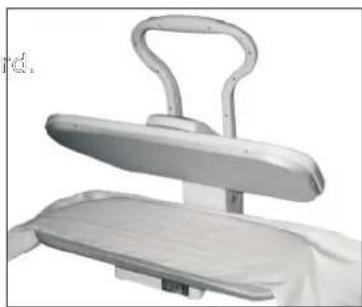
natural_image
Medical chair with adjustable armrest and white cushion (no visible text or symbols)TIPS PRESSING TIPS PRESSING
- Lower the Pressing Plate and then raise.
- Repeat this process until all wrinkles have been removed.
Shirts and Blouses Shirts and Blouses
- Place the shoulder yoke on the Ironing Board first and press.
- Then place the sleeves on the Ironing Board with the fold parallel to the long seam and press
- Place the cuffs on the end of the board and press.
- Place the bottom of the shirt behind ironing board so that you begin pressing pressing the side with the pocket. Pull the shirt towards you as you Press each section.
- Then finish with the collar of shirt. 5. Then finish with the collar of shirt.

text_image
Pressing Here and then 11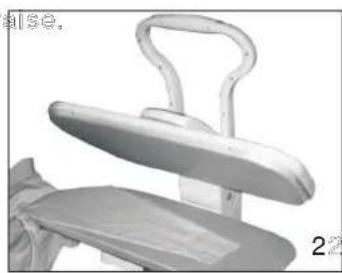
natural_image
Close-up of a white office chair with a handle and seat, no visible text or symbols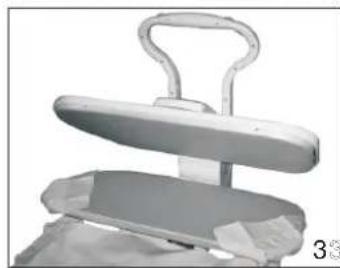
natural_image
3D rendered image of a mechanical device with a handle and base plate (no text or symbols visible)
natural_image
Exterior view of a modern office building (no signage)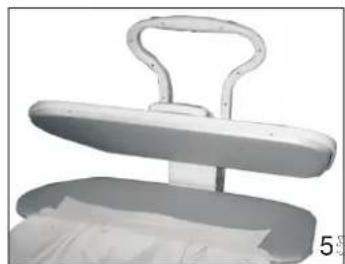
natural_image
3D rendered image of a white metal object with a curved handle and a flat base, no visible text or symbols.TIPS PRESSING TIPS PRESSING
PantsPants
- Place the Pressing Cushion under the waistband and press, repositioning the waistband until completely pressed.
- To press the in-seam, place the cushion under the area to be pressed.
- Place the pleated area on the Ironing Board. Carefully fold pleats and press.
- Embroidery should be placed face down on the Ironing Board to reduce wear and prevent damage to delicate areas.

natural_image
Close-up of a hand holding a white plastic bag with a handle, against a plain background (no text or symbols visible)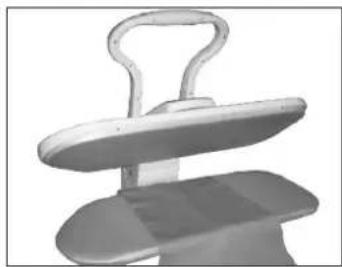
natural_image
3D rendered image of a mechanical component with a handle and flange (no text or symbols visible)
natural_image
Medical device with a metallic handle and base plate (no visible text or symbols)TIPS PRESSING TIPS PRESSING
Other Techniques Other Techniques
- Placing the pressing cushion between the fabric and the Pressing Plate may help with delicate fabrics.
- Buttons and Zippers: if you have older types of buttons or zippers, you may need to take special care to avoid melting. In order to do so, place the garment face down and cover with a pressing cushion before pressing.
- Spray bottle may be used to spray the fabric lightly. This will further help to remove stubborn wrinkles.
- Place a damp cloth over the fabric before pressing, which will help with stubborn wrinkles or heavy gauge fabrics.
- To press large pieces of fabric, place entire piece behind the Ironing Board. Pull the fabric towards you, over the Ironing Board, and lower the Pressing Plate. Press the fabric in sections until completed.
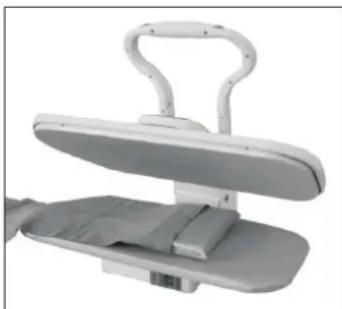
Using the Pressing Cushion Using the Pressing Cushion
- For garments constructed with details such as darts, curved seams, and shoulder pads, a Pressing Cushion may be used.
- Use the cushion in areas where no creases are desired or to shape a tailored garment.
- Place the area to be pressed onto the Ironing Board.
- Place the Pressing Cushion under the dart, seam, etc.
- Making sure that the area to be pressed is raised, lower the Pressing Plate until it meets the raised area.
- Do not force the plate to its lowest position, as this may cause damage to the unit.
natural_image
Medical device with adjustable arms and a flat base (no visible text or symbols)CLEANING THE STEAM PRESS & STORAGE CLEANING THE STEAM PRESS & STORA
CLEANING THE STEAM PRESS CLEANING THE STEAM PRESS
- Place the Pressing Cushion in the middle of Ironing Board.
- Place a clean towel over the Pressing Cushion and the Ironing Board.
- Set the temperature control Button to its highest setting (LINEN).
- When the Steam Burst Ready Indicator Light illuminates, lower Pressing Plate onto the pressing cushion.
- Press the steam burst button six times. 5. Press the steam burst button six times.
- Allow the Pressing Plate to cool. 6. Allow the Pressing Plate to cool.
- Clean the pressing plate with a damp cloth. 7. Clean the pressing plate with a damp cloth.
- Do not use abrasives or you may damage the plate.
- The Ironing Board cover is removable for cleaning. Hand wash only with mild detergent.
STORAGE STORAGE
- Once pressing is complete, immediately turn unit off and unplug power cord from electrical outlet.
- Allow unit to cool completely (at least 30 minutes).
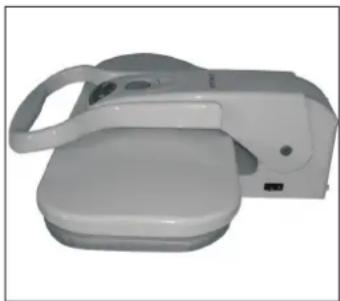
- Lower pressing plate down; and turn Locking Knob to "Lock" position.
- Wrap up power cord and place in Cord Storage Compartment.
- Store all accessories safely away, preferably near Digital Fabric Steam Press.
- Store Digital Fabric Steam Press in a cool, dry place.
- For long-term of storage, Press the steam button time to time, to use up the water remain in the water reservoir.
natural_image
Hand gripping a white electronic device with a handle, shown in grayscale (no text or symbols visible)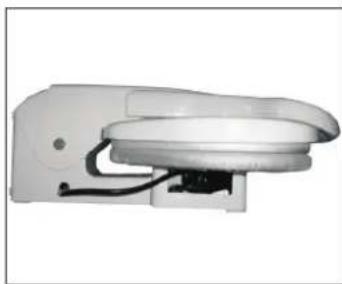
natural_image
White electronic device with a curved top and internal wiring (no visible text or symbols)TROUBLE SHOOTING TROUBLE SHOOTING
Before taking the unit to a service center, please check the following list of common problems for your issue.
| PROBLEMPROBLEM | POSSIBLE CAUSEPOSSIBLE CAUSE SOLUTIONSOLUTION | |
| Unit fails to steam.Power Indicator Light does not illuminate. | Unit is not plugged in.Unit is not plugged into electrical outlet.Plug into electrical outlet. | |
| Household Circuit Breaker/Ground Fault Interrupter has tripped or blown a fuse. | Reset Circuit Breaker/Ground Fault Interrupter, or replace fuse. If you need assistance, Contact a licensed electrician. | |
| Unit fails to steam.Power Indicator Light does illuminate. | Auto Shut-Off has engaged.Auto Shut-Off | Refer to Auto Shut-Off section on page 5 of this manual for proper procedure. |
| Water Reservoir is empty.Water Reservoir | Refill Water Reservoir using procedures on page 6-7 of this manual. | |
| Unit is damaged or malfunctioning.Unit is damaged or malfunctioning. | Please contact our customer support department. | |
| Steam Burst output is weak or intermittent. | Pressing Plate needs to be cleaned. | Refer to Cleaning the Digital Fabric Steam Press section on page 11 of this manual for proper procedure. |
WARNING: If the supply cord is damaged, it must be replaced by the manufacturer, its service agent or a similarly qualified person in order to avoid a hazard.
This electrical appliance complies with directive 2002/96/EC(Waste Electrical and Electronic Equipment----WEEE).
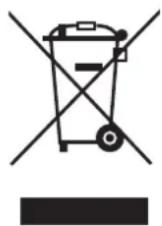
The meaning of the crossed-through waste bin symbol on the appliance is that the product must be disposed of separately to other household waste at the end of the useful life of the appliance. The user is responsible for delivering the appliance to an appropriate collection centre at that time.
Appropriate separate collection for environment-friendly treatment and recycling prevents or reduces harmful effect on the environment and human health. You can obtain information on available collection services in your area by contacting your local Council waste collection department, or the retailer from which you bought the appliance.