Digiflash - Luxmètre Gossen - Free user manual and instructions
Find the device manual for free Digiflash Gossen in PDF.


User questions about Digiflash Gossen
0 question about this device. Answer the ones you know or ask your own.
Ask a new question about this device
Download the instructions for your Luxmètre in PDF format for free! Find your manual Digiflash - Gossen and take your electronic device back in hand. On this page are published all the documents necessary for the use of your device. Digiflash by Gossen.
USER MANUAL Digiflash Gossen
Operating Instructions
GOSSEN
Digiflash
Exposure meter for flash and ambient light
15136
1/05.03
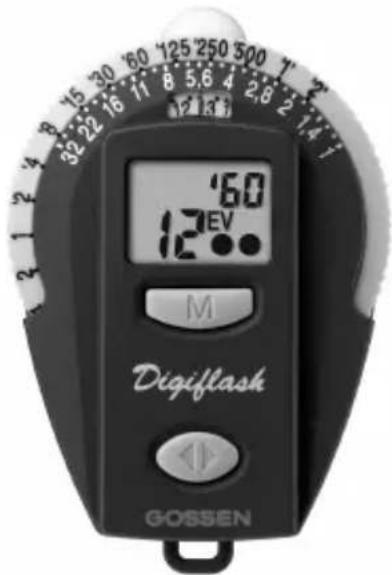
text_image
12 60 12°EV M Digiflash GOSSEN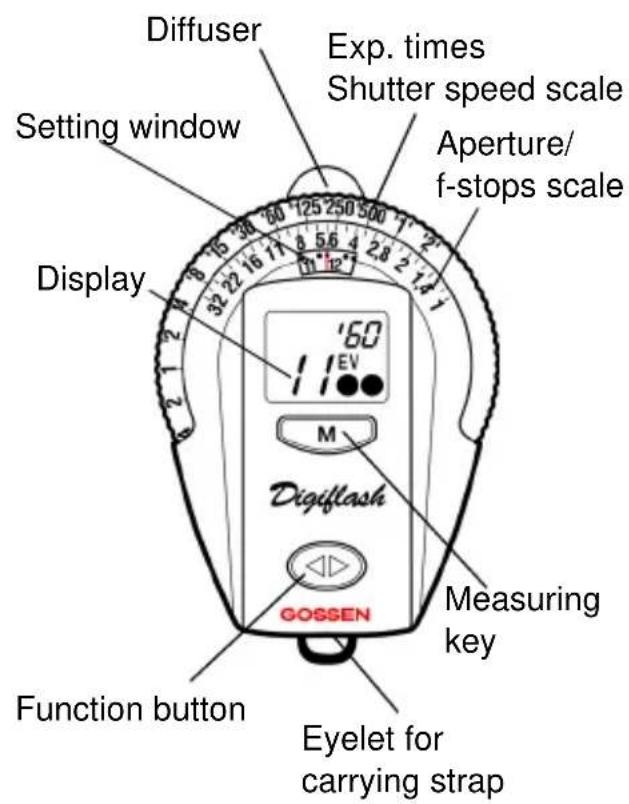
text_image
Diffuser Setting window Display Exp. times Shutter speed scale Aperture/ f-stops scale 125 250 500 12 2 4 6 8 10 12 14 16 18 20 22 24 26 28 30 32 34 36 38 40 16 18 20 22 24 26 28 30 32 34 36 38 40 160 11 EV M Digiflash GOSSEN Function button Eyelet for carrying strap Measuring key
text_image
Socket for tripod Camera mounting clip (accessory) Battery compartmentContents
1 The functioning of the Digiflash . 4
1.1 Preparation and self-test .... 4
1.2 Incident light and reflected light ..... 5
1.3 Duration of read-out in display ..... 5
2 Functions of the Digiflash ...... 6
2.1 Setting the film speed 6
2.2 Exposure measuring ambient light . 7
2.2.1 Read-out of the values measured .. 7
2.3 Flash measurement 8
2.3.1 Setting the sync speed (meas. time) 8
2.3.2 Measuring 8
2.3.3 Fill-in Flashes 9
2.4 Taking a measurement outside the measuring range 10
2.5 Contrast measurements ..... 10
2.6 Setting correction values ...... 11
2.7 Function TIMER 12
2.8 Watch/Alarm clock 13
2.9 Measuring temperatures ..... 15
2.9.1 Min./Max. temperatures 15
3 Service and repairs 16
4 Technical data 17
The Digiflash is a small but smart GOSSEN exposure meter, with digital read-out, for ambient light and flash. The Digiflash is made to exacting GOSSEN calibration standards for high precision measurements. The trendy styling and logical functioning make it easy and comfortable to operate. Key features:
- Incident and reflected light meas. mode
- Measuring of ambient and flash light
- P controlled
• Digital LCD read-out in the display in 1/3 stop increments
- Contrast readout in 1/3 EV steps
- Storage of the measuring results
- Indication of all suitable combinations of shutter speeds and f-stops
- Signal "range over" or "range under"
• Automatic battery check
- Countdown timer for long exposures
• Function Watch/Alarm clock
- Measuring temperatures
1 The functioning of the Digiflash
1.1 Preparation and self-test
Battery
The Digiflash is powered by a 3 V Lithium battery, type CR 2032. When the battery is running low, BAT appears in the display.
- The battery should be replaced as soon as possible. When BAT is shown alone in the display, the battery will need to be replaced before further measurements are possible.
- To replace the battery, pull out the battery compartment located under the eyelet for the carrying cord.
- Remove the old battery and insert the new one. Observe the "+" and "-" polarity!
- Close the battery compartment
Attention! The Digiflash is provided with a battery memory of 10 seconds. If the battery is removed briefly or replaced only within those ten seconds, the values stored in memory will be maintained. Otherwise changing the battery or pressing one of the buttons will cancel all the individually stored values.
Self-Test
After the new battery has been inserted, the microcomputer will carry out a self-test. Every display segment appears in the display panel. The self-test takes 10 seconds. It can be interrupted before by pressing any button.

text_image
ISO 4AM @PM 39:88 88 EVBATAfter the self-test, the standard settings will
be shown as set by the factory.
Standard settings
ISO 100/21° COR 0 ambient EV 8
t 1/125 flash EV 12
1.2 Incident light and reflected light Incident light method
For the incident mode, the diffusor is to be shifted to the left and placed in front of the measuring aperture. Taking measurements using the incident light mode in particular produces in most cases perfectly exposed shots. In this mode, the DF measures from the subject towards the camera. This guarantees that the tone quality of the picture is equivalent to that of the subject. This is especially important for very bright or dark subjects. Even under very difficult lighting conditions, as e.g. with subjects which have a lot of contrast, the incident light mode is a more reliable way of producing well exposed pictures.
Reflected light method
For the reflected mode, the diffuser must be shifted to the right. Care must be taken, that the light sensor is entirely free.
The measurement is taken from the position of the camera towards the subject. In this method, only the light reflected from the subject is detected by the meter. Therefore, the measuring values always depend on the reflection capacity of the subject. As a result of this, bright subjects are reproduced darker and therefore not properly exposed.
Consequently, this mode is conveniently used, when the subject does not show too high contrasts between bright and dark areas.
1.3 Duration of read-out in display
The Digiflash will always display the last function used. The meter does not automatically switch off, as the power consumption is extremely low.
2 Functions of the Digiflash
Press the function button for selecting the individual functions of the Digiflash.
Each time the button is pushed, the next function will be activated.
The display panel will show the functions in the following sequence:
- Ambient light
- Flash light
- Timer
- Watch
- Alarm clock
- Temperature

The next function will only be activated after the Function button has been released.
When the Function button is kept pressed down for more than two seconds, the settings of that function are displayed and can be adjusted as desired.
2.1 Setting the film speed
- Select the function "Exposure ambient light" and hold down the function button until the OK-signal sounds. The display will show ISO, blinking.

text_image
ISO 400- Use the measuring key M to select the desired film speed.
When holding the key M pressed down, the film speed will automatically be increased. When getting close to the desired ISO value, release the key M and set the desired film speed by pushing the key in individual steps.
Each time you push the key, the film speed is increased by a 1/3 stop.
- Confirm the speed you selected by pushing the Function button until the OK-signal sounds and the Digiflash returns to the function "Exposure ambient light". The film speed is shown in the upper right corner of the display.
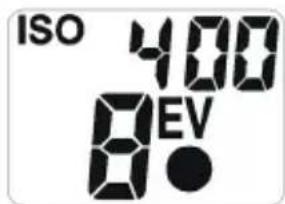
text_image
ISO 400 8.0 EVIf the film speed is changed, the measurement read-out stored in the memory will be immediately converted to the new ISO settings.
The film speed selected will stay stored in memory until it is changed in the way described above. The film speed selected will be valid both for ambient and flash light.
2.2 Exposure measuring ambient light
- Use the Function button to select the function „Exposure measuring ambient light“.
- The measurement is taken by briefly pressing down the measuring key M.
2.2.1 Read-out of the values measured
The EV value measured will appear in the display. The values will be indicated in 1/3 - stop increments by one dot, the 2/3 - stop increments by two dots.

text_image
125 250 500 8 5.6 4 2.8 2 1.4 1 11 12 '60 EV M- Transfer that EV value from the display to the setting window in the calculator rings and place it precisely under the red indicator line.
- All the suitable combinations of aperture (f-stops) - t (shutter speeds) can now be seen at the upper part of the circular scales (see previous example).
2.3 Flash measurement
2.3.1 Setting the sync speed (measuring time)
- Press the function button for selecting the function „flash measurement“. A small stroke in front of the sync time will appear in the display to signal „flash metering“.
- Keep the function button pressed down until the ok signal sounds. The display will now show the sync speed blinking.
- Use the measuring key to input the desired sync speed, in the range of 1 sec to
1/500 sec. and confirm by pressing the function button.
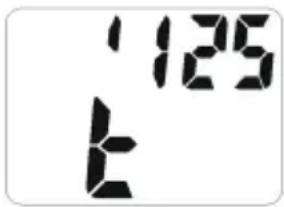
text_image
125 t2.3.2 Measuring
- Push the measuring key.
The Digiflash is ready to measure for 30 sec, as long as „F“ in the display is on.
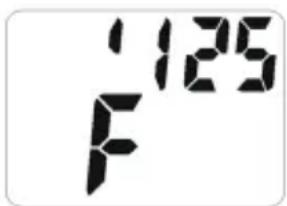
text_image
125 F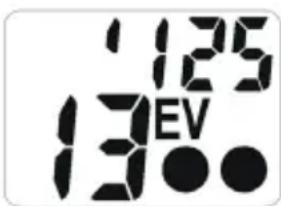
text_image
125 130V- Trigger the flash.
- Transfer the value measured from the display to the window in the printed scales above and set it precisely under the red indicator line.
- Read the f/stop in the upper part of the scale opposite the sync speed you had preselected (for 1/90 read between 1/60 and 1/125).
2.3.3 Fill-in Flashes
You will find the right combination in two steps:
First you take a reading of the background in the function „ambient light“. Transfer the EV value from the display to the setting window above. Then set the corresponding combined shutter speed and f/stop to your camera, while taking care that the shutter speed must be equal to the flash sync speed.
In the second step, you determine the fill-in flash by measuring the flash in the incident mode. From the shadow area of the subject you direct the Digiflash towards the camera in such a way that the meter will only receive the fill-in flash and the stray light, but definitely not the main light source.
The resulting EV value should be lower by 1 to 2 stops than the EV value for the ambient light. If not, adjust the power of the flash unit or change the distance to get the desired EV value.
2.4 Taking a measurement outside the measuring range
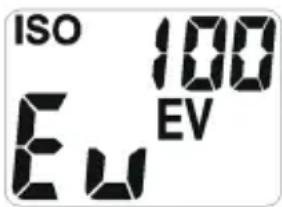
The Digiflash will not produce any useable readings outside its measuring range: in the display Eu (too dark) or E^n (too bright) will appear.
2.5 Contrast measurements
- Use the Function button to select the function "Exposure ambient light".
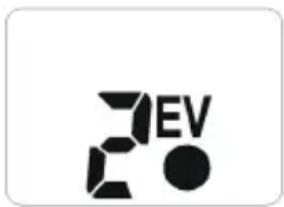
- Keep the measuring key M pressed down and the meter will switch over to contrast measurement. Continue holding down the key to measure various other areas in the subject. In the display, the difference between the individual results of the additional measurements and the first measuring value will be indicated in EV. A new metering will be made approx. 2 times a second.
natural_image
Abstract black and white graphic design with stylized 'EV' letters and a dot (no text or symbols)After you have released the measuring key M, the value of the first exposure measurement will reappear.
2.6 Setting correction values
In order to deliberately change the exposure of your photos, you may adjust the factory calibration.
- Remove the battery from the Digiflash and press one of the buttons (battery memory will be deactivated). Put the battery back in the compartment. The meter will then make the self-test.
– During this test, keep the measuring key and also the function button pressed down until the acoustic signal sounds. Release the key to enter the CORRECTION function.
Use the measuring key M to enter or change the correction value.
Press the function button again and hold it down until the OK signal sounds to return the meter to the normal measuring functions.
The EV in the display will blink to remind you that the standard factory calibration has been changed. Input of the correction in 1/3-stops in the range of ± 3 EV.
For cancelling the correction value, remove the battery from the compartment and then put it back again.
In case of over-exposure a positive correction, in case of under-exposure a negative correction value should be set.
2.7 Function TIMER
A timer function is provided in the Digiflash, useful for long exposure or other timings ranging from one second to thirty minutes.
- Use the function button to select the function TIMER and hold it down until the OK-signal sounds. The display shows the last value used. The read-out will show the "minutes" and will flash to allow the countdown timer to be adjusted.
- Use the key M to enter the desired time in minutes.
-
Confirm by pushing the function button. The read-out "seconds" in the display will flash.
-
Enter the "seconds" of the desired length of time. Confirm by pressing and holding the function button until the OK-signal will sound. The timer will now be in the Start/Stop function.
- Push the key M to start the timer. The display will show the remaining time of the count-down. In addition to that, during the last 10 seconds of the count-down, interrupted signals can be heard. At the end of the set time, a continued signal will sound.

text_image
0:27 8EV- To pause the count-down, push the measuring key; pressing it again will restart the count-down.
The timer will work in the background so that you can use other measurements.
2.8 Watch/Alarm clock
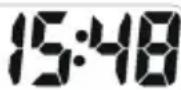
WATCH – Setting the time
- Use the function button to select the function WATCH and hold the key down until the OK-signal will sound. 12/24 will flash.

text_image
PM 3:48- With the function button select either 12 hours (AM/PM) - 24 hour display.
-
Confirm with the function button. The read-out "hours" will flash.
-
Use the key M to set the hours and confirm with the function button. The read-out "minutes" in the display will flash.
- Use the key M for setting the minutes. To confirm settings hold down the function button until the OK-signal is heard.
ALARM CLOCK
- Use function button to enter the function "ALARM CLOCK" and hold it pressed down until the OK-signal will sound. The time of the alarm clock is set in the same way as the watch.
- Hold the function button until the OK-signal sounds.
- The alarm is activated or deactivated with the measuring button.
- When the alarm is activated it is shown in the display with a bell symbol.

text_image
AM 9:00 AL- When the alarm is sounded it will sound each second for 1 min. It can be stopped by pressing either the measuring key or the function button.
2.9 Measuring temperatures
- Use the function button to select the function TEMPERATURE and hold the button pressed down until the OK-signal sounds. To change between °C or °F read-outs, press and hold the function button until the display changes.

text_image
95 24
text_image
of 75The Digiflash will indicate the actual ambient temperature. The temperature probe is incorporated in the meter housing.
As a result, the temperature measurement may be affected if you are holding the meter in your hand. If you attach the Digiflash with the clip to your camera, these errors can be avoided.
2.9.1 Min./Max. temperatures
When repeatedly pressing the measuring key, the minimum (Lo) and maximum (Hi) temperature values will be indicated. The minimum and maximum values indicated are those that have been measured since the last cancellation operation.

text_image
10 18
text_image
H1 32The min. and max. temperature values stored in memory can be cancelled by pressing the measuring key until the OK-signal sounds. The temp. measurements are repeated automatically every two min. providing always the actual values. These min. and max. temp. values will make it possible for you to check, whether your films may have been exposed to excessive high temperatures and have been damaged.
3 Service and repairs
In the event that your Digiflash is not working to your complete satisfaction, please send it to:
or to the GOSSEN agency in your country.
4 Technical data
Exposure meter
Measuring modes Ambient light
Flash light (non cord)
Incident light method
Reflected light
method
Contrast measurem.
Light sensor sbc photo diode
Meas. range ambient light
(when ISO 100/21°) EV 0 to 18
Shutter speeds 1/2000 s to 4 min
Apertures f/1 to f/32
Meas. range flash light
(when ISO 100/21°) f/2 to f/32
Synch speeds 1 to 1/500 sec.
(Measuring times) incl. 1/90 sec.
Correction values ± 3 stops
Film speeds ISO 6 to 3200
in 1/3 increments
Measuring angle
reflected light mode approx. 25°
Timer 1 sec to 30 min
Watch adjustable to 12 hrs
(AM + PM) or 24 hrs
Accuracy 5 min / year
Thermometer
adjustable to °C/°F
Measuring range
-15 ... 70 °C or
5 ... 160 °F
Accuracy
± 2 °C or ± 4 °F
Display Digital read-out of measuring values and analogue scales
Duration of read-out The DF will always display the last function used
Battery 1 x 3 V Lithium battery CR 2032
Operating temp. -10^ ... 60^
Dimensions 75 x 50 x 23 mm
Weight 40 g incl. battery
Accessories incl. Battery, carrying case, cord, instruction manual
Optional accessory Mounting clip for camera shoes Order code V069A
Printed in Germany • Subject to change without notice