PowerUp - Speaker JBL - Free user manual and instructions
Find the device manual for free PowerUp JBL in PDF.


User questions about PowerUp JBL
0 question about this device. Answer the ones you know or ask your own.
Ask a new question about this device
Download the instructions for your Speaker in PDF format for free! Find your manual PowerUp - JBL and take your electronic device back in hand. On this page are published all the documents necessary for the use of your device. PowerUp by JBL.
USER MANUAL PowerUp JBL
JBL PowerUp Wireless Charging Speaker for Nokia, MD-100W
Contents
About your speaker 3
About Qi 3
About Bluetooth connectivity 4
Keys and parts 5
Switch the speaker on 6
Pair your device 6
Pair and connect 6
Pair the speaker using NFC 7
Pair the speaker manually 7
Clear the pairings 8
Play music 8
Charge another device wirelessly 10
Connect to another device on the go 10
Support 11
Product and safety information 11
About your speaker
With the Nokia MD-100W wireless speaker, you can listen to music in high audio quality from your phone or other compatible device, such as a music player. You can connect to another device without stopping the music. You can also use a standard audio cable (3.5 mm) to connect your device to the audio connector in the speaker. The product comes with an audio cable.
The Nokia MD-100W wireless speaker can also be used as a wireless charger. To charge a Qi compatible device, place it on the wireless charging area, on top of the speaker.

Warning:
This product may contain small parts. Keep them out of the reach of small children.
Parts of the product are magnetic. Metallic materials may be attracted to the product. Do not place credit cards or other magnetic storage media near the product, because info stored on them may be erased.
The surface of this product is nickel-free.
About Qi
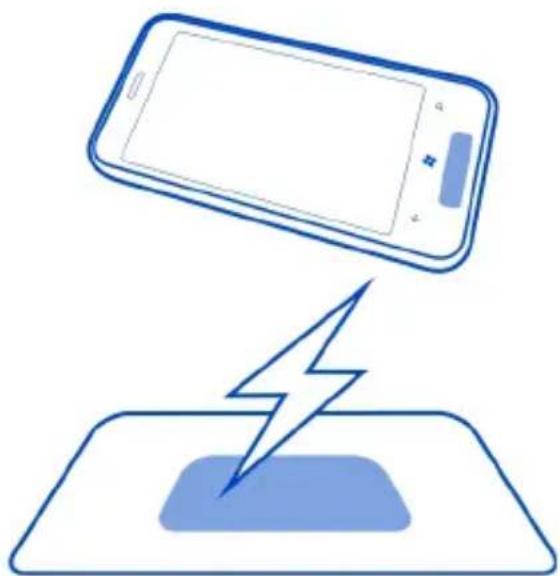
Qi is a global standard that makes wireless charging possible for your device. With a Qi-compatible device, you don't need to connect any cables. You just place your device on the charging surface.
natural_image
Illustration of a smartphone with a lightning bolt striking a blue surface, symbolizing battery charging (no text or symbols present)Qi works using magnetic induction, and is currently designed for devices that use 5 watts of power or less, such as mobile phones. Qi chargers and devices use the same
frequency, so as long as their active areas are touching, all Qi products are compatible, regardless of manufacturer or brand. For more details, see the user guides of both devices.
About Bluetooth connectivity
You can use Bluetooth to make a wireless connection to other compatible devices, such as mobile phones.
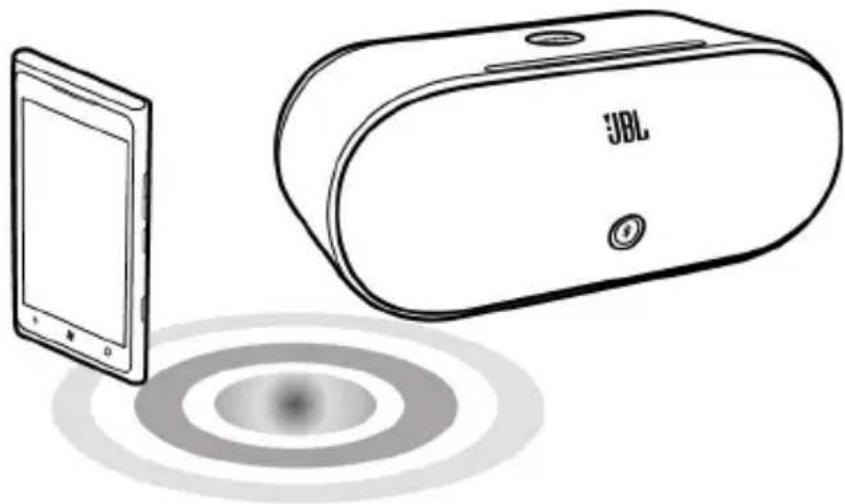
Devices do not need to be in direct line-of-sight, but they must be within 10 metres (33 feet) of each other. The connection may be affected by obstructions such as walls or other electronic devices.
natural_image
Illustration of a JBL phone with a smartphone and circular sound wave pattern (no text or symbols)10 m
This device is compliant with Bluetooth Specification 2.1 + EDR supporting the following profiles: A2DP and AVRCP. Check with the manufacturers of other devices to determine their compatibility with this device.
Keys and parts
text_image
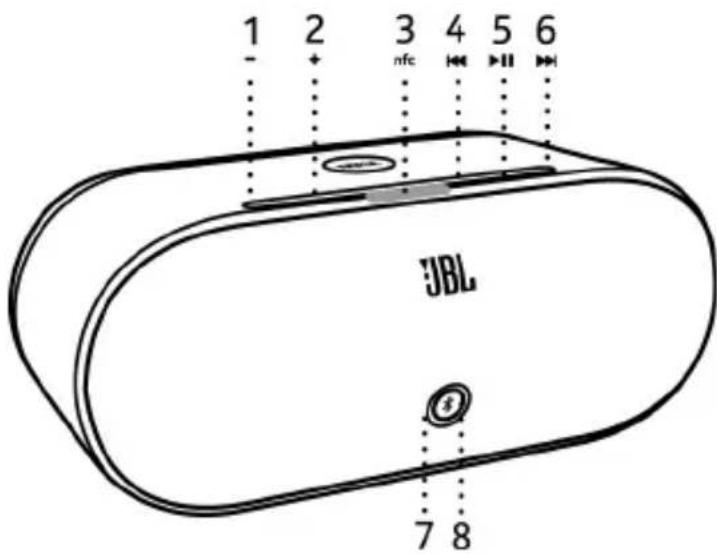
1 2 3 4 5 6 JBL 7 81 Volume down key
2 Volume up key
3 NFC area
4 Skip to previous track
5 Play or pause key
6 Skip to next track
7 Power and Bluetooth status indicator
8 Bluetooth key

text_image
9 10 11 12 13 149 Wireless charging area
10 Wireless charging status indicators
11 Power key
12 Connector for power supply
13 Service connector
14 Audio connector (3.5 mm)
Switch the speaker on

natural_image
Line drawing of a hand inserting a device into a circular button (no text or symbols)1 Connect the power supply cable to the connector on the speaker.
2 Connect a suitable plug to the AC-adapter of the power supply.
3 Plug the power supply into a wall outlet.
4 Press the power key.
If you've never paired your speaker with a device, or you've cleared the pairings, the speaker goes into pairing mode automatically when it is switched on, and the Bluetooth indicator light starts to flash slowly.
If you've already paired the speaker with one or more devices, the speaker connects to the last device it was used with.
If the speaker is not connected to another device, or has no audio connection or other activity for 30 minutes, it switches to standby mode, and all the indicator lights switch off.
Pair your device
Pair and connect
Before using your speaker with a phone or other compatible device for the first time, you must pair and connect it to the device.
You can only connect the speaker to one device at a time, but you can connect to another device on the go.
When the speaker is connected, the Bluetooth status indicator light is blue.
If the connected device goes out of Bluetooth range, the speaker tries to reconnect for 3 minutes. When the device comes back into range, the speaker reconnects automatically.
You can also use a standard audio cable (3.5 mm) to connect your device to the audio connector in the speaker. When you connect your speaker and device using a wired connection, Bluetooth is switched off automatically, and the Bluetooth indicator light turns white.
Pair the speaker using NFC
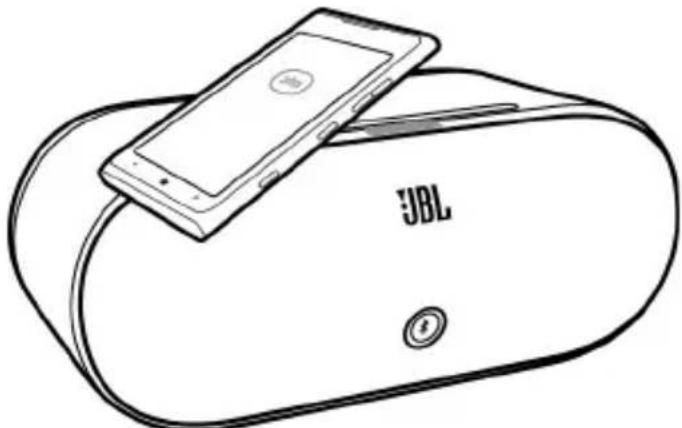
With Near Field Communication (NFC), you can easily pair and connect your speaker to your compatible device.
natural_image
Line drawing of a JBL brand electronic device with a smartphone and USB flash drive (no text or symbols on the device itself)If your device supports NFC, switch NFC on, and touch the NFC area of the speaker with the NFC area of your device. The speaker connects to your device automatically. Some devices may ask for confirmation on connection. For details on NFC, see your device user guide.
If your device doesn't support NFC, pair the speaker manually.
Pair the speaker manually
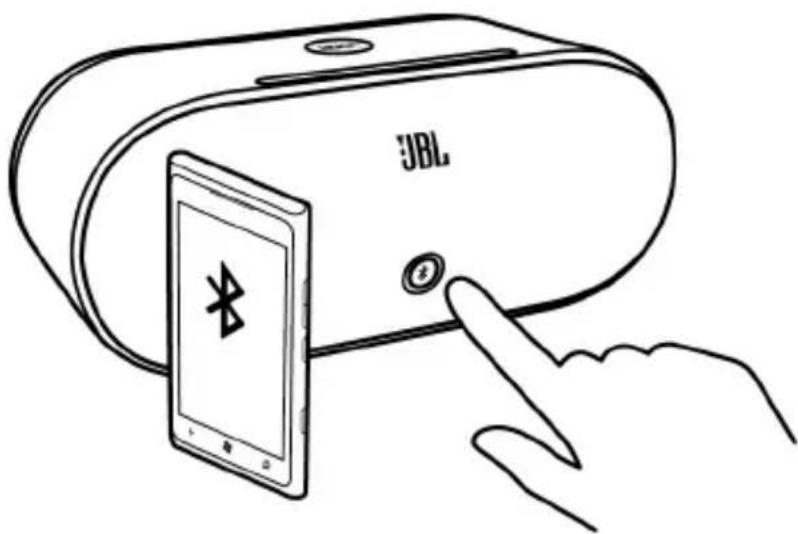
You can pair your speaker manually with Bluetooth.
text_image
JBL1 Switch on your speaker and phone or other compatible device.
2 If you've previously paired your speaker with another device, press and hold for 2 seconds to switch Bluetooth on.
3 Within 3 minutes, switch Bluetooth on in your phone, and search for Bluetooth devices. For details, see your phone user guide.
4 On your phone, select the speaker from the list of found devices.
5 If asked, type in the passcode 0000.
Clear the pairings
You can clear the paired devices list on your speaker.
Switch the speaker off, then press and hold and the power key for 5 seconds. The white and red indicator lights alternate.
Pressing and holding and power also restores factory settings in your speaker.
After you've cleared the pairings, you must pair the speaker before you can use it again. When you switch the speaker on, it goes into pairing mode automatically.
If the paired devices list on your speaker is cleared, also clear that pairing in your device before pairing again.
Play music
While playing music on your phone, you can control the music with your speaker as well.

natural_image
Illustration of a JBL phone with musical notes and a smartphone displaying a music note (no text or symbols on the device itself)Play a song
Select a song in the music player list, and press ▶ to play, pause, or resume playing.
If you receive or make a call while listening to music, the music is paused.
Play the next song
Press ▶▶
Play the previous song
Press
Adjust the volume
Press + or . -
Mute the music
Press and at the same time.
Unmute the music
Press either or, or both at the same time.

Warning:
Continuous exposure to high volume may damage your hearing. Listen to music at a moderate level.
Charge another device wirelessly
text_image
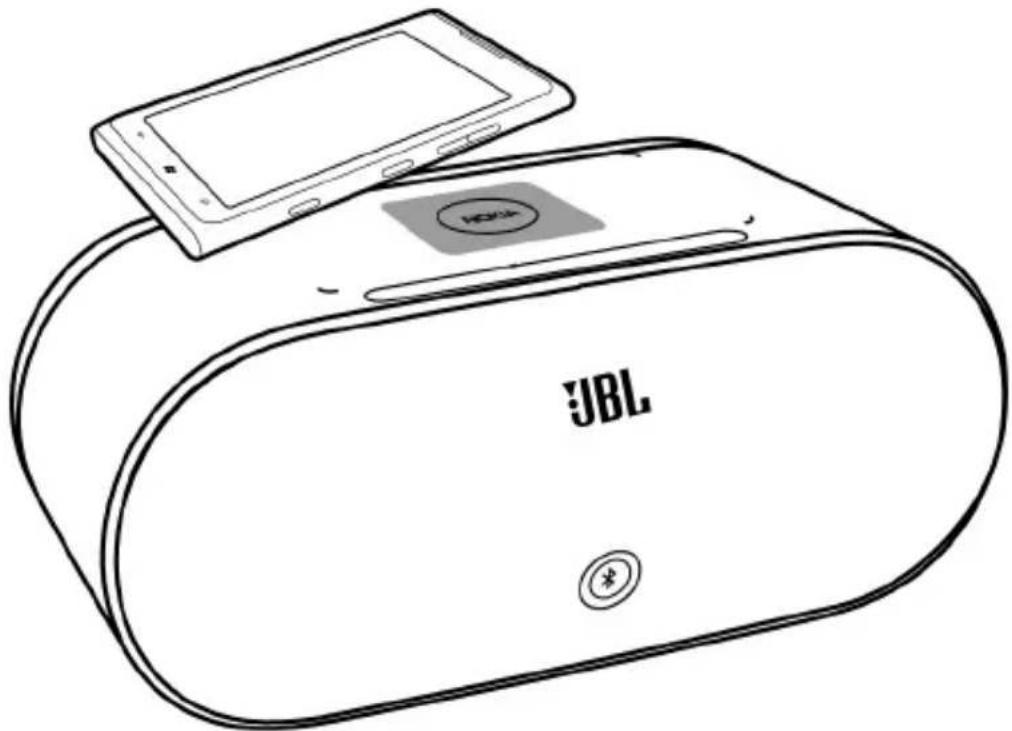
JBLPlace your phone or other compatible device on the wireless charging area on top of the speaker. The charging indicator lights turn white and flash on and off while charging. Adjust the position of your phone if the charging indicator lights blink quickly. When your phone is fully charged, the charging indicator lights go off immediately.
You can listen to music while charging, but make sure the music isn't too loud — vibrations may cause your phone to fall from the speaker.
It's normal for your speaker and phone to get warm, and they may get even warmer if you use your phone to, for example, stream music while charging. The speaker switches off automatically if it gets too warm. Wait for 5 minutes and try again.
Keep the speaker free of clutter. If there is something besides your phone on the speaker, the speaker doesn't charge, and the charging indicator lights blink quickly.
Connect to another device on the go
Take turns with your friends in playing your music. You can change the connected device on the go, without pausing the music.
1 While playing music from your connected device, press and hold for 2 seconds.
2 Pair and connect to another device. The music continues playing until pairing is complete.
3 Play music on the device just connected.
Support
When you want to learn more about how to use your device, or if you're unsure how your device should work, read the user guide thoroughly.
If you have an issue, restore the original factory settings.
If your issue remains unsolved, contact Nokia for repair options.
Product and safety information
Take care of your device
Handle your device, charger and accessories with care. The following suggestions help you protect your warranty coverage.
- Keep the device dry. Precipitation, humidity, and all types of liquids or moisture can contain minerals that corrode electronic circuits. If your device gets wet, allow the device to dry.
• Use the charger for intended purposes only. Improper use, or use of incompatible chargers may present a risk of fire, explosion, or other hazard. Never use a damaged charger. Only use the charger indoors. - Do not attempt to charge a device having a damaged, cracked or open battery case or a device that is not compatible with Qi.
- Do not store the device in high temperatures. High temperatures can shorten the life of the device, and warp or melt plastics.
- Do not attempt to open the device.
• Unauthorised modifications may damage the device and violate regulations governing radio devices. - Do not drop, knock, or shake the device.
- Only use a soft, clean, dry cloth to clean the surface of the device.
Recycle
Always return your used electronic products, batteries, and packaging materials to dedicated collection points. This way you help prevent uncontrolled waste disposal and promote the recycling of materials.
Crossed-out wheeled-bin symbol
The crossed-out wheeled-bin symbol on your product, battery, literature, or packaging reminds you that all electrical and electronic products, batteries, and accumulators must be taken to separate collection at the end of their working life. This requirement applies in the European Union. Do not dispose of these products as unsorted municipal waste. For more environmental information, see the product Eco profile at www.nokia.com/ecoprofile.
Additional safety information
Implanted medical devices
Manufacturers of medical devices recommend a minimum separation of 15.3 centimetres (6 inches) between a wireless device and an implanted medical device, such as a pacemaker or implanted cardioverter defibrillator, to avoid potential interference with the medical device. Persons who have such devices should:
• Always keep the wireless device more than 15.3 centimetres (6 inches) from the medical device.
• Not carry the wireless device in a breast pocket.
- Switch the wireless device off if there is any reason to suspect that interference is taking place.
- Follow the manufacturer directions for the implanted medical device.
If you have any questions about using your wireless device with an implanted medical device, consult your health care provider.
Copyright and other notices
DECLARATION OF CONFORMITY
C€1588
Hereby, NOKIA CORPORATION declares that this MD-100W product is in compliance with the essential requirements and other relevant provisions of Directive 1999/5/EC. A copy of the Declaration of Conformity can be found at http://www.nokia.com/global/declaration/declaration-of-conformity.
© 2012 Nokia. All rights reserved.
Nokia, Nokia Connecting People, and the Nokia Original Accessories logo are trademarks or registered trademarks of Nokia Corporation.
Reproduction, transfer, distribution, or storage of part or all of the contents in this document in any form without the prior written permission of Nokia is prohibited. Nokia operates a policy of continuous development. Nokia reserves the right to make changes and improvements to any of the products described in this document without prior notice.
The 'Qi' symbol is a trademark of the Wireless Power Consortium
The Bluetooth word mark and logos are owned by the Bluetooth SIG, Inc. and any use of such marks by Nokia is under license.
To the maximum extent permitted by applicable law, under no circumstances shall Nokia or any of its licensors be responsible for any loss of data or income or any special, incidental, consequential or indirect damages howsoever caused.
The contents of this document are provided "as is". Except as required by applicable law, no warranties of any kind, either express or implied, including, but not limited to, the implied warranties of merchantability and fitness for a particular purpose, are made in relation to the accuracy, reliability or contents of this document. Nokia reserves the right to revise this document or withdraw it at any time without prior notice.
The availability of products may vary by region. For more info, contact your Nokia dealer. This device may contain commodities, technology or software subject to export laws and regulations from the US and other countries. Diversion contrary to law is prohibited.
FCC/INDUSTRY CANADA NOTICE
This device complies with part 15 of the FCC rules and Industry Canada licence-exempt RSS standard(s). Operation is subject to the following two conditions: (1) This device may not cause harmful interference, and (2) this device must accept any
interference received, including interference that may cause undesired operation. Any changes or modifications not expressly approved by Nokia could void the user's authority to operate this equipment.
Note: This equipment has been tested and found to comply with the limits for a Class B digital device, pursuant to part 15 of the FCC Rules. These limits are designed to provide reasonable protection against harmful interference in a residential installation. This equipment generates, uses and can radiate radio frequency energy and, if not installed and used in accordance with the instructions, may cause harmful interference to radio communications. However, there is no guarantee that interference will not occur in a particular installation. If this equipment does cause harmful interference to radio or television reception, which can be determined by turning the equipment off and on, the user is encouraged to try to correct the interference by one or more of the following measures:
• Reorient or relocate the receiving antenna.
- Increase the separation between the equipment and receiver.
- Connect the equipment into an outlet on a circuit different from that to which the receiver is connected.
- Consult the dealer or an experienced radio/TV technician for help.
NOTE: FCC Radiation Exposure Statement: This equipment complies with FCC radiation exposure limits set forth for an uncontrolled environment. This transmitter must not be co-located or operating in conjunction with any other antenna or transmitter.
/Issue 1.2 EN