Speedlite 430 EX II - Flash CANON - Free user manual and instructions
Find the device manual for free Speedlite 430 EX II CANON in PDF.


User questions about Speedlite 430 EX II CANON
0 question about this device. Answer the ones you know or ask your own.
Ask a new question about this device
Download the instructions for your Flash in PDF format for free! Find your manual Speedlite 430 EX II - CANON and take your electronic device back in hand. On this page are published all the documents necessary for the use of your device. Speedlite 430 EX II by CANON.
USER MANUAL Speedlite 430 EX II CANON
Thank you for purchasing a Canon product.
The Canon Speedlite 430EX II is a multi-feature flash unit for Canon EOS cameras. It works automatically with E-TTL II, E-TTL, and TTL autoflash systems. It can be used as an on-camera flash or as part of a wireless flash system.
- Read this instruction manual while also referring to your camera's instruction manual.
Before using the Speedlite, read this instruction manual and your camera's instruction manual to familiarize yourself with the Speedlite operations. - The basic operation is the same as with normal AE shooting. When the 430EX II is attached to an EOS camera, almost all automatic exposure control for flash photography is handled by the camera.
Although the 430EX II is an external flash unit, it works automatically and seamlessly like the camera's built-in flash.
It becomes automatically compatible with the camera's flash metering mode (E-TTL II, E-TTL, and TTL).
In accordance with the camera's flash control system, the Speedlite controls the flash automatically in the respective flash metering mode:
- E-TTL II autoflash (evaluative flash metering with preflash reading/lens distance information)
- E-TTL autoflash (evaluative flash metering with preflash reading)
- TTL autoflash (off-the-film metering for real-time flash metering)
Regarding the camera's available flash metering modes, refer to the "External Speedlite" specification in the "Specifications" of your camera's instruction manual.
In the camera instruction manual, cameras having flash metering modes 1 or 2 are called Type-A cameras (compatible with E-TTL II or E-TTL). And cameras having flash metering mode 3 (compatible only with TTL) are Type-B cameras.
* This instruction manual assume that you are using the Speedlite with a Type-A camera.
For Type-B cameras, see page 37.
Contents
1 Getting Started and Basic Operation.... 7
2 Using Flash 13
3 Wireless Flash 25
Reference 32
Conventions Used in this Manual

natural_image
Simple circular diagram with two opposing sectors and a plus sign, no text or symbols present.- The <∅> symbol in the text refers to the +/- button.
natural_image
Simple geometric diagram with concentric circles and a central dot, no text or symbols present.- The <◎> symbol in the text refers to the Select/Setting button.
- The operation procedures in this instruction manual assume that both the camera and Speedlite's power switches are ON.
- Icons used in the text to indicate the respective buttons, dials, and settings match the same icons found on the camera and Speedlite.
The (♂4) / (♂6) / (♂16) icons indicate that the respective function remains in effect for 4 sec., 6 sec., or 16 sec. after you let go of the button. - Reference page numbers are indicated by (p.**).
This instruction manual uses the following alert symbols:
: Warning to prevent shooting problems.
: Gives supplemental information.
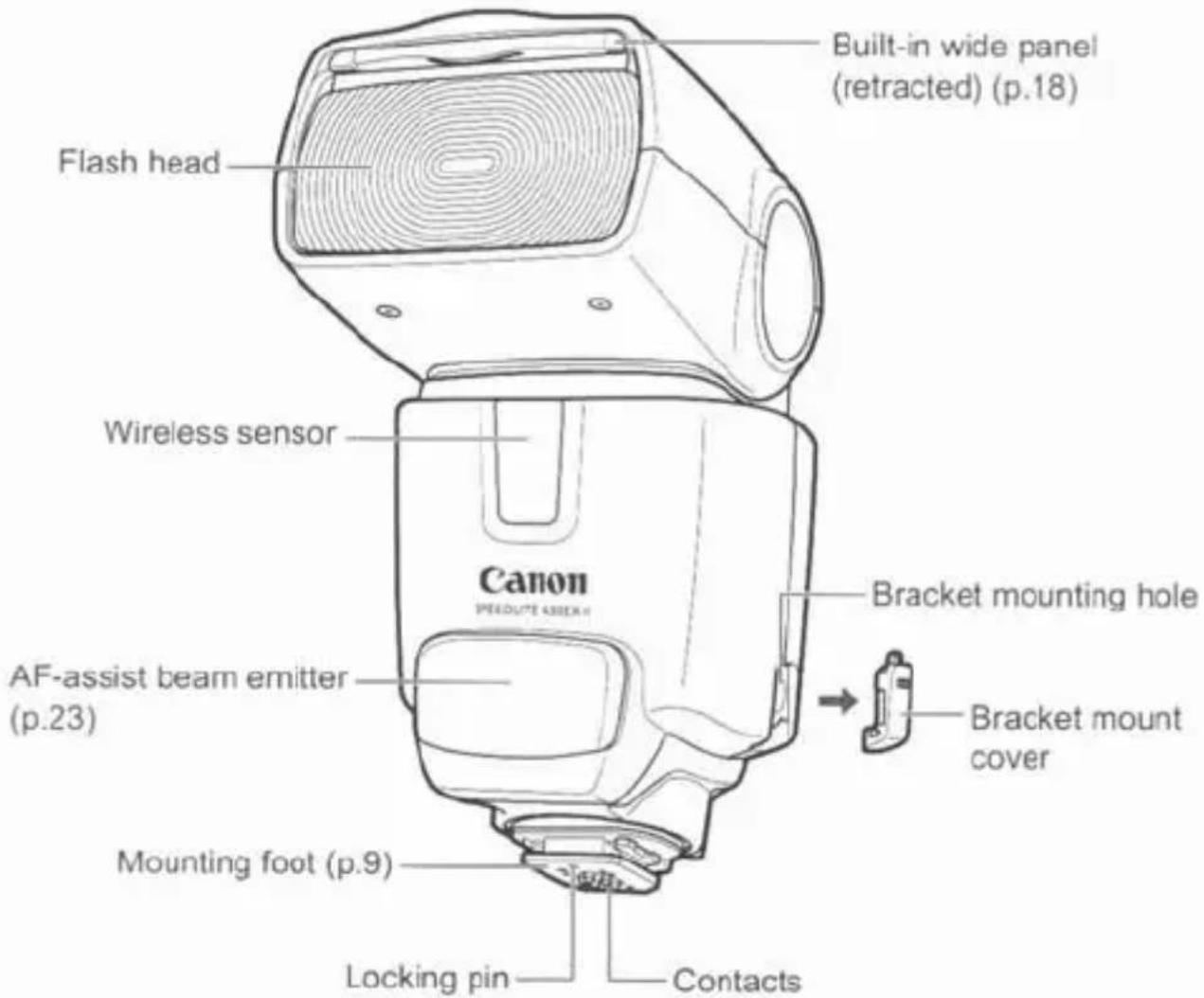
Nomenclature
text_image
Built-in wide panel (retracted) (p.18) Flash head Wireless sensor Canon FREDDUCE 45000 AF-assist beam emitter (p.23) Mounting foot (p.9) Locking pin Contacts Bracket mounting hole Bracket mount cover
text_image
Mini stand pocket Case Shoe Mini stand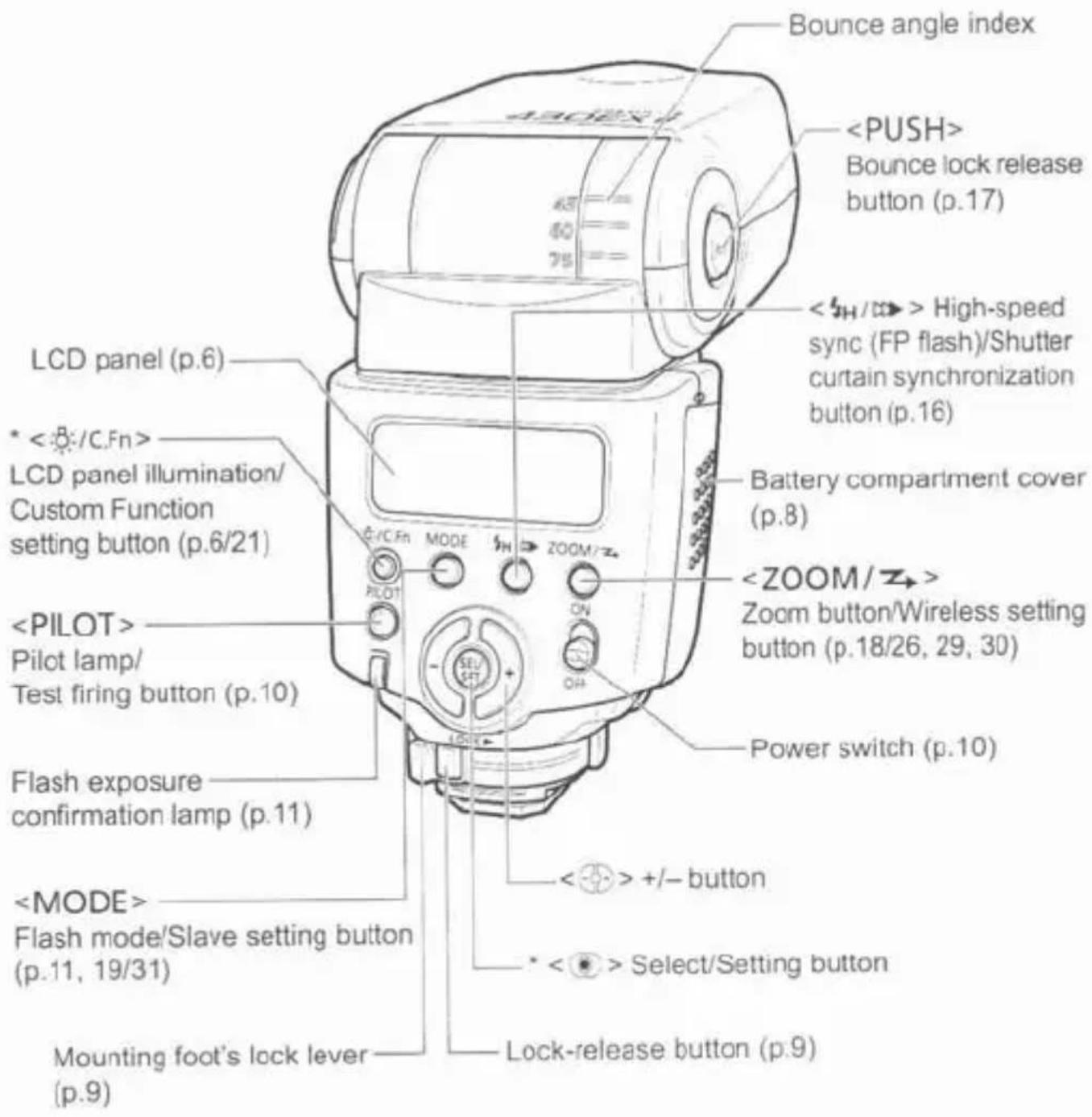
text_image
430EX Bounce angle index
Asterisked buttons have functions which remain active for 8 sec. after you press and let go of the button. The <:> illumination lasts for 12 sec.
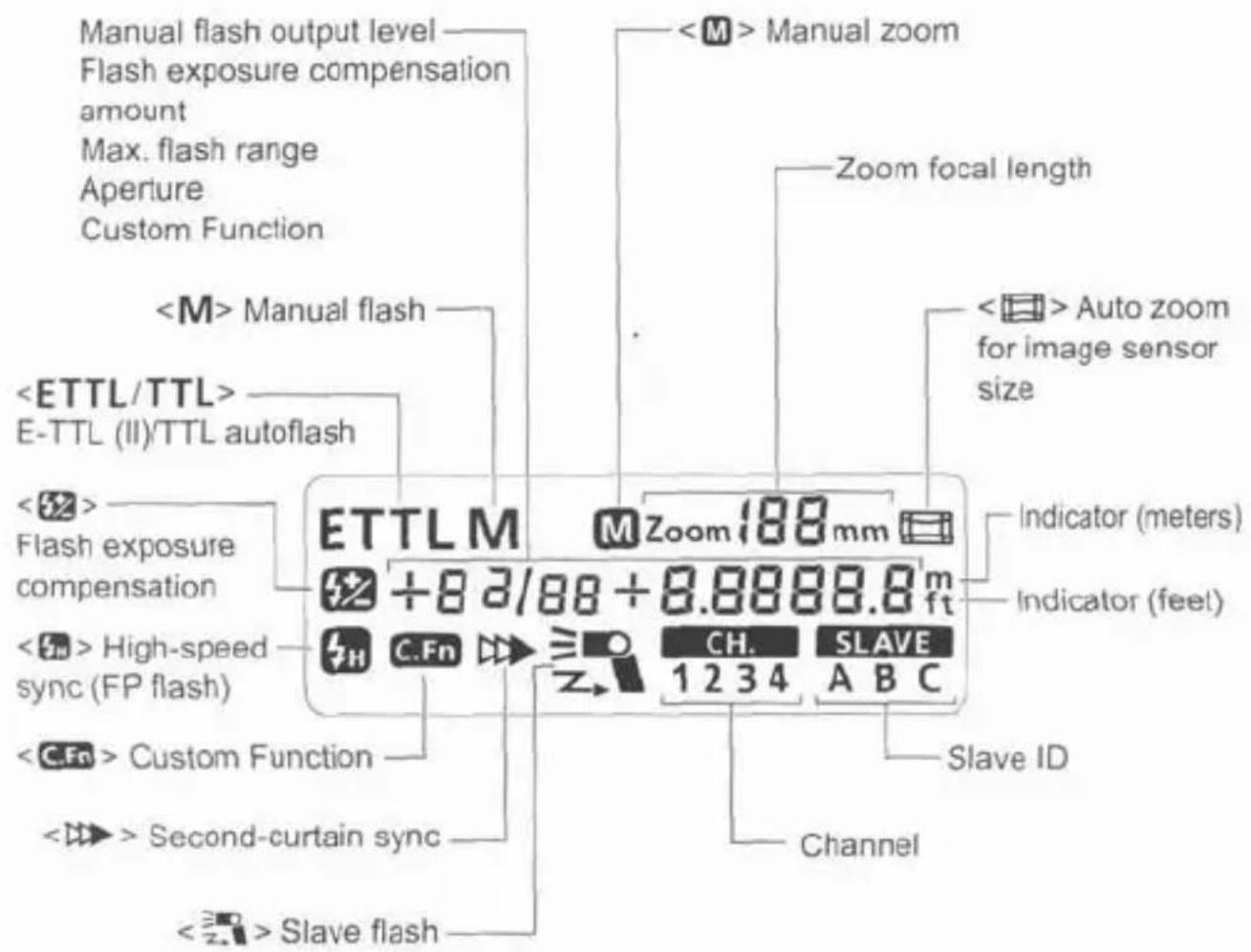
LCD Panel
text_image
Manual flash output level Flash exposure compensation amount Max. flash range Aperture Custom Function- To illuminate the LCD panel, press the <:> button.
- The items actually displayed depend on the current settings.
Getting Started and Basic Operation
Installing the Batteries 8
Attaching and Detaching the Flash....9
Turning on the Power Switch.... 10
Fully Automatic Flash Shooting 11
Using E-TTL II and E-TTL Autoflash in the
Shooting Modes.... 12

Cautions for firing continuous flashes
- To avoid overheating and degrading the flash head, do not fire more than 20 continuous flashes. After 20 continuous flashes, allow a rest time of at least 10 min.
- If you fire more than 20 continuous flashes and then fire more flashes in short intervals, the inner overheating prevention function may be activated to make the recycling time about 8 to 20 sec. If this occurs, allow a rest time of about 15 min. and the flash will then return to normal.
Installing the Batteries
Install four size-AA batteries.
text_image
Diagram of a digital camera with labeled parts and directional arrows indicating motion or operation1 Open the cover.
- Slide the battery compartment cover as shown by the arrow and open it.

text_image
Technical diagram of a camera module with labeled components and directional arrows indicating motion or movement.2 Install the batteries.
- Make sure the + and – battery contacts are correctly oriented as shown in the battery compartment.
text_image
Diagram of a digital camera with labeled parts and directional arrow indicating rotation or change3 Close the cover.
- Close the battery compartment cover and slide it as shown by the arrow.
Recycling Time and Flash Count
| Recycling Time (Approx.) | Flash Count (Approx.) |
| 0.1 - 3.0 sec. | 200 - 1400 |
- Based on new size-AA alkaline batteries and Canon's testing standards.

- Using size-AA batteries other than the alkaline type may cause improper battery contact due to the irregular shape of the battery contacts.
- If you change the batteries after firing many flashes continuously, be aware that the batteries might be hot.

- Use a new set of four batteries of the same brand. When replacing the batteries, replace all four at one time.
- Size-AA Ni-MH or lithium batteries can also be used.
Attaching and Detaching the Flash
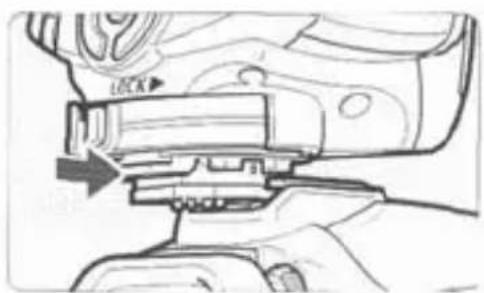
natural_image
Technical line drawing of a mechanical component with an arrow indicating a process or assembly (no text or symbols present)1 Attach the Speedlite.
- Slip the Speedlite's mounting foot into the camera's hot shoe all the way. (The mounting foot will protrude slightly from the hot shoe.)
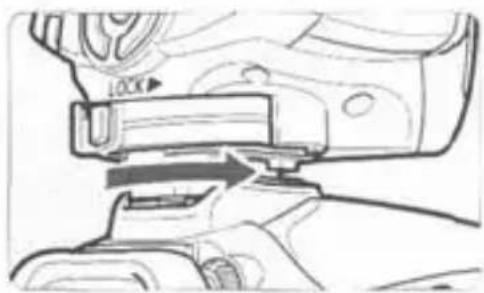
natural_image
Technical line drawing of a mechanical assembly with no visible text or symbolsSecure the Speedlite.
- On the mounting foot, slide the lock lever to the right. ▶ When the lock lever clicks in place, it will be locked.
text_image
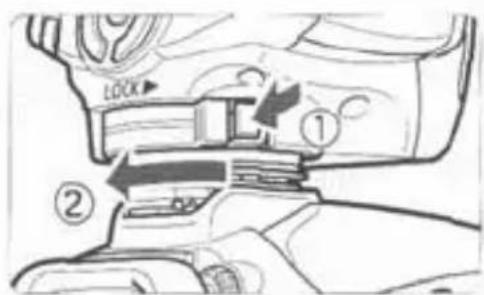
LOCK ① ②3 Detach the Speedlite.
While pressing the lock-release button, slide the lock lever to the left and detach the Speedlite.

Before attaching or detaching the Speedlite, be sure to turn off the Speedlite.
Turning on the Power Switch

text_image
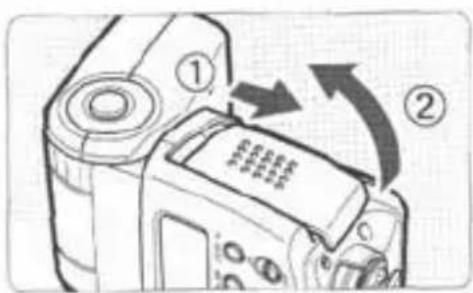
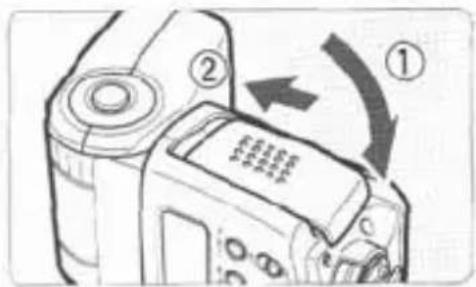
SEL/ SET + ON OFF1 Set the power switch to .
The flash recycling starts.
text_image
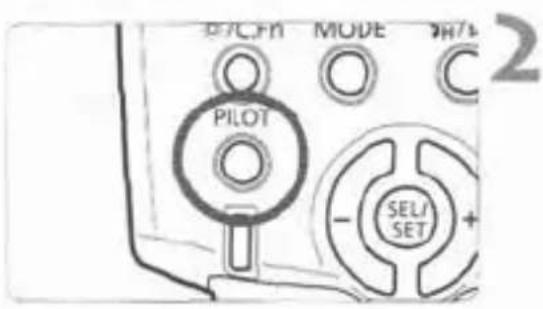
PILOT MODE SEL/ SET 2Check that the flash is ready.
- When the pilot lamp lights in red, the flash is ready to fire (fully charged).
- To fire a test flash, press the
button.
About Auto Power Off
To save battery power, the power will turn off automatically after a certain period (approx. 1.5 min. to 15 min.) of idle use. To turn on the Speedlite again, press the camera's shutter button halfway. Or press the Speedlite's

- A test firing cannot be fired while the camera's operation timer ⚙4 or ⚙6 is active.
- The Speedlite's settings will be retained in memory even after the power is turned off. To retain the Speedlite's settings after you replace the batteries, turn off the power and replace the batteries within 1 minute.
Fully Automatic Flash Shooting
When you set the camera's shooting mode to
(Program AE) or <□> (Full Auto), E-TTL II/E-TTL fully automatic flash will make it as easy as normal AE shooting in the
and <□> modes.
text_image
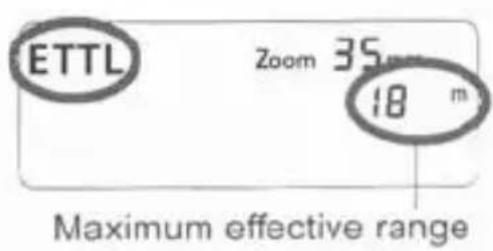
ETTL Zoom 35 mm 18 m Maximum effective range1
Set the Speedlite to .
- Press the
button so that is displayed. - When you press the shutter button halfway, the maximum effective range (distance) of the flash will be displayed.
text_image
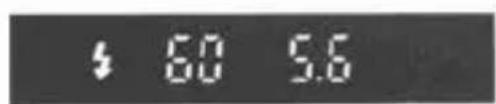
4 60 5.62
Focus the subject.
- Press the shutter button halfway to focus.
The shutter speed and aperture will be set as displayed in the viewfinder. - Check that the <#> icon is lit in the viewfinder.
text_image
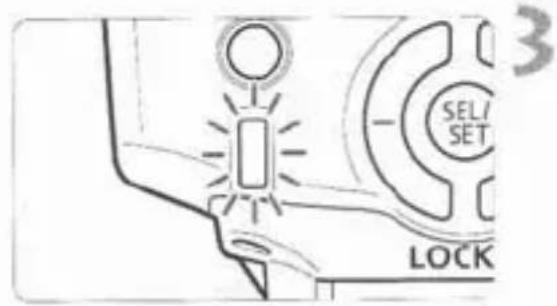
3 SEL/ SET LOCK3
Take the picture.
When you press the shutter button completely, the flash will fire and the picture will be taken.
If a standard flash exposure was obtained, the flash exposure confirmation lamp (green) will light for about 3 sec.

If the lens focal length blinks on the LCD panel, the periphery of the flash picture may turn out dark. Use the built-in wide panel (p.18).

will be displayed on the LCD panel even if the camera is compatible with E-TTL II. - If the flash exposure confirmation lamp does not light, move closer to the subject and take the picture again. With a digital camera, you can also increase the camera's ISO speed.
Using E-TTL II and E-TTL Autoflash in the Shooting Modes
Just set the camera's shooting mode to
| Tv | Select this mode when you want to set the shutter speed manually.The camera will then automatically set the aperture matching the shutter speed to obtain a standard exposure.If the aperture display blinks, it means that the background exposure will be underexposed or overexposed. Adjust the shutter speed until the aperture display stops blinking. |
| Av | Select this mode when you want to set the aperture manually.The camera will then automatically set the shutter speed matching the aperture to obtain a standard exposure.If the background is dark like a night scene, a slow sync speed will be used to obtain a standard exposure of both the main subject and background.Standard exposure of the main subject is obtained with the flash, while a standard exposure of the background is obtained with a slow shutter speed.Since a slow shutter speed will be used for low-light scenes, using a tripod is recommended.If the shutter speed display blinks, it means that the background exposure will be underexposed or overexposed. Adjust the aperture until the shutter speed display stops blinking. |
| M | Select this mode if you want to set both the shutter speed and aperture manually.Standard exposure of the main subject is obtained with the flash. The exposure of the background is obtained with the shutter speed and aperture combination you set. |
- If you use the
or shooting mode, the result will be the same as using the (Program AE) mode.
Flash Sync Speeds and Apertures Used
| Shutter Speed Setting | Aperture Setting | |
| P | Set automatically (1/X sec. - 1/60 sec.) | Automatic |
| Tv | Set manually (1/X sec. - 30 sec.) | Automatic |
| Av | Set automatically (1/X sec. - 30 sec.) | Manual |
| M | Set manually (1/X sec. - 30 sec., Bulb) | Manual |
- 1/X sec. is the camera's maximum flash sync speed.
Using Flash
Flash Exposure Compensation (★) 14
FEL: FE Lock (★) 15
High-Speed Sync (★) 16
Second-Curtain Sync (★) 16
Bounce Flash.... 17
ZOOM: Setting the Flash Coverage (★) and
Using the Wide Panel 18
M: Manual Flash (★) 19
C.Fn: Setting Custom Functions (★).... 21
Auto Zoom for Image Sensor Size 23
About Color Temperature Information Transmission.... 23
About the AF-Assist Beam 23
Speedlite Control with the Camera's Menu
Screen (★) 24
Flash Exposure Compensation
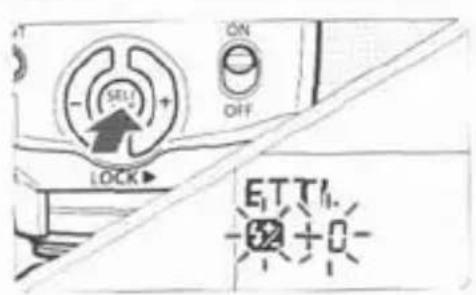
In the same way as normal exposure compensation, you can set exposure compensation for flash. The flash exposure compensation amount can be set up to ±3 stops in 1/3-stop increments. (If the camera's exposure compensation is in 1/2-stop increments, flash exposure compensation will be in 1/2-stop increments.)
text_image
SELL ON OFF LOCK ETTI -52 + 01 Press the <◎> button until the <52> icon and compensation amount start blinking.

text_image
SET SET ON OFF LOCK ETTL 12 1/3 Zoc2 Set the flash exposure compensation amount.
- Press the <∅> button to set the amount.
- To cancel the flash exposure compensation, set the amount to "+0."
text_image
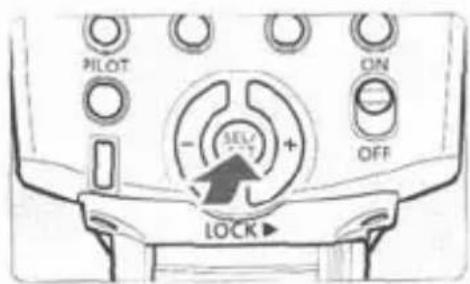
PILOT ON - + SELF OFF LOCK3 Press the <◎> button.
▶ Flash exposure compensation will be set.

If flash exposure compensation has been set with both the Speedlite and camera, the Speedlite's flash exposure compensation amount will override the camera's.
Using <∅>
This is for setting various numeric settings. Pressing the <∅> (plus) button increases the number, while the <∅> (minus) button decreases the number.
FEL: FE Lock
FE (flash exposure) lock locks the correct flash exposure setting for any part of the scene.
With
natural_image
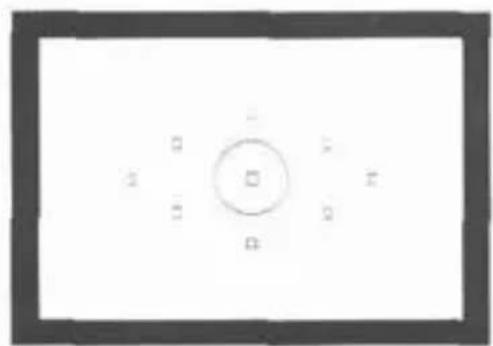
Simple diagram with a central circle and surrounding rectangular elements, no text or symbols present.1 Focus the subject.

natural_image
Close-up of a camera control panel with an arrow pointing to the left button (no visible text or symbols)Press the button. (⑧16)
- Aim the subject at the center of the viewfinder and press the
button.
The Speedlite fires a preflash, then the required flash output is retained in memory.
▶ "FEL" will be displayed in the viewfinder for 0.5 sec.
Each time you press thebutton, a preflash will be fired and a new flash exposure reading will be locked.

- If the subject is too far away and underexposure will result, the <#> icon will blink in the viewfinder. Move closer to the subject and try the FE lock again.
- If
is not displayed on the LCD panel, FE lock cannot be set. - If the target subject is too small in the viewfinder, the FE lock might not be very effective.

High-Speed Sync
With high-speed sync (FP flash), the flash can synchronize with all shutter speeds. This is convenient when you want to use aperture priority for fill-flash portraits.

text_image
ETTL Zoom 50mm 4.0mPress the < _H / _D > button so that < _H > is displayed.
- Check that the <_H> icon is lit in the viewfinder.

- If you set a shutter speed that is the same or slower than the camera's maximum flash sync speed, < _H > will not be displayed in the viewfinder.
- With high-speed sync, the faster the shutter speed, the shorter the effective flash range will be. Check the LCD panel for the maximum flash range for the respective shutter speed.
- To return to normal flash, press the <H/ > button so that <H> icon turns off.

Second-Curtain Sync
With a slow shutter speed, you can create a light trail following the subject. The flash fires right before the shutter closes.
text_image
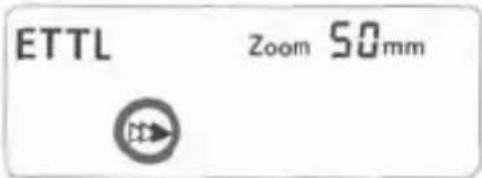
ETTL Zoom 50mmPress the <_H/> button so that <> is displayed.

- Second-curtain sync works well in the camera's "buLb" mode.
- To return to normal flash, press the <_H/> button. The <> icon will disappear.
- With E-TTL II/E-TTL, when you press the shutter button completely, a preflash will be fired. Then right before the shutter closes, the main flash is fired.
Bounce Flash
By pointing the flash head toward a wall or ceiling, the flash will bounce off the surface before illuminating the subject. This can soften shadows behind the subject for a more natural-looking shot. This is called bounce flash.
Set the Bounce Direction
- Hold down the
If the flash coverage is set automatically, the flash coverage will be fixed to 50mm.
The LCD panel will also display
- You can also set the flash coverage manually. (p.18)

text_image
90° 180° 90° 0° Camera
- If the wall or ceiling is too far away, the bounced flash might be too weak and result in underexposure.
- The wall or ceiling should be a plain, white color for high reflectance. If the bounce surface is not white, a color cast may result in the picture.
- After you take the shot, if the flash exposure confirmation lamp does not light, use a larger aperture opening and try again. With a digital camera, you can also increase the ISO speed.
ZOOM: Setting the Flash Coverage and Using the Wide Panel
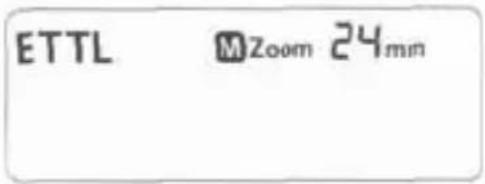
The flash coverage can be set to match the lens focal length from 24mm to 105mm. The flash coverage can be set automatically or manually. Also, with the built-in wide panel, the flash coverage will be compatible with ultra wide-angle lenses as short as 14mm.
text_image
ETTL MZoom 24mmPress the button.
- Press the <💡> button to change the flash coverage.
If <M> is not displayed, the flash coverage will be set automatically.

If you set the flash coverage manually, make sure it covers the lens focal length so that the picture will not have a dark periphery.
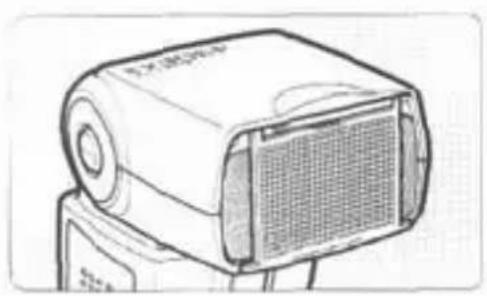
Using the Wide Panel
natural_image
Line drawing of a portable electronic device with a mesh grille and control panel (no text or symbols)Pull out the wide panel and place it as shown.
- The

- The flash coverage will not be compatible with the EF15mm f/2.8 Fisheye lens.
- For the effective lens focal length (or crop factor), refer to the camera's instruction manual.

- If you use bounce flash with the wide panel in place, the entire display on the LCD panel will blink as a warning. Since the subject will be illuminated by both the bounce flash and direct flash, it will look unnatural.
- Pull out the wide panel gently. Using excessive force may detach the wide panel.
M: Manual Flash
You can set the flash output from 1/64 power to 1/1 full power in 1/3-stop increments.
Use a hand-held flash meter to determine the required flash output to obtain a correct flash exposure. Setting the camera's shooting mode to

text_image
M Zoom 35mm 1Press the
text_image
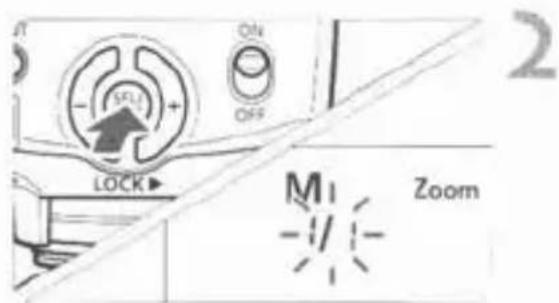
OFF SLE LOCK M ZoomSet the flash output.
- Press the <◎> button.
The flash output blinks. - Press the <◎> button to set the flash output, then press the <◎> button.
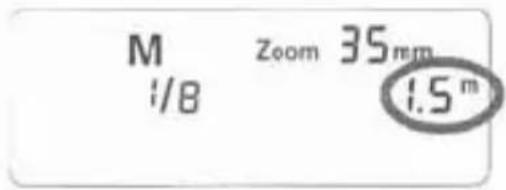
- Press the shutter button halfway to see the effective flash range displayed.
text_image
M Zoom 35mm 1/8 1.5 mFlash Output Display
The manual flash output value will change as shown below when the flash output is decreased or increased.
(Example)
Figures for decreased flash output →
| 1/1 | 1/1 -0.3 | 1/1 -0.7 | 1/2 | 1/2 -0.3 | 1/2 -0.7 | 1/4 |
| 1/2 +0.7 | 1/2 +0.3 | 1/4 +0.7 | 1/4 +0.3 |
← Figures for increased flash output
Metered Manual Flash Exposures
When the Speedlite is attached to an EOS-1D series camera, you can also set the flash exposure level manually.
1 Set the camera and Speedlite.
- Setting the camera's shooting mode to
or is recommended. - Set the Speedlite's flash mode to
(Manual flash).
2 Focus the subject.
• Focus manually.
3 Set up an 18% gray card.
- Place the gray card at the subject's position.
- In the viewfinder, the entire spot metering circle at the center should cover the gray card.
4 Press the button. (♂16)
The Speedlite will fire a preflash and the required flash output for the subject is retained in memory.
On the right side of the viewfinder, the exposure level indicator will show the flash exposure level for the correct flash exposure.
5 Set the flash exposure level.
- Adjust the Speedlite's manual flash level and the camera aperture so that the flash exposure level aligns with the standard exposure index.

natural_image
Two vertical bars with a right-pointing arrow between them, no text or symbols present.6 Take the picture.
- Remove the gray card and take the picture.
C.Fn: Setting Custom Functions
You can customize Speedlite features to suit your shooting preferences. You do this with Custom Functions.
| Custom Function No. | Function | Setting No. | Settings & Description | Reference page |
| C.Fn-00 | Distance indicator display | 0 | Meters (m) | - |
| 1 | Feet (ft) | |||
| C.Fn-01 | Auto power off | 0 | Enabled | p.10 |
| 1 | Disabled | |||
| C.Fn-02 | Modeling flash | 0 | Enabled (Depth-of-field preview button) | p.30 |
| 1 | Enabled (Test firing button) | |||
| 2 | Enabled (with both buttons) | |||
| 3 | Disabled | |||
| C.Fn-07 | Test firing with autoflash | 0 | 1/32 | - |
| 1 | Full output | |||
| C.Fn-08 | AF-assist beam firing | 0 | Enabled | p.23 |
| 1 | Disabled | |||
| C.Fn-09 | Auto zoom for sensor size | 0 | Enabled | p.23 |
| 1 | Disabled | |||
| C.Fn-10 | Slave auto power off timer | 0 | 60 minutes | p.28 |
| 1 | 10 minutes | |||
| C.Fn-11 | Slave auto power off cancel | 0 | Within 8 hours | |
| 1 | Within 1 hour | |||
| C.Fn-14 | Flash range/aperture info. | 0 | Maximum distance | p.11 |
| 1 | Aperture display |
C.Fn-02-1/3: Convenient when you want to use the depth-of-field preview button to check the depth of field.
C.Fn-08: If the Speedlite or camera's AF-assist beam is disabled, the AF-assist beam will not be emitted.
C.Fn-14: You can change the information displayed on the LCD panel when the shutter button is pressed halfway. This function can be set only with Type-A cameras.
Setting Custom Functions

text_image
Cfm Fn 0101 Press the button for 2 sec. or more so that
2 Select the Custom Function No.
- Press the <◦> button to select the Custom Function number.

text_image
ON OFF SELL LOCK C.Fn Fn 023 Change the setting.
- Press the <◎> button.
The setting number will blink.
▶ Press the <◎> button to set the desired number, then press the <◎> button.
▶ After you set the Custom Function and press thebutton, the camera will be ready to shoot.
Auto Zoom for Image Sensor Size
EOS DIGITAL cameras have one of three image sensor sizes. The lens' effective focal length will differ depending on the camera's sensor size. The Speedlite automatically recognizes the EOS DIGITAL camera's sensor size and automatically sets the flash coverage for lens focal lengths from 24mm to 105mm.
When the Speedlite is attached to a compatible camera, <☐> will appear on the Speedlite's LCD panel.
ETTL
Zoom 35mm

About Color Temperature Information Transmission
When the flash fires, the color temperature information is transmitted to the EOS DIGITAL camera. This feature optimizes the flash picture's white balance. When the camera's white balance is set to
To see if this feature works with your camera, see the Specifications in your camera's instruction manual.
About the AF-Assist Beam
Under low-light or low-contrast conditions when autofocus cannot be achieved, the built-in AF-assist beam will be emitted automatically to make it easier to autofocus. The 430EX II's AF-assist beam is compatible with the AF points of almost all EOS cameras. The AF-assist beam is compatible with 28mm and longer lenses. The effective range is shown below.
| Position | Effective Range (m / ft) |
| Center | Approx. 0.7 - 10 / 2.3 - 32.8 |
| Periphery | Approx. 0.7 - 5 / 2.3 - 16.4 |
Speedlite Control with the Camera's Menu Screen
If the Speedlite is attached to an EOS DIGITAL camera enabling External Speedlite control, the camera can set the Speedlite settings.
● Setting Speedlite functions
The settable functions will vary depending on the flash metering mode and flash mode.
- Flash mode
- Shutter sync (1st curtain, 2nd curtain, High-speed)
- Flash exposure compensation
- Flash metering mode
· Flash firing
· Zoom (Flash coverage)
· Clear Speedlite settings
● Speedlite Custom Functions
· 9 Custom Functions
● Clear All Speedlite Custom Functions
Only C.Fn-00 will not be cleared.
Flash function settings screen*

text_image
External flash func. setting Flash mode E-TTL II Shutter sync. 1st curtain Flash exp. comp -2..1..@..1..2 E-TTL II Evaluative Zoom Auto INFO Clear Speedlite settingsFlash C.Fn settings screen*
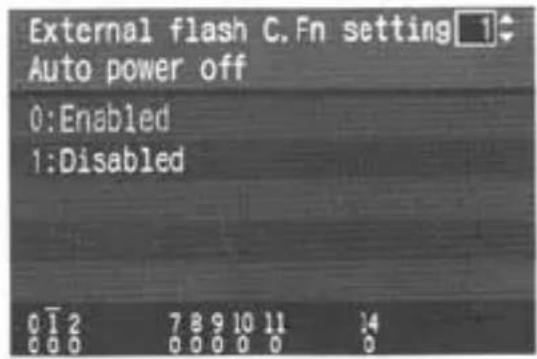
text_image
External flash C.Fn setting 1 Auto power off 0:Enabled 1:Disabled* The screen may look different depending on the camera.

If flash exposure compensation has already been set with the Speedlite, flash exposure compensation cannot be set with the camera.

If any Speedlite Custom Functions and flash function settings other than flash exposure compensation have been set by both the camera and Speedlite, the latest setting will take effect.
Wireless Flash
Wireless flash photography requires another Speedlite which can serve as the master unit such as Speedlite 580EX II.
Wireless Flash 26
Setting Manual Flash with the Slave Unit.... 31
Reference
430EX II System.... 32
Troubleshooting Guide 33
Specifications 35
Using a Type-B Camera 37
Wireless Flash
With multiple Canon Speedlites having the wireless flash feature, you can create various lighting effects with the same ease as using normal E-TTL II autoflash.
The settings you input with the master unit attached to the camera are also automatically transmitted to the slave units which are controlled by the master unit via wireless. Therefore, you need not operate the slave unit(s) at all during the shoot.
For details on wireless flash photography and operating the master unit, see the master unit's instruction manual. The procedure below applies to a master unit attached to the camera and slave unit(s) controlled by wireless.
1 Set the master unit.
- Attach the master unit Speedlite to the camera and set it as necessary.

text_image
MODE 100/100 ZOOM/Mo - 50/50+ 100 TL M Zoom 24mm CH SLAVE 1 ASet the 430EX II as the slave unit.
- Hold down the

text_image
ETTL MZoom 24mm CH. SLAVE 2 A3 Check the communication channel.
- If the master unit and slave unit(s) are set to a different channel, set them all to the same channel (p.29).
4 Set the slave ID.
- Set the slave ID when using two (A and B) or three (A, B, and C) slave groups (p.30).
5 Position the camera and Speedlites.
- Position the slave unit(s) within the master unit's wireless transmission range.
6 Set the master unit's flash mode to .
- For shooting,
text_image
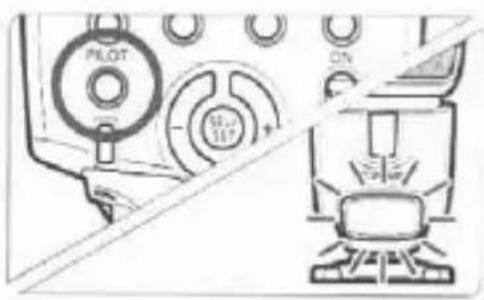
PLOT SET ON7 Check that the flash is ready.
- When the slave unit(s) is ready to fire (fully charged), the AF-assist beam will blink at 1-sec. intervals.
8 Check the flash operation.
- Press the master unit's test firing button.
The slave unit will fire. If the flash does not fire, adjust the slave unit's angle toward the master unit and distance from the master unit.
9 Set the camera and shoot.
- Set the camera in the same way as with normal flash shooting.
Sample wireless flash setup

text_image
Indoors Outdoors Slave A (430EX II) 80° Master unit such as Speedlite 580EX II Slave B (430EX II) 8m (26.2ft.) 12m (39.4ft.)- Use the mini stand (tripod socket provided) to prop up the slave unit.
- Use the bounce feature to swing the slave unit's flash body so that the wireless sensor faces the master unit.
- Indoors, the wireless signal can also bounce off the wall so there is more leeway in positioning the slave unit(s).
- After positioning the slave unit(s), be sure to test the wireless flash operation before shooting.
- Do not place any obstacles between the master unit and slave unit(s). Obstacles can block the transmission of wireless signals.

- Even with multiple slave units, all of them will be controlled in the same way via wireless.
- The Speedlite's zoom setting will be set automatically to 24mm. It is possible to change the master unit's zoom setting. However, note that the master unit transmits wireless signals to the slave unit(s) with the preflash. Therefore, the flash coverage must cover the slave unit's position. If you change the master unit's zoom setting, be sure to test the wireless flash operation before shooting.
- If the slave unit's auto power off takes effect, press the master unit's test firing button to turn on the slave unit.
- If the 430EX II is set as a slave unit and remains in auto power off mode for more than 8 hours, it will not turn on even if you try to fire a test flash with the master unit. In this case, press the slave unit's test firing button to turn it on.
- A test flash cannot be fired while the camera's operation timer ⚙4 or ⚙6 is active.
Using Fully Automatic Wireless Flash
Flash exposure compensation and other settings set with the master unit will also be automatically set in the slave units. Thus, you need not operate the slave unit(s). Wireless flash with the following settings can be done in the same way as with normal flash shooting.
- Flash exposure compensation
• High-speed sync (FP flash)
• FE lock
• FEB
- Manual flash
- Stroboscopic flash

- With FE lock, if even one Speedlite will result in underexposure, the < 4> icon will blink in the viewfinder. Open the aperture more or move the slave unit closer to the subject.
- With a wireless flash system, the master unit's settings will not be displayed on the 430EX II's LCD panel.
Setting the Communication Channel
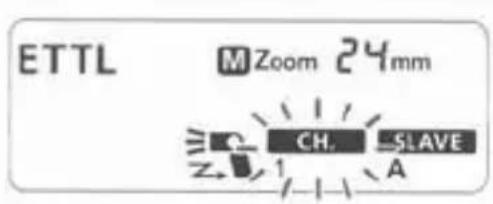
If there is another Canon wireless flash system nearby, you can change the channel No. to prevent signal confusion. Both the master and slave units must be set to the same channel No.
text_image
ETTL MZoom 24mm CH-SLAVE1 Press the
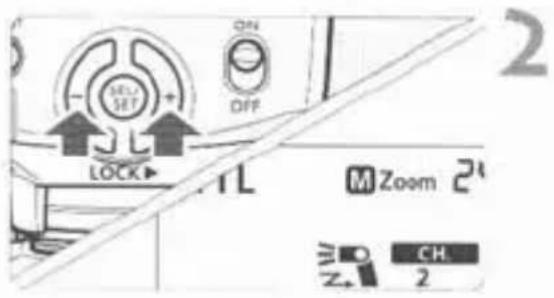
text_image
M ON OFF LOCK M Zoom 2" CH. 2Set the channel No.
- Press the <◦> button to select the channel number, then press the <◦> button.
Setting the Slave ID
Set the slave ID if you use two (A and B) or three (A, B, and C) slave groups.
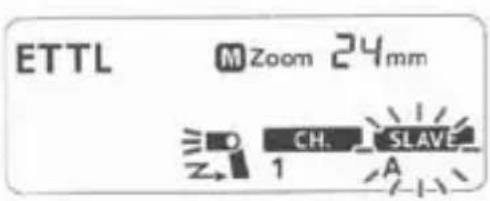
text_image
ETTL M Zoom 24mm CH. SLAVE 1 A1 Press the
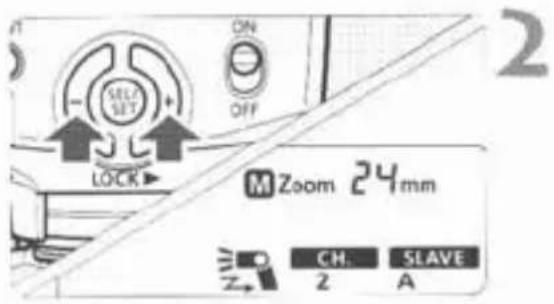
text_image
ON OFF M Zoom 24mm CH. SLAVE 2 ASet the slave ID.
- Press the <⊕> button to select the slave ID (A, B, or C), then press the <◎> button.
Modeling Flash
If the camera has a depth-of-field preview button, pressing it will fire the flash continuously for 1 sec. This is called the modeling flash.
It enables you to see the shadow effects on the subject and the lighting balance. You can fire the modeling flash for both wireless and normal flash shooting.
Do not fire the modeling flash more than 10 consecutive times. If you fire the modeling flash 10 consecutive times, allow the Speedlite to rest for at least 10 min. to avoid overheating and deteriorating the flash head.
The modeling flash cannot be fired with the EOS REBEL 2000/300 and Type-B cameras (p.2).
About Slave Group Control

text_image
Slave group A ID = A ID = A ID = AFor example, if you have the slave ID set to for three slave units, all three slave units will be controlled as if they were one Speedlite in slave group A.
Setting Manual Flash with the Slave Unit
Manual flash can be set manually with the slave unit. Do this in the following cases:
(1) When you want to set the flash output with the slave units individually for wireless or manual flash, as with studio flash units.
(2) When you use Speedlite Transmitter ST-E2 for wireless or manual flash.
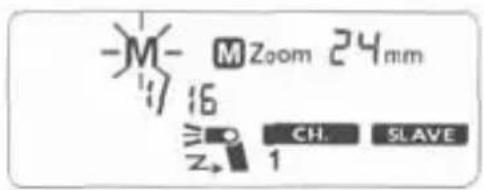
text_image
-M- 16 M Zoom 24mm ≥○ CH. SLAVE Z→ 1Hold down the
▶
- Set the manual flash output. (p.19)
430EX II System
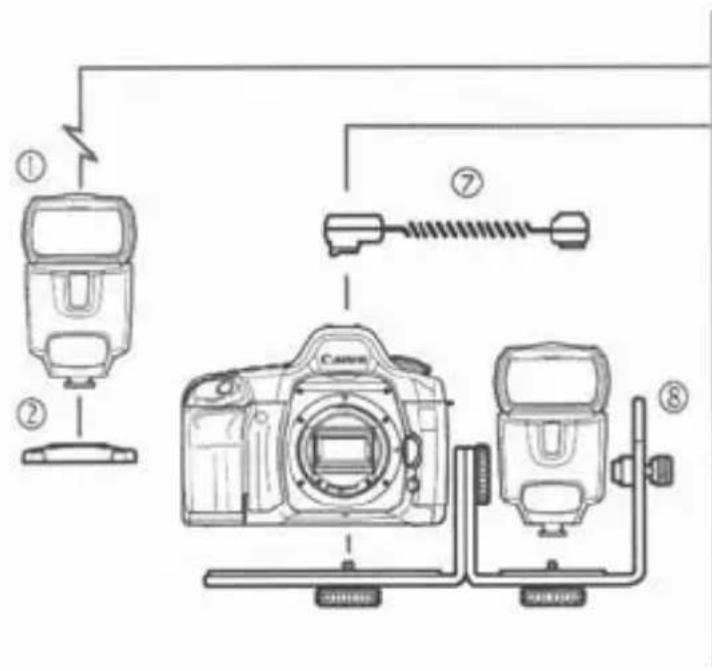
text_image
Diagram showing camera setup with labeled components including flash unit, camera, and cable connections
natural_image
Six technical illustrations of automotive air purifiers and enclosures, labeled ③ to ⑥ (no text or symbols on diagrams)① Speedlite 430EX II (Slave unit)
② Mini stand (included with 430EX II)
③ Speedlite 580EX II (On-camera/Master unit)
④ Speedlite Transmitter ST-E2
Dedicated transmitter for wireless control of 430EX II set as slave units.
⑤ Macro Ring Lite MR-14EX / ⑥ Macro Twin Lite MT-24EX
Flash for macro photography.
⑦ Off-Camera Shoe Cord OC-E3
Enables the 430EX II to be connected to the camera up to 60 cm/2 ft away.
⑧ Speedlite Bracket SB-E2
Troubleshooting Guide
If there is a problem, refer to this Troubleshooting Guide.
The Speedlite does not fire.
- The batteries are installed in the wrong orientation.
▶ Install the batteries in the correct orientation. (p.8)
The Speedlite's internal batteries are exhausted.
▶ If the flash recycling time takes 30 sec. or longer, replace the batteries. (p.8)
The Speedlite is not attached securely to the camera.
Attach the Speedlite's mounting foot securely to the camera. (p.9)
The electrical contacts of the Speedlite and camera are dirty.
▶ Clean the contacts.
The slave unit does not fire.
The channel does not match the master unit's channel.
▶ Set it to the same channel as the master unit. (p.29)
- The slave unit(s) is not positioned properly.
Place the slave unit within the master unit's transmission range. (p.26)
▶ Point the slave unit(s)'s sensor toward the master unit. (p.26)
The power turns off by itself.
• Auto power off took effect.
▶ Press the shutter button halfway or press the
The entire LCD panel blinks.
- The wide panel has been pulled out for bounce flash.
▶ Retract the wide panel. (p.18)
Auto zoom does not work.
The Speedlite is not attached securely to the camera.
Attach the Speedlite's mounting foot securely to the camera. (p.9)
The periphery or bottom of the picture looks dark.
- When you set the flash coverage manually, the setting was a higher number than the lens focal length, resulting in a dark periphery.
▶ Set the flash coverage that is a lower number than the lens focal length or set it to auto zoom. (p.18) - If only the bottom of the picture looks dark, you were too close to the subject.
▶ Keep at least 0.7 m/2.3 ft away from the subject.
The flash exposure is underexposed or overexposed.
There was a highly reflective object (glass window, etc.) in the picture.
▶ Use FE lock. (p.15)
The subject looks very dark or very bright.
▶ Set flash exposure compensation. For a dark subject, set a decreased flash exposure. And for a bright subject, set an increased flash exposure. (p.14)
• You used high-speed sync.
With high-speed sync, the effective flash range will be shorter. Make sure the subject is within the effective flash range displayed. (p.16)
The picture is really blurred.
- The shooting mode was set to
▶ Use a tripod or set the shooting mode to
. (p.12)
The buttons do not work.
- The Mode Dial is set to a Basic Zone mode.
▶ Set the Mode Dial to a Creative Zone mode.
Specifications
- Type
Type: On-camera, E-TTL II/E-TTL/TTL autoflash Speedlite
Compatible cameras: Type-A EOS cameras (E-TTL II/E-TTL autoflash), Type-B EOS cameras (TTL autoflash)
Guide No.: 43/141 (at 105mm focal length, ISO 100 in meters/feet)
Flash coverage: 24 - 105mm (14mm with wide panel)
- Auto zoom (Flash coverage set automatically to match the lens focal length and image sensor size)
- Manual zoom
- Flash head swing (bounce flash)
Color temperature
information transmission: Flash color temperature information transmitted to camera when flash is fired
- Exposure Control
Exposure control system: E-TTL II/E-TTL/TTL autoflash, manual flash
Effective flash range: 0.7 - 24.3 m / 2.3 - 79.7 ft.
(With EF50mm f/1.4 lens * High-speed sync: 0.7 - 12 m / 2.3 - 39.4 ft. (at 1/250 sec.) at ISO 100)
Flash exposure
compensation: ±3 stops in 1/3- or 1/2-stop increments
FE lock: Provided
High-speed sync: Provided
Flash exposure
confirmation: Flash exposure confirmation lamp lights
- Flash Recycling
Recycling time: Normal flash: Approx. 3.0 sec. (with size-AA alkaline batteries)
Flash-ready indicator. Red pilot lamp lights
- Wireless Slave
Transmission method: Optical pulse
Channels: 4
Transmission range: Reception angle: Approx. ±40° horizontal, Approx. ±30° vertical
Slave-ready indicator: AF-assist beam blinks
Modeling flash: Fired with camera's depth-of-field preview button
- Custom Functions: 9 (20 settings)
• AF-Assist Beam
| Linkable AF points: | 1 - 9 AF points (28mm or longer focal length) |
| Effective range: | At center: Approx. 0.7 - 10 m / 2.3 - 32.8 ft., Periphery: Approx. 0.7 - 5 m / 2.3 - 16.4 ft. |
• Power Source
| Battery: | Four size-AA alkaline batteries* Size-AA Ni-MH and lithium batteries also usable |
| Battery life (flash count): | Approx. 200 - 1400 flashes (with size-AA alkaline batteries) |
| Power saving: | Power off after approx. 1.5 min. to 15 min. of idle operation(60 min. if set as slave) |
- Dimensions
(W × H × D): 72 × 122 × 101 mm / 2.8 × 4.8 × 4.0 in.
• Weight: Approx. 320 g / 11.3 oz. (Speedlite only, excluding batteries)
- All specifications above are based on Canon's testing standards.
- Product specifications and external appearance are subject to change without notice.
Manual Flash Guide No. (ISO 100, in meters/feet)
| Flash Output | Flash Coverage (mm) | |||||||
| 14 | 24 | 28 | 35 | 50 | 70 | 80 | 105 | |
| 1/1 | 11/36.1 | 25/82 | 27/88.6 | 31/101.7 | 34/111.5 | 37/121.4 | 40/131.2 | 43/141.1 |
| 1/2 | 7.8/25.6 | 17.7/58.1 | 19.1/62.7 | 21.9/71.9 | 24/78.7 | 26.2/86 | 28.3/92.8 | 30.4/99.7 |
| 1/4 | 5.5/18 | 12.5/41 | 13.5/44.3 | 15.5/50.9 | 17/55.8 | 18.5/60.7 | 20/65.6 | 21.5/70.5 |
| 1/8 | 3.9/12.8 | 8.8/28.9 | 9.5/31.2 | 11/36.1 | 12/39.4 | 13.1/43 | 14.1/46.3 | 15.2/49.9 |
| 1/16 | 2.8/9.2 | 6.3/20.7 | 6.8/22.3 | 7.8/25.6 | 8.5/27.9 | 9.3/30.5 | 10/32.8 | 10.8/35.4 |
| 1/32 | 1.9/6.2 | 4.4/14.4 | 4.8/15.7 | 5.5/18 | 6/19.7 | 6.5/21.3 | 7.1/23.3 | 7.6/24.9 |
| 1/64 | 1.4/4.6 | 3.1/10.2 | 3.4/11.2 | 3.9/12.8 | 4.3/14.1 | 4.6/15.1 | 5/16.4 | 5.4/17.7 |
Using a Type-B Camera
If you use the 430EX II with a Type-B camera (TTL autoflash EOS camera), note the features available and not available below. When a Type-B camera is used with the 430EX II set to autoflash,
Features Available with Type-B Cameras
· TTL autoflash
- Flash exposure compensation
- Manual Flash
- Second-curtain sync
- Manual flash and stroboscopic flash with wireless flash
Features not Available with Type-B Cameras
· E-TTL II/E-TTL autoflash
· FE lock
· High-speed sync (FP flash)
- Autoflash and flash ratio setting with wireless flash
This device complies with Part 15 of the FCC Rules. Operation is subject to the following two conditions: (1) This device may not cause harmful interference, and (2) this device must accept any interference received, including interference that may cause undesired operation.
Do not make any changes or modifications to the equipment unless otherwise specified in the instructions. If such changes or modifications should be made, you could be required to stop operation of the equipment.
This equipment has been tested and found to comply with the limits for a class B digital device, pursuant to part 15 of the FCC Rules. These limits are designed to provide reasonable protection against harmful interference in a residential installation. This equipment generates, uses and can radiate radio frequency energy and, if not installed and used in accordance with the instructions, may cause harmful interference to radio communications.
However, there is no guarantee that interference will not occur in a particular installation. If this equipment does cause harmful interference to radio or television reception, which can be determined by turning the equipment off and on, the user is encouraged to try to correct the interference by one or more of the following measures:
• Reorient or relocate the receiving antenna.
- Increase the separation between the equipment and receiver.
- Consult the dealer or an experienced radio/TV technician for help.
This Class B digital apparatus complies with Canadian ICES-003.
The apparatus shall not be exposed to dripping or splashing.
Batteries shall not be exposed to excessive heat such as sunshine, fire or the like.
Dry batteries shall not be subjected to charging.

natural_image
Simple line drawing of a trash bin with crossed lines indicating no waste or discharge (no text or symbols)European Union (and EEA) only.
This symbol indicates that this product is not to be disposed of with your household waste, according to the WEEE Directive (2002/96/EC) and your national law. This product should be handed over to a designated collection point, e.g., on an authorized one-for-one basis when you buy a new similar product or to an authorized collection site for recycling waste electrical and electronic equipment (EEE). Improper handling of this type of waste could have a possible negative impact on the environment and human health due to potentially hazardous substances that are generally associated with EEE. At the same time, your cooperation in the correct disposal of this product will contribute to the effective usage of natural resources. For more information about where you can drop off your waste equipment for recycling, please contact your local city office, waste authority, approved WEEE scheme or your household waste disposal service. For more information regarding return and recycling of WEEE products, please visit www.canon-europe.com/environment.
(EEA: Norway, Iceland and Liechtenstein)
Canon
This Instructions booklet is dated May 2008. For information on the camera's compatibility with system accessories marketed after this date, contact your nearest Canon Service Center.