Midistart Music 25 - MIDI Keyboard Miditech - Free user manual and instructions
Find the device manual for free Midistart Music 25 Miditech in PDF.


User questions about Midistart Music 25 Miditech
0 question about this device. Answer the ones you know or ask your own.
Ask a new question about this device
Download the instructions for your MIDI Keyboard in PDF format for free! Find your manual Midistart Music 25 - Miditech and take your electronic device back in hand. On this page are published all the documents necessary for the use of your device. Midistart Music 25 by Miditech.
USER MANUAL Midistart Music 25 Miditech
natural_image
Black and white mini-flop keyboard with a small dial, displayed on a plain surface (no text or symbols visible)Owner's manual
USB-MIDI-Masterkeyboard with 25 keys
Features:
-Class Compliant for Windows XP,
Windows Vista 32/64 & Mac OS X (10.2.6 & higher)
-25 high-quality dynamic keys
-Programable 2-way-joystick with integrated knob
-4 different velocity curves
-Programable slider
-10 user memory places to store own settings
-Footswitch-input for a sustain-pedal
-MIDI-Out
-USB powered or optional with AC adaptor
eMail: info@miditech.de Internet: www.miditech.de
PREFACE
Congratulations on purchasing the Midistart music 25 master MIDI controller keyboard. It is one of the finest products of its kind, made after extensive research into what customers require from a MIDI Controller.
When using your Midistart music 25 in conjunction with a computer and appropriate music software, you will be able to discover the wonderful world of Computer Music, with a set of complete musical instruments from your sound card or workstation.
This manual is written to help you become familiar with the features of the Midistart music 25. Please read the manual carefully to discover all the features of your Midistart music 25. After reading the manual, you will have a clear understanding of how to transmit different MIDI messages to other instruments and equipment. For ease of use of MIDI implementation, we strongly recommend you to have the manual at hand when you are using the keyboard, especially if you are new to the world of MIDI.
TABLE OF CONTENTS
1.Userpanel
2.Installation
3.Basic functions
-
System settings
-
The Userpanel:
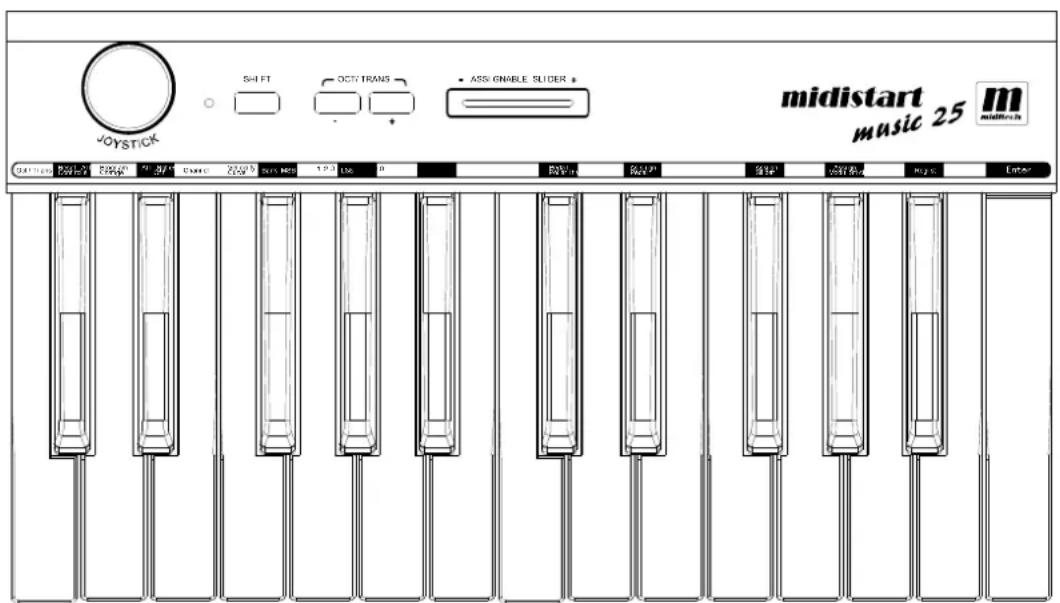
Front panel:
text_image
midistart music 25 midsink VOYSTICK SH FT OCT TRANS ASS-GNIBLE SLIDER * OUTPUTING OUTPUTING OUTPUTING OUTPUTING OUTPUTING OUTPUTING OUTPUTING OUTPUTING OUTPUTING OUTPUTING OUTPUTING OUTPUTING OUTPUTING OUTPUTING OUTPUTING OUTPUTING OUTPUTING OUTPUTING OUTPUTING OUTPUTING OUTPUTING OUTPUTING OUTPUTING OUTPUTING OUTPUTING OUTPUTING OUTPUTING OUTPUTING OUTPUTING OUTPUTING OUTPUTING OUTPUTING OUTPUTING OUTPUTING OutputKeyboard
The 25 keys are velocity sensitive, and can be used in combination with the SHIFT button to program multiple MIDI functions. On top of the keys you will find the MIDI controller function descript and the numeric keypad.
2-way-joystick
The joystick is part to control the pitch and/or modulation. Left/right sends Pitchbend, pressing the joystick up sends Modulation. Pressing it down sends Aftertouch, or you can define for this way a different controller.
Power-LED
This is the power indicator LED.
SHIFT button
The SHIFT button is used in combination with other keys to program the functions.
DATA buttons +/-
By default the DATA buttons are used for Octave function. If you hold the SHIFT button at the same time, they will be assigned with Transpose. The default keyrange of the Midistart music 25 is from C2-C4. With DATA +/- you can change it 3 octaves up or down.
Assignable slider
By default the slider is used for Volume control. This slider can be assigned with different CC-MIDI controllers.
Rear panel:

text_image
MIDI OUT PEDAL DC INUSB POWER ON - OFPEDAL
Can be used for a Sustain pedal. The polarity can be changed.
MIDI OUT
Standard 5-DIN MIDI Out port
USB port
To make the connection to the computer for the MIDI data transfer and to get USB power
DC IN
AC adaptor power in port, please use a AC/DC adaptor with 9 V DC/500 mA.
POWER ON-OFF
To turn the instrument on and off.
2. Installation
Windows XP/ Vista/ Mac OSX
Connect the Midistart music 25 keyboard to an available USB port on your computer with the USB cable provided. If the PC is running, switch the keyboard on with the power switch.
As the Midistart music 25 is a "Class Compliant" device, you do not need to install special software drivers. Windows XP; Vista and Mac OSX will automatically recognize the new device and establish it as "USB audio equipment" within the system. Once established it is ready to start use. Should you have previously used other USB audio equipment on this same USB port, it is advisable to choose another USB port that has never previously had audio equipment installed. This ensures that an Midistart "exclusive" is established at this port.
Turning on with initialization
If you press and hold both DATA buttons while switching on the Midistart music 25, the keyboard will initialize itself. This will clear all user settings and bring it back to the default settings.
3.Basic functions of the Midistart music 25
DATA buttons
By default the DATA buttons are used for Octave function. If you hold the SHIFT button at the same time, they will be assigned with Transpose. The default keyrange of the Midistart music 25 is from C2-C4. With DATA +/- you can change it 3 octaves up or down.
Programming with the keys
The controller functions will be programmed with the keyboard's keys. On top of a single keys you find the special function it has and the numeric keys. The right key is „Enter“, to confirm a change or program. In combination with the SHIFT button you can choose what function do you want to change.
For example, press the SHIFT button, and then „Assign slider“, the press the numeric key „1“, and „Enter“. Now the slider is assigned with the Modulation controller.
After this the power-LED will blink 3 times, and the light from the SHIFT button turns off. Some functions, eg. the Velocity curves, it is not necessary to confirm the new setting with „Enter“.
Adjusting Volume - Assignable slider
When the power on, the application of the slider is volume control. You can use the slider to send the volume control message CC#7 to adjust volume. Read how you can assihn the slider to another CC-controller:
Press
Value range : 0-146
The most left position of the slider will send data 0, and the most right position will send data 127.
Transpose and octave - Oct/Trans key
By default the DATA buttons are used for Octave function. If you hold the SHIFT button at the same time, they will be assigned with Transpose. The default keyrange of the Midistart music 25 is from C2-C4. With DATA +/- you can change it 3 octaves up or down.
You can use the
Press
Now the basic function of DATA +/- is transpose up/down.
Working with the Joystick
Move the joystick to the left/right to send the PITCHBEND message. Move the joystick upward to send the MODULATION message. Move the joystick downward to send the AFTER TOUCH message.
How to assign the downward joystick message:
Press
Value range : 0-145
The center position of the joystick will send data 0, and the lowest position will send data 127.
How to choose a soundprogram in 3 steps:
The next 3 steps will work together, if you want to choose a bank and a sound number in a sound module.
You can use step 3 alone to change the sound number in the actual soundbank.
1. Bank MSB - Bank MSB key
Press the SHIFT button, then the „Bank MSB“ key, after this the number you want to program, and confirm with „Enter“. Power LED blinks 3 times, and the SHIFT LED turns off.
Press
Do NOT confirm with
2. Bank LSB - Bank LSB key
Press the SHIFT button, then the „Bank LSB“ key, after this the number you want to program, do NOT confirm with „Enter“. Power LED blinks 3 times, and the SHIFT LED turns off.
Press
Do NOT confirm with
3. Program change - Program change key
Press the SHIFT button, then the „Program change“ key, after this the numeric sound number, eg. 61, and confirm with „Enter“. Power LED blinks 3 times, and the SHIFT LED turns off.
Press
The values of this three steps will send at one time, and switch the bank and the program number.
MIDI channel - Channel key
Press the SHIFT button, then the „Channel“ key, after this the numeric channel number from 1 to 16, and confirm with „Enter“. Power LED blinks 3 times, and the SHIFT LED turns off. Now the keyboard sends the MIDI data on the specified new MIDI channel.
Press
Default value : 1
Value range : 1-16
Reset all controllers - Rest all controls key
Press the SHIFT button, then the „Reset all controls“ key, and message of reset all controllers will be sent out immediately.
Press
Reset all events - All notes off key
Press the SHIFT button, then the „All notes off“ key, and message of reset all events will be sent out immediately.
Press
After complete setting operation with key on the keyboard, the SHIFT indicator will run off and the keyboard will recover to normal play mode.
4. System settings
Velocity Curve
There are 4 different velocity curves can be selected ranged.
Press
Velocity Curve 1 (Normal) Velocity Curve 2 (Soft)

line
| X | Y | |---|---| | 000 | 000 | | 127 | 127 |
line
| x | y | | ---- | ----- | | 0.00 | 0.00 | | 0.64 | 0.64 | | 1.27 | 1.27 |Velocity Curve 3 (Hard) Velocity Curve 4 (Expand)

line
| x | y | | ---- | ----- | | 000 | 000 | | 064 | 064 | | 127 | 127 |
line
| x | y | | ---- | ----- | | 960 | 0.00 | | 964 | 0.64 | | 127 | 127 |Pedal Polarity
You can set the polarity of the switch type pedal. The default setting is normal off pedal. Press a key as a toggle switch.
Press
GM/GS Switch
With the default setting, when you first time to triggle this feature, the GS On message F0 41 10 42 12 40 00 7F 00 41 F7 will be sent. Triggle this feature again, the GM On message F0 7E 7F 09 01 F7 will be sent out. In another words, it'll send GS On and GM On message alternatively.
Press
Registration - Storing your own settings
All settings you made are non-volatile. After power off, settings will keep no change. When you turn on the keyboard again, it'll work with settings you made last time.
You may save your setting in 10 registration memories numbered 0 – 9 individually. You could recall one of them any time. The contents of the registration memory are: Oct/Trans setting, velocity curve, all assignments for slider, pedal etc.
Store operation:
Press
Recall Operation:
Press
Standard Midi Controller (CC) numbers
| ControllerFunktionControllerFunktion | |||
| 0 Bank Select 50 General Purpose #3 | |||
| 1 Modulation Wheel | 51 General Purpose #4 | ||
| 2 Breath Control 52-63 Not defined | |||
| 3 Not defined 64 Damper Pedal | |||
| 4 Foot Controller 65 | Portamento on/off | ||
| 5 Portamento Time | 66 Sostenuto on/off | ||
| 6 Data Entry 67 Soft | Pedal on/off | ||
| 7 Channel Volume | 68 Legato Footswitch | ||
| 8 Balance 69 Hold 2 | |||
| 9 Not defined 70 Sound Variation | |||
| 10 Pan | 71 Timbre/Harmonic Intensity | ||
| 11 | Expression | 72 Release Time | |
| 12 Effect Control 1 | 73 Attack Time | ||
| 13 Effect Control 2 | 74 Brightness | ||
| 14/15 | Not defined 75 Decay Time | ||
| 16 General Purpose #1 | 76 Vibrato Rate | ||
| 17 General Purpose #2 | 77 Vibrato Depth | ||
| 18 General Purpose #3 | 78 Vibrato Delay | ||
| 19 General Purpose #4 | 79 Sound Contr. | ||
| 20-31 Not defined 80 General Purpose #5 | |||
| 32 Bank Select 81 General Purpose #6 | |||
| 33 Modulation Wheel | 82 General Purpose #7 | ||
| 34 Breath Control 83 | General Purpose #8 | ||
| 35 Not defined 84 Portamento Control | |||
| 36 Foot Controller 85-90 Not defined | |||
| 37 Portamento Time | 91 Reverb Send Level | ||
| 38 Data Entry 92 Tremolo Depth | |||
| 39 Channel Volume | 93 Chorus Send Level | ||
| 40 Balance 94 Celeste/Detune Depth | |||
| 41 Not defined 95 Phaser Depth | |||
| 42 Pan 96 Data Entry +1 | |||
| 43 Expression 97 Data Entry -1 | |||
| 44 Effect Control 1 98 NRPN LSB | |||
| 45 Effect Control 2 99 NRPN MSB | |||
| 46/47 Not defined 100 RPN LSB | |||
| 48 General Purpose #1 101 RPN MSB | |||
| 49 General Purpose #2 102-119 Not defined | |||
| 120 All Sound Off 142 EG Attack Time | |||
| 121 Reset All Controllers 143 EG Decay Time | |||
| 122 Local Control on/off 144 EG Release Time | |||
| 123 All Notes off 145 After Touch | |||
| 124 Omni Mode off 146 * | Program Change | ||
| 125 Omni Mode on 147 ** | Start (MTC) | ||
| 126 Poly Mode off 148 ** | Continue (MTC) | ||
| 127 Poly Mode on 149 ** Stop (MTC) | |||
| 128 Pitch Bend 150 ** System Reset (MTC) | |||
| 129 Pitch Bend Sensitivity 151 ** | Stop (MMC) | ||
| 130 Fine Tuning 152 ** | Play (MMC) | ||
| 131 Coarse Tuning 153 ** | Deferred Play | ||
| 132 Vibrato Rate 154 ** | Forward (MMC) | ||
| 133 Vibrato Depth 155 ** Rewind (MMC) | |||
| 134 Vibrato Delay | 156 ** | Record Strobe (MMC) | |
| 135 Low Pass Filter Cutoff Frequency 157 ** | Record Exit (MMC) | ||
| 136 Low Pass Filter Resonance 158 ** | Record Pause (MMC) | ||
| 137 High Pass Filter Cutoff Frequency | 159 ** | Pause (MMC) | |
| 138 EQ Low Gain 160 ** | Ejcct (MMC) | ||
| 139 EQ High Gain 161 ** | Chase (MMC) | ||
| 140 EQ Low Frequency 162 ** Comman Error Reset (MMC) | |||
| 141 EQ High Frequency 163 ** | MMC Reset (MMC) | ||
* This controller cannot be assigned to the joystick.
** This controllers cannot be assigned to the joystick or the slider.
Specifications:
Keyboard:25 keys (C2 - C4), (velocity sensitive)
Functions: Basic functions: USB MIDI, Octave shift, Transpose, Joystick, Pedals, MIDI OUT, Slider,
Function buttons: MIDI Data: Bank select, Program change, GM System On, GS System on, All Notes Off, etc;
Parameters: Transose, Octave, MIDI out channels, Velocity curve, Pitch bend, Moulation, Brightness, etc.
Panel Controls and Indicators: Function buttons with light × 2; Slider × 1, SHIFT button with light × 1, Joystick × 1.
Display: LED indicator for power/signal.
Input/Output Terminals: POWER ON/OFF switch × 1, POWER IN connector × 1, USB port × 1 PEDAL jack × 1, MIDI OUT port × 1
Power Supply: USB bus power or AC Power Adapter (Optional), AC Power Adapter requirement: 9V 500mA

Dimensions (W x D x H) and Weight : 390 mm × 200mm × 500 mm, 2.3 kg
IMPORTANT SECURE INFORMATONS
Please read the following secure instructions first!
- Never use the keyboard in the near of water like a swimming pool, bathtub or wet environment like a basement, in rain or similar.
- Never use the keyboard in the near of heating elements like a radiator or similar, also high temperatures or direct sunbeam should be avoid.
- Use only the power supply that is declared in our Specification
- If you didn't use the keyboard for a longer time please plug power off.
- Take care that no liquid flows inside the keyboard
- Also take care that no metal objects like a coin or paperclip and other small objects can fall into the keyboard (e.g. by children...) because of electrical shortcut.
- Do not open the keyboard, this is allowed by qualified technicians only.
- Never leave the keyboard powered and switched on alone, because of fire for example by thunderstorm or other reasons.
- Children should inform about the secure information and/or an adult should take care about, if children are to young for understanding this information.
- In the near of a radio or television device, are electromagnetic fields possible they can disturb the reception. Enough distance is important!
- In the near of Audio Amplifiers is noise possible. Enough distance is important too.
- For cleaning never use petrol, alcohol or solvent because damaging of the housing.
Use only a dry or little wet rag for cleaning and unplug the power supply or USB connector, because of electrical shock. - Never unplug the keyboard if the power supply is powered.
- Don't throw the Keyboard, and also never let them crash down. Also don't push or trust the keyboard.
- At a thunderstorm please unplug all connectors.
Thank You.