Virtuoso Preciso - Coffee grinder Baratza - Free user manual and instructions
Find the device manual for free Virtuoso Preciso Baratza in PDF.


User questions about Virtuoso Preciso Baratza
0 question about this device. Answer the ones you know or ask your own.
Ask a new question about this device
Download the instructions for your Coffee grinder in PDF format for free! Find your manual Virtuoso Preciso - Baratza and take your electronic device back in hand. On this page are published all the documents necessary for the use of your device. Virtuoso Preciso by Baratza.
USER MANUAL Virtuoso Preciso Baratza
Conical Burr Coffee Grinder
Operations Manual

natural_image
Close-up of a micro adjustable coffee maker with visible branding and coffee beans (no text or symbols on the device itself)BARATZA

text_image
Virtuoso PRECISO™Skilled in the art of grinding
Operations manuals are available in the following languages at www.baratza.com
English .pdf
Spanish .pdf
French .pdf
Thank you for purchasing the Virtuoso PRECISO Conical Burr Coffee Grinder. With the Virtuoso PRECISO, it's now easier than ever to make professional quality coffee, whether at home, the office, or your café.
Below are detailed descriptions of the features that make the PRECISO stand out from other grinders in its class.
Precise, commercial-quality burrs:
Manufactured in Italy, the PRECISO'S burrs are of the same material and durability as the industry's highest-quality line of commercial conical burr coffee grinders. The burrs rotate slower than those of most grinders minimizing the heat in the beans, to preserve the flavor.
Innovative grind adjustment system:
Macro and Micro adjustments are quickly and repeatedly achievable with this new precise adjustment system. The range of grind and accuracy of the settings are truly impressive. The PRECISO has over 400 distinct settings of grind from Espresso to French Press. An innovative calibration system allows all the manufacturing tolerances of the grinder to be eliminated, resulting in identical, accurate performance of each grinder. Furthermore the PRECISO'S ring burr is supported on three points, providing a stable platform for a more accurate grind. Whether in commercial, semi-professional or personal applications, exact grind is imperative to a high-quality extraction and, therefore, a better cup of coffee!
Efficient motor:
The PRECISO houses a powerful DC motor that produces more than four times the output of a standard AC motor found in most grinders in this class. The motor spins at less than one-third the speed, making it much quieter and lower in pitch. Extremely well-made, the motor is built to handle long-duty cycles. In addition, it possesses a thermal safety device that protects the motor from overheating and automatically resets once the motor cools.
Table of Contents
Introduction 1
Table of Contents 2
Parts Identification 3
Safety Information.... 4
Initial Operation 5
Setting the Grind Adjustment 5
Adjustable Self Timer 6
Front Mounted Pulse Button 7
PortaHolder ^TM Installation 7
Care and Cleaning 8
Cleaning the Housing and Hopper 8
Cleaning the Burrs 8
Remove the Ring Burr 8
Cleaning the Ring Burr 9
Replacing the Ring Burr 9
Replacing the Bean Hopper 9
Cleaning a Clogged Grinder.... 10
Automatic Cleaning ....11
Warranty and Service 12
Notes 13
Troubleshooting guide ...... www.baratza.com/troubleshooting
BEFORE USING YOUR GRINDER
Prior to using your PRECISO grinder for the first time you should wash the bean hopper and ground coffee bin in warm soapy water. See the section on Care and Cleaning for instruction on how to remove and reinstall these parts.

text_image
Parts Identification Hopper Lid Whole Bean Hopper MACRO Grind Setting Indicator MACRO Grind Adjustment Scale MICRO Grind Adjustment Pulse Button Adjustable Self-Timer Ground Coffee Bin Grind Adjustment Ring Grind Adjustment Tab Center Cone Burr Silicone Seal (cutaway) Removable Ring Burr Burr Alignment and Lifting TabsImportant Information
Please read the information below very carefully. It contains important tips for the use, the safety and the maintenance and care of this appliance. Please keep these operating instructions for future reference.
- Use only with AC current and the correct voltage. See the label on the base of the grinder to determine the correct voltage.
- Only clean the grinder housing with a dry or slightly damp cloth.
- Do not use this grinder for anything other than its intended use (i.e. grinding whole roasted coffee beans).
- Disassemble your grinder only as directed in the care and cleaning section of this manual. If you cannot remedy a malfunction check www.baratza.com and visit our Troubleshooting page. If you need further assistance e-mail us at support@baratza.com or call us at 425-641-1245.
- Baratza will not accept any liability for damage or injury if the grinder is used other than for its intended purpose or is improperly operated or repaired. All warranty claims will be void.
For Your Safety
- Do not operate the grinder with a damaged cord or plug, or if the grinder malfunctions.
- Do not leave your grinder unattended while turned ON.
- Shut off and unplug the grinder from the electrical outlet when not in use and before cleaning.
- To unplug, grasp plug and remove from the outlet-never pull on cord.
- Keep your grinder out of the reach of children.
- Do not immerse the grinder, plug or cord in water or any other liquid.
Caution
Always unplug the electrical supply cord prior to cleaning the grinder.
Note:
You may notice some rust on the burrs. This is normal and will disappear after a small amount of coffee has been ground. To remove the rust and season the burrs, grind 1/4 pound of coffee and discard.
Initial Operation
See the bottom of the grinder to determine the proper voltage for the grinder. Place the PRECISO on a level surface and plug into a correct voltage, AC outlet only. Remove the lid from the hopper by lifting off. Pour the desired quantity of roasted whole coffee beans into the hopper up to a maximum of 8 oz. Replace the lid. Ensure the ground coffee bin is fully inserted.
Setting the Macro and Micro Grind Adjustment
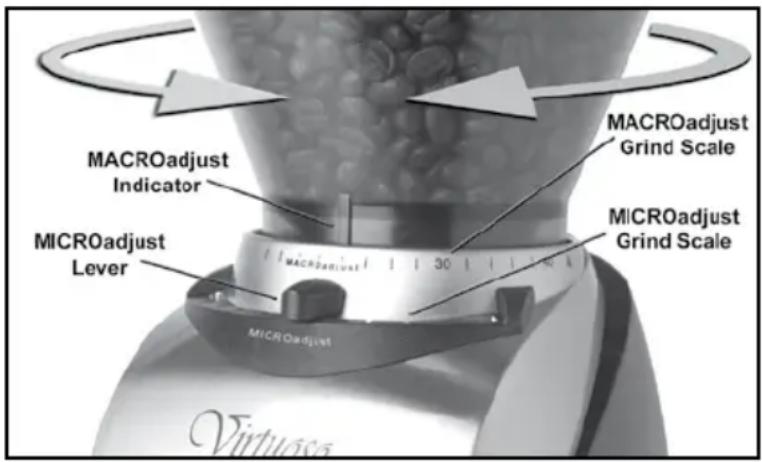
Slowly rotate the bean hopper clockwise or counter clockwise to align the indicator on the bean hopper with the desired number setting on the Macro grind scale. Select the correct grind for the brew process you are using. (Note: whenever moving the Macro adjustment to the left(finer direction), the grinder should be running.) Set the Micro adjustment lever to the middle of the scale. Grind a small amount of coffee. Check the particle size. If the particle size is close to what you desire, now use the Micro lever to "fine tune" your grind size (A is finer, K is coarser). If the particle size needs a big change then adjust the Macro adjustment to a new position then fine tune with the Micro lever. The full range on the Micro scale is equal to one "click" or position on the Macro scale. With both the hopper and the micro adjustment, moving right (counter-clockwise) produces a bigger particle size and left
text_image
MACROadjust Indicator MICROadjust Lever MACROadjust Grind Scale MICROadjust Grind Scale 30 MICROadjust(clockwise) produces a smaller particle size. The actual grind size for a particular setting will vary depending on many factors, including: degree of roast (light vs. dark), freshness, humidity, type of bean, oil content, etc. With use, you will determine the setting that is right for your taste, brewing style and your favorite beans.
| Setting Type | of Coffee Grind | |
| 1 to 14 Espresso Fine | ||
| 16 to 32 Filter / Drip Medium | ||
| 34 to 40 Press Coarse | ||
Note: Partially ground coffee beans may remain between the burrs after the grinder is turned off, adjusting the grind may be easier when the grinder is running. Avoid running the grinder at very fine settings without beans as it can damage the burrs.
Adjustable Self Timer
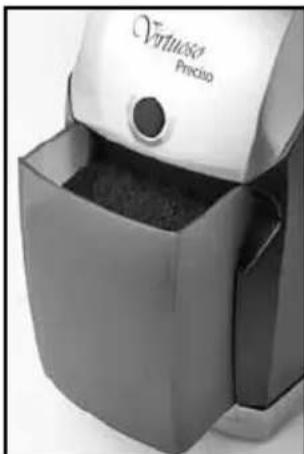
The PRECISO is equipped with a 60 second timer switch. Each segment around the timer represents about 10 seconds of run time. The grinder switches off automatically once the time has elapsed. If you want
natural_image
Close-up of a white Versusco Precision vacuum cleaner with a black lid and granular body (no visible text or symbols)to interrupt grindingbefore the time haselapsed, simply turnthe timer switch counterclockwise until the grinder switches off.

natural_image
Close-up of a rotary dial with 'OFF' label, no other text or symbols visibleThe quantity of ground coffee you need depends on the type of bean, coarseness of the grind, brewing method and personal taste. With use, you will find the most suitable settings for your personal taste.
Front Mounted Pulse Button
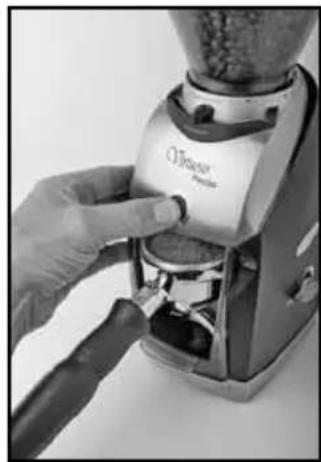
For short duration grinding, the PRECISO is equipped with a front mounted pulse button. It can be used for grinding directly into an espresso-brewing basket. Remove the grounds bin and position the espresso-basket inside the grinder directly below the pulse button or position the espresso basket in the Portaholder which is included (see photo). Push and hold the pulse button to grind. Grinding will stop when the button is released.
natural_image
Close-up of a hand using a Kevlar brand graser to press or adjust a coffee maker's surface (no visible text or symbols)PortaHolder™ Installation
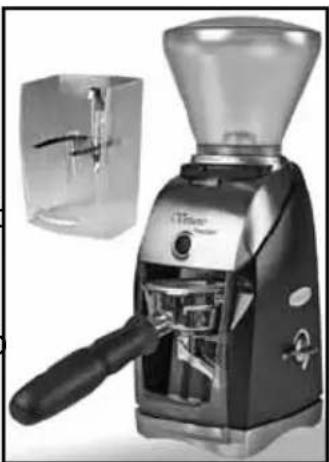
Insert the PortaHolder™ into the grinder. Then insert your porta filter into the PortaHolder™ by tipping the basket down so the lip of the porta filter slides under and gets hooked by the hook bracket at the top rear of the PortaHolder™ while the base of the basket is supported by the two metal fingers that extend from the PortaHolder™ If the porta filter basket is not horizontal in the holder, remove the screw and move the bracket higher or lower in order to level the portafilter basket.
natural_image
Exterior view of a modern coffee machine with glass lid and handle (no visible text or symbols)To use, insert your porta filter into the PortaHolder™. Turn the timer to the desired time. The grinder will run for the time set and stop automatically.
Note: Use caution not to overfill the porta filter. If you overfill the filter coffee will back up and jam your grinder.
Care and Cleaning
Cleaning the Housing and Hoppers
natural_image
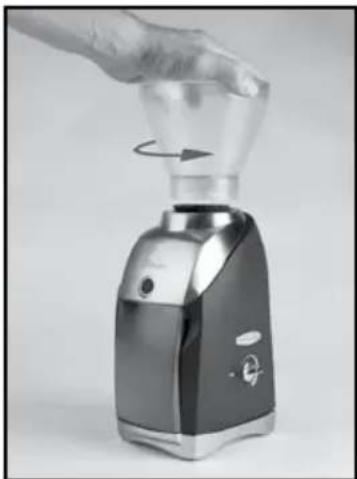
Hand holding a glass blender with a rotating knob, no visible text or symbolsSwitch the grinder off and remove the plug from the power supply. Remove any remaining beans from the bean hopper (it may be easiest to tip the grinder over and pour the beans into a bowl.). Remove the hopper by twisting it in a counterclockwise direction as far as it will turn, and then lift the bean hopper from the housing. Wash the hopper, hopper lid, and ground coffee bin in warm soapy water, rinse and dry.

natural_image
Close-up of a hand holding a mechanical component with a star-like internal structure (no visible text or symbols)Caution
Do not put the bean hopper, hopper lid, or ground coffee bin in the dishwasher. Handwash only. Do not immerse the grinder housing in water.
Cleaning the Burrs:

text_image
Burr Lifting TabsIf the grinder is used daily, the burrs should be cleaned every few weeks. Cleaning enables the burrs to achieve the most consistent grind possible. Cleaning also removes coffee oils which will stale and degrade the flavor of the ground coffee. Do not wash the burr.
Remove the Ring Burr
Pull the silicone seal off the top of the ring Burr. Remove the ring burr by lifting it straight up out of the grinder by the lifting tabs.

natural_image
Close-up of hands holding a small object with a pointed tip, possibly a seed or nut (no text or symbols visible)Cleaning the Ring Burr
Use the bristle brush (included with your grinder) to remove any loose coffee residue on the ring burr and the center cone burr mounted within the motor housing. Wash the silicone seal in warm soapy water and dry.
Replacing the Ring Burr

text_image
Ring Burr Alignment TabsEnsure that the black adjustment ring is rotated counterclockwise as far as it will go. Replace the burr by lining up the red tab on the burr with the rectangular cutout on the black adjustment ring. Wiggle and push down firmly on the ring burr to ensure that it seats properly.
After replacing the burr, replace the silicone seal by lining up the two slots in the silicone seal with the small tabs on the top of the ring burr and slide the seal onto the ring burr.
Replacing the Bean Hopper
natural_image
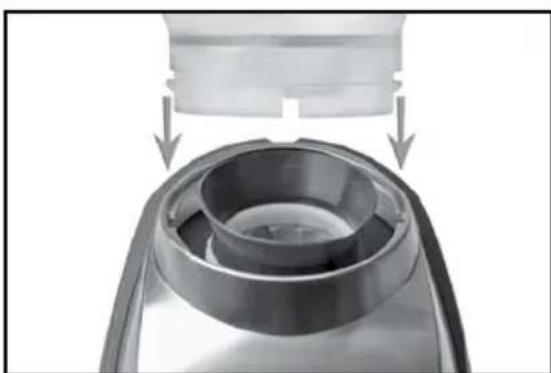
Close-up of a mechanical component with a cylindrical housing and a top component, showing internal structure and arrows indicating motion (no text or symbols)To replace the bean hopper, line up the two small tabs on the base of the hopper with their respective slots in the top of the grinder housing and insert the hopper into the grinder. Once the hopper is in place rotate it clockwise to your desired grind setting.
Clearing a Clogged Grinder
If your grinder is not dispensing coffee normally, it could be clogged with coffee powder. This can happen if the grounds bin or portafilter are allowed to overfill and ground coffee gets backed up into the grounds chute and grinding chamber. It can also happen with the build up of coffee powder over time.
Cleaning the Grounds Chute:
text_image
C-Standard Press Grounds chutsPhoto # 1
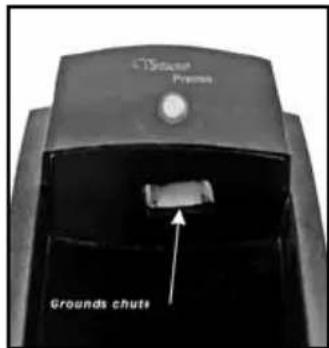
To clear the grinder remove any beans that remain in the bean hopper, then remove the bean hopper. Also remove the ring burr and the grounds bin. Check to see if the grounds chute is clogged by looking at the exit of the grounds chute which is located at the top of the recess that holds the grounds bin (see photo # 1). If clogged, remove the coffee grounds with a stiff piece of wire such as a straightened jumbo paper clip and your cleaning brush.
Cleaning the Paddle Wheel:
text_image
Burr Alignment Indicator Padsles Cone Burr Grind Adjustment RingPhoto # 2
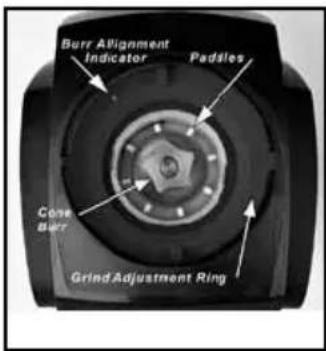
Looking at the grinder from the top you'll see the cone burr in the center and a paddle wheel with eight fins that rotates at the base of the cone burr (see photo # 2). During grinding these fins push the ground coffee out of the grinding chamber. Ground coffee can get tightly packed between the fins. Use a straightened jumbo paper clip (or similar) to remove any coffee powder lodged between the fins. Once all the coffee is removed, make sure that all eight fins are present and reach to the wall of the grinding chamber. If the paddle wheel is broken or warn, go to www.baratza.com troubleshooting to see how to purchase and replace the paddle wheel.
Cleaning the Grinding Chamber Exit Port:

text_image
Exit portPhoto # 3
Turn the grinder so the back is facing you, then rotate the black adjustment ring counter clockwise until it stops. The rectangular cutout on the ring should now be at the 11 o'clock position (see photo #3). Directly below the cutout, at the bottom of the chamber is the exit port leading to the grounds bin. If the exit port is clogged, clear it with the jumbo paper clip and brush. Make sure the exit port and grounds chute are clear all the way to the exit of the grounds chute. A blast of compressed air can help complete the cleaning.
Automatic Cleaning
Note
The use of Grindz will NOT clear a clogged grinder, this can only be done by following the steps in “Clearing a Clogged Grinder”.
A thorough, fast, and easy cleaning can be accomplished using Grindz ^™ grinder cleaner. Grindz ^™ is a product designed to dislodge coffee particles and absorb and remove odors and coffee oil residue. Simply place one packet of Grintz™ into the empty grinder hopper. Adjust grind setting to 20, and operate as if grinding coffee beans until all of the Grindz™ has been ground. Once complete, we recommend passing about 4 Tbs. of coffee through the grinder to remove any Grindz™ residue. Discard the ground coffee. For information on Grindz™ go to www.urnex.com.
Grindz™ can be purchased at www.baratza.com

text_image
GRINDZ Grinder Cleaner Limpardor de Molino Reiniger für Muhlen Nettoyant pour Moulin 3x 1.2 oz (25 g)Warranty and Service
Length of Warranty: One-year from date of purchase.
United States and Canadian Warranty Information
If your grinder fails within one year: e-mail: support@baratza.com or call 425-641-1245. Baratza will deliver an identical or comparable replacement grinder to your door, free of charge, and arrange to have your “failed” grinder returned to us.
When you receive your replacement grinder, please use the carton and packing material and the return shipping label supplied to return the "failed" grinder to us. Also, please include your name, address and telephone number.
International Warranty Information
Go to: www.baratza.com for warranty information on grinders sold outside the United States.
Proof of Purchase and Product Registration
You can register your grinder at www.baratza.com. Registration will enable us to contact you in the unlikely event of a product safety notification and assist us in complying with the provisions of the Consumer Product Safety Act. The serial number is located on the bottom of the grinder.
Please keep your sales receipt that shows the date of purchase and complete the following for your personal records:
Serial Number (located on bottom of grinder): ____
Date Purchased: ____ Store: ____
For repairs or parts contact
Baratza LLC
3923-120th Ave. S.E.
Bellevue, WA. 98006
425-641-1245
e-mail: support@baratza.com
Parts: www.baratza.com


Notes:
© 2010
Baratza, LLC
3923-120th Ave. S.E.
Bellevue, WA. 98006
www.baratza.com
BARATZA
rev: 081110