MM 500-X - Earphones SENNHEISER - Free user manual and instructions
Find the device manual for free MM 500-X SENNHEISER in PDF.


User questions about MM 500-X SENNHEISER
0 question about this device. Answer the ones you know or ask your own.
Ask a new question about this device
Download the instructions for your Earphones in PDF format for free! Find your manual MM 500-X - SENNHEISER and take your electronic device back in hand. On this page are published all the documents necessary for the use of your device. MM 500-X by SENNHEISER.
USER MANUAL MM 500-X SENNHEISER
natural_image
Black and white photo of a modern SMM 500X headphones with blue illuminated buttons (no text or symbols visible)Instruction manual
Contents
Important safety instructions 2
MM 500-X 4
Delivery includes 5
Product overview 7
Putting the MM 500-X into operation 8
Charging the battery pack 8
Adjusting the headband 10
Connecting the MM 500-X to the audio source ....11
Connecting the MM 500-X using the audio cable ....13
Switching the MM 500-X on/off ....14
Using the MM 500-X 15
Switching the Bluetooth function on/off 15
Changing the volume 15
Remote-controlling connected devices from the MM 500-X .....16
Transporting the MM 500-X....19
Cleaning and maintaining the MM 500-X 20
If a problem occurs ... 21
Specifications 23
apt-X audio coding 24
Manufacturer Declarations ....26
Important safety instructions
Read this instruction manual carefully and completely before using the product.
▶ Always include this instruction manual when passing the product on to third parties.
▶ Do not use an obviously defective product.
Preventing damage to health and accidents
▶ Do not listen at high volume levels for long periods of time to prevent hearing damage.
Always maintain a distance of at least 3.94" (10 cm) between the ear cups and the cardiac pacemaker or implanted defibrillator since the product generates permanent magnetic fields.
Keep the product, accessory and packaging parts out of reach of children and pets who could swallow smaller pieces.
Do not use the product in an environment that requires your special attention (e.g. in traffic).
Preventing damage to the product and malfunctions
▶ Always keep the product dry and do not expose it to extreme temperatures (hairdryer, heater, extended exposure to sunlight, etc.) to avoid corrosion or deformation.
▶ Only clean the product with a soft, dry cloth.
▶ Switch off the product after use to conserve battery power. Remove the battery pack if the product will not be used for extended periods of time.
Only use the product in environments where wireless Bluetooth ^® transmission is permitted.
▶ Only use attachments/accessories supplied or recommended by Sennheiser.
Intended use
The MM 500-X is a wireless Bluetooth headset that works with mobile phones or other Bluetooth devices/Bluetooth compliant devices and allows for wireless music enjoyment or calls.
"Improper use" means using the product
- other than as described in this instruction manual,
- under operating conditions which differ from those described in this instruction manual.
Safety instructions for the Lithium-Polymer battery pack
If abused or misused, the battery pack may leak. In extreme cases, it may even present an explosion or fire hazard.

• Heat generation
- Fire development
- Explosion
- Smoke or gas development.
Please understand that Sennheiser does not accept liability for damage arising from abuse or misuse.
| Keep away from children. When not using the product for extended periods of time, remove the battery pack from the product. | |||
 | Immediately remove the battery pack from an obviously defective product. |  | Only use battery packs recommended by Sennheiser. |
 | Dispose of the battery pack at special collection points or return it to your specialist dealer. |  | Switch battery pack-powered products off after use. |
| [AY7X] | Only charge the battery pack with the appropriate Sennheiser chargers. |  | When not using the battery pack for extended periods of time, charge it regularly (about every 3 months). |
| [TCVT] | Only charge the battery pack at ambient temperatures between 10°C/50°F and 40°C/104°F. | [CEC] | Do not heat above 70°C/158°F, e.g. do not expose to sunlight or throw into a fire. |
 | Do not mutilate or dismantle. |  | Do not continue to use a defective battery pack. |
 | Store charged battery packs so that the terminals cannot contact each other – danger of shorting out/fire hazard. | [W447] | Do not expose to moisture. |
MM 500-X
The MM 500-X is an accessory which allows for wireless music enjoyment when used with mobile phones or other Bluetooth devices/Bluetooth compliant devices. Its circumaural and closed design makes the MM 500-X especially suitable for use with in-flight entertainment systems.
Bluetooth

The MM 500-X complies with the Bluetooth 2.1 standard. Via its Bluetooth interface, it can be connected to a wide variety of Bluetooth enabled devices. Bluetooth wireless technology allows the MM 500-X to communicate with your Bluetooth enabled device (e.g. mobile phone, MP3 player, PC or PDA) within a range of up to 10 meters.
apt-X

With apt-X audio coding, you can be assured of crisp, pure and full stereo sound. It allows you to not only hear, but experience and feel the audio as it was intended. Utilizing apt-X, Bluetooth technology can now offer wireless audio quality that is indistinguishable from the highest quality wired connection.
From major public broadcasters to film production studios, apt-X is used throughout the world to transmit high quality digital audio from A to Z in real-time. It was developed to meet the exacting standards of musicians and audio engineers who love the exceptional dynamic range and high fidelity it provides.
Now available on selected consumer devices, the apt-X technology ensures that music lovers everywhere can stream the rich listening experience that only apt-X can deliver.
Additional features
- Great for travel: comfortable, rugged and foldable headset construction
- Optional connection via audio cable for music enjoyment without Bluetooth technology
- Outstanding sound quality due to Duofol diaphragms
Delivery includes
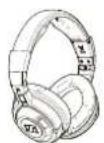
MM 500-X headset
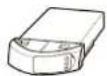
BA 370 PX battery pack
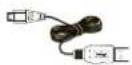
USB charging cable
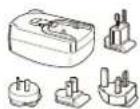
Mains unit with country adapters

Stereo audio cable
(2.5 mm to 3.5 mm jack plug)

Audio adapter
(3.5 mm jack socket to 1/4" (6.35 mm) jack plug)

In-flight adapter
(3.5 mm jack socket to 3.5 mm double mono jack plug)
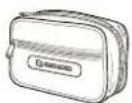
Transport case
Quick start guide incl. CD ROM with detailed instruction manual as PDF

Safety guide
Manufacturer Declarations

A list of accessories can be found on the MM 500-X product page at www.sennheiser.com.
For information on suppliers, contact your local Sennheiser partner: www.sennheiser.com > "Service & Support"
Overview of the pictograms
Meaning of the pictograms for pressing a button
| Pictogram Meaning | |
 | Briefly press this button. |
 | Keep this button pressed for 4 seconds. |
 | Keep this button pressed until the desired setting is made or the desired action is completed. |
Meaning of the pictograms for the flashing of the LED
| Pictogram Meaning | |
| This pictogram symbolizes a flashing. | |
| - | This pictogram symbolizes an interruption. |
| 1s | This pictogram symbolizes an interval. |
| This pictogram symbolizes a continuous flashing. | |
Examples of some of the pictograms that are used throughout this instruction manual:
 | |
| The LED flashes once every 3 seconds. | |
| The LED flashes 3 times per second. | |
| The LED flashes in a rhythmic sequence. | |
| The LED flashes blue 3 times and then goes off. | |
The pictogram "i"

This note provides important information!
Notes marked with the pictogram "i" provide important information on the use of the headset.
Product overview

text_image
Technical diagram of an audio headset with numbered parts labeled 1 through 7, showing front and side views.① Headband ⑤ Battery pack compartment
② Socket for audio cable
③ Bluetooth button
4 Ear pad
6 Socket for charging cable
7 Microphone
A Operating panel
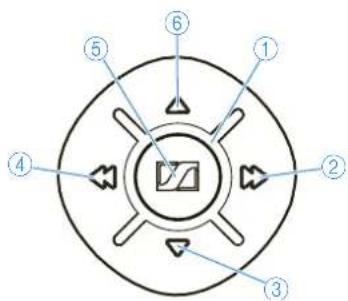
text_image
Diagram of a circular device with numbered components and directional arrows indicating flow or movement.①LED
② Fast-forward ▶ button
③ Volume ▼ button
④ Rewind ◀ button
⑤ Master button
⑥ Volume ▲ button
Putting the MM 500-X into operation
Before using the MM 500-X for the first time, remove the protection strip from the battery pack.
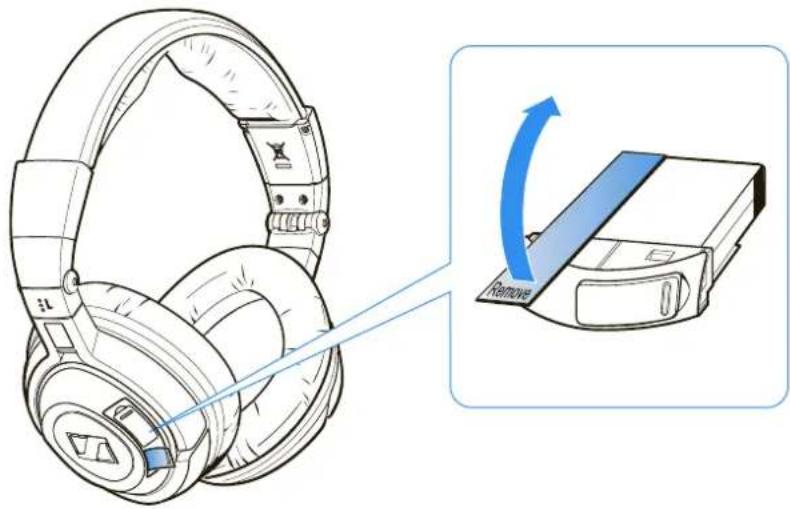
text_image
Diagram showing a pair of headphones with an arrow indicating the process to remove a device, accompanied by a magnified view.Charging the battery pack
Before using the battery pack for the first time, charge it for at least 3 hours. The battery pack can also be charged inside the headset during operation.
When charging the battery pack, the LED ⑧ on the battery pack lights up red. When the battery pack is fully charged, the LED ⑧ on the battery pack lights up green.
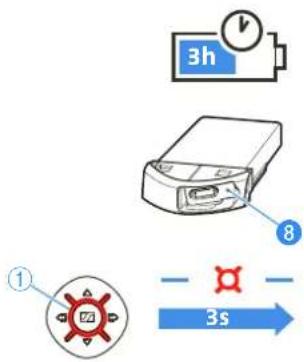
text_image
3h ① 8 3sWhen the battery pack is almost flat, the LED ① flashes red. You hear a short, descending acknowledgement tone.
The operating time of the battery pack depends on the device settings, the listening situation and the audio sources used.
Type of use Operating time
Bluetooth technology 10 hours
Remove the battery pack if the headset will not be used for extended periods of time.
Possibilities of charging the battery pack
First, connect the charging cable ⑨ to the battery pack as described in section a and then connect the charging cable ⑨ to a power source as described in section b.
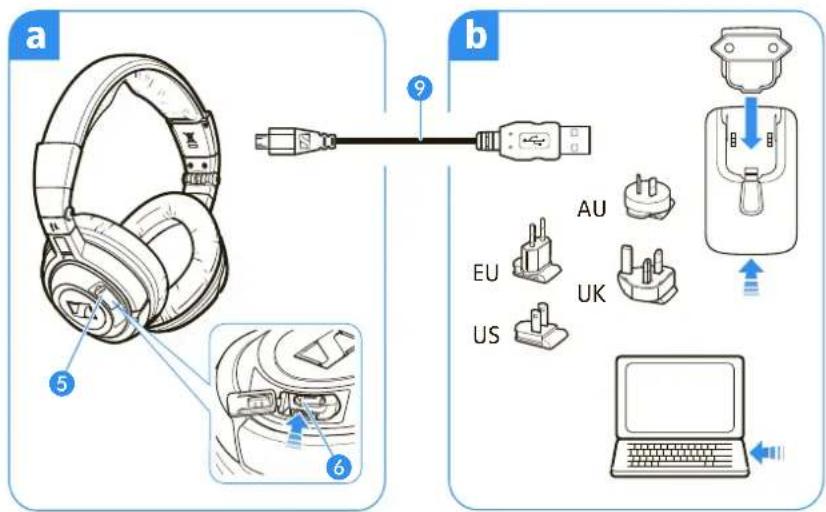
text_image
a b 5 9 6 EU US AU UKa Connecting the charging cable to the battery pack
You can charge the battery pack either inside or outside the headset. This is helpful if you are using a spare battery pack (to be ordered separately).
To charge the battery pack inside the headset:
Open the cover of the battery pack compartment 5 on the left ear cup.
Connect the charging cable ⑨ to the socket for charging cable ⑥ on the headset.
To charge the battery pack outside the headset:
Open the cover of the battery pack compartment ⑤ on the left ear cup.
▶ Press the button next to the battery pack compartment and remove the battery pack.
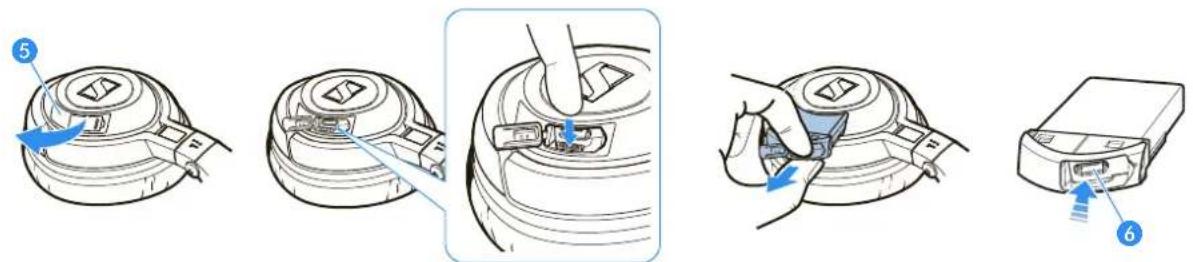
text_image
Diagram showing five steps of a device's internal components, labeled 5 to 6 with blue arrows indicating movement.Connect the charging cable 9 to the socket for charging cable 6 on the battery pack.

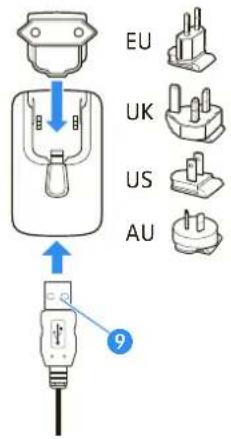
Connecting the charging cable to the mains unit, to a PC or to other USB devices
In order to charge the battery pack, you can connect the charging cable to either the USB socket of your PC or the supplied mains unit or to other USB devices.
To connect the charging cable to a PC:

text_image
EU UK US AU 9Connect the USB plug of the charging cable ⑨ to the USB socket of your PC. The battery pack is being charged. The LED ⑧ on the battery pack lights up red.
To connect the charging cable to the mains unit:
Connect the charging cable ⑨ to the mains unit.
Plug the suitable country adapter onto the mains unit.
Plug the mains unit into a wall socket.
The battery pack is being charged. The LED 8 on the battery pack lights up red.
▶ After charging, unplug the mains unit from the wall socket.
If you have charged the battery pack outside the headset:
Insert the charged battery pack into the headphone's battery pack compartment until it locks into place.
Close the cover of the battery pack compartment 5.
Adjusting the headband
For optimum transmission quality, good noise attenuation and best possible comfort, the headband has to be adjusted to properly fit your head:
▶ Wear the headset so that the headband ① runs over the top of your head.
Adjust the length of the headband so that
- the ear pads ④ rest comfortably against the ears,
– you feel even, gentle pressure around your ears, - a snug fit of the headband 1 on the head is ensured.
To ensure maximum noise attenuation, final adjustment is best made in a noisy environment.

text_image
Diagram of a multi-band headphones with labeled parts and blue directional arrows indicating compression or movement.Connecting the MM 500-X to the audio source
CAUTION
Danger of malfunction due to radio waves!
The transmitted radio waves of mobile phones can impair the operation of sensitive and unprotected devices.
▶ Only use the headset in environments where wireless Bluetooth transmission is permitted.
The headset complies with the Bluetooth 2.1 standard. In order that data can be transmitted wirelessly using Bluetooth technology, you have to register your headset with your audio source (pairing).
The headset can save the connection profiles of up to 8 Bluetooth devices with which it has been paired. After switch-on, the headset automatically connects to one of these devices.
If you pair the headset with a ninth audio source, the saved connection profile of the first Bluetooth device will be overwritten. If you want to re-establish a connection with the first audio source, you have to pair the headset with this audio source again.
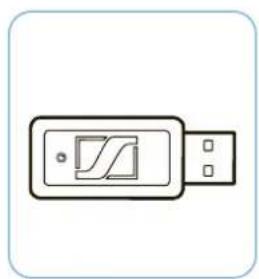
If your audio source does not have a Bluetooth interface, use an optional dongle.
natural_image
Simple line drawing of a USB flash drive with a logo (no text or symbols)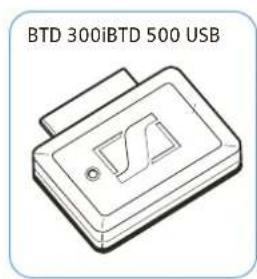
text_image
BTD 300iBTD 500 USBFor an optimum listening experience, your audio source has to support the A2DP profile.
Pairing the MM 500-X with an audio source
Make sure that your headset is switched off (see "Switching the MM 500-X on/off" on page 14).
When switching the headset on for the first time, it will automatically go into pairing mode. The headset is waiting to be paired with a Bluetooth enabled device.
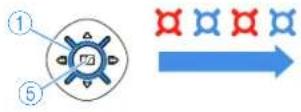
Press the Master button ⑤ and keep it pressed until the LED ① alternately flashes blue and red.
On your audio source, activate the Bluetooth function "Add a new device".
▶ Proceed as described in the instruction manual of the audio source.
If a suitable audio source is found, the devices will exchange device identification information. The LED ① flashes 3 times blue and you hear an ascending beep. The devices have identified each other and the headset is paired with the audio source.
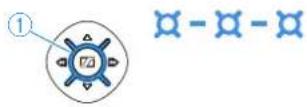
i PIN code When the audio source prompts for a password or PIN code, enter the default PIN code "0000".

If no device is found within approx. 5 minutes, the LED ① flashes 3 times red and you hear a descending beep. The headset will then try for 3 minutes to connect to one of the up to 8 previously paired audio sources. If this fails, the headset automatically switches off after 60 minutes.
In this case, repeat the necessary steps to pair the headset with the audio source again.
Disconnecting the Bluetooth connection
The Bluetooth button ③ is backlit, indicating the current setting. The backlighting goes off after a short time to conserve energy.
▶ Press any button on the headset to display the current setting of the Bluetooth function.
To disconnect the Bluetooth connection to the audio source, you can switch off the headset or the Bluetooth function. This setting is retained until the Bluetooth function is switched on again.
To switch the headset off:

Press the Master button ⑤ and keep it pressed until the LED ① flashes 3 times red. You hear a descending beep. The Bluetooth connection is automatically deactivated. The headset switches off.
To switch the Bluetooth function off:

Press the Bluetooth button ③ and keep it pressed until the LED ① flashes 3 times red. You hear a descending beep. The Bluetooth button ③ goes off. The Bluetooth function is switched off.
Connecting the MM 500-X using the audio cable
Connecting the audio cable
You can connect the headset to the audio source using the audio cable if:
- you do not want to use the Bluetooth function,
- you are not allowed to use the Bluetooth function (some airlines do not allow Bluetooth transmission)
or
• the battery pack is flat.
When the audio cable is connected to the headset, the Bluetooth function cannot be switched on.
flowchart
graph TD
    A["Sensor Input ①"] --> B["Device ⑪"]
    C["Sensor Input ⑩"] --> B
    D["Sensor Input ⑫"] --> E["Device ⑫"]
    F["Sensor Input ⑪"] --> E
    B --> G["Output: Smartphone"]
    E --> H["Output: Drone"]
    style A fill:#f9f,stroke:#333
    style C fill:#f9f,stroke:#333
    style D fill:#f9f,stroke:#333
    style F fill:#f9f,stroke:#333
    style B fill:#ccf,stroke:#333
    style E fill:#ccf,stroke:#333
    style G fill:#dfd,stroke:#333
    style H fill:#dfd,stroke:#333
    note right of B "11"
    note right of E "12"
    note right of H "1s"
    note right of F "1s"
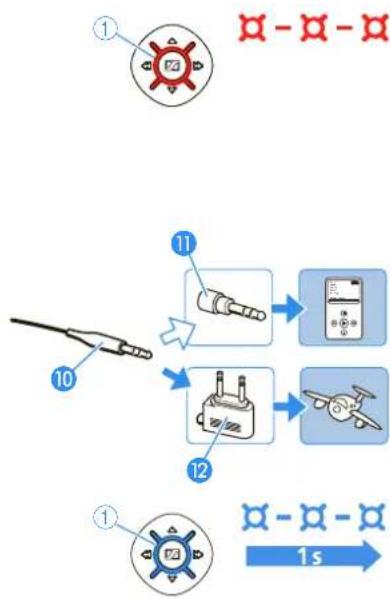
If the headset is already connected to the audio source via the Bluetooth interface, the Bluetooth connection is automatically disconnected when you connect the audio cable. The LED ① flashes 3 times red and you hear a descending beep.
Connect the 2.5 mm jack plug of the audio cable to the socket ② of the headset.
Connect the 3.5 mm jack plug of the audio cable 10 to
– the headphone socket of your audio source or
- the audio adapter for 14'' (6.35 mm) jack socket ⑪ if the 3.5 mm jack plug of the audio cable is too small or
- the in-flight adapter 12 if you want to use the headset with an in-flight entertainment system.
When the audio cable is connected to your audio source, you hear the sound from your audio source and the LED ① flashes blue.
Detaching the audio cable
If you only want to use the MM 500-X as a Bluetooth headset, you can detach the audio cable 10.
Pull the 2.5 mm jack plug of the audio cable 10 from the socket 2 of the headset.
When detaching the audio cable, the Bluetooth function is not automatically switched on.
Switch the Bluetooth function on again (see "Switching the Bluetooth function on/off" on page 15).
Switching the MM 500-X on/off

WARNING
Danger of hearing damage!
Listening at high volume levels for long periods can lead to permanent hearing defects.
Before putting the headset on, set the volume to a low level.
▶ Do not continuously expose yourself to high volumes.
Switching the MM 500-X on


Press the Master button ⑤ and keep it pressed until the LED ① flashes blue. You hear an ascending beep.
- When switching the headset on for the first time, it will automatically go into pairing mode. The headset is waiting to be paired with a Bluetooth enabled device (see page 12).
- When the headset is already paired with an audio source, the Bluetooth connection is automatically established. You hear an ascending beep and then you hear your audio source.
- When the headset is already paired with an audio source but the audio source is switched off or out of range, the LED ① flashes blue.
The headset will try for 3 minutes to connect to one of the up to 8 previously paired audio sources. If this fails, the headset automatically switches off after 60 minutes.


Switching the MM 500-X off
Press the Master button ⑤ and keep it pressed until the LED ① flashes 3 times red.
You hear a descending beep. The Bluetooth connection is automatically deactivated. The headset switches off.
Using the MM 500-X
The headset has a Bluetooth function for wireless connectivity. Depending on the listening situation, you can switch this function on or off.

If your audio source supports apt-X, the MM 500-X will automatically stream music wirelessly in high-quality mode (apt-X). If your audio source does not support apt-X, music will be streamed in standard quality mode (SBC).
Switching the Bluetooth function on/off
Via the Bluetooth interface, the headset can be connected to a wide variety of Bluetooth enabled devices.
To switch the Bluetooth function on:
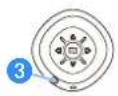

Press the Bluetooth button ③ and keep it pressed until the LED ① flashes 3 times blue. The Bluetooth function is switched on.
To switch the Bluetooth function off:
Press the Bluetooth button ③ and keep it pressed until the LED ① flashes 3 times red. You hear a descending beep.
The Bluetooth button ③ goes off. The LED ① flashes blue and the Bluetooth function is switched off.
Changing the volume
The MM 500-X allows you to change the volume of the audio signal during a call or while listening to music:
| Button Duration Function | |||
 |  |  | Incrementally increases the volume |
 |  |  | Incrementally reduces the volume |
 |  |  | Continuously increases the volume |
 |  |  | Continuously reduces the volume |
If you press the respective button briefly, the volume is changed incrementally; if you hold down the button, the volume is changed continuously.
When the minimum or maximum volume is reached, you hear an acknowledgement tone.
Remote-controlling connected devices from the MM 500-X
You can directly remote-control any device supporting the AVRCP profile and connected to the MM 500-X by using the buttons on the headset. Please refer to the instruction manual of your audio source for information on whether your device supports the AVRCP profile.
Remote-controlling the audio source from the MM 500-X
If your headset has a Bluetooth connection to an audio source (e.g. mobile phone, iPod, MP3 or CD player), you can use the MM 500-X to remote-control the audio source as follows:
| Button Duration Function | |||
 |  |  | Plays the track |
 |  |  | Stops the track (acknowledgement tone) |
 |  |  | Skips to the next track |
 |  |  | Skips to the previous track |
 |  |  | Fast-forwards the track * |
 |  |  | Rewinds the track * |
These functions are not supported by all connected Bluetooth devices.


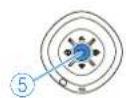

Managing calls
When your MM 500-X is connected to a mobile phone and you receive a call, the LED ① flashes blue 3 times per second. You can also hear the ring tone of your mobile phone, if your mobile phone supports this function.
If your mobile phone automatically transfers the call to the headset, you hear a beep in the headset. If your mobile phone does not automatically transfer the call to the headset, you have to press a button on your mobile phone to transfer the call (see the instruction manual of your mobile phone).
To manage your calls from your MM 500-X, press the Master button ⑤ or the Bluetooth button ③:
Button Duration Function
 | Accepts the call | |
 | Rejects the call (acknowledgement tone) | |
 | Ends the call | |
 | Transfers the ongoing call back to the mobile phone |
Redialing
The redialing function must be supported by your mobile phone or Bluetooth device (with HF profile respectively) and be activated.
To redial the last number from your MM 500-X, press the Bluetooth button ③:
Button Duration Function
 |  |  | Redials the last number(acknowledgement tone) |
 |  |  | Stops redialing |
Voice dialing
The voice dialing function must be supported by your mobile phone (with HF profile) and be activated. Follow the instructions in the instruction manual of your mobile phone.
To activate the voice dialing function from your MM 500-X, press the Bluetooth button ③:
Button Duration Function


Muting the headset's microphone
To mute the microphone on your MM 500-X, press the Bluetooth button ③:
Button Duration Function


Any button


Switching the Bluetooth function off
If you press the Bluetooth button ③ too long, the Bluetooth function switches off!
Transporting the MM 500-X
For space-saving transportation, the headset can be folded up flatly and compactly.
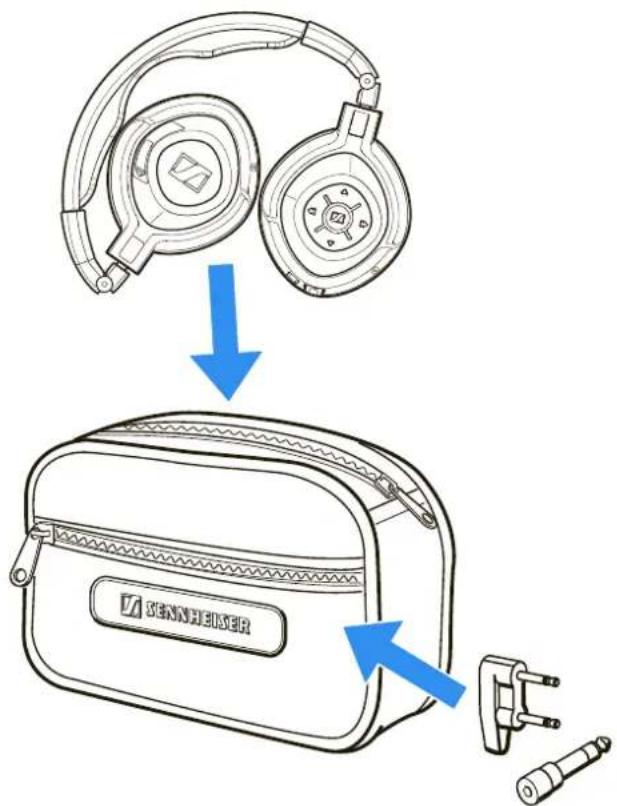
▶ Rotate the ear cups by 90°.
▶ Fold the ear cups inwards.
Place the headset flat into the transport case.

natural_image
Illustration of two types of headsets with blue directional arrows indicating rotation or motion (no text or symbols present)Your accessories can be transported in the transport case:
• Audio adapter (1/4" (6.35 mm) jack plug)
• In-flight adapter (3.5 mm double mono jack)
text_image
SENNHEIZERCleaning and maintaining the MM 500-X
Cleaning the MM 500-X
CAUTION
Liquids can damage the electronics of the product!
Liquids entering the housing of the product can cause a short-circuit and damage the electronics.
Keep all liquids far away from the product.
Do not use any solvents or cleansing agents.
For reasons of hygiene, you should clean the headset regularly:
Before cleaning, make sure that the product is not recharged via the mains.
▶ Only use a dry and soft cloth to clean the product.
Replacing the ear pads
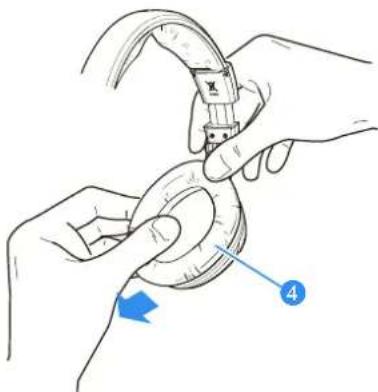
You can replace the ear pads. Spare ear pads are available from your Sennheiser partner or can be ordered at www.sennheiser.com under "Service & Support".
Grasp the edge of the ear pad 4 behind the ear cup and peel it up and away from the ear cup.
Slide the new ear pad 4 onto the ear cup.
natural_image
Illustration of hands performing a mechanical manipulation or repair operation (no text or symbols present)If a problem occurs ...
| Problem Possible cause Solution Page | |||
| No operation indicator – headset cannot be switched on | The battery pack is flat. | Recharge the battery pack. 8 | |
| No audio signal when the audio cable is connected | The jack plug of the audio cable is not properly connected. | Check the connection to your audio source. | 13 |
| No audio signal during Bluetooth connection | The headset is switched off. | Switch the headset on. 14 | |
| The headset is not paired with an audio source. | Check if the headset is paired. If necessary, pair the headset with the audio source again. | 12 | |
| The Bluetooth function on the headset is switched off. | Switch the Bluetooth function on the headset on. | 15 | |
| The audio cable is connected to the headset. | The connection of the audio cable automatically switches off the Bluetooth connection. Remove the audio cable and then switch the Bluetooth function on again. | 13 | |
| The volume is adjusted too low. | Increase the volume. 15 | ||
| Headset cannot be paired | The pairing does not work. | Check if the audio source supports the A2DP profile. If not, use one of the optional dongles. | - |
| The audio source is switched off. | Switch the audio source on. 11 | ||
| Headset do not react to any button press | The operation of the headset is faulty. | Remove the battery pack from the headset. Reinsert the battery pack into the headset. Switch the headset on again. | - |
| Bluetooth connection is suddenly interrupted | The Bluetooth button has been pressed too long. | Switch the Bluetooth function on. | 15 |
If a problem occurs that is not listed in the above table or if the problem cannot be solved with the proposed solutions, please contact Sennheiser partner for assistance.
To find a Sennheiser partner in your country, search at www.sennheiser.com.
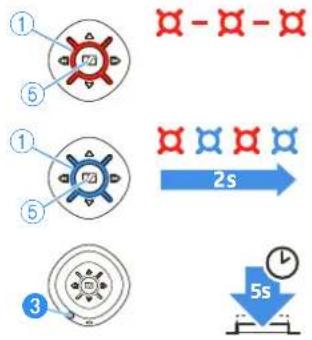
Resetting the settings of the MM 500-X
You can reset all settings of your headset to the factory default settings. This allows you to prevent that other users of the headset can access your Bluetooth enabled devices. You can then pair five new devices with the headset.
flowchart
graph TD
    A["①"] --> B["⑤"]
    B --> C["①"]
    C --> D["⑤"]
    D --> E["③"]
    E --> F["③"]
    F --> G["③"]
    G --> H["③"]
    H --> I["③"]
    I --> J["③"]
    J --> K["③"]
    K --> L["③"]
    L --> M["③"]
    M --> N["③"]
    N --> O["③"]
    O --> P["③"]
    P --> Q["③"]
    Q --> R["③"]
    R --> S["③"]
    S --> T["③"]
    T --> U["③"]
    U --> V["③"]
    V --> W["③"]
    W --> X["③"]
    X --> Y["③"]
    Y --> Z["③"]
Press the Master button ⑤ and keep it pressed until the LED ① flashes 3 times red. The headset switches off (see "Switching the MM 500-X off" on page 14).
▶ Press the Master button ⑤ and keep it pressed until the LED ① alternately flashes blue and red.
Press the Bluetooth button 3 for at least 5 seconds until the settings of the headset are reset.
Specifications
Transducer principle dynamic, closed
Ear coupling circumaural
Frequency response 15 - 22,000 Hz
Nominal impedance
active/passive 590/100 Ω
Sound pressure level at
1 kHz and 1 Volt 107 dB SPL
THD at 1 kHz < 0.1%
Audio connection 3.5 mm stereo jack socket
Audio adapter 1/4" (6.35 mm) stereo jack plug
In-flight adapter 3.5 mm double mono jack plug
Cable length
Audio cable 1.4 m
Charging cable 0.8 m
Weight 179 g
BA 370 PX battery pack 3.7 V; 250 mAh Lithium-Polymer
Charging time 3 hrs
Operating time 10 hrs
Operating temperature range 0°C to +40°C
Storage temperature range -10^ to +70^
Passive noise attenuation 25 dB
PSAI05R-050Q or SIL SSA-4P 5050F mains unit
Nominal input voltage 110 - 240 V\~
Nominal input current max. 0.2 A
Mains frequency 50 – 60 Hz
Nominal output voltage 5 V
Nominal output current SIL SSA-4P 5050F: max. 0.5 A
PSAI05R-050Q: max. 1 A
Operating temperature range 0°C to +45°C
Storage temperature range -40^ to +85^
Relative humidity 20 to 90%
Weight approx. 61 g
Bluetooth

Bluetooth

Bluetooth version 2.1 + EDR
Range up to 10 m
Transmission frequency 2.4 GHz
Transmission power 8 dBm
Profiles HSP, HFP, A2DP, AVRCP
Codec SBC, apt-X
apt-X audio coding
Outstanding audio quality
apt-X technology is what wireless audio has been waiting for. With apt-X audio coding, you can be assured of crisp, pure and full stereo sound. It allows you to not only hear, but experience and feel the audio as it was intended. Utilizing apt-X, Bluetooth can now offer wireless audio quality that is indistinguishable from the highest quality wired connection.
Professional grade sound
Until now, apt-X has been the best-kept secret of the professional audio industry. From major public broadcasters to film production studios, apt-X is used throughout the world to transmit high quality digital audio from A to Z in real-time. It was developed to meet the exacting standards of musicians and audio engineers who love the exceptional dynamic range and high fidelity it provides.
Now available on selected consumer devices, the technology ensures that music lovers everywhere can stream the rich listening experience that only apt-X can deliver.
Revolutionizing Bluetooth listening
Bluetooth technology has revolutionized our communications and lifestyle by eliminating troublesome wires and letting us get on with life “on the move”. Listening to a mobile phone conversation on a Bluetooth earpiece sounds just fine but when it comes to delivering full stereo sound, a little extra help is required. apt-X works within Bluetooth to deliver CD quality audio, ensuring you are getting the most from your wireless listening experience.
In order to deliver two-channel digital sound within the Bluetooth A2DP profile, audio compression is necessary. While traditional audio compression technologies struggle to provide full-bandwidth, high-fidelity audio over Bluetooth, apt-X works to ensure you enjoy the fullest, richest sound your music collection has to offer.
apt-X legacy
If you have ever been to the movies or listened to the radio then chances are you'll already have heard apt-X in action. Over 20,000 radio stations across the world and thousands of cutting-edge film studios rely on apt-X for high quality audio delivery.
The digital compression technology now known as apt-X was originally developed in Queen's University, Belfast, Northern Ireland. The technology was first brought to market for radio automation applications to store CD quality audio on computer hard drives for direct playout during radio shows, hence automating the process of the disc jockey.
The acclaim the technology received lead to further research and development and throughout the 1990s the technology was used by Broadcast and Post-production studios worldwide to deliver high-fidelity, low latency audio in situations where bandwidth was limited. The same core principles that have earned apt-X worldwide acclaim in the Broadcast and Post-Production markets make it the perfect solution for delivering high quality audio on wireless devices. apt-X is leading the way in bringing pro-audio quality to the discerning consumer.
apt-X key features:
- Blind listening tests with industry reference audiences have shown that apt-X over Bluetooth is indistinguishable from audio delivered over wired technology. Unlike psychoacoustic-based technologies such as MP3 or AAC, apt-X can be used to transport audio without degrading the audio quality. With MPEG/AAC compression, the encoding process is destructive and content perceived as "irrelevant" is discarded. apt-X's transparent, non-destructive approach ensures that every frequency present in the original signal is preserved in the encoded and decoded signal.
- Dynamic range of > 92 dB for 16 bit audio and > 120 dB for 24 bit audio.
- The overall framework of apt-X ensures a high degree of resilience to random bit errors, with the bit error response well matched to the auditory response of the human ear. apt-X employs connection and synchronization techniques to ensure a robust connection and enable delivery of audio even under stressful conditions.
- Shortest processing delay of any professional audio compression technology. Many current wireless devices suffer from unwanted delays which cause lip-sync issues, apt-X can enable real-time delivery of wireless audio ensuring seamless integration when used with video devices.
- apt-X encoded audio fits neatly within the available bandwidth of wireless transmission standards to offer an efficient solution for bandwidth-restricted connections.
Manufacturer Declarations
Warranty
Sennheiser electronic GmbH & Co. KG gives a warranty of 24 months on this product. For the current warranty conditions, please visit our website at www.sennheiser.com or contact your Sennheiser partner.
In compliance with the following requirements
• RoHS Directive (2002/95/EC)
• WEEE Directive (2002/96/EC)

Please dispose of this product by taking it to your local collection point or recycling center for such equipment.
- Battery Directive (2006/66/EC)

The supplied standard/rechargeable batteries can be recycled. Please dispose of them as special waste or return them to your specialist dealer. In order to protect the environment, only dispose of exhausted batteries.
CE Conformity
• R&TTE Directive (1999/5/EC)
• EMC Directive (2004/108/EC)
- Low Voltage Directive (2006/95/EC)
• ErP directive (2009/125/EC)
The declaration is available on the internet at www.sennheiser.com. Before putting the product into operation, please observe the respective country-specific regulations!
Trademarks
Sennheiser is registered trademark of Sennheiser electronic GmbH & Co. KG. The Bluetooth ^® word mark and logos are registered trademarks owned by Bluetooth SIG, Inc. and any use of such marks by Sennheiser electronics GmbH & Co. KG is under license.
iPhone ^® and iPod ^® are registered trademarks of Apple Inc, registered in the U.S. and other countries.
apt-X is a registered trademark of CSR plc.

SENNHEISER
Sennheiser electronic GmbH & Co. KG
Am Labor 1, 30900 Wedemark, Germany
www.sennheiser.com
Publ. 12/11, 546147/A01