Pro Diver 14340 - Watch INVICTA - Free user manual and instructions
Find the device manual for free Pro Diver 14340 INVICTA in PDF.


User questions about Pro Diver 14340 INVICTA
0 question about this device. Answer the ones you know or ask your own.
Ask a new question about this device
Download the instructions for your Watch in PDF format for free! Find your manual Pro Diver 14340 - INVICTA and take your electronic device back in hand. On this page are published all the documents necessary for the use of your device. Pro Diver 14340 by INVICTA.
USER MANUAL Pro Diver 14340 INVICTA
Movement Caliber VD53
INFO
The measurement time indicated by the stopwatch hands move independently of the center hands.
Chrono 1/10 sec: The stopwatch 1/10 second hand moves for a first minute. After one minute, it indicates the measurement time when it is stopped.
Movement Caliber : VD53
Presentation
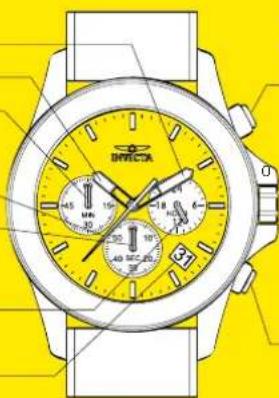
Display Elements
Minutes Hand
Hour Hand
Stopwatch
Minutes Hand
(Move in second increments)
Second Hand
Stopwatch
Minutes Hand
IMove in second
increments)
24-Hour Hand
(Indicates the time on
a 24-Hour basis)
Date Window
natural_image
Illustration of a wristwatch with yellow dials and black buttons, no visible text or symbolsControl Buttons
Push Button A
In stopwatch function
Start / Stop

Crown Positions
1: Date setting
2: Time setting
Push Button B
In stopwatch function:
Split / Split release / Reset
Movement Caliber : VD53
Setting
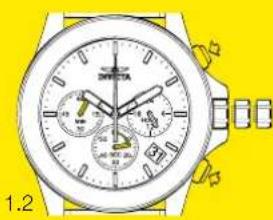
Adjusting the Stopwatch Hand Position
Before setting the time, check if all the chronograph hands - second, minute - are at the "0"(12 o'clock) position.
- If the stopwatch is in use, press the buttons in the following order to reset it, and then, check if the hands return to "0" position. (For details, see "HOW TO USE THE STOPWATCH")
- If the chronograph is counting: A > B
- If the stopwatch is stopped: B
- If the split time is displayed: B > A > B
If either of the stopwatch hands are not in the "0" position, reset them following the procedure below
natural_image
Illustration of a wristwatch with dual dials and buttons, set against a yellow background (no text or symbols visible)Press button A or B to reset all stopwatch hands to "0" position.
• The stopwatch minute hand moves correspondingly with the stopwatch second hand.
- The hands move quickly if the respective buttons are kept pressed.

natural_image
Close-up of a wristwatch with dual dials and analog watch face (no visible text or symbols)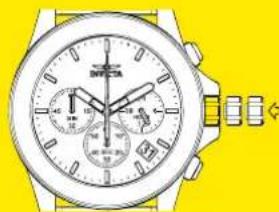
natural_image
Illustration of a wristwatch with dual dials and buttons, set against a yellow background (no text or symbols)Pull the crown out to position 2. Push the crown back to the normal position.
Movement Caliber : VD53
Setting
Time Setting
- Before setting the time, check that the chronograph measurement is stopped.
- Do not set the date between 9:00 P.M. and 1:00 A.M, otherwise the day may not change properly. If it is necessary to set the date during the time period, firstly change the time to any time outside it, set the date and then reset the correct time.
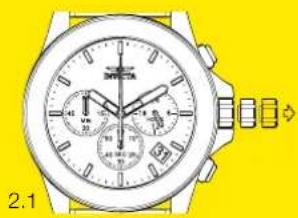
2.1 Pull out the crown to the position 1
2.2 Turn the crown clockwise until the preview day's date appears.
2.3 Pull out the crown to the position 2 when the second hand is at the 12 o'clock position. It will stop on the spot. Set the hands to the desired time of the day (make sure AM/PM is set correctly) by turning the crown.
- When the crown is at the second click position, do not press any button. Otherwise the chronograph hands will move.
2.4 Push the crown back in the normal position in accordance with a time signal.
natural_image
Illustration of a wristwatch with dual dials and wrist strap (no text or symbols)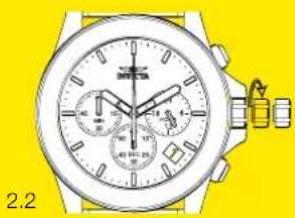
natural_image
Illustration of a wristwatch with dual dials and wrist strap (no text or symbols visible)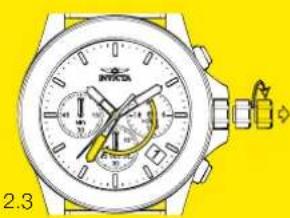
natural_image
Illustration of a wristwatch with dual dials and a small watch on top, set against a yellow background (no text or symbols)
natural_image
Illustration of a wristwatch with dual dials and a wrist strap, set against a yellow background (no text or symbols)Movement Caliber : VD53
Functions
How to Use the Stopwatch
- The measurement time is indicated by the stopwatch hands that move independently of the center hands (and 24-hour hand where applicable).
• The stopwatch can measure up to 60 minutes.
Standard Measurement
E.g. 100m race (Press the buttons in the following order A > A > B)

natural_image
Illustration of a wristwatch with dual dials and wrist strap (no text or symbols visible)3.1
Start
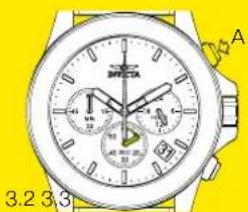
text_image
A 3.2 3.3Stop (Finish) 10 Seconds
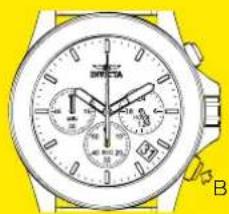
natural_image
Close-up of a wristwatch with dual dials and wrist strap, no visible text or symbolsReset (Reset to "0'00")
Movement Caliber : VD53
Functions
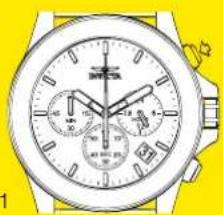
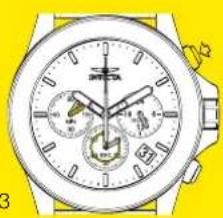
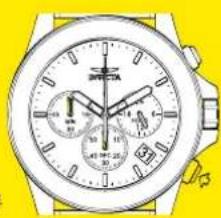
Accumulated Elapsed Time Measurement
E.g. basketball game
(Press the buttons in the following order A > A / A ... > A > B)
Restart and stop of the stopwatch can be repeated as many times as necessary by pressing button A.
4.1 Start > Stop (Start of game) (Time out)
4.2 Restart (Restart of game), 5 Seconds 10 Seconds
4.3 Stop (Game Over), 20 Seconds 00 Seconds
4.4 Reset
4.1
natural_image
Illustration of a wristwatch with dual dials and wrist strap (no text or symbols visible)4.2

natural_image
Illustration of a wristwatch with dual dials and wrist strap (no visible text or symbols)4.3
natural_image
Illustration of a wristwatch with dual dials and buttons, no visible text or symbols4.4
natural_image
Illustration of a wristwatch with dual dials and wrist strap (no text or symbols visible)Movement Caliber : VD53
Functions
Split Time Measurement
E.g. 5,000m race
(Press the buttons in the following order A > B / B … > A > B)
Measurement and release of the split time can be repeated as many times as necessary by pressing button B.
5.1 Start
5.2 Split / Split release, 5 Minutes 50 Seconds
5.3 Stop, 15 Minutes 10 Seconds
5.4 Reset
5.1

natural_image
Illustration of a wristwatch with dual dials and wrist strap (no text or symbols visible)5.2

natural_image
Illustration of a wristwatch with dual dials and buttons (no text or symbols visible)5.3

natural_image
Illustration of a wristwatch with dual dials and a yellow strap (no text or symbols visible)5.4
