Linda IronVerb - Audio software Audified - Free user manual and instructions
Find the device manual for free Linda IronVerb Audified in PDF.


User questions about Linda IronVerb Audified
0 question about this device. Answer the ones you know or ask your own.
Ask a new question about this device
Download the instructions for your Audio software in PDF format for free! Find your manual Linda IronVerb - Audified and take your electronic device back in hand. On this page are published all the documents necessary for the use of your device. Linda IronVerb by Audified.
USER MANUAL Linda IronVerb Audified
Webpage:audified.com
Support: audified.zendesk.com
Table of contents
Introduction2
The cooperation story 2
How it works 2
Software installation 3
Product activation 3
Software uninstallation 3
Opening the plug-in 4
WorkingwithLindalronVerb4
Control overview 4
Preset management 5
Services menu 5
Utility menu 5
Recommended workflow 5
Basic 6
Advanced 6
Detailed controls description 6
Space section 6
Filter section 6
Mode section 7
Modulation section 7
Mix section 7
Technical info 7
Specification 8
Requirements 8
Conclusion 8
Introduction
Thank you for purchasing Linda IronVerb. IronVerb is an algorithmic reverb with a character and vibe. Sound wise IronVerb has something in common with plate and reverbs and adds expressive modulation.
Thecooperationstory
The product is a result of the cooperation between Martin Linda of Linda Audio Martin experimented with completely independent and original algorithms for reverber and turned them into the DSP code powering the plug-in. Audified created the graphic interface to resemble the vintage character of the plug-in sound and provides services, accessible in the top bar – updates, preset management, etc.
Howitworks
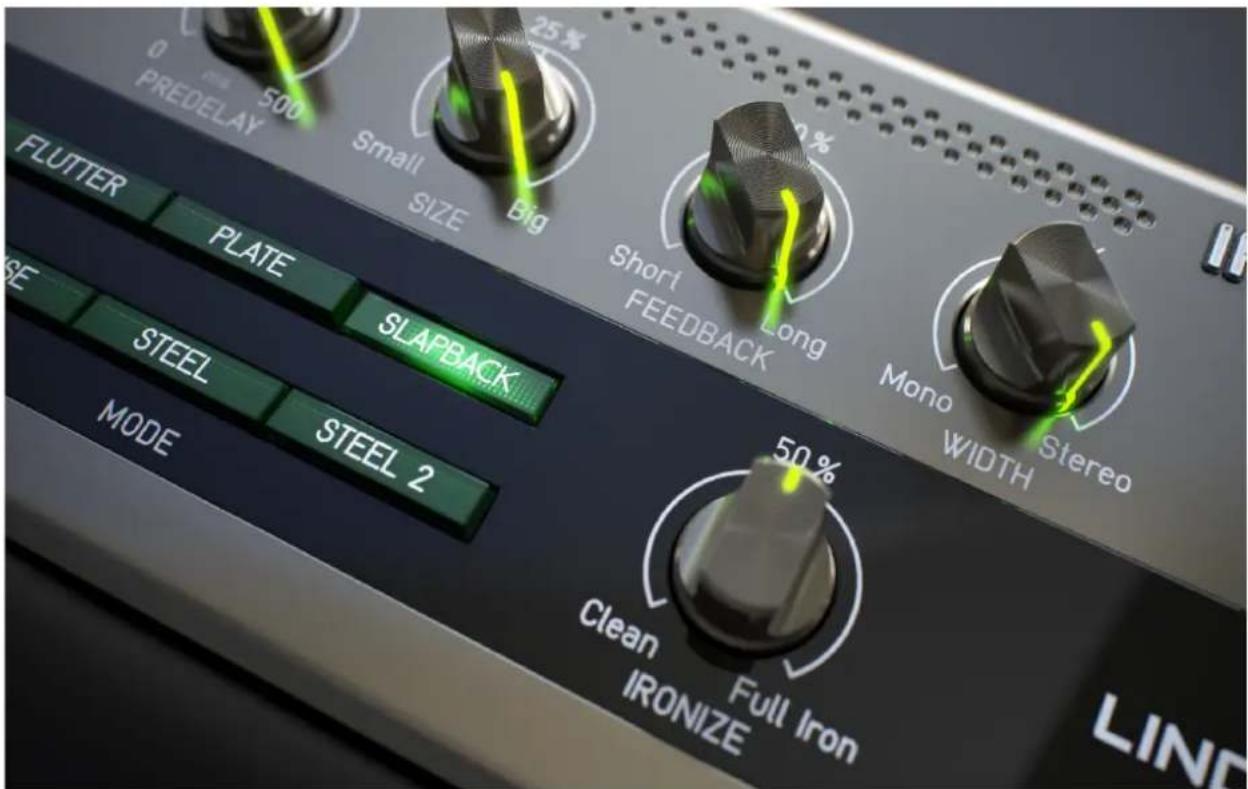
IronVerb does not emulate any existing HW reverb unit, it is original of its own were tailored from scratch to add very natural and lively space to the source s the other hand, it features simple to use and very effective modulation options to add some "synthy" vibe. With proper settings it may resemble some plate rev reverb units while with more excessive modulation sounding like a vintage string unit. It was designed with very straightforward and clear interface and with music mind.
text_image
PREDELAY 500 Small SIZE Big 25% Short FEEDBACK Long Mono WIDTH STEEL STEEL 2 FLUTTER PLATE SLAPBACK STEEL MODE 50% Clean Full Iron IRONIZE LINDSoftwareinstallation
Get the recent version of the plug-in from your user account on our website:
Webpage: audified.com/account/downloads
- Windows: The downloaded and run the installer and follow the on-screen instructions. You can select the destination path and the installed plug-in format during the pro
- Mac: Mount the downloaded disk image and run the installer. You can select the installed plug-in format by clicking the Customize button. Plug-ins are installed in the st locations.
Productactivation
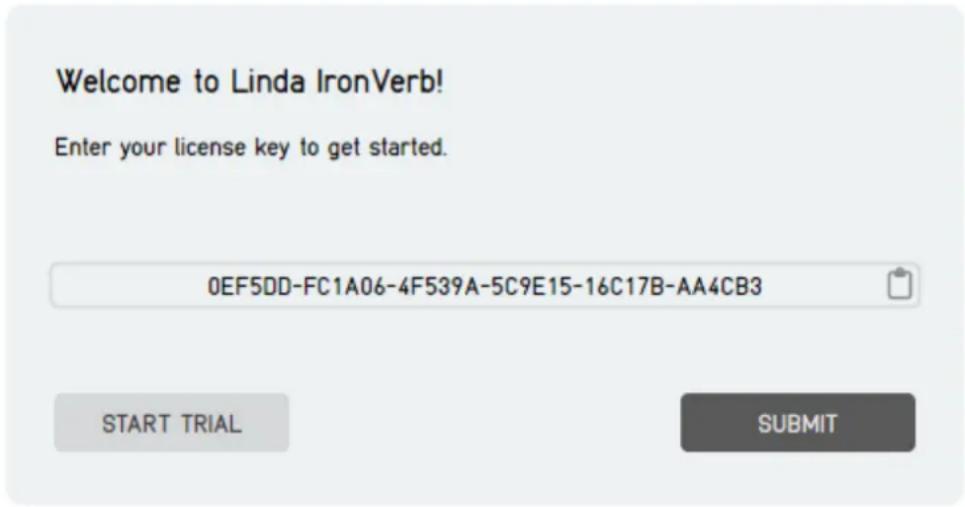
Starting with version 1.0.1, you will automatically create an account via checkout first-time buyer. You can also sign in to your account anytime on our site audi Account icon in the right corner to access your Account dashboard.
Upon completing the purchase, you will receive an automatic email containing your numbers and the download link for your purchased products.
When you first launch the plugin, you will be asked to enter the serial number the product for a limited time as a trial.
text_image
Welcome to Linda IronVerb! Enter your license key to get started. 0EF5DD-FC1A06-4F539A-5C9E15-16C17B-AA4CB3 START TRIAL SUBMITSoftwareuninstallation
- Windows: Navigate to the Linda IronVerb program folder in the Start menu and run the uninstaller.
- Mac: Open the provided disk image and run the uninstaller.
Openingtheplug-in
Linda IronVerb works in all major digital audio workstations (recording applications) plug-in.
To open the plug-in, locate the plug-in selection (usually a hierarchic menu). Lind listed in the Reverb group or in the AUDIFIED group when the manufacturer sor
Working with Linda IronVerb
Controloverview

text_image
PREDELAY Adjust the initial delay before the fx kicks in. SIZE Adjust the overall size of the simulated space. FEEDBACK Adjust how long the reflections will repeat. WIDTH Stereo width of the simulated space. DAMP AMT Determines how fast will be high frequencies dampened. DAMP FREQ Adjusts the frequency of the damping lowpass filter. RESO Sets the resonance/mid frequency of the damping filter. HI-PASS Adjust frequency of the output hi-pass filter. AUDIFIED IRONVERB Linda Verb Default 125 25% 50% 50% LONG 50% 50% 265 0 ms 500 PREDELAY Small Big Short Long Mono Stereo WIDTH NORMAL Min Max 0.1 15 DAMP FREQ Flat Peak 20 Hz HI-PASS FLUTTER PLATE SLAPBACK DENSE STEEL STEEL 2 MODE Clean Full Iron IRONIZE LINDA AUDIO 25% 50% Clean Wicked Slow Fast MOD AMP Adjust how much the vibrato/chorus modulation is applied to the reverberated signal. LOWSPEED Adjust how fast is the vibrato/chorus modulation. DHY Level of the dry unaffected signal. WET Level of the processed signal. IRONVERB features six reverb modes which slightly differ in their algorithms. IRONIZE Adds smooth or even glossy Iron feel to the sound. LONG/NORMAL Switches between the normal and long modes. MOD AMP Adjust how much the vibrato/chorus modulation is applied to the reverberated signal.Presetmanagement
Presets can be loaded and saved in the display area.
- The left button offers a selection from a preset list, structured in several subm
- The mid button opens a menu allowing users to save or delete user presets.

Please note that the parameters in the utility panel are not included
Servicesmenu
A click to the Audified logo opens the Services menu. Services menu allows access
- user manual,
- product updates,
- feedback form on the Audified web,
- support,
- Audified website,
- product version and other info.
Utilitymenu
Clicking the wrench symbol opens the utility menu. You can easily copy the static instance to the other instance using Copy and Paste functionality.
Recommendedworkflow
Basic
- Choose one of the factory presets.
- Adjust the DRY and WET level according to your preferences and used workflo
- Adjust the SIZE and FEEDBACK to fit your needs.
- Done
Advanced
- Adjust the DRY and WET level according to your preferences and used workflo
- Adjust the SIZE, FEEDBACK, and PREDELAY to fit your needs.
- Select reverb MODE which suits your sound the best.
- Adjust the WIDTH and the Filter section to fit reverb signal into the mix.
- Experiment with Modulation section to add some vibe to the sound.
- Done
Detailedcontrolsdescription
Spacesection
PREDELAY- adjusts the initial delay before the fx kicks in. Ranges from 0 to 50
SIZE- adjusts the size of the simulated space. Ranges from dense steel barrel to space.
FEEDBACK- adjusts how long the reflections will repeat or vice versa how fast it
WIDTH- stereo width of the simulated space. Ranges from mono to full stereo.
LONG/NORMAL switch — switches between normal and long mode. In long mode and partially also feedback are multiplied.
Filtersection
DAMPAMT- determines how fast high frequencies will be dampened.
DAMPFREQ- adjusts the frequency of the damping lowpass filter. Ranges from 100 kHz.
RESO- sets the resonance/mid frequency shaping of the damping filter. The more more gain is added to the band just below the damping frequency and the less to the rest of the spectrum and the more narrow this band is.
HI-PASS- adjusts frequency of the output hi-pass filter. Ranges from 20 to 1000
Modesection
IronVerb features six reverb modes which slightly differ in their algorithms.
FLUTTER- the bright lively mode with higher density and narrower space. Due to algorithm nature it takes twice as much CPU than other modes.
PLATE- mode which resembles classic plate reverb character. It is smooth, full bo wide spaced.
SLAPBACK- similar to the PLATE, but with slower attack
DENSE- similar to the PLATE, but with narrow tight space and higher density.
STEEL- similar to DENSE, but with distinct "iron" sound character.
STEEL2- similar to STEEL, but with slower attack.
Modulationsection
It consists of two parts - IRONIZE fx and vibrato/chorus modulation. With vibrato/modulation the lush warm pad character can be achieved, or it can introduce so glitches and effects in some extreme settings.
IRONIZE- this is the very original fx which adds smooth or even glossy Iron feed perfect for some pad and atmospheric sounds.
MODAMP- adjusts how much the vibrato/chorus modulation is applied to the reve signal.
MODSPEED- adjusts how fast the vibrato/chorus modulation is.
Mixsection
DRY- level of the dry unaffected signal.
WET- level of the processed signal.
Technical info
Specification
- AAX, AU, VST3,
- macOS, Windows plug-ins.
Requirements
- macOS 10.13 and newer (64bit format delivered),
- Windows 7 and newer (64bit format delivered),
• 120 MB of disk space required.
Conclusion
We are confident that you can now work with GK Amplification. However, if any unclear or you need assistance, feel free to contact us.
Support: audified.zendesk.com
ThanksforusingAUDIFIEDproducts.