Finisher DYNAMO - Audio software ujam - Free user manual and instructions
Find the device manual for free Finisher DYNAMO ujam in PDF.


User questions about Finisher DYNAMO ujam
0 question about this device. Answer the ones you know or ask your own.
Ask a new question about this device
Download the instructions for your Audio software in PDF format for free! Find your manual Finisher DYNAMO - ujam and take your electronic device back in hand. On this page are published all the documents necessary for the use of your device. Finisher DYNAMO by ujam.
USER MANUAL Finisher DYNAMO ujam
text_image
ujam Start Your Engines... Save Save as FINISHER DYNAMO SUSTAIN MODE 03/10 NOTES Breathing Spaces A nice alternative to simple du animated, pumping and breath VARI Pattern Regroove Finisher Resha InputUser Guide
Version 1.0.0
The information in this document is subject to change without notice and does not represent a commitment on the part of UJAM Music Technology GmbH. The software described herein is subject to a License Agreement and may not be copied to any other media except as specifically allowed in the License Agreement. No part of this publication may be copied, reproduced or otherwise transmitted or recorded, for any purpose, without prior written permission by UJAM Music Technology GmbH.
©2021 UJAM Music Technology GmbH. All specifications are subject to change without notice. All other commercial symbols are protected trademarks and trade names of their respective holders. All rights reserved.
Welcome to Finisher DYNAMO 4
What's Special About Finisher DYNAMO? 5
Why Finisher? 5
Installing Finisher DYNAMO on Your System 6 Trying, Buying, Authorizing 6
User Interface Overview 7
Main View 7
Number 7
Description 7
Browser View 8
Adding Finisher DYNAMO to Your Track 9
Finisher DYNAMO on Mono Tracks 9
Quick Start 9
What's Inside Finisher DYNAMO? 9
Finisher DYNAMO Reference 10
Loading Presets 10
Presets 11
Saving Presets 12
Resizable Interface 13
Managing the Plug-In 13
Trial Period 13
Update 13
About Page 14
User Interface Concept 14
The MODE Section 15
Selecting Modes 15
Notes 16
Mode Notes 16
The Finisher Knob 16
Variation Knobs (1-4) 17
Variation Knob Types 19
Checking and Setting Levels 20
Using Input Level to Optimize Effects 20
Automating Controls 21
Automatable Parameters 21
DAW Automation 21
Assigning DYNAMO Knobs to MIDI Controllers 22
Effect Algorithms 23
I Have Questions! Where Can I Send Them? 26
Welcome to Finisher DYNAMO
text_image
ujam Daydreamer Save Save as FINISHER DYNAMO Solo MODE 04/10 Auto Acid NOTES You can literally hold down a single note and this mode will turn it into an old bass sequencer. In fact, we encourage you to do just that. Pattern VARI Bipartisan Finisher Partisan Tone Input OutputFinisher DYNAMO
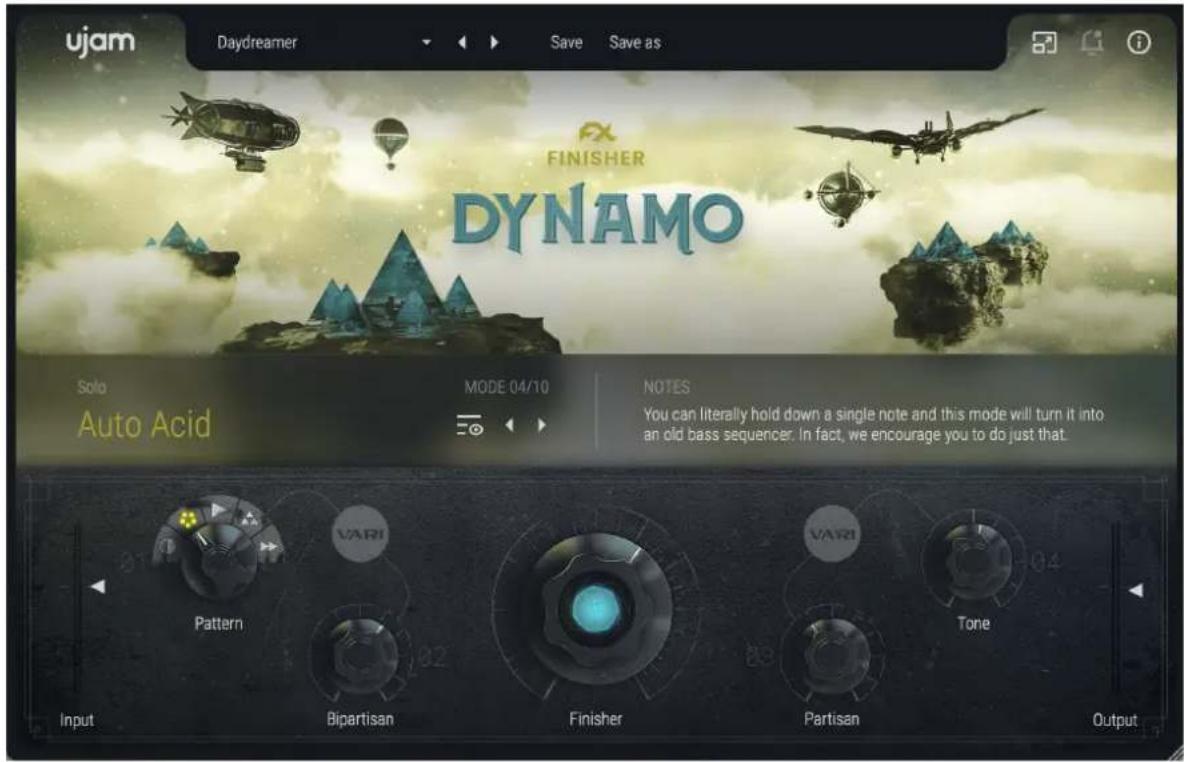
The Finisher series is UJAMs take on creating innovative effects that inspire and lead to results. They're designed to deliver the power and flexibility of a full rack of audio processors and effects with the instant gratification of a single plug-in. Being a UJAM product, we've also applied our signature emphasis on spontaneity and ease of use. The Finisher series wants to be your companion in your music creation, always coming up with a fresh idea, never failing to inspire you and never leaving you with bland or boring tracks ever again.
A Finisher is not a Chorus, Reverb, nor Compressor or EQ – it is all of that and way more. It is built from a plethora of different effect types that get combined into entirely new and complex effect chains. There's an endless world of Finisher effect combinations that are not available in any other product – plug-in or hardware.
Finisher DYNAMO offers you highly professional audio quality and sound design inspiration packed in one sleek, modern and easy-to-use design.
Go ahead - put Finisher DYNAMO on your tracks and start playing with it. We hope it'll become a staple in your toolbox to provide you with joy and inspiration for years to come!
What's Special About Finisher DYNAMO?
If you're familiar with Finisher FLUXX, you might remember that there are a couple of modes in there that completely re-sequence and rhythmically animate your input. These modes were some of the most celebrated by our users, so we decided to make a plug-in devoted entirely to just that!
Finisher DYNAMO is here to stir up your arrangements and grooves. The goal of DYNAMO is to morph the input signal into something entirely new. The plug-in focuses on doing this rhythmically rather than tonally (although there are some tonal effects packed in there as well!). For this reason, it's best to think of DYNAMO as more of a "Starter" than a "Finisher". You can completely remix a song with the turn of a knob, or turn a simple sine wave into a morphing bassline. It can also serve as a miracle vocal-chopper - perfect for electronic and pop music.
Just like the other Finishers, DYNAMO offers 50 modes and four tweakable variation controls. As always, Vari Knob 4 ('Tone') is the same across all Modes. In DYNAMO, Vari Knob 1 is also the same with each Mode. This 'Pattern' control is a new feature of DYNAMO, and it allows you to select between different rhythmic patterns and grooves to ensure that you're getting the best results for your productions. As usual, Vari Knobs 2 and 3 are Mode-dependent, offering you more detailed control over each effect.
Why Finisher?
We at UJAM are musicians, and Finisher was born out of our frustration with always tediously having to construct effect chains for every track – compressor, EQ, chorus, delay .. whatever it takes for a certain kind of instrument or vocal.
You know that feeling when you got a great basic track laid down, but you just can't get it to sound interesting? Sure you do, and we do too. That's why we designed Finisher.
Finisher is a one-stop solution to that problem, designed to make this process fast and easy and keep the inspiration high while delivering professional audio quality. The Finisher series is designed to give you a companion that always comes up with a fresh idea, never fails to inspire you and never leaves you with bland or boring tracks ever again.
A Finisher functions like a complete mixer channel with insert effects, except you also get a dozen hands tweaking hundreds of controls in response to you tweaking just a few simple knobs.
Until now, you'd open a bunch of plug-ins and often get lost in possibilities, while all you would want is a dash of inspiration – finding a great-sounding treatment for your instrument that inspires you, tweak it a little, maybe automate it, and move on happily.
Now you have a Finisher!
Installing Finisher DYNAMO on Your System
Installation is straightforward – double-click the installer file you got with the free trial email or purchase the product in our shop and download the installer from your ____ account.
Trying, Buying, Authorizing
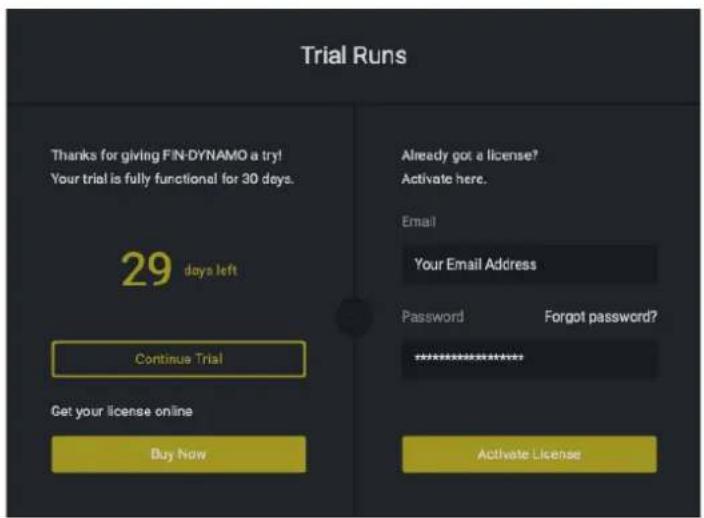
We only want you to spend money if you're absolutely happy with Finisher DYNAMO. Therefore, we grant you a 30-day trial period, during which the plug-in will run without any limitation. When opening Finisher DYNAMO during the trial period (or when clicking the Authorize button in the menu bar), you will see this overlay which shows:
•Information about your trial status
- A link to the product page where you can purchase a Finisher DYNAMO license after or during the trial period.
- The fields to enter your credentials and authorize Finisher DYNAMO once you've purchased it (the license has to be linked to your UJAM account)
Trial Screen
text_image
Trial Runs Thanks for giving FIN-DYNAMO a try! Your trial is fully functional for 30 days. 29 days left Continue Trial Get your license online Buy Now Already got a license? Activate here. Email Your Email Address Password Forgot password? ********** Activate LicenseUser Interface Overview
Main View
text_image
ujam Color Round Robin Save Save as Authorize 1 2 3 FINISHER DYNAMO 5 Track Totally Convoluted MODE 03/10 7 8 NOTES Sequentially runs the signal through different gated impulse responses. In other words, it sounds weird and that's the whole idea. 6 10 11 VARI Pattern 12 9 13 14 Confusion Finisher Anger Tone 15 Output| Number | Description |
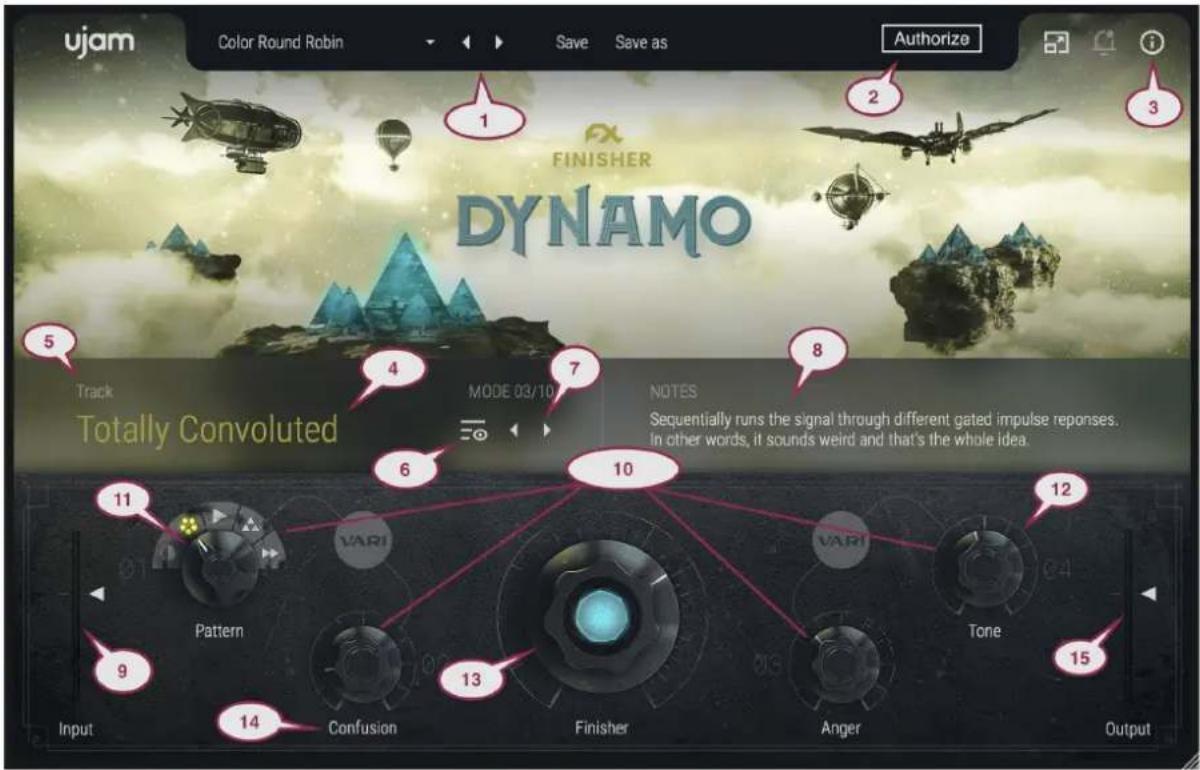
| 1 | Preset Area: Select, Load and Save Presets |
| 2 | Authorize Button (while in Trial Mode) |
| 3 | Info Button - About Page, User Manual, Acknowledgments, etc. |
| 4 | Mode Title |
| 5 | Mode Category |
| 6 | Browser View Button |
| 7 | Mode Selection Arrows |
| 8 | Mode Notes (Info About the Current Mode) |
| 9 | Input Level Meter and Slider |
| 10 | Variation (VARI) Knobs |
| 11 | Pattern Selector (VARI 01) |
| 12 | Tone Control (VARI 04) |
| 13 | Finisher Knob |
| 14 | Knob Label (Different for Every Mode) |
| 15 | Output Level Meter and Slider |
Browser View

text_image
ujam Color Round Robin Track SOLD RHYTH SUSTAIN VOCAL 01 Sequenced Spaces 06 Underwater Feedback 1 02 Backbeater 07 The Syncopator 03 Occasionally Bold 08 Divide and Conquer 04 Breakdowner 09 Vacuum Chamber 2 05 Turntable Time Machine 10 Power Surge Rhythm MODE 09/10 NOTES Vacuum Chamber Lots and lots of reverse business. VARI 2 and 3 add different reverse reverb options, but the mode also works great without them. Pattern Reverserer Finisher Reverserer Tone Input Output| 1 | Switch Category |
| 2 | Select Mode |
Adding Finisher DYNAMO to Your Track
After installing Finisher DYNAMO, it will appear in the effect plug-in menu of your VST-, AU- or AAX-compatible digital audio workstation (DAW).
Here you can select it as an insert for any stereo audio track, instrument track or bus.
Finisher DYNAMO on Mono Tracks
Finisher DYNAMO 1.0.0 will also appear in the plug-in selection of mono tracks in your DAW.
Quick Start
Open Finisher DYNAMO in your favorite DAW. Pick a preset from the list. Turn the Finisher Knob to get more of whatever effect you've chosen, and play with the four smaller ('Vari') knobs to tweak it to your liking. Repeat as necessary. That's the easiest way to get started, read along if you want more information.
Note: Although the Modes are more visible on the UI, the Presets are really what you want to play with first! The difference? A preset changes all settings of DYNAMO - the levels, Mode, Finisher Knob and Vari knobs. Changing the Mode itself just switches the effect configuration but leaves the knobs and levels untouched.
What's Inside Finisher DYNAMO?
You could think of Finisher DYNAMO as a huge effect rack with almost unlimited slots for effect processors, all of which can be activated and adjusted with a simple click on the Mode selector.
Finisher DYNAMO features over 50 different effect types. Get sounds moving with tools ranging from granular beat cutting to step-sequenced distortion – with a total of over 76 effect slots distributed across 2 busses plus a Master bus. That's quite some real estate if you'd try to build that out in your hardware setup!
The Finisher knob in the center of the interface gets wired to every parameter of every active effect, in varying degrees. No worries – this has already been done for you.
The Finisher knob always blends between dry signal and effect, also often ramping up a phaser while introducing a little distortion or mixing in a dash of reverb. What we mean to say is: it's more than just a dry/wet control - be sure you check out various positions for unique results!
Every Mode and its knob assignments are a complex sound design piece to create one particular “change of scene” for your track. That you can’t see all the hundreds and hundreds of parameters under the hood is deliberate. It enables you to focus on complex sound changes as simple knobs, encourages you to use your ears and your openness to be inspired.
The four Vari Knobs allow you to adjust the effect to your needs. Vari 2 and 3 are different with each Mode, but Vari 1 and 4 are always the same in this Finisher, controlling Pattern and Tone, respectively..
Switch Modes, turn the knobs – and make your tracks more beautiful, interesting, bigger, tougher, or change them entirely. Achieving the same dynamic and motion in conventional effect plugins would require dozens of automation lanes and diminish serendipity altogether.
Finisher DYNAMO Reference

text_image
Daft Breakdown FACTORY User Introduction Track Bass Drums Pads Vocals Subtle Send FX MODE 05/10 Save Save as Backbeater Bouncing Walls Breakdowner Breathe Machine Breathing Scatches Buffer Size Confuser Busy Bites Changing Color Reverb Dark Resonances Divide And Conquer Drums To ChordFinisher DYNAMO Preset Menu
Loading Presets
The Preset Menu at the top of the plugin window lets you easily select from and step through the nearly 300 included Presets.
You can either:
- Click the arrow buttons right next to the Preset name to step through the list
- Click the current Preset name or the downward facing arrow to open the dropdown menu
If you're new to Finisher DYNAMO, we recommend you set up a track and just go through the Presets to get an impression of what it can do.
Presets
Finisher DYNAMO comes with nearly 300 Presets organized into various folders:
| Preset Folder | Description |
| Introduction | Try these presets if you want a quick overview of what DYNAMO can do |
| Track | Presets in this category were designed with ‘larger gestures’ and more intense manipulations. These will work great on full song mixes for instant remixing potential! |
| Bass | Presets in this category will work best on basses and other single-voiced instruments |
| Drums | These presets are meant to be applied to drums, percussion, and anything else that might already have a well-defined groove |
| Pads | Put these presets on your pads or other sustained, chordal sounds for completely new soundscapes and ambience! |
| Vocals | Use these presets to help you create interesting vocal chops from your own vocal recordings or samples |
| Subtle | These presets are less dramatic than the others - use them if you are looking to spice things up just a tad |
| Send FX | Throw these presets on a return track or bus and gradually send your sounds to it to dial in some super interesting reverbs, delays, etc |
Saving Presets
text_image
Save Preset Your preset will be saved in the User Library of this plugin. Name Wow! Category Introduction Cancel Save PresetOnce you have made changes to a Preset, you can save it in various ways:
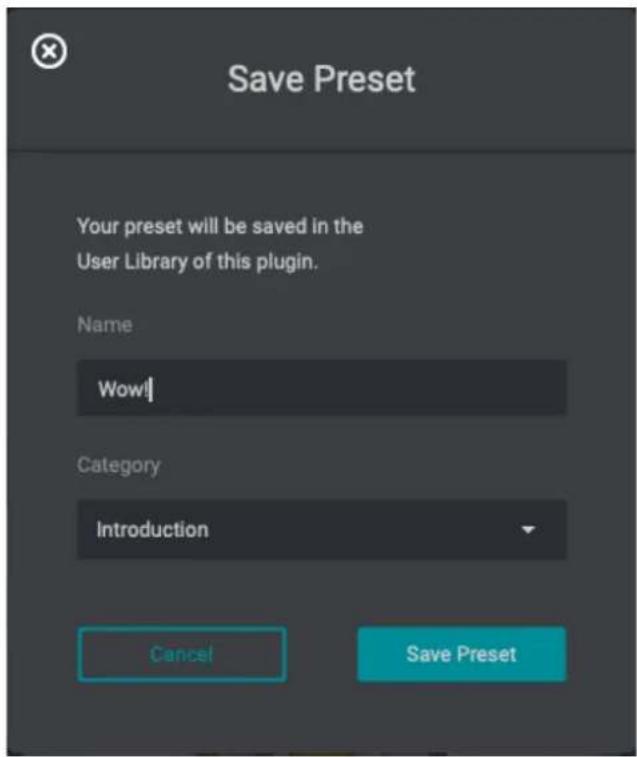
- You can overwrite Presets using the Save command. This way you can make modifications or improvements to your preset and save the changes for future use
- You can save new User Presets under a different name using the Save as... command
Note: You cannot overwrite Factory Presets. Please use the Save as...
command to create a new version of that Preset and save it to the User Library
Either way, when saving a Preset, you can select a preset category for organization purposes. Once saved, you'll find your new Preset in the 'User' folder, organized into whichever category you've selected.
Resizable Interface
The user interface is now resizable to fit optimally on different sized screens. To resize, either click the "window" icon next to the notification bell in the top right corner or simply drag the three stripes in the bottom right corner of the user interface. This feature will come to all Finishers in future updates!

Managing the Plug-In
Trial Period
Like any other UJAM plugin, you can download Finisher DYNAMO and try it without limitations for 30 days.
During that time, the menu bar of Finisher DYNAMO will show "Trial Period, X days left" and an Authorize button.
After the trial period expires, you will need to purchase Finisher DYNAMO if you wish to keep using it. Once you've done so, click the Authorize Button or open the About Page directly to enter your credentials (email address and password) and authorize DYNAMO.
Update

The little Bell icon in the menu bar of Finisher DYNAMO informs you of available updates. When an update is waiting, the icon will show a dot and a dialog will open where you will be given the option to download it.
Although we do our best to ensure that updates do not break any existing projects, we usually recommend keeping your previous installer in case you updated in the middle of a project and something goes wrong.
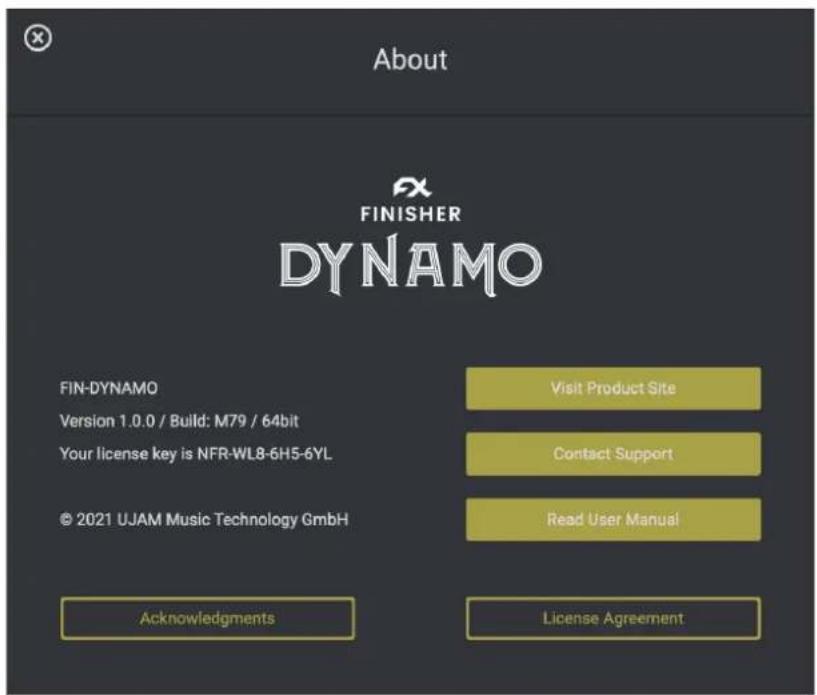
About Page
text_image
About FINISHER DYNAMO FIN-DYNAMO Version 1.0.0 / Build: M79 / 64bit Your license key is NFR-WL8-6H5-6YL © 2021 UJAM Music Technology GmbH Acknowledgments Visit Product Site Contact Support Read User Manual License AgreementThe circled "i" symbol to the right of the menu bar gives you access to various types of important information:
- Acknowledgments – the people behind Finisher DYNAMO
- Visit Product Site – Product Page with demos, information and more
- Contact Support – when you have a problem with Finisher, we're here to help!
- Read User Manual – opens this User Guide ...
- License Agreement – opens the license agreement if you care to look
User Interface Concept
Here's the user experience concept of Finisher DYNAMO in a nutshell:
- At the heart of Finisher DYNAMO is the Mode. It sets up the entire machinery under the hood – the effect algorithms and their routing as well as the macro assignments for the main Finisher Knob and the four Variation Knobs
- The Finisher Knob dials in the effect itself and also often creates an important change to the sound. Generally, however, the rule applies: turn up the Finisher Knob for more of the effect
- Variation Knobs allow you to adjust aspects of the effect to your production or taste and they can be automated as well (more details below).
Vari 4 is assigned to EQ and Compressor settings which is universally useful to curve out the frequency spectrum to your liking.
- When you select a Mode, you will find instructions and tips right next to the name, and the Vari Knob labels change to display that knob's functionality in that particular Mode
The MODE Section
When going through Modes, we recommend you set the Finisher Knob to at least the center position so you can properly hear the effect while stepping through.
Modes are carefully sound-designed effect configurations in Finisher DYNAMO, each with its individual parameter settings, and a custom macro-assignment of parameters to the Finisher Knob as well as the Vari 2 and 3 controls.
Selecting Modes
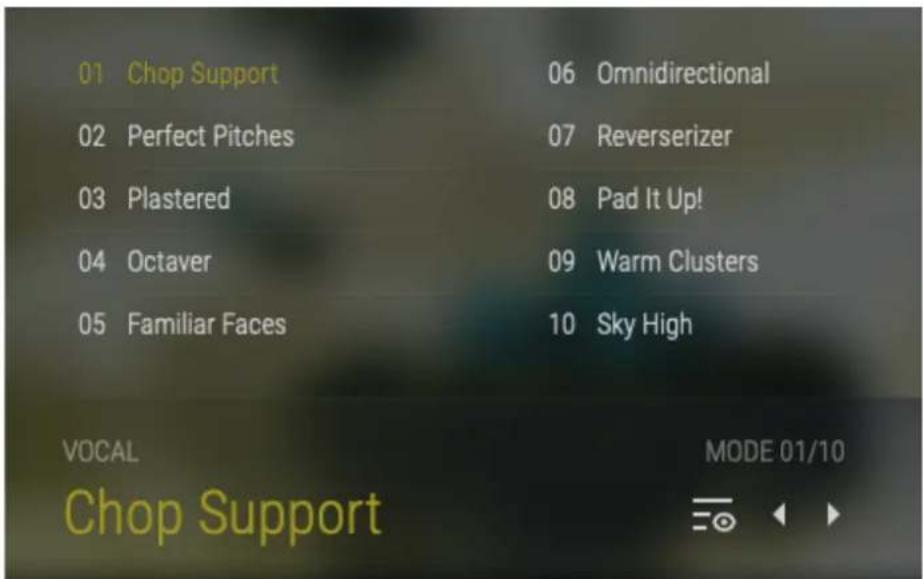
text_image
01 Chop Support 02 Perfect Pitches 03 Plastered 04 Octaver 05 Familiar Faces 06 Omnidirectional 07 Reverserizer 08 Pad It Up! 09 Warm Clusters 10 Sky High VOCAL MODE 01/10 Chop SupportBrowser View
Finisher DYNAMO lets you select Modes in two different ways:
-
Click on the Mode title or the Browser Button to open Browser View.
- Choose a category and click any Mode name to select that Mode.
-
Click on the arrows next to the selected Mode title to step back and forth through the list of Modes.
Notes
The number of the currently selected Mode is always shown above the Mode Title.
Please note that when switching Modes, the settings of the Finisher and Variation knobs remain unchanged. To change Modes including knob settings, choose Presets.
Mode Notes

text_image
Solo Daft Modulator MODE 05/10 NOTES A french Electro modulation classic, with a randomized sequencer twist. Works best with short, punchy basslines.Mode Notes (right)
The Modes within Finisher DYNAMO aren't conventional effects with learned names. Each one is a totally unique and independently designed effect. To help you out, right next to the Mode title you will find Mode Notes - brief descriptions of the effect world with usage tips.
The Finisher Knob

natural_image
Top-down view of a circular mechanical component with a glowing blue center and concentric rings, labeled 'Finisher' at the bottom (no other text or symbols)Finisher Knob
The Finisher Knob is the central control in Finisher DYNAMO. It is a super powerful macro control, multi-wired into all effect algorithms under the hood, and carefully set up for each individual Mode.
The Finisher Knob is not just another one-knob thing that you set up and leave to tweak the effect – although you very well could do just that.
Actually, you are encouraged to play with the Finisher Knob and automate it to create arcs, transitions and modulations over the length of your track.
We strongly encourage you to assign it to a MIDI controller like a modulation wheel or a pedal so you can play along with your song and record what you like to create more dynamic tracks that will feel much more alive and interesting!
Variation Knobs (1-4)

text_image
01 Pattern VARI 02 PulseVariation Knobs 1 and 2 with Labels
The smaller Variation Knobs to the left and right of the Finisher Knob were designed for adjustments and variations. In Finisher DYNAMO, the 1st and 4th Vari Knobs remain constant across all of the Modes.
The Vari 1 knob is also known as the Pattern Selector. This control allows you to edit the rhythm of the Modethat is currently selected. The rhythmic manipulations of the Modesare automatically synchronized to the host DAW's tempo (i.e. the tempo of your song), but this control offers you a handful of different options so you can find the best grooves for your production:
| SYMBOL | NAME | DESCRIPTION |
| Halftime | Adjusts the Mode to play at half of the speed that it was programmed to (half of 'Standard') | |
| Poly | Divides the modulations into more complex, interchanging patterns for a polyrhythmic effect | |
| Standard | Plays whatever rhythm the Modeis programmed to (this is different for each Mode) | |
| Triplet | Introduces a triplet feel to the Mode's rhythm, allowing compatibility with shuffled beats | |
| Double Time | Adjusts the Mode to play at twice the speed that it was programmed to (2 x 'Standard') |
The Vari 4 knob (Tone) allows you to fine-tune the characteristic of a Mode's sound. Turning the control to the left (counterclockwise) will gradually make the signal fatter and add low-end. As you continue to turn it further, it will begin to shelf off high frequencies until the treble is fully removed via low-pass filtering at the left-most positions of the knob.
Turning the knob to the right will do exactly the opposite! As you do so, the plug-in will add treble and begin to shelf off the bass frequencies until they are fully removed via high-pass filtering.
Similar to the Finisher Knob, the Vari 2 and Vari 3 controls are entirely Mode-dependent. They were programmed to control the most musically-useful functions in any given Mode (the "Variation" labels say what the knob does).
Also like the Finisher Knob, Vari knobs are pre-assigned to multiple parameters, each with their own scaling and range. This allows you to create complex changes with such simple controls. Their function assignments are named directly below each knob so you get an idea of what they will do.
Variation Knob Types
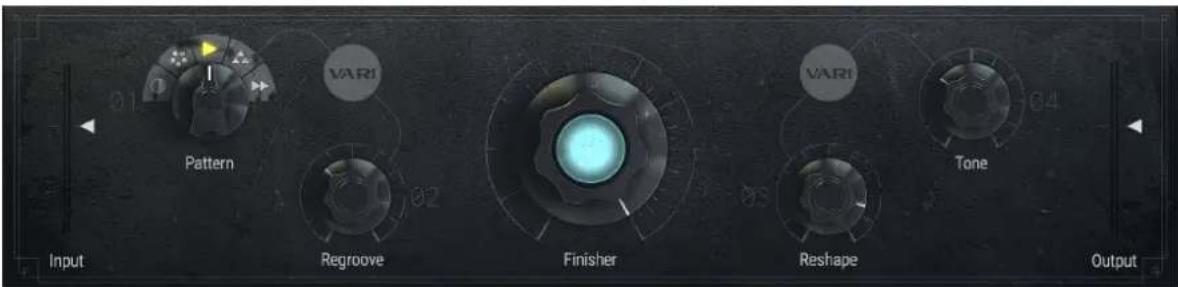
text_image
01 Pattern VARI 02 Input Regroove Finisher VARI 03 Reshape Tone OutputDifferent Vari Knob Types:
Vari 1: 5-way Switch, Vari 2 & 3: Unipolar, Vari 4: Bipolar
Regardless of what Mode is selected, the first and fourth Vari Knobs always control the Pattern and Tone of the Mode, respectively. The Pattern control is a 5-way selector switch, while the Tone control is a bipolar knob.
Vari Knobs 2 and 3 are unipolar continuous controls. The user interface will reflect the respective control mode. When using presets, the knob doesn't turn but jumps to the pre-programmed positions.
Checking and Setting Levels
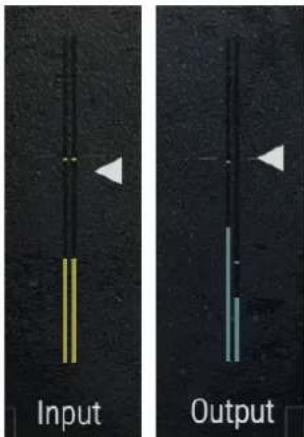
text_image
Input OutputInput and Output Level and Meter
The Input Level Meter and Slider in the bottom left corner of the plug-in allows you to attenuate or boost the level of the signal you send into Finisher DYNAMO, and the Output Level and Slider on the right side does the same for the signal coming out of DYNAMO. A few tips:
- Signals are at an optimal level if they are around the little calibration marks on the meters. Adjust them if they're not.
- Optimal input levels are important particularly for Modes that use distortion, compression or any kind of dynamic treatment.
- Optimal output levels are particularly important to avoid clipping and if you use subsequent processing in the same track.
Note that while you drag a slider, the resulting change will be displayed in dB.
Finisher DYNAMOs is optimized to alter the signal's level as little as possible from input to output, but depending on the frequency content of the input signal and the processing applied (e.g. sub-bass on kick drums, high resonant filters on mid-rich signals) this is sometimes unavoidable.
Using Input Level to Optimize Effects
Many effects, particularly dynamic filters, use the input signal level to control movements in the effect. If the input signal level is too high, you will hardly hear any effect.
If you had to lower the Input Level a lot, compensate with Output Level. Of course, YOU knew this!
Automating Controls
Finisher DYNAMO can be fully automated and MIDI-controlled and you will quickly realize how fun this is and how significantly it can add to your productions.
Create stunning introduction or riser effects by slowly increasing the Finisher Knob or Tone control. Build cool step-sequences by switching the Mode every beat or add breath to vocals by fading in delays only on last words.
Automatable Parameters
The following parameters can be automated via DAW Automation and – with the exception of Mode – using MIDI Control Change events:
- Effect (Finisher)
- Input
• Output
•Mode - Variation 1
- Variation 2
- Variation 3
- Variation 4
When automating the Mode, you will notice that between certain effects there are noticeable morph fades. These are due to temporary level jumps between the complex effect configurations and protect your speakers and ears. No reason to worry.
DAW Automation
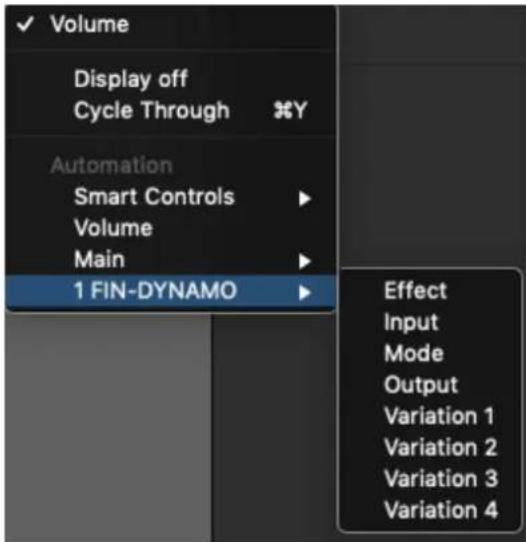
To automate a parameter using the automation of your DAW, just find where you activate automation (usually a menu in the track inspector or hotkey "a") and choose the parameter. The Finisher DYNAMO automation menu in Logic looks like this:
text_image
Volume Display off Cycle Through Automation Smart Controls Volume Main 1 FIN-DYNAMO Effect Input Mode Output Variation 1 Variation 2 Variation 3 Variation 4Automation in Logic
Assigning DYNAMO Knobs to MIDI Controllers
It's great fun to play DYNAMO's controls with your favorite MIDI controller. However, this requires a little bit of work on your end, because all DAWs handle MIDI controllers differently for effects. There is no 'MIDI Learn' functionality in most of them.
The good news is that DYNAMO fully supports MIDI control. All you need to do is look up how your DAW handles MIDI controller assignments.
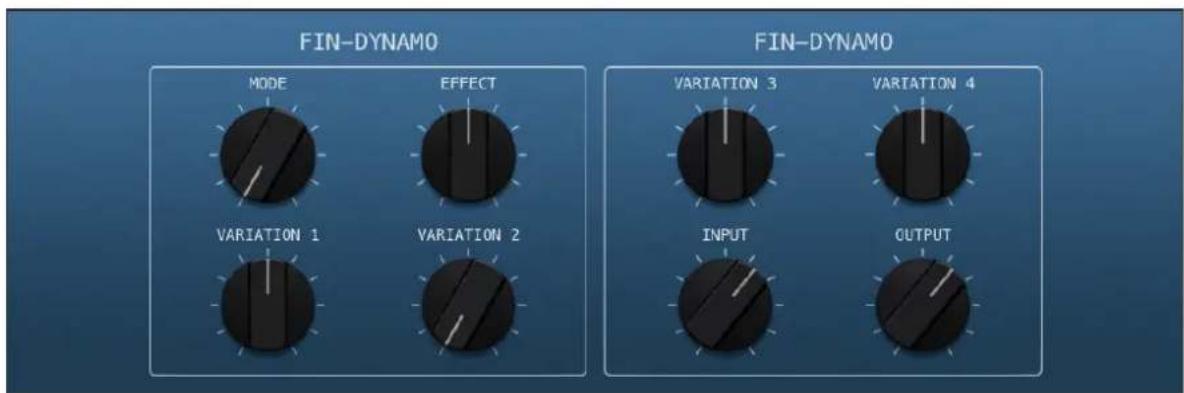
Here's an example screenshot from Logic Pro X – here you press B for the Smart Control view, then you can assign every DYNAMO control to a Smart Control internally using the Learn function, and do the same for assignment of your MIDI Controller to Logic.
text_image
FIN-DYNAMO MODE EFFECT VARIATION 1 VARIATION 2 FIN-DYNAMO VARIATION 3 VARIATION 4 INPUT OUTPUTDon't hesitate to contact UJAM support if you get stuck!
Effect Algorithms
The 50 Modes in Finisher DYNAMO are built using 27 different effect algorithms as buildingblocks.TherearethreeparallelbussesfedintoaMasterBus,plusaDryBus thatfeedstheunprocessed,butlevel-adjustedinputsignaltotheFinisherplug-in's output.
| Mode | Description |
| Retrify | Bitcrushing can be messy unless you automate gates around it, like this mode does. Add a touch of VARI 2 or 3 for sufficient madness. |
| Rubber Band | Bounces your sound with ridiculous amounts of animated, parallel filters. VARI 2 adds warmth and distortion. VARI 3 adds... aluminum? |
| Totally Convoluted | Sequentially runs the signal through different gated impulse responses. In other words, it sounds weird and that's the whole idea. |
| Kitchen Sink | You can literally throw everything and the kitchen sink at this, and it will turn it into an actual kitchen sink. Science! |
| Remix-O-Matic | If you have a tight remix deadline, we suggest you start here. Turn up VARI 2 for a buildup and VARI 3 for a breakdown... |
| Modulator Debate | A family of modulators having a nice chat. There's also a smurf. |
| Occasional Glitch | It occasionally glitches. VARI 2 and VARI 3 offer additional, slightly questionable interpretations of the term "occasional". |
| Screamer | Bump the Finisher knob all the way up to turn anything into a proper scratch sample. Automate it for melodic stretching, if you dare. |
| Tone It Down | Most effects make signals bigger. This one does just the opposite. |
| Filterducker | A bread-and-butter pumping effect isn't the most complex thing in the world, but a very useful thing to have around. |
| Octave Jumper | Adds nice octave jumps on the one. Try setting the VARI 1 pattern to 'Poly' for varying beats that you won't see coming. |
| Cavern Calls | This mode will mock you from a deep, dark cavern. VARI 2 and 3 are feedbacks. Turn them down if you want them to stop. |
| Wobble Is Coming | Instant Discobass. VARI 2 adds extra groove, while VARI 3 is maybe best described as the questionable substance knob. |
| Auto Acid | You can literally hold down a single note and this mode will turn it into an old bass sequencer. In fact, we encourage you to do just that. |
| Daft Modulator | A french Electro modulation classic, with a randomized sequencer twist. Works best with short, punchy basslines. |
| Ghost Strokes | Adds subtle and dry ghostnotes. Use VARI 2 to tune them to taste and VARI 3 if you're hungry for more ghostnotes. Yum. |
| Hold One Note | A less-mannered variant of the "turn a single note into a sequencer" concept. We beg you to try this on a simple monosynth! |
| Hyper Scatter | You've heard a major third before. Which is why we added a ton of spaced out modulations that maybe you haven't. |
| Mechanical Mind | A 80s synthpop trope, but with several modern twists and some ducking. Works great on single notes, and likely not at all on chords. |
| Overtone Symphony | Adds animated overtones. VARI 2 and 3 let you rhythmically offset root notes or overtones for subtle groove interaction. |
| Sequenced Spaces | Trigger different reverbs on different beats and then cut them into pieces. Or use this mode. Or both. |
| Backbeater | Spice up your 2 and 4 with this mode, or set Pattern to 'Poly' to spice up pretty much anything. Add VARI 2 and 3 if it's still not crazy enough. |
| Occasionally Bold | Inserts various bold events that will turn even the simplest beat into a remix extravaganza. Use VARI 2 and 3 sparingly for extra events. |
| Breakdowner | Your song has a breakdown? This mode is your friend. |
| Turntable Time Machine | HOW TO USE THIS MODE: Turn VARI 2 up and then mindlessly fiddle with VARI 3. Thou shall not regret it. |
| Underwater Feedback | Adds groovy bass feedbacks. Since it lies in the nature of feedbacks to never stop, turn down VARI 2 and 3 if you want them to. |
| The Syncopator | We stole this from "Druums". We just had to. It rearranges your drums into maximally unpredictable syncopated grooves. Preposterous fun. |
| Divide and Conquer | Splits the signal into three bands and resequences them separately. Use VARI 2 and 3 to alter the pitches of the different bands. |
| Vacuum Chamber | Lots and lots of reverse business. VARI 2 and 3 add different reverse reverb options, but the mode also works great without them. |
| Power Surge | Without VARI 2 and 3, this will add some classic processing on select beats. With VARI 2 and 3, it's electrifying. |
| Tranced Out | With the 90s being increasingly en vogue, here is the de facto standard 90s pad sequence, plus some extras in VARI 2 and 3. |
| Aesthetic Switcher | Stepfilters are nice but nothing new. This mode steps through different amp impulses instead. You can add a stepfilter with VARI 3. |
| Breathing Spaces | A nice alternative to simple ducking. This mode features various animated, pumping and breathing spaces and echos. |
| Retro Reminiscence | If you played pingpong with two vintage mirage sampling keyboards, this is what it would probably sound like. |
| Octomorph | Morphs the signal in various ways and then cuts it into pieces. Great for pads, cake and horror movie plots. |
| Haunted Thing | Adds ghostly modulations that are great for creating dark spaces and pads. VARI 2 and 3 dial in individual resonances for extra ghoulishness. |
| Wash Out | If you long to add subtle movement, this mode was developed for just that. VARI 2 brings it to life while VARI 3 defines its character. |
| Varispeed Racer | A wild pad modulation mode that refuses to settle on any particular modulation speed. VARI2 and 3 add even more indecision. |
| Voyager | Cuts the signal into fluffy chops and lets them wander around. VARI 2 somehow manages to be fluffy and punchy at the same time. |
| The Beyond | A warm, stuttering effect. VARI 2 adds large extra space. If things get a bit muddy, use VARI 3 to re-stutter the whole thing. |
| Chop Support | Instant vocal chop gratification. VARI 2 lets you add the original vocal back into the mix, but in an appropriately processed manner. |
| Perfect Pitches | The 5th is often the preferred harmony to match a song's original key. This offers just the right amount of remix-y chipmunkiness. |
| Plastered | A handful of slightly intoxicated resequencers. Also works wonders as a "Fat Chorus with a Twist" effect. |
| Octaver | This vocal chopper stays somewhat close to the original vocal by simply jumping through octaves. Use VARI 3 for more variation. |
| Familiar Faces | If you want a bit of choppiness without venturing too far from the original vocal. Add VARI 2 to stay even closer. |
| Omnidirectional | A nicely funky chop that alters between forward and reverse playback. Not that you'd even notice with all of the gating involved... |
| Reverserizer | Plays strictly in reverse, but in windows short enough to follow along with the original vocal, which again can be emphasized with VARI 2. |
| Pad It Up! | Turns your vocals into an ambient pad. VARI 2 and 3 let you filter the low and high ranges separately. |
| Warm Clusters | As an alternative to a dark pad, this mode turns the input into warm clusters. Use VARI 2 and 3 to make it more and more clustery. |
| Sky High | Summons a remix sequence in the octave above the original. Thank you for flying UJAM Airlines, have a wonderful day. |
All of these complex modules aren't only combined in DYNAMO, their parameters are also individually assigned and scaled to DYNAMO's knobs, and are often automated by Envelope Followers, Curves, and LFOs.
I Have Questions! Where Can I Send Them?
Please submit a request to our support staff. Thanks!
Don't hesitate, we're eager to help you out and learn about your opinion and suggestions. Many improvements and even products have been influenced by our user community!
ujam We Inspire
We Inspire, U Dare.