Wingmate Pro - Breathalyzer Andatech - Free user manual and instructions
Find the device manual for free Wingmate Pro Andatech in PDF.


User questions about Wingmate Pro Andatech
0 question about this device. Answer the ones you know or ask your own.
Ask a new question about this device
Download the instructions for your Breathalyzer in PDF format for free! Find your manual Wingmate Pro - Andatech and take your electronic device back in hand. On this page are published all the documents necessary for the use of your device. Wingmate Pro by Andatech.
USER MANUAL Wingmate Pro Andatech
text_image
Fuel Cell Breathalyser .000 % RESULT WINGMATE Central Power Australian Standard AS247
Australian
Standard
AS3547
Lic. SMK40556
SAI GLOBAL
CHECK YOUR LIMIT
User's Manual
Congratulations on buying your new Wingmate Pro breathalyser.
We hope you enjoy owning your Wingmate Pro breathalyser. If you have any questions regarding the unit or want to speak with us further, please visit andatech.com.au or call 1300 800 200 (between 9am and 5pm Monday to Friday).
Wingmate Pro Components

text_image
Mouthpiece Slot Digital LCD Display Power Button Breath out (do not cover) .000 % RESULT Battery Cover (Back) Contents: Breathalyser, mouthpieces (x5), AAA batteries (x2), and user's manual WINGMATESpecifications
| Sensor | Fuel Cell Sensor |
| Indication of B.A.C | 0.000 to 0.400 %BAC |
| Accuracy | ± 0.005 %BAC at 0.050 %BAC |
| Operation Temperature | 5°C to 40°C |
| Storage Temperature | 0°C to 40°C |
| Warm Up Time | 15 ~ 35 seconds |
| Response Time | 3 ~ 22 seconds |
| Display | 3-Digit LCD |
| Power Supply | Two 1.5V “AAA” size alkaline batteries |
| Use Mouthpiece | Compatible with Wingmate mouthpieces |
| Dimensions (mm) | 114 (height) X 47 (width) X 24 (thickness) |
| Weight | 61.5g (84g including batteries) |
| Calibration | Recommended every 500 tests or 6 months, whichever comes first.Australian Standards Requirement:1 month |
Display
Device is ready to take a test. Start blowing.
Battery low. Replace with new batteries.
Test result is displayed as a 3 decimal place %BAC reading
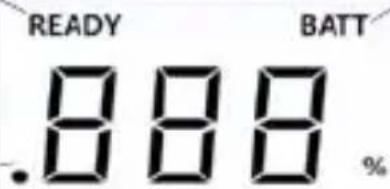
text_image
READY BATT .888 %RESULT
WARN
Result is above 0.050% BAC
Displays test result Dual colour LCD backlight.
See Warnings Display section in the manual.
Operating Instructions
- Insert a mouthpiece into the mouthpiece slot
- Press the power button. "ON" will display and the breathalyser will start warming up, which will take about 15 \~ 35 seconds.
-
The breathalyser will beep and display "BLO" on the screen. Blow steadily into the mouthpiece and continue blowing until you hear another beep.
(If you do not blow into the breathalyser within 20 seconds, it will automatically switch off. Press the power button to switch it back on.) -
The breathalyser will display a circling line as it analyses the breath sample. It will then beep and display the result for 20 seconds.
- If the test result is over 0.050%BAC (set by default), the LCD backlight will change to red and display "WARN" and sound an audible alert.
- Test results are displayed for 20 seconds (LCD backlight will dim down in the last 5 seconds).
- Press the power button during the last 5 seconds to take another test. The breathalyser will start warming up for a second test.
- To take another test, repeat from step 2.
- Try to space consecutive tests at least 2 minutes apart.
- Switch the breathalyser off by pressing the power button for 2 seconds.
Please note:
- The breathalyser will turn off automatically when not in use.
Warnings Display
The breathalyser's LCD Backlight will turn red when any of these errors occur.
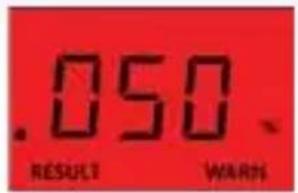
text_image
.050 RESULT WARNIf the result is higher than 0.050% BAC, the breathalyser will display "WARN" and sound an audible alert.

text_image
Hot RESULT WARNIf the result is above 0.400% BAC, "Hot" signal is displayed along with alarm sound.

text_image
CALIf you have tested over 500 times, CAL will show up on the display screen for 3 seconds before warming up for a test. Please send the breathalyser back for calibration.

text_image
BAT BATTThe battery voltage is too low to perform a test. The device will turn off automatically after showing this signal. Please replace with new 1.5V alkaline batteries.
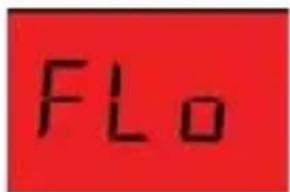
text_image
FLOThe breath sample was not strong enough for a measurement. Please power on the unit again and make sure the breath is strong and steady during sampling.

text_image
OUTWhen the ambient temperature is out of the working temperature range (5°C\~40°C) the unit shows "OUT" and then turns off. Keep and use the unit within the recommended temperature range.
How to Change Batteries

natural_image
Simple line drawing of a device with an arrow pointing to a button (no text or symbols)
natural_image
Simple line drawing of a rectangular object with an arrow pointing right, no text or symbols present.
text_image
3 MADE IS KOMA 100 R4-800mm x 100Step 1: Apply a small amount of pressure on the battery cover located on the back of the unit.
Step 2: Push down and away from the unit to release the cover.
Step 3: Replace with new alkaline batteries in the proper positive(+) and negative(-) positions as indicated. Then, replace the battery cover.
Limits
AUSTRALIAN BLOOD ALCOHOL LIMITS: Adult License 0.05% Some drivers are restricted to lower levels of BAC. Please refer to your local transport authority for your correct limit. If in any doubt do not drink and drive.
The safest level when driving is none at all. Alcohol impairs your judgement and can make you drowsy or sleepy.
Disclaimer
PLEASE NOTE:
- This product must be used in accordance with the instructions in this manual and - in particular - must not be allowed to get wet.
- This product is intended to provide the user with an indication of alcohol on the breath. However, neither the manufacturer nor the supplier gives any warranty (express or implied) that the product can give any indication of blood alcohol level.
- A person's BAC (Blood Alcohol Concentration) can only be accurately measured by the administration of a blood test. This product only measures breath alcohol content which, in turn, only gives an approximate indication of blood alcohol concentration.
- In these circumstances the user of this product should not rely on the information provided thereby as an accurate indication of his blood alcohol concentration or of his level of intoxication or of his fitness to drive and in particular should not take any action in reliance on such information as the product can provide no more than an indication of alcohol on the breath.
- If the user of this product makes any decision or takes any action based on the use of the product such decision or such action shall be at the sole risk of the user and neither the manufacturer nor the supplier assumes any responsibility for such decision or action. In particular, neither the manufacturer nor the supplier shall be in any way liable if the user of the product asserts that the product led him to believe that he was fit to operate a motor vehicle and is subsequently found not to be so fit.
Warnings
a. Allow at least 20 minutes after eating or drinking before testing. Any type of alcohol remaining in the mouth of saliva may interfere with proper testing and requires about 20 minutes to disperse. This includes alcohol-based mouthwash or similar products.
b. Avoid testing in high wind conditions or in poorly ventilated or enclosed spaces. Poor ventilation may also lengthen the time required for warm up between tests.
c. Do not blow smoke, saliva or other contaminants into the unit as the sensor may become damaged. Wait at least 20 minutes after smoking before conducting a test.
d. Do not use the breathalyser as a tool to drink and drive.
e. Do not blow fluid into the instrument as it will damage the sensor and void your warranty.
f. Do not store in an extreme environment where high temperature or high humidity exists. Keep out of the reach of children.
g. To maintain accuracy, we recommend professional recalibration every 6 months.
h. Blood alcohol concentration can continue to rise for up to 2 hours after the cessation of drinking. If a caution result or a result is close to the designated BAC, it is recommended to wait and retest after 20 minutes.
i. It can take 10 hours or more for the alcohol level to return to a zero after a high blood alcohol level has been reached. A further test should be carried out later in the day of the following morning.
j. User-serviceable batteries safety:
• Do not dispose of batteries in a fire.
- Do not expose the Wingmate Pro or batteries to heat source.
- Do not mix old and new batteries, or mix different types or makes of batteries.
• Do not allow children to play with the batteries.
Recalibration & Service
The Wingmate Pro uses a fuel cell sensor to measure breath alcohol levels. Depending upon the amount of alcohol registered by the sensor after a period of time, it will require recalibration. Andatech recommends the Wingmate Pro is calibrated every 6 months or after 500 uses, whichever comes first. To maintain the unit to Australian Standards, calibration every one (1) month is required.
Warranty Details
It is our aim to provide you with quality products that you can trust. Our products come with guarantees that cannot be excluded under the Australian Consumer Law. You are entitled to a replacement or a refund for a major failure and for compensation for any other reasonably foreseeable loss or damage.
You are also entitled to have the goods repaired or replaced if the goods fail to be of acceptable quality and the failure does not amount to a major failure.
The Guarantee
The product is guaranteed to be free from defects in workmanship and parts for a period of 36 months from the date of purchase. Defects that occur within this warranty period, under normal use and care, will be repaired, replaced or refunded at our discretion, solely at our option with no charge for parts and labour. The benefits conferred by this warranty are in addition to all rights and remedies in respect of the product that the consumer has under the Trade Practices Act and similar state laws.
Proof of Purchase
This warranty is valid for the original purchase and is not transferable. Please keep your purchase docket or receipt as proof of purchase and as proof of date on which the purchase was made. The purchase docket (or a copy) or receipt must be presented with the warranty when making a claim under this warranty.
Service during the Warranty Period
To claim for warranty, contact us on 1300 800 200 or go to support.andatech.com.au to get an RA# (Return Authorization Number). Ensure that the RA# is clearly stated on the outside of the packaging and that the product is properly packaged so that no damage occurs to the product during transit. Shipping of the product back to us for warranty will be at your cost. A product return without the RA# or proof of purchase will not be accepted.
Extent of Warranty
This warranty is limited to defects in workmanship or parts. All defective products or parts will be repaired or replaced. This warranty does not cover manuals and packaging.
Normal Wear and Tear
This warranty does not cover normal wear and tear to the product or parts.
Exclusions
This warranty does not cover:
• Calibration costs.
- Any defect caused by an accident, misuse, abuse, improper operation, lack of reasonable care, unauthorised modification, loss of parts, tampering or attempted repair by a person not authorised by the distributor.
• The product if it is located outside of Australia.
- Any damage caused by improper power input or improper cable connection.
- Reduction in battery discharge time due to battery age or use
Product Registration
my.andatech.com.au is a central location where you can register your warranty, sign up to recieve calibration reminders and schedule calibrations. Once you have registered you can add as many products as needed to that account.
Register online at my.andatech.com.au
Product Registration Form
If you prefer the old fashioned method, complete this form and forward to the address below along with a copy of your proof of purchase.
Andatech Pty Ltd PO BOX 3038, Nunawading VIC 3131 Australia.
Product Wingmate Pro
Serial Number
Date of Purchase ....
Place of Purchase
Name
Address
Suburb
Postcode .... State ....
Contact no.
Please Affix Stamp here
Product Registration
Register online at my.andatech.com.au or complete this form and forward to
Andatech Pty Ltd
PO BOX 3038
Nunawading VIC 3131
Australia