AC042KN4DCH - Air-conditioner SAMSUNG - Free user manual and instructions
Find the device manual for free AC042KN4DCH SAMSUNG in PDF.


User questions about AC042KN4DCH SAMSUNG
0 question about this device. Answer the ones you know or ask your own.
Ask a new question about this device
Download the instructions for your Air-conditioner in PDF format for free! Find your manual AC042KN4DCH - SAMSUNG and take your electronic device back in hand. On this page are published all the documents necessary for the use of your device. AC042KN4DCH by SAMSUNG.
USER MANUAL AC042KN4DCH SAMSUNG
- Thank you for purchasing this Samsung air conditioner.
- Before operating this unit, please read this user manual carefully and retain it for future reference.
Contents
Safety Information 3
Safety Information 3
At a Glance 10
Indoor Unit Overview 10
Power Smart Features 11
Operation Features 11
Operating temperature and humidity
Cleaning and Maintenance 12
Cleaning and Maintaining 12
Cleaning the indoor unit exterior • Disassembling the air filter • Cleaning the air filter • Reassembling the air filter • Periodical maintenance • Troubleshooting
WARNING
State of California Proposition 65 Warning (US only)
This product contains chemicals known to the State of California to cause cancer, birth defects, or other reproductive harm.
Before using your new air conditioner, please read this manual thoroughly to ensure that you know how to safely and efficiently operate the extensive features and functions of your new appliance.
Because the following operating instructions cover various models, the characteristics of your air conditioner may differ slightly from those described in this manual. If you have any questions, call your nearest contact centre or find help and information online at www.samsung.com.
WARNING
Hazards or unsafe practices that may result in severe personal injury or death.
CAUTION
Hazards or unsafe practices that may result in minor personal injury or property damage.
! Follow directions.
Do NOT attempt.
Make sure the machine is grounded to prevent electric shock.
Cut-off the power supply.
Do NOT disassemble.
Use the power line with the power specifications of the product or higher and use the power line for this appliance only. In addition, do not use an extension line.
- Extending the power line may result in electric shock or fire.
- Do not use an electric transformer. It may result in electric shock or fire.
- If the voltage/frequency/rated current condition is different, it may cause fire.
The installation of this appliance must be performed by a qualified technician or service company.
- Failing to do so may result in electric shock, fire, explosion, problems with the product, or injury.
Install a switch and circuit breaker dedicated to the air conditioner.
- Failing to do so may result in electric shock or fire.
Fix the outdoor unit firmly so that the electric part of the outdoor unit is not exposed.
- Failing to do so may result in electric shock or fire.
Do not install this appliance near a heater, inflammable material. Do not install this appliance in a humid, oily or dusty location, in a location exposed to direct sunlight and water (rain drops). Do not install this appliance in a location where gas may leak.
• This may result in electric shock or fire.
Never install the outdoor unit in a location such as on a high external wall where it could fall.
- If the outdoor unit falls, it may result in injury, death or property damage.
This appliance must be properly grounded. Do not ground the appliance to a gas pipe, plastic water pipe, or telephone line.
- Failure to do so may result in electric shock, fire, an explosion, or other problems with the product.
- Never plug the power cord into a socket that is not grounded correctly and make sure that it is in accordance with local and national codes.

CAUTION
Install your appliance on a level and hard floor that can support its weight.
- Failing to do so may result in abnormal vibrations, noise, or problems with the product.
Install the draining hose properly so that water is drained correctly.
- Failing to do so may result in water overflowing and property damage. Avoid adding drain to waste pipes as odours may arise in the future.
When installing the outdoor unit, make sure to connect the draining hose so that draining is performed correctly.
- The water generated during the heating operation by the outdoor unit may overflow and result in property damage. In particular, in winter, if a block of ice falls, it may result in injury, death or property damage.
FOR POWER SUPPLY

WARNING
When the circuit breaker is damaged, contact your nearest service centre.
Do not pull or excessively bend the power line. Do not twist or tie the power line. Do not hook the power line over a metal object, place a heavy object on the power line, insert the power line between objects, or push the power line into the space behind the appliance.
- This may result in electric shock or fire.

CAUTION
When not using the air conditioner for a long period of time or during a thunder/lightning storm, cut the power at the circuit breaker.
- Failing to do so may result in electric shock or fire.
FOR USING

WARNING
If the appliance is flooded, please contact your nearest service centre.
- Failing to do so may result in electric shock or fire.
If the appliance generates a strange noise, a burning smell or smoke, unplug the power plug immediately and contact your nearest service centre.
- Failing to do so may result in electric shock or fire.
In the event of a gas leak (such as propane gas, LP gas, etc.), ventilate immediately without touching the power line. Do not touch the appliance or power line.
- Do not use a ventilating fan.
- A spark may result in an explosion or fire.
To reinstall the air conditioner, please contact your nearest service centre.
- Failing to do so may result in problems with the product, water leakage, electric shock, or fire.
- A delivery service for the product is not provided. If you reinstall the product in another location, additional construction expenses and an installation fee will be charged.
- Especially, when you wish to install the product in an unusual location such as in an industrial area or near the seaside where it is exposed to the salt in the air, please contact your nearest service centre.
Do not touch the circuit breaker with wet hands.
• This may result in electric shock.
Do not turn the air conditioner off with the circuit breaker while it is operating.
- Turning the air conditioner off and then on again with the circuit breaker may cause a spark and result in electric shock or fire.
After unpacking the air conditioner, keep all packaging materials well out of the reach of children, as packaging materials can be dangerous to children.
- If a child places a bag over its head, it may result in suffocation.
Do not touch the front panel with your hands or fingers during the heating operation.
• This may result in electric shock or burns.
Do not insert your fingers or foreign substances into the outlet when the air conditioner is operating or the front panel is closing.
• Take special care that children do not injure themselves by inserting their fingers into the product.
Do not insert your fingers or foreign substances into the air inlet/outlet of the air conditioner.
- Take special care that children do not injure themselves by inserting their fingers into the product.
Do not strike or pull the air conditioner with excessive force.
- This may result in fire, injury, or problems with the product.
Do not place an object near the outdoor unit that allows children to climb onto the machine.
- This may result in children seriously injuring themselves.
Do not use this air conditioner for long periods of time in badly ventilated locations or near infirm people.
- Since this may be dangerous due to a lack of oxygen, open a window at least once an hour.
any foreign substance such as water has entered the appliance, cut the power by unplugging the power plug and turning the circuit breaker off and then contact your nearest service centre.
- Failing to do so may result in electric shock or fire.
Do not attempt to repair, disassemble, or modify the appliance yourself.
- Do not use any fuse (such as copper, steel wire, etc.) other than the standard fuse.
- Failing to do so may result in electric shock, fire, problems with the product, or injury.

CAUTION
Do not place objects or devices under the indoor unit.
- Water dripping from the indoor unit may result in fire or property damage.
Check that the installation frame of the outdoor unit is not broken at least once a year.
- Failing to do so may result in injury, death or property damage.
Max current is measured according to IEC standard for safety and current is measured according to ISO standard for energy efficiency.
Do not stand on top of the appliance or place objects (such as laundry, lighted candles, lighted cigarettes, dishes, chemicals, metal objects, etc.) on the appliance.
- This may result in electric shock, fire, problems with the product, or injury.
Do not operate the appliance with wet hands.
• This may result in electric shock.
Do not spray volatile material such as insecticide onto the surface of the appliance.
- As well as being harmful to humans, it may also result in electric shock, fire or problems with the product.
Do not drink the water from the air conditioner.
• The water may be harmful to humans.
Do not apply a strong impact to the remote controller and do not disassemble the remote controller.
Do not touch the pipes connected with the product.
• This may result in burns or injury.
Do not use this air conditioner to preserve precision equipment, food, animals, plants or cosmetics, or for any other unusual purposes.
• This may result in property damage.
Avoid directly exposing humans, animals or plants from the air flow from the air conditioner for long periods of time.
- This may result in harm to humans, animals or plants.
This appliance is not intended for use by persons (including children) with reduced physical, sensory or mental capabilities, or lack of experience and knowledge, unless they have been given supervision or instruction concerning use of the appliance by a person responsible for their safety. Children should be supervised to ensure that they do not play with the appliance.
FOR CLEANING
WARNING
Do not use benzene, thinner, alcohol or acetone to clean the appliance.
- This may result in discoloration, deformation, damage, electric shock or fire.
Before cleaning or performing maintenance, unplug the air conditioner from the wall socket and wait until the fan stops.
- Failing to do so may result in electric shock or fire.
CAUTION
Take care when cleaning the surface of the heat exchanger of the outdoor unit since it has sharp edges.
- To avoid cutting your fingers, wear thick cotton gloves when cleaning it.
- This should be done by a qualified technician please contact your installer or service centre.
Do not clean the inside of the air conditioner by yourself.
- For cleaning inside the appliance, contact your nearest service centre.
- When cleaning the internal filter, refer to the descriptions in the ‘Cleaning and Maintaining’ section.
- Failure to do may result in damage, electric shock or fire.
Indoor Unit Overview
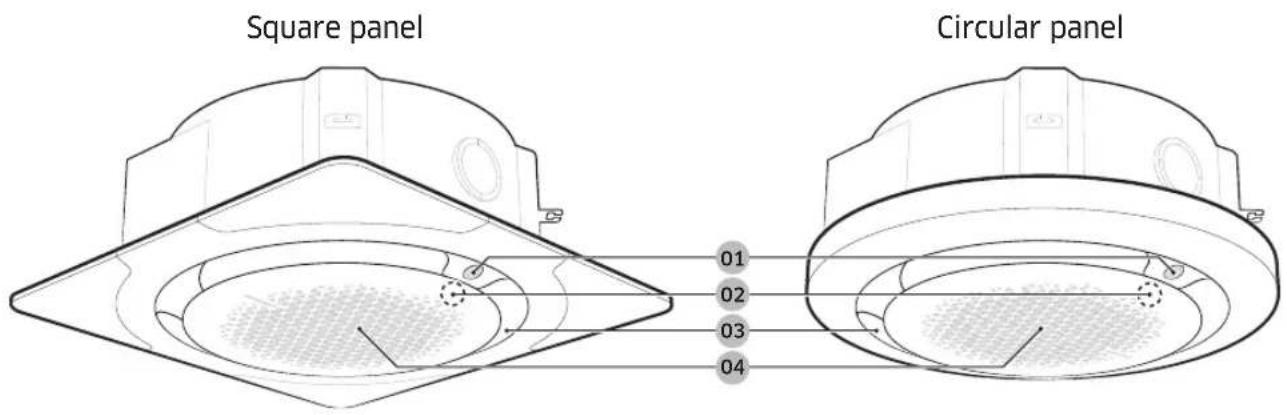
text_image
Square panel Circular panel 01 02 03 0401 Display

natural_image
Diagram of a hand holding a small oval object, possibly a lens or capsule, with no visible text or symbols.| Operation status | Indication on the display |
| Power on Ice blue (blinking) | |
| In operation Ice blue | |
| Stopped Off | |
| Timed on/off function | Blue |
| Requires filter cleaning | Yellow green |
| Defrost function | Ice blue (blinking once every 10 seconds) |
| Wide |  |
| Mid |  |
| Spot |  |
| Swing |  |
NOTE
- For the AR-KH00U wireless remote control, the air flow direction indications appear on its display, too.
- By using the AR-KH00U wireless remote control, you can turn on or turn off the air flow direction indications that appear on the indoor unit display.
- For the MR-EH00U wireless remote control, which is designed generally for any indoor units, the air flow direction is not shown on the remote control display. Control the air flow direction with checking it on the indoor unit display.
02 Remote control sensor (behind the front grille)
03 Air outlet
04 Front grille / Air filter (behind the front grille)
NOTE
- For information on how to operate the product, see the user manual for the remote control.
- The actual appearances of the indoor units and their displays may differ slightly from the images depicted above.
- By using the AR-KH00U wireless remote control, which is designed specifically for the 360 cassette indoor units, you can operate them more conveniently. In addition, because you can check the operation status of each indoor unit on the remote control, you can use the indoor units more effectively.
Operating temperature and humidity
| Mode Outdoor temperature Indoor temperature Indoor humidity | |||
| Cool mode | -18°C to 46°C(0°F to 115°F) | 18°C to 32°C(64°F to 90°F) | 80% or less |
| Heat mode | -20°C to 24°C(-4°F to 75°F) | 30°C(86°F) or less - | |
| Dry mode | -18°C to 46°C(0°F to 115°F) | 18°C to 32°C(64°F to 90°F) | - |

CAUTION
- If you use the air conditioner at a relative humidity above 80%, it may cause formation of condensation and a leakage of water on the floor.
Cleaning and Maintaining
Cleaning the indoor unit exterior

natural_image
Illustration showing a hand cleaning a ceiling-mounted device and a hand holding a brush near a basketball (no text or symbols)Wipe the surface of the unit with a slightly wet or dry cloth when needed. Wipe off dirt from odd-shaped areas by using a soft brush.
CAUTION
- Do not use alkaline detergent, sulphuric acid, hydrochloric acid, or organic solvents (such as thinner, kerosene, and acetone) to clean the surfaces.
- Do not put any stickers on it as this can damage the surface of the indoor unit.
Disassembling the air filter

flowchart
graph LR
    A["Initial surgical tool manipulation"] --> B["Step 1: Surgical tool insertion, placement"]
    B --> C["Step 2: Mid-pointing device placement, test tube placement"]
    C --> D["Step 3: Endoscopic placement with measurement tools and tool"]
    D --> E["Endoscopic placement with measurement tools and tool"]
!CAUTION
- For cleaning and maintenance, be sure to turn off the circuit breaker.
NOTE
- When the next filter-cleaning time arrives (after 1000 hours of operation), the indoor unit display appears in yellow green.
Cleaning the air filter
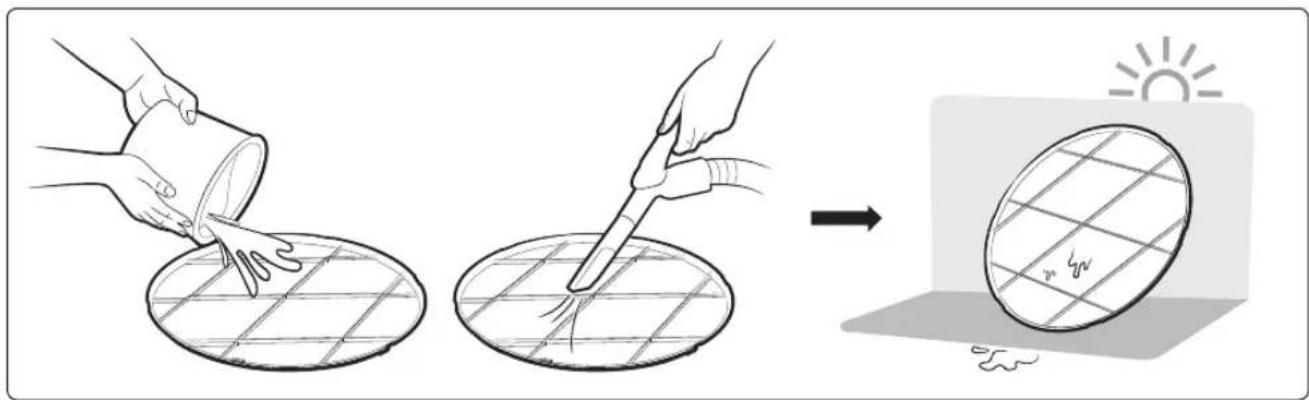
text_image
Diagram illustrating the process of coating or cleaning using a tool, showing steps from mixing to surface treatment.
NOTE
- Clean the air filter once every two weeks.
- Spray water or use a vacuum cleaner to remove dust.
• After removing dust, dry the air filter completely. - Avoid direct sunlight. Failure to do so may deform the air filter.
Reassembling the air filter
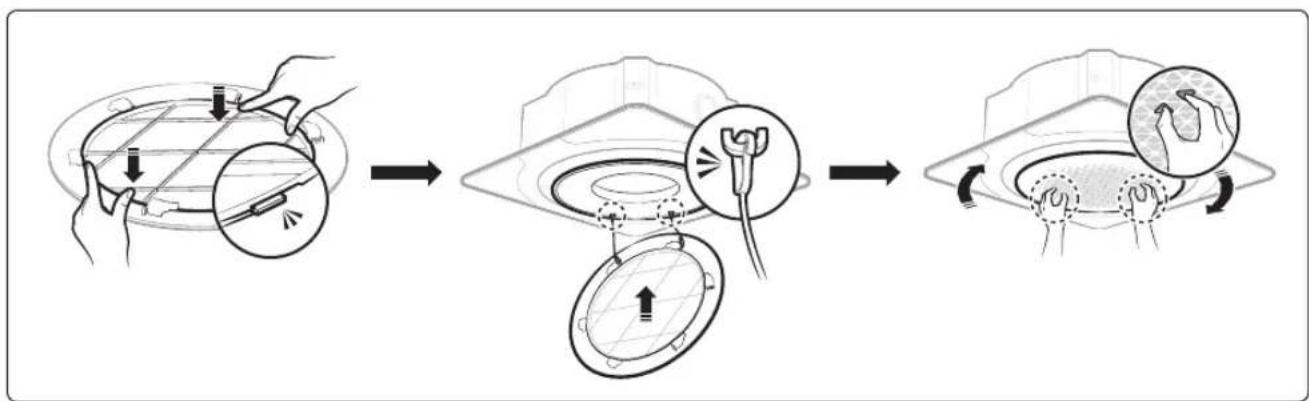
flowchart
graph LR
    A["Start: Surgical Tool Application"] --> B["Step 1: Surgery"]
    B --> C["Step 2: Radiocent placement"]
    C --> D["Step 3: Endoscopic Implantation"]
    D --> E["End: Augmented Radiocent with Stamps and Ulcers"]
After cleaning and reassembling the air filter, reset the filter-cleaning reminder as follows:
• AR-KH00U remote control: Options > Select Filter Reset.
- MR-EH00U remote control: Hold down the Filter Reset button for two seconds.

NOTE
- If you try to assemble the air filter upside down, it will not be assembled because it cannot be clamped by the internal structure.
Periodical maintenance
| Unit Maintenance item Interval | Requires qualified technicians | ||
| Indoor unit | Clean the air filter. At least once a month | ||
| Clean the condensate drain pan. Once a year Required | |||
| Clean up the heat exchange. Once a year Required | |||
| Clean the condensate drain pipe. Once every 4 months Required | |||
| Replace the remote control batteries. | At least once a year | ||
| Outdoor unit | Clean the heat exchanger on the outside of the unit. | Once every 4 months Required | |
| Clean the heat exchanger on the inside of the unit. | Once a year Required | ||
| Clean the electric components with jets of air. | Once a year Required | ||
| Verify that all the electric components are firmly tightened. | Once a year Required | ||
| Clean the fan. Once a year Required | |||
| Verify that the fan assemblies are firmly tightened. | Once a year Required | ||
| Clean the condensate drain pan. Once a year Required | |||
Troubleshooting
Refer to the following chart if the air conditioner operates abnormally. This may save time and unnecessary expense.
| Problem Solution | |
| The air conditioner does not operate at all. | Check if the power plug is properly connected.Check whether the auxiliary power switch (MCCB, ELB) is turned on.If the auxiliary power switch (MCCB, ELB) is turned off, the air conditioner does not work although you press the ⏻ (Power) button.When you clean the air conditioner or do not use it for an extended period of time, turn off the auxiliary power switch (MCCB, ELB).After the air conditioner is not used for an extended period of time, be sure to turn on the auxiliary power switch (MCCB, ELB) 6 hours before starting operation.NOTEThe auxiliary power switch (MCCB, ELB) is sold separately.Make sure that auxiliary power switch (MCCB, ELB) is installed in the distribution box inside the building.If the air conditioner is turned off by the Timed off function, turn on the air conditioner again by pressing the ⏻ (Power) button. |
| The temperature does not change. | Check whether the Fan mode is running. In the Fan mode, the air conditioner controls the set temperature automatically, and you cannot change the set temperature. |
| Warm air does not come out of the air conditioner. | Check whether the outdoor unit is designed for cooling only. In this case, warm air does not come out although you select the Heat mode.Check whether the remote control is designed only for cooling only. Use a remote control that supports both cooling and heating. |
| The fan speed does not change. | Check whether the Auto or Dry mode is running. In these modes, the air conditioner controls the fan speed automatically, and you cannot change the fan speed. |
| The wireless remote control does not operate. | Check whether the batteries are discharged. Replace the batteries with new ones.Make sure that nothing is blocking the remote control sensor.Check whether any strong lighting sources are near the air conditioner. Strong light which comes from fluorescent bulbs or neon signs may interfere with the remote control. |
| Problem Solution | |
| The wired remote control does not operate. | ·Check whether the indicator is displayed at the bottom right of the remote control display. In this case, turn off both the air conditioner and the auxiliary power switch, and then contact a service centre. |
| The air conditioner is not turned on or off immediately with the wired remote control. | ·Check whether the wired remote control is set for group control. In this case, the air conditioners connected to the wired remote control are turned on or off sequentially. This operation takes up to 32 seconds. |
| The Timed on/off function does not operate. | ·Check whether you pressed the (SET) button on the remote control after setting the on/off time. Set the on/off time. |
| The indoor unit display blinks continuously. | ·Turn on the air conditioner again by pressing the (Power) button.·Turn off and then turn on the auxiliary power switch, and then turn on the conditioner.·If the indoor unit display is still blinking, contact a service centre. |
| I want to get cooler air. | ·Operate the air conditioner with a common fan to save energy and enhance the cooling efficiency. |
| The air is not cool or warm enough. | ·In the Cool mode, cool air does not come out if the set temperature is higher than the current temperature.- MR-EH00U remote control: Press the Temperature button repeatedly until the set temperature (minimum : 18°C (64°F)) is set to lower than the current temperature.- AR-KH00U remote control: Press the Temperature button on the remote control. Then rotate the Wheel until the set temperature (minimum : 18°C (64°F)) is set to lower than the current temperature.·In the Heat mode, warm air does not come out if the set temperature is lower than the current temperature.- MR-EH00U remote control: Press the Temperature button repeatedly until the set temperature (maximum : 30°C (86°F)) is set to higher than the current temperature.- AR-KH00U remote control: Press the Temperature button on the remote control. Then rotate the Wheel until the set temperature (maximum: 30°C (86°F)) is set to higher than the current temperature. |
| Problem Solution | |
| The air is not cool or warm enough. | Both cooling and heating do not operate in the Fan mode. Select the Cool, Heat, Auto, or Dry mode.Check whether the air filter is blocked with dirt. A dusty filter may decrease the cooling and heating efficiencies. Clean the air filter frequently.If a cover is on the outdoor unit or any obstacle is present near the outdoor unit, remove them.Install the outdoor unit in a well-ventilated place. Avoiding places exposed to direct sunlight or close to a heating appliance.Place a sunscreen over the outdoor unit to protect it from direct sunlight.If the indoor unit is installed in a place exposed to direct sunlight, pull the curtains on the windows.Close the windows and doors to maximize the cooling and heating efficiencies.If the Cool mode is stopped and then started immediately, cool air comes out after about 3 minutes to protect the compressor of the outdoor unit.When the Heat mode is started, warm air does not come out immediately to prevent cool air from coming out at the beginning.If the refrigerant pipe is too long, the cooling and heating efficiencies may be decreased. Avoid exceeding the maximum pipe length. |
| The air conditioner makes strange noises. | In certain conditions (especially, when the outdoor temperature is lower than 20°C (68°F)), a hissing, rumbling, or splashing sound may be heard while the refrigerant is circulating through the air conditioner. This is a normal operation.When you press the (Power) button on the remote control, noise may be heard from the drain pump inside the air conditioner. This noise is a normal sound. |
| Unpleasant odours permeate the room. | If the air conditioner is running in a smoky area or if there is a smell entering from outside, ventilate the room properly.If both indoor temperature and indoor humidity are high, operate the air conditioner in the Clean or Fan mode for 1 to 2 hours.If the air conditioner has not been operated for an extended period of time, clean the indoor unit and then operate the air conditioner in the Fan mode for 3 to 4 hours to dry the inside of the indoor unit for removal of unpleasant odours.If the air filter blocked with dirt, clean the air filter. |
Cleaning and Maintaining
| Problem Solution | |
| Steam is produced on the indoor unit. | · In winter, if the indoor humidity is high, steam may be produced around the air outlet while the defrost function is running. This is a normal operation. |
| The outdoor unit fan continues to operate when the air conditioner is turned off. | · When the air conditioner is turned off, the outdoor unit fan may continue to operate to reduce noise of the refrigerant gas. This is a normal operation. |
| Water drops from the piping connections of the outdoor unit. | · Condensation may develop due to the difference in temperature. This is a normal condition. |
| Steam is produced on the outdoor unit. | · In winter, when the air conditioner runs in the Heat mode, the frost on the heat exchanger melts and steam may be produced. This is a normal operation, neither product malfunction nor a fire. |
QUESTIONS OR COMMENTS?
| COUNTRY CALL OR VISIT US ONLINE AT | ||
| U.S.A- Consumer Electronics | 1-800-SAMSUNG (726-7864) www.samsung.com/us/support | |
| CANADA 1-800-SAMSUNG(726-7864) | "www.samsung.com/ca/support (English)www.samsung.com/ca_fr/support (French)" | |
| MEXICO 01-800-SAMSUNG(726-7864) www.samsung.com/mx/support | ||
| BRAZIL | "0800-124-421 (Demais cidades e regiões)4004-0000 (Capitais e grandes centros)" | www.samsung.com/br/support |
| COSTA RICA 00-800-1-SAMSUNG (726-7864) | "www.samsung.com/latin/support (Spanish)www.samsung.com/latin_en/support (English)" | |
| DOMINICAN REPUBLIC 1-800-751-2676 | "www.samsung.com/latin/support (Spanish)www.samsung.com/latin_en/support (English)" | |
| ECUADOR 1-800-SAMSUNG (72-6786) | "www.samsung.com/latin/support (Spanish)www.samsung.com/latin_en/support (English)" | |
| EL SALVADOR 8000-SAMSUNG (726-7864) | "www.samsung.com/latin/support (Spanish)www.samsung.com/latin_en/support (English)" | |
| GUATEMALA 1-800-299-0033 | "www.samsung.com/latin/support (Spanish)www.samsung.com/latin_en/support (English)" | |
| HONDURAS 800-2791-9111 | "www.samsung.com/latin/support (Spanish)www.samsung.com/latin_en/support (English)" | |
| JAMAICA 1-800-SAMSUNG (726-7864) www.samsung.com/latin_en/support (English) | ||
| NICARAGUA 001-800-5077267 | "www.samsung.com/latin/support (Spanish)www.samsung.com/latin_en/support (English)" | |
| PANAMA 800-0101 | "www.samsung.com/latin/support (Spanish)www.samsung.com/latin_en/support (English)" | |
| PUERTO RICO | 1-800-682-3180 | "www.samsung.com/latin/support (Spanish)www.samsung.com/latin_en/support (English)" |
| TRINIDAD & TOBAGO | 1-800-SAMSUNG(726-7864) | "www.samsung.com/latin/support (Spanish)www.samsung.com/latin_en/support (English)" |
| VENEZUELA | 0-800-SAMSUNG (726-7864) | "www.samsung.com/latin/support (Spanish)www.samsung.com/latin_en/support (English)" |
| COLOMBIA | "Bogotá en el 600 12 72Sin costo en todo el país 01 8000 112 112Y desde tu celular #726" | www.samsung.com/co/support |
| CHILE | "800-SAMSUNG(726-7864)[HHP] 02-24828200" | www.samsung.com/cl/support |
| BOLIVIA | 800-10-7260 | www.samsung.com/cl/support |
| PERU | "080077708 Desde teléfonos fijos ó públicos7116800 Desde teléfonos celulares" | www.samsung.com/pe/support |
| ARGENTINE | 0800-555-SAMSUNG(7267) | www.samsung.com/ar |
| URUGUAY | 0800-SAMS(7267) | www.samsung.com/uy |
| PARAGUAY | 0800-11-SAMS(7267) | www.samsung.com/py |