
Helia HF70 - Lamp Ikan - Free user manual and instructions
Find the device manual for free Helia HF70 Ikan in PDF.


| Product Type | LED Studio Light |
| Model | Helia HF70 |
| Brand | Ikan |
| Color Temperature | 5600K (Daylight) |
| Beam Angle | 28 - 70 degrees |
| Build Material | Aluminum |
| Control | Local Knob Control and DMX In/Out |
| Cooling System | Active Cooling Fan |
| Dimming | Flicker Free Dimming, 10%-100% (minimal color shift) |
| Fixture Size | 11 x 10 x 6 in. |
| Fixture Weight | 6.3 lbs |
| Focusing | Rotating Rear Knob |
| Lens | 4" Acrylic Fresnel |
| Light Source | 1 x 70 watt LED |
| Power Supply | AC 110-220V, 50-60Hz, 40 watts |
| Yoke | Cast Aluminum with 1 1/8" pin |
| Fuse Rating | T6.3A 250V |
| DMX Control | 8Bit DMX, DMX512 |
| Included Accessories | Barn Doors, Gel Frame, Yoke, AC Power Cord |
| Maintenance | Keep in cool dry place; do not cover fan vent |
Frequently Asked Questions - Helia HF70 Ikan
User questions about Helia HF70 Ikan
0 question about this device. Answer the ones you know or ask your own.
Ask a new question about this device
Download the instructions for your Lamp in PDF format for free! Find your manual Helia HF70 - Ikan and take your electronic device back in hand. On this page are published all the documents necessary for the use of your device. Helia HF70 by Ikan.
USER MANUAL Helia HF70 Ikan
Helia 70 Watt 4 in. Fresnel Daylight LED Studio Light w/ DMX
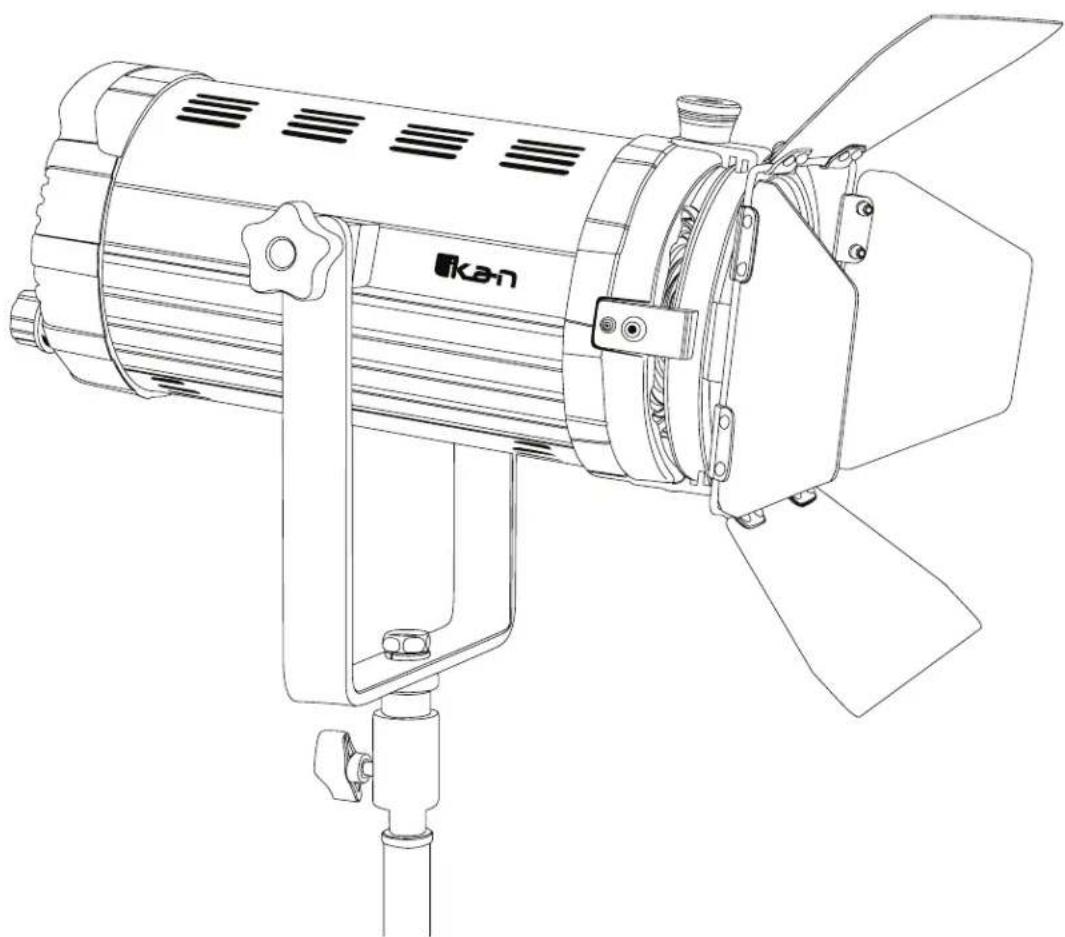
natural_image
Line drawing of a KAN telescope with three blades and mounting bracket (no text or symbols)What's Included
□ 1x Helia 70 Watt Fresnel
□ 1x Barn Doors
□ 1x Gel Frame
□ 1x Yoke
□ 1x AC Power Cord
Getting Started
Thank you for buying the HF150 Fresnel Light from ikan. Please carefully read the instructions and guide before operating the products. The guide includes product usage and maintenance. When you operate the product, please make sure that you have read the instructions carefully.
All the content of the manual is based on up-to-date information; technical data subject to change without notice.
Safety Instructions
- Connect the AC power cable to the HF70 light before plugging into the power source. You risk electrocution by not following this instruction.
- Don't drag cables with excessive force. Any repairs on the products should be performed by ikan technicians. Users should not remove the power supply, or else the damage will not be covered under warranty.
- Be sure that the power is off before connecting and changing the fixture head or disconnecting your cable from the power source. We recommend using Ikan connecting cables and connectors to avoid electrical shock.
- The voltage shouldn't exceed the value in the technical specifications. If the voltage is greater than, or less than the regulated values, it could damage the product.
Overview
Color temperatures of 5600K (daylight). Ikan developed the HF70 Fresnel Light to handle both these temperatures. The HF70 offers a professional and customizable LED light source. In addition, the light features separately-cooling ducts for optimizing heat dissipation. Specifically, the HF70 Fresnel Light offers the following features:
- The 10-100% brightness incremental adjustment of the 5600K temperature
- A four-inch diameter Fresnel lens provides even, well-distributed light
- Ultra-low noise and active cooling technology contribute to excellent thermal stability.
- The power supply will automatically cut off when the fixture overheats.
- The bright LCD readout is easy to view, enabling smooth adjustment of functions.
- Digitally adjustable knob allows you to adjust menu settings quickly and accurately.
- DMX Channel assignments can be adjusted as needed.
- AC/DC power supply, AC110VAC-270VAC
Instructions
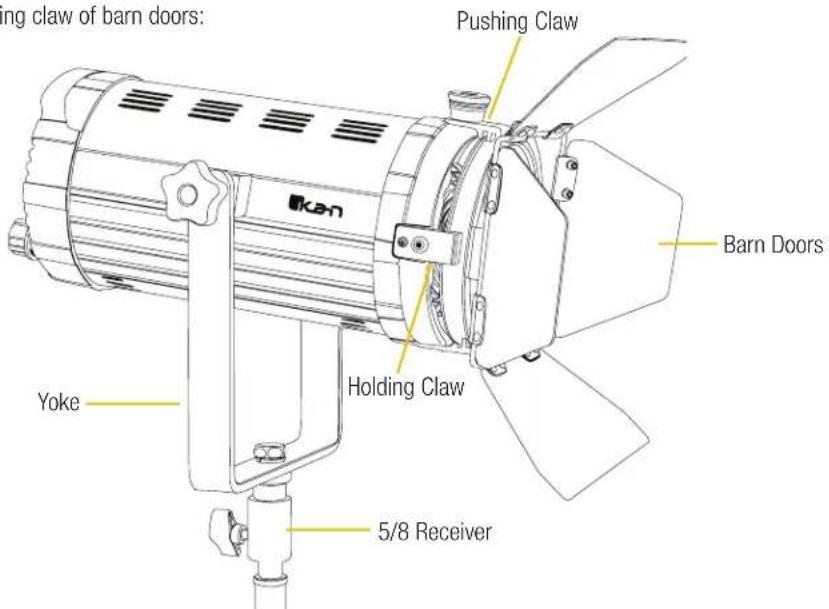
LED Fresnel housing is made aluminum alloy, which is heavy-duty, lightweight, and easy to transport. The HF70 structure is illustrated on the following page.
Appearance & Structure - Front
5/8 Receiver: Connecting the lamp with stands or grid mounts
Yoke: Adjustable lighting direction
The pushing claw of barn doors; the holding claw of barn doors:
Appearance & Structure - Back
Power switch: Turn on/turn off power
Brightness Knob: Adjusts brightness from 10%-100% (Press in to Toggle off the LED)
LCD Setting Screen: Displays brightness and color temperature
+&- Buttons: Adjusts the DMX channels
SYNC/DC24V: Possibe future update usage
Fuse Cap: Fuse Holder with T6.3A 250V fuse
AC 110-220V Power Connector: Connecting with 110-220V power cable
Focusing Knob: Changing the Beam angle of the light from flood to spot

Installation & Power Supply
- Ensure power is off before installation.
- Place the light on the Ikan customized stands, release the tension knob on the 5/8" receiver, adjust the light in the desired direction, and then tighten the tension knob on the 5/8" receiver.
- When connecting the power cords, plug the AC power cords into the AC120 socket on the rear panel (as shown in the drawing).
DMX 512 Controls
The DMX IN/OUT on the HF70 allows for remote fixture control over the brightness.
The 8Bit DMX allows for use with controllers that use just dimmer controls.
Depending on channel assigned the brightness is controlled on the first fader.

What's in the box?
Please carry and place the packing box carefully. Check the lighting equipment and accessories upon opening the box. Please contact us if anything is damaged or missing. Please save the packing materials for replacing and repairing the products in the future.
Notice & Maintenance
- The HF70 Spotlight working temperature range must be regulated. Overheating and Under-cooling will reduce the LED working life.
- Products must be placed on a stable, dry, flat surface. Avoid exposure to sunlight and operating in an environment with high humidity or explosive gas.
- Don't cover the fan vent. It will shorten the working life of the fixture.
- Don't beat, knock or shake the lighting equipment during the operation.
- If the HF70 isn't working normally, please contact the Ikan repair department. Please don't disassemble/re-assemble by yourself.
- Please place the HF70 in a cool and dry place when you don't use it for an extended period of time.
Specifications
| Beam Angle | 28 - 70 degrees |
| Build Material Aluminum | |
| Control Local Knob Control and DMX In/Out | |
| Cooling System Active Cooling Fan | |
| Dimming | Flicker Free Dimming, Onboard dimming Knob 10%-100% (minimal color shift) |
| Fixture Size | 11 x 10 x 6 in. |
| Fixture Weight | 6.3 lbs |
| Focusing Rotating Rear Knob | |
| Head Type 5600K | |
| Lens 4" Acrylic Fresnel | |
| Light Source 1 x 70 watt LED | |
| Power Supply 6 ft power cable | |
| Rating AC volts 120volts AC,50-60Hz, 40 watts |
| Yoke: Cast Aluminum with 1 1/8" pin |
Optional Accessories
Some other products that work well with the Helia HF70 available from Ikan include:
HD-STND-V2 Heavy Duty Light Stand
KCP-703 Stage Clamp w/ 16mm Stud
SW-04 Safety Wire
Learn More
More dynamic information at official website: www.ikancorp.com
Support
Contact email: support@ikancorp.com
CONDITIONS OF WARRANTY SERVICE
- Free service for one year from the day of purchase if the problem is caused by manufacturing errors.
- The components and maintenance service fee will be charged if the warranty period is expired.
Free Service will not be Provided in the Following Situations:(*Even if the product is still within the warranty period.)
- Damage caused by abuse or misuse, dismantling, or changes to the product not made by the company.
- Damage caused by natural disaster, abnormal voltage, and environmental factors, etc.
©2018 ikan Corporation. All rights reserved
- Helia 70 Watt 4 in. Fresnel Daylight LED Studio Light w/ DMX
- What's Included
- Getting Started
- Safety Instructions
- Overview
- Instructions
- Appearance & Structure - Front
- Appearance & Structure - Back
- Installation & Power Supply
- DMX 512 Controls
- What's in the box?
- Notice & Maintenance
- Optional Accessories
- Learn More
- Support
- CONDITIONS OF WARRANTY SERVICE
Brand : Ikan
Model : Helia HF70
Category : Lamp