
LS-CL40M - Unknown Impact - Free user manual and instructions
Find the device manual for free LS-CL40M Impact in PDF.


| Product Type | 40 in. Quick Release Sliding-Leg C-stand Kit |
| Model | LS-CL40M |
| Load Capacity (Stand) | 22 lb (10 kg) |
| Maximum Working Height | 10.3 ft (312 cm) |
| Minimum Working Height | 4.3 ft (131.5 cm) |
| Closed Length | 4.3 ft (131.5 cm) |
| Footprint Diameter | 37.4 in (95 cm) |
| Leveling Leg | Yes (sliding leg) |
| Finish | Chrome / Matte black |
| Construction Material | Steel |
| Stand Weight | 14.8 lb (6.7 kg) |
| Grip Head Weight | 1.75 lb (800 g) |
| Grip Arm Weight | 3.25 lb (1.47 kg) |
| Grip Head Compatibility | 5/8, 1/2, 3/8 in diameters |
| Grip Arm Length | 40 in (101.6 cm) |
| Grip Arm Load Capacity | 10 lb (4.5 kg) |
| Included Accessories | Stand, Grip Arm (KCP-240/B), Grip Head (KCP-200/B) |
| Mounting Options | 5/8 in stud (baby pin) |
| Warranty | 1-year limited warranty |
| Safety Features | Quick-release leg lock, sandbag usage recommended, overload protection by design |
Frequently Asked Questions - LS-CL40M Impact
User questions about LS-CL40M Impact
0 question about this device. Answer the ones you know or ask your own.
Ask a new question about this device
Download the instructions for your Unknown in PDF format for free! Find your manual LS-CL40M - Impact and take your electronic device back in hand. On this page are published all the documents necessary for the use of your device. LS-CL40M by Impact.
USER MANUAL LS-CL40M Impact
natural_image
Metal laboratory instrument with tripod stand against yellow background (no text or symbols visible)LS-CL40M Series
40 in. Quick Release
Sliding-Leg C-stand
INSTRUCTIONS
Introduction
Thank you for choosing Impact.
Impact's C-stand features a 40-inch double riser. The C-stand is constructed with oversized steel tubing for maximum rigidity and strength to hold light fixtures and accessories up to 22 pounds. This sliding-leg model has a movable top leg that's designed for leveling the stand on uneven surfaces like stairs or a curb.
Impact's unique quick-release leg lock simplifies opening and closing the legs for rapid deployment and breakdown. Three leg heights make it possible to soldier these stands closely together for convenient light placement, transport, and storage.
Contents
• 40 in. Quick Release Sliding-Leg C-stand (LS-CL40M/B)
Kit Includes
• 40 in. Quick Release Sliding-Leg C-stand (LS-CL40M/B)
• 40 in. Grip Arm (KCP-240/B)
• 2.5 in. Grip Head (KCP-200/B)
Scan for a complete listing of our studio equipment or visit www.ImpactStudioLighting.com/se

Precautions ⚠️
- Please read and follow these instructions, and keep this manual in a safe place.
• Make sure that this product is intact and that there are no missing parts. - Do not exceed the maximum load capacity.
- Use caution when operating this product with the maximum load capacity.
• Make sure all connections and locking knobs are secure before proceeding.
• Always use sandbags. - Be careful not to catch or pinch your fingers when opening and closing the legs and adjusting riser sections.
• Always make sure the load is supported when loosening any of the riser knobs to adjust the height of the stand.
• Make sure the load is balanced.
- When handling a kit (grip head and grip arm mounted on top pin), always grab the riser and grip arm together to prevent your hand from catching between the arm and the main riser.
- When opening and closing the legs, make sure the area around you is clear. Be especially aware of the perimeter where the legs swing open and closed, as well the other end of the center column.
- When opening the legs, make sure the sliding leg is locked in with the bottom two legs. If the sliding leg is not locked in, it can slide up the center column, and the legs won't open. If this happens, you can manually adjust the sliding leg to lock it in place, and then open the legs.
- All images are for illustrative purposes only.
Setup
Setting Up the Legs
To open the legs
- Hold the C-stand with the legs facing up and to the right.

natural_image
Person holding a metal pipe fitting with multiple curved pipes (no text or symbols visible)- Loosen the locking knob, and rotate the C-stand clockwise, just until gravity takes over and the legs open.

natural_image
Person using a tool to adjust a metal bracket with yellow motion arrows indicating rotation (no text or symbols)- Retighten the locking knob.
To close the legs
-
Hold the C-stand with the top leg facing up.
-
Loosen the locking knob, and rotate the C-stand counterclockwise, just until gravity takes over and the legs close automatically.
-
Retighten the locking knob.
Using the Sliding Leg
The sliding leg adjusts the C-stand's vertical alignment on an uneven surface like a hill, stairs, or curb.
-
Loosen the sliding leg's locking knob.
-
Adjust the height of the sliding leg so the main shaft is vertically aligned, and tighten the locking knob until secure.

natural_image
Person standing next to a metal bar with curved supports, no visible text or symbols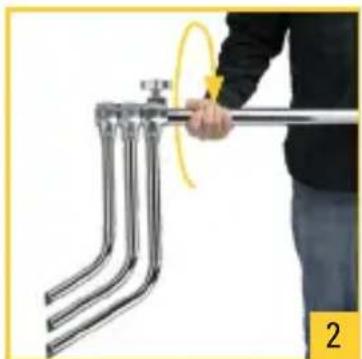
natural_image
Person holding a metal pipe with three parallel pipes, no text or symbols visible
natural_image
Diagram showing a mechanical or electrical setup with arrows indicating direction of motion, no text or symbols present.Attaching the Grip Head
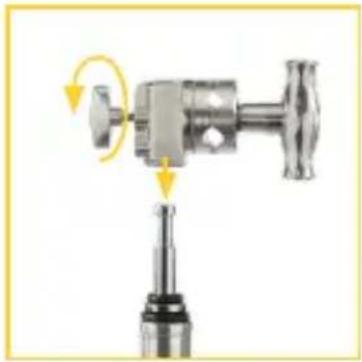
Loosen the locking handle, and place the grip head's baby receiver over the baby pin. Then tighten the locking handle until secure.
natural_image
Mechanical assembly diagram showing a valve and tap with directional arrows indicating motion (no text or symbols)Attaching the Grip Arm
- Face the grip head's T-handle, and loosen the T-handle.
- Make sure the 5/8-inch hole is on top of the T-handle. Insert the grip arm with the load to the right of the grip head.
- Tighten the T-handle until secure.

natural_image
Diagram of a mechanical device with directional arrows indicating motion or force (no text or symbols)Important! Make sure the T-handles faces you, the arm is inserted through the top of the grip, and the load is on the right side of the T-handle. This will prevent the T-handle from accidentally loosening.
Specifications
C-stand
| Load Capacity 22 lb. (10 kg) |
| Mounting Options 5/8 in. stud |
| Maximum Working Height 10.3 ft. (312 cm) |
| Minimum Working Height 4.3 ft. (131.5 cm) |
| Closed Length 4.3 ft. (131.5 cm) |
| Footprint Diameter 37.4 in. (95 cm) |
| Leveling Leg Yes |
| Finish Chrome / Matte black |
| Construction Material Steel |
| Weight 14.8 lb. (6.7 kg) |
Grip Head
| Number of Heads Single grip |
| Compatible Diameters 5/8, 1/2, 3/8 in. |
| Bottom Mount 5/8 in. receiver |
| Construction Material Steel |
| Finish Chrome / Matte black |
| Head Diameter 2.5 in. (6.3 cm) |
| Weight 1.75 lb. (800 g) |
Grip Arm
| Load Capacity 10 lb. (4.5 kg) |
| Construction Material Aluminum, steel |
| Finish Chrome / Matte black |
| Length 40 in. (101.6 cm) |
| Width 2.5 in. (6.3 cm) grip |
| Weight 3.25 lb. (1.47 kg) |
One-Year Limited Warranty
This Impact product is warranted to the original purchaser to be free from defects in materials and workmanship under normal consumer use for a period of one (1) year from the original purchase date or thirty (30) days after replacement, whichever occurs later. The warranty provider's responsibility with respect to this limited warranty shall be limited solely to repair or replacement, at the provider's discretion, of any product that fails during normal use of this product in its intended manner and in its intended environment. Inoperability of the product or part(s) shall be determined by the warranty provider. If the product has been discontinued, the warranty provider reserves the right to replace it with a model of equivalent quality and function.
This warranty does not cover damage or defect caused by misuse, neglect, accident, alteration, abuse, improper installation or maintenance. EXCEPT AS PROVIDED HEREIN, THE WARRANTY PROVIDER MAKES NEITHER ANY EXPRESS WARRANTIES NOR ANY IMPLIED WARRANTIES, INCLUDING BUT NOT LIMITED TO ANY IMPLIED WARRANTY OF MERCHANTABILITY OR FITNESS FOR A PARTICULAR PURPOSE. This warranty provides you with specific legal rights, and you may also have additional rights that vary from state to state.
To obtain warranty coverage, contact the Impact Customer Service Department to obtain a return merchandise authorization (“RMA”) number, and return the defective product to Impact along with the RMA number and proof of purchase. Shipment of the defective product is at the purchaser’s own risk and expense.
For more information or to arrange service, visit www.impactstudiolighting.com or call Customer Service at 212-594-2353.
Product warranty provided by the Gradus Group.
www.gradusgroup.com
Impact is a registered trademark of the Gradus Group. © 2022 Gradus Group LLC. All Rights Reserved.

IMPACT®
A Gradus Group Brand

Brand : Impact
Model : LS-CL40M
Category : Unknown