Multiview Lite - Unknown BirdDog - Free user manual and instructions
Find the device manual for free Multiview Lite BirdDog in PDF.


User questions about Multiview Lite BirdDog
0 question about this device. Answer the ones you know or ask your own.
Ask a new question about this device
Download the instructions for your Unknown in PDF format for free! Find your manual Multiview Lite - BirdDog and take your electronic device back in hand. On this page are published all the documents necessary for the use of your device. Multiview Lite by BirdDog.
USER MANUAL Multiview Lite BirdDog
Welcome to BirdDog Multivew.
text_image
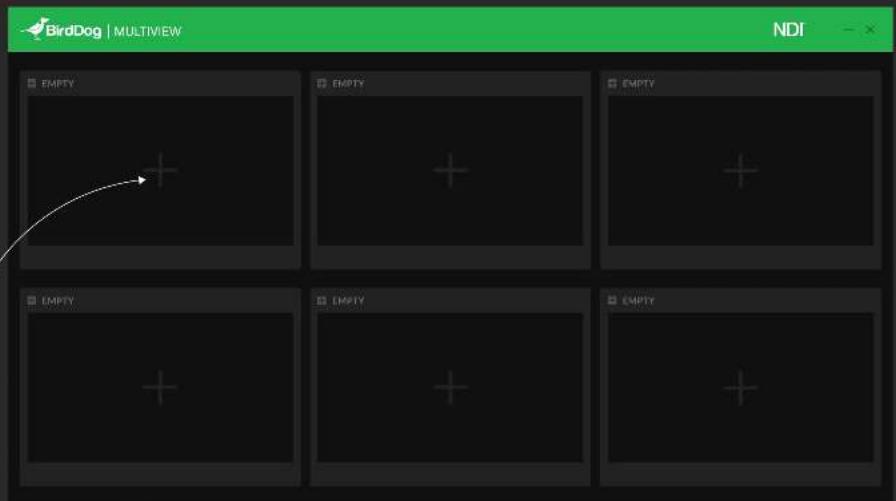
BirdDog | MULTIVIEW NDI - × □ EMPTY □ EMPTY □ EMPTY □ EMPTY □ EMPTY □ EMPTY □ EMPTY NDITo add a new multiview click on one of the "+" icons.

text_image
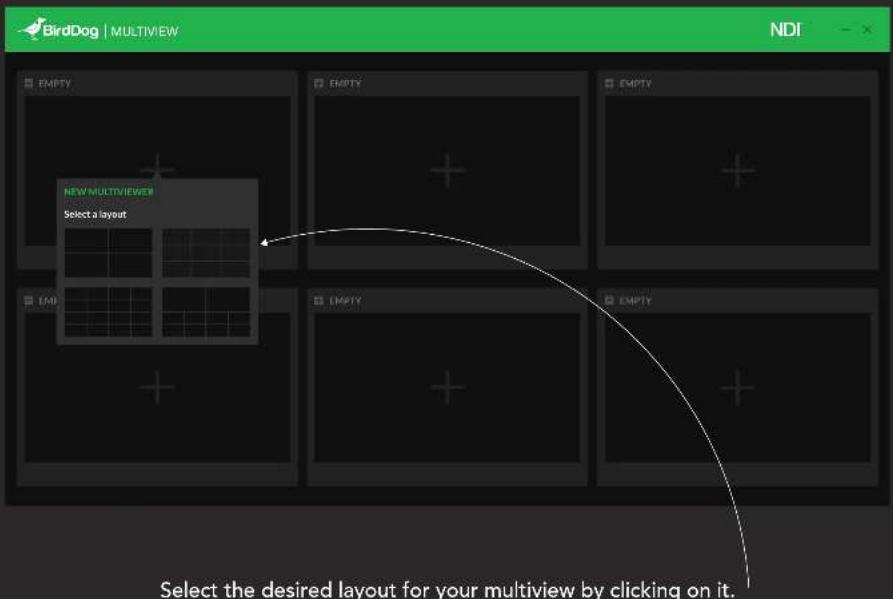
BirdDog | MULTIVIEW NDI EMPTY NEW MULTIVIEWER Select a layout EMI EMPTY EMPTY EMPTY Select the desired layout for your multiview by clicking on it.
text_image
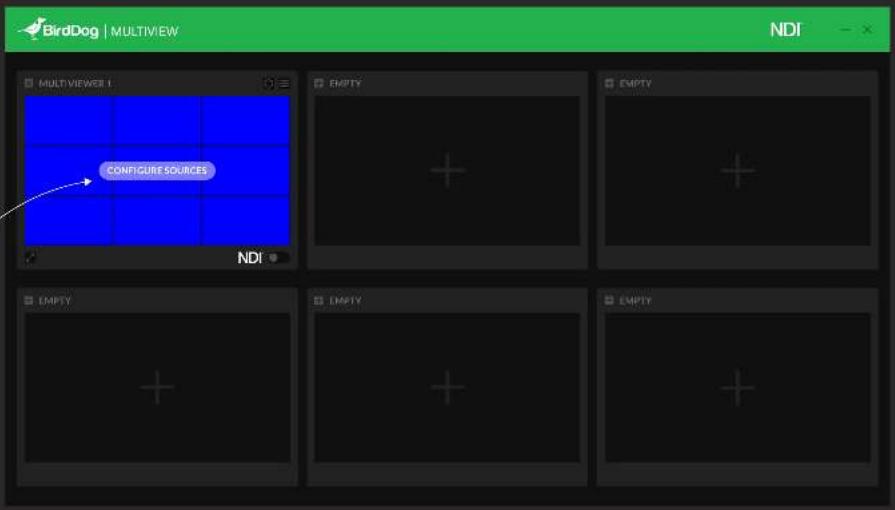
BirdDog | MULTIVIEW NDI MULTIVIEWER 1 CONFIGURE SOURCES NDI EMPTY EMPTY EMPTY EMPTY EMPTY EMPTYA mouse hover will allow you to configure your sources by pressing the button.

Select the screen you want to configure by clicking on it and then on a source from the list.

text_image
BirdDog | MULTIVIEW NDI CONFIGURE SOURCES Select the screen you want to configure and add a source from list below NONE CLOCK STUDIO NDI 01 STUDIO NDI 02 STUDIO NDI 03 BD MINI 05 BD MINI 02 EYES P200 B 01 EYES P200 W 01 BD P4K B 01 CANCEL SAVERepeat until you have completed your desired configuration. Save.


text_image
BirdDog | MULTIVIEW NDI MULTIVIEWER 1 00:00:00 NDI EMPTY EMPTY EMPTY EMPTY EMPTY EMPTYToggle the NDI switch to enable/disable NDI broadcasting on the network.

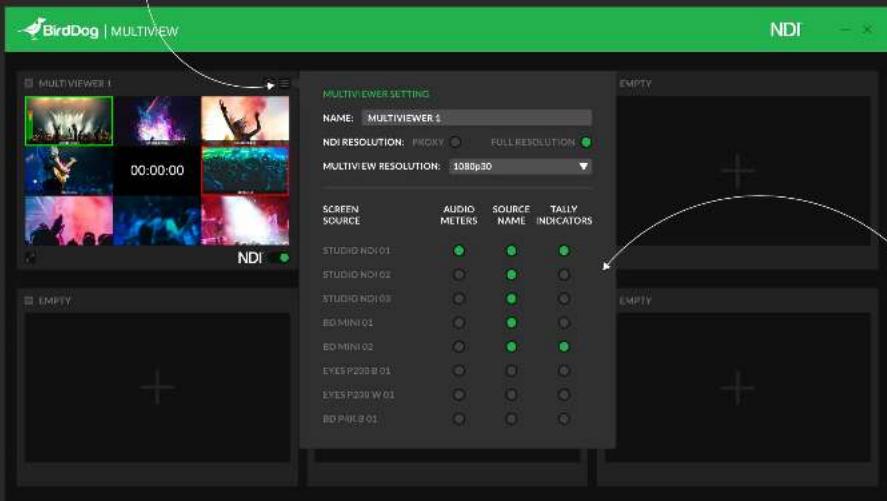
By clicking on the burger menu a setting popup will appear.
text_image
BirdDog | MULTIVIEW NDI MULTIVIEWER SETTING NAME: MULTIVIEWER $ NDI RESOLUTION: PROXY FULL RESOLUTION MULTIVIEW RESOLUTION: 1086p30 SCREEN SOURCE AUDIO SOURCE TALLY METERS NAME INDICATORS STUDIO ND101 STUDIO ND102 STUDIO ND103 BO MIN101 BO MIN102 EYES P200 B 01 EYES P200 W 01 BO PAIE 01 EMPTY EMPTYYou can choose to change the name, NDI resolution, multiview resolution and add audio meters, source name, and tally indicators for your sources.


text_image
BirdDog | MULTIVIEW NDI MULTIVIEWER 1 00:00:00 NDI EMPTY EMPTY EMPTY EMPTY EMPTYYou can view any Multiviewer in full screen by pressing the expand button.


natural_image
Crowd at a concert with dramatic lighting and stage lights (no visible text or symbols)
natural_image
Nighttime stage performance with dramatic lighting and fireworks, no visible text or symbols
natural_image
Silhouette of a person celebrating with raised arms against a vibrant pink and orange sky (no text or symbols visible)
natural_image
Person playing electric guitar on stage with blue lighting (no visible text or symbols)
text_image
00:00:00
natural_image
Crowd at a music event with colorful stage lighting and audience silhouettes (no visible text or symbols)
natural_image
Crowd silhouettes against a vibrant red and orange smoke plume (no text or symbols visible)
natural_image
Blurred blue-tinted photo of a crowd or audience in an indoor setting (no visible text or symbols)
natural_image
Stage performance with performers and audience under dramatic lighting (no visible text or symbols)Click the top right button to exit from full screen mode.


text_image
BirdDog | MULTIVIEW NDI MULTIVIEWER 1 00:00:00 NDI EMPTY EMPTY EMPTY EMPTY EMPTYBy pressing the "X" on the multiview top left corner you will delete it.