MS-6U1C - USB extender MSolutions - Free user manual and instructions
Find the device manual for free MS-6U1C MSolutions in PDF.


User questions about MS-6U1C MSolutions
0 question about this device. Answer the ones you know or ask your own.
Ask a new question about this device
Download the instructions for your USB extender in PDF format for free! Find your manual MS-6U1C - MSolutions and take your electronic device back in hand. On this page are published all the documents necessary for the use of your device. MS-6U1C by MSolutions.
USER MANUAL MS-6U1C MSolutions
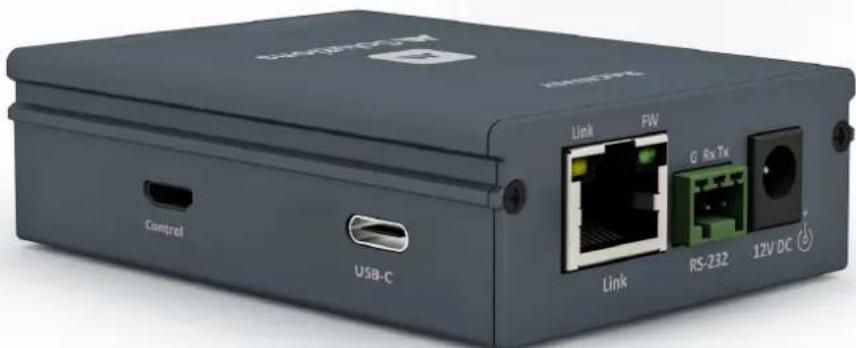
USB-C Extender Set - up to 100m. PoC, RS-232 pass through
text_image
Control USB-C Link FW Link G Rx Tx RS-232 12V DCContents
Introduction 03
Key Features 03
Connectivity Overview (Host and Device) 04
Understanding the LED's _05
Cabling for HDBaseT 05
Audio 05
USB 06
RS-232 Control & Power 06
Specifications & Package Contents 07
Schematic 08
Notices
- This MSolutions product contains electrical components that may be damaged by electrical spikes, surges, electric shock, lightning strikes, etc. Use of surge protection is highly recommended in order to protect and extend the life of your equipment.
- The transmission distances of data over Cat cables are measured using TE CONNECTIVITY 1427071-6 EIA/TIA-568-B termination (T568B) of cables is recommended for optimal performance. To minimise interference of unshielded twisted pairs in the CAT5e/6 cable, do not run the Cat5e/6/6a cabling with or in close parallel proximity to mains power cables.
- Do not substitute or use any other power supply other than the enclosed unit, or an MSolutions approved replacement. Do not disassemble either the Transmitter or Receiver units for any reason. Doing so will void the manufacturer's warranty.
- MSolutions reserves the right to change the specifications of this unit without prior notice. As a result of this, physical representations or graphical elements contained within this user guide may not be accurate.
Introduction
The MSolutions MS-6U1C is an entry level USB-C extender allowing for a single USB-C data channel to be extended to distances of up to 100m over a single CATx cable infrastructure.
The extender features RS-232 serial pass-through and bi-directional 12V PoC (Power over Cable) expand the capabilities of this extender kit for a variety of commercial uses.
Key Features
- Uncompressed extension of USB data up to 100m over single CAT
- 1x USB-C channel for up to 320Mbps data connectivity of USB-C devices across the links
- Flexible USB extension for: USB-C PTZ cameras, hard drives, laptops and other USB-C peripherals
- Bi-directional RS-232 serial pass through
- Bi-directional 12V PoC (Power over Cable)
Connectivity Overview - Device

text_image
Control USB-C
text_image
Link FW Link G Rx Tx RS-232 12V DCSide panel:
- Control - Micro USB for firmware and control (reserved for future use)
- USB-C - connect USB-C peripheral
Front panel: (rear panel is blank)
- CATx Link - connect to Cat cable from receiver
- RS-232 - use supplied 3-pin phoenix connector to connect to serial device
- Power - connect to 12V/2A DC power supply
Connectivity Overview - Host

text_image
Control USB-C
text_image
Link FW Link G Rx Tx RS-232 12V DCSide panel:
- Control - Micro USB for firmware and control (reserved for future use)
- USB-C - connect USB-C host
Front panel: (rear panel is blank)
- CATx Link - connect to Cat cable from receiver
- RS-232 - use supplied 3-pin phoenix connector to connect to serial device
- Power - connect to 12V/2A DC power supply
Understanding the LED's
This MSolutions extender set includes status LED indicators on both the Host and Device products to show active connections and to further help integrators diagnose potential problems with the associated cabling.
The RJ45 Link connections on both the host and device units have orange and green LED's.
- The orange LED indicates that the unit is receiving power. The LED will blink continuously when there is a link to the unit on the opposing side of the cable.
- The green LED indicates that the unit is communicating with the unit attached to the far side of the link over the Cat cable.
Cat Cabling for Extenders
It is important that the interconnecting Cat cable between the MSolutions products is terminated using the correct RJ45 pin configuration. The link Cat cable must be a 'straight' (pin-to-pin) Cat cable and it is advised that this is wired to the T568B wiring standard as this format is less prone to EMI (Electro-Magnetic Interference).
When installing Cat cables it is advised that the best possible Cat cable quality possible is used. MSolutions recommends using a Cat6 (or higher) cable for installations, especially when running over longer distances, in areas of high EMI, or with high data rate signal distribution.
USB
This KVM extender allows for USB-C peripherals including cameras, touch screens, smart boards, hard drives, games controllers, USB audio devices, printers, scanners, and HID's (mouse or keyboard) to be distributed over a distance of up to 100m to a USB-C host device on the far side of the link.
The extender supports transparent true plug and play USB pass-through without the requirement of software or driver son the extender kit.
A maximum combined data transfer of 320Mbps can be achieved over the link.
The Micro-USB connections on both Host and Device units are utilised for firmware updating and are reserved for future CloudOS control.
Note: the USB-C connectivity does not support high-bandwidth video data from a laptop / tablet to a display due to the limitation of available bandwidth.
RS-232 Control
The MS-6U1C can distribute bi-directional serial commands between the transmitter and receiver to allow for control commands to be sent alongside USB KVM.
Each unit is fitted with a 3-pin phoenix connector block that will need the serial TX, RX and Ground pins terminating into for serial pass-through. The link has the ability to transparently send any type of serial data as both pieces of equipment are able to communicate using the same baud rate, stop-gap, and parity.
Power
The MS-6U1C uses bi-directional PoC (Power over Cable) to provide power from either the Host or Device unit to the far side of the link over the Cat cable. Please only use the supplied 12V/2A DC PSU supplied with the MSolutions MS-6U1C to power the unit
Specifications
Device
- USB-C connectivity: 1 x USB-C (female) - peripheral
- USB control: 1 x Micro USB (female)
- RS-232 connectivity: 1 x 3-pin phoenix connector, block included
- Power supply (PoC): 1x 12V/2A DC
- Individual unit dimensions (W x D x H): 60 x 84 x 25mm
- Individual unit weight: 0.2kg
- Operating temperature: 32°F to 104°F (0°C to 40°C)
- Storage temperature: -4°F to 140°F (-20°C to 60°C)
- Operating humidity: 0-80% non condensing
Host
- USB-C connectivity: 1 x USB-C (female) - host
- USB control: 1 x Micro USB (female)
- RS-232 connectivity: 1x 3-pin phoenix connector, block included
- Power supply (PoC): 1x 12V/2A DC
- Individual unit dimensions (W x D x H): 60 x 84 x 25mm
- Individual unit weight: 0.2kg
- Operating temperature: 32°F to 104°F (0°C to 40°C)
- Storage temperature: -4°F to 140°F (-20°C to 60°C)
- Operating humidity: 0-80% non condensing
Package Contents
- 1 x MST-6U1C (host)
- 1 x MSR-6U1C (device)
- 1 x 12V / 2A DC power supply with US, UK, and EU clips
- 1 x USB-C (male) to USB-A (female) cable
- 2 x 3-pin phoenix connector blocks
- 2 x Surface mounting brackets
Schematic

flowchart
graph TD
    A["MS-6uIC Host"] --> B["MS-6uIC Device"]
    B --> C["MS-6uIC Host"]
    C --> D["Computer (Host) - USB-C"]
    D --> E["MS-6uIC Host"]
    E --> F["MS-6uIC Device"]
    F --> G["MS-6uIC Host"]
    G --> H["MS-6uIC Host"]
    H --> I["MS-6uIC Device"]
    I --> J["MS-6uIC Host"]
    J --> K["MS-6uIC Host"]
    K --> L["MS-6uIC Host"]
    L --> M["MS-6uIC Host"]
    M --> N["MS-6uIC Host"]
    N --> O["MS-6uIC Host"]
    O --> P["MS-6uIC Host"]
    P --> Q["MS-6uIC Host"]
    Q --> R["MS-6uIC Host"]
    R --> S["MS-6uIC Host"]
    S --> T["MS-6uIC Host"]
    T --> U["MS-6uIC Host"]
    U --> V["MS-6uIC Host"]
    V --> W["MS-6uIC Host"]
    W --> X["MS-6uIC Host"]
    X --> Y["MS-6uIC Host"]
    Y --> Z["MS-6uIC Host"]
    Z --> AA["MS-6uIC Host"]
    AA --> AB["MS-6uIC Host"]
    AB --> AC["MS-6uIC Host"]
    AC --> AD["MS-6uIC Host"]
    AD --> AE["MS-6uIC Host"]
    AE --> AF["MS-6uIC Host"]
    AF --> AG["MS-6uIC Host"]
    AG --> AH["MS-6uIC Host"]
    AH --> AI["MS-6uIC Host"]
    AI --> AJ["MS-6uIC Host"]
    AJ --> AK["MS-6uIC Host"]
    AK --> AL["MS-6uIC Host"]
    AL --> AM["MS-6uIC Host"]
    AM --> AN["MS-6uIC Host"]
    AN --> AO["MS-6uIC Host"]
    AO --> AP["MS-6uIC Host"]
    AP --> AQ["MS-6uIC Host"]
    AQ --> AR["MS-6uIC Host"]
    AR --> AS["MS-6uIC Host"]
    AS --> AT["MS-6uIC Host"]
    AT --> AU["MS-6uIC Host"]
    AU --> AV["MS-6uIC Host"]
    AV --> AW["MS-6uIC Host"]
    AW --> AX["MS-6uIC Host"]
    AX --> AY["MS-6uIC Host"]
    AY --> AZ["MS-6uIC Host"]
    AZ --> BA["MS-6uIC Host"]
    BA --> BB["MS-6uIC Host"]
    BB --> BC["MS-6uIC Host"]
    BC --> BD["MS-6uIC Host"]
    BD --> BE["MS-6uIC Host"]
    BE --> BF["MS-6uIC Host"]
    BF --> BG["MS-6uIC Host"]
    BG --> BH["MS-6uIC Host"]
    BH --> BI["MS-6uIC Host"]
    BI --> BJ["MS-6uIC Host"]
    BJ --> BK["MS-6uIC Host"]
    BK --> BL["MS-6uIC Host"]
    BL --> BM["MS-6uIC Host"]
    BM --> BN["MS-6uIC Host"]
    BN --> BO["MS-6uIC Host"]
    BO --> BP["MS-6uIC Host"]
    BP --> BQ["MS-6uIC Host"]
    BQ --> BR["MS-6uIC Host"]
    BR --> BS["MS-6uIC Host"]
    BS --> BT["MS-6uIC Host"]
    BT --> BU["MS-6uIC Host"]
    BU --> BV["MS-6uIC Host"]
    BV --> BW["MS-6uIC Host"]
Solutions
www.m4sol.com