
PASTREAM2 - Audio PulseAudio - Free user manual and instructions
Find the device manual for free PASTREAM2 PulseAudio in PDF.


| Product Type | Streaming Audio Receiver (Analog & Digital) |
| Brand | PulseAudio |
| Model | PASTREAM2 |
| Dimensions | 4.6" x 3.4" x 1" (118 x 87 x 25 mm) |
| Weight | Approx. 100 g (est.) |
| Power Supply | 5V DC 1A via Micro USB (included adapter) |
| Audio Output | 3.5mm stereo analog, SPDIF optical input/output |
| Audio Input | 3.5mm stereo analog, SPDIF optical |
| Network Connectivity | WiFi 2.4GHz (802.11b/g/n), Ethernet 10/100 |
| Wireless Protocols | AirPlay 2, WiFi Direct (Miracast), DLNA compatible |
| Supported Streaming Services | Spotify, Qplay, TuneIn, iHeartRadio, Amazon Music, Tidal (via app) |
| Control App | PulseAudio Streaming (iOS & Android) |
| Multi-Room Capability | Up to multiple PASTREAM/PA230SWA units syncable |
| LED Indicator | Blue (startup), Green flashing (connecting), Solid green (ready) |
| WPS Button | Yes (short press WPS, long press factory reset) |
| Package Contents | PASTREAM2 unit, 3.5mm audio cable, Micro USB cable, USB power adapter, manual |
| Operating Conditions | Indoor use only, 32-104°F (0-40°C), well-ventilated area |
| Compliance | FCC, CE, RoHS certified (based on typical Vanco products) |
| Warranty | 2 years limited (by Vanco) |
| Maintenance | Clean with dry cloth; unplug before cleaning |
| Safety Notes | Do not block vents, avoid heat sources, use only supplied PSU |
| Spare Parts & Reparability | Contact Vanco for service; no user-replaceable parts |
Frequently Asked Questions - PASTREAM2 PulseAudio
User questions about PASTREAM2 PulseAudio
0 question about this device. Answer the ones you know or ask your own.
Ask a new question about this device
Download the instructions for your Audio in PDF format for free! Find your manual PASTREAM2 - PulseAudio and take your electronic device back in hand. On this page are published all the documents necessary for the use of your device. PASTREAM2 by PulseAudio.
USER MANUAL PASTREAM2 PulseAudio

natural_image
Black rectangular electronic device labeled 'PIONEAVO' with ports and ports (no readable text beyond branding)PART NUMBER PASTREAM2
STREAM MUSIC OVER A WIRED OR WIRELESS INTERNET CONNECTION
vanco1.com | 800.626.6445
DEAR CUSTOMER
Thank you for purchasing this product. For optimum performance and safety, please read these instructions carefully before connecting, operating or adjusting this product. Please keep this manual for future reference.
THIS PRODUCT IS 100% INSPECTED AND TESTED IN THE UNITED STATES TO VERIFY PERFORMANCE PARAMETERS.
WARNING
- Do not install or place this unit in a built-in cabinet, or other confined space without adequate ventilation.
- To prevent risk of electrical shock or fire hazard, due to overheating do not obstruct unit's ventilation openings.
- Do not install near any source of heat, including other units that may produce heat.
-
Do not place unit near flames.
-
Only clean unit with a dry cloth.
- Unplug unit during lightning storms or when not used for an extended period of time.
- Protect the power cord from being walked on or pinched, particularly at the plugs.
- Use unit only with accessories specified by the manufacturer.
- Refer all servicing to qualified personnel.
FEATURES
The PulseAudio PASTREAM2 is an analog and digital audio streamer that allows amplifiers and distributed audio systems to stream music over a wired or wireless internet connection. A great solution to stream music to any audio device, or create a wireless distributed audio system, all with an easy to use and intuitive app! Play and control music, downloaded or streamed from your phone, tablet, or computer. The PASTREAM2 is compatible with Airplay2, and WiFi Direct (Miracast) devices that are found within the same network, allowing for songs to be shared easily in a distributed audio system. In addition, the PulseAudio Streaming mobile app is available on the iOS and Google Play App Stores, and allows the end user to sync their Spotify, Qplay, TuneIn, iHeartRadio, Amazon Music, and Tidal accounts for an effortless and enhanced listening experience. Multiple PASTREAM, PASTREAM2, and PA230SWA devices (sold separately) can be managed within the same system using the PulseAudio Streaming app, allowing everyone to listen to their own music and playlists, or be combined for party mode!
STREAMING AUDIO RECEIVER Part # PASTREAM2
- Allows amplifiers and distributed audio systems to stream music over a wired or wireless internet connection
- A great solution for streaming music to any audio device, or creating a wireless distributed audio system
- Stream music directly or through a connected network
- PulseAudio Streaming mobile control app available on iOS and Android App Stores compatible with Airplay2 and WiFi Direct devices that are found within the same network, allowing for songs to be shared easily in a distributed audio system
- Allows user to sync their Spotify, Qplay, TuneIn, iHeartRadio, Amazon Music and Tidal accounts for an effortless and enhanced listening experience
- Multiple PASTREAM devices such as the PASTREAM2 and PA230SWA (sold separately) can be managed within the same system allowing everyone to listen to their own music and playlists or combine into a party mode
- Works well with distributed audio systems
- Dimensions: 4.6" x 3.4" x 1" (118mm x 87mm x 25mm)
○ PACKAGE CONTENTS
• PASTREAM2 Streaming Audio Receiver
• 3.5mm audio cable
• USB A to Micro USB Cable
• USB Power Adapter (5V, 1A)
- Product Manual
° PANEL DESCRIPTIONS

- SPDIF Optical Audio Input: Connect a digital optical audio source
- 3.5mm Stereo Audio Input: Connect to an analog audio source
- 3.5mm Stereo Audio Output: Connect to an amplifier, A/V receiver, distributed audio system, etc.
- Indicator Link Status Light:
a. No Light: Unit powered off or connected to line in input
b. Blue flashing: Startup mode, searching for network
c. Green flashing: In the process of connecting to internet
d. Solid Green: Connected to internet and ready for use
- Power (Micro USB): Connect included USB cable and power adapter
- Ethernet connection: Connect to network for hardwired connection
- WPS Button for wireless connectivity: Press to activate WPS, long press for factory reset
° CONNECT AND OPERATE
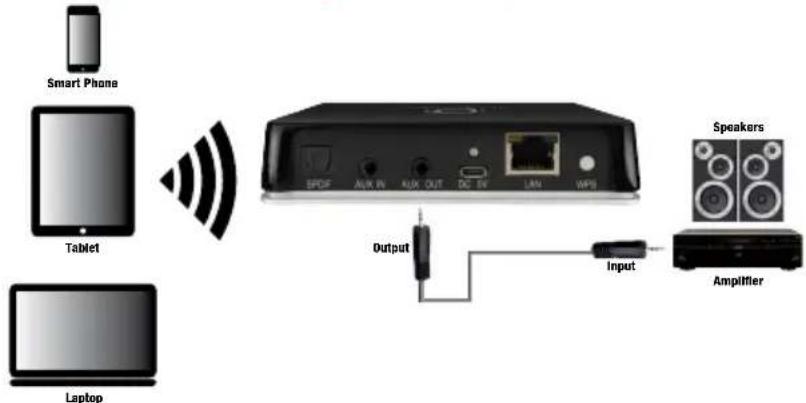
The PASTREAM2 Receiver is a device that receives internet streaming music or other wireless music from any wifi enabled device. Multiple PASTREAM devices such as the PASTREAM2 and PA230SWA (sold separately) receivers can be used in a single distributed audio system to create multiple streaming sources.
- Connect the output of the PASTREAM2 to an amplifier, A/V receiver, distributed audio system, etc. (output) using the 3.5mm stereo jacks
- OPTIONAL: Connect a source (input) to either the 3.5mm stereo input or the SPDIF optical input of the PASTREAM2 for wired audio connection, if utilizing wireless streaming, connection to this input is not necessary
- Connect the provided USB cable and power adapter to power up the unit
- Connect a mobile device that will be the audio source to the local WiFi network
- Connect the PASTREAM2 to the same WiFi network
- Download the PASTREAM APP from the Google Play or Apple Marketplace, follow the steps for connection provided by the instructions within the app.
NOTE: The PASTREAM2 can only be utilized on a 2.4GHz network, a 5GHz connection will not work
To play music:
- From an iOS device, open Airplay to choose the PASTREAM2 as a receiver.
- From an Android device, choose the PASTREAM2 and audio will be streamed to the receiver
- Connection and stream can also be done with the PASTREAM app

flowchart
graph LR
    A["Steaming by Smart Sensor WiFi\nPlease make sure your device is planned on the website or email will be transferred to the website or email"] --> B["Make sure your phone is connected to 2.4G WiFi, not 5G\nYOUR WIRELESS 2.4G\nYOUR WIRELESS 5G\nNot sure what can be correctly read? See it\nSelect to your user's order to access them, etc."]
    B --> C["Next"]
    C --> D["WiFi INFO\nPlease write WiFi password\nWiFi: Load/Load\Password: Phone and WiFi password\nNext"]
    D --> E["Press TO ENTER SETUP MODE\nPeople We're my device to get the device into account, help me. Your website: 'Next' is then to continue"]
◦ LIMITED WARRANTY
With the exceptions noted in the next paragraph, Vanco warrants to the original purchaser that the equipment it manufactures or sells will be free from defects in materials and workmanship for a period of two years from the date of purchase. Should this product, in Vanco's opinion, prove defective within this warranty period, Vanco, at its option, will repair or replace this product without charge. Any defective parts replaced become the property of Vanco. This warranty does not apply to those products which have been damaged due to accident, unauthorized alterations, improper repair, modifications, inadequate maintenance and care, or use in any manner for which the product was not originally intended. Items integrated into Vanco products that are made by other manufacturers, notably computer hard drives and liquid crystal display panels, are limited to the term of the warranty offered by the respective manufacturers. Such specific warranties are available upon request to Vanco. A surge protector, power conditioner unit, or an uninterruptible power supply must be installed in the electrical circuit to protect against power surges. If repairs are needed during the warranty period the purchaser will be required to provide a sales receipt/sales invoice or other acceptable proof of purchase to the seller of this equipment. The seller will then contact Vanco regarding warranty repair or replacement.
° SAFETY AND NOTICE
The PASTREAM2 has been tested for conformance to safety regulations and requirements, and has been certified for international use. However, like all electronic equipment, the PASTREAM2 should be used with care. Please read and follow the safety instructions to protect yourself from possible injury and to minimize the risk of damage to the unit.
- Follow all instructions and warnings marked on this unit.
- Do not attempt to service this unit yourself, except where explained in this manual.
- Provide proper ventilation and air circulation and do not use near water.
- Keep objects that might damage the device and assure that the placement of this unit is on a stable surface.
- Use only the power adapter and power cords and connection cables designed for this unit.
- Do not use liquid or aerosol cleaners to clean this unit.
• Always unplug the power to the device before cleaning
° TECHNICAL SUPPORT
In case of problems, please contact Vanco Technical Support by dialing 1-800-626-6445. You can also email technical support issues to techsupport@vanco1.com. When calling, please have the Model Number, Serial Number (affixed to the bottom of the unit) and Invoice available for reference during the call. Please read this Instruction Manual prior to calling or installing this unit, since it will familiarize you with the capabilities of this product and its proper installation. All active electronic products are 100% inspected and tested to insure highest product quality and trouble-free installation and operation. The testing process utilizes the types of high-definition sources and displays typically installed for entertainment and home theatre applications. For additional information please visit www.vanco1.com.
◦ LIABILITY STATEMENT
Every effort has been made to ensure that this product is free of defects. The manufacturer of this product cannot be held liable for the use of this hardware or any direct or indirect consequential damages arising from its use. It is the responsibility of the user and installer of the hardware to check that it is suitable for their requirements and that it is installed correctly. All rights are reserved. No parts of this manual may be reproduced or transmitted by any form or means electronic or mechanical, including photocopying, recording or by any information storage or retrieval system without the written consent of the publisher. Manufacturer reserves the right to revise any of its hardware and software following its policy to modify and/or improve its products where necessary or desirable. This statement does not affect the legal rights of the user in any way.
Vanco® International
506 Kingsland Drive Batavia, Illinois 60510
call: 800.626.6445 | fax: 630.879.9189
visit: www.vanco1.com

Brand : PulseAudio
Model : PASTREAM2
Category : Audio