
HEW8D4-500P - Subwoofer Hifonics - Free user manual and instructions
Find the device manual for free HEW8D4-500P Hifonics in PDF.


| Product Type | Powered Subwoofer |
| Speaker Size | 8 inches |
| Amplifier Power (RMS) | 300W (estimated based on 30A fuse) |
| Fuse Rating | 30A external |
| Power Cable Size Recommended | 4 AWG (for 17 ft length, OFC) |
| Ground Cable Size Recommended | 4 AWG (18 in length, OFC) |
| Input Connections | RCA (Left/Right), Remote turn-on (REM), Power (12V), Ground (GND) |
| Low Pass Filter | Adjustable, cuts frequencies above setting |
| High Pass Filter | Adjustable, cuts frequencies below setting |
| Subsonic Filter | Adjustable, prevents excessive cone movement |
| Bass Boost | Adjustable at 45Hz |
| Level Control | Adjustable gain to match source unit |
| Remote Level Control | Included (wired remote knob) |
| Compliance | FCC Class B, RoHS |
| Warranty | 1 year from purchase |
| Recommended Use | Car audio subwoofer system |
| Mounting | Enclosed powered sub, install in vehicle |
Frequently Asked Questions - HEW8D4-500P Hifonics
User questions about HEW8D4-500P Hifonics
0 question about this device. Answer the ones you know or ask your own.
Ask a new question about this device
Download the instructions for your Subwoofer in PDF format for free! Find your manual HEW8D4-500P - Hifonics and take your electronic device back in hand. On this page are published all the documents necessary for the use of your device. HEW8D4-500P by Hifonics.
USER MANUAL HEW8D4-500P Hifonics
natural_image
Black HIFONICS audio amplifier box with speaker grille and textured base (no visible text or symbols on body)HEW6D4-500P
HEW8D4-500P
HEW10D4-500P
Before you start

CAUTION

Many new and factory radios require a reset code when disconnected from battery power. This is an anti-theft feature. Before unplugging power, you must determine if your radio/source unit requires a reset code. Check the operation manual for your vehicle or contact the dealer.
Congratulations on your choice of a Hifonics HEW Powered Subwoofers. This "Quick Start Installation" guide is meant to help you "hook up" and play music. For more detailed information, please visit our website at www.Hifonics.com
Power cable size
It is critical to use the proper power and ground cable. Select the size listed here for your amplifier model. Always use high quality copper cable.
Model Fuse Size
Cable Size
HEW6D4-500P 30a External
HEW8D4-500P 30a External
HEW10D4-500P 30a External

Power cable size and fuse size based on a 17ft power (B+) (OFC) cable length and 18-inch ground (OFC) oxygen free cable.
Any other lengths used please consult a certified professional installer.
Installation
- Begin by removing the negative terminal at the vehicle's battery.
NOTE Battery & Location vary by vehicle

natural_image
Close-up of hands holding a small electronic component (no visible text or symbols)- Bring the power wire of your choosing up to the battery. Then remove the fuse from the fuse holder.

natural_image
Close-up of a hand holding a tool with a green and red pointer, against a dark background (no text or symbols visible)
natural_image
Close-up of a hand adjusting a car engine component with black and white parts (no visible text or symbols)
natural_image
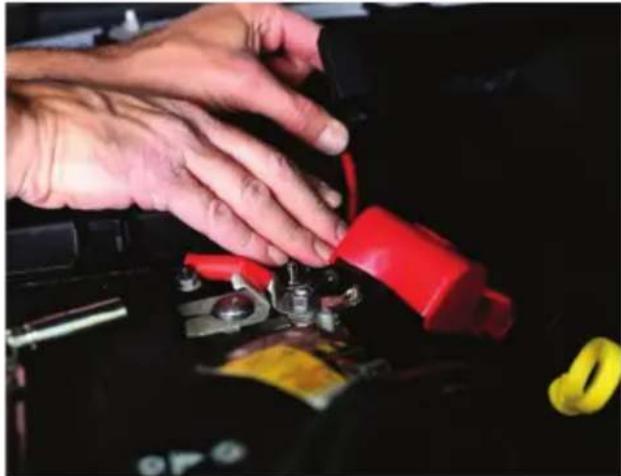
Close-up of hands adjusting a small black component on a dark vehicle chassis (no visible text or symbols)- Remove the nut from the positive battery terminal. Place the power wire at the positive battery terminal and reinstall the previously removed nut.

natural_image
Close-up of hands assembling a mechanical component with red and yellow parts (no visible text or symbols)- Then place the battery cover back into place.
NOTE
Battery cover may vary by vehicle
natural_image
Close-up of hands installing a red and black automotive battery with a yellow tape, no visible text or symbols
natural_image
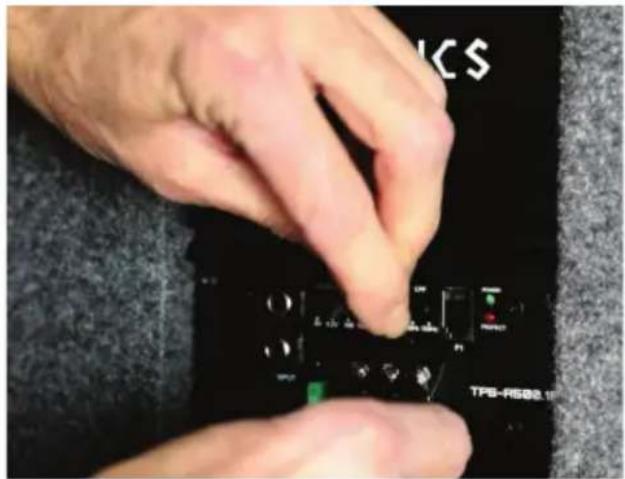
Close-up of a red and black electronic device with yellow labels, possibly a battery or connector (no readable text)- Install the power wire to the sub. Install the red power wire in the location labeled 12v for power. Then use the Allen key to secure the connection to the subwoofer.

- Install the blue remote turn on wire to the terminal labeled REM. Then use the Allen key to secure the connection to the sub.
NOTE
The REM wire needs to be connected to REM output of an aftermarket radio or to a switched 12v source in the vehicle. Consult a professional 12v installer if you are unsure of where to find a switched 12v source.

- Install the black ground wire in the location labeled GND for ground. Then use the Allen key to secure the connection to the subwoofer.
natural_image
Close-up of hands installing or adjusting a black electronic component with visible ports and buttons (no readable text or symbols)- Install the RCA wires in the sub. The red wire is for right and the black wire is for the left.

- Install the base remote wire to the spot labeled P1 on the sub, and mount your base remote knob at a location of your choosing.

- Back in the engine bay, reconnect the negative battery terminal.
natural_image
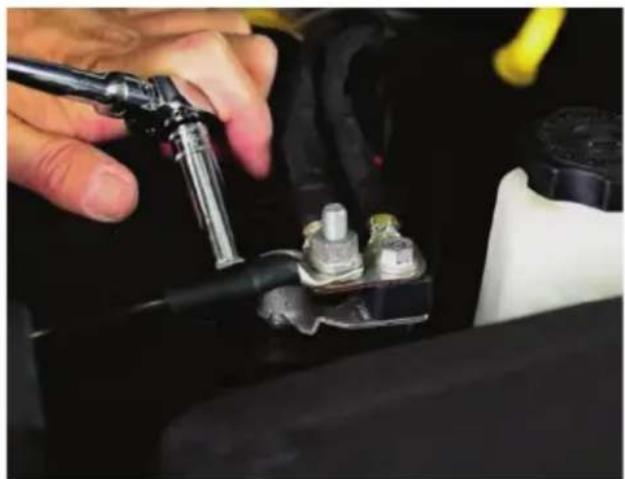
Close-up of a hand adjusting a car engine component with a tool (no visible text or symbols)- Reinstall the fuse into the fuse holder. Zip Tie it down away from any heat or moving components.

natural_image
Close-up of hands adjusting a small black component on a dark surface, with red components visible (no text or symbols)- Once powered on, tune the subwoofer for optimal sound and with that your subwoofer is successfully installed.

Settings
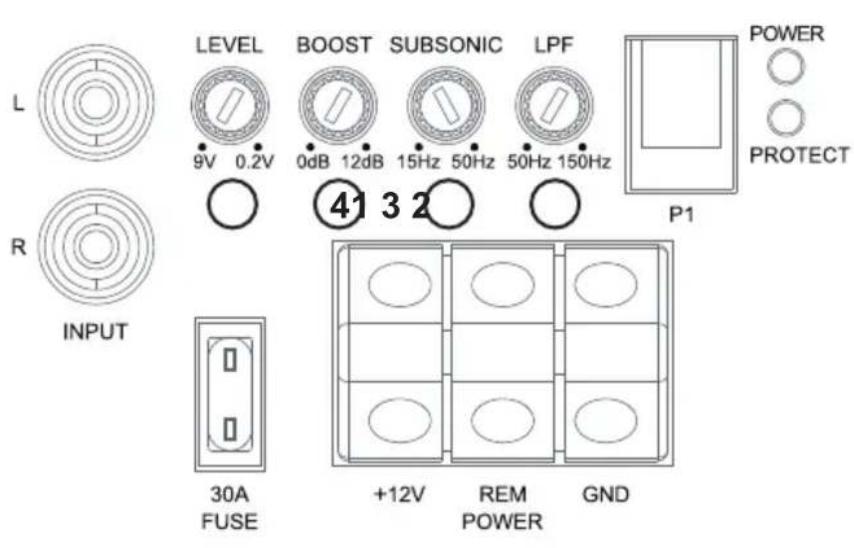
① LEVEL Adjustment
The level control purpose is to match the output of your source signal to the amplifier.
② Frequencies Adjustment
The Low Pass Filter will cut off the frequencies above the setting. The High Pass Filter will cut off the frequencies below the setting.
③ SUBSONIC
The Subsonic filter, prevents very low frequencies, which can cause excessive cone movement and potential speaker damage, from reaching the speaker by gradually reducing their volume as they drop below the set filter frequency.
④ BASS BOOST

The Bass EQ control will increase the power output at 45Hz for more pronounced bass. Exercise caution when using this control. Increase the level in small amounts until distortion is noticed, then back off a little.
SUBSONIC SETUP (HEW6D4-500P & HEW8D4-500P ONLY)
Level Setting

This is a critical step to insure your amplifier is properly adjusted to match the signal output level of your source unit.
THIS IS NOT A VOLUME CONTROL!
LEVEL

- If possible, with the source unit off, confirm that the primary volume control is turned down (counter clockwise).
- Turn on the source unit (CD, or MP3 player). Re-confirm that the volume is turned down. Make sure the source unit controls; balance, fader, bass and treble are all set to center or "0" adjustment. Make sure that the green LED on the end of the amplifier is illuminated.
- Play a clean musical selection of which you are very familiar. CD is preferred. Do not use radio signals for level setting. Hit play and start turning the volume of the source unit up.
- Stop increasing the source unit volume when you reach 3/4 (about 75%) or until you hear speakers begin to slightly start producing distortion.
- Increase the amplifier gain (clockwise) until distortion is heard, then back the level down (counter clockwise) until the distortion is eliminated. Small adjustments may need to be made to balance the levels of multiple amplifiers.
Remote Level Control
Avoid adjusting the bass remote while operating vehicle.

natural_image
Pure electrical circuit lines without any symbolsFCC Notice
This equipment has been tested and found to comply with the limits for a Class B digital device, pursuant to part 15 of the FCC Rules. These limits are designed to provide reasonable protection against harmful interference in a mobile installation. This equipment generates, uses and can radiate radio frequency energy and, if not installed and used in accordance with the instructions, may cause harmful interference to radio communications. However, there is no guarantee that interference will not occur in a particular installation.
WARNING: Changes or modifications not expressly approved by the party responsible for compliance could void the user's authority to operate the equipment.
This equipment complied with FCC radiation exposure limits set forth for an uncontrolled environment. This equipment should be installed and operated with minimum distance 20cm between the radiator & your body.
Visit Hifonics.com
WARRANTY
Maxxsonics, LLC. warrants this product, to the original consumer purchaser, to be free from defects in material and workmanship for a period of one (1) year from the date of purchase.
Maxxsonics, LLC. will, at its discretion, repair or replace defective products during the warranty period. Components that prove to be defective in materials and workmanship under proper installation and use must be returned to the original authorized Maxxsonics,
LLC. retailer from where it was purchased. A photocopy of the original receipt must accompany the product being returned. The costs associated with removal, re-installation, and freight are not the responsibility of Maxxsonics, LLC. This warranty is limited to defective parts and specifically excludes any incidental or consequential damages connected therewith. To view the full warranty, please visit the website.
Hifonics products are designed and engineered in the USA by
MAXXSONICS®
www.maxxsonics.com


Brand : Hifonics
Model : HEW8D4-500P
Category : Subwoofer