
Mutant Hot Glue - Master Keyboard Erica Synths - Free user manual and instructions
Find the device manual for free Mutant Hot Glue Erica Synths in PDF.


| Type | Eurorack Module (Bus Mixer with Effects and Compressor) |
| Width | 24HP |
| Depth | 30mm |
| Power Consumption | +70mA, -70mA @12V |
| Input Channels | 4 (A, B dual, C, D) |
| Mixer Controls | Level per channel, Effects Send per channel |
| Effects Send/Return | Dedicated SEND and RETURN jacks with level control |
| Distortion | Voltage controlled analog distortion with Blend and CV input |
| Compressor | Hi-fidelity analog soft-knee compressor with Threshold, Ratio, Gain, Blend, Sidechain input |
| Sidechain Input | AC-coupled, breaks normal compressor input |
| Compressor Speed | Selectable via internal jumper: Slow (220ms), Medium (45ms), Fast (2ms) |
| Distortion Limit Trim | Front panel trim screw to adjust maximum distortion |
| LED Indicators | Distortion active (purple), Compressor gain reduction (green) |
| Additional Outputs | Mix Out, Comp Out, C+D Sum, Channel A Direct Out |
| Normalizations | Mix Out to Compressor In, Distortion to Send/Return, Channel A to Comp Out via switch |
| Weight | Approx. 150g (typical eurorack module) |
| Cleaning | Use a dry, soft cloth; avoid liquids and solvents |
| Safety | Install in a eurorack case with proper power; ensure correct polarity |
| Repairability | Jumper for compressor speed; trim screw for distortion; no user-serviceable parts inside |
| Warranty | Check with Erica Synths or retailer for details |
Frequently Asked Questions - Mutant Hot Glue Erica Synths
User questions about Mutant Hot Glue Erica Synths
0 question about this device. Answer the ones you know or ask your own.
Ask a new question about this device
Download the instructions for your Master Keyboard in PDF format for free! Find your manual Mutant Hot Glue - Erica Synths and take your electronic device back in hand. On this page are published all the documents necessary for the use of your device. Mutant Hot Glue by Erica Synths.
USER MANUAL Mutant Hot Glue Erica Synths
analog bus mixer with effects and compressor
Thank you for your interest in the Mutant Hot Glue (MHG) eurorack module. We would like to thank you for considering a place for the MHG in your modular synthesizer! We hope you find it as useful as we do.
GLUING THINGS TOGETHER
Having previously developed the limited edition batteryACID distortion + compressor module for the I Dream of Wires modular synthesizer documentary, we were getting a lot of customer requests to produce more of them, after the limited stock ran out. batteryACID is a voltage controlled distortion which is coupled to a great sounding, but really easy to use analog compressor. We wanted to bring something to the eurorack modular realm that would provide similar utility, but be a different module altogether. The Mutant Hot Glue is the result of our venture. It combines a handy four channel mixer with effects send and return, together with a voltage controlled distortion and analog compressor. The distortion makes the signal "HOT" and the compressor "GLUE"s your mix together. Get the joke? Ha...ha....
FEATURES
4 Channel Mixer with Effects Send
- 4 input channels, each with their own level and effects send control
- Channel A mixer bypass switch and dedicated output for easy sidechain compression
- Channel B is dual input, but shares level/send controls (for dual output modules, like the Mutant Hihats)
• Channel C+D summed output - Main mixer output normalized to compressor input
Hi-Fidelity Analog Compressor
- Soft-knee compressor based on the same family of premium audio ICs used in some 500 Series studio gear
• Dedicated threshold and compression ratio controls - Gain control dials in up to +40dB of compressor make-up gain
- Compressor sidechain input for creating pumping effects
- LED indicator actively displays the amount of compressor gain reduction
Voltage Controlled Analog Distortion
- A classic distortion topology reborn for modular analog synthesizers and drum processing
- In/Outputs are conveniently normalized to the module's send and return jacks
- Blend control lets you adjust the mix of distorted and clean input signal
- Fast responding CV input allows for complex modulation patterns and even modulating with audio signals
TECHNICAL SPECIFICATIONS
Width: 24HP | Depth: 30mm
Current draw: +70mA, -70mA @ 12V
THE HOT GLUE ARCHITECTURE
The Mutant Hot Glue is a versatile bus mixer for analog effects chain design. The included analog compressor offers series or parallel compression and a sidechain input, making it particularly well suited to drum processing. The voltage controlled distortion is based on ideas borrowed from the guitar pedals responsible for a lot of yesterday's acid style techno sounds, but improved over the guitar equivalents, and made specifically for synthesizer and drum processing. The distortion can be used in its default position, normalized to the effects send, or like every other part of the module, broken out and used elsewhere in your modular system.
By default, the 4 channel mixer's output conveniently feeds into the compressor's input, giving access to easy New York style parallel compression by way of the compressor blend control. The dedicated output and mixer bypass switch for channel A allow you to use it as a sidechain source for the compressor. An effects send and return allow you to create complex effects routings within your modular system. With the number of excellent DSP and other effects modules on the market today, this makes it easy to combine modules to great effect, all within the eurorack modular domain.
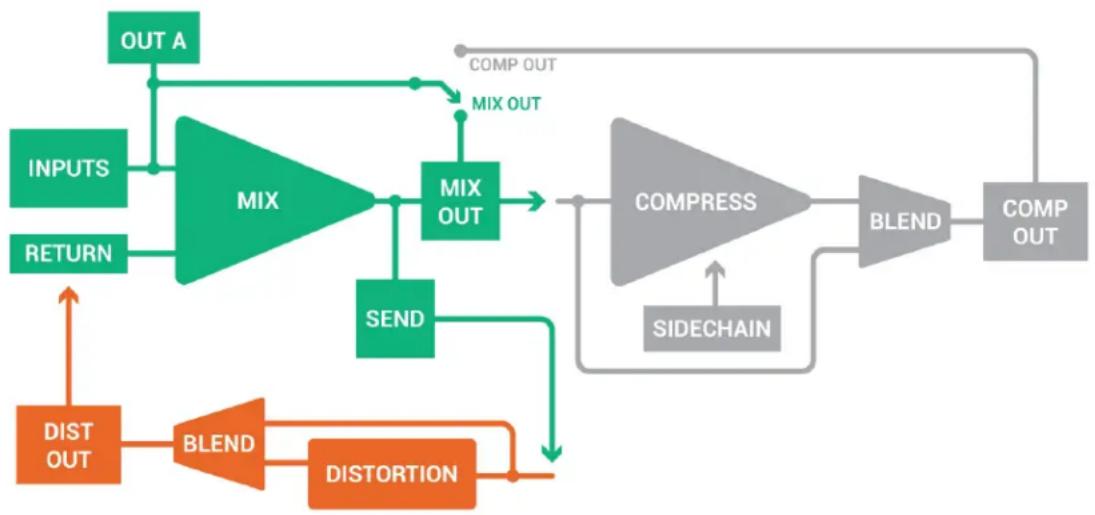
Below is a diagram of the basic signal flow and normalizing in the Mutant Hot Glue. We haven't shown every input and output here, for clarity's sake. Just the ones that we feel would be most confusing to understand.
The main points to take away from this diagram are:
- MIX OUT normalizes to the COMPRESSOR input until you plug a signal into the compressor input
- CHANNEL A can be switched to go to the COMP OUT jack instead of MIX OUT
- By plugging a signal into the SIDECHAIN input, the compressor is driven by that sidechain signal instead of the signal coming in to the compressor during normal compression.
- The DISTORTION normalizes to the effects SEND and RETURN by default, until you plug jacks in and break the signal flow. You can easily add external effects in series with the built-in DISTORTION this way, or replace the distortion entirely.
flowchart
graph TD
    A["INPUTS"] --> B["MIX"]
    C["RETURN"] --> B
    B --> D["MIX OUT"]
    D --> E["COMPRESS"]
    E --> F["BLEND"]
    F --> G["COMP OUT"]
    H["OUT A"] --> B
    I["DIST OUT"] --> J["BLEND"]
    J --> K["DISTORTION"]
    K --> L["DIVISION"]
    M["MIX OUT"] --> N["MIX OUT"]
    O["SEND"] --> P["COMPRESS"]
    Q["SIDECHAIN"] --> E
    R["COMP OUT"] --> F
THE MIXER INTERFACE
LEVEL CONTROLS
Each LEVEL control can attenuate the input signal present, or allow the input signal to pass at 0dB. As eurorack signals can get quite high in volume, you may need to dial them down to work with lower level signals from other sources.
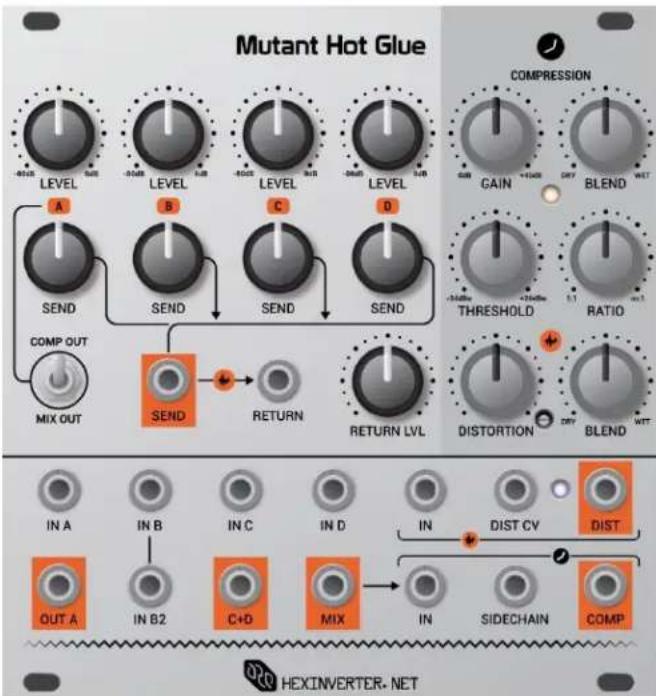
IN/OUT A
This input can easily be used as the compressor sidechain signal source, if desired. So plug your bassdrum or other source to be used as a sidechain here, if you plan to use sidechain dynamics. Otherwise, it is just a regular input. IN A's attenuated signal is always present at OUT A.
Use the switch below IN A's controls to toggle between IN A's routing. When set to MIX OUT, channel A is blended into the MIX output as normal. When switched to COMP OUT, however, channel A bypasses the MIX output and gets summed at the COMP output jack. This can be useful for sidechain dynamics when you don't want your sidechain source going into the compressor with the rest of the mix.
IN B, IN B2
IN B and IN B2 share a common LEVEL control. This dual input is handy for using with modules like the Mutant Hihats, which has two audio outputs.
IN C, IN D, C+D
IN C and IN D are regular mixer inputs. The C+D output sums IN C and IN D together, for sending elsewhere in your system, if desired.
SEND CONTROLS
Adjusts the level of each channel sent out of the SEND output to the effects loop (SEND/RETURN). Outputs signal to a maximum of 0dB (unity gain).
RETURN LVL
Adjusts the volume of the external effects coming back into the mixer. Plug your effect chain's output into this jack, or use it like a 5th input jack for the mixer, and add another signal into the mix.
THE DISTORTION INTERFACE
DISTORTION CONTROL + DIST CV INPUT
The control adjusts the amount of distortion, and the CV input will modulate the distortion from clean to fully distorted with an CV signal of a little less than 5 volts. The purple LED beside the distortion jacks lights up as distortion occurs.
BLEND CONTROL
Adjust the DISTORTION wet/dry blend with this control.
ADJUSTING THE DISTORTION LIMIT
There is a trim screw on the front of the panel so you can adjust the maximum amount of distortion to your taste. From the factory, it is set to a fairly high value that should be suitable for most signals, but, if you find you are getting too little or too much distortion, you may need to adjust it to your taste. To calibrate the maximum distortion, follow these steps:
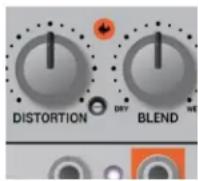
- Insert an audio signal into the distortion input (a low-pass resonant filtered bassline is a good benchmark)
- Turn the BLEND control completely up (fully distorted)
- Turn the DISTORTION control to maximum
- Adjust the trim screw while listening to the signal. You are now adjusting the maximum distortion possible on the signal. Please note that the trim pot used can turn upwards of 12 times, so if you're not hearing any change, keep turning, or switch directions until you perceive change.
THE COMPRESSOR INTERFACE
BLEND CONTROL
Adjust the wet/dry mix of the compressor from completely dry to fully compressed with this control.
THRESHOLD + RATIO CONTROLS
The THRESHOLD adjusts the amplitude of signal which the compressor begins to react at, and the RATIO adjusts the amount of compression applied to the signal when it kicks in.
GAIN
Turn this control up to add make-up gain to the compressor. This control is capable of adding an overwhelming amount of gain to the signal.
SIDECHAIN INPUT
Plug a signal into the AC-coupled SIDECHAIN input to modulate the compressor with a specific audio signal. Doing so breaks the normalized connection derived from the compressor input signal.
SIDECHAIN COMPRESSION
The Mutant Hot Glue allows you to easily use mixer IN A as a sidechain source, with the following steps...
- Plug the signal you want to use to sidechain your mix into the IN A input (eg: a bassdrum)
- Patch OUT A to the SIDECHAIN input
- Switch IN A's toggle switch to COMP OUT to bypass the mixer output, and sum channel A directly at the COMP output.
- For good results, try a very high RATIO, turn up the BLEND and turn your THRESHOLD down slowly while listening to the output to hear the pumping take effect. You will see the gain reduction LED light up as your sidechain signal source activates the compressor. You will probably want to adjust your compressor settings to match the signal strength you are using.
Try adding some distortion to your mix while applying heavy sidechain pumping.
While applying some dramatic sidechain to your mix, turn up the RETURN and DISTORTION controls about half way, making sure that the distortion's BLEND control is also turned to WET. Now, bring in some SEND for each mix element you want to add distortion to. Don't be afraid to try it on the signal you are using as a sidechain source. It can get pretty crazy!
CHANGING THE COMPRESSOR RESPONSE SPEED
In order to make the compressor in the Mutant Hot Glue high quality yet economic enough to fit our price point, we had to settle with a fixed attack/release ratio for the circuit. As you may or may not have noticed, there is a jumper on the back of the module that lets you change this speed setting, should you not enjoy the versatile MED (medium) setting which is useful for the majority of dynamics effects. To change the setting, move the jumper on the back of the module (while it's powered off) to the jumper setting displayed on the legend on the back of the module.
SLOW = 220ms attack/release
MEDIUM = 45ms attack/release
FAST = 2ms attack/release

- GLUING THINGS TOGETHER
- FEATURES
- Channel Mixer with Effects Send
- Hi-Fidelity Analog Compressor
- Voltage Controlled Analog Distortion
- TECHNICAL SPECIFICATIONS
- THE HOT GLUE ARCHITECTURE
- The main points to take away from this diagram are:
- THE MIXER INTERFACE
- LEVEL CONTROLS
- IN/OUT A
- IN B, IN B2
- IN C, IN D, C+D
- SEND CONTROLS
- RETURN LVL
- THE DISTORTION INTERFACE
- DISTORTION CONTROL + DIST CV INPUT
- BLEND CONTROL
- ADJUSTING THE DISTORTION LIMIT
- THE COMPRESSOR INTERFACE
- THRESHOLD + RATIO CONTROLS
- GAIN
- SIDECHAIN INPUT
- SIDECHAIN COMPRESSION
- CHANGING THE COMPRESSOR RESPONSE SPEED
Brand : Erica Synths
Model : Mutant Hot Glue
Category : Master Keyboard