K10 - Car stereo CLARION - Free user manual and instructions
Find the device manual for free K10 CLARION in PDF.


User questions about K10 CLARION
0 question about this device. Answer the ones you know or ask your own.
Ask a new question about this device
Download the instructions for your Car stereo in PDF format for free! Find your manual K10 - CLARION and take your electronic device back in hand. On this page are published all the documents necessary for the use of your device. K10 by CLARION.
USER MANUAL K10 CLARION
limited lifetime consumer warranty
This Ungo Pro Security system is warranted against defects in material and workmanship. The main unit is covered by this limited lifetime warranty. This Limited Lifetime Warranty applies to Ungo Pro Security systems that have been installed by an authorized Ungo Pro Security dealer. This warranty is to the Original Purchaser ("Owner") and to the original vehicle in which it was installed into. This warranty is not transferable to any subsequent owner(s) of the product(s).
Warranty Program:
Main Unit Limited Lifetime Remote Controls One year from date of purchase Siren One year from date of purchase Shock Sensor One year from date of purchase LED One year from date of purchase Override Switch One year from date of purchase
The Warranty does not cover batteries or products deemed damaged through alterations or installation. It also does not cover products mishandled, misused, neglected, abused, water damaged, or with removed/altered serial numbers.
PROOF OF PURCHASE WILL BE REQUIRED FOR WARRANTY SERVICE OF THIS PRODUCT.
This warranty does not cover the costs incurred for removal or reinstallation of the main unit and/or any damage to the vehicle or the vehicle's electrical system.
The sole responsibility of Clarion Corporation of America ("Clarion") under this Warranty shall be limited to the repair or replacement of the product, at the sole discretion of Clarion.
If it becomes necessary to send the product or any defective part to Clarion, the product must be shipped in its original carton or equivalent carton, fully insured, with shipping charges prepaid. Clarion will not assume any responsibility for any loss or damage incurred in shipping.
ALL IMPLIED WARRANTIES EXCEPT TO THE EXTENT PROHIBITED BY APPLICABLE LAW SHALL HAVE NO GREATER DURATION THAN THE WARRANTY PERIOD SET FORTH ABOVE. UNDER NO CIRCUMSTANCES SHALL CLARION CORPORATION BE LIABLE FOR ANY LOSS OR DAMAGE, DIRECT OR CONSEQUENTIAL, ARISING OUT OF THE USE OR INABILITY
TO USE OF THE PRODUCT. BECAUSE SOME STATES DO NOT ALLOW LIMITATIONS ON HOW LONG AN IMPLIED WARRANTY LASTS OR EXCLUSIONS OR LIMITATIONS OF INCIDENTAL OR CONSEQUENTIAL DAMAGES, THE ABOVE LIMITATIONS OR EXCLUSIONS MAY NOT APPLY TO YOU.
THIS WARRANTY GIVES YOU SPECIFIC LEGAL RIGHTS, AND YOU MAY ALSO HAVE THE OTHER RIGHTS, WHICH VARY FROM STATE TO STATE.
Should you have any difficulties with the performance of this product during warranty, please call: 1-800-GO-CLARION or visit your local Ungo Pro Security dealer. You may also contact the National Service Manager at the following address below for additional service help you may need.
Clarion Corporation of America
Attn: National Service Manager
661 W. Redondo Beach Blvd.
Gardena, Ca 90247
table of contents
limited lifetime consumer warranty ....i
standard remote configuration....2
what is included 3
important information....3
system maintenance 3
fcc/id notice 4
remote functions ....4
standard configuration 4
using your system 6
locking/arming 6
unlocking/disarming 7
disabling the system without a remote 8
silent arm/disarm 8
override mode 9
panic mode 9
individual recognition 10
power-up....10
programming options 11
glossary of terms 12
security & convenience expansions 12
standard remote configuration

controls the Arm function.

controls the Disarm function.

controls Silent Arm/Disarm and an Auxiliary Output.

controls the Panic function.

and pressed together control an Auxiliary Output.
what is included
• The control module
• Superhet receiver
• A pair of four-button remotes
• The blue status LED indicator light
• A push-button override switch
• Starter Kill Relay
important information
Congratulations on the purchase of your alarm/keyless entry system. Due to the complexity of this system, it must be installed by an authorized dealer only. Installation of this product by anyone other than an authorized dealer voids the warranty.
By carefully reading this Owner's Guide prior to using your system, you will maximize the use of this system and its features.
system maintenance
The system requires no specific maintenance. Your remote is powered by a small, lightweight 3-volt lithium battery that will last approximately one year under normal use. When the battery begins to weaken, operating range will be reduced and the LED on the remote will dim.
fcc/id notice
This device complies with Part 15 of FCC rules. Operation is subject to the following conditions: (1) This device may not cause harmful interference, and (2) This device must accept any interference received, including interference that may cause undesirable operation.
Changes or modifications not expressly approved by the party responsible for compliance could void the user's authority to operate this device.
remote functions
The receiver uses a computer-based learn routine to learn the remote buttons. This makes it possible to assign any specific remote button, or combination of buttons, to any receiver function. The remote initially comes programmed with the Standard Configuration, but may also be customized by an authorized dealer. The remote buttons indicated in all of the instructions in this manual correspond to a Standard Configuration remote.
standard configuration

Button
The locking/arming function is controlled by pressing this button for one second.

Button
The unlocking/disarming function is controlled by pressing this button for one second.

Button
Silent Arm/Disarm and an optional auxiliary function are controlled by this button. (An optional auxiliary function, such as trunk release, can be controlled by pressing this button for 1.5 seconds.)
The auxiliary output controls ____.

Button
The panic feature is controlled by pressing this button for one second.

and

Buttons
An optional auxiliary convenience or expansion function that you have added to your system can be activated by pressing these buttons simultaneously.
The auxiliary output controls ____.
using your system
locking/arming
Pressing for one second arms the system by activating the starter kill and locking the doors (if connected). The horn will honk (if connected) and the parking lights will flash once to confirm arming of the system. While the system is armed, the status LED will flash once per second. The Starter Kill (if installed) will also prevent the vehicle's starter from cranking.
note: Manually locking the vehicle does not arm the system; it will only lock the doors.
The system can also be programmed to arm the optional Starter Kill automatically (called Passive Mode). If the system has been programmed for Passive Mode, the Starter Kill will automatically activate 30 seconds after the ignition has been turned off. After the ignition has been turned off, the status LED will flash rapidly to indicate that the system is in Passive Mode.
If Passive Mode has been programmed on, then it is also possible to program the system for Passive Locking. With Passive Locking, the vehicle doors lock automatically at the same time that the Starter Kill is activated. If Passive Locking is programmed on, care must be taken to prevent the keys from being locked in the vehicle.
note: For Passive Mode to be effective, the Starter Kill relay must be installed.
unlocking/disarming
Pressing for one second disarms the system and unlocks the doors (if connected). The horn will honk twice (if connected) and the parking lights will flash twice to confirm disarming of the system. The optional Starter Kill will be deactivated. The status LED will turn off, unless the system is programmed for Passive Mode. In Passive Mode, the status LED will flash rapidly when the system is disarmed. This indicates that the system will re-engage the starter kill and re-lock the doors (if Passive Locking has been programmed) in 30 seconds unless the ignition is turned on.
note: If the system has been armed with the remote, you must use the remote or the Override switch to disarm the system and deactivate the starter kill. Manually unlocking the vehicle does not disarm the system; it will only unlock the doors.
disabling the system without a remote
If your remote is lost or damaged, you can manually override the system. To do this, you must have the vehicle's ignition key and know where the Override switch is located. Be sure to check with the installer for the location of the Override switch.

To disarm the security system, turn the ignition to the ON position. Press and release the Override switch within 10 seconds. The status LED will stop flashing and the vehicle should start. If the vehicle does not start, you may have waited too long; turn the ignition off and repeat the process.

Location of Override Switch
silent arm/disarm
To temporarily turn off the arm or disarm chirps, use Silent Arm/Disarm. Simply press for less than one second before arming or disarming, and the confirmation chirp(s) will be eliminated for that one operation only. If you want the arm/disarm chirps turned off permanently, your dealer can do this for you.
override mode
You can prevent your system from automatically activating the Starter Kill and locking the doors by using override mode. This is very useful when washing the vehicle or having it serviced. In override mode, the starter kill cannot be activated, even with the remote, but all convenience functions (door locks, trunk release, etc.) will continue to work normally.
To enter or exit override mode:
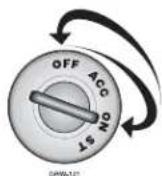
- Turn the ignition on.
- Turn the ignition off.
- Press and then release the Override switch within 10 seconds.

The status LED will light steadily if you are entering override mode and will turn off if you are exiting override mode.
panic mode
If you are threatened in or near your vehicle, you can attract attention by triggering the system with your remote. Just press two seconds to enter panic mode. In panic mode, the horn will honk and the parking lights will flash for 30 seconds. To stop panic mode at any time, press the remote again.
note: In order for panic mode to be effective, the vehicle's horn (or optional siren) as well as the vehicle's parking lights must be connected.
individual recognition
Individual recognition is a feature available. Using the Pro Security Programmer, a hand-held programming tool, your dealer can program many of the system settings. The programmer makes it possible to program different settings for each remote that is used with the system. Then, whenever a specific remote is used, the system will recall the settings assigned to that remote. Individual recognition lets up to four users of the system have different settings that meet their specific needs. It is almost like having four separate alarms in your vehicle, one for each user.
note: Individual recognition cannot be programmed without a Pro Security Programmer and the necessary software. Check with your dealer for more information.
power-up
This system will store its current state to non-volatile memory. If power is lost and then reconnected, the system will recall the stored state from memory. This means if the unit is in override mode and the battery is disconnected for any reason, such as servicing the car, when the battery is reconnected the unit will still be in override mode. This applies to all states of the system including arm, disarm, and panic mode.
programming options
Programming options control your system's normal, operational set-up. Most options do not require additional parts, but some may require additional installation labor. This system's programming options are listed below, with the factory default settings in bold:
- Passive Mode or Active Mode. In Passive Mode the Starter Kill will automatically activate 30 seconds after the ignition has been turned off.
- Ignition switch-controlled door-locking on or off. With this feature on, the doors will lock 3 seconds after the ignition key is turned on, and unlock when the ignition key is turned off.
- Passive Locking or Active Locking (doors lock only with the remote). With Passive Locking, the vehicle doors lock automatically 30 seconds after the ignition has been turned off. Passive Locking can only be selected when the system has been programmed for Passive Mode.
- The horn honk confirmations for locking and unlocking can be programmed on or off. In order for this feature to work properly, the horn must be connected to the system.
- Domelight supervision when the key is turned off can be programmed on or off. If programmed on, the domelight will turn on for 30 seconds each time the ignition is turned off.
glossary of terms
Control Unit: The "brain" of your system. Usually hidden under the dash area of the vehicle. It houses the microprocessor that monitors your vehicle and controls all system functions.
LED: A blue light mounted at a discretionary location inside the vehicle. It is used to indicate the status of your system.
Starter Interrupt: An automatic switch controlled by your system which prevents the vehicle's starter from cranking whenever the system is armed. The vehicle is never prevented from cranking when the system is disarmed, in override mode, or if the starter interrupt switch itself fails. Your system has feature-ready circuitry for the starter interrupt, however installation may require additional labor.
Remote: A hand-held, remote control which operates the various functions of your system.
Override Switch: A small button mounted at a discretionary location inside the vehicle. It is used to override the starter interrupt when a remote is lost or damaged, or to enter or exit override mode.
security & convenience expansions
Listed below are some of the many expansion options available for use with your system. Some options may require additional parts and/or labor. Please consult with your dealer for a complete list of options available for use with this system.
Domelight Supervision: The domelight will illuminate for 30 seconds each time the system is disarmed using the remote. This is useful for seeing inside the vehicle at night prior to entering it.
Power Door Lock Control: Your system is capable of controlling many types of power door lock systems; however, some door lock systems may require extra parts. Consult with your dealer to determine which type of locks your vehicle uses. If power locks are connected, the system can be programmed to lock the doors automatically 30 seconds after the ignition has been turned off. The system can also be programmed to lock the doors when the ignition is turned on and to unlock them when the ignition is turned off.
Power Trunk Release: The system's auxiliary output can be programmed to operate a factory power release for the vehicle's trunk or hatch. If the factory release is not power-activated, An optional trunk-release solenoid can often be added.
Power Window Control: Power window control can be provided by one of two systems. The first system provides control that will roll up two windows automatically when the system is armed, or roll two windows down by using the remote. The second system will roll two windows both up and down. This second system also provides one touch switch operation.
Progressive Door Unlocking: For added security, your system can be configured to unlock the driver's door only, leaving the passenger doors locked. Pressing the unlock button an additional time will unlock the passenger doors. This option requires additional parts and labor.
QUICK REFERENCE GUIDE
To lock/arm using your remote
To arm the system press for one second. The doors will lock (if connected). The LED will begin to flash. The Starter Kill will prevent the vehicle's starter from cranking if it has been installed. The vehicle's horn (if connected) will honk and the parking lights will flash once to confirm arming of the system.
To unlock/disarm using your remote
To disarm the system press for one second. The doors will unlock (if connected). The Starter Kill will be deactivated and the vehicle's horn (if connected) will honk twice and the parking lights will flash twice.
Disabling the Starter Kill without a remote
▶ Turn on the ignition. Press and release the Override switch within 10 seconds. The LED will stop flashing and the vehicle should start.
To enter or exit override mode
▶ Turn the ignition to the ON position. Turn the ignition back off. Press and release the Override switch within 10 seconds. The status LED will light steadily if you have entered override mode. To exit override mode, repeat the steps above. The LED will turn off when exiting override mode.
To activate panic mode
▶ Press and hold for 2 seconds.
To exit panic mode
▶ Press on the remote.
Location of Override Switch
Get Started Get Protected
UNGO
A CLARION COMPANY
Ungo Pro Security
661 W. Redondo Beach Blvd.
Gardena, Ca. 90247
800-GO-CLARION