
InvisiPac HM50 24Y118 - Baby accessories GRACO - Free user manual and instructions
Find the device manual for free InvisiPac HM50 24Y118 GRACO in PDF.


| Product Type | Pattern Controller |
| Brand | Graco |
| Model | InvisiPac HM50 24Y118 |
| Display | LCD screen with navigation keys |
| Power Source | Supplied by integrated system (24 VDC typical) |
| System Compatibility | Integrated or stand-alone systems |
| Line Mode Options | Time-based, distance-based (with encoder, PC-8e only) |
| Trigger Setup | Assignable to line 1 or 2, polarity configurable |
| Gun (Valve) Compensation | Open/close compensation, ≈5ms for high-speed, ≈10ms for standard guns |
| Run Up Control | Modulated bead curve and run up curve settings |
| Pattern Definition | Adjustable bead offset, length, stitch savings, and mirroring |
| Error Handling | On-screen error acknowledgment with persistent error support |
| Programming | Multiple programs, copy/delete feature, event map configuration |
| Dimensions (estimated) | 7.0 x 5.0 x 2.0 in (178 x 127 x 51 mm) |
| Weight (estimated) | 2.0 lb (0.9 kg) |
| Operating Temperature | 32°F to 104°F (0°C to 40°C) |
| Housing Material | Industrial-grade plastic/metal |
| Certifications | CE, RoHS (typical) |
| Maintenance | No special maintenance required; clean with dry cloth |
| Included Accessories | Quick guide only; full manual available |
Frequently Asked Questions - InvisiPac HM50 24Y118 GRACO
User questions about InvisiPac HM50 24Y118 GRACO
0 question about this device. Answer the ones you know or ask your own.
Ask a new question about this device
Download the instructions for your Baby accessories in PDF format for free! Find your manual InvisiPac HM50 24Y118 - GRACO and take your electronic device back in hand. On this page are published all the documents necessary for the use of your device. InvisiPac HM50 24Y118 by GRACO.
USER MANUAL InvisiPac HM50 24Y118 GRACO
Read instruction manual 334784 for complete instructions and warnings. This Quick Guide is not a substitute for reading and understanding all instructions manuals and warnings labels supplied with the equipment.
Quick Guide
InvisiPac® Pattern Controller

GRACO
335007B
EN
| Turn System On |  | Screen Navigation | ||
| Turn System Off |  - or - - or -  | Integrated SystemsRun ScreensPC Control PC Home Home Targets Events Errors DiagnosticsSetup ScreensPC Setup System Advanced Maintenance ScheduleStand-Alone SystemsRun ScreensPC Control PC Home Home Events ErrorsSetup ScreensPC Setup System Advanced | ||
| Select Program | 1. Arrow left navigate to the "PC Control" screen.2. Enter the screen and arrow up or down . Press to select a pro-gram. |  | ||
| Clear Errors | Acknowledge errors by pressing once for each error.Display will show "No Active Errors" unless error was unable to clear. Seek technical support if any error persists. | 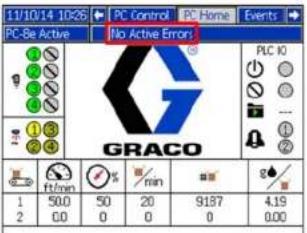 | ||
PROVEN QUALITY. LEADING TECHNOLOGY.
Wiring Installation

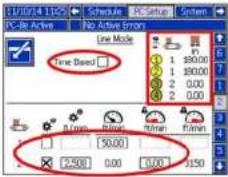
| Line Mode | 2. | No EncoderCheck time based or distance mode.Un-check encoder box (PC-8e only)Set fixed speed to adjust last measured product length. | Encoder (PC-8e only)Un-check time based mode.Check encoder box  Set pulses per mm adjust last measured product length. Set low line speed advisory level Set pulses per mm adjust last measured product length. Set low line speed advisory level |
| Trigger Setup | 3. | Set trigger polarity indicators show on1 or off. Assign to line 1 or 2 (PC-8e only). | |
| General 4. | No Run UpDisable pressure compensation.Enable or disable modulated bead (PC-8e only). | Run Up (PC-8e only)Enable pressure compensation. | |
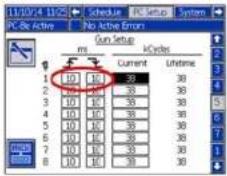
| Gun (Valve) Setup | 5. | Set gun open and close compensation~5ms for high speed guns~10ms for standard gunsNOTE: Applies to high speed lines requiring precise beads. | |
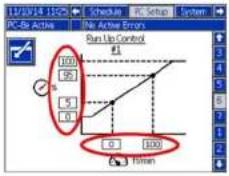
| Run Up Control | 6. | Set Modulated Bead CurveSet output value at line speedSet max and min | Set Run Up CurveSet output value at line speedSet max and min |
| PC Setup Screens | |
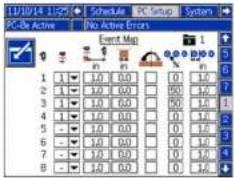
| 1. Event Map 2. Line Mode | |
 |  |
| 3. Trigger Setup 4. General | |
 |  |
| 5. Gun (Valve) Setup 6. Run Up Control | |
 |  |
| Select Program | Select and Name Programs1. Enter page to select program to edit.2. Name program3. Copy or delete program.TipsCopy existing to start new programsMake backup copies before editing |  |  |  |
| Enter Event Map | Set Up Even Map1. Assign triggers to valve2. Set gun-to-trigger offset3. Set minimum box length (optional)4. Enable or disable pattern mirroring5. Set stitch savings and interval |  | ||
| Define Pattern | Enter Bead Information1. Enter page,use arrows and press enter to edit beads.2. Offset from start of product3. Length of bead4. Stitched or notNOTE: Stitch option not shown when sav-ings on Event Map is set to 0%.5. Confirm changesPreview PatternSee which beads are solid or stitchedView endpoint of last bead on each gunView trigger assignment (red if none) | 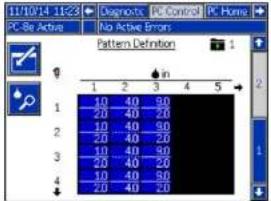 |  |  |
 |  |
Brand : GRACO
Model : InvisiPac HM50 24Y118
Category : Baby accessories