
AT-DRC444 - Audio/Video Accessories Atlona - Free user manual and instructions
Find the device manual for free AT-DRC444 Atlona in PDF.


| Product Type | Multi-Input Presentation Switcher |
| Brand | Atlona |
| Model | AT-DRC444 |
| Category | Audio/Video Accessories |
| Video Inputs | 4 Composite (BNC), 4 VGA (HD15), 2 DVI, 2 HDMI |
| Video Outputs | 1 Composite (BNC), 1 VGA (HD15), 1 DVI |
| Audio Inputs | 12 stereo line (8 captive screw, 4 3.5mm) + 1 mic (6.3mm) |
| Audio Outputs | 3 stereo unbalanced line, 1 unbalanced programmed audio |
| Max Video Resolution (DVI/HDMI) | Up to 1920x1200 or 1080p |
| Max Video Resolution (VGA) | Up to 3200x2400 @60Hz |
| Composite Video Formats | NTSC 3.58, NTSC 4.42, PAL, SECAM |
| Video Bandwidth (DVI/HDMI) | 340 MHz (10.2 Gbps) |
| Video Bandwidth (VGA) | 750 MHz |
| HDCP Compliance | Yes (DVI/HDMI inputs) |
| EDID/DDC Compliance | Yes |
| Switching Speed | 200 ns |
| Control Methods | RS-232, RS-485, IR remote |
| Power Supply | Internal, 100-240 VAC, 50/60 Hz |
| Power Consumption | 25 W |
| Dimensions (W x H x D) | 19 x 1.73 x 9.25 in (483 x 44 x 235 mm) |
| Weight | 4 lb (1.8 kg) |
| Rack Mountable | Yes, 1U height |
| Operating Temperature | -20°C to +70°C |
| Operating Humidity | 10% to 90% |
| Cleaning | Use a damp cloth; do not use cleaning fluids or aerosols |
| Safety | Do not expose to moisture; use only recommended accessories; unplug before cleaning |
| Spare Parts & Repairability | No user-serviceable parts; contact authorized Atlona reseller for repairs |
| Warranty | 3 years limited |
Frequently Asked Questions - AT-DRC444 Atlona
User questions about AT-DRC444 Atlona
0 question about this device. Answer the ones you know or ask your own.
Ask a new question about this device
Download the instructions for your Audio/Video Accessories in PDF format for free! Find your manual AT-DRC444 - Atlona and take your electronic device back in hand. On this page are published all the documents necessary for the use of your device. AT-DRC444 by Atlona.
USER MANUAL AT-DRC444 Atlona
Multi-Input Presentation Switcher AT-DRC444
User Manual
TABLE OF CONTENTS
- Introduction 2
- Features 2
- Package Contents 3
- Specifications 3
- Panel Descriptions 4
5.1. Front Panel 4
5.2. Rear Panel 4
6. IR Remote Control 5
7. RS232 Control 5
8. Connection Diagram 7
9. Troubleshooting 8
10. Safety Information 9
11. Warranty 10
12. Atlona Product Registration 11
INTRODUCTION
The Atlona AT-DRC444 is a Multi-Input Presentation Switcher designed with 3 x Audio and Video Switcher platforms built into one product.
The Atlona Multi-Input Presentation switch includes 4 inputs, one output Composite Video Switch; 4 inputs, one output VGA switch; and 2 input DVI and 2 input HDMI to one DVI Output Switch. Each video input is accompanied with its own audio input. Furthermore, the switcher is featured with microphone input and allows user to mix the microphone signal with the main audio in "talk-over" mode. The Atlona DRC444 is designed to be controlled via RS232, RS485 or IR.
FEATURES
- Offers 3 separate switching platforms which includes 4 inputs, one output Composite Video Switch; 4 inputs, one output VGA switch; and 2 input DVI and 2 input HDMI to one DVI Output Switch.
- Either platform (Composite, VGA or DVI/HDMI) could be switched simultaneously, as all 3 Video Platforms are completely separated from each other.
• Each video input is accompanied with its own audio input (total 12 audio inputs)
- Microphone input, allows user to mix the microphone signal with the main audio in "talk-over" mode.
- Video:
a) The DVI/HDMI inputs can support extremely high resolutions up to 1920x1200 and fully EDID and HDCP compliant. DVI/HDMI platforms will pass up to 10.2Gbps
b) The VGA inputs can support extremely high bandwidth of 750MHz and therefore up to 3200x2400 in resolutions. The VGA platform fully supports DDC.
c) The Composite video inputs are compatible with NTSC 3.58, NTSC 4.42, PAL, and SECAM formats.
- Audio:
a) Twelve inputs include four stereo balanced/unbalanced on capture screw connectors on Composite Video Platform, for 3.5mm (1/8-inch) audio inputs on VGA platform and four stereo balanced/unbalanced on capture screw connectors on DVI/HDMI platform.
b) Each one of the Audio inputs supports separate Audio adjustments and presets.
• Auto-control and Learning function:
a) The AT-DRC444 can learn and automatically transmit the RS232/RS485 commands to the Display which allows switching the display on/off or changing inputs.
- Control :
a) RS-232 input, allows user to control the DRC444 with a 3rd party control system.
b) RS-232/RS-485 output, programmable output, allows users to send commands to Display's.
c) IR remote control.
- Rack-mountable. 1U height.
- Internal power supply (100Volt\~240Volt AC, 50/60Hz)
PACKAGE CONTENT
- 1 x AT-DRC444
- 1 x Power Cable
- 1 x IR Remote Control
- 1 x RS232 Cable
• 1 x Instructions Manual
SPECIFICATIONS
| Video inputs | 2 x DVI (DVI-D Only 24+1 Pin Female), 2 x HDMI (Type A female), 4 x VGA (HD15 female), 4 x Composite Video (BNC male) |
| Video outputs | 1 x DVI (DVI-D Only 24+1 Pin Female), 1 x VGA (HD15 female), 1 x Composite Video (BNC male) |
| Video resolution DVI/HDMI | up to 1920x1200 or 1080p;VGA up to 3200x2400 @60Hz;Composite Video: NTSC 3.58, NTSC 4.42, PAL, and SECAM |
| Video bandwidth DVI/HDMI | 340MHz (10.2Gbps);VGA: 750MHz (-2.8dB) / Crosstalk (-49db@4.9MHz) / 0.5V~2.0Vp-p;Composite Video: 150MHz |
| Switching Speed 200ns | |
| HDCP DVI/HDMI Inputs are | HDCP Compliant |
| EDID/DDC VGA/HDMI/DVI | Inputs are EDID/DDC compliant |
| Audio Inputs 12 Stereo line | audio, 1 Mic |
| Audio Outputs 3 x Stereo | unbalanced line audio and 1 x unbalanced programmed audio |
| Input Connectors | 4 x 1/8-inch (3.5mm) – for VGA; 8 x Captive Screw connectors – for DVI/HDMI and Composite and 1 x 1⁄4-inch (6.3mm) – Mic |
| Audio Frequency 20Hz~20K Hz | |
| CMRR >90dB @20Hz to 20K Hz | |
| RS232 DB9 (2 = TX, 3 = RX, 5 = GND) | |
| Power supply 100~ 240VAC, 50/60Hz | |
| Power consumption 25W | |
| Dimensions (inch) | W19 x H1.73 x D9.25 - 1U |
| Dimensions (mm) | W483 x H44 x D235 - 1U |
| Weight | 4lb |
| Operating Temperature | -20°C ~ +70°C |
| Operational Humidity | 10% ~ 90% |
PANEL DESCRIPTIONS
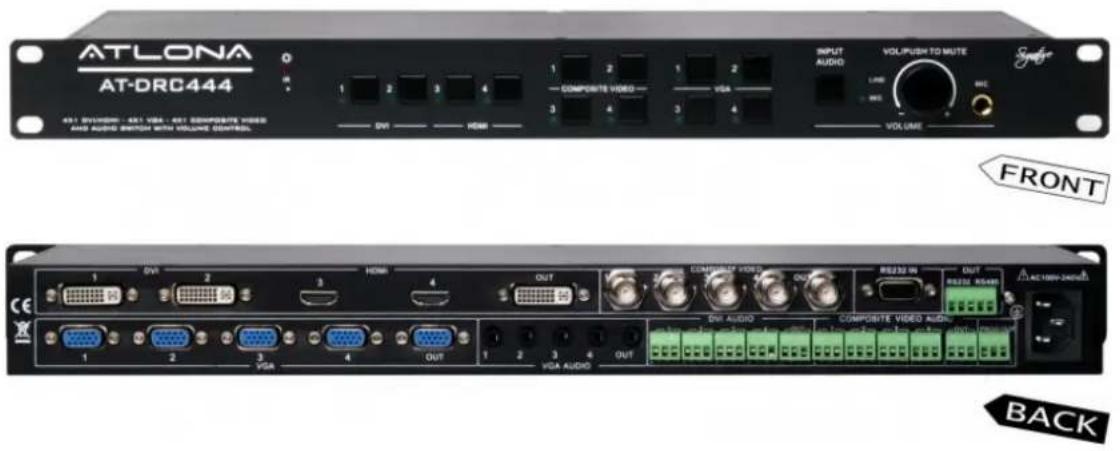
1. Front Panel

- IR sensor
- Power status LED indicator
- DVI/HDMI Selection buttons.
- Composite Video Selection buttons.
- VGA Selection Buttons.
- Volume adjustments and switching between Line Input and Mic Input
a) Switch between Line Input and Mic Input by pressing a button. The LED will indicate which input is selected.
b) Turn knob to adjust either a Mic level or a Line Input Level.
c) Push knob to mute. If Mic is selected, the Mic will mute and if Line Input is selected the Line Input will mute.
2. Rear Panel

1) DVI/HDMI Inputs (4 inputs and 1 output)
2) Composite Video Inputs (4 inputs and 1 output)
3) VGA Inputs (4 inputs and 1 output)
4) 3 sets of 4 by 1 Audio Switchers:
a. VGA audio: 3.5mm (1/8-inch) 4 by 1 switch
b. DVI audio: Balance/unbalance stereo audio on capture screw connector, 4 by 1 switch
c. Composite audio: Balance/unbalance stereo audio on capture screw connector, 4 by 1 switch
d. Prog. Out: Line Audio Break-out, can be mixed with any other Line Audio Inputs or Mic Audio.
5) RS-232 input: Connect to a 3rd party control system
6) RS-232 & RS-485 outputs: connect to the display e.g., Projector, LCD, LED or Plasma Display.
7) Power Cable Input
IR REMOTE CONTROL
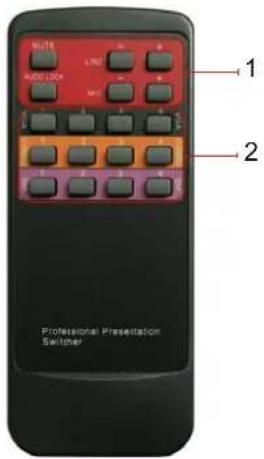
1. Audio volume adjustment:
"Mute": mute audio.
"Audio Lock": keep the last switched audio on, it will not change when another video input is selected.
“- and +”: adjust the volume of Line audio or Mic Audio.
2. Video signal switching:
Switch between 3 platforms (DVI/HDMI, VGA and Composite Video); The selection on each platform will also carry audio signal along, unless it's locked.
RS232 CONTROL
Baud Rate: 9600
Data Bit: 8
Parity: None
Stop Bit: 1
| Series Function Feedback code | ||
| 600% Mute Mute ON /Mute OFF | ||
| 601% Master volume + VGA 1 Volume : XX (0~60) | ||
| 0602% Master volume - VGA 1 Volume : XX (0~60) | ||
| 603% MIC volume + MicVolume : XX (0~60) | ||
| 0604% MIC volume - MicVolume : XX (0~60) | ||
| LOCK% Keyboard Lock System Locked!/System Unlock! | ||
| 01XX% Set Line volume to 'XX' 0~60 Line out Volume : XX (0~60) | ||
| 02XX% | Set MIC volume to 'XX' 0~60 | MicVolume : XX (0~60) |
| 0700% | Check Series:Current video source,Switching series,Last video source status,Baud rate | Source: VGA 1232/485 DVI data:232/485 AV data:232/485 VGA data:232/485 Current data:Baud rate: 9600 |
| 0701% | Switch to DVI Input # 1 Source: DVI 1 | |
| 0702% | Switch to DVI Input # 2 Source: DVI 2 | |
| 0703% | Switch to HDMI Input # 3 | Source: DVI 3 |
| 0704% Switch to HDMI Input # 4 Source: DVI 4 | ||
| 0709% Switch to VGA Input # 1 Source: VGA 1 | ||
| 0710% Switch to VGA Input # 2 Source: VGA 2 | ||
| 0711% Switch to VGA Input # 3 Source: VGA 3 | ||
| 0712% Switch to VGA Input # 4 Source: VGA 4 | ||
| 0705% Switch to Composite Video Input # 1 Source: CVIDEO 1 | ||
| 0706% Switch to Composite Video Input # 2 Source: CVIDEO 2 | ||
| 0707% Switch to Composite Video Input # 3 Source: CVIDEO 3 | ||
| 0708% Switch to Composite Video Input # 4 Source: CVIDEO 4 | ||
| 0747% Lock audio LOCK VOICE OUT | ||
| 0748% Unlock audio input UNLOCK VOICE OUT | ||
| 0800% Check the volume | DVI 1 Volume: XX (0~60)DVI 2 Volume: XX (0~60)DVI 3 Volume: XX (0~60)DVI 4 Volume: XX (0~60)AV 1 Volume: XX (0~60)AV 2 Volume: XX (0~60)AV 3 Volume: XX (0~60)AV 4 Volume: XX (0~60)VGA 1 Volume: XX (0~60)VGA 2 Volume: XX (0~60)VGA 3 Volume: XX (0~60)VGA 4 Volume: XX (0~60)MicVolume: XX (0~60) | |
| 0801% Set Baud rate to 4800 bps Baud rate: 4800 | ||
| 0802% Set Baud rate to 9600 bps Baud rate: 9600 | ||
| 0803% | Set Baud rate to 19200 bps | Baud rate: 19200 |
| 0804% | Set Baud rate to 38400 bps | Baud rate: 38400 |
| 0805% | Set Baud rate to 57600 bps | Baud rate: 57600 |
| 0806% | Set Baud rate to 115200 bps | Baud rate: 115200 |
| /+1xxxx; | Send Command though RS232/485 Output which will follow DVI/HDMI platform | 232/485 DVI data: XXXXXXXX |
| /+2xxxx; | Send Command though RS232/485 Output which will follow Composite platform | 232/485 AV data: XXXXXXXX |
| /+3xxxx; | Send Command though RS232/485 Output which will follow VGA platform | 232/485 VGA data: XXXXXXXX |
| /+0xxxx; | Send Direct Command though RS232/485 Output | 232/485 Direct out data: XXXXXXXX |
| 0900% | Change all volume input mode | Change to output vol. control/Change to input vol. control |
Series Function Feedback code
| 31XX% Set DVI 1 volume to XX DVI 1 Volume : XX 0~60 |
| 32XX% Set DVI 2 volume to XX DVI 2 Volume : XX 0~60 |
| 33XX% Set DVI 3 volume to XX DVI 3 Volume : XX 0~60 |
| 34XX% Set DVI 4 volume to XX DVI 4 Volume : XX 0~60 |
| 41XX% Set AV 1 volume to XX AV 1 Volume : XX 0~60 |
| 42XX% Set AV 2 volume to XX AV 2 Volume : XX 0~60 |
| 43XX% Set AV 3 volume to XX AV 3 Volume : XX 0~60 |
| 44XX% Set AV 4 volume to XX AV 4 Volume : XX 0~60 |
| 51XX% Set VGA 1 volume to XX VGA 1 Volume : XX 0~60 |
| 52XX% Set VGA 2 volume to XX VGA 2 Volume : XX 0~60 |
| 53XX% Set VGA 3 volume to XX VGA 3 Volume : XX 0~60 |
| 54XX% Set VGA 4 volume to XX VGA 4 Volume : XX 0~60 |
CONNECTION DIAGRAM

flowchart
graph TD
    A["HDMI Blu-Ray Player"] --> B["1 VDA"]
    A --> C["2 VGA"]
    A --> D["3 HDMI"]
    A --> E["4 OUT"]
    A --> F["1 COMPOSITE VIDEO"]
    A --> G["2 COMPOSITE VIDEO"]
    A --> H["3 OUT"]
    A --> I["4 RS232 IN"]
    A --> J["5 RS232 OUT"]
    A --> K["6 VGA AUDIO"]
    A --> L["7 COMPOSITE VIDEO AUDIO"]
    A --> M["8 RS232 OUT"]
    A --> N["9 RS232 OUT"]
    A --> O["10 RS232 OUT"]
    P["VGA or DVI PC"] --> Q["Laptop"]
    R["Camera"] --> S["Display"]
    T["Projector"] --> U["Speaker"]
    V["Video Audio"] --> W["ComPOSITE VIDEO"]
    X["Video Audio"] --> Y["ComPOSITE VIDEO"]
TROUBLESHOOTING
- Image Ghosting is usually related to the low quality cables or extremely long length. Please try replacing cables with extenders or better quality cables.
- If user is not able to connect to the DCR444 via RS232, this may be related to either incorrect COM port being used or incorrect wiring on the serial cable. Please use the supplied RS232.
- Interference on the output signal is usually caused by long cables or if switcher is not grounded. Please rack-mount the switcher and make sure that the rack is grounded properly.
SAFETY INFORMATION
Safeguards
To reduce the risk of electric shock, do not expose this product to rain or moisture void the warranty and safety features. Do not modify the wall plug. Doing so will
If the wall plug does not fit into your local power socket, hire an electrician to replace your obsolete socket. be easily accessible in the case it requires This equipment should be installed near the socket outlet and the device should disconnection.
Precautions
FCC regulations state that any unauthorized changes or modifications to this equipment, not expressly approved by the manufacturer, could void the user's authority to operate this equipment.
Operate this product using only the included external power supply. Use of other power supplies could impair performance, damage the product, or cause fires.
In the event of an electrostatic discharge this device may automatically turn off. If this occurs, unplug the device and plug it back in.
Protect and route power cords so they will not be stepped on or pinched by anything placed on or against them. Be especially careful of plug-ins or cord exit points from this product.
Avoid excessive humidity, sudden temperature changes or temperature extremes.
Keep this product away from wet locations such as bathtubs, sinks, laundries, wet basements, fish tanks, and swimming pools.
Use only accessories recommended by Atlona to avoid fire, shock, or other hazards.
Unplug the product before cleaning. Use a damp cloth for cleaning and not cleaning fluid or aerosols.
Such products could enter the unit and cause damage, fire, or electric shock. Some substances may also mar the finish of the product.
Never open, remove unit panels, or make any adjustments not described in this manual. Attempting to do so could expose you to dangerous electrical shock or other hazards. It may also cause damage to your AT-DRC444. Opening the product will void the warranty.
Do not attempt to service the unit. Disconnect the product and contact your authorized Atlona reseller or contact Atlona directly.
WARRANTY
Limited Warranty
Atlona Technologies warrants that (a) its products (the AT-DRC444) will perform substantially in accordance with the accompanying written materials for a period of 3 years from the date of receipt and (b) that the product will be free from defects in materials and workmanship under normal use and service for a period of 3 years. In the event applicable law imposes any implied warranties, the implied warranty period is limited to 3 years from the date of receipt. Some jurisdictions do not allow such limitations on duration of an implied warranty, so the above limitation may not apply to customers that fall within those areas.
Customer Remedies
Atlona Technologies' and its suppliers' entire liability and Customer's exclusive remedy shall be, at Atlona Technologies' decision, either return of the price paid for the product, repair, or replacement of the product that does not meet this Limited Warranty and which is returned to Atlona Technologies with a copy of the Customer's receipt. This Limited Warranty is void if failure of the product has resulted from accident, abuse, misapplication, or natural occurrence. In example but not limited to: power surges (electrical storms, local power outage), dropping the product (or items on the product), contact with fluids, and physical misconduct (i.e. kicking or punching). Any replacement product will be warranted for the remainder of the original warranty period.
No other warranties
To the maximum extent permitted by applicable law, Atlona Technologies and its suppliers disclaim all other warranties, either expressed or implied, including, but not limited to, implied warranties of merchantability and fitness for a particular purpose, with regard to the product and any related written materials. This Limited Warranty gives customer specific legal rights. Customers may have other rights depending on the jurisdiction.
No liability for damages
To the maximum extent permitted by applicable law, in no event shall Atlona Technologies or its suppliers be liable for any damages arising out of the use of or inability to use this product, even if Atlona Technologies has been advised of the possibility of such damages. Such damages include but are not limited to: special, incidental, consequential, or indirect damages for personal injury, loss of business profits, business interruption, loss of business information, or any other pecuniary loss.
Atlona Technologies' and its suppliers' entire liability under any provision of this agreement shall be limited to the amount actually paid by you for the product. Some Jurisdictions do not allow the exclusion or limitation of liability for consequential or incidental damage. The above limitations may not apply to you in such jurisdictional cases.
ATLONA PRODUCT REGISTRATION
Thank you for purchasing this Atlona product. - We hope you enjoy it and will take an extra few moments to register your new purchase.
Registration creates an ownership record if your product is lost or stolen and helps ensure you'll receive notification of performance issues and firmware updates.
At Atlona, we respect and protect your privacy, assuring you that your registration information is completely secure. Atlona product registration is completely voluntary and failure to register will not diminish your limited warranty rights.
To register go to: http://www.atlona.com/registration


- Multi-Input Presentation Switcher AT-DRC444
- TABLE OF CONTENTS
- INTRODUCTION
- FEATURES
- PACKAGE CONTENT
- PANEL DESCRIPTIONS
- Front Panel
- Rear Panel
- IR REMOTE CONTROL
- Audio volume adjustment:
- Video signal switching:
- RS232 CONTROL
- TROUBLESHOOTING
- SAFETY INFORMATION
- Safeguards
- Precautions
- WARRANTY
- Limited Warranty
- Customer Remedies
- No other warranties
- No liability for damages
- ATLONA PRODUCT REGISTRATION
Brand : Atlona
Model : AT-DRC444
Category : Audio/Video Accessories