
CV7XX-HFH - Camera Marshall Electronics - Free user manual and instructions
Find the device manual for free CV7XX-HFH Marshall Electronics in PDF.


| Product Type | Compact Weatherproof Dome Housing for PTZ Cameras |
| Brand | Marshall Electronics |
| Model | CV7XX-HFH |
| Weight (without camera) | 32 lbs (15 kg) |
| Protection Rating | IP68 (with properly installed cable glands) |
| Heater and Fan | Built-in for environmental control |
| Power Supply - Camera | 12VDC (via included coaxial cable from enclosure) |
| Power Supply - Environmental Controls | Line power (120VAC, hot/neutral/ground) |
| Mounting Options | Pendant, Wall, Pole (optional brackets) |
| Included Hardware | Concrete anchors, screws, washers, cable glands, foam conduit plugs |
| Dome Lens | Replaceable domed lens with protective film |
| Camera Mounting Interface | Ceiling mount bracket (M4 fasteners) or direct mount (1/4-20 screws) |
| Cable Gland Ports | Two 7/8" diameter holes (for 1/2" NPT or PG13 fittings) |
| Minimum Installation Personnel | 2 people |
| Compliance | Local and national electrical codes must be followed |
Frequently Asked Questions - CV7XX-HFH Marshall Electronics
User questions about CV7XX-HFH Marshall Electronics
0 question about this device. Answer the ones you know or ask your own.
Ask a new question about this device
Download the instructions for your Camera in PDF format for free! Find your manual CV7XX-HFH - Marshall Electronics and take your electronic device back in hand. On this page are published all the documents necessary for the use of your device. CV7XX-HFH by Marshall Electronics.
USER MANUAL CV7XX-HFH Marshall Electronics
Compact Weatherproof Dome Housing for PTZ w/Fan and Heater

natural_image
Exterior view of a modern office building (no signage)INTENTIONALLY BLANK
Table of Contents
PRODUCT INSTALLATION PRECAUTIONS – WARNINGS – ADDITIONAL INFORMATION......4
- Required Hardware....5
- Mount Installaon 5
2.1 Pendant Mount....5
2.2 Wall Mount 6
2.3 Pole Mount....8
- Enclosure Preparaon....8
- Enclosure Installaon....10
- Electrical Conduit Guidelines 12
- Mounng Detail 14
6.1 Pendant Mount....14
6.2 Wall Mount 15
PRODUCT INSTALLATION PRECAUTIONS – WARNINGS – ADDITIONAL INFORMATION
(RETAIN THIS DOCUMENT)
IMPORTANT SAFEGUARDS
1 Read Instrucons - All the safety and operating instrucons should be read before the unit is operated.
2 Retain Instruons-The safety and operating instructions should be retained for future reference.
3. Heed Warnings - All warnings on the unit and in the operang instructions should be adhered to.
4. Follow Instrucons - All operang & user instructions should be followed.
5. Electrical Connections - Only a qualified electrician should make electrical connecons.
6. Aachments - Do not use aachments not recommended by the product manufacturer as they may cause hazards
7. Cable Runs - All cable runs must be within permissible distance
8. Mounting -This unit must be properly and securely mounted to a suppomg structure capable of sustaining the weight of the unit. Accordingly: a.Installaon should be made by a qualled installer. b.Installaon should be in compliance with local codes
c. Care should be exercised to select suitable hardware to install the unit, taking into account both the composition of the mounng surface and the weight of the unit. Be sure to periodically examine the unit and the supporting structure to make sure that the integrity of the installaons intact. Failure to comply with the foregoing could result in the unit separating from the support structure and falling, with resultant damages or injury to anyone or anything struck by the falling unit.
| CAUTION: TO REDUCE THE RISK OF ELECTRICAL SHOCK, DO NOT EXPOSE COMPONENTS TO WATER OR MOISTURE | |
 | The lightning ash with an arrowhead symbol, within an equilateral triangle, is intended to alert the user to the presence of non-insulated "dangerous voltage" within the product's enclosure that may be of sucient magnitude to constute a risk of electric shock to persons |
 | The exclamation point within an equilateral triangle is intended to alert the user to the presence of important operang and maintenance (servicing) instrucons in the literature accompanying the appliance |
SERVICE
If the unit ever needs repair service, customer should contact Marshall
Electronics (800-800-6608) for return authorizaon & shipping instrucons.
UNPACKING
Unpack carefully. Electronic components can be damaged if improperly handled or dropped. If an item appears to have been damaged in shipment, replace it properly in its carton and nofy the shipper. Be sure to save
- The shipping carton and packaging material. They are the safest material in which to make future shipments of the equipment.
- These Installaon and Operang Instrucons.
√ For technical quesons or product returns – call Marshall Electronics Customer Service (800-800-6608) 7:30 AM to 4:30 PM (PST). The proper technician will contact you as soon as possible.
The External Nut on All electrical wire feed Glands must be ghtened to create a weather ght seal prior to pung CV7XX-HFH in service. Failure to create this seal may result in water incursion into enclosure. This may lead to electrical shock, product failure and damage to electrical systems installed within enclosure, including but not limited to damage to camera, heater and blower circuitry, cooling circuitry and other systems installed in unit.
- All screws supplied for hinged lower must be ghtened to create seal on enclosure. Failure to create this seal may result in water incursion into enclosure. This may lead to electrical shock, failure and damage to electrical systems installed within enclosure, including but not limited to damage to camera, heater and blower circuitry, cooling circuitry and other systems installed in unit.
- Do not over ghten any Screws, Stand Os, or other fasteners on this unit. Failure to heed this warning will cause damage or failure of the CV7XX-HFH enclosure.
This installaon requires a minimum of two people. Do not aempt to install this enclosure by yourself.
- Be sure to take extra care to protect domed ("bubble") lens of unit prior to installaon, during installaon, and during service. Failure to protect lens will adversely affect product performance.
1. Required Hardware
Ensure that all required hardware is included before beginning the installaon.
- 4 x 3/8-16 Concrete anchors, washers, and nuts, torque nuts to 247 in-lbs. [27.9 Nm]
- 12 x 6-32 at head screws (installed on unit), torque to 10 in-lbs. [1.1 Nm]
- 4 x 10-32 buon head screws, torque to 30 in-lbs. [3.4 Nm]
- 2 x 1/4-20 socket head cap screw, nylon locking, torque to 78 in-lbs. [8.9 Nm]
2. Mount Installaon
2.1 Pendant Mount
2.1.1 Separate the Mounng Plate form the enclosure. Place hardware aside in a safe place for later re-installation.
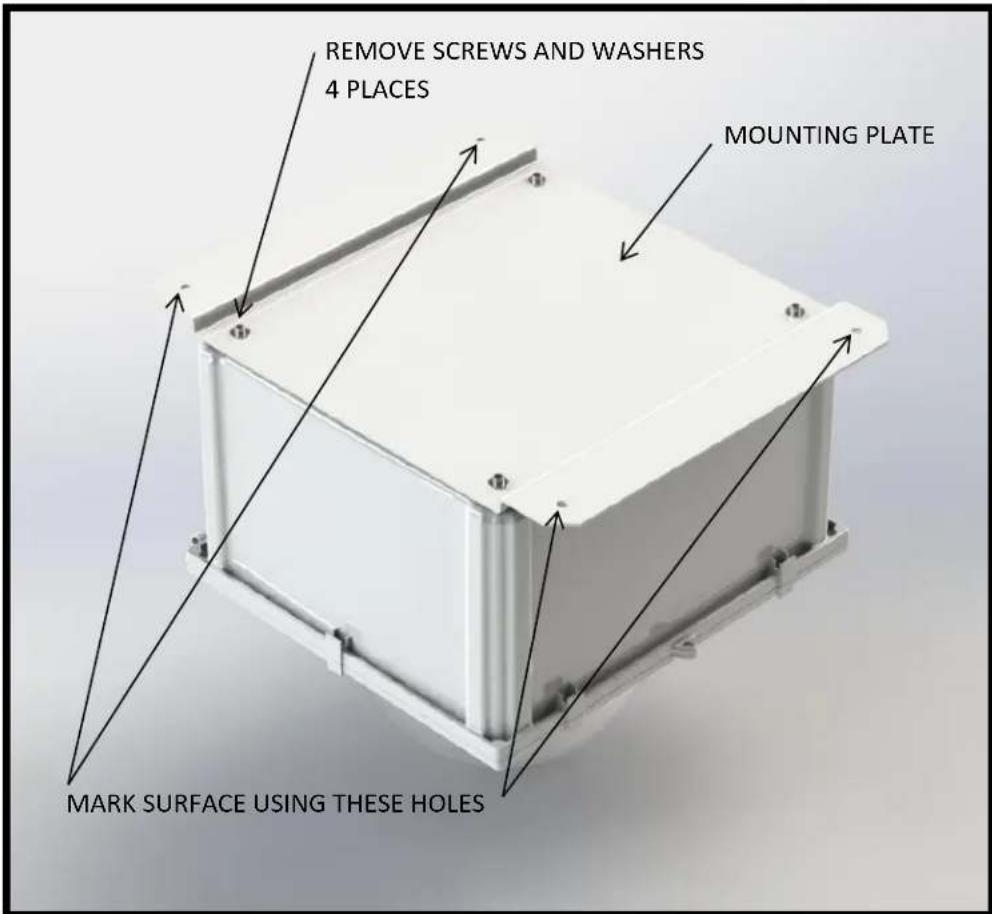
2.1.2 Hold the Mounng Plate up to the desired mounng locaon. Using the Mounng Plate as a template, mark the mounng surface at the locaon of the 4 indicated mounng holes for
Drilling. Ensure that the holes are marked as accurately as possible. Set the Mounng Plate aside aer marking the drilling locaons.
2.1.3 Use a hammer drill to make 3/8 inch diameter holes at each of the 4 mounng locaons marked in the previous step. A hammer drill is required for this operaon. Clean the holes of all concrete dust using a wire brush and compressed air or a vacuum. Install the 3/8-16 concrete anchors in each of the 4 drilled holes by hammering them in to the appropriate depth. Leave the nut on while hammering so that the threads of the concrete anchor are protected and not damaged. Ensure that the Mounng Plate ts over the concrete anchors, and then set it aside.

Warnings:
- The supplied anchors are for concrete only. Do not aempt to use in brick, block or other materials. Other fasteners are required for brick, block and other materials and are not included. Minimum engagement of the supplied concrete anchors is 2" [50 mm]. If the provided fasteners are not appropriate for the installaon surface, it is the responsibility of the customer to specify and source appropriate fasteners for the applicaon.
- Holes for concrete anchors should be drilled a minimum of 1/2 inch [13 mm] deeper than the overall length of the anchor, provided that the moung surface can tolerate such a depth. This allows the anchor to be hammered ush should a mistake be made or a locaon change be necessary.
2.2 Wall Mount
2.2.1 Remove the Wall Mount Cover from the Wall Mount by unscrewing the four 6-32 at head screws in the corners of the bracket system. Set the cover and four fasteners aside in a safe place for later use.

2.2.2 Hold the Wall Mount up to the desired moung locaon. Ensure that the mount is level and oriented properly in the correct locaon. Using the Wall Mount as a template, mark the 4 moung holes for drilling. There are two suitable moung paerns to allow for installaon exibility, as indicated below. With the hole locaons marked, set the Wall Mount aside for later use.
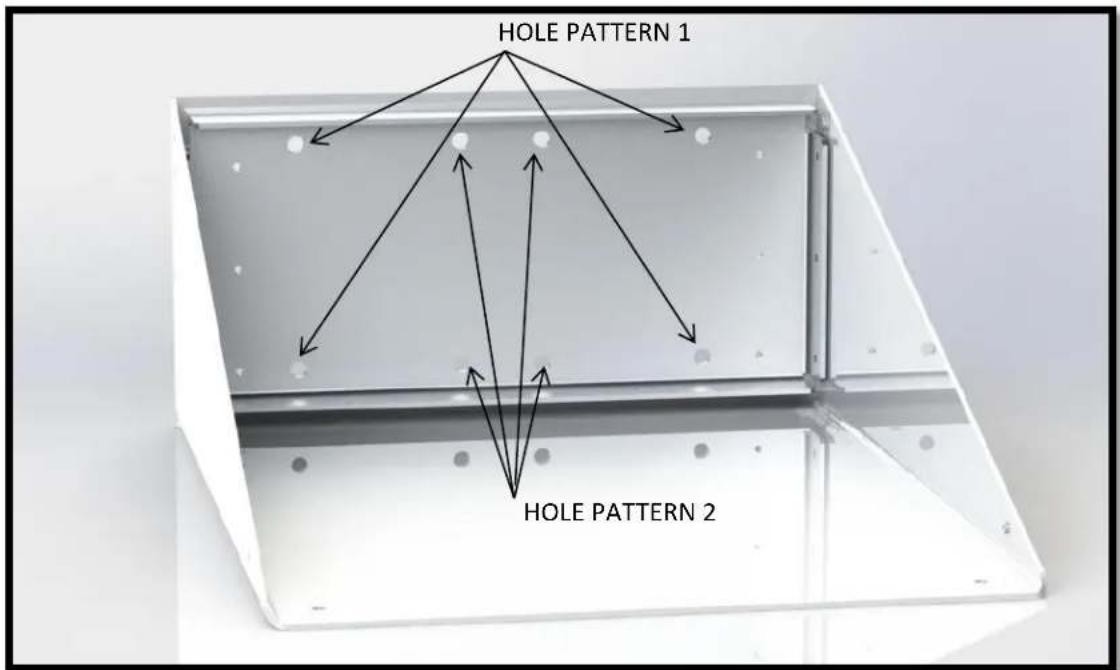
2.2.3 Use a hammer drill to make 3/8 inch diameter holes at each of the 4 mounng locaons marked in the previous step. A hammer drill is required for this operaon. Clean the holes of all concrete dust using a wire brush and compressed air or a vacuum. Install the 3/8-16 concrete anchors in each of the 4 drilled holes by hammering them in to the appropriate depth. Leave the nut on while hammering so that the threads of the anchor are not damaged. Ensure that the Wall Mount is over the concrete anchors, and then set it aside.

Warnings:
- The supplied anchors are for concrete only. Do not aempt to use in brick, block, or other materials. Other fasteners are required for brick, block and other materials and are not included. Minimum engagement of the supplied concrete anchors is 2" [50 mm]. If the provided fasteners are not appropriate for the installaon surface, it is the responsibility of the customer to specify and source appropriate fasteners for the applicaon.
- Holes for concrete anchors should be drilled a minimum of 1/2 inch [13 mm] deeper than the overall length of the anchor, provided that the moung surface can tolerate such a depth. This allows the anchor to be hammered ush should a mistake be made or a locaon change be necessary.
2.3 Pole Mount
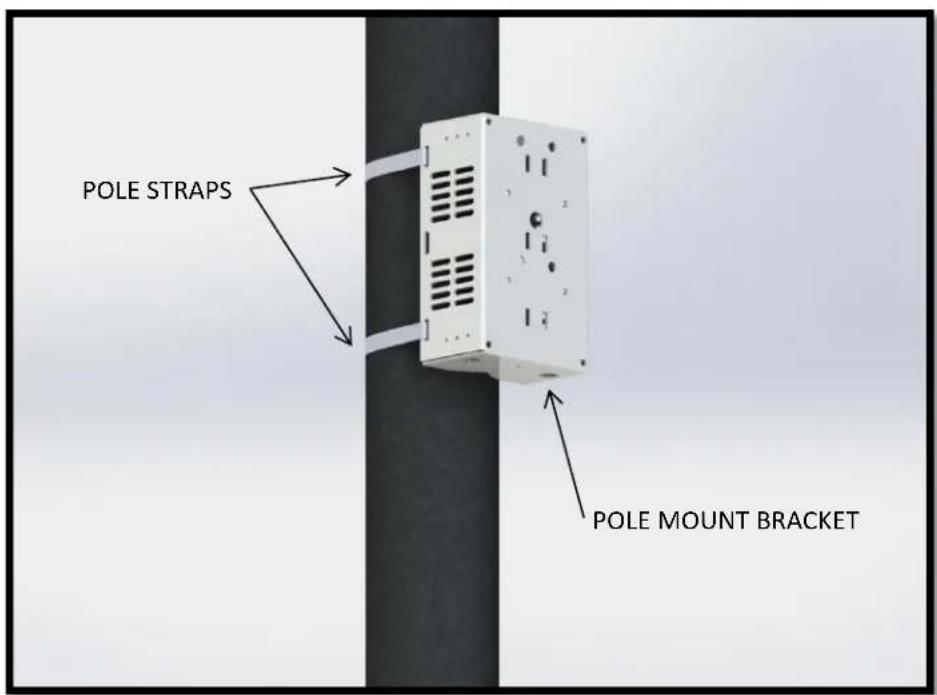
2.3.1 Install the BR-MPM1, BR-MPM2 or KT-CDR2 pole mount bracket system on the desired pole at the appropriate height using pole strapping or hose clamps. Pole straps are not included and are the responsibility of the customer to source for their parcular applicaon.
3. Enclosure Preparaon
3.1 Install the camera manufacturer supplied ceiling mount bracket (typically twist-to-lock) onto the black Camera Bracket inside the enclosure. The black bracket inside the enclosure is designed to accept typical ceiling mount brackets via four M4 fasteners and four M4 nylon locking nuts. If this hardware cannot be sourced, the camera can also be directly installed using the supplied 2 x 1/4-20 socket head cap screws from the hardware kit. Using the camera manufacturer supplied "mount bracket" is highly recommended to minimize overall weight while the enclosure is being lied for moung.
3.2 Install the supplied domed lens on the hinged lid of the enclosure. Remove the 12 x 6-32 at head screws and set aside in a safe place for reinstallaon. Remove the metal retaining ring to expose the seal. Remove the protecve lm from the domed lens and align the moung holes of the dome with the holes in the gasket. Place the retaining ring over the domed lens and align the holes of the retaining ring with the moung holes in the domed lens. Reinstall the twelve 6-32 at head screws and torque them to the appropriate value, making sure to alternate from one side of the lens to the other when ghtening the 12 screws to minimize stresses in the domed lens.

3.3 Plan your cable management before installing the enclosure. Pay parcular aenon to bend radii and sealing of cable glands. The cable glands installed on the enclosure can be used as plugs or break through, mul-hole glands for smaller diameter cables. The cable glands provided in the hardware kit are designed to accommodate 1 cable per cable gland. The cable diameters accommodated are 4.3 mm – 11.4 mm. Other cable diameters will require alternate cable glands to create an environmental seal. It may be required to cut connectors o of terminated cables and re-terminate a connector on the opposite side of the gland if a connector does not t through the prescribed gland.
4. Enclosure Installaon
4.1 Install the Mounng Plate or Wall Mounng Bracket on the CV7XX-HFH Enclosure using four 1/4-20 fasteners and washers.
4.2 Without the camera installed, bring the enclosure up to the moung locaon.

Warnings:
- The enclosure weighs 32 lbs. [15 kg] without a camera installed. The nal mounng of the enclosure requires a minimum of 2 people to complete in a safe manner. Do not aempt to complete this step by yourself.
- If the manufacturer provided camera moung plate is not being used for camera moung, it may be easier to mount the camera inside the enclosure before bringing the enclosure up to the moung surface.
4.3 Secure the enclosure to the mounng surface by ghtening the nuts on the concrete anchors, screwing the enclosure to the pole mount, or by using alternate fasteners that are appropriate for the installaon. Ensure appropriate torque is applied to each fastener. A thread locking compound is recommended for these connecons.
4.4 Install the camera in the enclosure using the manufacturer provided "twist-to-lock" mounng plate. If the camera manufacturer does not supply a "twist-to-lock" mounng plate, use the 2 x 1/4-20 fasteners that were supplied (see 4.5). This is more easily achieved prior to mounng the enclosure.
4.5 Establish all video and communicaon connecons to the camera before applying power. Once all other lines are connected, connect the coaxial power cable from the Marshall electronics to the camera. This cable is included and connected to a 12VDC source.
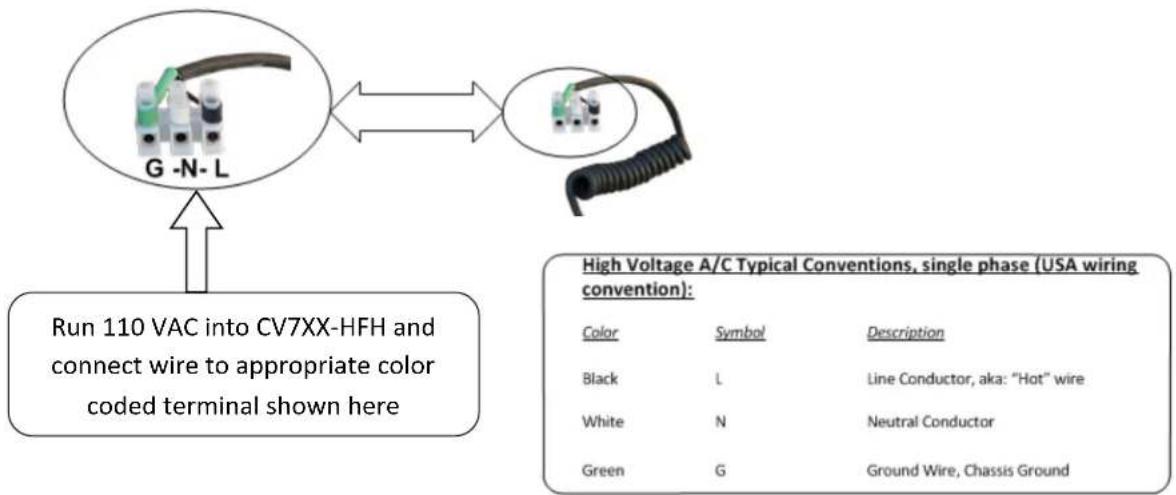
4.6 Connect line power to the Marshall electronics via the supplied terminal that is marked black (hot), white (neutral) and green (protective ground). This will provide power to the environmental controls and to the camera.

Warning:
- Only a cered electrician should make electrical connnecons. The above listed electrical connnecons may contain dangerous voltages. Only professionally trained electricians should interface with electrical components.
4.7 Test camera funconality to ensure proper operaon of the unit.
4.8 Close the lid of the enclosure and engage the 4 latches at the 3 unhinged edges. Install the four 10-32 buon head screws through the 4 corners of the lid to ensure adequate long term sealing.
4.9 If a Wall Mount is used, re-install the Wall Mount Cover onto the Wall Mount by using the four 6-32 at head screws.

5. Electrical Conduit Guidelines
The below information applies to the CV7XX-HFH and should be followed strictly.

For optimal performance, your CV7XX-HFH is designed to be air and water tight to eliminate any moisture, dust, and insect damage.
Use of Electrical Conduit, without sealing the entry ports/ inside wire feeds within Camera Enclosure, will subject the inside of your enclosure to possibility of condensation driven moisture, dust, and insect contamination hazards. Always follow local and national electrical codes for installation. Installation should always be done by a qualified service technician.

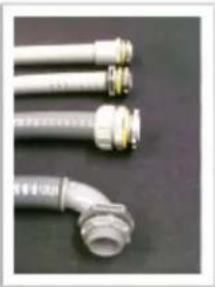
Marshall has provided each CV7XX-HFH with two Cable Gland Strain Relief seal ports that fully seal enclosure to IP68 rating, Waterproof, and Airtight Seal. (holes on enclosure are 7/8" diameter, ready for standard 1/2" I.D. NPT Connector, or PG13 fittings.)
However, we realize our customers are retrofitting these connectors with electrical conduit fittings. We acknowledge this industry customization and installation practice, and would like to make these suggestions for customers to properly install these products.
natural_image
Close-up of three metallic hoses with threaded connectors, no visible text or symbolsConduit Suggestions:
1) If wires, cabling, or conduit are coming at enclosure wire entry level, or above, always create a drip loop.
2) Please use only approved watertight electrical conduit and connectors, IP66 or better, with proper seals and fittings installed & fully seal.
3) Then, after all wire and cables are installed into enclosure, Seal wire entry ports inside of enclosure with any number of commercially available sealing putty's, Silicone Sealant, or similar products that are approved by applicable local and relevant electrical codes.
Marshall supplies two 1/2" diameter foam conduit plugs, that when installed, will assist in sealing off airflow in conduit feed thru, at cable entry inside of enclosure. Putty or sealant can be used in conjunction with these plugs, to assure a full seal inside enclosure cable feed entry.
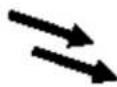
FORCES AT WORK IN ANY UNSEALED, CONDUIT WIRE FEED ENCLOSURE SYSTEM
WARM/MOIST IN UNSEALED CONDUIT MOVES THRU CONDUIT FEEDS EXPAND & CONTRACT WHEN CONDUIT HEATS & COOLS WITH OUTSIDE TEMPERATURES

EXPANDING HEATED AIR IS PUSHED INTO ENCLOSURE THEN COOLS & CONDENSES, HUMID AIR CONDENSES ON SURFACES INSIDE ENCLOSURE
Humid Air

Condensing to Water


natural_image
Close-up of a person's arm with a black tool near the mouth (no visible text or symbols)Arrows illustrate air flow within conduit when wire feed is not sealed within enclosure
SHOCK HAZARD!
hazard unsatisfactory in the CV7XX-HFH product, electronics due to air collecting in enclosure
Failure to fully seal enclosure wire and cabling entry ports may lead to shock product performance, a possibility of damage to electronics including camera damage, and damage to integrated driven moisture traveling thru the conduit, condensing and creating a short circuit hazard.

Electrical Putty


Silicone Sealants

Foam Sealants (use very sparingly)
Marshall does not endorse, nor has it evaluated any of these products. Test products first, and follow all manufacturers' instructions.
Follow all applicable electrical and building codes and installation guidelines. End user assumes liability for applicability of these products and their effectiveness and incurred liability in using these products.


IMPORTANT

VENT STOPPER PLUGS for CONDUIT
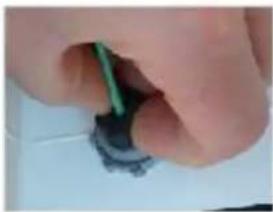
Foam Conduit Feed Plugs for 1/2" I.D. Conduit Fittings

Conduit Feeds Must Be Sealed for Safe and Satisfactory Product Performance.
Conduit Stopper Plugs prevent Humid Air exchange from venting thru external conduit into Marshall sealed enclosure, when conduit is used with Marshall enclosures. Vent Stopper Plugs eliminate Conduit driven condensation in surveillance camera enclosures, or other outdoor enclosure products.
QUICK INSTALLATION GUIDE

natural_image
Close-up of ceiling-mounted cables and electrical components (no visible text or symbols)1) Pull wires to final installed length.

natural_image
Close-up of hands installing a small electronic component on a white surface (no visible text or symbols)2) Open Vent Stop Plug and install over wire.
natural_image
Close-up of a hand holding a small electronic component with a green cable (no visible text or symbols)3) Pinch Plug to compress over wire, and insert into conduit feed mouth.

natural_image
Close-up of a blue curved cable with black connectors on a white surface (no text or symbols visible)4] Push plug into conduit mouth with finger tips till it flush with outside of fitting.

natural_image
Close-up of a hand holding a blue cable inserted into a white electronic device with a coiled cable (no visible text or symbols)5) Repeat steps 1-4 for any other conduit feeds as needed.

natural_image
Close-up of a hand holding a cylindrical electronic device with visible wiring and components (no readable text or symbols)6) To assure an airlight seal, caulk around wires and cables, coating entire plug surface with sealant.

natural_image
Five grayscale images showing mechanical connectors or fittings, no visible text or symbols.6. Mounng Detail
These are the moung dimensions for the CV7XX-HFH Enclosure. See Secon 2 for recommended steps to follow.

Warning: It is recommended to use the Mounng Plate or Wall Mount as a template for marking drill locaons. This helps account for fabricaon tolerances in the mounng plate.
6.1 Pendant Mount
![[19.750in] 501.65mm [.406in] 4 X Ø 10.32mm [15.500in] 393.70mm](/content/2026/06/1229528/images/4780d045feac0b42f96cbae86e7029b134b2175cd565ff066e1737e8b9c00b68.jpg)
6.2 Wall Mount
![[10.000] 254.00 [2.000] 50.80 [.406] 8 x Ø10.32 [5.500] 139.70](/content/2026/06/1229528/images/b956c342abb3c6184e5ed7d2387bc88a0a8292a3eba23182f1453b885582966f.jpg)

- Table of Contents
- PRODUCT INSTALLATION PRECAUTIONS – WARNINGS – ADDITIONAL INFORMATION......4
- PRODUCT INSTALLATION PRECAUTIONS – WARNINGS – ADDITIONAL INFORMATION
- (RETAIN THIS DOCUMENT)
- IMPORTANT SAFEGUARDS
- SERVICE
- UNPACKING
- Required Hardware
- Mount Installaon
- Pendant Mount
- Warnings:
- Wall Mount
- Pole Mount
- Enclosure Preparaon
- Enclosure Installaon
- Electrical Conduit Guidelines
- Conduit Suggestions:
- FORCES AT WORK IN ANY UNSEALED, CONDUIT WIRE FEED ENCLOSURE SYSTEM
- SHOCK HAZARD!
- IMPORTANT
- Conduit Feeds Must Be Sealed for Safe and Satisfactory Product Performance.
- Mounng Detail
- Pendant Mount
Brand : Marshall Electronics
Model : CV7XX-HFH
Category : Camera