
ErgoReach ED5 - Laptop stand Rocstor - Free user manual and instructions
Find the device manual for free ErgoReach ED5 Rocstor in PDF.


| Product Type | Laptop Stand / Monitor Arm |
| Brand | Rocstor |
| Model | ErgoReach ED5 |
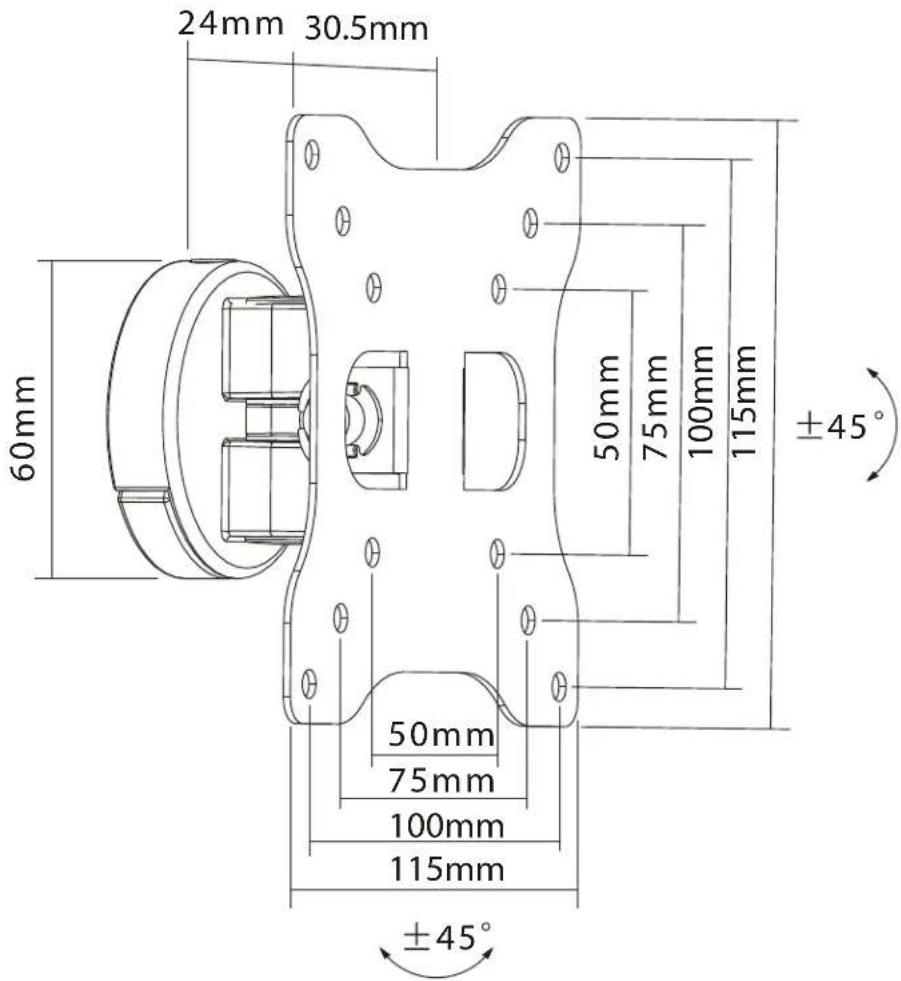
| VESA Compatibility | 50x50, 75x75, 100x100 mm |
| Maximum Screen Size | 27 inches |
| Weight Capacity | Up to 15 kg (33 lbs) |
| Material | Aluminum and Steel |
| Color | Black |
| Mounting Type | Clamp or Grommet (not specified) |
| Arm Type | Full motion articulating with gas spring |
| Tilt Range | -45° to +45° |
| Swivel Range | 180° |
| Rotation | 360° |
| Height Adjustment | Yes, gas spring assisted |
| Cable Management | Integrated clips (assumed) |
| Installation Tools | Stud finder, level, pen, drill, bit, Phillips screwdriver, wrench |
| Package Contents | 1x Arm (A), 1x Base (B), 1x Screw Set (C), 4x M4x14 screws, 4x M5x14 screws, 4x D5 washers |
| Warranty | 5-year limited factory warranty |
| Safety | Stored energy risk; never detach equipment unless arm is at highest position |
| Care & Cleaning | Wipe with mild detergent and soft cloth; avoid harsh chemicals |
| Repairability | No user-serviceable parts; contact Rocstor support |
| Compliance | VESA standard; RoHS (assumed) |
| Contact | Rocstor Corporate: 12979 Arroyo Ave, San Fernando, CA 91340, USA; support@Rocstor.com |
Frequently Asked Questions - ErgoReach ED5 Rocstor
User questions about ErgoReach ED5 Rocstor
0 question about this device. Answer the ones you know or ask your own.
Ask a new question about this device
Download the instructions for your Laptop stand in PDF format for free! Find your manual ErgoReach ED5 - Rocstor and take your electronic device back in hand. On this page are published all the documents necessary for the use of your device. ErgoReach ED5 by Rocstor.
USER MANUAL ErgoReach ED5 Rocstor
natural_image
Technical line drawing of a mechanical assembly with mounting holes and internal components (no text or symbols)User Manual
Y10N025-S1
VESA Compatible
50x50 75x75 100x100
27"
MAX
工

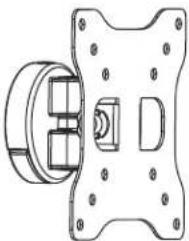
Package Content
 |  |  |
| 1xA | x1B | x1C |
 |  |  |
| M4x14 - x4M-A | M5x14 - x4M-B | D5 washer - x4M-C |
 |  | |
 | x2 |

The following tools are required for proper installation:


Stud Finder
Level Pen Drill and bit Phillips ScrewdriverWrench
1

natural_image
Technical illustration of a mechanical assembly showing a disassembled component before and after assembly, with no visible text or symbols.2-a




3

4

natural_image
Mechanical assembly diagram showing a disassembly of a mechanical component into a housing, with close-ups of parts labeled C and B (no text or symbols present)5


natural_image
Diagram showing a mechanical assembly transforming from a rectangular frame to a flat panel, with no visible text or symbols.6

natural_image
Technical diagram of a mechanical component with a 90-degree angle indicator (no text or symbols on the diagram itself)
+45°
-45°
Safety Seguridad Sécurité Sicurezza Sicherheit Veiligheid

EN
WARNING: Given the potential variability of mounting surface materials, it is crucial to verify that the mounting surface is sufficiently robust to support the installed product and equipment.
WARNING! Stored Energy Risk. The arm mechanism is under tension and will autonomously elevate when attached equipment is detached. Consequently, NEVER disengage equipment unless the arm has reached its utmost position! Neglecting this directive could lead to severe personal injury and/or equipment damage.
ES ¡ADVERTENCIA! Riesgo de Energía Almacenada. El mecanismo del brazo está bajo tensión y se elevará de forma autónoma cuando se retire el equipo conectado. Por lo tanto, NUNCA desactive el equipo a menos que el brazo haya alcanzado su posición más alta. Ignorar esta directiva podría resultar en lesiones personales graves y/o daños al equipo.
FR AVERTISSEMENT ! Risque lié à l'énergie stockée. Le mécanisme du bras est sous tension et s'élèvera automatiquement dès que l'équipement attaché sera détaché. Par conséquent, NE DÉTACHEZ JAMAIS l'équipement à moins que le bras n'ait atteint sa position la plus élevée ! Ne pas suivre cette directive pourrait entraîner de graves blessures personnelles et/ou des dommages à l'équipement.
DE WARNUNG! Gefahr durch gespeicherte Energie. Der Armmechanismus steht unter Spannung und wird sich autonom nach oben bewegen, sobald das angeschlossene Gerät entfernt wird. Daher NIEMALS das Gerät entfernen, es sei denn, der Arm hat seine höchste Position erreicht! Die Nichtbeachtung dieser Anweisung kann zu schweren persönlichen Verletzungen und/oder Geräteschäden führen.
JA 警告!蓄積されたエネルギーのリスク。アームメカニズムは張力の状態であり、取り付けられた機器が取り外されると自動的に上昇します。したがって、アームが最高位置に達するまで、機器を取り外さないでください!この指示に従わないと、重大な個人的なけがや機器の損傷の原因となる可能性があります。
ZH 警告!储存能量风险。手臂机构处于张力状态,一旦拆下附加设备,它将自动上升。因此,除非手臂达到最高位置,否则绝对不要拆卸设备!不遵守此指令可能导致严重的个人伤害和/或设备损坏。
NL WAARSCHUWING! Risico van opgeslagen energie. Het armmechanisme staat onder spanning en zal automatisch omhoog bewegen zodra het aangesloten apparatuur wordt verwijderd. Daarom NOOIT apparatuur verwijderen tenzij de arm in de hoogste positie staat! Het niet opvolgen van deze instructie kan leiden tot ernstig persoonlijk letsel en/of schade aan de apparatuur.
IT AVVERTENZA! Rischio da Energia Immagazzinata. Il meccanismo del braccio è sotto tensione e si alzerà automaticamente non appena verrà staccata l'attrezzatura collegata. Pertanto, NON SCOLLEGARE MAI l'attrezzatura a meno che il braccio non sia nella posizione più alta! La mancata osservanza di questa direttiva potrebbe comportare gravi lesioni personali e/o danni all'attrezzatura.
TR UYARI! Depolanan Enerji Riski. Kol mekanizması gerilim altındadır ve bağlı ekipman çıkarıldığında otomatik olarak yukarı çıkacaktır. Bu nedenle, kol en yüksek pozisyonuna gelene kadar asla ekipmanı çıkarmayın! Bu talimata uymamak kişisel yaralanmalara ve/veya ekipman hasarına neden olabilir.
Safety Seguridad Sécurité Sicurezza Sicherheit Veiligheid

EN
CAUTION: Ensure that the bolt is perfectly centered in the hole. To securely attach the arm and prevent equipment damage, the plate must make contact with the underside of the desk on both sides of the hole.
Note: For support and warranty information, when contacting Rocstor customer service, please reference the serial number.
natural_image
Mechanical component with circular aperture and mounting bracket, no visible text or symbols on the main body
Five-Year Factory Warranty
Rocstor provides a Limited Factory Warranty which applies to products you have purchased for commercial Household use in the ordinary course of your business.
Terms of warranty
Rocstor warrants its ErgoReach and ErgoCenter product series to be free from defects in materials and workmanship for a period of five years from the date of purchase. Rocstor's obligation under this warranty coverage is limited to repairing or replacing, at its sole discretion, any such defective products. This warranty does not apply to equipment that has been damaged by accident, negligence, or misapplication or has been altered or modified in any way. In the event Rocstor repairs or provide a replacement of a defective product or part, the warranty does not extend the original warranty period. Rocstor reserves the right to repair or replace any parts under warranty as new or factory re manufactured.
Non-transferable warranty
This warranty extends only to the original purchaser who must have properly registered the product. The product may be registered at the Rocstor Web site, https://rocstor.com/customer-support/warranty registration.
Exclusions
If Rocstor tests or examines the alleged defect in the product and finds that the damages or defects do not exist or were caused by a third party or an end user's misuse, improper installation or testing, or negligence, then Rocstor shall not be liable under the warranty. Furthermore, unauthorized attempts to repair or modify the product by wrong or inadequate electrical connection or voltage, inadequate or inappropriate site operation conditions, repair, installation corrosive area or atmosphere, a change in location or operating conditions or use, repair by non-Rocstor designated personnel, exposure to the elements, fire, Acts of God, theft, or equipment installation not recommended or contrary to Rocstor's specifications or recommendations. Warranties will be void and Rocstor will not be liable if the product serial number is tampered with, altered, removed, defaced or any other cause beyond the range of intended use.
Contact Information
Corporate Headquarters
12979 Arroyo Ave
San Fernando, CA 91340 - USA
Office: +1 (818) 727-7000
Email: info@Rocstor.com
Technical Support / RMA
Hours: 9:00 am - 5:00 pm PST
Mon - Fri (excluding holidays)
Tell: +1 (818) 727-7000 (Domestic and Internationals)
Email: support@Rocstor.com
Sales Info
Hours: 8:00 am - 5:00 pm PST
Mon - Fri (excluding holidays)
Tell: +1 (818) 727-7000 (Domestic and Internationals)
Email: support@Rocstor.com
Corporate, Government and Academic Customers
Our Corporate Sales Team's goal is to help our U.S.A. and Canadian customers find a storage solution that best serves their needs. We will help you determine your best purchasing options. For more information please contact the appropriate department below or call us at +1 (818) 727-7000.
General sales information: sales@Rocstor.com
Corporate sales information: corporate_sales@Rocstor.com
Educational sales information: academic_sales@Rocstor.com
Federal, State & Local government sales information: government_sales@Rocstor.com
Resellers/Business Development/OEM Partners
All Channel National and International Resellers, VARs, Consultants ...
contact Rocstor Channel Sales: call: +1 (818) 727-7000
Email: reseller_info@Rocstor.com


- Package Content
- Safety Seguridad Sécurité Sicurezza Sicherheit Veiligheid
- Note: For support and warranty information, when contacting Rocstor customer service, please reference the serial number.
- Five-Year Factory Warranty
- Terms of warranty
- Non-transferable warranty
- Exclusions
- Contact Information
- Corporate Headquarters
- Technical Support / RMA
- Sales Info
- Corporate, Government and Academic Customers
- Resellers/Business Development/OEM Partners
Brand : Rocstor
Model : ErgoReach ED5
Category : Laptop stand