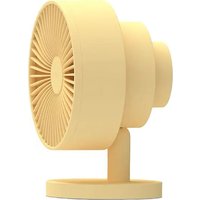
FC07W3 - Fan Windmill - Free user manual and instructions
Find the device manual for free FC07W3 Windmill in PDF.


| Product Type | Air Circulator / Table Fan |
| Brand | Windmill |
| Model | FC07W3 |
| Speeds | 5 (Whisper, Low, Medium, High, Boost) |
| Control Methods | Button on unit, remote control, Windmill Air app (Wi-Fi) |
| Wi-Fi Connectivity | 2.4 GHz; Works with Amazon Alexa and Google Home |
| Power Supply | 120 V AC, 60 Hz |
| Plug Type | Polarized plug |
| Overload Protection | Built-in fuse in plug |
| Cleaning | Unplug, remove front grille by rotating counterclockwise, clean blades with damp cloth |
| Safety Features | Polarized plug, fuse overload protection, FCC compliant |
| Warranty | 5-year limited warranty |
| FCC ID | Contains FCC ID: 2AC7Z-ESP32WROOM32E |
| Year-Round Use | Can be used for cooling in summer and circulating warm air in winter |
| Recommended Use | Indoor, on flat dry surface |
Frequently Asked Questions - FC07W3 Windmill
User questions about FC07W3 Windmill
0 question about this device. Answer the ones you know or ask your own.
Ask a new question about this device
Download the instructions for your Fan in PDF format for free! Find your manual FC07W3 - Windmill and take your electronic device back in hand. On this page are published all the documents necessary for the use of your device. FC07W3 by Windmill.
USER MANUAL FC07W3 Windmill
The Windmill Fan Owner's Guide
Welcome to the Breezy Life
We started Windmill to help you feel more comfortable at home. We're a small, family-run business, and your support means the world!
Any questions or issues? We'll get you squared away.
windmillair.com/support
support@windmillair.com
Thanks for choosing Windmill, Mike & Team

Did you know?
1 You can raise your thermostat several degrees just by using your new fan. Save money, use less energy!
2 Fans aren't just for the hot months! You can use your fan to circulate warm air in your room during the winter.
Table of contents
1 Let's chat safety 3
2 FCC statement 6
3 Get to know your fan 7
a. Fan 101 7
b. Using the fan 8
c. Connecting the fan to Wi-Fi 9
d. Get the most from your fan 10
4 Cleaning and maintenance 11
5 Troubleshooting 12
6 Warranty 13
Let's chat safety
READ THESE INSTRUCTIONS AND THE WHOLE MANUAL BEFORE USING YOUR FAN
(You'll probably learn something useful!)
AND SAVE IT PLEASE
(You might actually refer to it later...)
A few highlights:
- Unplug the fan before cleaning or maintenance so you don't get shocked.
- Don't cover the front or back fan grille or you might damage the fan.
- Don't use the fan near flames or combustible materials—it could spread fire.
- Use the fan only as described in this manual. Any other use could cause fire, electrical shock, or injury.
Operational safety
1 Place the fan on a flat, dry surface before use.
2 Don't immerse the fan in water or other liquids. Don't let water get inside the fan. If you need to immerse the grille or fan blades for cleaning, remove them first.
3 Don't use the fan on wet surfaces or near water (bathtub, shower, laundry, swimming pool etc). Don't use it outdoors or expose it to the weather or elements.
4 Don't use the fan unless it's fully assembled.
5 Don't insert fingers, pencils, or other objects into the grille under any circumstances.
6 Don't dismantle, repair, or modify the fan. Don't attempt to service the fan yourself or substitute your own replacement parts. Contact customer support at windmillair.com/support.
7 Don't use the fan close to curtains.
8 Don't hang objects from the fan or cover the grille.
9 Don't operate the fan in overly humid, high-temperature, or dusty environments, or near where acid or alkali is stored.
10 Fans should never blow directly on infants, the elderly, or medical patients for long periods of time.
11 Supervision is required during the installation, operation, cleaning and maintenance of this product by children 12 years of age and younger and anyone with reduced physical, sensory or mental capabilities.
Electrical safety
1 Make sure the voltage of your electricity supply is 120 V.
2 Always unplug before cleaning or leaving the appliance unused for a long time. Keep your hands dry when plugging/unplugging.
3 Don't use the fan if the cord or plug are damaged. Discard the fan or return it to an authorized service facility for examination and/or repair.
4 Don't run the cord under carpeting or other coverings, under furniture or appliances, or in places where it may be tripped over.
5 Don't use the fan with any solid-state speed control device (e.g. don't plug it into an outlet controlled by a dimmer switch).
6 The fan employs overload protection (the fuse in the plug). A blown fuse indicates an overload or short circuit. If the fuse blows, unplug the fan and contact customer support immediately at windmillair.com/support.
7 This appliance has a polarized plug (one blade is wider than the other). To reduce the risk of electric shock, the plug is intended to fit in a polarized outlet only one way. If the plug doesn't fit in fully, reverse the plug. If it still doesn't fit, contact a qualified electrician. Don't attempt to defeat this safety feature.
8 Don't use the fan with an outlet that has a loose fit between the plug and the outlet, as this may cause overheating and distortion of the plug. Contact a qualified electrician to replace loose or worn outlets.
9 Don't use replacement parts that have not been recommended by the manufacturer (e.g. parts made at home using a 3D printer).
FCC statement
Federal Communications Commission (FCC) Interference Statement:
This equipment has been tested and found to comply with the limits for a Class B digital device, pursuant to part 15 of the FCC Rules. These limits are designed to provide reasonable protection against harmful interference in a residential environment. This equipment generates, uses, and can radiate radio frequency energy and, if not installed and used in accordance with the instructions, may cause harmful interference to radio communications. However, there is no guarantee that interference will not occur in a particular installation. If this equipment does cause harmful interference to radio or television reception, which can be determined by tuning the device off and on, the user is encouraged to try to correct the interference by one or more of the following measures:
- Reorient or relocate the receiving antenna.
- Increase the separation between the device and receiver.
- Connect the equipment into an outlet other than the one used for the receiver.
- Consult the dealer or an experienced radio/TV technician for assistance.
This device complies with Part 15 of the FCC Rules. Operation is subject to the following two conditions: (1) This device may not cause harmful interference, and (2) This device must accept any interference received, including interference that may cause undesired operation.
FCC Caution:
Any changes or modifications not expressly approved by the party responsible for compliance could void the user's authority to operate the equipment.
Host Device Labeling:
This device includes the following module.
Contains FCC ID: 2AC7Z-ESP32WROOM32E

RF Exposure Statement:
This equipment complies with FCC radiation exposure limits set forth for an uncontrolled environment. This equipment should be installed and operated with minimum 20 cm between the radiator and your body. This transmitter must not be collocated or operating in conjunction with any other antenna or transmitter unless authorized to do so by the FCC.
Fan 101

Using the fan
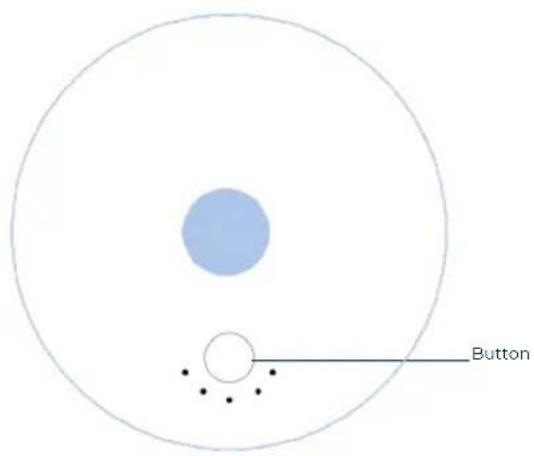
With the button
- Press the button for 1 second to turn the fan on or off.
- Tap the button to change speed. (Once you get to 5, tap the button again to cycle back to 1).
- Hold the button for 5 seconds for Wi-Fi pairing.
With the remote control
- The remote has 3 buttons: On / off, increase speed, and decrease speed. Easy peasy.

With the app
• We're glad you asked. Read on...

Did you know?
An air circulator is just a fancy term for a powerful fan that moves air around a room. You can use this as a personal/table fan on levels Whisper (1), Low (2), and Medium (3) or as an air circulator on levels High (4) and Boost (5).
Connecting the fan to Wi-Fi

Download the Windmill Air app to control the fan from your phone. Scan the QR code with your phone's camera, or go to the app store and search for "Windmill Air".

GET IT ON
Google Play

Download on the
App Store
If you ever accidentally enter Wi-Fi pairing mode, don't worry. Just hold the button for another 5 seconds to exit.
Once you connect your fan to Wi-Fi, you can control it with Amazon Alexa and Google Home.
1 Download the Windmill Air app for iOS or Android.
2 Sign up in the app: enter your email address and then check your inbox for the activation link.
3 Tap the upper right corner of the app to add a new device.
4 Follow the instructions to add the device. When instructed, hold the fan button for 5 seconds to make the LEDs blink. (It will switch on/off after 1 second. Keep holding the button until the lights start blinking).
5 The lights on the fan will dance when you finish pairing. (Isn't that worth celebrating?! You can dance along if you'd like...).
Get the most from your fan
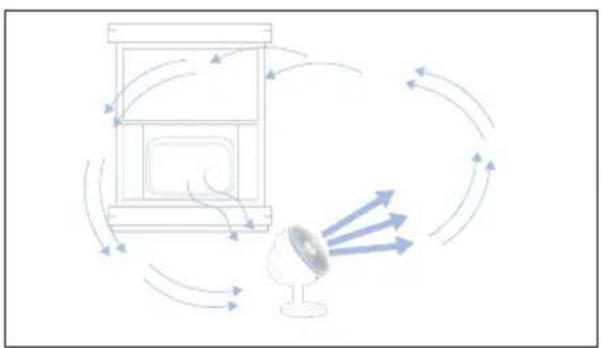
Use your fan all year long!
natural_image
Diagram showing airflow around a lamp and a cabinet (no text or symbols)Summer:
Turn on your fan to use less AC, and blow cold air from the AC around your home.
Pro tip: You can raise your thermostat several degrees just by turning on the fan. Save money, use less energy.

natural_image
Diagram showing airflow around a globe with directional arrows indicating movement (no text or symbols)Fall / Spring:
Bring fresh air inside for greater comfort and cleaner air.

flowchart
graph TD
    A["Light Lamp"] --> B["Hot Exchanger"]
    B --> C["Return to Lamp"]
    C --> D["Return to Heat Exchanger"]
    D --> E["Return to Lamp"]
    E --> F["Return to Heat Exchanger"]
    F --> G["Return to Lamp"]
    G --> H["Return to Heat Exchanger"]
    H --> I["Return to Lamp"]
    I --> J["Return to Heat Exchanger"]
    J --> K["Return to Lamp"]
    K --> L["Return to Heat Exchanger"]
    L --> M["Return to Lamp"]
    M --> N["Return to Heat Exchanger"]
    N --> O["Return to Lamp"]
    O --> P["Return to Heat Exchanger"]
    P --> Q["Return to Lamp"]
    Q --> R["Return to Heat Exchanger"]
    R --> S["Return to Lamp"]
    S --> T["Return to Heat Exchanger"]
    T --> U["Return to Lamp"]
    U --> V["Return to Heat Exchanger"]
    V --> W["Return to Lamp"]
    W --> X["Return to Heat Exchanger"]
    X --> Y["Return to Lamp"]
    Y --> Z["Return to Heat Exchanger"]
Winter:
Circulate warm air from your heaters for more even heating.
Cleaning and maintenance
Important
• Always unplug the fan (and any other appliance) before fiddling with it.
- Don't get water inside the fan-use a damp cloth on the main part of the fan.
- Don't use any chemical agents when cleaning the fan blades - just water, and if you prefer, mild dish soap.
Cleaning the fan What you'll need
Who wants dust on their fan blades? No one, that's who. That's why we made our fan easy to open and clean.
Phillips head screwdriver (required) Pliers (optional)
1
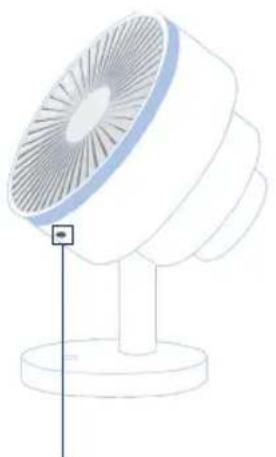
Tilt the fan up to better access the screw under the front grille, and unscrew the screw.
natural_image
Line drawing of a standard office lamp with a vertical indicator (no text or symbols)Why is there a screw? Safety regulations require it.
2
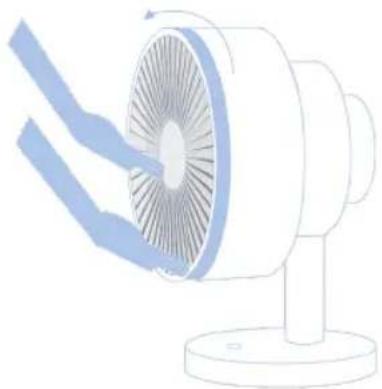
To remove the front grille, use both hands to rotate it slightly counterclockwise, then pull it toward you.
natural_image
Illustration of a white cylindrical fan with blue blades, mounted on a base (no text or symbols)3
You can now clean the blades with a damp cloth. If you want to remove the blades, hold the center nut with pliers, and rotate the blades clockwise until the nut comes off.
Troubleshooting
| Issue | Causes and solutions |
| Fan won't turn on | Hold the button for 1 second to turn the fan on/off. Tapping only changes the fan speed.Is it plugged in? (We know, we know. But we have to ask.).The outlet is worn or damaged. Try another outlet or contact a qualified electrician.The outlet is the wrong voltage. Make sure it's 120 V.Under certain conditions, it is possible for a Ground Fault Circuit Interrupter outlet (the kind with the "Test" and "Reset" buttons on it) to trip when you change fan speeds. If so, change to a non-GFCI outlet. Contact a qualified electrician to check the GFCI outlet-it might be weak or defective.The plug fuse has blown or the fan needs repair. First, unplug the fan. Then, contact customer support atsupport@windmillair.com. |
| Fan is shaky or wobbly | Place the fan on a flat, dry, stable surface. |
| Airflow is weak | Increase the speed. Try number 5: Boost mode!Check the front and back of the fan. Is there any blockage? If so, remove it and clean the fan if needed.Make sure the fan is pointed directly at you. |
| Fan is making too much noise | Place the fan on a flat, level surface.Be sure not to insert anything into the fan. |
If that didn't solve the problem, please contact customer support (chat or email) at windmillair.com/support
Warranty
The Windmill Fan comes with a 5-year limited warranty.
To register your fan or learn about how to make a warranty claim, go to windmillair.com/support.

natural_image
White 3D render of a modern fan with radial blades, set against a cloudy sky background (no text or symbols)


- The Windmill Fan Owner's Guide
- Welcome to the Breezy Life
- Did you know?
- Table of contents
- Let's chat safety
- READ THESE INSTRUCTIONS AND THE WHOLE MANUAL BEFORE USING YOUR FAN
- AND SAVE IT PLEASE
- A few highlights:
- Operational safety
- Electrical safety
- FCC statement
- Federal Communications Commission (FCC) Interference Statement:
- FCC Caution:
- Host Device Labeling:
- RF Exposure Statement:
- Fan 101
- Using the fan
- With the button
- With the remote control
- With the app
- Connecting the fan to Wi-Fi
- Get the most from your fan
- Summer:
- Fall / Spring:
- Winter:
- Cleaning and maintenance
- Important
- Cleaning the fan What you'll need
- Troubleshooting
- Warranty
- The Windmill Fan comes with a 5-year limited warranty.
Brand : Windmill
Model : FC07W3
Category : Fan