
PCI-1733-BE - Digital Input Card Advantech - Free user manual and instructions
Find the device manual for free PCI-1733-BE Advantech in PDF.


| Product Type | 32-channel Isolated Digital Input Card for PCI Bus |
| Dimensions | 175 mm x 100 mm (6.9" x 3.9") |
| Power Consumption | Typical: +5V @ 200 mA, +12V @ 50 mA; Max: +5V @ 350 mA |
| Number of Digital Input Channels | 32 (bi-directional) |
| Optical Isolation | 2500 VDC |
| Opto-isolator Response Time | 100 μs |
| Over-voltage Protection | 70 VDC |
| Input Voltage Range (VIH) | 5 to 30 VDC |
| Input Current (typical at 24VDC) | 8.2 mA |
| I/O Connector | 37-pin D-Sub female |
| Operating Temperature | 0 to 60°C (32 to 140°F) |
| Storage Temperature | -20 to 70°C (-4 to 158°F) |
| Relative Humidity | 5 to 95% RH non-condensing |
| Certification | CE, FCC Class A |
| Software Installation | Install driver from DVD, then install hardware, configure via utility |
| Safety Precaution | Turn off computer before installation; use shielded cables for CE compliance |
| Maintenance | Keep connectors clean; no user-serviceable parts inside |
Frequently Asked Questions - PCI-1733-BE Advantech
User questions about PCI-1733-BE Advantech
0 question about this device. Answer the ones you know or ask your own.
Ask a new question about this device
Download the instructions for your Digital Input Card in PDF format for free! Find your manual PCI-1733-BE - Advantech and take your electronic device back in hand. On this page are published all the documents necessary for the use of your device. PCI-1733-BE by Advantech.
USER MANUAL PCI-1733-BE Advantech
32-channel Isolated Digital Input Card
Packing List
Before installation, please make sure that you have received the following:
PCI-1733 card
- Driver CD
■ Quick Start User Manual
If anything is missing or damaged, contact your distributor or sales representative immediately.
User Manual
For more detailed information on this product, please refer to the PCI-1730_1733_1734 User Manual on the CD-ROM (PDF format).
CD:\Documents\Hardware Manuals\PCI\PCI-1730
Declaration of Conformity
FCC Class A
This equipment has been tested and found to comply with the limits for a Class A digital device, pursuant to part 15 of the FCC Rules. These limits are designed to provide reasonable protection against harmful interference when the equipment is operated in a commercial environment. This equipment generates, uses, and can radiate radio frequency energy and, if not installed and used in accordance with the instruction manual, may cause harmful interference to radio communications. Operation of this equipment in a residential area is likely to cause interference in which case the user is required to correct interference at his own expense.
CE
This product has passed the CE test for environmental specifications when shielded cables are used for external wiring. We recommend the use of shielded cables. This kind of cable is available from Advantech. Please contact your local supplier for ordering information.
| Notes | |
| For more information on this and other Advantech products, please visit our websites at: | |
| http://www.advantech.com | |
| For technical support and service: | |
| http://www.advantech.com/support/ | |
| This startup manual is for PCI-1733. | |
| Part No: 2003173301 | 2nd Edition |
| June 2015 | |
Overview
The Advantech PCI-1733 is a 32-channel isolated digital input card for the PCI bus. For easy monitoring, each isolated digital input channel is equipped with one red LED, and each isolated digital output channel is equipped with one green LED to show its ON/OFF status. The PCI-1733's isolated digital input channels are ideal for digital input in noisy environments or with floating potentials. The PCI-1733 provides specific functions for different user requirements.
Specifications
Isolated Digital Input
| Number of Channels 32 (bi-directional) | |
| Optical Isolation 2,500 VDC | |
| Opto-isolator response time | 100 μs |
| Over-voltage Protection 70 VDC | |
| Input Voltage | VIH (max.) 30 VDC |
| VIH (min.) 5 VDC | |
| VIL (max.) 2 VDC | |
| Input Current | 5 VDC 1.4 mA (typical) |
| 12 VDC 3.9 mA (typical) | |
| 24 VDC 8.2 mA (typical) | |
| 30 VDC 10.3 mA (typical) | |
General
| I/O Connector Type | 37-pin D-Sub female | ||
| Dimensions 175 mm | x 100 mm (6.9" x 3.9") | ||
| Power Consump-tion | Typical +5 V @ 200 mA+12 V @ 50 mA | ||
| Max. +5 V @ 350 mA | |||
| Temperature | Operation | 0 ~ +60°C (32~ 140°F )(refer to IEC 68 -2 - 1 ,2) | |
| Storage | -20 ~ +70°C (-4 ~158°F) | ||
| Relative Humidity | 5 ~ 95% RH non-condensing(refer to IEC 60068-2-3) | ||
| Certification | CE/FCC | ||
Software Installation

flowchart
graph TD
    A["Install Driver from DVD-ROM and turn off computer"] --> B["Install hardware and turn on computer"]
    B --> C["Use driver utility to configure hardware"]
    C --> D["Use test utility to test hardware"]
    D --> E["Read example & driver manual"]
    E --> F["Start to write your own application"]
Hardware Installation
- Turn off your computer and unplug the power cord and cables. TURN OFF your computer before installing or removing any components on the computer.
- Remove the cover of your computer.
- Remove the slot cover on the back panel of your computer.
- Touch the metal surface of your computer to neutralize any static electricity that may be on your body.
- Insert the PCI-1733 card into a PCI slot. Hold the card only by its edges and carefully align it with the slot. Insert the card firmly into place. Use of excessive force must be avoided, otherwise the card might be damaged.
- Fasten the bracket of the PCI card on the back panel rail of the computer with screws.
- Connect appropriate accessories (37-pin cable, wiring terminals, etc. if necessary) to the PCI card.
- Replace the cover of your computer chassis. Reconnect the cables you removed in step 2.
- Plug in the power cord and turn on the computer.
Switch and Jumper Settings
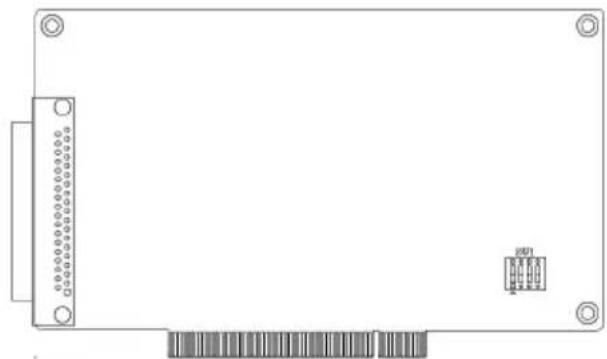
The following figure shows a card connector, jumper and switch locations
natural_image
Front view of a rectangular electronic device with a grid of pins and a small connector pin (no text or symbols visible)Board ID Settings
| ID3 ID2 ID1 ID0 Board ID | |||
| 1 1 1 1 0 | |||
| 1 1 1 0 1 | |||
| 1 1 0 1 2 | |||
| 1 1 0 0 3 | |||
| 1 0 1 1 4 | |||
| 1 0 1 0 5 | |||
| 1 0 0 1 6 | |||
| 1 0 0 0 7 | |||
| 0 1 1 1 8 | |||
| 0 1 1 0 9 | |||
| 0 1 0 1 1 0 | |||
| 0 1 0 0 1 1 | |||
| 0 0 1 1 1 2 | |||
| 0 0 1 0 1 3 | |||
| 0 0 0 1 1 4 | |||
| 0 0 0 0 1 5 | |||
Note: On: 1, Off: 0
PIN Assignments
| IDI 0 | 1 | ||
| IDI 2 | 2 | 20 | IDI 1 |
| IDI 4 | 3 | 21 | IDI 3 |
| IDI 6 | 4 | 22 | IDI 5 |
| ECOM 0 | 5 | 23 | IDI 7 |
| IDI 9 | 6 | 24 | IDI 8 |
| IDI 11 | 7 | 25 | IDI 10 |
| IDI 13 | 8 | 26 | IDI 12 |
| IDI 15 | 9 | 27 | IDI 14 |
| IDI 16 | 10 | 28 | ECOM 1 |
| IDI 18 | 11 | 29 | IDI 17 |
| IDI 20 | 12 | 30 | IDI 19 |
| IDI 22 | 13 | 31 | IDI 21 |
| ECOM 2 | 14 | 32 | IDI 23 |
| IDI 25 | 15 | 33 | IDI 24 |
| IDI 27 | 16 | 34 | IDI 26 |
| IDI 29 | 17 | 35 | IDI 28 |
| IDI 31 | 18 | 36 | IDI 30 |
| EGND | 19 | 37 | ECOM 3 |
Connection
Isolated Digital Input
Each of the 16 isolated digital input channels accept voltages from 5 to 30 V. Every eight input channels share one external common. (Channels 0 \~ 7 use ECOM0. Channels 8 \~ 15 use ECOM1.) The following figure shows how to connect an external input.

flowchart
graph TD
    A["External"] --> B["Wet contact"]
    B --> C["IDI0"]
    C --> D["Internal"]
    D --> E["Isolated Circuit"]
    F["Dry Contact"] --> G["IDI1"]
    G --> H["Internal"]
    H --> I["EGND"]
Brand : Advantech
Model : PCI-1733-BE
Category : Digital Input Card