
IDAQ-841-AE - Industrial Data Acquisition Module Advantech - Free user manual and instructions
Find the device manual for free IDAQ-841-AE Advantech in PDF.


| Product Type | Industrial Data Acquisition Module |
| Model | IDAQ-841-AE |
| Channels | 8 differential analog inputs |
| ADC Resolution | 16 bits |
| Maximum Sampling Rate | 1 MS/s per channel (total 4 MS/s) |
| Input Ranges | ±20 V, ±12.5 V, ±10 V, ±5 V, ±20 mA (software selectable per channel) |
| Input Coupling | DC only |
| Input Impedance | 1 MΩ (voltage), 500 Ω (current) |
| Over-Voltage Protection | ±30 V |
| Isolation Protection | 600 V RMS |
| Analog Low-Pass Filter | 22.5 kHz or 250 kHz, software selectable per channel |
| Acquisition Types | Instant and buffered (with internal FIFO of 8192 samples) |
| Analog Trigger | 2 channels (start/stop), threshold and hysteresis programmable |
| Power Consumption | 650 mW typical, 900 mW maximum (from iDAQ chassis) |
| Dimensions (W x H x D) | 100 x 80 x 25 mm (3.94 x 3.15 x 0.98 in) |
| Weight | 176 g |
| Operating Temperature | -20 °C to 60 °C (-4 °F to 140 °F) |
| Storage Temperature | -40 °C to 70 °C (-40 °F to 158 °F) |
| Compliance | CE, FCC Class A |
| Warranty | 2 years |
| Included Accessories | 2 x 10-pin terminal block, startup manual |
| Hot-Swappable | Yes (when disabled in software) |
| Software Support | DAQNavi SDK, Navigator utility, DAQNavi MCM |
| Cleaning | Disconnect power; use a damp cloth only |
| Repair | Only by qualified service personnel |
Frequently Asked Questions - IDAQ-841-AE Advantech
User questions about IDAQ-841-AE Advantech
0 question about this device. Answer the ones you know or ask your own.
Ask a new question about this device
Download the instructions for your Industrial Data Acquisition Module in PDF format for free! Find your manual IDAQ-841-AE - Advantech and take your electronic device back in hand. On this page are published all the documents necessary for the use of your device. IDAQ-841-AE by Advantech.
USER MANUAL IDAQ-841-AE Advantech
natural_image
Technical line drawing of an electronic circuit board with two components (no text or symbols)iDAQ-801/iDAQ-841
DSA and Simultaneous Industrial DAQ Modules
Copyright
The documentation and the software included with this product are copyrighted 2022 by Advantech Co., Ltd. All rights are reserved. Advantech Co., Ltd. reserves the right to make improvements in the products described in this manual at any time without notice. No part of this manual may be reproduced, copied, translated, or transmitted in any form or by any means without the prior written permission of Advantech Co., Ltd. The information provided in this manual is intended to be accurate and reliable. However, Advantech Co., Ltd. assumes no responsibility for its use, nor for any infringements of the rights of third parties that may result from its use.
Acknowledgments
Intel and Pentium are trademarks of Intel Corporation.
Microsoft Windows and MS-DOS are registered trademarks of Microsoft Corp.
All other product names or trademarks are properties of their respective owners.
Product Warranty (2 years)
Advantech warrants the original purchaser that each of its products will be free from defects in materials and workmanship for two years from the date of purchase.
This warranty does not apply to any products that have been repaired or altered by persons other than repair personnel authorized by Advantech, or products that have been subject to misuse, abuse, accident, or improper installation. Advantech assumes no liability under the terms of this warranty as a consequence of such events.
Because of Advantech's high quality-control standards and rigorous testing, most customers never need to use our repair service. If an Advantech product is defective, it will be repaired or replaced free of charge during the warranty period. For out-of-warranty repairs, customers will be billed according to the cost of replacement materials, service time, and freight. Please consult your dealer for more details.
If you believe your product is defective, follow the steps outlined below.
-
Collect all the information about the problem encountered. (For example, CPU speed, Advantech products used, other hardware and software used, etc.) Note anything abnormal and list any onscreen messages displayed when the problem occurs.
-
Call your dealer and describe the problem. Please have your manual, product, and any helpful information readily available.
-
If your product is diagnosed as defective, obtain a return merchandise authorization (RMA) number from your dealer. This allows us to process your return more quickly.
-
Carefully pack the defective product, a completed Repair and Replacement Order Card, and a proof of purchase date (such as a photocopy of your sales receipt) into a shippable container. Products returned without a proof of purchase date are not eligible for warranty service.
-
Write the RMA number clearly on the outside of the package and ship the package prepaid to your dealer.
Part No. 2001080100 Edition 1
Printed in China January 2022
Declaration of Conformity
CE
This product has passed the CE test for environmental specifications when shielded cables are used for external wiring. We recommend the use of shielded cables. This type of cable is available from Advantech. Please contact your local supplier for ordering information.
Test conditions for passing also include the equipment being operated within an industrial enclosure. In order to protect the product from damage caused by electrostatic discharge (ESD) and EMI leakage, we strongly recommend the use of CE-compliant industrial enclosure products.
FCC Class A
This equipment has been tested and found to comply with the limits for a Class A digital device, pursuant to part 15 of the FCC Rules. These limits are designed to provide reasonable protection against harmful interference when the equipment is operated in a commercial environment. This equipment generates, uses, and can radiate radio frequency energy and, if not installed and used in accordance with the instruction manual, may cause harmful interference to radio communications. Operation of this equipment in a residential area is likely to cause harmful interference. In this event, users are required to correct the interference at their own expense.
Technical Support and Assistance
- Visit the Advantech website at www.advantech.com/support to obtain the latest product information.
- Contact your distributor, sales representative, or Advantech's customer service center for technical support if you need additional assistance. Please have the following information ready before calling:
– Product name and serial number
– Description of your peripheral attachments
– Description of your software (operating system, version, application software, etc.)
– A complete description of the problem
– The exact wording of any error messages
Warnings, Cautions, and Notes
Warning! Warnings indicate conditions that if not observed can cause personal injury!

Caution! Cautions are included to help prevent hardware damage and data losses. For example,

"Batteries are at risk of exploding if incorrectly installed. Do not attempt to recharge, force open, or heat the battery. Replace the battery only with the same or equivalent type as recommended by the manufacturer. Discard used batteries according to the manufacturer's instructions."
Note! Notes provide additional optional information.

Document Feedback
To assist us with improving this manual, we welcome all comments and constructive criticism. Please send all such feedback in writing to support@advantech.com.
Packing List
Before system installation, check that the items listed below are included and in good condition. If any item does not accord with the list, contact your dealer immediately.
iDAQ-801
iDAQ-801 x 1
■ Startup Manual x 1
iDAQ-841
iDAQ-841 x 1
■ 10-pin terminal block x 2
■ Startup Manual x 1
Safety Instructions
- Read these safety instructions carefully.
- Retain this user manual for future reference.
- Disconnect the equipment from all power outlets before cleaning. Use only a damp cloth for cleaning. Do not use liquid or spray detergents.
-
For pluggable equipment, the power outlet socket must be located near the equipment and easily accessible.
-
Protect the equipment from humidity.
-
Place the equipment on a reliable surface during installation. Dropping or letting the equipment fall may cause damage.
-
The openings on the enclosure are for air convection. Protect the equipment from overheating. Do not cover the openings.
-
Ensure that the voltage of the power source is correct before connecting the equipment to a power outlet.
-
Position the power cord away from high-traffic areas. Do not place anything over the power cord.
-
All cautions and warnings on the equipment should be noted.
-
If the equipment is not used for a long time, disconnect it from the power source to avoid damage from transient overvoltage.
-
Never pour liquid into an opening. This may cause fire or electrical shock.
-
Never open the equipment. For safety reasons, the equipment should be opened only by qualified service personnel.
-
If any of the following occurs, have the equipment checked by service personnel:
– The power cord or plug is damaged.
– Liquid has penetrated the equipment.
– The equipment has been exposed to moisture.
- The equipment is malfunctioning, or does not operate according to the user manual.
– The equipment has been dropped and damaged.
– The equipment show obvious signs of breakage.
-
Do not leave the equipment in an environment with a storage temperature of below -20 °C (-4 °F) or above 60 °C (140 °F) as this may damage the components. The equipment should be kept in a controlled environment.
-
CAUTION: Batteries are at risk of exploding if incorrectly replaced. Replace only with the same or equivalent type as recommended by the manufacturer. Discard used batteries according to the manufacturer's instructions.
-
In accordance with IEC 704-1:1982 specifications, the sound pressure level at the operator's position does not exceed 70 dB (A).
DISCLAIMER: These instructions are provided according to IEC 704-1 standards. Advantech disclaims all responsibility for the accuracy of any statements contained herein.
Safety Precautions - Static Electricity
Follow these simple precautions to protect yourself from harm and the products from damage.
To avoid electrical shock, always disconnect the power from the PC chassis before manual handling. Do not touch any components on the CPU card or other cards while the PC is powered on.
■ Disconnect the power before making any configuration changes. A sudden rush of power after connecting a jumper or installing a card may damage sensitive electronic components.
Contents
Chapter 1 Start Using iDAQ-801/841 ....1
1.1 Overview 2
1.2 Product Overview.... 2
Figure 1.1 Overview of iDAQ-801....2
Figure 1.2 Overview of iDAQ-841....2
1.3 Product Features.... 3
1.3.1 Power Input.... 3
1.3.2 BoardID.... 3
1.3.3 Plug and Play Device.... 3
1.4 Driver Installation 3
Figure 1.3 Xnavi Installation Interface.... 3
1.5 Software Utility 4
1.6 Software Development Using DAQnavi SDK 4
1.7 Application Software DAQnavi MCM....4
1.8 FPGA Code Update 4
1.9 Ordering Information 4
1.10 Accessories....4
Chapter 2 Installation Guide ....5
2.1 Initial Unpacking Check....6
2.2 Installation 6
Figure 2.1 iDAQ Module Install into iDAQ Chassis....6
2.3 Signal Connection and Pin Assignment....7
2.3.1 Analog Input Connection of iDAQ-801....7
Figure 2.2 Analog input signal connection (IEPE sensor). ..... 7
Figure 2.3 Analog input signal connection (voltage source)..... 8
2.3.2 Analog Input Connection of iDAQ-841.... 8
Figure 2.4 Analog input signal connection....9
2.3.3 Pin Assignment....9
Figure 2.5 Pin Assignment for iDAQ-801....9
Table 2.1: Pin Assignment for iDAQ-801....9
Figure 2.6 Pin Assignment for iDAQ-841.... 10
Table 2.2: Pin Assignment for iDAQ-841.... 10
Chapter 3 Function Details......11
3.1 Analog Input 12
3.1.1 Instant Analog Input Acquisition.... 12 Figure 3.1 Instant analog input acquisition.... 12
3.1.2 Buffered Analog Input Acquisition.... 12 Figure 3.2 Buffered analog input acquisition.... 13
Figure 3.3 Start and stop triggers of the analog input acquisition.. 13
Figure 3.4 Start and stop of the analog input acquisition with delay....14
3.1.3 Analog Input Low-pass Filter 14
3.1.4 Analog Input Isolation 14
3.2 Buffered Analog Input Configuration.... 15
3.2.1 One-buffered Acquisition 15
Figure 3.5 Post-trigger acquisition.... 15
Figure 3.6 Post-trigger acquisition with delay.... 15
Figure 3.7 Pre-trigger acquisition.... 16
Figure 3.8 About-trigger acquisition.... 16
3.2.2 Streaming Analog Input Acquisition.... 16
Figure 3.9 Streaming acquisition.... 16
3.2.3 Re-triggerable Analog Input Acquisition 17
Figure 3.10 Post-trigger acquisition with re-trigger.... 17
Figure 3.11 Pre-trigger acquisition with re-trigger. 17
Figure 3.12 About-trigger acquisition with re-trigger.... 17
Figure 3.13Streaming acquisition with re-trigger. 18
3.3 Trigger and Timing Signal Output 19
Figure 3.14 Rising edge active analog trigger. 19
Figure 3.15Falling edge active analog trigger. 19
3.4 Analog Input Channel Features & Configuration 20
3.4.1 Analog Input Coupling 20
3.4.2 Integrated Electronic Piezoelectric (IEPE) Current Source ..... 20
3.4.3 IEPE Fault Detection 20
3.4.4 Analog Input Low-pass Filter 21
3.4.5 Anti-aliasing Filter 21
Figure 3.16 Anti-aliasing filter response. 21
3.5 Device Description and Configuration.... 22
Figure 3.17Device description shown in Navigator 22
Appendix A Specifications.... 23
A.1 Analog Input of iDAQ-801.... 24
A.2 Analog Input of iDAQ-841.... 27
A.3 Analog Trigger 30
A.4 General 30
A.5 Function Block 31
Appendix B System Dimensions.... 33
B.1 System Dimensions 34
Chapter 1
Start Using iDAQ-801/841
1.1 Overview
This chapter provides an overview of Advantech industrial data acquisition (iDAQ) modules for iDAQ-801 and iDAQ-841, ranging the product lineups, features and accessories.
iDAQ-801 is a 4-channel DSA (Dynamic Signal Acquisition) module. It features maximum sampling rate of 256kS/s for each channel, IEPE current supply and anti-aliasing filter. It's suitable for acoustic and vibration sensing scenario.
iDAQ-841 is an 8-channel simultaneous sampling module. It features maximum sampling rate of 1MS/s for each channel, maximum input range of +/-20V and selectable anti-aliasing filter. It's suitable for high-speed dynamic signal sensing scenario.
1.2 Product Overview
iDAQ-801

Figure 1.1 Overview of iDAQ-801
iDAQ-841
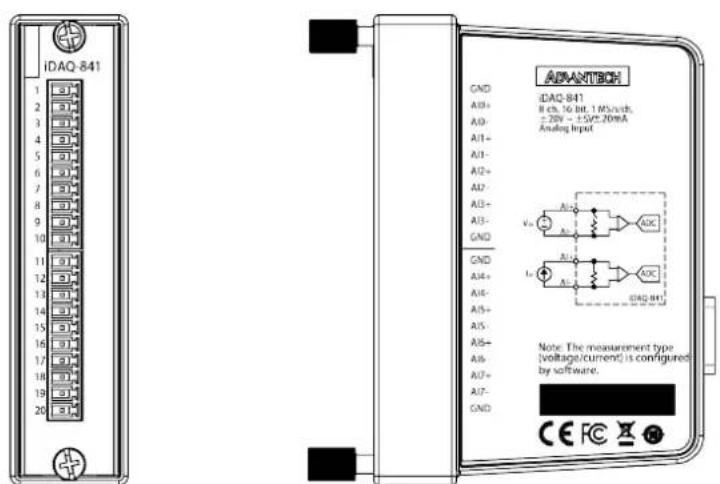
Figure 1.2 Overview of iDAQ-841
1.3 Product Features
1.3.1 Power Input
The power input of all the iDAQ I/O modules come from iDAQ chassis via the DB 15-pin connector. The iDAQ I/O modules are powered on when the power of iDAQ chassis is connected.
1.3.2 BoardID
A board ID (BID) can be assigned to the iDAQ chassis by the rotary switch and slot number. The board ID will be shown in the software and can be used to distinguish modules. The number shown around the rotary switch is in hexadecimal format. For example, "A" represents 10 in decimal format, and "F" represents 15 in decimal format. The number assigned to each iDAQ module follows a rule combining the ChassisID and slot number. Refer to section 3.3 for detailed information.
1.3.3 Plug and Play Device
The iDAQ modules are hot-swappable in the iDAQ chassis. The modules will be recognized instantly in the software (Installed Devices list) when they are plugged into the iDAQ slots and they can be removed as soon as they are disabled in the software. Therefore, it's strongly recommended to operate these actions whilst the system is in idle mode not data acquisition mode.
1.4 Driver Installation
The driver package could be found on Advantech Support Portal (https://www.advantech.com/support). Search for iDAQ on the support portal, then the corresponding driver/SDK package can be found. You'll get the Xnavi installer after the download session finishes.
Execute the installer, then it will guide you through the session. You can choose the device and software components you'd like to install in the system (Figure 1.3). After the selection, click on "start" to begin the installation.
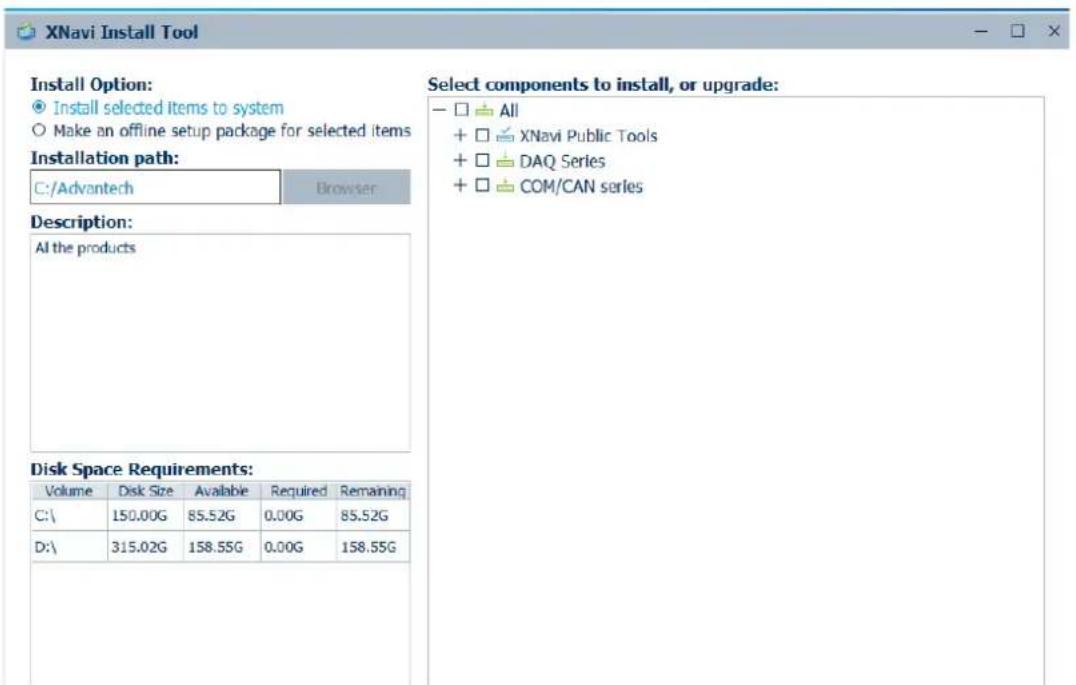
Figure 1.3 Xnavi Installation Interface
1.5 Software Utility
Advantech offers device drivers, SDKs, third-party driver support and application software to help fully exploit the functions of your iDAQ system. All these software packages are available on the Advantech website: http://www.advantech.com/.
The Advantech Navigator is a utility that allows you to set up, configure and test your device, and later store your settings in a proprietary database.
-
To set up the I/O device, you could first run the Advantech Navigator program (by accessing Start/Programs/Advantech Automation/DAQNavi/Advantech Navigator). The settings could also be saved.
-
You can then view the device(s) already installed on your system (if any) on the Installed Device tree view. Once the software and hardware installation have completed, you will see the iDAQ modules in the Installed Devices list.
1.6 Software Development Using DAQNavi SDK
DAQNavi SDK is the software development kit for programming applications with Advantech DAQ products. The necessary runtime DLL, header files, software manual and tutorial videos could be installed via XNavi installer. They could be found under C:\Advantech\DAQNavi (default directory) after the finishing the installation.
1.7 Application Software DAQnavi MCM
DAQNavi MCM is an application software focusing on high-speed data acquisition, data monitoring and network access. It provides a graphical interface for users to achieve DAQ configuration, data pre-processing, feature extraction, user-defined formula calculation and output settings to upload data. All the settings could also be saved to a project file for further parameter management. On top of that, the data logging function is also available in DAQNavi/MCM. All the data could be saved not only in local storage, but also in remote storage.
By introducing the DAQNavi/MCM, the DAQ system could become an IoT-solution-ready edge device. For more information, please search for DAQNavi/MCM on the Advantech Support Portal (https://www.advantech.com/support).
1.8 FPGA Code Update
The FPGA could also be updated via the interface in Navigator. However, it isn't normal to move on to an FPGA update. Advantech strongly suggests you to consult your technical support before starting an FPGA update.
1.9 Ordering Information
IDAQ-801-AE 4-ch, 24-bit, 256kS/s/ch, DSA iDAQ module
IDAQ-841-AE 8-ch, 16-bit, 1MS/s/ch, AI iDAQ module
1.10 Accessories
PCL-1010B-1E BNC Coax Cable, 1m
Chapter 2
Installation Guide
2.1 Initial Unpacking Check
Before you install your iDAQ modules, please make sure you have the following necessary components when unpacking the package:
■ DAQ module*1
■ Startup manual*1
Terminal blocks
If anything in the packing list is missing, please contact your local support for further assistance.
2.2 Installation
Below are the steps to insert the iDAQ modules into the iDAQ chassis.
- Insert the module follow the guide rail to the end
- Screw the two thumb screws tight onto the chassis

natural_image
Technical line drawing of an electrical enclosure with multiple compartments and control panels (no text or symbols)Figure 2.1 iDAQ Module Install into iDAQ Chassis
2.3 Signal Connection and Pin Assignment
2.3.1 Analog Input Connection of iDAQ-801
An analog input channel provides constant current source ( I_EPE ) for the external integrated electronic piezoelectric (IEPE) sensor, and measures the voltage ( V_S ) generated by the sensor. The voltage is AC coupled through internal capacitors, amplified or attenuated by a programmable gain instrumentation amplifier (PGIA), conditioned by an anti-aliasing filter, and sampled and converted into a digital form of data by an analog-to-digital converter (ADC). This is shown in Figure 2.2.

flowchart
graph LR
    A["Vs"] --> B["I_IEPE"]
    B --> C["Device Internal"]
    D["AI+"] --> E["PGIA"]
    F["AI-"] --> E
    G["R_PSE"] --> H["Ground"]
    I["I_IEPE"] --> J["Switch"]
    K["Anti-Aliasing Filter"] --> L["ADC"]
    L --> M["Internal Circuit"]
Figure 2.2 Analog input signal connection (IEPE sensor).
The analog input channel can also measure the voltage ( V_S ) of the external source. The voltage is amplified or attenuated by a programmable gain instrumentation amplifier (PGIA), conditioned by an anti-aliasing filter, and sampled and converted into a digital form of data by an analog-to-digital converter (ADC). This is shown in Figure 2.3.

flowchart
graph LR
    A["Device Internal"] --> B["AI+"]
    A --> C["AI-"]
    B --> D["I_IEPE"]
    C --> E["R_PSE"]
    D --> F["PGIA"]
    E --> F
    F --> G["Anti-Aliasing Filter"]
    G --> H["ADC"]
    H --> I["Internal Circuit"]
    J["Vs"] --> A
Figure 2.3 Analog input signal connection (voltage source).
The device only accepts differential input configuration. Connect the external source between the positive analog input (AI+) terminal and the negative analog input (AI−) terminal.
2.3.2 Analog Input Connection of iDAQ-841
An analog input channel measures the voltage ( V_S ) or current ( ) of the external source. When measuring current, the current value is first converted into a voltage value by the measuring resistor ( R_MEA ). The voltage is then amplified or attenuated by a programmable gain instrumentation amplifier (PGIA), conditioned by a low-pass filter (LPF), and sampled and converted into a digital form of data by an analog-to-digital converter (ADC). This is shown in Figure 2.4. The ADC of every channel samples the signal at the same time, and this architecture is thus called simultaneous sampling.

flowchart
graph LR
    subgraph Device Internal
        A["Vs"] --> B["Al<m>"]
        C["Is"] --> D["Al<n>"]
        B --> E["R_MEA"]
        D --> F["R_MEA"]
        E --> G["PGIA"]
        F --> H["PGIA"]
        G --> I["LPF"]
        H --> J["LPF"]
        I --> K["ADC"]
        J --> L["ADC"]
        K --> M["Internal Circuit"]
        L --> M
    end
    style Device Internal fill:#f9f,stroke:#333
    style Device Internal fill:#ccf,stroke:#333
Figure 2.4 Analog input signal connection.
The device only accepts differential input configuration. Connect the external source between the positive analog input (AI+) terminal and the negative analog input (AI−) terminal.
2.3.3 Pin Assignment
iDAQ-801

Figure 2.5 Pin Assignment for iDAQ-801
Table 2.1: Pin Assignment for iDAQ-801
| Pin Name Description |
| AI0+ Analog input 0 positive terminal |
| AI0- Analog input 0 negative terminal |
| AI1+ Analog input 1 positive terminal |
| AI1- Analog input 1 negative terminal |
| AI2+ Analog input 2 positive terminal |
| AI2- Analog input 2 negative terminal |
| AI3+ Analog input 3 positive terminal |
| AI3- Analog input 3 negative terminal |
iDAQ-841
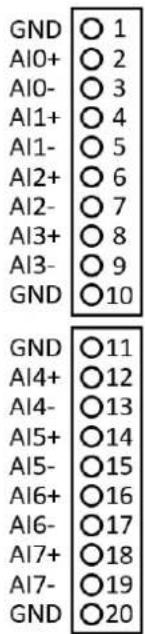
Figure 2.6 Pin Assignment for iDAQ-841
Table 2.2: Pin Assignment for iDAQ-841
Pin Name Description Pin Number
| Al<n>+ Analog input n positive terminal, n = 0~7 2, 4, 6, ..., 18 |
| Al<n>- Analog input n negative terminal, n = 0~7 3, 5, 7, ..., 19 |
| GND Ground 1, 10, 11, 20 |
Chapter 3
Function Details
The iDAQ system relies on the chassis module as a platform to bring all the signals together in order to achieve functions including synchronization, data streaming, and timing control. This chapter describes all the functions that the iDAQ system provides and how they work.
3.1 Analog Input
Insert an iDAQ module supporting analog input to perform analog input measurement. The following sections describe the analog input acquisition mechanisms. For detailed specifications of the analog input functions, please refer to the document for the individual iDAQ module.
3.1.1 Instant Analog Input Acquisition
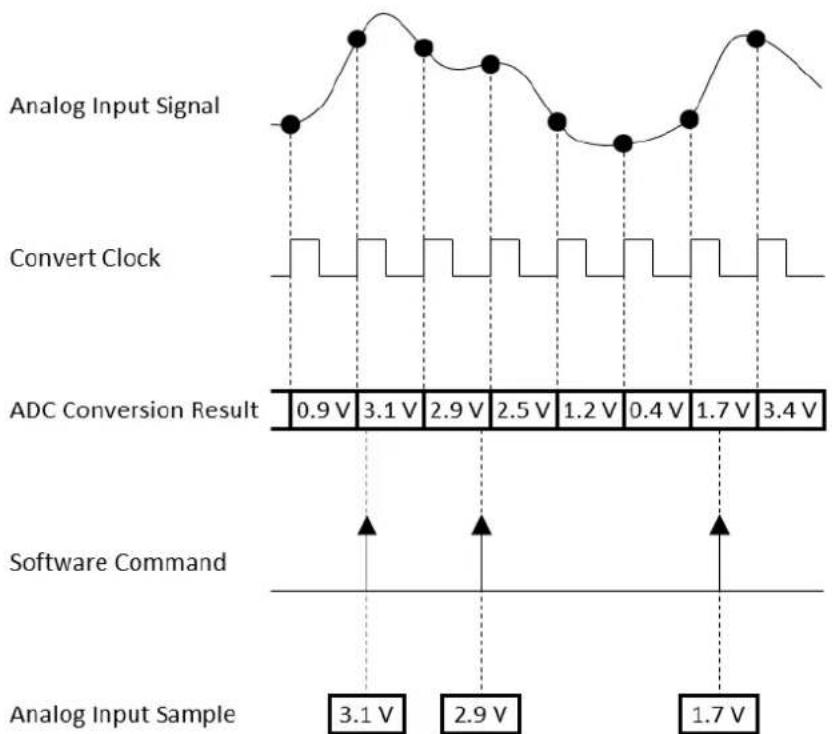
With instant analog input acquisition, the software controls the sample timing. The analog-to-digital converter (ADC) is continuously converting analog input signals by its maximum allowable conversion rate. Each time the software sends a “read instant analog input sample” command, the most recent conversion result is sampled as shown in Figure 3.1.
line
| Signal Type | Value | | ----------------------- | --------- | | Analog Input Signal | 3.1 V | | Convert Clock | 2.9 V | | ADC Conversion Result | 3.4 V | | Software Command | 2.9 V | | Analog Input Sample | 3.1 V | | Convert Clock | 2.5 V | | ADC Conversion Result | 1.2 V | | Software Command | 1.7 V |Figure 3.1 Instant analog input acquisition.
3.1.2 Buffered Analog Input Acquisition
With buffered analog input acquisition, the ADC conversion rate and the duration of the acquisition is controlled by hardware timing signals. All conversion results are sampled and stored in the buffer memory before sending back to the host computer as shown in Figure 3.2.

flowchart
graph TD
    A["Analog Input 0"] --> B["Sample Clock"]
    C["Analog Input 1"] --> D["Sample Clock"]
    E["Analog Input 2"] --> F["Sample Clock"]
    G["Al Sample in FIFO"] --> H["Al0"]
    G --> I["Al1"]
    G --> J["Al2"]
    G --> K["Al0"]
    G --> L["Al1"]
    G --> M["Al2"]
    G --> N["Al1"]
    G --> O["Al2"]
    G --> P["Al0"]
    Q["Al Sample in FIFO"] --> R["Al0"]
    Q --> S["Al1"]
    Q --> T["Al2"]
    Q --> U["Al1"]
    Q --> V["Al2"]
    Q --> W["Al0"]
    X["Al Sample in FIFO"] --> Y["Al0"]
    X --> Z["Al1"]
    X --> AA["Al2"]
    X --> AB["Al1"]
    X --> AC["Al2"]
    X --> AD["Al0"]
Figure 3.2 Buffered analog input acquisition.
The start and stop mechanism of the data acquisition are controlled by the start trigger and stop trigger respectively. When configuration is completed, the acquisition engine of the iDAQ chassis is at standby state. After receiving a start trigger, acquisition becomes active and each rising edge of the sample clock acquires one analog input sample. The acquisition active period lasts until a stop trigger is received, which ends the acquisition. This is shown in Figure 3.3.
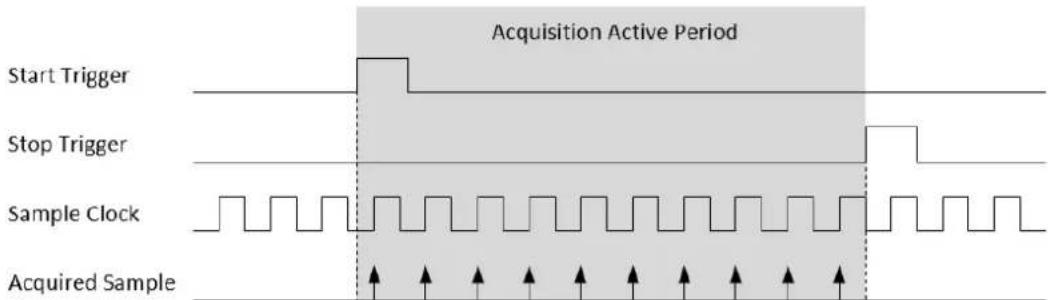
Figure 3.3 Start and stop triggers of the analog input acquisition.
The start and stop of data acquisition can also be delayed in the number of samples after receiving the corresponding trigger signal. As shown in Figure 3.4, the start of acquisition is delayed by 3 samples after receiving a start trigger, and the stop of acquisition is delayed by 2 samples after receiving a stop trigger.

Figure 3.4 Start and stop of the analog input acquisition with delay.
Buffered analog input acquisition has several advantages over instant analog input acquisition:
The start and stop time of acquisition (or duration of the acquisition) can be precisely controlled by hardware trigger signals.
The ADC conversion rate is configurable and the sample rate can be much higher by using hardware sample clock signals.
■ Time between samples is deterministic.
3.1.3 Analog Input Low-pass Filter
The low-pass filter removes high frequency noise of the input signal and the noise that is added by the high common-mode voltage amplifier. It can also act as an anti-aliasing filter which avoids alias generation due to ADC conversion.
3.1.4 Analog Input Isolation
The analog input circuitry is equipped with a galvanic isolator, which can withstand a large continuous voltage between external side and internal side. This prevents the internal components and the host devices (e.g. PC) from damaging when such fault condition happens.
3.2 Buffered Analog Input Configuration
3.2.1 One-buffered Acquisition
For one-buffered acquisition, only a specified number of samples is acquired. The start or stop of acquisition can be controlled by a software command or a hardware signal. Three types of acquisitions can be achieved: post-trigger acquisition, pre-trigger acquisition, and about-trigger acquisition.
3.2.1.1 Post-Trigger Acquisition
A post-trigger acquisition acquires a specified number of samples after the start trigger. The acquisition starts when a start trigger is received and automatically stops when the specified number of samples is acquired. An example of 5-sample post-trigger acquisition is shown in Figure 3.5.

Figure 3.5 Post-trigger acquisition.
The start trigger can be a software command or a hardware signal. If a hardware signal is used as the start trigger, the start of acquisition can be delayed for a specified number of sample clock cycles after a start trigger is received. Figure 3.6 shows an example of a 2-sample delay post-trigger acquisition. Refer to the device specifications for possible signal sources.

Figure 3.6 Post-trigger acquisition with delay.
3.2.1.2 Pre-Trigger Acquisition
A pre-trigger acquisition acquires a specified number of samples before the stop trigger. The acquisition is started by a software command and stopped when a hardware stop trigger is received. Figure 3.7 shows an example of a 5-sample pre-trigger acquisition. Only the samples in the shaded area are returned.
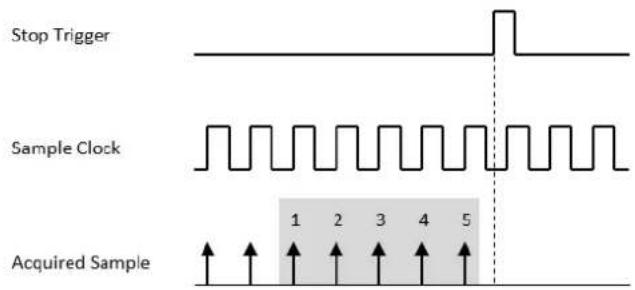
Figure 3.7 Pre-trigger acquisition.
The stop trigger can only be a hardware signal. Refer to the device specifications for possible signal sources.
3.2.1.3 About-Trigger Acquisition
An about-trigger acquisition is the same as a pre-trigger acquisition except that the time when the acquisition stops can be delayed by a specified number of sample clock cycles. Figure 3.8 shows an example of a 5-sample about-trigger acquisition with 2 cycles of stop delay. Only the samples in the shaded area are returned.

Figure 3.8 About-trigger acquisition.
The stop trigger can only be a hardware signal. Refer to the device specifications for possible signal sources.
3.2.2 Streaming Analog Input Acquisition
For a streaming acquisition, the number of samples to be acquired is set to infinite. The acquisition starts when a start trigger is received and continues until a stop trigger is received as shown in Figure 3.9.

Figure 3.9 Streaming acquisition.
Both the start trigger and the stop trigger can come from a software command or a hardware signal. If a hardware signal is used, the start (for the start trigger) or the stop (for the stop trigger) of the acquisition can also be delayed. Refer to the device specifications for possible signal sources.
3.2.3 Re-triggerable Analog Input Acquisition
The acquisition can be re-triggerable. When re-trigger is enabled, after the acquisition stops, it restarts whenever the required trigger is received, and reconfiguration of the acquisition is not required.
Figures 3.10 to 3.13 show examples of re-trigger acquisition for post-trigger, pre-trigger, about-trigger, and streaming acquisitions, respectively. In a post-trigger acquisition, a start trigger is ignored while the acquisition is in progress. In an about-trigger acquisition, a stop trigger is ignored while the acquisition is being stopped.

Figure 3.10 Post-trigger acquisition with re-trigger.
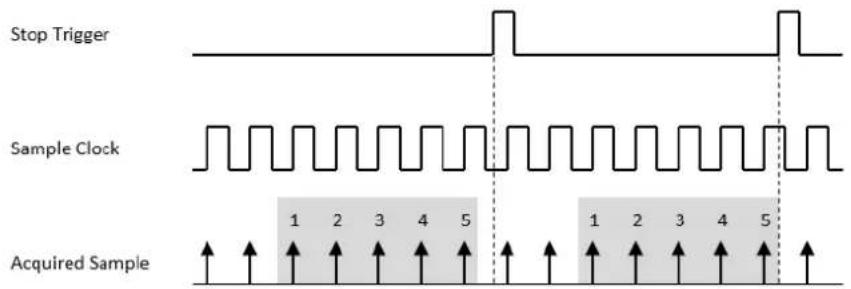
Figure 3.11 Pre-trigger acquisition with re-trigger.

Figure 3.12 About-trigger acquisition with re-trigger.
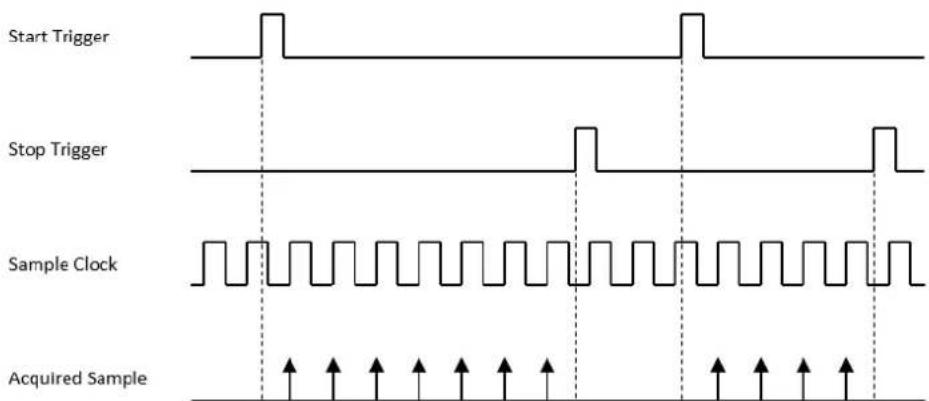
Figure 3.13 Streaming acquisition with re-trigger.
3.3 Trigger and Timing Signal Output
Analog Trigger
One of the analog input channel can be selected as the signal source for the specified trigger signal. The trigger signal can be configured as rising edge active or falling edge active. In addition, user can configure the threshold level and the hysteresis value for an analog trigger. The threshold level specifies the analog input voltage level where the trigger occurs. The hysteresis value prevents unwanted triggers due to noisy signals.
A rising edge active analog trigger occurs when the signal crosses the threshold level from below. And another trigger occurs only if the signal has crossed the voltage specified by the threshold level minus the hysteresis value from above before it crosses the threshold level from below again. This is shown in Figure 3.14.

Figure 3.14 Rising edge active analog trigger.
A falling edge active analog trigger occurs when the signal crosses the threshold level from above. And another trigger occurs only if the signal has crossed the voltage specified by the threshold level plus the hysteresis value from below before it crosses the threshold level from above again. This is shown in Figure 3.15.

Figure 3.15 Falling edge active analog trigger.
3.4 Analog Input Channel Features & Configuration
The channels on iDAQ-801 and iDA-841 have their own features, they are
- iDAQ-801: Input Coupling, IEPE, IEPE fault detection and anti-aliasing filter
- iDAQ-841: Input Isolation and input low-pass filter
In this section, function and feature details will be described. For the specifications, please refer to Appendix A.
3.4.1 Analog Input Coupling
The input coupling can be configured as AC coupling or DC coupling for each channel independently.
When configured as AC coupling, the DC component of the input signal is removed. If the input signal contains a significant amount of unwanted offset voltage, or this offset voltage is of no use, select AC coupling to increase the measuring resolution or dynamic range.
When configured as DC coupling, the DC component of the input signal is not removed. Select DC coupling if the input signal has only a small amount of offset voltage, or this offset voltage is importance for the applications.
3.4.2 Integrated Electronic Piezoelectric (IEPE) Current Source
An IEPE sensor requires a constant current supply to operate. The device is equipped with constant current sources for the IEPE sensors and can be enabled/disabled by software independently for each channel. If the constant current source is enabled, the pseudo-differential configuration must be selected accordingly for that channel to provide a bias current path.
The value of the constant current can be selected by software independently for each channel. Refer to the device specifications for supported constant current value.
When IEPE constant current source is enabled, a DC offset voltage is generated which is equal to
$$ V _ {O F F S E T} = I _ {I E P E} \times (R _ {S E N S O R} + R _ {P S E}) $$
where
V_OFFSET is the offset voltage in volts,
I_IEPE is the constant current in amps,
R_SENSOR is the impedance of the sensor in ohms, and
R_PSE is the pseudo-differential resistance in ohms.
If this offset voltage is unwanted, it can be removed by selecting AC coupling configuration. If the DC information is important, the offset voltage can also be preserved by selecting DC coupling configuration as long as the sum of the offset voltage and the maximum swing of the AC signal does not exceed the input range of the channel.
Each IEPE sensor provider may have their own trademark name for the sensor, such as ICP, CCLD, IsoTron, and DeltaTron. They are all IEPE compatible sensors.
3.4.3 IEPE Fault Detection
The device monitors the connection status of the IEPE sensor. The status can be read back by the software as normal, sensor short, or sensor open (no sensor connected).
3.4.4 Analog Input Low-pass Filter
The low-pass filter removes high frequency noise of the input signal. It can also act as an anti-aliasing filter which avoids alias generation due to ADC conversion.
3.4.5 Anti-aliasing Filter
In a sampling system, such as an ADC, the maximum bandwidth of the signal that can be measured is limited. Specifically, a sampling system with sample rate of fS can represent only signals with frequency lower than f_S / 2 . This frequency is called the Nyquist frequency and the bandwidth from 0 Hz to the Nyquist frequency is called the Nyquist bandwidth.
However, frequency components above the Nyquist frequency, if any, will be modulated back to the Nyquist bandwidth when ADC is sampling, which introduces distortion to the measurement result. This undesirable effect is called aliasing. And unfortunately, one cannot tell whether aliasing occurs by just looking the measured result. The only method to prevent aliasing is by low-pass filtering to remove frequency components above the Nyquist frequency. This low-pass filter is usually called anti-aliasing filter.
The delta-sigma ADCs on the device contain an oversampled architecture and sharp roll-off digital filters with cut-off frequencies that track the sampling rate. The cut-off frequencies of the digital filters will be automatically adjusted to a little lower than the Nyquist frequency, which can be considered as excellent anti-aliasing filters.
Although the digital filter eliminates almost all out-of-band components, it is still susceptible to aliases from certain narrow frequency bands. These bands are located at sample rate multiplied by oversample factor, and the bandwidth is always one fs wide. To deal with these susceptible bands, the device is also equipped with a fixed cut-off frequency, multiple-pole analog low-pass filter. The analog filter removes high-frequency components that are not covered by the digital filter in the ADCs in the analog signal path before they reach the ADC. This is shown in Figure 3.16.
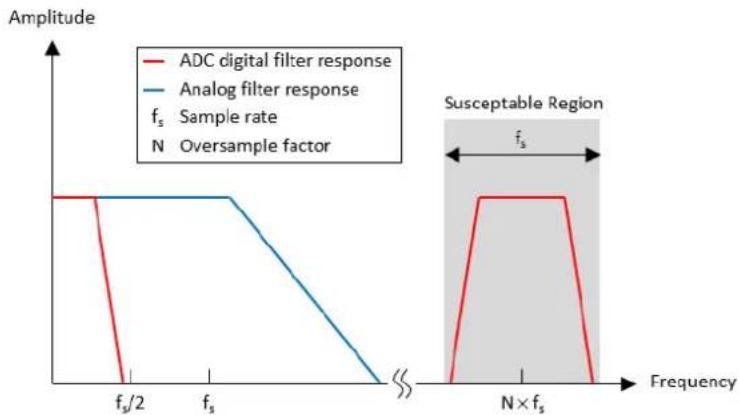
line
| Frequency | ADC digital filter response | Analog filter response | | --------- | --------------------------- | ---------------------- | | f_s/2 | 1 | 1 | | f_s | 0 | 1 | | N × f_s | 1 | 0 |Figure 3.16 Anti-aliasing filter response.
3.5 Device Description and Configuration
The Device Description is used to differentiate the modules in the iDAQ system. It's given following a naming rule of combining chassis ID, model name and slot number. You can change the description in Navigator, or just leave it as default. The description is used in your own program, in order to get control or device handler from the device.
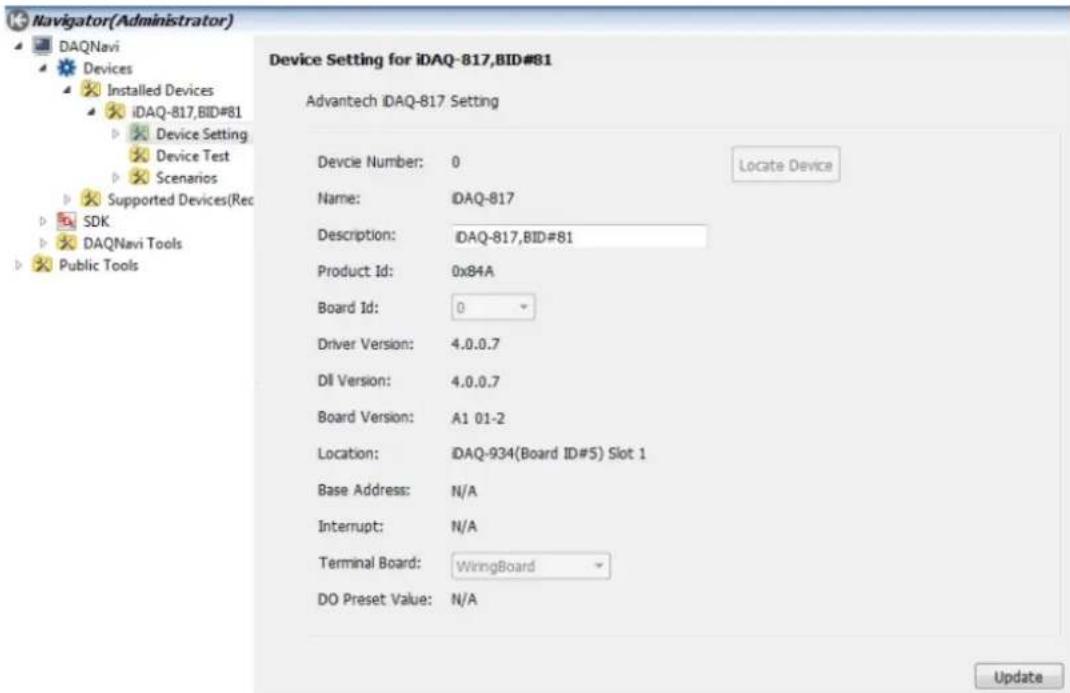
Figure 3.17 Device description shown in Navigator
Appendix
A
Specifications
A.1 Analog Input of iDAQ-801
Channels: 4
■ Analog-to-digital converter (ADC) resolution: 24 bits
Input configuration: Differential or pseudo-differential (50 Ω between negative input terminal and chassis ground), software configurable per channel
Input range: ±12 V, ±6 V, ±3 V, ±1.5 V, ±0.75 V, ±0.375 V, or ±0.1875 V, software selectable per channel
■ Maximum input voltage: ±12 V
■ Input common-mode voltage range: ±12 V
■ Over-voltage protection: ±25 V
■ Input coupling: AC or DC, software configurable per channel
■ Input impedance: 400 kΩ
■ Integrated electronic piezoelectric excitation (IEPE) ^(1)
– Current: 0 mA or 2 mA, software configurable per channel
– Accuracy: ±5% error max.
- Compliance: 22 V min.
– Fault detection threshold: < 1.5 V (short) and > 19.5 V (open)
– Status report: Software polling
■ Analog low-pass filter
– Filter type: 4-th order, linear phase
- -3 dB bandwidth: 1 MHz
■ Digital low-pass filter (anti-aliasing filter)
- Filter type: Wideband
- -3 dB bandwidth: 0.433 × sample rate
■ Absolute accuracy
- Operating temperature within ± 5^ of last
Auto-calibration temperature: ±0.01% of full-scale range max.
Over full operating temperature range: ±0.05% of full-scale range max.
■ Common-mode rejection ratio (CMRR): 99.5 dB
DC performance
| Idle Channel Noise | ||||||
| Range | 64 kS/s 128 kS/s 256 kS/s | |||||
| Noise (μVrms) | ENOB (bits) | Noise (μVrms) | ENOB (bits) | Noise (μVrms) | ENOB (bits) | |
| ±12 V 20.77 | 20.14 | 26.66 | 19.78 | 39.30 | 19.22 | |
| ±6 V 10.68 | 20.10 | 15.10 | 19.60 | 19.93 | 19.20 | |
| ±3 V 5.80 | 19.98 | 8.09 | 19.50 | 10.98 | 19.06 | |
| ±1.5 V 3.29 | 19.80 | 4.65 | 19.30 | 6.26 | 18.87 | |
| ±0.75 V 2.18 | 19.39 | 3.09 | 18.89 | 4.40 | 18.38 | |
| ±0.375 V | 1.79 | 18.68 | 2.56 | 18.16 | 3.62 | 17.66 |
| ±0.1875 V | 1.68 | 17.77 | 2.41 | 17.25 | 3.31 | 16.79 |
AC performance
Signal-to-Noise Ratio
(SNR, 1 kHz Input Tone, -1 dBFS Amplitude)
| Range 64 kS/s 128 kS/s 256 kS/s |
| ±12 V 110.28 dB 107.63 dB 104.33 dB |
| ±6 V 109.79 dB 107.48 dB 104.33 dB |
| ±3 V 109.22 dB 106.29 dB 103.49 dB |
| ±1.5 V 108.45 dB 106.06 dB 102.44 dB |
| ±0.75 V 106.19 dB 102.99 dB 100.15 dB |
| ±0.375 V 101.92 dB 98.96 dB 95.58 dB |
| ±0.1875 V 96.55 dB 93.62 dB 91.30 dB |
Total Harmonic Distortion
(THD, 1 kHz Input Tone, -1 dBFS Amplitude)
| Range 64 kS/s 128 kS/s 256 kS/s | |||
| ±12 V | -116.30 dB | -116.33 dB | -114.37 dB |
| ±6 V | -119.05 dB | -117.79 dB | -115.71 dB |
| ±3 V | -118.81 dB | -118.24 dB | -114.90 dB |
| ±1.5 V | -119.49 dB | -117.95 dB | -115.34 dB |
| ±0.75 V | -118.00 dB | -115.24 dB | -112.58 dB |
| ±0.375 V | -111.91 dB | -109.78 dB | -107.91 dB |
| ±0.1875 V | -109.28 dB | -106.36 dB | -102.84 dB |
Total Harmonic Distortion Plus Noise
(THD+N, 1 kHz Input Tone, -1 dBFS Amplitude)
| Range 64 kS/s 128 kS/s 256 kS/s | |||
| ±12 V | -109.31 dB | -107.08 dB | -103.92 dB |
| ±6 V | -109.30 dB | -107.10 dB | -104.02 dB |
| ±3 V | -108.76 dB | -106.03 dB | -103.19 dB |
| ±1.5 V | -108.12 dB | -105.79 dB | -102.22 dB |
| ±0.75 V | -105.92 dB | -102.74 dB | -99.91 dB |
| ±0.375 V | -101.51 dB | -98.62 dB | -95.33 dB |
| ±0.1875 V | -96.32 dB | -93.39 dB | -91.01 dB |
Spurious-Free Dynamic Range
(SFDR, 1 kHz Input Tone, -1 dBFS Amplitude)
| Range 64 kS/s 128 kS/s 256 kS/s | |||
| ±12 V 118.65 dB 120.88 dB 117.00 dB | |||
| ±6 V 121.97 dB 121.58 dB 120.46 dB | |||
| ±3 V 123.48 dB 121.83 dB 120.57 dB | |||
| ±1.5 V 123.74 dB 121.90 dB | 117.11 dB | ||
| ±0.75 V 121.76 dB 120.67 dB 115.60 dB | |||
| ±0.375 V | 117.80 dB | 116.07 dB 108.51 dB | |
| ±0.1875 V | 113.18 dB | 111.15 dB | 109.08 dB |
| Dynamic Range(DR, 1 kHz Input Tone, -60 dBFS Amplitude) | |
| Range 64 kS/s 128 kS/s 256 kS/s | |
| ±12 V 113.05 dB 110.33 dB 105.97 dB | |
| ±6 V 112.27 dB 109.39 dB 105.30 dB | |
| ±3 V 111.23 dB 108.40 dB 105.00 dB | |
| ±1.5 V | 109.97 dB 107.07 dB 103.80 dB |
| ±0.75 V | 107.07 dB 104.53 dB 101.25 dB |
| ±0.375 V | 102.70 dB 99.62 dB 96.82 dB |
| ±0.1875 V | 97.36 dB 94.55 dB 91.18 dB |
| Crosstalk(1 kHz Input Tone, -1 dBFS Amplitude) | |||
| Range 64 kS/s 128 kS/s 256 kS/s | |||
| ±12 V | -104.06 dB | -100.80 dB | -98.01 dB |
| ±6 V | -104.06 dB | -99.84 dB | -97.06 dB |
| ±3 V | -102.10 dB | -99.76 dB | -96.18 dB |
| ±1.5 V | -102.09 dB | -98.99 dB | -95.47 dB |
| ±0.75 V | -99.55 dB | -96.46 dB | -92.93 dB |
| ±0.375 V | -94.22 dB | -91.89 dB | -88.20 dB |
| ±0.1875 V | -88.20 dB | -86.40 dB | -84.04 dB |
| Crosstalk(46.4 kHz Input Tone, -1 dBFS Amplitude) | ||
| Range | 128 kS/s | 256 kS/s |
| ±12 V | -100.16 dB | -97.88 dB |
| ±6 V | -100.76 dB | -97.54 dB |
| ±3 V | -99.15 dB | -96.83 dB |
| ±1.5 V | -98.70 dB | -96.07 dB |
| ±0.75 V | -96.46 dB | -92.93 dB |
| ±0.375 V | -91.40 dB | -88.90 dB |
| ±0.1875 V -86.96 dB | -84.04 dB | |
■ Acquisition type: Instant or buffered, software configurable
- Buffered acquisition
- Enabled channel combination: Each channel can be enabled/disabled independently by software
- Sample rate: (256 / 2^n) kHz, where n = 0 8 , for all channels, simultaneous sampling, software configurable
- Internal data buffer (FIFO) size: 4096 samples
(1) Input coupling must be AC and input configuration must be pseudo-differential when IEPE is enabled.
A.2 Analog Input of iDAQ-841
■ Channels: 8 differential
■ Analog-to-digital converter (ADC) resolution: 16 bits
■ Input range: ±20 V, ±12.5 V, ±10 V, ±5 V, or ±20 mA, software configurable per channel
■ Maximum input voltage: ±20 V
■ Input common-mode voltage range
- ±20 V range: ±10 V
- ±12.5 V range: ±6.25 V
- ±10 V range: ±5 V
- ±5 V range: ±2.5 V
■ Over-voltage protection: ±30 V
■ Input coupling: DC
■ Input impedance
– Voltage input: 1 MΩ
- Current input: 500
■ Analog low-pass filter
- -3 dB bandwidth: 22.5 kHz or 250 kHz, software configurable per channel
■ Isolation protection: 600 V RMS
■ Absolute accuracy
- Voltage input: Operating temperature within ± 5^ of last Auto-calibration temperature: ± 0.01% of full-scale range max. Over full operating temperature range: ± 0.05% of full-scale range max.
- Current input: Operating temperature within ± 5^ of last Auto-calibration temperature: ± 0.1% of full-scale range max. Over full operating temperature range: ± 0.5% of full-scale range max.
DC performance
| Idle Channel Noise | ||||||
| Range | 10 kS/s 100 kS/s 1 MS/s | |||||
| Noise (μVrms) | ENOB (bits) | Noise (μVrms) | ENOB (bits) | Noise (μVrms) | ENOB (bits) | |
| ±20 V 336 | 16.0 334 | 16.0 326 | 16.0 | |||
| ±12.5 V 205 | 16.0 204 | 16.0 213 | 16.0 | |||
| ±10 V 177 | 16.0 175 | 16.0 174 | 16.0 | |||
| ±5 V 100 | 16.0 100 | 16.0 100 | 16.0 | |||
AC performance
| Signal-to-Noise Ratio(SNR, 1 kHz Input Tone, -1 dBFS Amplitude, 25 kHz Bandwidth) | |||
| Range | 10 kS/s 100 kS/s 1 MS/s | ||
| ±20 V | 86.70 dB | 87.26 dB | 89.21 dB |
| ±12.5 V | 87.34 dB | 88.12 dB | 88.23 dB |
| ±10 V | 88.12 dB | 88.42 dB | 88.53 dB |
| ±5 V | 87.40 dB | 88.19 dB | 88.06 dB |
| Signal-to-Noise Ratio(SNR, 1 kHz Input Tone, -1 dBFS Amplitude, 220 kHz Bandwidth) |
| Range 10 kS/s 100 kS/s 1 MS/s |
| ±20 V 87.42 dB 87.12 dB 88.17 dB |
| ±12.5 V 87.65 dB 88.09 dB 87.14 dB |
| ±10 V 88.13 dB 88.04 dB 88.88 dB |
| ±5 V 87.11 dB 87.75 dB 87.16 dB |
| Total Harmonic Distortion(THD, 1 kHz Input Tone, -1 dBFS Amplitude, 25 kHz Bandwidth) | ||
| Range 10 kS/s 100 kS/s 1 MS/s | ||
| ±20 V -100.70 dB -100.87 dB -103.93 dB | ||
| ±12.5 V -103.76 dB -104.06 dB -102.95 dB | ||
| ±10 V -102.68 dB -102.51 dB -103.90 dB | ||
| ±5 V | -102.68 dB -101.16 dB | -99.35 dB |
| Total Harmonic Distortion(THD, 1 kHz Input Tone, -1 dBFS Amplitude, 220 kHz Bandwidth) | |
| Range 10 kS/s 100 kS/s 1 MS/s | |
| ±20 V -100.35 dB -102.29 dB -102.64 dB | |
| ±12.5 V -102.47 dB -102.97 dB -104.01 dB | |
| ±10 V -102.95 dB -103.08 dB -106.09 dB | |
| ±5 V | -102.06 dB -100.99 dB -100.65 dB |
| Total Harmonic Distortion Plus Noise(THD+N, 1 kHz Input Tone, -1 dBFS Amplitude, 25 kHz Bandwidth) | |||
| Range 10 kS/s 100 kS/s 1 MS/s | |||
| ±20 V | -86.54 dB | -87.07 dB | -89.06 dB |
| ±12.5 V | -87.24 dB | -88.06 dB | -88.10 dB |
| ±10 V | -87.97 dB | -88.25 dB | -88.41 dB |
| ±5 V | -87.27 dB | -87.97 dB | -87.75 dB |
| Total Harmonic Distortion Plus Noise(THD+N, 1 kHz Input Tone, -1 dBFS Amplitude, 220 kHz Bandwidth) | |||
| Range 10 kS/s 100 kS/s 1 MS/s | |||
| ±20 V | -87.21 dB | -86.99 dB | -83.78 dB |
| ±12.5 V | -87.51 dB | -87.95 dB | -87.05 dB |
| ±10 V | -87.99 dB | -87.91 dB | -88.80 dB |
| ±5 V | -86.97 dB | -87.07 dB | -86.97 dB |
Spurious-Free Dynamic Range
(SF, 1 kHz Input Tone, -1 dBFS Amplitude, 25 kHz Bandwidth)
| Range 10 kS/s 100 kS/s 1 MS/s |
| ±20 V 100.75 dB 98.10 dB 98.45 dB |
| ±12.5 V 103.21 dB 98.76 dB 93.06 dB |
| ±10 V 102.69 dB 99.28 dB 92.85 dB |
| ±5 V 104.43 dB 100.59 dB 93.14 dB |
Spurious-Free Dynamic Range
(SF, 1 kHz Input Tone, -1 dBFS Amplitude, 220 kHz Bandwidth)
| Range 10 kS/s 100 kS/s 1 MS/s |
| ±20 V 101.99 dB 97.70 dB 87.36 dB |
| ±12.5 V 103.54 dB 96.95 dB 91.61 dB |
| ±10 V 102.09 dB 97.56 dB 94.85 dB |
| ±5 V 102.51 dB 97.21 dB 92.82 dB |
Dynamic Range
(DR, 1 kHz Input Tone, -60 dBFS Amplitude, 25 kHz Bandwidth)
| Range 10 kS/s 100 kS/s 1 MS/s | |
| ±20 V 94.09 dB 93.98 dB 95.78 dB | |
| ±12.5 V | 93.78 dB 93.52 dB 94.93 dB |
| ±10 V 93.49 dB 93.64 dB 96.42 dB | |
| ±5 V | 93.26 dB 93.38 dB 94.98 dB |
Dynamic Range
(DR, 1 kHz Input Tone, -60 dBFS Amplitude, 220 kHz Bandwidth)
| Range 10 kS/s 100 kS/s 1 MS/s | |
| ±20 V 94.13 dB 93.91 dB 95.37 dB | |
| ±12.5 V | 93.58 dB 93.69 dB 95.35 dB |
| ±10 V 93.52 dB 93.69 dB 94.61 dB | |
| ±5 V | 93.15 dB 93.18 dB 96.40 dB |
Crosstalk
(1 kHz Input Tone, -1 dBFS Amplitude, 25 kHz Bandwidth)
| Range 10 kS/s 100 kS/s 1 MS/s | |||
| ±20 V | -100.88 dB | -100.72 dB | -100.39 dB |
| ±12.5 V | -100.11 dB | -100.15 dB | -100.11 dB |
| ±10 V | -100.01 dB | -100.06 dB | -99.96 dB |
| ±5 V | -98.91 dB | -98.83 dB | -99.00 dB |
| Crosstalk(1 kHz Input Tone, -1 dBFS Amplitude, 220 kHz Bandwidth) | |
| Range 10 kS/s 100 kS/s 1 MS/s | |
| ±20 V -100.54 dB -100.36 dB -100.26 dB | |
| ±12.5 V -99.69 dB -100.15 dB -100.11 dB | |
| ±10 V -100.31 dB -99.68 dB -99.96 dB | |
| ±5 V | -98.91 dB -98.74 dB -99.00 dB |
■ Acquisition type: Instant or buffered, software configurable
- Buffered acquisition
- Enabled channel combination: Each channel can be enabled/disabled independently by software
– Sample rate: Maximum 4MS/s in total for all channels. For example, 1MS/s for 4 channels or 500kS/s for 8 channels
– Internal data buffer (FIFO) size: 8192 samples
A.3 Analog Trigger
■ Channel: 2 (start and stop)
■ Source: One of the analog input channels, software configurable
■ Threshold level: Full scale of analog input range, software configurable
■ Hysteresis: 1/256 of analog input range, software configurable
- Polarity: Rising edge or falling edge, software configurable
A.4 General
■ Power consumption from chassis
- iDAQ-801: 2 W typ./ 2.6 W max.
- iDAQ-841: 650 mW typ./ 900 mW max.
■ Module dimensions: 100 x 80 x 25 mm (3.94 x 3.15 x 0.98 in.)
Weight:
-iDAQ-801: 200 g
-iDAQ-841: 176 g
■ Operating temperature: -20 °C to 60 °C (-4 °F to 140 °F)
■ Storage temperature: -40 °C to 70 °C (-40 °F to 158 °F)
■ Operating humidity: 10% to 90% RH, non-condensing
■ Storage humidity: 5% to 95% RH, non-condensing
■ Random Vibration: 5Grms, random, 5\~500Hz, 1hr/axis
■ Shock: 30G, half sine, 11ms
A.5 Function Block
iDAQ-801
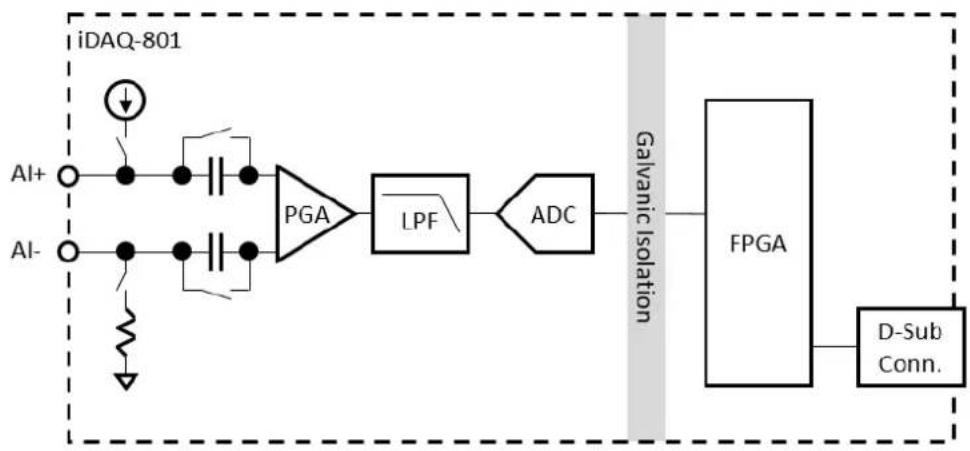
flowchart
graph LR
    A["iDAQ-801"] --> B["Al+"]
    A --> C["Al-"]
    B --> D["PGA"]
    C --> D
    D --> E["LPF"]
    E --> F["ADC"]
    F --> G["FPGA"]
    G --> H["D-Sub Conn."]
    style A fill:#f9f,stroke:#333
    style B fill:#ccf,stroke:#333
    style C fill:#ccf,stroke:#333
    style D fill:#cfc,stroke:#333
    style E fill:#fcc,stroke:#333
    style F fill:#fcc,stroke:#333
    style G fill:#cff,stroke:#333
    style H fill:#ffc,stroke:#333
iDAQ-841

flowchart
graph LR
    A["iDAQ-841"] --> B["+PGA"]
    C["AIO+"] --> B
    D["AIO-"] --> B
    E["..."] --> F["..."]
    G["AI7+"] --> H["+PGA"]
    I["AI7-"] --> H
    B --> J["LPF"]
    J --> K["ADC"]
    K --> L["FPGA"]
    M["D-Sub Conn."] --> N["D-Sub Conn."]
    style A fill:#f9f,stroke:#333
    style C fill:#f9f,stroke:#333
    style D fill:#f9f,stroke:#333
    style E fill:#f9f,stroke:#333
    style I fill:#f9f,stroke:#333
    style G fill:#f9f,stroke:#333
    style M fill:#f9f,stroke:#333
Appendix B
System Dimensions
B.1 System Dimensions
iDAQ-801

natural_image
Technical line drawing of a mechanical device with no visible text or symbols

iDAQ-841
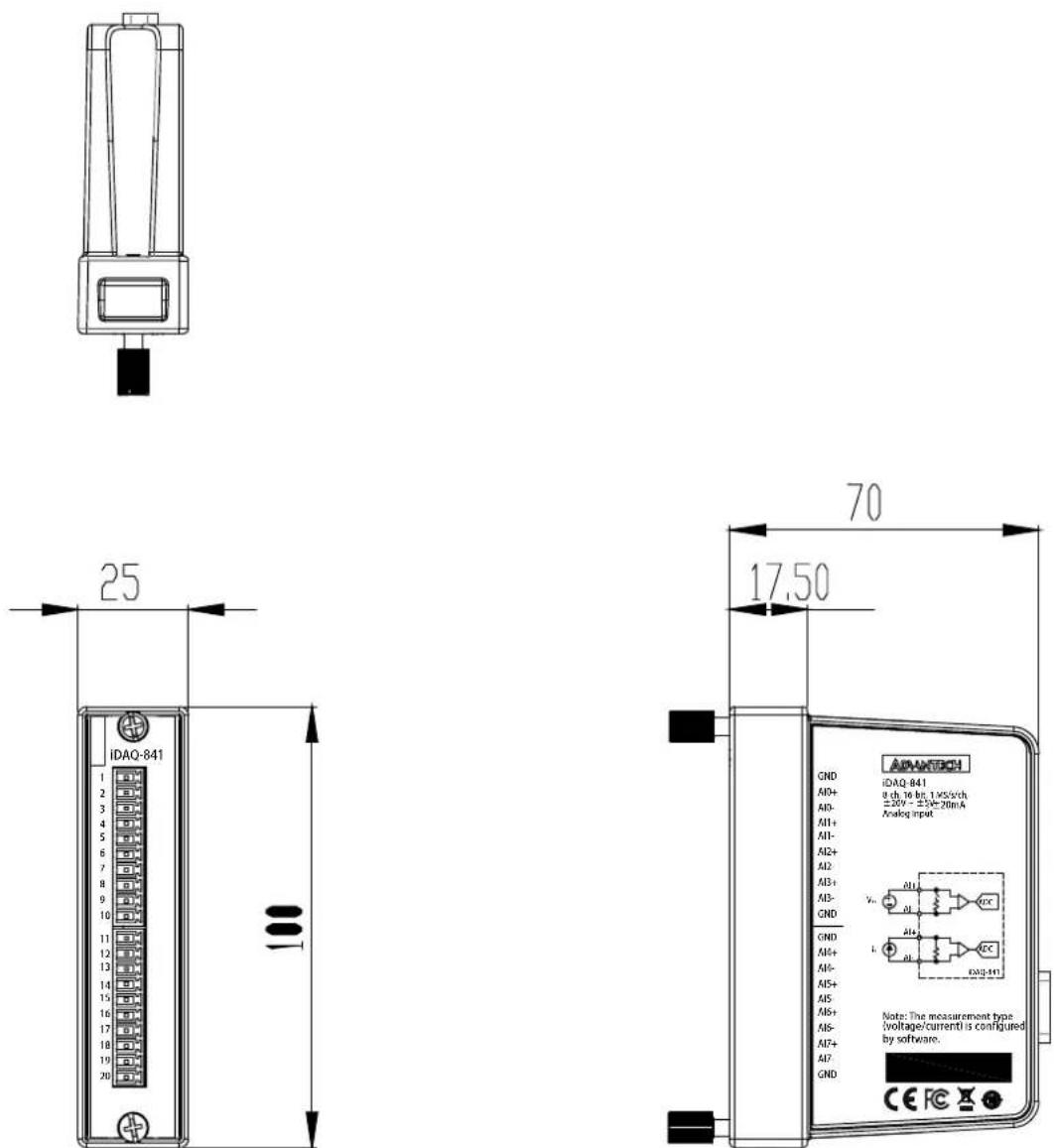
www.advantech.com
Please verify specifications before quoting. This guide is intended for reference purposes only.
All product specifications are subject to change without notice.
No part of this publication may be reproduced in any form or by any means, such as electronically, by photocopying, recording, or otherwise, without prior written permission from the publisher.
All brand and product names are trademarks or registered trademarks of their respective companies.
© Advantech Co., Ltd. 2022
- iDAQ-801/iDAQ-841
- DSA and Simultaneous Industrial DAQ Modules
- Copyright
- Acknowledgments
- Product Warranty (2 years)
- Declaration of Conformity
- CE
- FCC Class A
- Technical Support and Assistance
- Warnings, Cautions, and Notes
- Document Feedback
- Packing List
- iDAQ-801
- iDAQ-841
- Safety Instructions
- Safety Precautions - Static Electricity
- Contents
- Chapter 1 Start Using iDAQ-801/841 ....1
- Chapter 2 Installation Guide ....5
- Chapter 3 Function Details......11
- Appendix A Specifications.... 23
- Appendix B System Dimensions.... 33
- Chapter 1
- Overview
- Product Overview
- Product Features
- Power Input
- BoardID
- Plug and Play Device
- Driver Installation
- Software Utility
- Software Development Using DAQNavi SDK
- Application Software DAQnavi MCM
- FPGA Code Update
- Ordering Information
- Accessories
- Chapter 2
- Initial Unpacking Check
- Installation
- Signal Connection and Pin Assignment
- Analog Input Connection of iDAQ-801
- Analog Input Connection of iDAQ-841
- Pin Assignment
- Chapter 3
- Analog Input
- Instant Analog Input Acquisition
- Buffered Analog Input Acquisition
- Analog Input Low-pass Filter
- Analog Input Isolation
- Buffered Analog Input Configuration
- One-buffered Acquisition
- Post-Trigger Acquisition
- Pre-Trigger Acquisition
- About-Trigger Acquisition
- Streaming Analog Input Acquisition
- Re-triggerable Analog Input Acquisition
- Trigger and Timing Signal Output
- Analog Trigger
- Analog Input Channel Features & Configuration
- Analog Input Coupling
- Integrated Electronic Piezoelectric (IEPE) Current Source
- IEPE Fault Detection
- Analog Input Low-pass Filter
- Anti-aliasing Filter
- Device Description and Configuration
- Appendix
- A
- A.1 Analog Input of iDAQ-801
- AC performance
- A.2 Analog Input of iDAQ-841
- A.3 Analog Trigger
- A.4 General
- A.5 Function Block
- Appendix B
- B.1 System Dimensions
- www.advantech.com
Brand : Advantech
Model : IDAQ-841-AE
Category : Industrial Data Acquisition Module